Image to Video

Transform text into stunning visuals with vivago.ai's AI image/video generator. Explore curated effects, professional editing tools, and seamless creativity for high-quality content. Ideal for innovators and creators.

Recreate
arrow

FAQs

How do I animate static images using vivago.ai?

Upload any image (JPG/PNG), and our AI models will automatically detect content layers and generate 5/10-second video clips with dynamic motion patterns.

Can I control specific movement directions?

Yes. Combine image uploads with text prompts like 'swaying leaves left-to-right' or 'a girl waves her hands'.

What if AI-generated videos don't match my expectation?

Utilize iterative refinement cycles: 1) Try a few more times, 2) Modify prompts, 3) Visit the Explore section to use templates for more consistent results.

What membership benefits does Pro offer?

Pro membership offers better outcomes, more generation credits, and premium features. Details available at: https://vivago.ai/subscribe

More From VIVAGO AI

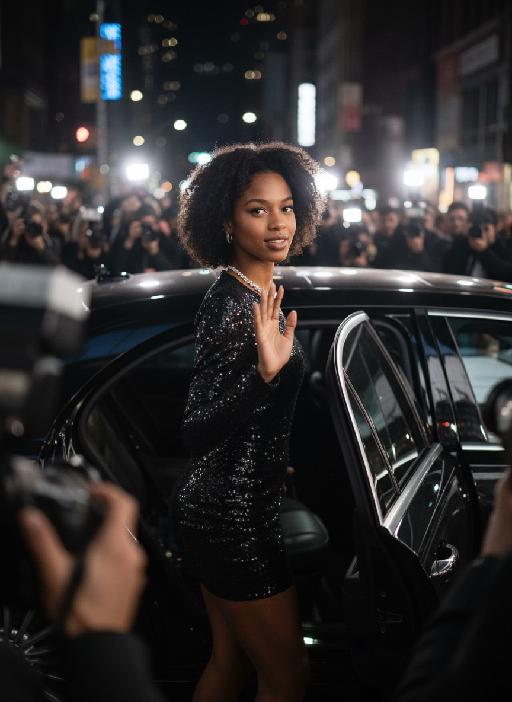
Hollywood Star AI effects generated image

Hollywood Star

A medium close-up shot from a frontal perspective with a slight upward tilt, the camera angle is slightly tilted forward. This shot was taken using a professional full-frame digital SLR camera and a 50mm f/1.2 wide-angle fixed-focus lens. The uploaded image shows a person (with unchanged facial features, gender, age, and hairstyle), wearing a tight black sequined sexy dress and wearing high-end custom accessories. This figure is preparing to get into a black luxury car with open doors. The figure turns halfway and looks at the camera, raising one hand and making a gentle waving or shielding gesture. The person has a relaxed and confident smile on their face, with bright and expressive eyes. The scene is on a night-time city street, illuminated by a group of paparazzi and a large number of flashes, creating a high-contrast light and shadow effect, with shadows and bright highlights, and the foreground also includes cameras and flashes, creating the feeling that the celebrity figure is surrounded by paparazzi and cameras. This aesthetic style is the street style of Hollywood celebrity paparazzi, featuring grainy film texture, clear focus on the subject, blurred background and dark tones. The person's face is illuminated by the flash, and the makeup characteristic of the figure is exaggerated false eyelashes, clear cheekbones, nude matte lip color and bright highlights used to enhance the three-dimensionality; the picture adds dark corners at the four corners and bright parts in the middle, creating a strong contrast between light and shadow.

Punk Graffiti AI effects generated image

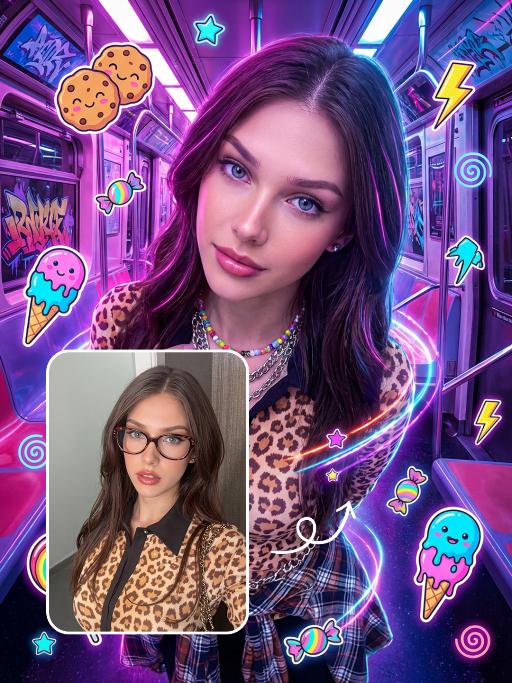
Punk Graffiti

先将上传的图片扩图成3:4比例的2k超清尺寸照片,然后将原图转换为垂直俯拍视角(俯视),半身人像,特写近景镜头从斜上方向下拍摄,主体为图中的人物形象特征保持不变,直视镜头,超写实摄影质感。背景是一个霓虹灯照亮的室内空间(类似于未来主义的地铁车厢),里面有着粉色/紫色的发光灯和涂鸦。写实美国人像、上半身写真、街头潮流服饰(豹纹、格纹元素潮流穿搭元素、佩戴彩色的配饰)、Y2K 在图像上覆盖上充满活力、可爱的卡通贴纸:微笑的饼干、滴着奶油的冰淇淋(蓝色/粉色)、棒棒糖、糖果、星星、闪电和漩涡。这些贴纸有着醒目的轮廓、鲜艳的霓虹色(粉色、蓝色、绿色、黄色)以及活泼的表情,与霓虹色的场景完美融合。整体风格融合了写实摄影与充满趣味的 Y2K 网络朋克美学元素,色彩饱和度高,霓虹灯效果耀眼,画面呈竖向构图。人物的皮肤轻微磨皮,皮肤自然美颜效果,面部妆容改成欧美流行风格的自然写实的潮流的妆容;人物的周围加上赛博的霓虹发光光效

Follow Me Portal AI effects generated image

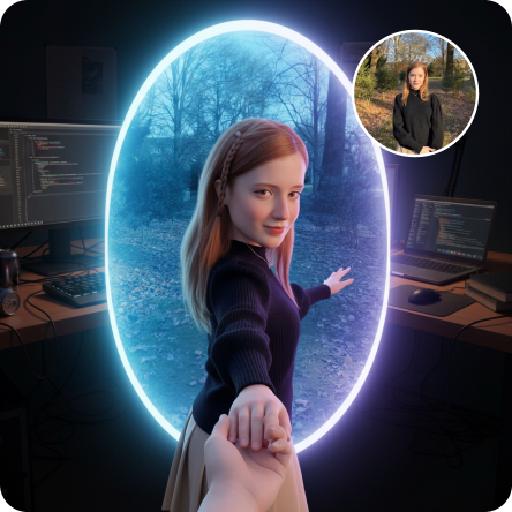
Follow Me Portal

A 3D chibi-style version of the person in the photo is stepping through a glowing portal, reaching out and holding the viewer’s hand. As the character pulls the viewer forward, they turn back with a dynamic glance, inviting the viewer into their world.Behind the portal is the viewer’s real-life environment: a typical programmer’s study with a desk, monitor, and laptop, rendered in realistic detail. Inside the portal lies the character’s 3D chibi world, inspired by the photo, with a cool blue color scheme that sharply contrasts with the real-world surroundings.The portal itself is a perfectly elliptical frame glowing with mysterious blue and purple light, positioned at the center of the image as a gateway between the two worlds.The scene is captured from a third-person perspective, clearly showing the viewer’s hand being pulled into the character’s world.

Telephone Ring AI effects generated image

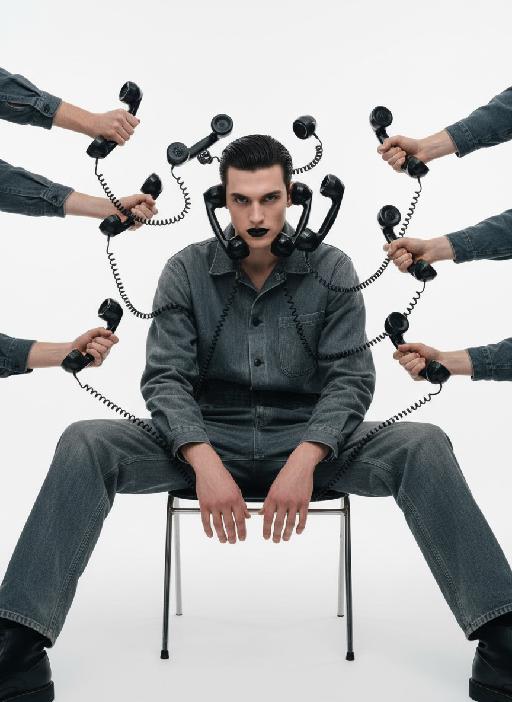
Telephone Ring

"Shooting perspective and focal length: Frontal level view, using a medium telephoto lens (approximately 50mm), with an appropriate focal length, medium close-up shot, able to clearly present the upper body and hand details of the characters, and the picture has no obvious distortion. Equipment: Professional studio camera (such as Canon 5D series or Sony A7 series), combined with a studio lighting system. Character pose: The character is in a sitting position, with legs apart and knees bent, the upper body leaning forward and the head close to the camera; multiple arms extend from all around the frame, each hand holding an old-fashioned black wired telephone, multiple receivers randomly surround the character's head, creating a visual effect of being surrounded. Character expression: Eyes gaze at the camera, the gaze is slightly distant and cold, the facial expression is calm and undisturbed, conveying a restrained emotional tension. Lighting: Use studio hard light, the main light source comes from the front, supplemented by side lighting, forming a clear contrast of light and shade, highlighting the fabric texture and facial contours, the background is pure white, clean and without any color impurities. Style: Pioneer fashion photography, integrating surrealism and minimalism, creating an absurd yet highly tense atmosphere through strong visual impact. Clothing: A set of gray-blue distressed texture workwear, the fabric has fine textures, the fit is loose and firm, the lapel design combines toughness and retro charm. Hair style: Black short hair, using hair gel to comb backward, revealing a full forehead, the style is clean and neat with a sense of lines. Makeup: Matte texture pure black lipstick as the visual focus, the facial base makeup is even and transparent, only highlighting the lip color, the overall makeup is avant-garde and has a distinctive characteristic."

Elephant Dance

The features of the figure in the uploaded image remain unchanged, standing in an anthropomorphic pose (upper limbs resting naturally on the waist, lower limbs standing on the ground). Adopting the Disney 3D animation style, bright and highly saturated vivid colors are used to create a soft, cute and chibi cartoon image with oversized bright eyes and long, slender eyelashes, and a sweet, endearing expression. The costume features Indian traditional festive style adornments and styling: a gorgeous forehead ornament with geometric patterns (in green, red, yellow and purple) plus colorful tassel beading; delicate traditional Indian colorful patterns on the face and nose; a shawl with fan-shaped patterns (in primary colors of red, purple and blue) trimmed with golden geometric motifs on the edges; green and white striped bands with golden beading worn on the limbs; and small colorful flower ornaments in the style of yellow base + red center + green trim dotted on the ears and body. The overall adornment is intricate with rich color clashing (blending hues of red, green, yellow, purple, blue and more), boasting ultra-realistic details, cinematic artistic effects and high-end artistic presentation.

Fashion Art AI effects generated image

Fashion Art

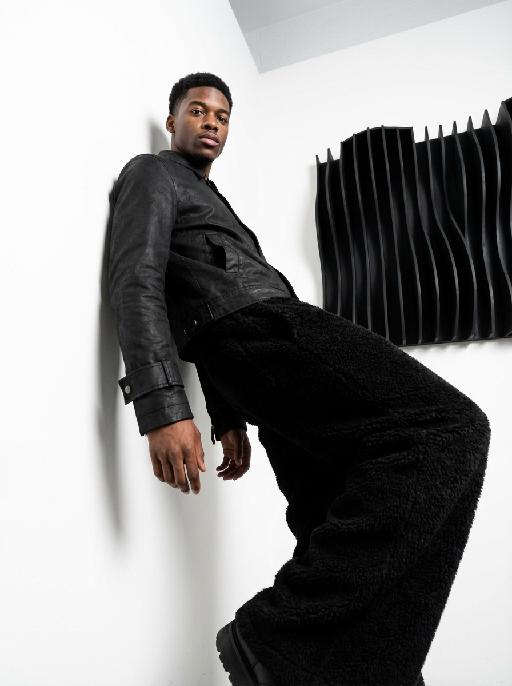
This is a set of professional minimalist style portrait works shot from a low angle. Using a 35mm wide-angle lens, a unique strong perspective distortion effect is presented. This work was taken with a Sony A7R V camera. The uploaded images show the image of the person (with facial features, age and gender unchanged), with neat short hair, matte makeup, highlighting a hard and angular outline, a cold and confident expression, and calm and avant-garde gaze directly at the camera. The body leans against a white matte wall, the right leg is bent and raised, the left arm is placed on the wall, and the right hand is naturally hanging down. Wearing a black worn-out high-end custom leather jacket (with detachable cuffs), a black inner layer, and loose and fluffy black wide-leg pants. The studio uses high-contrast hard light for illumination, with the main light forming a strong contrast line of light and dark in the front, deep shadows, and clear contours. The background is a white matte wall and some black three-dimensional abstract wave-shaped art installations, presenting a strong contrast in visual effect, high contrast, clear texture, and a fashionable and avant-garde photography art style, which can be regarded as a heavyweight work in the fashion world.

Minimal Chic AI effects generated image

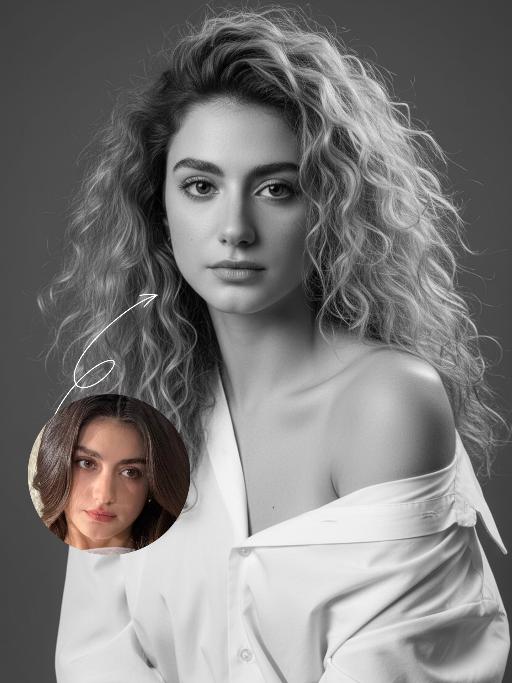
Minimal Chic

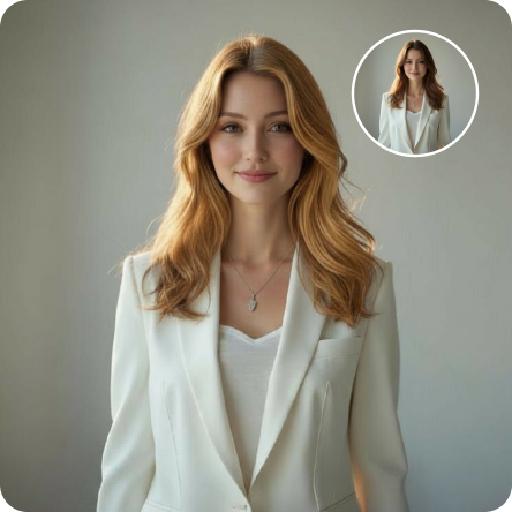
Strict identity locking is based on the uploaded portrait, with the original facial features, fair skin tone and youthful vitality retained in a 1:1 ratio, reimagined with a striking Euro-American mixed-race aesthetic. The hair color is replaced with long wavy platinum blonde locks, styled in a naturally tousled and voluminous manner. This is a black-and-white artistic portrait photography piece featuring a young woman wearing an oversized white shirt that slips naturally off one shoulder; her platinum blonde tresses softly frame her delicate facial features, with strands gilded by sunlight to reveal an exquisite sheen, and her skin exudes a smooth, refined texture. She sits in an upright posture, facing the camera with a calm, pensive gaze and a relaxed expression that brims with narrative depth. Shot in a professional photo studio against a minimalist solid gray background, a soft, cinema-grade back rim light sculpts her three-dimensional facial contours, with a precise ray of hair light layered in to make each strand of the blonde hair distinct and translucent with clear gradations. Rich details are preserved in the shadow areas, and the highlights transition naturally, crafting an elegant and serene atmosphere. Boasting 8K ultra-realistic resolution and a high-contrast black-and-white aesthetic, the image features razor-sharp details where even pores and individual hair strands are clearly visible, with natural and authentic skin texture. The composition is minimalist with no extraneous elements; the overall style is elegant and sophisticated, blending refined luxury with compelling narrative quality, reaching the standard of professional commercial photography.

Indian Dancer

The figure in the uploaded image (with unchanged facial features) has smooth, luminous skin and a well-defined facial contour, with sleek, glossy hair styled in loose waves. She wears understated burgundy lipstick, has deep brown almond-shaped eyes with subtle smoky eye makeup, and a small red bindi on her forehead. Standing front-on and gazing at the camera, her long black curly hair cascades over her shoulders. She is dressed in an exquisite choli (blouse) with golden thread embroidery, adorned with numerous turquoise/red gemstones, pearl inlays, black spaghetti straps and beaded tassels; exuding intense sexiness, the outfit bares her waist and bust line, paired with a flowy turquoise silk lehenga (traditional Indian long skirt) and a wide, opulent kamarband (golden waist belt) inlaid with red gemstones and strung with golden bells. A full set of golden accessories adorns her: a maang tikka (forehead ornament with gemstones and pearls) in her hair, large chandelier earrings, a fitted pearl and gemstone necklace, bangles (bajuband), and delicate bracelets. Background: Luxurious blurred golden bokeh (flash lighting), warm and dramatic side lighting, studio portrait, 8K resolution, rich details on the face and accessories, and a sharp, clear frame.

On the water

Use the uploaded portrait for strict facial features, gender, skin color, pupil color, clothing, hairstyle and gender locking. Select the main characters from the uploaded pictures. Have a natural expression, face the camera, and show a relaxed state. The camera suddenly switches from the front to the back of the character, changing from a frontal shot to a rear shot. Action: Face the camera, maintain a natural expression, suddenly turn around and leap, run on the water surface, as if possessing Chinese martial arts skills. When the character starts flying, the posture is to spread both arms and be in a flying state. The camera follows the character running on the water surface. The scene becomes a vast sea level, with a dreamy and beautiful scenery, with clouds and the sky in the distance.

Golden 2026 AI effects generated image

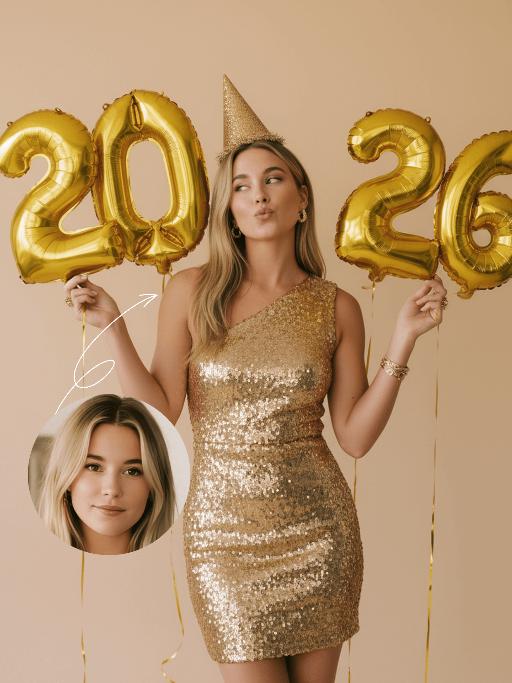
Golden 2026

The figure from the uploaded image (with unchanged facial features, age and gender, natural skin retouching on the face, and a fresh, sheer makeup look). This is a fashion portrait photography piece with a centered composition and an eye-level shooting perspective, captured with a Canon EOS R5 camera paired with an 85mm f/1.4 lens. The figure holds golden number balloons (20 and 26) in each hand, with arms raised naturally, body slightly turned and head tilted gently. Their gaze is directed diagonally upward, with a playful pout and a relaxed expression, striking an elegant posture. They are dressed in a high-customized gold sequined one-shoulder slim-fit dress with a distinctive design, and wear a gold glitter party hat, paired with high-end, luxurious and exquisitely designed accessories (necklace, rings, earrings, bracelet). Set against a solid pale off-white background with soft warm studio lighting, the image features high-texture skin details and sharply defined sequin details, presenting a delicate and sophisticated visual effect. It adopts an avant-garde fashion photography style with high-end photographic quality and a low-saturation color palette.

Brazilian Dance

Medium-close-up shot (capturing the upper body of the person): Ultra-realistic portrait photography. The image uploaded (with the facial features, gender and age remaining unchanged) shows a person wearing a yellow strapless tank top with a Brazilian theme, featuring large green capital letters "BRASIL" and the national flag pattern of Brazil on the front, a short and low-cut design, a close-fitting and form-fitting silhouette. The fabric is soft cotton/nylon knitted texture. It is paired with black tight pants. The natural and relaxed expression and natural standing posture (without any props in hand) are maintained as in the original image. The background scene remains unchanged. The picture is clean and clear, with an 8K ultra-high-definition resolution. The skin texture and details of the clothing fabric are clear. The composition is centered.

Load more

Next-Gen Multi-Model AI Video Architecture

Vivago AI isn't just one engine—it’s a unified hub for the world’s most advanced video AI. Whether you need cinematic realism or high-speed social content, we provide the right model for your creative vision.

Free Generate

Beauty and Dolphins

Vacation Time

Stellar Tear

Fish Tank Supervisor

Cinematic Quality & Precision Control

Enables 4K resolution with multi-lens motion control, generating delicate scene via text prompts for customized cinematography.​

TRY NOW

Dynamic AV Sync

Auto-generates original audio to avoid copyright issues. Build 3D immersive environments through layered sound design automatically.

TRY NOW

OpenAI Sora 2

​Advanced visual storytelling with unparalleled physics and consistency.

TRY NOW

Kling v2.6 Pro

Industry-leading cinematic image animation and motion control.

TRY NOW

Google Veo 3 & 3.1

Ultra-fast generation with enhanced realism for creative workflows.

TRY NOW

Vivago AI 2.0

Our proprietary model optimized for efficiency, speed, and cost-effective generation.
TRY NOW

Users' Voice

We listen carefully to the opinions of every user.
Free Generate
Contact Us
I tried the Lip Sync feature inside Vivago.ai’s AI Video Generator for my educational podcast, and the results were stunning! The avatar's lip movements perfectly matched my audio recording, creating a professional AI-generated video without complex editing. Compared with tools like OpenAI Sora 2 and Google Veo 3.1, Vivago Image-to-Video delivers fast, studio-quality results online. It saved me hours of post-production work.
ElenaM (Spain)
Vivago’s Image-to-Video AI transformed my marketing workflow. I uploaded a product image and described the launch scene in text, and it generated a 10-second cinematic AI video with background music and dynamic visuals. The output quality rivals Kling v2.6 Pro and Google Veo 3 Fast. It’s now my go-to AI video generator for social media ads and product campaigns.
KenjiT (Japan)
As a digital artist, I use Vivago.ai 2.0 daily for Image-to-Image and AI Image-to-Video creation. The e-book covers and animated visuals I generate for clients look cinematic and professional. Unlike many standalone AI tools, Vivago integrates multiple leading models into one platform, making it easier to create copyright-safe AI images and videos for publishing.
ChenL (China)
I tried the Lip Sync feature inside Vivago.ai’s AI Video Generator for my educational podcast, and the results were stunning! The avatar's lip movements perfectly matched my audio recording, creating a professional AI-generated video without complex editing. Compared with tools like OpenAI Sora 2 and Google Veo 3.1, Vivago Image-to-Video delivers fast, studio-quality results online. It saved me hours of post-production work.
ElenaM (Spain)
Vivago’s Image-to-Video AI transformed my marketing workflow. I uploaded a product image and described the launch scene in text, and it generated a 10-second cinematic AI video with background music and dynamic visuals. The output quality rivals Kling v2.6 Pro and Google Veo 3 Fast. It’s now my go-to AI video generator for social media ads and product campaigns.
KenjiT (Japan)
As a digital artist, I use Vivago.ai 2.0 daily for Image-to-Image and AI Image-to-Video creation. The e-book covers and animated visuals I generate for clients look cinematic and professional. Unlike many standalone AI tools, Vivago integrates multiple leading models into one platform, making it easier to create copyright-safe AI images and videos for publishing.
ChenL (China)
I absolutely love Vivago’s AI Image-to-Video Generator. As a travel blogger, static images often fail to capture real atmosphere, but Vivago helps me turn photos into vivid cinematic AI videos with motion effects. It feels comparable to OpenAI Sora 2 and Google Veo 3.1, but more accessible and faster for creators who need high-quality AI videos online.
LiamK (Australia)
I tried the Lip Sync feature inside Vivago.ai’s AI Video Generator for my educational podcast, and the results were stunning! The avatar's lip movements perfectly matched my audio recording, creating a professional AI-generated video without complex editing. Compared with tools like OpenAI Sora 2 and Google Veo 3.1, Vivago Image-to-Video delivers fast, studio-quality results online. It saved me hours of post-production work.
ElenaM (Spain)
Vivago’s Image-to-Video AI transformed my marketing workflow. I uploaded a product image and described the launch scene in text, and it generated a 10-second cinematic AI video with background music and dynamic visuals. The output quality rivals Kling v2.6 Pro and Google Veo 3 Fast. It’s now my go-to AI video generator for social media ads and product campaigns.
KenjiT (Japan)
As a digital artist, I use Vivago.ai 2.0 daily for Image-to-Image and AI Image-to-Video creation. The e-book covers and animated visuals I generate for clients look cinematic and professional. Unlike many standalone AI tools, Vivago integrates multiple leading models into one platform, making it easier to create copyright-safe AI images and videos for publishing.
ChenL (China)
I absolutely love Vivago’s AI Image-to-Video Generator. As a travel blogger, static images often fail to capture real atmosphere, but Vivago helps me turn photos into vivid cinematic AI videos with motion effects. It feels comparable to OpenAI Sora 2 and Google Veo 3.1, but more accessible and faster for creators who need high-quality AI videos online.
LiamK (Australia)
Using Vivago.ai’s Image-to-Video AI has greatly enhanced my classroom teaching. I transform textbook notes into historical AI videos with cinematic filters and dynamic animations. Compared with tools like Kling v2.6 Pro and Google Veo 3 Fast, Vivago offers faster generation and easier parameter control for educators who need reliable AI video creation.
RajivG (India)
I frequently create AI videos on Vivago and publish them on TikTok and YouTube Shorts. The AI video templates and trending content ideas help me produce viral-ready clips quickly. With Vivago’s integrated models—including advanced video engines similar to OpenAI Sora 2—I can generate anime-style and cinematic social media videos that drive high engagement.
MarieJ (Spain)
What attracts me most about Vivago.ai is not only the powerful AI Video Generator but also the active AIGC creator community. It combines AI Image-to-Video, Text-to-Video, and leading model integrations like Google Veo 3.1 into one creative platform.
TomW (India)
At first, I was hesitant about using AI video tools. But after trying Vivago Image-to-Video, I realized how easy it is to create professional AI-generated videos online. I just upload an image, add a short prompt, and adjust a few settings. The results are cinematic and copyright-safe, which is essential for commercial projects.
HectorC (Mexico)
Using Vivago.ai’s Image-to-Video AI has greatly enhanced my classroom teaching. I transform textbook notes into historical AI videos with cinematic filters and dynamic animations. Compared with tools like Kling v2.6 Pro and Google Veo 3 Fast, Vivago offers faster generation and easier parameter control for educators who need reliable AI video creation.
RajivG (India)
I frequently create AI videos on Vivago and publish them on TikTok and YouTube Shorts. The AI video templates and trending content ideas help me produce viral-ready clips quickly. With Vivago’s integrated models—including advanced video engines similar to OpenAI Sora 2—I can generate anime-style and cinematic social media videos that drive high engagement.
MarieJ (Spain)
What attracts me most about Vivago.ai is not only the powerful AI Video Generator but also the active AIGC creator community. It combines AI Image-to-Video, Text-to-Video, and leading model integrations like Google Veo 3.1 into one creative platform.
TomW (India)
At first, I was hesitant about using AI video tools. But after trying Vivago Image-to-Video, I realized how easy it is to create professional AI-generated videos online. I just upload an image, add a short prompt, and adjust a few settings. The results are cinematic and copyright-safe, which is essential for commercial projects.
HectorC (Mexico)