

Image to Video

一个人拿着勺子喂图上长了脸的苹果吃了一小块苹果,苹果张嘴吃掉然后咀嚼

Recreate
arrow

More From VIVAGO AI

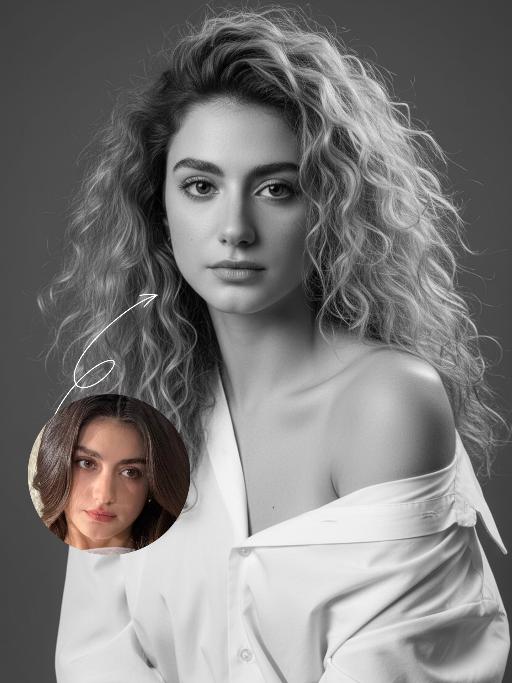
Minimal Chic AI effects generated image

Minimal Chic

Strict identity locking is based on the uploaded portrait, with the original facial features, fair skin tone and youthful vitality retained in a 1:1 ratio, reimagined with a striking Euro-American mixed-race aesthetic. The hair color is replaced with long wavy platinum blonde locks, styled in a naturally tousled and voluminous manner. This is a black-and-white artistic portrait photography piece featuring a young woman wearing an oversized white shirt that slips naturally off one shoulder; her platinum blonde tresses softly frame her delicate facial features, with strands gilded by sunlight to reveal an exquisite sheen, and her skin exudes a smooth, refined texture. She sits in an upright posture, facing the camera with a calm, pensive gaze and a relaxed expression that brims with narrative depth. Shot in a professional photo studio against a minimalist solid gray background, a soft, cinema-grade back rim light sculpts her three-dimensional facial contours, with a precise ray of hair light layered in to make each strand of the blonde hair distinct and translucent with clear gradations. Rich details are preserved in the shadow areas, and the highlights transition naturally, crafting an elegant and serene atmosphere. Boasting 8K ultra-realistic resolution and a high-contrast black-and-white aesthetic, the image features razor-sharp details where even pores and individual hair strands are clearly visible, with natural and authentic skin texture. The composition is minimalist with no extraneous elements; the overall style is elegant and sophisticated, blending refined luxury with compelling narrative quality, reaching the standard of professional commercial photography.

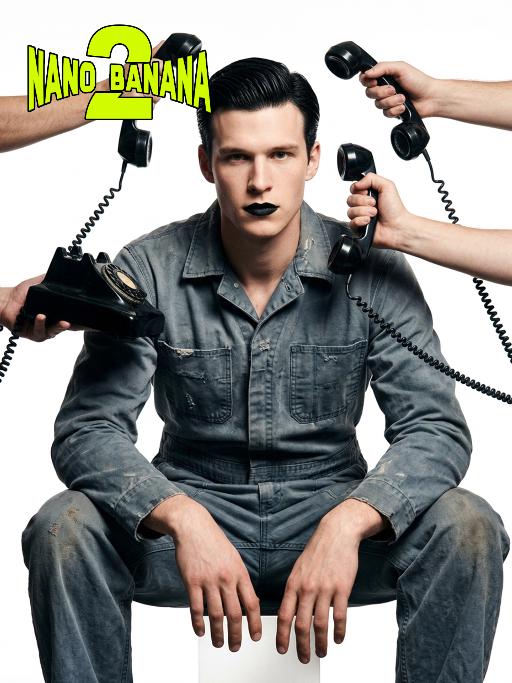
Telephone Ring AI effects generated image

Telephone Ring

Shooting perspective and focal length: Frontal level view, using a medium telephoto lens (approximately 50mm), with an appropriate focal length, medium close-up shot, able to clearly present the upper body and hand details of the characters, and the picture has no obvious distortion. Equipment: Professional studio camera (such as Canon 5D series or Sony A7 series), combined with a studio lighting system. Character pose: The character is in a sitting position, with legs apart and knees bent, the upper body leaning forward and the head close to the camera; multiple arms extend from all around the frame, each hand holding an old-fashioned black wired telephone, multiple receivers randomly surround the character's head, creating a visual effect of being surrounded. Character expression: Eyes gaze at the camera, the gaze is slightly distant and cold, the facial expression is calm and undisturbed, conveying a restrained emotional tension. Lighting: Use studio hard light, the main light source comes from the front, supplemented by side lighting, forming a clear contrast of light and shade, highlighting the fabric texture and facial contours, the background is pure white, clean and without any color impurities. Style: Pioneer fashion photography, integrating surrealism and minimalism, creating an absurd yet highly tense atmosphere through strong visual impact. Clothing: A set of gray-blue distressed texture workwear, the fabric has fine textures, the fit is loose and firm, the lapel design combines toughness and retro charm. Hair style: Black short hair, using hair gel to comb backward, revealing a full forehead, the style is clean and neat with a sense of lines. Makeup: Matte texture pure black lipstick as the visual focus, the facial base makeup is even and transparent, only highlighting the lip color, the overall makeup is avant-garde and has a distinctive characteristic.

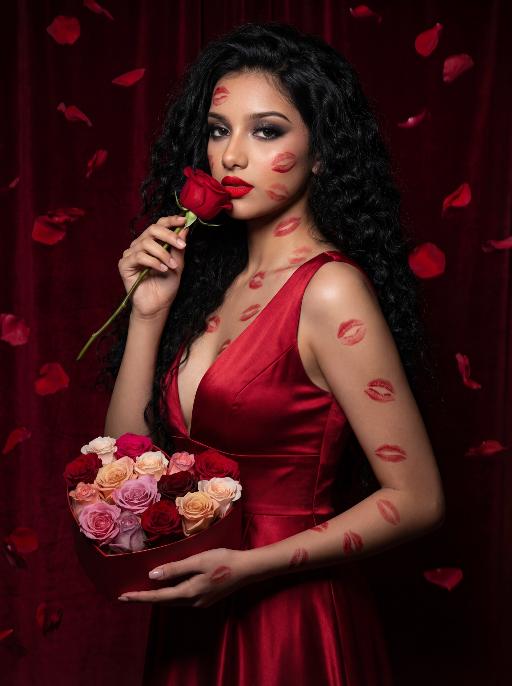
Love Yourself AI effects generated image

Love Yourself

A charming and alluring figure in the uploaded picture (with unchanged facial features, gender and age), stands sideways and turns around, looking at the camera. She has long, fluffy, jet-black curly hair, exquisite eye makeup and a bright matte red lipstick. Red lipstick marks are all over her face, neck, chest and arms. She is wearing a luxurious deep V-neck red satin dress. One hand holds a heart-shaped box filled with various colored roses, and the other hand holds a rose placed near her mouth. Background: A dark red velvet texture studio background. Several red rose petals float slowly in the air in the background. Lighting hint: Low-key high-contrast dramatic light, soft directional highlights shining on her facial features and the satin dress, deep velvet-like shadows to enhance the sexy effect, with a cinematic sense of melancholy and depth. Tone hint: Rich, saturated deep red contrasts with dark black and soft charcoal gray, warm and passionate color combination, with subtle velvet texture in the shadow areas. Style: High-end fashion editing photography, highly realistic detail depiction, precise capture of skin texture and fabric luster, full of charm and allure Valentine's Day theme, with professional photography studio level, fashion pioneer photography

Cyberpunk 2026

The figure from the uploaded image (with unchanged facial features), captured in a medium close-up shot of the upper body, with hair dyed red and wearing black square-framed sunglasses (with transparent red lenses). The figure is dressed in a glossy black leather sportswear set (jacket + track pants) printed with the Chinese character "Fu" pattern, black gloves (holding a sparkler in one hand), and stylish cool black leather shoes, plus an ultra-cool helmet cap adorned with glowing lights that fit the contour of the cap as decorations. The figure stands on a neon-lit city street in cyberpunk style, set against a rainy night backdrop—featuring glowing Chinese neon signboards, wet road surfaces reflecting the lights, towering futuristic buildings, and a blend of blue/red/yellow neon lights. The image features subtle motion blur effects, realistic color grading (with a stark contrast between dark tones and neon hues), and a street photography style. There are fireworks blooming in the background sky, creating a festive atmosphere; the overall style boasts avant-garde photography, trendy fashion sense and a high-end sophisticated feel. At the bottom of the frame, the glowing artistic font "Cyberpunk 2026"—a large handwritten-style effect composed of blooming blue-purple fireworks—floats prominently, with decorative patterns of colorful blooming fireworks beside the text.

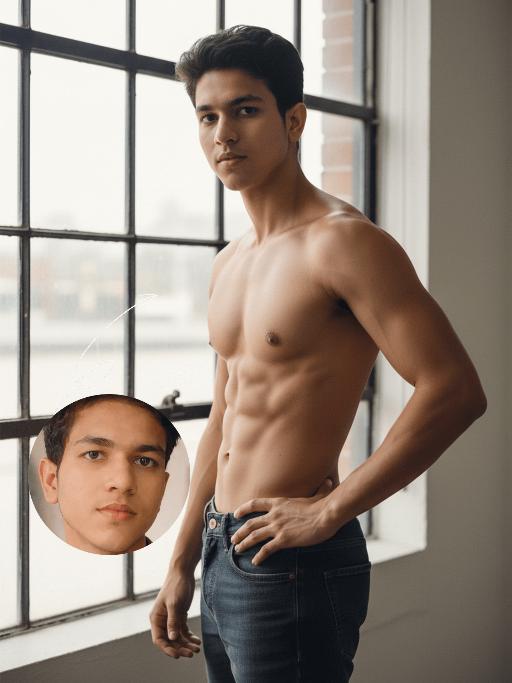
Muscular AI effects generated image

Muscular

Strictly lock the identity of the uploaded portrait (preserve facial contours, native Indian skin tone, hairstyle, and age). A full-body shot of a handsome young South Asian man in a **three-quarter side stance** (natural, relaxed posture), shirtless, wearing dark wash denim jeans. He has a **lean, athletic physique with naturally defined, realistic muscle tone** (avoid exaggerated or artificial-looking muscles), with one hand firmly on his hip and the other resting naturally at his side, gaze confident and intense. Standing in front of a large industrial-style window with soft, bright natural light filtering through, creating subtle, realistic highlights and shadows on his muscle groups. High-end fitness fashion photography style, film-like texture, warm natural skin tones, sharp focus on authentic muscle definition, cinematic natural lighting, clean minimalist background, sophisticated and powerful aesthetic

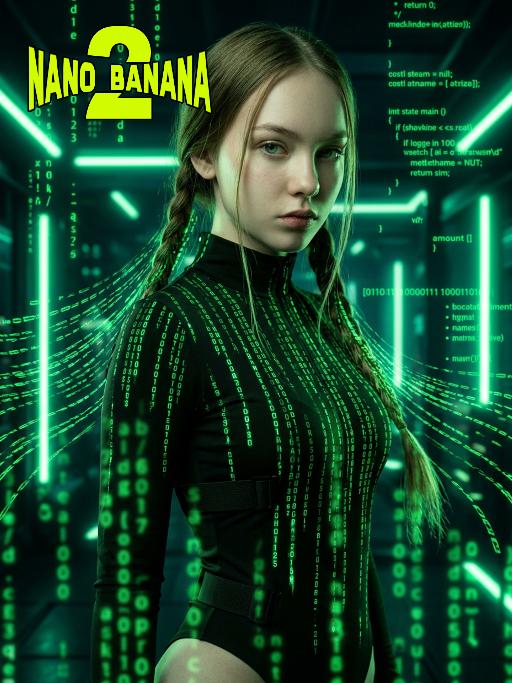
The Matrix AI effects generated image

The Matrix

Medium-close-up shot (showing the upper body of the protagonist, from above the thigh area): In the uploaded picture, the features (unchanged) and gender (also unchanged) of the character are clearly visible. Standing in the center of the frame, with a serious and cold expression, a flowing bright green digital coding stream is presented in his hair. Wearing a high-neck tight outfit, it is covered with a green matrix-like digital rain. It has a cyberpunk style, adopting the color scheme of "The Matrix", with a dark background, dramatic side light, and neon lights emitting bright green light, presenting a green matrix-like digital rain background in the dark environment. The skin texture is fine, the details are realistic, with a clear focus, a cinematic composition, and a style of avant-garde fashion photography. This is a masterpiece, of superior quality, surreal 8K image. There are also some green matrix-like digital rains in the foreground, with a large depth of field effect, and a wide aperture shooting.

Christmas Baby

Transform the figure in the uploaded image into a Christmas-themed style, standing upright and dressed in a retro Christmas knit sweater with red and green color-blocking (printed with white snowflake and reindeer patterns), a long red tasseled scarf, a cute Christmas hat, a full set of Christmas-themed clothing with Christmas pants, and cute fluffy slouch socks on its feet.Scene: A warm American home with a Christmas setup, featuring exquisite gift boxes placed on snow-dusted ground; the background is Christmas decor in a dominant red tone, with a Christmas wreath hung above adorned with red and gold baubles and white flowers, and Christmas trees on both sides dusted with a light layer of snow and decorated with red and gold baubles.Texture & Style: The frame is ultra-high-definition and delicate (cinematic texture at 8K level), with soft and bright lighting, vivid and festive colors, and clear details such as the sweater’s knit texture and the luster of apples. Shot in the style of high-end editorial fashion photography.

Dance With her

Model’s original facial features, facial contour and hairstyle are 100% preserved in their entirety, extremely smooth cinematic visual transition, natural narrative pacing, 4K ultra-high resolution, photorealistic skin & fabric textures, cinematic color grading, warm soft natural light, highly saturated vivid colors, exquisite lifelike details, strong cinematic texture, seamless scene fusion, smooth lens-like visual connection, no abrupt frame or element changes, **fixed medium close-up perspective throughout, the camera follows the characters' dancing movements smoothly without pulling back or zooming out. The picture presents a natural lens narrative with a fixed medium close-up: the uploaded character is in the core visual area, initially wearing original daily wear with a relaxed posture and slight face-to-camera, facial features in sharp focus, warm soft light bathing the whole body; the background fades and blends naturally from a simple base into a traditional Indonesian interior, with Persian-patterned carpets and painted carved pillars emerging gradually to lay a seamless spatial foundation, the scene expansion is gentle and fits the lens follow rhythm without any perspective pullback. The traditional Indonesian interior scene is fully presented with rich layers—Persian-patterned carpets covering the ground, painted carved stone pillars standing tall, warm wall sconces emitting soft light, the entire space is bright with distinct light and shadow levels. A gorgeous and attractive young Indonesian woman enters the frame in a smooth, natural way matching the scene fusion rhythm; she has long thick black double braids, a bright and seductive smile, and is barefoot, wearing a luxurious traditional Indonesian kebaya (color-blocked embroidered sequined corset with turquoise tulle lantern skirt, decorated with pearl tassels and gold-thread embroidery) and ornate Indonesian ethnic gold jewelry (necklace, earrings, bangles). The uploaded character stands up naturally and gracefully in the visual transition, the two hold hands tightly in the center of the Indonesian interior space, spinning and dancing joyfully with light, vivid and smooth movements; the camera follows the two characters' spinning and dancing trajectory in a steady medium close-up, with the lens moving naturally and slightly to fit their body movements, always keeping both characters in the core of the frame without pulling back or changing the perspective**. Warm wall sconce light blends with soft natural light, perfectly highlighting the intricate embroidery details of the two's costumes, the bright luster of gold jewelry and the joyful, vivid facial expressions of both characters, highly saturated colors amplify the gorgeous and lively atmosphere of the scene, all character and costume details are clear and realistic due to the fixed medium close-up follow shot; the whole picture realizes seamless connection of scene fading, character entry and dance movement, the lens follow is smooth and natural, and the narrative layering is rich without disorder.

Figure AI effects generated image

Figure

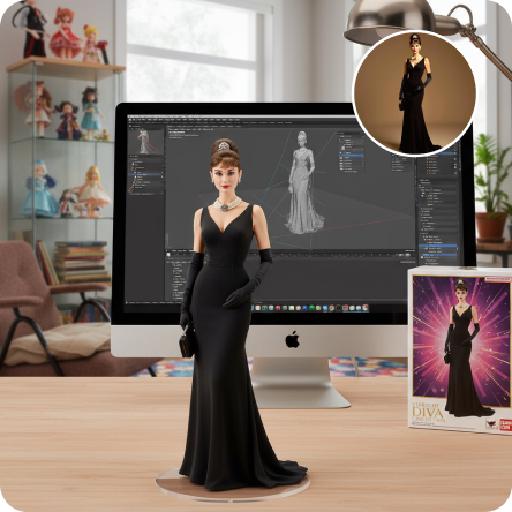
Create a 1/7 scale commercialized figure of the character in the illustration, in a realistic style and environment. Render the exact hairstyle and the same outfit with the uploaded figure. Render garments as molded plastic with engraved seams and sculpted folds; keep accessories as plastic parts. Fictionalize any brand text/logos while keeping layout and colors. Place the figure on a computer desk, using a circular transparent acrylic base without any text. On the Apple computer screen, display the Z Brush modeling process of the figure. Next to the Apple computer screen, place a BANDAl-style toy packaging box printed with the original artwork. The background shows a modern realistic room furnished with contemporary furniture, including a display cabinet filled with books, dolls, and scale figures, adding a casual and everyday atmosphere. Behind the Apple computer, place a desk lamp to add detail and depth to the scene.

Hold Deceased

The two uploaded characters (with their facial features, age and gender remaining unchanged), the first uploaded image shows a person with a warm glowing edge effect), the two stand naturally side by side; the scene is an American country-style living room, with a burning stone fireplace, wooden furniture, vintage paintings and large windows with white curtains as the background. The entire scene is enveloped by soft and warm yellow light, creating a peaceful, warm and slightly nostalgic atmosphere. The camera is in medium shot and medium close-up, within the focal range, and the character proportions follow the laws of physical movement. The film has high-definition quality, hyper-realistic, all characters face forward, stand closely side by side, with realistic film texture. The shallow depth of field highlights the characters, the warm-toned soft light, fine skin and fabric textures, and the composition is natural and realistic.

Load more

Next-Gen Multi-Model AI Video Architecture

Vivago AI isn't just one engine—it’s a unified hub for the world’s most advanced video AI. Whether you need cinematic realism or high-speed social content, we provide the right model for your creative vision.

Free Generate

Beauty and Dolphins

Vacation Time

Stellar Tear

Fish Tank Supervisor

Cinematic Quality & Precision Control

Enables 4K resolution with multi-lens motion control, generating delicate scene via text prompts for customized cinematography.​

TRY NOW

Dynamic AV Sync

Auto-generates original audio to avoid copyright issues. Build 3D immersive environments through layered sound design automatically.

TRY NOW

OpenAI Sora 2

​Advanced visual storytelling with unparalleled physics and consistency.

TRY NOW

Kling v2.6 Pro

Industry-leading cinematic image animation and motion control.

TRY NOW

Google Veo 3 & 3.1

Ultra-fast generation with enhanced realism for creative workflows.

TRY NOW

Vivago AI 2.0

Our proprietary model optimized for efficiency, speed, and cost-effective generation.

TRY NOW

Users' Voice

We listen carefully to the opinions of every user.
Free Generate
Contact Us
I tried the Lip Sync feature inside Vivago.ai’s AI Video Generator for my educational podcast, and the results were stunning! The avatar's lip movements perfectly matched my audio recording, creating a professional AI-generated video without complex editing. Compared with tools like OpenAI Sora 2 and Google Veo 3.1, Vivago Image-to-Video delivers fast, studio-quality results online. It saved me hours of post-production work.
ElenaM (Spain)
Vivago’s Image-to-Video AI transformed my marketing workflow. I uploaded a product image and described the launch scene in text, and it generated a 10-second cinematic AI video with background music and dynamic visuals. The output quality rivals Kling v2.6 Pro and Google Veo 3 Fast. It’s now my go-to AI video generator for social media ads and product campaigns.
KenjiT (Japan)
As a digital artist, I use Vivago.ai 2.0 daily for Image-to-Image and AI Image-to-Video creation. The e-book covers and animated visuals I generate for clients look cinematic and professional. Unlike many standalone AI tools, Vivago integrates multiple leading models into one platform, making it easier to create copyright-safe AI images and videos for publishing.
ChenL (China)
I tried the Lip Sync feature inside Vivago.ai’s AI Video Generator for my educational podcast, and the results were stunning! The avatar's lip movements perfectly matched my audio recording, creating a professional AI-generated video without complex editing. Compared with tools like OpenAI Sora 2 and Google Veo 3.1, Vivago Image-to-Video delivers fast, studio-quality results online. It saved me hours of post-production work.
ElenaM (Spain)
Vivago’s Image-to-Video AI transformed my marketing workflow. I uploaded a product image and described the launch scene in text, and it generated a 10-second cinematic AI video with background music and dynamic visuals. The output quality rivals Kling v2.6 Pro and Google Veo 3 Fast. It’s now my go-to AI video generator for social media ads and product campaigns.
KenjiT (Japan)
As a digital artist, I use Vivago.ai 2.0 daily for Image-to-Image and AI Image-to-Video creation. The e-book covers and animated visuals I generate for clients look cinematic and professional. Unlike many standalone AI tools, Vivago integrates multiple leading models into one platform, making it easier to create copyright-safe AI images and videos for publishing.
ChenL (China)
I absolutely love Vivago’s AI Image-to-Video Generator. As a travel blogger, static images often fail to capture real atmosphere, but Vivago helps me turn photos into vivid cinematic AI videos with motion effects. It feels comparable to OpenAI Sora 2 and Google Veo 3.1, but more accessible and faster for creators who need high-quality AI videos online.
LiamK (Australia)
I tried the Lip Sync feature inside Vivago.ai’s AI Video Generator for my educational podcast, and the results were stunning! The avatar's lip movements perfectly matched my audio recording, creating a professional AI-generated video without complex editing. Compared with tools like OpenAI Sora 2 and Google Veo 3.1, Vivago Image-to-Video delivers fast, studio-quality results online. It saved me hours of post-production work.
ElenaM (Spain)
Vivago’s Image-to-Video AI transformed my marketing workflow. I uploaded a product image and described the launch scene in text, and it generated a 10-second cinematic AI video with background music and dynamic visuals. The output quality rivals Kling v2.6 Pro and Google Veo 3 Fast. It’s now my go-to AI video generator for social media ads and product campaigns.
KenjiT (Japan)
As a digital artist, I use Vivago.ai 2.0 daily for Image-to-Image and AI Image-to-Video creation. The e-book covers and animated visuals I generate for clients look cinematic and professional. Unlike many standalone AI tools, Vivago integrates multiple leading models into one platform, making it easier to create copyright-safe AI images and videos for publishing.
ChenL (China)
I absolutely love Vivago’s AI Image-to-Video Generator. As a travel blogger, static images often fail to capture real atmosphere, but Vivago helps me turn photos into vivid cinematic AI videos with motion effects. It feels comparable to OpenAI Sora 2 and Google Veo 3.1, but more accessible and faster for creators who need high-quality AI videos online.
LiamK (Australia)
Using Vivago.ai’s Image-to-Video AI has greatly enhanced my classroom teaching. I transform textbook notes into historical AI videos with cinematic filters and dynamic animations. Compared with tools like Kling v2.6 Pro and Google Veo 3 Fast, Vivago offers faster generation and easier parameter control for educators who need reliable AI video creation.
RajivG (India)
I frequently create AI videos on Vivago and publish them on TikTok and YouTube Shorts. The AI video templates and trending content ideas help me produce viral-ready clips quickly. With Vivago’s integrated models—including advanced video engines similar to OpenAI Sora 2—I can generate anime-style and cinematic social media videos that drive high engagement.
MarieJ (Spain)
What attracts me most about Vivago.ai is not only the powerful AI Video Generator but also the active AIGC creator community. It combines AI Image-to-Video, Text-to-Video, and leading model integrations like Google Veo 3.1 into one creative platform.
TomW (India)
At first, I was hesitant about using AI video tools. But after trying Vivago Image-to-Video, I realized how easy it is to create professional AI-generated videos online. I just upload an image, add a short prompt, and adjust a few settings. The results are cinematic and copyright-safe, which is essential for commercial projects.
HectorC (Mexico)
Using Vivago.ai’s Image-to-Video AI has greatly enhanced my classroom teaching. I transform textbook notes into historical AI videos with cinematic filters and dynamic animations. Compared with tools like Kling v2.6 Pro and Google Veo 3 Fast, Vivago offers faster generation and easier parameter control for educators who need reliable AI video creation.
RajivG (India)
I frequently create AI videos on Vivago and publish them on TikTok and YouTube Shorts. The AI video templates and trending content ideas help me produce viral-ready clips quickly. With Vivago’s integrated models—including advanced video engines similar to OpenAI Sora 2—I can generate anime-style and cinematic social media videos that drive high engagement.
MarieJ (Spain)
What attracts me most about Vivago.ai is not only the powerful AI Video Generator but also the active AIGC creator community. It combines AI Image-to-Video, Text-to-Video, and leading model integrations like Google Veo 3.1 into one creative platform.
TomW (India)
At first, I was hesitant about using AI video tools. But after trying Vivago Image-to-Video, I realized how easy it is to create professional AI-generated videos online. I just upload an image, add a short prompt, and adjust a few settings. The results are cinematic and copyright-safe, which is essential for commercial projects.
HectorC (Mexico)
