Image to Video

Create cinematic slow-motion scenes with AI: Generate a realistic tiger engulfed in blue flames and white sparks walking in dark settings. Elevate visuals with VivaGo's surreal AI effects, dynamic low-angle shots, and professional-grade editing tools for intense, lifelike animal portrayals.

Recreate
arrow

FAQs

How to generate images/videos from text prompts?

Describe the visual content in natural language (e.g., 'A cyberpunk cat wearing neon goggles') and our AI models will create outputs. Complex prompts trigger multi-stage NLP parsing for enhanced accuracy.

How to refine unsatisfactory results?

Use our Prompt Bot - an AI-powered optimizer that suggests technical modifiers. Simply describe your ideas, desired changes ('more metallic texture'), then you will get optimized prompt variants.

When should I use reference images?

Upload references to: 1) Guide character consistency (e.g., faces/outfits), 2) Control motion patterns in videos using our feature matching algorithm. Supports JPG/PNG

What's the credit system?

Daily login grants 100 credits. Upgrade options: 1) Premium Membership, 2) Credit Packs. Details: https://vivago.ai/subscribe

More From VIVAGO AI

Moving Figure

Create a 1/7 scale commercialized figure of the character in the illustration, in a realistic style and environment. Render the exact hairstyle and the same outfit with the uploaded figure. Render garments as molded plastic with engraved seams and sculpted folds; keep accessories as plastic parts. Fictionalize any brand text/logos while keeping layout and colors. Place the figure on a computer desk, using a circular transparent acrylic base without any text. On the Apple computer screen, display the Z Brush modeling process of the figure. Next to the Apple computer screen, place a BANDAl-style toy packaging box printed with the original artwork. The background shows a modern realistic room furnished with contemporary furniture, including a display cabinet filled with books, dolls, and scale figures, adding a casual and everyday atmosphere. Behind the Apple computer, place a desk lamp to add detail and depth to the scene.

Cosmetics

A cute 25-year-old Japanese woman in a cozy, neutral-toned bedroom. She holds a cosmetic product in her right hand, presenting it naturally to the camera as if introducing it, but without applying it to her face. The product she displays is exactly the same as the one shown in the provided image. Facing the camera with a friendly expression, she highlights the product design, which follows the style shown in the provided image. The setting has an authentic, everyday bedroom vibe with soft, warm lighting, capturing the natural feel of a mobile phone shot. The background is realistic and everyday, with no blur, showcasing simple furniture and decor that feel lived-in and comfortable. The lighting diffuses naturally across her face, creating a soft, inviting atmosphere with gentle shadows.

Three Frames

Film effect, three-screen split-frame photography (close-up, medium close-up, medium shot or long shot) in upper, middle and lower sections; cinematic Japanese-style film effect with three-screen split-frame photography in upper, middle and lower sections, set in a cold, lonely snowy scene on a clear day. A single figure with soft facial features, wearing an exquisitely tailored high-end red gown, a white mink fur hat and a white scarf, paired with sophisticated and textured accessories, stands in a vast white snowfield with snowflakes falling and snow accumulating on the scarf. The image boasts a strong cinematic texture. Upper screen: Extreme close-up of the head, with distinct individual eyelashes, fair and even skin, and snowflakes dotted on the eyelashes. Middle screen: Solo medium shot of the figure against the snowscape. Lower screen: Close-up of the figure leaning gently against a moose’s head with a soft smile, the details of the face and scarf in sharp focus, with a pale grey-blue sky and a single pine tree in the distance. Cinematic and realistic three-frame split-frame portrait: retain the facial features of the uploaded figure (with a fresh and translucent winter makeup look featuring silver shimmery eyeshadow, pink translucent blusher with fine glitter and light pink lip makeup—all on-trend winter styles in Western fashion, paired with a gentle and innocent expression, and fair, delicate skin). Soft diffused winter natural light highlights the soft texture of the skin and clothing. The figure leans affectionately beside a tame reindeer, with snow resting on the reindeer’s antlers and fur. The background features a snow-covered Christmas tree and an expanse of white snow, with fine snowflakes floating in the air. Soft natural cold light creates a fresh and translucent winter mood; a 50mm standard lens is used to preserve the delicate interactive details between the figure and the reindeer. The overall atmosphere is warm and healing, with ultra-high details and naturally saturated colors, in a horizontal composition. Avoid blurriness, disproportionate figure proportions and cluttered backgrounds.

Super Shoes

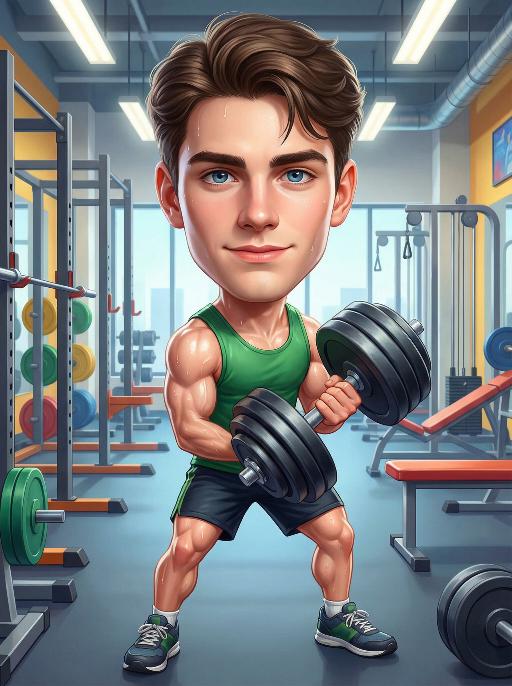
A stylish 25-year-old Korean man in a room, standing in front of a shoe cabinet filled with numerous shoe boxes. He is wearing a fashionable jacket and denim jeans, exuding a modern yet vintage aesthetic. Use the uploaded image as the hero.He holds the product( (as shown in the uploaded image), facing the camera and confidently showcasing the product, as if introducing them in a casual, fashion blogger-style video. The scene is a close-up, focusing only on his upper body, hands, and the sneakers, without showing his feet. The background has a realistic, lived-in vibe with no blur, mimicking the feel of an iPhone shot. Soft, natural lighting illuminates both the man and the sneakers, creating warmth and balance, typical of smartphone photography with its crisp details and smooth gradients. The atmosphere feels authentic and relatable, with an Instagram-style aesthetic that highlights the mobile phone's natural, clean feel.

E-commerce

High-quality professional e-commerce product banners (mainly showcasing the products as the main objects), featuring realistic 3D rendering effects, cinematic lighting effects, a dark gradient background with matte black texture decoration, a close-up shot of the product's front, highlighting the active noise reduction function, a visual effect of the side screen displaying the music equalizer, key features prominently displayed in English: "SUPER HIGH QUALITY", "40-HOUR BATTERY LIFE", "HIGH FIDELITY EFFECT", the top navigation bar has English labels "PRODUCT", "PARAMETERS", "ACCESSORIES", "BUY NOW", and the bottom small illustration shows the product's charger, with high contrast, matte surface, 8K resolution, ultra-fine details, technology product display, modern design, simple layout and commercial photography style.

Noir Portrait AI effects generated image

Noir Portrait

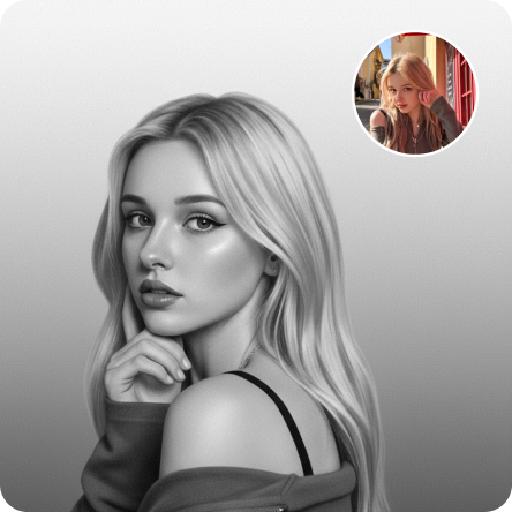
Generate black-and-white portrait artworks from the uploaded photos, using editing and artistic photography styles.The background presents a soft gradient effect, transitioning from medium gray to nearly pure white, creating a sense of layering and a quiet atmosphere. The fine film grain texture simulates the soft texture of photography, evoking the classic black-and-white photography. His face, with the outline of the light, evokes a sense of mystery, intimacy and elegance.A gentle directed beam of light diffused softly, caressing the curve of his cheek or flashing light spots in his eyes - this was the emotional core of the picture. The remaining part is occupied by a large amount of negative space, deliberately maintaining simplicity to allow the picture to breathe freely. There are no words or signs in the picture - only the interweaving of light and shadow with emotions. Change the pose for each photo.

Blue Ocean AI effects generated image

Blue Ocean

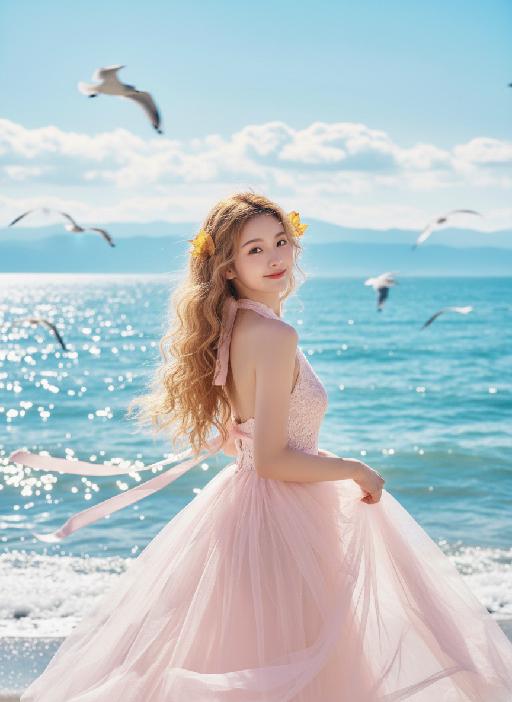
Strictly lock the facial features of the uploaded portrait (completely preserve facial contours, native skin tone, hairstyle and age); young girl with light golden long curly hair, Korean sweet style looks, delicate facial features with clear nude makeup and light pink blush, gentle and lively eyes, smiling and looking back sideways, hair fluttering in the sea breeze; wearing a light pink lace halter tulle dress with a flowing skirt and pink ribbons fluttering in the wind; background is the blue Erhai Lake/seaside, sparkling sea with white waves, fluffy white clouds in the sky, flocks of seagulls flying freely, light cyan mountains in the distance; overall fresh and healing seaside atmosphere photo, soft and transparent natural light, high saturation fresh tones, cinematic lighting, motion blur (seagulls/hair), full of details, 8K ultra-clear, realistic human photography, flawless, Japanese fresh + Korean pictorial style

Advanced Image AI effects generated image

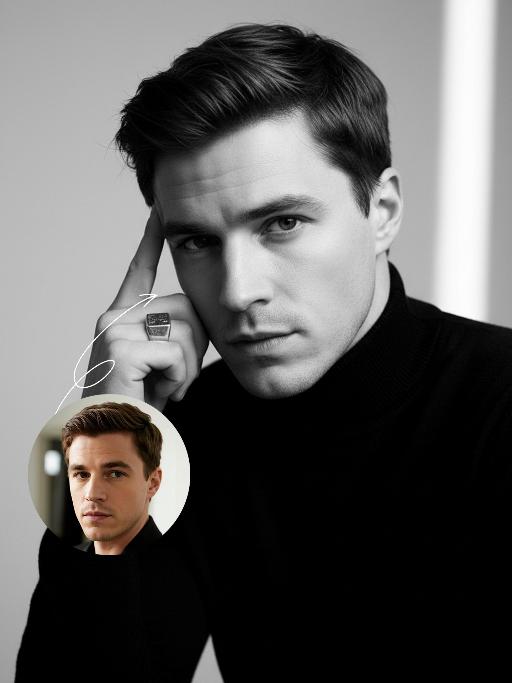
Advanced Image

Strict identity verification is carried out using the uploaded avatar (maintaining consistency in facial features, hair, skin tone and age). The composition frames the head and shoulders from the top of the head to the upper chest; the face is angled three-quarters to the left and slightly downward, with the chin gently tucked, eyes almost straight to the camera, a stern and cold expression, and lips firmly closed, featuring a sharp jawline and a straight nose. The short black hair is slightly tousled with a few strands falling onto the forehead, styled to have a subtle sheen to its texture. He is wearing a pure black long-sleeved turtleneck sweater with the collar snugly wrapped around the neck. Set against an off-white interior background, his left hand is raised with the index finger touching the temple, the other fingers curled, and a large, prominent silver signet ring adorns his finger, clearly visible against the black sleeve. Soft studio key light streams in from the upper left (the camera’s left), casting intense highlights on the left side of the face and deep shadows on the right side. The background gradients from grey to white, with a faint vertical gradient light strip on the right side. The entire image is in full black and white with no color, only grayscale tones, boasting extremely stark contrast and exquisitely sharp details. It features a studio lighting style, portrait photography aesthetics, and an avant-garde fashion black-and-white photography style.

Load more

Next-Gen Multi-Model AI Video Architecture

Vivago AI isn't just one engine—it’s a unified hub for the world’s most advanced video AI. Whether you need cinematic realism or high-speed social content, we provide the right model for your creative vision.

Free Generate

Beauty and Dolphins

Vacation Time

Stellar Tear

Fish Tank Supervisor

Cinematic Quality & Precision Control

Enables 4K resolution with multi-lens motion control, generating delicate scene via text prompts for customized cinematography.​

TRY NOW

Dynamic AV Sync

Auto-generates original audio to avoid copyright issues. Build 3D immersive environments through layered sound design automatically.

TRY NOW

OpenAI Sora 2

​Advanced visual storytelling with unparalleled physics and consistency.

TRY NOW

Kling v2.6 Pro

Industry-leading cinematic image animation and motion control.

TRY NOW

Google Veo 3 & 3.1

Ultra-fast generation with enhanced realism for creative workflows.

TRY NOW

Vivago AI 2.0

Our proprietary model optimized for efficiency, speed, and cost-effective generation.

TRY NOW

Users' Voice

We listen carefully to the opinions of every user.
Free Generate
Contact Us
I tried the Lip Sync feature inside Vivago.ai’s AI Video Generator for my educational podcast, and the results were stunning! The avatar's lip movements perfectly matched my audio recording, creating a professional AI-generated video without complex editing. Compared with tools like OpenAI Sora 2 and Google Veo 3.1, Vivago Image-to-Video delivers fast, studio-quality results online. It saved me hours of post-production work.
ElenaM (Spain)
Vivago’s Image-to-Video AI transformed my marketing workflow. I uploaded a product image and described the launch scene in text, and it generated a 10-second cinematic AI video with background music and dynamic visuals. The output quality rivals Kling v2.6 Pro and Google Veo 3 Fast. It’s now my go-to AI video generator for social media ads and product campaigns.
KenjiT (Japan)
As a digital artist, I use Vivago.ai 2.0 daily for Image-to-Image and AI Image-to-Video creation. The e-book covers and animated visuals I generate for clients look cinematic and professional. Unlike many standalone AI tools, Vivago integrates multiple leading models into one platform, making it easier to create copyright-safe AI images and videos for publishing.
ChenL (China)
I tried the Lip Sync feature inside Vivago.ai’s AI Video Generator for my educational podcast, and the results were stunning! The avatar's lip movements perfectly matched my audio recording, creating a professional AI-generated video without complex editing. Compared with tools like OpenAI Sora 2 and Google Veo 3.1, Vivago Image-to-Video delivers fast, studio-quality results online. It saved me hours of post-production work.
ElenaM (Spain)
Vivago’s Image-to-Video AI transformed my marketing workflow. I uploaded a product image and described the launch scene in text, and it generated a 10-second cinematic AI video with background music and dynamic visuals. The output quality rivals Kling v2.6 Pro and Google Veo 3 Fast. It’s now my go-to AI video generator for social media ads and product campaigns.
KenjiT (Japan)
As a digital artist, I use Vivago.ai 2.0 daily for Image-to-Image and AI Image-to-Video creation. The e-book covers and animated visuals I generate for clients look cinematic and professional. Unlike many standalone AI tools, Vivago integrates multiple leading models into one platform, making it easier to create copyright-safe AI images and videos for publishing.
ChenL (China)
I absolutely love Vivago’s AI Image-to-Video Generator. As a travel blogger, static images often fail to capture real atmosphere, but Vivago helps me turn photos into vivid cinematic AI videos with motion effects. It feels comparable to OpenAI Sora 2 and Google Veo 3.1, but more accessible and faster for creators who need high-quality AI videos online.
LiamK (Australia)
I tried the Lip Sync feature inside Vivago.ai’s AI Video Generator for my educational podcast, and the results were stunning! The avatar's lip movements perfectly matched my audio recording, creating a professional AI-generated video without complex editing. Compared with tools like OpenAI Sora 2 and Google Veo 3.1, Vivago Image-to-Video delivers fast, studio-quality results online. It saved me hours of post-production work.
ElenaM (Spain)
Vivago’s Image-to-Video AI transformed my marketing workflow. I uploaded a product image and described the launch scene in text, and it generated a 10-second cinematic AI video with background music and dynamic visuals. The output quality rivals Kling v2.6 Pro and Google Veo 3 Fast. It’s now my go-to AI video generator for social media ads and product campaigns.
KenjiT (Japan)
As a digital artist, I use Vivago.ai 2.0 daily for Image-to-Image and AI Image-to-Video creation. The e-book covers and animated visuals I generate for clients look cinematic and professional. Unlike many standalone AI tools, Vivago integrates multiple leading models into one platform, making it easier to create copyright-safe AI images and videos for publishing.
ChenL (China)
I absolutely love Vivago’s AI Image-to-Video Generator. As a travel blogger, static images often fail to capture real atmosphere, but Vivago helps me turn photos into vivid cinematic AI videos with motion effects. It feels comparable to OpenAI Sora 2 and Google Veo 3.1, but more accessible and faster for creators who need high-quality AI videos online.
LiamK (Australia)
Using Vivago.ai’s Image-to-Video AI has greatly enhanced my classroom teaching. I transform textbook notes into historical AI videos with cinematic filters and dynamic animations. Compared with tools like Kling v2.6 Pro and Google Veo 3 Fast, Vivago offers faster generation and easier parameter control for educators who need reliable AI video creation.
RajivG (India)
I frequently create AI videos on Vivago and publish them on TikTok and YouTube Shorts. The AI video templates and trending content ideas help me produce viral-ready clips quickly. With Vivago’s integrated models—including advanced video engines similar to OpenAI Sora 2—I can generate anime-style and cinematic social media videos that drive high engagement.
MarieJ (Spain)
What attracts me most about Vivago.ai is not only the powerful AI Video Generator but also the active AIGC creator community. It combines AI Image-to-Video, Text-to-Video, and leading model integrations like Google Veo 3.1 into one creative platform.
TomW (India)
At first, I was hesitant about using AI video tools. But after trying Vivago Image-to-Video, I realized how easy it is to create professional AI-generated videos online. I just upload an image, add a short prompt, and adjust a few settings. The results are cinematic and copyright-safe, which is essential for commercial projects.
HectorC (Mexico)
Using Vivago.ai’s Image-to-Video AI has greatly enhanced my classroom teaching. I transform textbook notes into historical AI videos with cinematic filters and dynamic animations. Compared with tools like Kling v2.6 Pro and Google Veo 3 Fast, Vivago offers faster generation and easier parameter control for educators who need reliable AI video creation.
RajivG (India)
I frequently create AI videos on Vivago and publish them on TikTok and YouTube Shorts. The AI video templates and trending content ideas help me produce viral-ready clips quickly. With Vivago’s integrated models—including advanced video engines similar to OpenAI Sora 2—I can generate anime-style and cinematic social media videos that drive high engagement.
MarieJ (Spain)
What attracts me most about Vivago.ai is not only the powerful AI Video Generator but also the active AIGC creator community. It combines AI Image-to-Video, Text-to-Video, and leading model integrations like Google Veo 3.1 into one creative platform.
TomW (India)
At first, I was hesitant about using AI video tools. But after trying Vivago Image-to-Video, I realized how easy it is to create professional AI-generated videos online. I just upload an image, add a short prompt, and adjust a few settings. The results are cinematic and copyright-safe, which is essential for commercial projects.
HectorC (Mexico)