Text to Video

Create Tolkien-inspired photorealistic AI images of an enchanted industrial hall with elvish furniture, mythological sculptures, and fairy-tale forest motifs. Generate mystical atmospheres with golden lighting, ancient carvings, and magical nature blends using advanced AI art tools for mythical worldbuilding and fantasy scene creation.

Recreate
arrow

FAQs

How to generate images/videos from text prompts?

Describe the visual content in natural language (e.g., 'A cyberpunk cat wearing neon goggles') and our AI models will create outputs. Complex prompts trigger multi-stage NLP parsing for enhanced accuracy.

How to refine unsatisfactory results?

Use our Prompt Bot - an AI-powered optimizer that suggests technical modifiers. Simply describe your ideas, desired changes ('more metallic texture'), then you will get optimized prompt variants.

When should I use reference images?

Upload references to: 1) Guide character consistency (e.g., faces/outfits), 2) Control motion patterns in videos using our feature matching algorithm. Supports JPG/PNG

What's the credit system?

Daily login grants 100 credits. Upgrade options: 1) Premium Membership, 2) Credit Packs. Details: https://vivago.ai/subscribe

More From VIVAGO AI

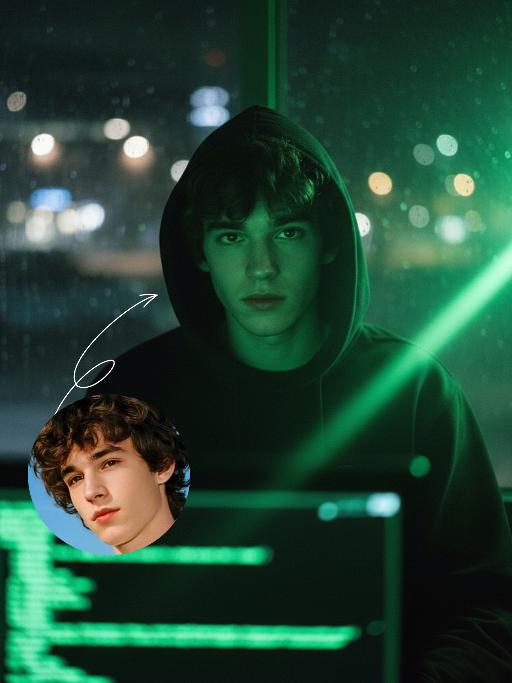
Hacker AI effects generated image

Hacker

A straight-on close-up headshot of the figure from the uploaded image (with unchanged facial features, age and gender), who sits centered and faces the camera directly, wearing a black hoodie with the hood up, their expression calm and focused. The figure’s face is cast in the green glow of code from a computer screen. A broad wash of soft, bright green side light slants in from the right side of the frame, creating a large-scale Tyndall effect that outlines their facial contours. The background features a blurred night view of the city in the rain outside the window (with traces of raindrops sliding down the glass), accompanied by warm bokeh lights; the foreground consists of a computer screen with glowing green code on it. Shot at eye level with a low-light, dark-toned palette, it embodies the dark-toned aesthetic of cyberpunk style. Main colors: black, blue-gray, neon green, low-saturation cool tones. Shallow depth of field blurs both the foreground and background, with the face in sharp focus. The work features an avant-garde fashion photography style, a film-like filter effect, and dramatic contrast between light and shadow.

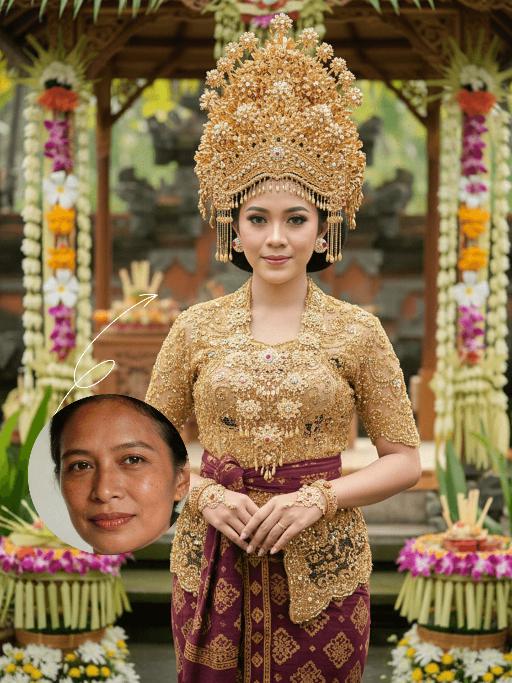
Bali Queen AI effects generated image

Bali Queen

Strictly lock the facial features of the uploaded portrait (preserve facial contours, native Indonesian skin tone, hairstyle and age). Half-body portrait photography, the subject is centered in the frame, not positioned too low, hyper-realistic style, 4K ultra-high definition, soft warm tropical daylight, authentic Balinese wedding cultural atmosphere | A young Indonesian Balinese woman with a poised, elegant expression, standing front-facing in a traditional Balinese bridal outfit. She wears an extremely elaborate, oversized golden beaded and embroidered ceremonial headdress (Bali crown) adorned with intricate floral and gem details, a matching golden beaded and embroidered short-sleeve top, and a deep maroon batik-patterned sarong skirt with gold trim. She accessorizes with layered golden necklaces, bracelets, and a ceremonial handpiece, with her hands gracefully clasped in front of her torso. The background is a softly blurred authentic Balinese wedding ceremony setting: a sacred bamboo and palm-frond ceremonial pavilion (bale agung) decorated with vibrant tropical flowers (frangipani, orchids, and jasmine), a carved wooden altar adorned with traditional offerings, and lush green tropical foliage, creating a romantic and culturally immersive wedding atmosphere. Focus on the intricate details of the golden beadwork, the ornate headdress, and the timeless cultural elegance of the Balinese wedding tradition, with warm diffused sunlight enhancing the opulence of the bridal attire

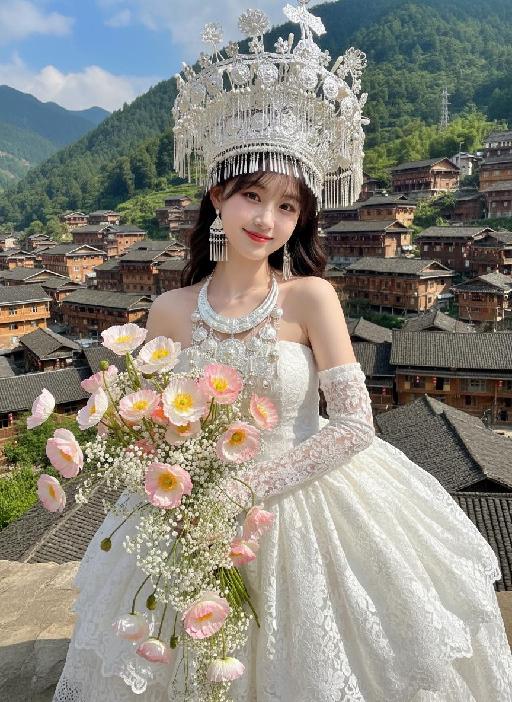
White Clothes AI effects generated image

White Clothes

Strictly lock the facial features of the uploaded portrait (completely preserve facial contours, native skin tone, hairstyle and age). From a high-angle top-down perspective, a young and sweet East Asian woman tilts her body gently to the right, with a gentle and healing smile and bright, captivating eyes. She wears an ornate and intricate large-horned headdress of Miao silver ornaments, a multi-layered Miao silver necklace, a white lace strapless puffy dress, and long white lace gloves. Her hands hold a large bouquet of mixed pink-white gradient poppies and small white flowers, which falls naturally and extends toward the camera. The background features the cascading wooden stilted buildings of Xijiang Qianhu Miao Village in Guizhou, lush green mountains in the distance, and a fresh cloudy blue sky. Bright natural sunlight illuminates the entire scene, casting distinct soft shadows on the ground and the hem of the dress; warm sunlight creates gentle highlights on the Miao silver ornaments, lace fabric and flower petals, forming a clear light and shadow contrast. High-definition realistic portrait photography, soft and bright natural light, fresh and transparent colors, blending ethnic style with a fairy-tale vibe.

Goodnight Kiss

This is a realistic and warm night scene picture, captured using a medium shot close-up technique, with a style similar to American family documentary photography. In the first uploaded picture, the figure (with facial features, gender and age unchanged, the edges presenting a bright and sacred glow) stands straight on a white children's bed. In the second uploaded picture, the figure is lying quietly on the bed, wearing a light blue shirt. The scene is set in a charming American rural children's bedroom: light blue walls, a warm yellow lamp on the white bedside table, a wooden shelf filled with stuffed toys, small potted plants and children's picture books. On the walls are children's paintings and hanging decorations, and translucent flower curtains let the soft moonlight in, creating a peaceful and intimate atmosphere, filled with family love.

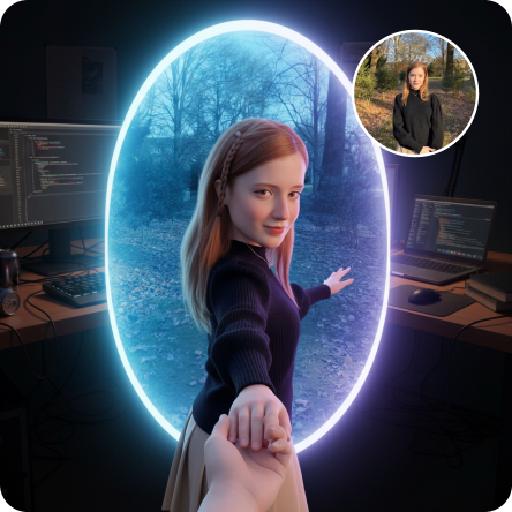
Follow Me Portal AI effects generated image

Follow Me Portal

A 3D chibi-style version of the person in the photo is stepping through a glowing portal, reaching out and holding the viewer’s hand. As the character pulls the viewer forward, they turn back with a dynamic glance, inviting the viewer into their world.Behind the portal is the viewer’s real-life environment: a typical programmer’s study with a desk, monitor, and laptop, rendered in realistic detail. Inside the portal lies the character’s 3D chibi world, inspired by the photo, with a cool blue color scheme that sharply contrasts with the real-world surroundings.The portal itself is a perfectly elliptical frame glowing with mysterious blue and purple light, positioned at the center of the image as a gateway between the two worlds.The scene is captured from a third-person perspective, clearly showing the viewer’s hand being pulled into the character’s world.

Indian Dancer

The figure in the uploaded image (with unchanged facial features) has smooth, luminous skin and a well-defined facial contour, with sleek, glossy hair styled in loose waves. She wears understated burgundy lipstick, has deep brown almond-shaped eyes with subtle smoky eye makeup, and a small red bindi on her forehead. Standing front-on and gazing at the camera, her long black curly hair cascades over her shoulders. She is dressed in an exquisite choli (blouse) with golden thread embroidery, adorned with numerous turquoise/red gemstones, pearl inlays, black spaghetti straps and beaded tassels; exuding intense sexiness, the outfit bares her waist and bust line, paired with a flowy turquoise silk lehenga (traditional Indian long skirt) and a wide, opulent kamarband (golden waist belt) inlaid with red gemstones and strung with golden bells. A full set of golden accessories adorns her: a maang tikka (forehead ornament with gemstones and pearls) in her hair, large chandelier earrings, a fitted pearl and gemstone necklace, bangles (bajuband), and delicate bracelets. Background: Luxurious blurred golden bokeh (flash lighting), warm and dramatic side lighting, studio portrait, 8K resolution, rich details on the face and accessories, and a sharp, clear frame.

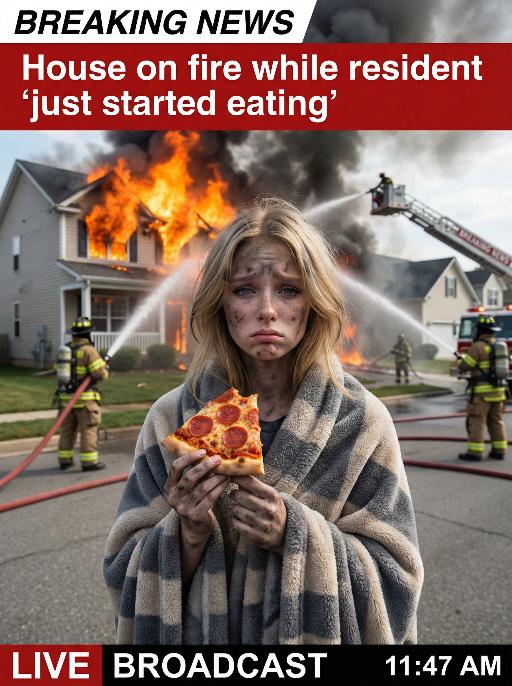
House On Fire AI effects generated image

House On Fire

This is a realistic breaking news photo. In the middle of the picture is the uploaded figure (with the facial features, gender and age unchanged), standing in the middle of the frame, with coal dust all over his face, looking sad. He is wrapped in a gray and beige striped plush blanket and holding a slice of Italian pepperoni pizza, looking confused and sad. In the background, a two-story suburban house is engulfed in flames, and firefighters are using water hoses to put out the fire. The silhouette of a fire engine can be seen. The scene takes place on a residential street during the day. Above there is a prominent large red and white news headline: "BREAKING NEWS". In the middle and lower part of the picture, there is a news caption that reads: "House on fire while resident 'just started eating'", "LIVE BROADCAST", "11:47 AM".

Load more

Next-Gen Multi-Model AI Video Architecture

Vivago AI isn't just one engine—it’s a unified hub for the world’s most advanced video AI. Whether you need cinematic realism or high-speed social content, we provide the right model for your creative vision.

Free Generate

Beauty and Dolphins

Vacation Time

Stellar Tear

Fish Tank Supervisor

Cinematic Quality & Precision Control

Enables 4K resolution with multi-lens motion control, generating delicate scene via text prompts for customized cinematography.​

TRY NOW

Dynamic AV Sync

Auto-generates original audio to avoid copyright issues. Build 3D immersive environments through layered sound design automatically.

TRY NOW

OpenAI Sora 2

​Advanced visual storytelling with unparalleled physics and consistency.

TRY NOW

Kling v2.6 Pro

Industry-leading cinematic image animation and motion control.

TRY NOW

Google Veo 3 & 3.1

Ultra-fast generation with enhanced realism for creative workflows.

TRY NOW

Vivago AI 2.0

Our proprietary model optimized for efficiency, speed, and cost-effective generation.

TRY NOW

Users' Voice

We listen carefully to the opinions of every user.
Free Generate
Contact Us
I tried the Lip Sync feature inside Vivago.ai’s AI Video Generator for my educational podcast, and the results were stunning! The avatar's lip movements perfectly matched my audio recording, creating a professional AI-generated video without complex editing. Compared with tools like OpenAI Sora 2 and Google Veo 3.1, Vivago Image-to-Video delivers fast, studio-quality results online. It saved me hours of post-production work.
ElenaM (Spain)
Vivago’s Image-to-Video AI transformed my marketing workflow. I uploaded a product image and described the launch scene in text, and it generated a 10-second cinematic AI video with background music and dynamic visuals. The output quality rivals Kling v2.6 Pro and Google Veo 3 Fast. It’s now my go-to AI video generator for social media ads and product campaigns.
KenjiT (Japan)
As a digital artist, I use Vivago.ai 2.0 daily for Image-to-Image and AI Image-to-Video creation. The e-book covers and animated visuals I generate for clients look cinematic and professional. Unlike many standalone AI tools, Vivago integrates multiple leading models into one platform, making it easier to create copyright-safe AI images and videos for publishing.
ChenL (China)
I tried the Lip Sync feature inside Vivago.ai’s AI Video Generator for my educational podcast, and the results were stunning! The avatar's lip movements perfectly matched my audio recording, creating a professional AI-generated video without complex editing. Compared with tools like OpenAI Sora 2 and Google Veo 3.1, Vivago Image-to-Video delivers fast, studio-quality results online. It saved me hours of post-production work.
ElenaM (Spain)
Vivago’s Image-to-Video AI transformed my marketing workflow. I uploaded a product image and described the launch scene in text, and it generated a 10-second cinematic AI video with background music and dynamic visuals. The output quality rivals Kling v2.6 Pro and Google Veo 3 Fast. It’s now my go-to AI video generator for social media ads and product campaigns.
KenjiT (Japan)
As a digital artist, I use Vivago.ai 2.0 daily for Image-to-Image and AI Image-to-Video creation. The e-book covers and animated visuals I generate for clients look cinematic and professional. Unlike many standalone AI tools, Vivago integrates multiple leading models into one platform, making it easier to create copyright-safe AI images and videos for publishing.
ChenL (China)
I absolutely love Vivago’s AI Image-to-Video Generator. As a travel blogger, static images often fail to capture real atmosphere, but Vivago helps me turn photos into vivid cinematic AI videos with motion effects. It feels comparable to OpenAI Sora 2 and Google Veo 3.1, but more accessible and faster for creators who need high-quality AI videos online.
LiamK (Australia)
I tried the Lip Sync feature inside Vivago.ai’s AI Video Generator for my educational podcast, and the results were stunning! The avatar's lip movements perfectly matched my audio recording, creating a professional AI-generated video without complex editing. Compared with tools like OpenAI Sora 2 and Google Veo 3.1, Vivago Image-to-Video delivers fast, studio-quality results online. It saved me hours of post-production work.
ElenaM (Spain)
Vivago’s Image-to-Video AI transformed my marketing workflow. I uploaded a product image and described the launch scene in text, and it generated a 10-second cinematic AI video with background music and dynamic visuals. The output quality rivals Kling v2.6 Pro and Google Veo 3 Fast. It’s now my go-to AI video generator for social media ads and product campaigns.
KenjiT (Japan)
As a digital artist, I use Vivago.ai 2.0 daily for Image-to-Image and AI Image-to-Video creation. The e-book covers and animated visuals I generate for clients look cinematic and professional. Unlike many standalone AI tools, Vivago integrates multiple leading models into one platform, making it easier to create copyright-safe AI images and videos for publishing.
ChenL (China)
I absolutely love Vivago’s AI Image-to-Video Generator. As a travel blogger, static images often fail to capture real atmosphere, but Vivago helps me turn photos into vivid cinematic AI videos with motion effects. It feels comparable to OpenAI Sora 2 and Google Veo 3.1, but more accessible and faster for creators who need high-quality AI videos online.
LiamK (Australia)
Using Vivago.ai’s Image-to-Video AI has greatly enhanced my classroom teaching. I transform textbook notes into historical AI videos with cinematic filters and dynamic animations. Compared with tools like Kling v2.6 Pro and Google Veo 3 Fast, Vivago offers faster generation and easier parameter control for educators who need reliable AI video creation.
RajivG (India)
I frequently create AI videos on Vivago and publish them on TikTok and YouTube Shorts. The AI video templates and trending content ideas help me produce viral-ready clips quickly. With Vivago’s integrated models—including advanced video engines similar to OpenAI Sora 2—I can generate anime-style and cinematic social media videos that drive high engagement.
MarieJ (Spain)
What attracts me most about Vivago.ai is not only the powerful AI Video Generator but also the active AIGC creator community. It combines AI Image-to-Video, Text-to-Video, and leading model integrations like Google Veo 3.1 into one creative platform.
TomW (India)
At first, I was hesitant about using AI video tools. But after trying Vivago Image-to-Video, I realized how easy it is to create professional AI-generated videos online. I just upload an image, add a short prompt, and adjust a few settings. The results are cinematic and copyright-safe, which is essential for commercial projects.
HectorC (Mexico)
Using Vivago.ai’s Image-to-Video AI has greatly enhanced my classroom teaching. I transform textbook notes into historical AI videos with cinematic filters and dynamic animations. Compared with tools like Kling v2.6 Pro and Google Veo 3 Fast, Vivago offers faster generation and easier parameter control for educators who need reliable AI video creation.
RajivG (India)
I frequently create AI videos on Vivago and publish them on TikTok and YouTube Shorts. The AI video templates and trending content ideas help me produce viral-ready clips quickly. With Vivago’s integrated models—including advanced video engines similar to OpenAI Sora 2—I can generate anime-style and cinematic social media videos that drive high engagement.
MarieJ (Spain)
What attracts me most about Vivago.ai is not only the powerful AI Video Generator but also the active AIGC creator community. It combines AI Image-to-Video, Text-to-Video, and leading model integrations like Google Veo 3.1 into one creative platform.
TomW (India)
At first, I was hesitant about using AI video tools. But after trying Vivago Image-to-Video, I realized how easy it is to create professional AI-generated videos online. I just upload an image, add a short prompt, and adjust a few settings. The results are cinematic and copyright-safe, which is essential for commercial projects.
HectorC (Mexico)