Image to Video

Transform text into stunning visuals with vivago.ai's AI image/video generator. Explore curated effects, professional editing tools, and seamless creativity for high-quality content. Ideal for innovators and creators.

Recreate
arrow

FAQs

How do I animate static images using vivago.ai?

Upload any image (JPG/PNG), and our AI models will automatically detect content layers and generate 5/10-second video clips with dynamic motion patterns.

Can I control specific movement directions?

Yes. Combine image uploads with text prompts like 'swaying leaves left-to-right' or 'a girl waves her hands'.

What if AI-generated videos don't match my expectation?

Utilize iterative refinement cycles: 1) Try a few more times, 2) Modify prompts, 3) Visit the Explore section to use templates for more consistent results.

What membership benefits does Pro offer?

Pro membership offers better outcomes, more generation credits, and premium features. Details available at: https://vivago.ai/subscribe

More From VIVAGO AI

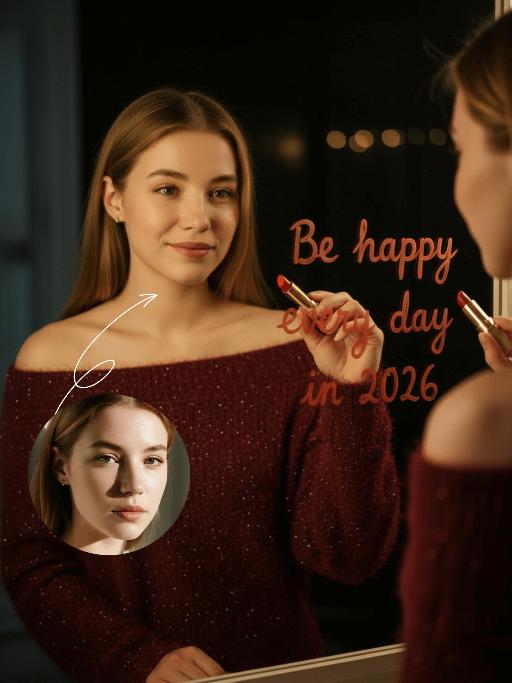
Happy 2026 AI effects generated image

Happy 2026

Subject & Posture: The figure from the uploaded image (unchanged facial features, age and gender) gazes at a mirror with a gentle smile, holding a lipstick to write on the mirror surface. The left hand grips a red lipstick with a gold case, writing on the mirror with it; the figure strikes a relaxed off-the-shoulder pose. Attire & Accessories: A burgundy off-the-shoulder fuzzy sweater with fine glitter texture; a red lipstick with a gold case held in hand. Composition & Perspective: Mirror reflection composition, medium close-up shot with the subject centered; shot with a 35mm lens and shallow depth of field (blurred background), the mirror shows partial reflections of the hand and lipstick. Lighting & Color Scheme: Dark, low-key background, with soft key light illuminating the face and clothing, plus tiny bokeh light spots; main color tones: burgundy, black and warm orange-red, creating a warm atmosphere with soft color contrast. Background & Details: In the bottom right corner of the background, the artistic handwritten phrase Be happy every day in 2026 in bold orange-red lipstick lettering; ultra-realistic texture with natural skin grain, and clear fuzzy & fine glitter fabric details of the garment. Natural skin retouching with well-preserved realistic light and shadow transitions, a Fuji film filter effect, and a warm, cozy ambiance enhanced by soft room lighting in the background. The figure’s reflection in the mirror is physically accurate and consistent with the figure outside the mirror.

Silhouette AI effects generated image

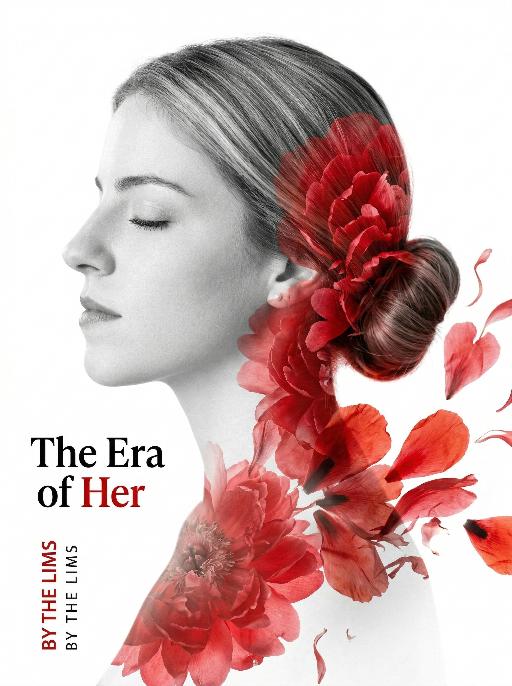
Silhouette

Use the exact same facial features, gender, and age as the uploaded image. Double exposure portrait photography, minimalist aesthetic, high contrast, 8K resolution, ultra-detailed.A side profile of an elegant woman with her eyes gently closed, her silhouette rendered in soft grayscale tones. Her hair is styled in a neat bun.The silhouette is seamlessly blended with large, vibrant red floral petals (resembling peonies or poppies) that flow organically from her bun down her neck and shoulder, creating a delicate overlay effect. The petals drift and spread on the right side of the frame, as if rendered in an ink wash painting. The background is a pure, stark white, emphasizing the subject. On the left side of the frame, the text "The Era of Her" are displayed, alongside smaller vertical English text "BY THE LIMS" in black and red ink. The overall style is artistic and conceptual, with a strong visual contrast between the monochrome figure and the vivid red flowers, conveying themes of feminine power and beauty. The composition is clean and precise, with sharp focus on the intricate textures of the petals and the smooth contours of the face.

Uncertainty

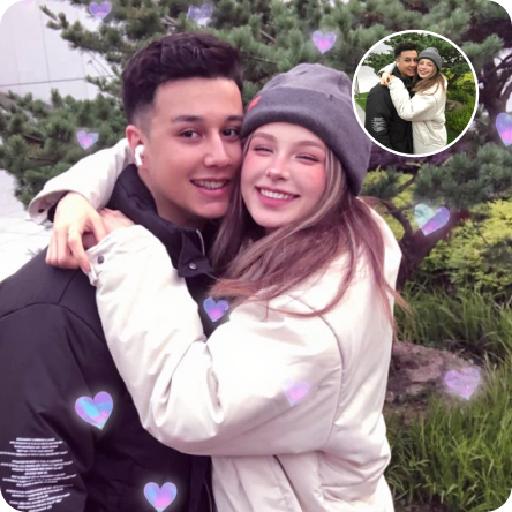
Hyper-realistic photography: The two uploaded images depict the characters in the same scene. The first character (with unchanged facial features, expressions and age) has long curly hair and light brown hair, touching the deep red wall beautifully and charmingly, wearing a tight and sexy red nightgown. The other character (with unchanged facial features, expressions and age) is wearing a smooth and loose black patterned shirt. There is an intimate and passionate eye contact between the two characters, creating a sexy and romantic atmosphere. The dim modern bedroom background features dark-colored bed sheets and red neon signs shining on the walls; lighting adjustment suggestion: high-end film-level lighting, strong contrast of light and dark, soft melancholic shadows, deep and rich shadows, subtle highlights on the skin, shallow depth of field, clearly focused on the couple; color tone suggestion: warm and melancholic color combination, mainly saturated red and dark black, natural skin with warm tones, rich immersive color grading, fashion-forward photography, extreme ambiguous atmosphere, high-definition film style. Dark interior and red light and shadow

Black Rose AI effects generated image

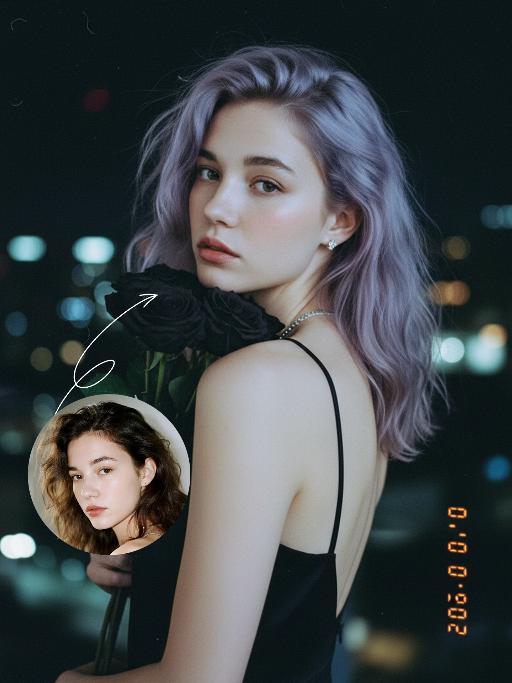
Black Rose

Preserve the original facial features of the uploaded figure. An ultra-realistic portrait photograph, close-up shot with a shallow depth of field (blurred background). The figure from the uploaded image (unchanged facial features) has messy shoulder-length hair in ash purple taupe, green eyes, light pink blush, nude pink lips, and faint freckles scattered across the cheeks and shoulders. They are wearing a black strapless slip dress with thin shoulder straps, small stud earrings and a delicate chain necklace, holding a bouquet of black roses close to the cheek, and turning half their body to look at the camera. Shooting angle: eye-level perspective, dramatic contrasting light from a flash against the night scene, a cool-toned color palette (black, ash purple taupe, pale skin tone, urban night view background), a melancholic and dreamy atmosphere, high level of detail, film texture, retro color tones, vintage film portrait style, grain texture, film light leak effects, ultra-high-definition details. An orange vertical digital date watermark (2026:00:00) is added to the bottom right corner.

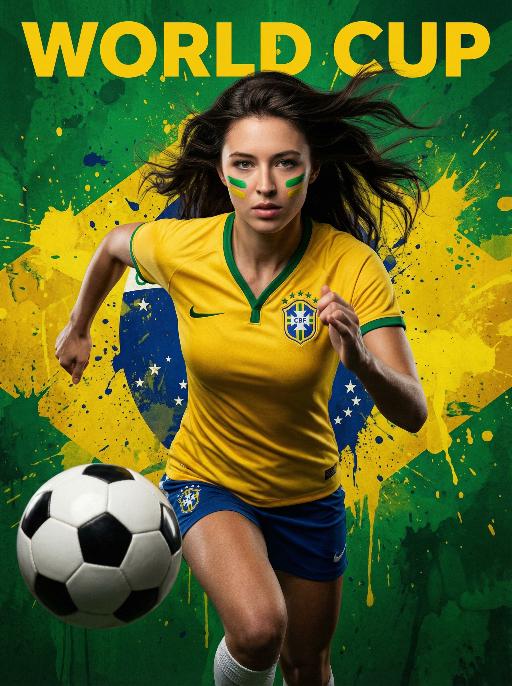
 World Cup AI effects generated image

World Cup

Use the exact same facial features, gender, and age as the uploaded image. Dynamic World Cup-themed portrait, set against a bold, artistic Brazilian flag-inspired background. The backdrop features a large, stylized Brazilian flag rendered in vibrant green and yellow paint splatters, with the text "WORLD CUP" in bold yellow lettering at the top, The figure is positioned dynamically, taking up a smaller proportion of the frame, captured mid-action in a powerful forward-charging sprint. Arms are bent at the elbows, legs in a running stride, conveying explosive forward momentum and athletic energy. A classic black-and-white soccer ball is fully visible in the foreground, positioned to the side of the figure, fully displayed within the frame. The figure wears a form-fitting Brazil national team jersey in iconic yellow with green trim, featuring the team crest on the chest. Long, straight dark hair flows backward with the motion of the charge. The cheeks are adorned with green and yellow face paint, echoing the Brazilian flag colors. Professional studio lighting, high contrast, cinematic color grading, hyper-realistic, 8K, high detail, vibrant and energetic atmosphere, clean composition.

Cool Boss

Strict identity verification is conducted using the first uploaded portrait (with facial features, hairstyle, skin tone and age unchanged). His body is covered in traditional American realistic tattoos – an intricate rose and dagger design on his neck, and elaborate skull and poker card motifs on both hands, featuring sharp lines and rich, saturated colors. He wears multiple heavy metal-style rings on his fingers and a silver necklace. The frame adopts dramatic lighting with bold blue and dark tones; a broad wash of soft side light slants in from the right side of the frame, creating an extensive tin sel effect that outlines his facial contours and the fine details of his tattoos. His facial expression is fraught with tension, and his eyes are as sharp as an eagle’s. Shot in 8K resolution, the overall style embodies high-end, fashion-forward artistic photography. The man, dressed in a tailored suit blazer set with an emerald green shirt and matching suit trousers, sits on a sofa in an utterly relaxed posture. He stares directly at the camera, exuding poise and grace. He then slowly shifts his weight, crossing one leg over the other, and runs his fingers through his hair. The camera pans slightly to the left, capturing his subtle movements and the play of light on his tattoos, further amplifying the dynamic energy of the frame.

Dinner Party

Keep the facial features of the uploaded figure unchanged, with an elegant, noble and sophisticated retro makeup look: natural facial blurring for delicate, smooth skin, smudged diffused eyeliner, slender curved eyebrows, matte vintage red lipstick, light pink foundation, and defined exaggerated cheekbones – the makeup is exquisitely beautiful. The figure is dressed in a high-end custom elaborate gown crafted from red velvet with luxury diamond and pearl inlays, boasting a designer brand aesthetic of noble elegance, paired with delicate high-grade diamond accessories. Set the scene as an upscale Christmas dinner in a premium VIP venue with a Christmas tree in the background. At the bottom of the frame, place the large artistic typography "Merry Christmas!" with a sparkling golden texture and ultra-luxury playful English floral font; scatter small golden stars, silver snowflake patterns, and the secondary typography "A fashionable Christmas VIP dinner party" around the main text. Adopt a high-end magazine photoshoot style with avant-garde fashion, strong design sense, artistic appeal, retro charm and cinematic texture. Maintain the camera focal length for a close-up shot framing the figure’s upper body, shoot with a large aperture to create a blurred background and bokeh effect for other people. Apply film filters, flash lighting, dreamy soft focus, gentle glow, luminous halation, and Fuji film texture, with a dim light atmosphere. Decorate the four corners and edges of the frame with golden star and silver snowflake patterns.

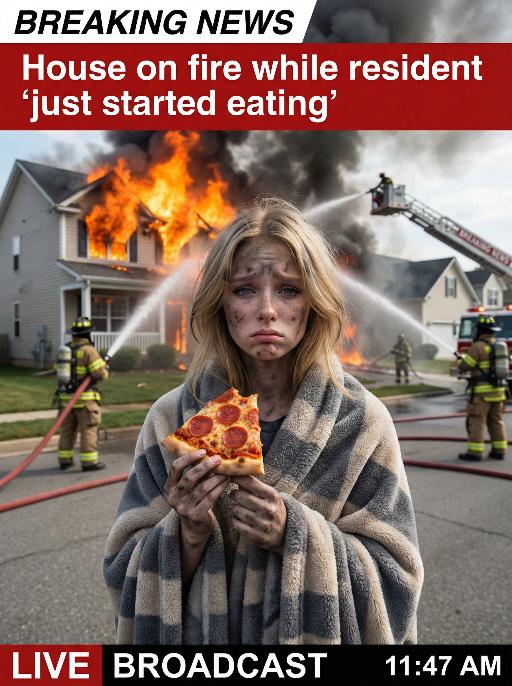
House On Fire AI effects generated image

House On Fire

This is a realistic breaking news photo. In the middle of the picture is the uploaded figure (with the facial features, gender and age unchanged), standing in the middle of the frame, with coal dust all over his face, looking sad. He is wrapped in a gray and beige striped plush blanket and holding a slice of Italian pepperoni pizza, looking confused and sad. In the background, a two-story suburban house is engulfed in flames, and firefighters are using water hoses to put out the fire. The silhouette of a fire engine can be seen. The scene takes place on a residential street during the day. Above there is a prominent large red and white news headline: "BREAKING NEWS". In the middle and lower part of the picture, there is a news caption that reads: "House on fire while resident 'just started eating'", "LIVE BROADCAST", "11:47 AM".

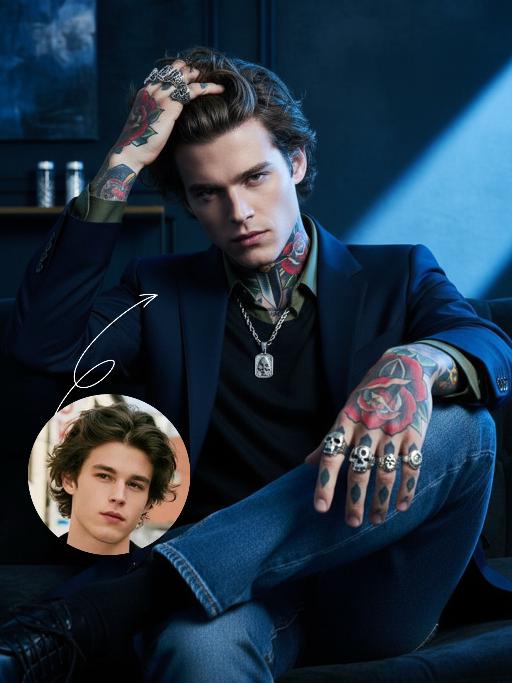
Cool Boss AI effects generated image

Cool Boss

The first uploaded portrait is used for strict identity consistency (with unchanged facial features, hairstyle, skin tone and age). His body is covered in traditional American realistic tattoos – an intricate rose and dagger pattern adorns his neck, and delicate skull and poker card motifs feature on both hands, with sharp lines and rich, saturated colors. He wears multiple heavy metal-style rings on his fingers and a silver necklace. The frame employs dramatic lighting in bold blue and dark tones, with a large wash of soft side light slanting in from the right side of the frame to create an extensive tintype effect, which outlines his facial contours and the fine details of his tattoos. His facial expression is fraught with tension, and his eyes are as sharp as an eagle’s. Boasting 8K resolution, the overall style embodies high-end, fashion-forward artistic photography. The man, dressed in a tailored suit blazer set with a dark green shirt and matching suit trousers, sits on a sofa in an utterly relaxed posture. He stares directly at the camera, exuding poise and confidence. He then slowly shifts his weight, crossing one leg over the other, before running his fingers through his hair. The camera pans slightly to the left, capturing his subtle movements and the way light casts over his tattoos, further amplifying the dynamic feel of the frame.

Load more

Next-Gen Multi-Model AI Video Architecture

Vivago AI isn't just one engine—it’s a unified hub for the world’s most advanced video AI. Whether you need cinematic realism or high-speed social content, we provide the right model for your creative vision.

Free Generate

Beauty and Dolphins

Vacation Time

Stellar Tear

Fish Tank Supervisor

Cinematic Quality & Precision Control

Enables 4K resolution with multi-lens motion control, generating delicate scene via text prompts for customized cinematography.​

TRY NOW

Dynamic AV Sync

Auto-generates original audio to avoid copyright issues. Build 3D immersive environments through layered sound design automatically.

TRY NOW

OpenAI Sora 2

​Advanced visual storytelling with unparalleled physics and consistency.

TRY NOW

Kling v2.6 Pro

Industry-leading cinematic image animation and motion control.

TRY NOW

Google Veo 3 & 3.1

Ultra-fast generation with enhanced realism for creative workflows.

TRY NOW

Vivago AI 2.0

Our proprietary model optimized for efficiency, speed, and cost-effective generation.
TRY NOW

Users' Voice

We listen carefully to the opinions of every user.
Free Generate
Contact Us
I tried the Lip Sync feature inside Vivago.ai’s AI Video Generator for my educational podcast, and the results were stunning! The avatar's lip movements perfectly matched my audio recording, creating a professional AI-generated video without complex editing. Compared with tools like OpenAI Sora 2 and Google Veo 3.1, Vivago Image-to-Video delivers fast, studio-quality results online. It saved me hours of post-production work.
ElenaM (Spain)
Vivago’s Image-to-Video AI transformed my marketing workflow. I uploaded a product image and described the launch scene in text, and it generated a 10-second cinematic AI video with background music and dynamic visuals. The output quality rivals Kling v2.6 Pro and Google Veo 3 Fast. It’s now my go-to AI video generator for social media ads and product campaigns.
KenjiT (Japan)
As a digital artist, I use Vivago.ai 2.0 daily for Image-to-Image and AI Image-to-Video creation. The e-book covers and animated visuals I generate for clients look cinematic and professional. Unlike many standalone AI tools, Vivago integrates multiple leading models into one platform, making it easier to create copyright-safe AI images and videos for publishing.
ChenL (China)
I tried the Lip Sync feature inside Vivago.ai’s AI Video Generator for my educational podcast, and the results were stunning! The avatar's lip movements perfectly matched my audio recording, creating a professional AI-generated video without complex editing. Compared with tools like OpenAI Sora 2 and Google Veo 3.1, Vivago Image-to-Video delivers fast, studio-quality results online. It saved me hours of post-production work.
ElenaM (Spain)
Vivago’s Image-to-Video AI transformed my marketing workflow. I uploaded a product image and described the launch scene in text, and it generated a 10-second cinematic AI video with background music and dynamic visuals. The output quality rivals Kling v2.6 Pro and Google Veo 3 Fast. It’s now my go-to AI video generator for social media ads and product campaigns.
KenjiT (Japan)
As a digital artist, I use Vivago.ai 2.0 daily for Image-to-Image and AI Image-to-Video creation. The e-book covers and animated visuals I generate for clients look cinematic and professional. Unlike many standalone AI tools, Vivago integrates multiple leading models into one platform, making it easier to create copyright-safe AI images and videos for publishing.
ChenL (China)
I absolutely love Vivago’s AI Image-to-Video Generator. As a travel blogger, static images often fail to capture real atmosphere, but Vivago helps me turn photos into vivid cinematic AI videos with motion effects. It feels comparable to OpenAI Sora 2 and Google Veo 3.1, but more accessible and faster for creators who need high-quality AI videos online.
LiamK (Australia)
I tried the Lip Sync feature inside Vivago.ai’s AI Video Generator for my educational podcast, and the results were stunning! The avatar's lip movements perfectly matched my audio recording, creating a professional AI-generated video without complex editing. Compared with tools like OpenAI Sora 2 and Google Veo 3.1, Vivago Image-to-Video delivers fast, studio-quality results online. It saved me hours of post-production work.
ElenaM (Spain)
Vivago’s Image-to-Video AI transformed my marketing workflow. I uploaded a product image and described the launch scene in text, and it generated a 10-second cinematic AI video with background music and dynamic visuals. The output quality rivals Kling v2.6 Pro and Google Veo 3 Fast. It’s now my go-to AI video generator for social media ads and product campaigns.
KenjiT (Japan)
As a digital artist, I use Vivago.ai 2.0 daily for Image-to-Image and AI Image-to-Video creation. The e-book covers and animated visuals I generate for clients look cinematic and professional. Unlike many standalone AI tools, Vivago integrates multiple leading models into one platform, making it easier to create copyright-safe AI images and videos for publishing.
ChenL (China)
I absolutely love Vivago’s AI Image-to-Video Generator. As a travel blogger, static images often fail to capture real atmosphere, but Vivago helps me turn photos into vivid cinematic AI videos with motion effects. It feels comparable to OpenAI Sora 2 and Google Veo 3.1, but more accessible and faster for creators who need high-quality AI videos online.
LiamK (Australia)
Using Vivago.ai’s Image-to-Video AI has greatly enhanced my classroom teaching. I transform textbook notes into historical AI videos with cinematic filters and dynamic animations. Compared with tools like Kling v2.6 Pro and Google Veo 3 Fast, Vivago offers faster generation and easier parameter control for educators who need reliable AI video creation.
RajivG (India)
I frequently create AI videos on Vivago and publish them on TikTok and YouTube Shorts. The AI video templates and trending content ideas help me produce viral-ready clips quickly. With Vivago’s integrated models—including advanced video engines similar to OpenAI Sora 2—I can generate anime-style and cinematic social media videos that drive high engagement.
MarieJ (Spain)
What attracts me most about Vivago.ai is not only the powerful AI Video Generator but also the active AIGC creator community. It combines AI Image-to-Video, Text-to-Video, and leading model integrations like Google Veo 3.1 into one creative platform.
TomW (India)
At first, I was hesitant about using AI video tools. But after trying Vivago Image-to-Video, I realized how easy it is to create professional AI-generated videos online. I just upload an image, add a short prompt, and adjust a few settings. The results are cinematic and copyright-safe, which is essential for commercial projects.
HectorC (Mexico)
Using Vivago.ai’s Image-to-Video AI has greatly enhanced my classroom teaching. I transform textbook notes into historical AI videos with cinematic filters and dynamic animations. Compared with tools like Kling v2.6 Pro and Google Veo 3 Fast, Vivago offers faster generation and easier parameter control for educators who need reliable AI video creation.
RajivG (India)
I frequently create AI videos on Vivago and publish them on TikTok and YouTube Shorts. The AI video templates and trending content ideas help me produce viral-ready clips quickly. With Vivago’s integrated models—including advanced video engines similar to OpenAI Sora 2—I can generate anime-style and cinematic social media videos that drive high engagement.
MarieJ (Spain)
What attracts me most about Vivago.ai is not only the powerful AI Video Generator but also the active AIGC creator community. It combines AI Image-to-Video, Text-to-Video, and leading model integrations like Google Veo 3.1 into one creative platform.
TomW (India)
At first, I was hesitant about using AI video tools. But after trying Vivago Image-to-Video, I realized how easy it is to create professional AI-generated videos online. I just upload an image, add a short prompt, and adjust a few settings. The results are cinematic and copyright-safe, which is essential for commercial projects.
HectorC (Mexico)