Text to Video

Uncover the mystery of Atlantis with AI-generated visuals. Dive into ocean depths exploring ancient civilizations and legendary lost cities. Discover if Atlantis was real or myth through AI-enhanced underwater exploration. Perfect for history enthusiasts seeking AI-powered creative tools to reveal hidden secrets of mythical realms.

Recreate
arrow

FAQs

How to generate images/videos from text prompts?

Describe the visual content in natural language (e.g., 'A cyberpunk cat wearing neon goggles') and our AI models will create outputs. Complex prompts trigger multi-stage NLP parsing for enhanced accuracy.

How to refine unsatisfactory results?

Use our Prompt Bot - an AI-powered optimizer that suggests technical modifiers. Simply describe your ideas, desired changes ('more metallic texture'), then you will get optimized prompt variants.

When should I use reference images?

Upload references to: 1) Guide character consistency (e.g., faces/outfits), 2) Control motion patterns in videos using our feature matching algorithm. Supports JPG/PNG

What's the credit system?

Daily login grants 100 credits. Upgrade options: 1) Premium Membership, 2) Credit Packs. Details: https://vivago.ai/subscribe

More From VIVAGO AI

Moving Figure

Create a 1/7 scale commercialized figure of the character in the illustration, in a realistic style and environment. Render the exact hairstyle and the same outfit with the uploaded figure. Render garments as molded plastic with engraved seams and sculpted folds; keep accessories as plastic parts. Fictionalize any brand text/logos while keeping layout and colors. Place the figure on a computer desk, using a circular transparent acrylic base without any text. On the Apple computer screen, display the Z Brush modeling process of the figure. Next to the Apple computer screen, place a BANDAl-style toy packaging box printed with the original artwork. The background shows a modern realistic room furnished with contemporary furniture, including a display cabinet filled with books, dolls, and scale figures, adding a casual and everyday atmosphere. Behind the Apple computer, place a desk lamp to add detail and depth to the scene.

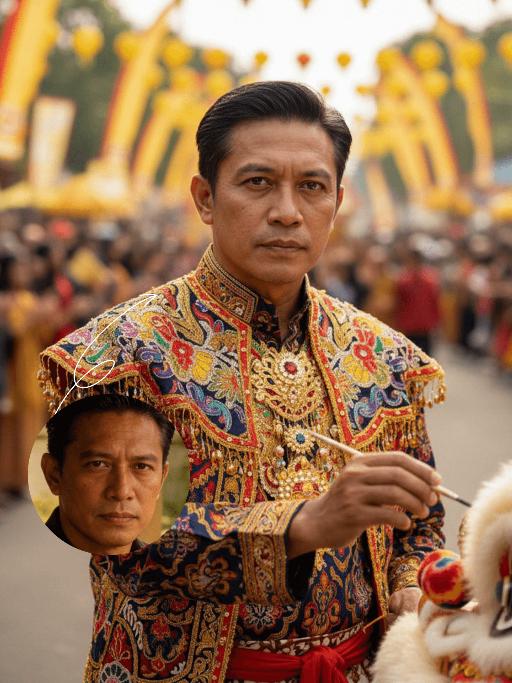
Lion Dance AI effects generated image

Lion Dance

Strictly lock the identity of the uploaded portrait (preserve facial contours, native Indian skin tone, hairstyle, and age). Aspect ratio 3:4, hyper-realistic photography, high definition and exquisite details, advanced light and shadow: A 40-year-old Indonesian man with a solemn, dignified demeanor, in the sacred ritual moment of dotting the eyes for traditional Indonesian lion dance. The figure is positioned exactly in the center of the frame, as the absolute main subject occupying more than 80% of the canvas; only a tiny corner of the traditional Indonesian lion dance head peeks into the edge of the frame, with an extremely small proportion. He is dressed in exquisite traditional Indonesian lion dance costume with classic ethnic patterns and delicate decorations, holding a delicate painting brush, his fingertips gently touching the eye-dotting position of the lion head, his arm slightly raised with a calm and steady posture. The background is a super bustling and lively festive scene with soft slight bokeh—filled with crowds of people in festive attires, colorful traditional lanterns, festive streamers, and lively parade elements, with bright festive ambient light and vibrant street decorations, presenting an extremely dynamic and jubilant festive atmosphere. Soft natural light outlines the man's firm facial lines and delicate hand details, the man's solemn ritualistic state forms a striking contrast with the lively background, the overall color palette is rich and bright with a sense of hierarchy, and all details of the character and costume are clear and textured

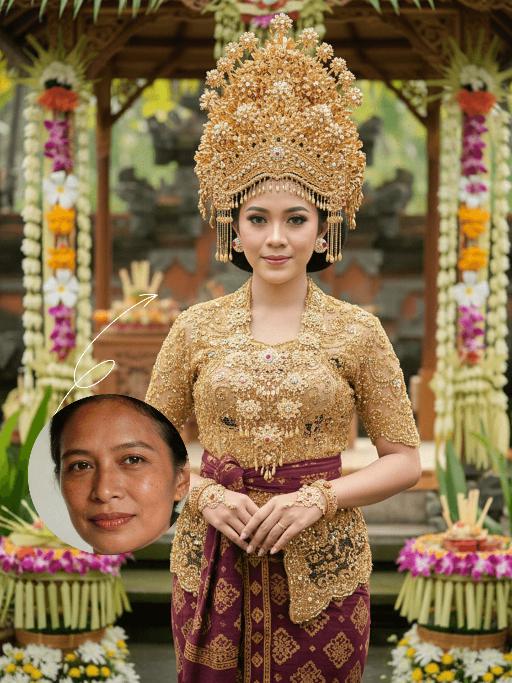
Bali Queen AI effects generated image

Bali Queen

Strictly lock the facial features of the uploaded portrait (preserve facial contours, native Indonesian skin tone, hairstyle and age). Half-body portrait photography, the subject is centered in the frame, not positioned too low, hyper-realistic style, 4K ultra-high definition, soft warm tropical daylight, authentic Balinese wedding cultural atmosphere | A young Indonesian Balinese woman with a poised, elegant expression, standing front-facing in a traditional Balinese bridal outfit. She wears an extremely elaborate, oversized golden beaded and embroidered ceremonial headdress (Bali crown) adorned with intricate floral and gem details, a matching golden beaded and embroidered short-sleeve top, and a deep maroon batik-patterned sarong skirt with gold trim. She accessorizes with layered golden necklaces, bracelets, and a ceremonial handpiece, with her hands gracefully clasped in front of her torso. The background is a softly blurred authentic Balinese wedding ceremony setting: a sacred bamboo and palm-frond ceremonial pavilion (bale agung) decorated with vibrant tropical flowers (frangipani, orchids, and jasmine), a carved wooden altar adorned with traditional offerings, and lush green tropical foliage, creating a romantic and culturally immersive wedding atmosphere. Focus on the intricate details of the golden beadwork, the ornate headdress, and the timeless cultural elegance of the Balinese wedding tradition, with warm diffused sunlight enhancing the opulence of the bridal attire

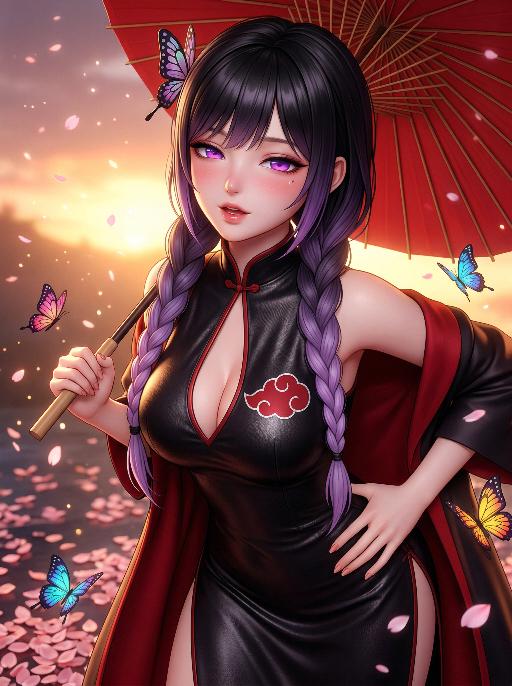
Butterfly Girl AI effects generated image

Butterfly Girl

"Masterpiece, highest quality, ultra-fine, 8K, realistic 3D anime style, cinematic rendering, The image in the uploaded picture is the main subject (maintaining the facial features, gender and age of the character), alone, beautiful face, charming expression, half-closed eyes, alluring gaze, open lips, faint blush, Purple eyes, fine eyelashes, black hair with purple gradient color, tied in a braid, butterfly-shaped hair accessory, Wearing a black leather qipao with a deep V neckline, on the chest has a red Akatuku cloud pattern logo, red cloak draped over the shoulders, Sexually appealing posture, slightly leaning forward, one hand on the hip, head tilted to one side, Holding a red paper umbrella, background has fallen cherry blossom petals and colorful butterflies, warm sunset light, soft glow, blurred effect, particles in the air, Dynamic angle, mid-shot, fine skin texture, smooth skin, soft focus, dramatic shadow, bright colors"

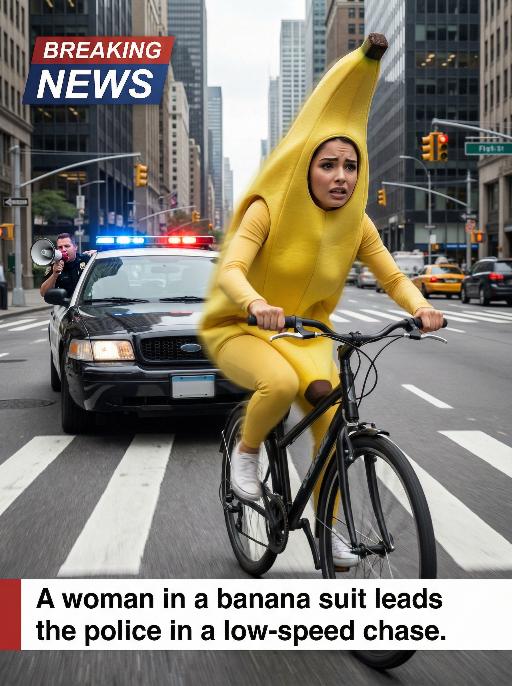
Banana Man AI effects generated image

Banana Man

Ultra-realistic breaking news photo: In this uploaded photo, the figure (with unchanged facial features, gender and age) is wearing a full-body banana costume and is frantically riding a bicycle at high speed on a busy city street, with a frightened but determined expression on their face. The main subject is centered and prominent, and the main character occupies 80% of the frame, being closely pursued by a black police car with blue and red flashing lights. A police officer leans out of the car window and shouts loudly through a megaphone. The scene is set in the daytime, with skyscrapers, crosswalks and traffic signals in the background. The dynamic blur effect of the bicycle wheels and the police car conveys the tense atmosphere during the low-speed chase. There is a large title text in the upper left corner of the picture (with a style consistent with the design style of news live broadcasts): BREAKING NEWS; At the bottom, there is a text title layout (with a style consistent with the design style of news live broadcasts): A woman in a banana suit leads the police in a low-speed chase. Style: Ultra-realistic, cinematic, comedy style, high detail, 4K resolution.

Darkroom Flash

Subject & Makeup: The figure from the uploaded image (unchanged facial features) with a cold and natural expression and a light, translucent makeup look; Shooting & Atmosphere: soft pink blush on the apples of the cheeks, nude pink lip gloss, long and curled false eyelashes, natural eyebrow shape; taking a selfie with a Canon retro point-and-shoot camera, with the camera’s flash shining directly into the lens (creating a distinct white lens flare), shot from a selfie perspective in front of an indoor mirror; a dim everyday room background (blurred furniture and decorations), a relaxed edgy-sweet portrait style, dark natural color tones, film photography texture, a retro natural film filter and film grain; Detail Embellishments: add an orange digital date watermark (2026.00.00) plus a small starburst decoration at the bottom right corner.

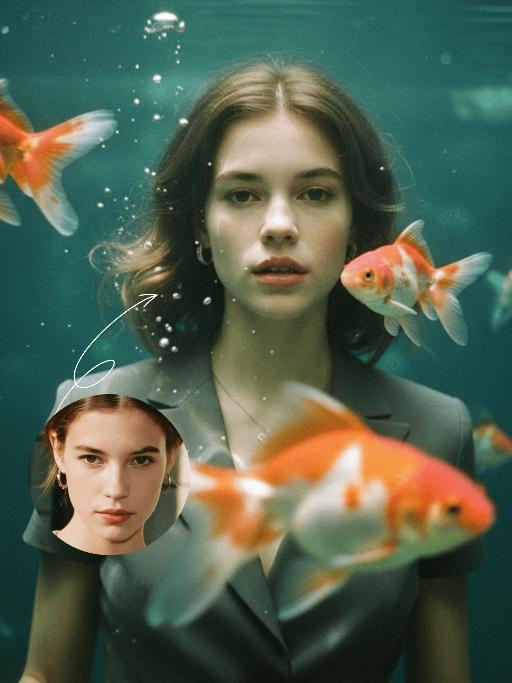
Goldfish AI effects generated image

Goldfish

Underwater scene inside a large ecological fish tank, featuring the figure from the uploaded image (unchanged facial features, age and gender) with faint small freckles on the cheeks. Their hair floats and fans out in soft curls due to water buoyancy, with tiny water droplets clinging to the tips. Expression: Gaze fixed on the camera, lips slightly parted with a subtle breathy quality; eyebrows droop gently, conveying alienation and loneliness, with a taut jawline. Attire: Exquisitely tailored high-end summer couture, the fabric forming natural folds from water buoyancy, paired with sophisticated and delicate accessories. Composition: Close-up facial shot (the figure’s face occupies 80% of the frame). Multiple large orange-white/silver-white goldfish nuzzle the cheeks and circle the hair tips in an interactive way, with tiny air bubbles rising slowly beside the figure’s profile. Goldfish swim in the foreground with a blurred effect, and water ripples blur and smudge softly in the background. Shooting Angle: Eye-level close-up underwater perspective, with the lens positioned 3cm below the water surface to capture the broken light spots refracted by the water. Light & Shadow: Kodak Portra 400 film texture with fine yet distinct film grain and slight vignetting. Soft diffused cool cyan-green light filters through the underwater environment, with diamond-shaped light spots piercing through the water surface; weak light and shadow contrast yet gentle layered tones, with edges slightly blurred and smudged. Color Palette: A base of low-saturation dark tones (deep cyan + jet black + grayish green), accented by the warm orange-white/silver-white of the goldfish. A retro film tone with a subtle cyan-yellow cast, creating an overall hazy and lonely atmosphere, with striking contrast between light and shadow underwater.

Load more

Next-Gen Multi-Model AI Video Architecture

Vivago AI isn't just one engine—it’s a unified hub for the world’s most advanced video AI. Whether you need cinematic realism or high-speed social content, we provide the right model for your creative vision.

Free Generate

Beauty and Dolphins

Vacation Time

Stellar Tear

Fish Tank Supervisor

Cinematic Quality & Precision Control

Enables 4K resolution with multi-lens motion control, generating delicate scene via text prompts for customized cinematography.​

TRY NOW

Dynamic AV Sync

Auto-generates original audio to avoid copyright issues. Build 3D immersive environments through layered sound design automatically.

TRY NOW

OpenAI Sora 2

​Advanced visual storytelling with unparalleled physics and consistency.

TRY NOW

Kling v2.6 Pro

Industry-leading cinematic image animation and motion control.

TRY NOW

Google Veo 3 & 3.1

Ultra-fast generation with enhanced realism for creative workflows.

TRY NOW

Vivago AI 2.0

Our proprietary model optimized for efficiency, speed, and cost-effective generation.

TRY NOW

Users' Voice

We listen carefully to the opinions of every user.
Free Generate
Contact Us
I tried the Lip Sync feature inside Vivago.ai’s AI Video Generator for my educational podcast, and the results were stunning! The avatar's lip movements perfectly matched my audio recording, creating a professional AI-generated video without complex editing. Compared with tools like OpenAI Sora 2 and Google Veo 3.1, Vivago Image-to-Video delivers fast, studio-quality results online. It saved me hours of post-production work.
ElenaM (Spain)
Vivago’s Image-to-Video AI transformed my marketing workflow. I uploaded a product image and described the launch scene in text, and it generated a 10-second cinematic AI video with background music and dynamic visuals. The output quality rivals Kling v2.6 Pro and Google Veo 3 Fast. It’s now my go-to AI video generator for social media ads and product campaigns.
KenjiT (Japan)
As a digital artist, I use Vivago.ai 2.0 daily for Image-to-Image and AI Image-to-Video creation. The e-book covers and animated visuals I generate for clients look cinematic and professional. Unlike many standalone AI tools, Vivago integrates multiple leading models into one platform, making it easier to create copyright-safe AI images and videos for publishing.
ChenL (China)
I tried the Lip Sync feature inside Vivago.ai’s AI Video Generator for my educational podcast, and the results were stunning! The avatar's lip movements perfectly matched my audio recording, creating a professional AI-generated video without complex editing. Compared with tools like OpenAI Sora 2 and Google Veo 3.1, Vivago Image-to-Video delivers fast, studio-quality results online. It saved me hours of post-production work.
ElenaM (Spain)
Vivago’s Image-to-Video AI transformed my marketing workflow. I uploaded a product image and described the launch scene in text, and it generated a 10-second cinematic AI video with background music and dynamic visuals. The output quality rivals Kling v2.6 Pro and Google Veo 3 Fast. It’s now my go-to AI video generator for social media ads and product campaigns.
KenjiT (Japan)
As a digital artist, I use Vivago.ai 2.0 daily for Image-to-Image and AI Image-to-Video creation. The e-book covers and animated visuals I generate for clients look cinematic and professional. Unlike many standalone AI tools, Vivago integrates multiple leading models into one platform, making it easier to create copyright-safe AI images and videos for publishing.
ChenL (China)
I absolutely love Vivago’s AI Image-to-Video Generator. As a travel blogger, static images often fail to capture real atmosphere, but Vivago helps me turn photos into vivid cinematic AI videos with motion effects. It feels comparable to OpenAI Sora 2 and Google Veo 3.1, but more accessible and faster for creators who need high-quality AI videos online.
LiamK (Australia)
I tried the Lip Sync feature inside Vivago.ai’s AI Video Generator for my educational podcast, and the results were stunning! The avatar's lip movements perfectly matched my audio recording, creating a professional AI-generated video without complex editing. Compared with tools like OpenAI Sora 2 and Google Veo 3.1, Vivago Image-to-Video delivers fast, studio-quality results online. It saved me hours of post-production work.
ElenaM (Spain)
Vivago’s Image-to-Video AI transformed my marketing workflow. I uploaded a product image and described the launch scene in text, and it generated a 10-second cinematic AI video with background music and dynamic visuals. The output quality rivals Kling v2.6 Pro and Google Veo 3 Fast. It’s now my go-to AI video generator for social media ads and product campaigns.
KenjiT (Japan)
As a digital artist, I use Vivago.ai 2.0 daily for Image-to-Image and AI Image-to-Video creation. The e-book covers and animated visuals I generate for clients look cinematic and professional. Unlike many standalone AI tools, Vivago integrates multiple leading models into one platform, making it easier to create copyright-safe AI images and videos for publishing.
ChenL (China)
I absolutely love Vivago’s AI Image-to-Video Generator. As a travel blogger, static images often fail to capture real atmosphere, but Vivago helps me turn photos into vivid cinematic AI videos with motion effects. It feels comparable to OpenAI Sora 2 and Google Veo 3.1, but more accessible and faster for creators who need high-quality AI videos online.
LiamK (Australia)
Using Vivago.ai’s Image-to-Video AI has greatly enhanced my classroom teaching. I transform textbook notes into historical AI videos with cinematic filters and dynamic animations. Compared with tools like Kling v2.6 Pro and Google Veo 3 Fast, Vivago offers faster generation and easier parameter control for educators who need reliable AI video creation.
RajivG (India)
I frequently create AI videos on Vivago and publish them on TikTok and YouTube Shorts. The AI video templates and trending content ideas help me produce viral-ready clips quickly. With Vivago’s integrated models—including advanced video engines similar to OpenAI Sora 2—I can generate anime-style and cinematic social media videos that drive high engagement.
MarieJ (Spain)
What attracts me most about Vivago.ai is not only the powerful AI Video Generator but also the active AIGC creator community. It combines AI Image-to-Video, Text-to-Video, and leading model integrations like Google Veo 3.1 into one creative platform.
TomW (India)
At first, I was hesitant about using AI video tools. But after trying Vivago Image-to-Video, I realized how easy it is to create professional AI-generated videos online. I just upload an image, add a short prompt, and adjust a few settings. The results are cinematic and copyright-safe, which is essential for commercial projects.
HectorC (Mexico)
Using Vivago.ai’s Image-to-Video AI has greatly enhanced my classroom teaching. I transform textbook notes into historical AI videos with cinematic filters and dynamic animations. Compared with tools like Kling v2.6 Pro and Google Veo 3 Fast, Vivago offers faster generation and easier parameter control for educators who need reliable AI video creation.
RajivG (India)
I frequently create AI videos on Vivago and publish them on TikTok and YouTube Shorts. The AI video templates and trending content ideas help me produce viral-ready clips quickly. With Vivago’s integrated models—including advanced video engines similar to OpenAI Sora 2—I can generate anime-style and cinematic social media videos that drive high engagement.
MarieJ (Spain)
What attracts me most about Vivago.ai is not only the powerful AI Video Generator but also the active AIGC creator community. It combines AI Image-to-Video, Text-to-Video, and leading model integrations like Google Veo 3.1 into one creative platform.
TomW (India)
At first, I was hesitant about using AI video tools. But after trying Vivago Image-to-Video, I realized how easy it is to create professional AI-generated videos online. I just upload an image, add a short prompt, and adjust a few settings. The results are cinematic and copyright-safe, which is essential for commercial projects.
HectorC (Mexico)