Image to Video

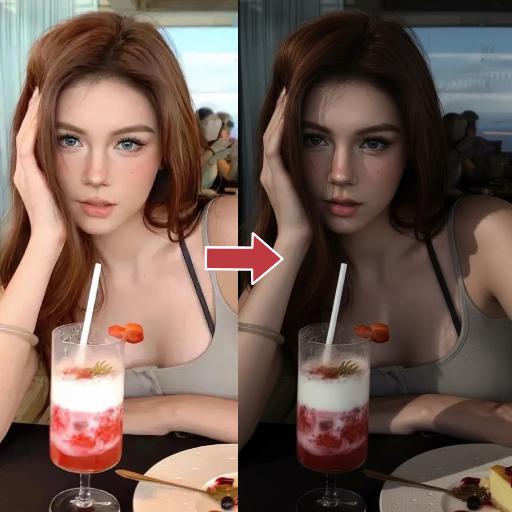
Hoshino ai is winking and turning pout to smile. Her body doesn't move.

Recreate
arrow

More From VIVAGO AI

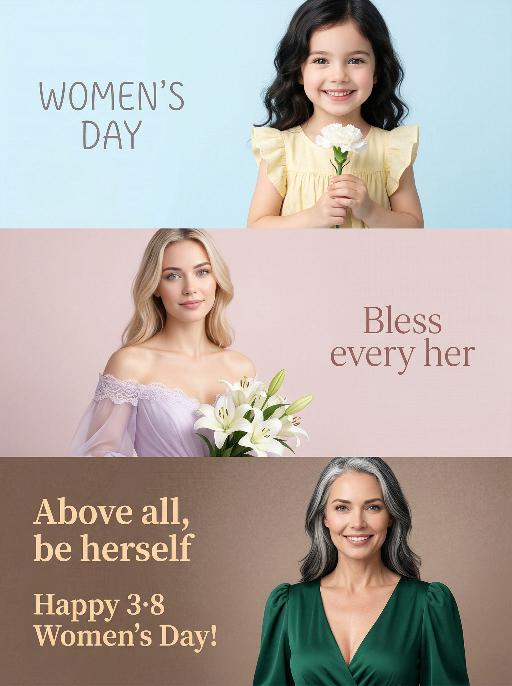
Three-Panel AI effects generated image

Three-Panel

Use the exact same facial features, gender, and age as the uploaded image. A triptych studio portrait, paying tribute to International Women's Day through three unique yet interconnected scenes, with gradient cool-to-warm background colors for each panel to enhance visual rhythm: Top panel (childhood scene): The model as a child, about 5 years old, with soft dark hair, wearing a light yellow ruffled dress, holding a white carnation and smiling brightly at the camera. The background is a pale sky blue gradient. The text "WOMEN'S DAY" appears on the left in a delicate, playful font. Middle panel (youth scene): The same woman, wearing a soft lavender off-shoulder wedding-style dress with lace trim, holding a bouquet of white lilies, gaze gentle and hopeful. The background is a muted blush pink gradient. The text "Bless every her" is displayed on the right in an elegant, flowing font. Bottom panel (senior scene): The model in her senior years, about 60 years old, with salt-and-pepper (black and white intermingled) hair, wearing a deep emerald green deep V-neck puff-sleeve dress, confident and calm, smiling directly at the camera. The background is a warm taupe brown gradient. The texts "Above all, be herself" and "Happy 3·8 Women's Day!" appear on the left in a warm, bold font. The overall style is minimalist, bright and soft, with high-key lighting, ultra-realistic details, and a clean modern design, highlighting the theme of women's diverse identities across life stages.

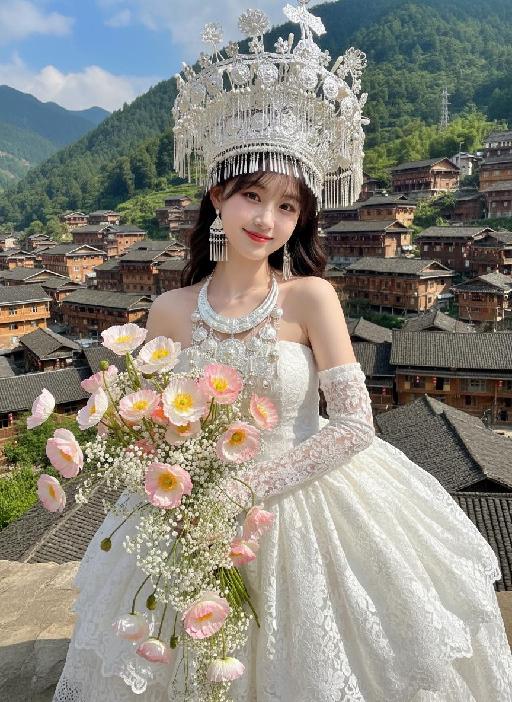
White Clothes AI effects generated image

White Clothes

Strictly lock the facial features of the uploaded portrait (completely preserve facial contours, native skin tone, hairstyle and age). From a high-angle top-down perspective, a young and sweet East Asian woman tilts her body gently to the right, with a gentle and healing smile and bright, captivating eyes. She wears an ornate and intricate large-horned headdress of Miao silver ornaments, a multi-layered Miao silver necklace, a white lace strapless puffy dress, and long white lace gloves. Her hands hold a large bouquet of mixed pink-white gradient poppies and small white flowers, which falls naturally and extends toward the camera. The background features the cascading wooden stilted buildings of Xijiang Qianhu Miao Village in Guizhou, lush green mountains in the distance, and a fresh cloudy blue sky. Bright natural sunlight illuminates the entire scene, casting distinct soft shadows on the ground and the hem of the dress; warm sunlight creates gentle highlights on the Miao silver ornaments, lace fabric and flower petals, forming a clear light and shadow contrast. High-definition realistic portrait photography, soft and bright natural light, fresh and transparent colors, blending ethnic style with a fairy-tale vibe.

Noble Person AI effects generated image

Noble Person

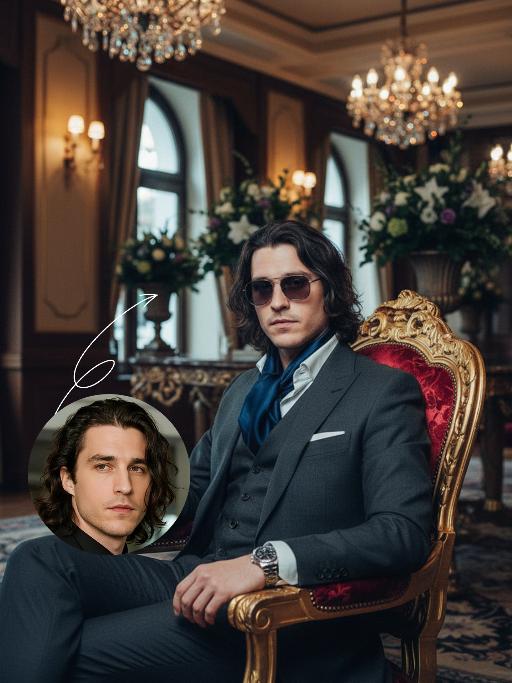
The figure from the uploaded image (with consistent facial features, hair, skin tone and age) sits confidently on an ornate golden vintage chair, holding a glass of white wine in one hand, with the other hand resting elegantly and naturally on the chair. He looks at the camera with a confident, cold and elegant expression, dressed in a dark gray haute couture suit with a white shirt underneath and an elegant textured cravat. He wears sunglasses and a watch, exuding an air of refinement, calmness and self-assurance. The background is a luxurious hotel setting with warm lighting, hanging chandeliers and floral accents, creating a retro, elegant, noble and lavish atmosphere. Captured in a medium shot from a slightly low, side angle relative to the subject, the image presents a cinematic portrayal of stylish living, featuring portrait photography aesthetics and an avant-garde fashion photography art style, with high-end cinematic texture, ultra-high definition quality, an overall cool color tone, cinema-grade image quality, a film-like filter, and dramatic lighting contrast.

Christmas Eve

The subject is the figure in the uploaded image (with unchanged facial features), wearing a red Christmas hat, a red sweater with white snowflake patterns, a retro plaid Christmas midi skirt, and Christmas boots, standing naturally front-on in the center of the frame. The scene is set in front of a snow-covered rural wooden cabin, with a Christmas tree decorated with colorful fairy lights and baubles in the background, piles of exquisitely wrapped Christmas gifts on the ground, and snowflakes falling in the air. The scene is illuminated by warm yellow lighting (fairy lights on the cabin + Christmas tree lights), creating a warm and dreamy Christmas night atmosphere. Shot with an 85mm lens to highlight the soft texture of the figure’s fur, the knitted texture of the sweater, and the delicate details of the snowflakes in the image. 8K resolution with warm and saturated colors. Realistic photography style, full panoramic shot that shows the full body of the figure from the uploaded image.

Happy 2026 AI effects generated image

Happy 2026

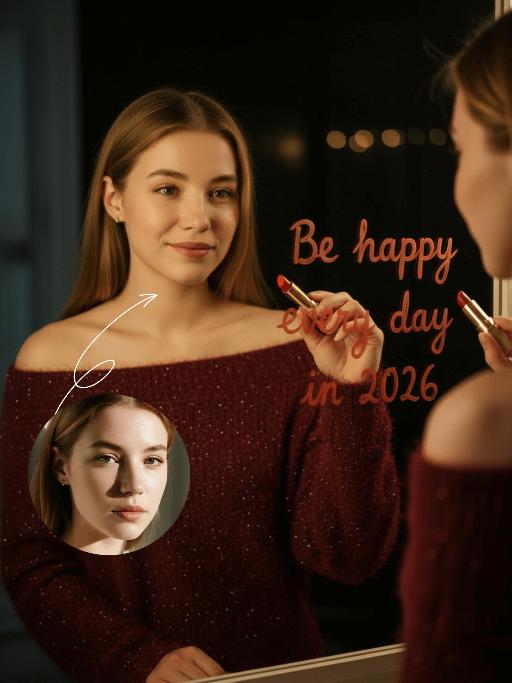
Subject & Posture: The figure from the uploaded image (unchanged facial features, age and gender) gazes at a mirror with a gentle smile, holding a lipstick to write on the mirror surface. The left hand grips a red lipstick with a gold case, writing on the mirror with it; the figure strikes a relaxed off-the-shoulder pose. Attire & Accessories: A burgundy off-the-shoulder fuzzy sweater with fine glitter texture; a red lipstick with a gold case held in hand. Composition & Perspective: Mirror reflection composition, medium close-up shot with the subject centered; shot with a 35mm lens and shallow depth of field (blurred background), the mirror shows partial reflections of the hand and lipstick. Lighting & Color Scheme: Dark, low-key background, with soft key light illuminating the face and clothing, plus tiny bokeh light spots; main color tones: burgundy, black and warm orange-red, creating a warm atmosphere with soft color contrast. Background & Details: In the bottom right corner of the background, the artistic handwritten phrase Be happy every day in 2026 in bold orange-red lipstick lettering; ultra-realistic texture with natural skin grain, and clear fuzzy & fine glitter fabric details of the garment. Natural skin retouching with well-preserved realistic light and shadow transitions, a Fuji film filter effect, and a warm, cozy ambiance enhanced by soft room lighting in the background. The figure’s reflection in the mirror is physically accurate and consistent with the figure outside the mirror.

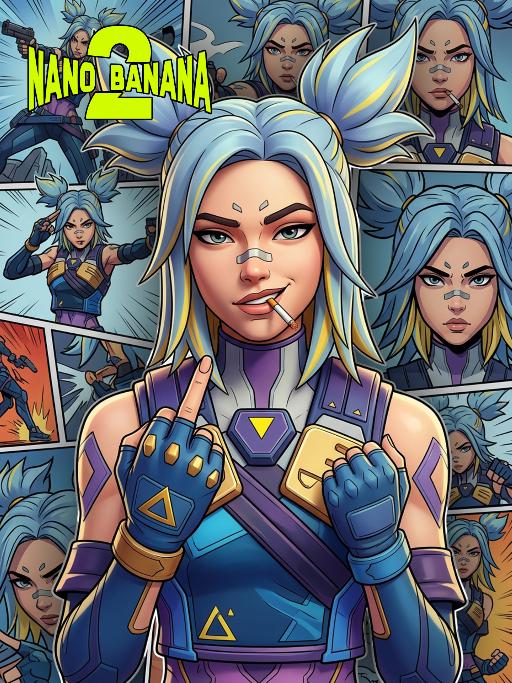
Neon AI effects generated image

Neon

Based on the image of the protagonist in the uploaded picture (while retaining the facial features, gender and age of the character to ensure consistency with the character in the picture), create a 3D stereoscopic image work for the character in "Valorant", perfectly reproducing the artistic style of the game poster. The depiction of this character has 3D volume and structure, but adopts the aesthetic style of 3D game posters: clear thin black outlines, bright flat colors and exquisite 3D rendering, emphasizing the fine 3D rendering effect. The character's hair is light blue with yellow highlights, styled into two high and sharp ponytails. The face presents a confident and rebellious expression, with a cigarette in the mouth, making a middle finger gesture towards the audience, and there are some black projections and thick black strokes around the character, making it stand out from the background. The background is a collage of comic pages (presented in 2D comic style, with thick black strokes, comic design style), each page showing different close-up expressions of the same character (based on the image in the uploaded picture), forming a richly layered and self-referential composition. This character is wearing the iconic tactical clothing, equipped with blue, purple and gold decorations, including shoulder pads, chest decorations with yellow triangles and blue gloves. The lighting uses a movie-level 3D rendering effect, with high contrast, to highlight the character's attitude and this stylized 3D shape. The overall atmosphere is avant-garde, confident and visually impactful, perfectly combining the depth of 3D stereoscopic rendering with the style of comic, Maya, Blender and C4D OC renderers.

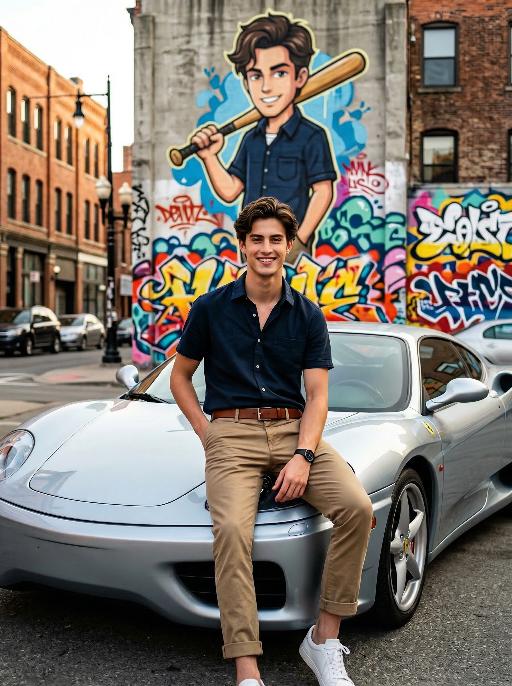
Cars - Graffiti AI effects generated image

Cars - Graffiti

Maintain the exact same facial features, gender, and age as the person in the uploaded image. Photorealistic photo of a handsome young man with neatly styled brown hair, smiling brightly at the camera. He wears a dark navy short-sleeve button-up shirt, khaki casual pants with rolled cuffs, a brown leather belt, and white sneakers, with a black watch on his left wrist. He sits casually on the hood of a stylish silver Ferrari sports car parked on an urban street, one hand in his pocket and the other resting on his knee. Behind him is a large, vibrant graffiti mural on a concrete building wall, depicting a cartoon version of himself in the same outfit, holding a wooden baseball bat over his shoulder, surrounded by colorful street art tags and patterns. Background: urban street scene with brick buildings, street lamps, and distant cars, natural daylight, soft warm lighting, shallow depth of field. No logos, watermarks, or text overlays in the image. Cinematic composition, 8K resolution, shot with a Sony A7R V camera and 50mm f/1.8 lens, hyper-detailed textures, sharp focus on the man and the car, capturing a playful and stylish atmosphere that matches the mural behind him.

MUSIC BOX

Create a close-up of a 1/7 scale figure of the characters, placed on a circular rotating music box base. The music box should have intricate details, with a smooth, elegant design, emphasizing its fine craftsmanship. The figure should capture the character's pose, facial expression, and features in high detail, with realistic textures for the clothing, accessories, hair, and face. The close-up shot should focus on the figure and music box, highlighting the fine details, such as the sculpting of the character’s outfit and accessories. The background should be a dreamy, soft-focus display window, with a magical ambiance that suggests a whimsical atmosphere. Soft, natural lighting should enhance the refined and timeless feel of the scene, bringing attention to the figure and music box in the foreground.

Load more

Next-Gen Multi-Model AI Video Architecture

Vivago AI isn't just one engine—it’s a unified hub for the world’s most advanced video AI. Whether you need cinematic realism or high-speed social content, we provide the right model for your creative vision.

Free Generate

Beauty and Dolphins

Vacation Time

Stellar Tear

Fish Tank Supervisor

Cinematic Quality & Precision Control

Enables 4K resolution with multi-lens motion control, generating delicate scene via text prompts for customized cinematography.​

TRY NOW

Dynamic AV Sync

Auto-generates original audio to avoid copyright issues. Build 3D immersive environments through layered sound design automatically.

TRY NOW

OpenAI Sora 2

​Advanced visual storytelling with unparalleled physics and consistency.

TRY NOW

Kling v2.6 Pro

Industry-leading cinematic image animation and motion control.

TRY NOW

Google Veo 3 & 3.1

Ultra-fast generation with enhanced realism for creative workflows.

TRY NOW

Vivago AI 2.0

Our proprietary model optimized for efficiency, speed, and cost-effective generation.

TRY NOW

Users' Voice

We listen carefully to the opinions of every user.
Free Generate
Contact Us
I tried the Lip Sync feature inside Vivago.ai’s AI Video Generator for my educational podcast, and the results were stunning! The avatar's lip movements perfectly matched my audio recording, creating a professional AI-generated video without complex editing. Compared with tools like OpenAI Sora 2 and Google Veo 3.1, Vivago Image-to-Video delivers fast, studio-quality results online. It saved me hours of post-production work.
ElenaM (Spain)
Vivago’s Image-to-Video AI transformed my marketing workflow. I uploaded a product image and described the launch scene in text, and it generated a 10-second cinematic AI video with background music and dynamic visuals. The output quality rivals Kling v2.6 Pro and Google Veo 3 Fast. It’s now my go-to AI video generator for social media ads and product campaigns.
KenjiT (Japan)
As a digital artist, I use Vivago.ai 2.0 daily for Image-to-Image and AI Image-to-Video creation. The e-book covers and animated visuals I generate for clients look cinematic and professional. Unlike many standalone AI tools, Vivago integrates multiple leading models into one platform, making it easier to create copyright-safe AI images and videos for publishing.
ChenL (China)
I tried the Lip Sync feature inside Vivago.ai’s AI Video Generator for my educational podcast, and the results were stunning! The avatar's lip movements perfectly matched my audio recording, creating a professional AI-generated video without complex editing. Compared with tools like OpenAI Sora 2 and Google Veo 3.1, Vivago Image-to-Video delivers fast, studio-quality results online. It saved me hours of post-production work.
ElenaM (Spain)
Vivago’s Image-to-Video AI transformed my marketing workflow. I uploaded a product image and described the launch scene in text, and it generated a 10-second cinematic AI video with background music and dynamic visuals. The output quality rivals Kling v2.6 Pro and Google Veo 3 Fast. It’s now my go-to AI video generator for social media ads and product campaigns.
KenjiT (Japan)
As a digital artist, I use Vivago.ai 2.0 daily for Image-to-Image and AI Image-to-Video creation. The e-book covers and animated visuals I generate for clients look cinematic and professional. Unlike many standalone AI tools, Vivago integrates multiple leading models into one platform, making it easier to create copyright-safe AI images and videos for publishing.
ChenL (China)
I absolutely love Vivago’s AI Image-to-Video Generator. As a travel blogger, static images often fail to capture real atmosphere, but Vivago helps me turn photos into vivid cinematic AI videos with motion effects. It feels comparable to OpenAI Sora 2 and Google Veo 3.1, but more accessible and faster for creators who need high-quality AI videos online.
LiamK (Australia)
I tried the Lip Sync feature inside Vivago.ai’s AI Video Generator for my educational podcast, and the results were stunning! The avatar's lip movements perfectly matched my audio recording, creating a professional AI-generated video without complex editing. Compared with tools like OpenAI Sora 2 and Google Veo 3.1, Vivago Image-to-Video delivers fast, studio-quality results online. It saved me hours of post-production work.
ElenaM (Spain)
Vivago’s Image-to-Video AI transformed my marketing workflow. I uploaded a product image and described the launch scene in text, and it generated a 10-second cinematic AI video with background music and dynamic visuals. The output quality rivals Kling v2.6 Pro and Google Veo 3 Fast. It’s now my go-to AI video generator for social media ads and product campaigns.
KenjiT (Japan)
As a digital artist, I use Vivago.ai 2.0 daily for Image-to-Image and AI Image-to-Video creation. The e-book covers and animated visuals I generate for clients look cinematic and professional. Unlike many standalone AI tools, Vivago integrates multiple leading models into one platform, making it easier to create copyright-safe AI images and videos for publishing.
ChenL (China)
I absolutely love Vivago’s AI Image-to-Video Generator. As a travel blogger, static images often fail to capture real atmosphere, but Vivago helps me turn photos into vivid cinematic AI videos with motion effects. It feels comparable to OpenAI Sora 2 and Google Veo 3.1, but more accessible and faster for creators who need high-quality AI videos online.
LiamK (Australia)
Using Vivago.ai’s Image-to-Video AI has greatly enhanced my classroom teaching. I transform textbook notes into historical AI videos with cinematic filters and dynamic animations. Compared with tools like Kling v2.6 Pro and Google Veo 3 Fast, Vivago offers faster generation and easier parameter control for educators who need reliable AI video creation.
RajivG (India)
I frequently create AI videos on Vivago and publish them on TikTok and YouTube Shorts. The AI video templates and trending content ideas help me produce viral-ready clips quickly. With Vivago’s integrated models—including advanced video engines similar to OpenAI Sora 2—I can generate anime-style and cinematic social media videos that drive high engagement.
MarieJ (Spain)
What attracts me most about Vivago.ai is not only the powerful AI Video Generator but also the active AIGC creator community. It combines AI Image-to-Video, Text-to-Video, and leading model integrations like Google Veo 3.1 into one creative platform.
TomW (India)
At first, I was hesitant about using AI video tools. But after trying Vivago Image-to-Video, I realized how easy it is to create professional AI-generated videos online. I just upload an image, add a short prompt, and adjust a few settings. The results are cinematic and copyright-safe, which is essential for commercial projects.
HectorC (Mexico)
Using Vivago.ai’s Image-to-Video AI has greatly enhanced my classroom teaching. I transform textbook notes into historical AI videos with cinematic filters and dynamic animations. Compared with tools like Kling v2.6 Pro and Google Veo 3 Fast, Vivago offers faster generation and easier parameter control for educators who need reliable AI video creation.
RajivG (India)
I frequently create AI videos on Vivago and publish them on TikTok and YouTube Shorts. The AI video templates and trending content ideas help me produce viral-ready clips quickly. With Vivago’s integrated models—including advanced video engines similar to OpenAI Sora 2—I can generate anime-style and cinematic social media videos that drive high engagement.
MarieJ (Spain)
What attracts me most about Vivago.ai is not only the powerful AI Video Generator but also the active AIGC creator community. It combines AI Image-to-Video, Text-to-Video, and leading model integrations like Google Veo 3.1 into one creative platform.
TomW (India)
At first, I was hesitant about using AI video tools. But after trying Vivago Image-to-Video, I realized how easy it is to create professional AI-generated videos online. I just upload an image, add a short prompt, and adjust a few settings. The results are cinematic and copyright-safe, which is essential for commercial projects.
HectorC (Mexico)
