Text to Video

Unwrap festive LEGO magic with this AI-generated scene: a red gift box with yellow ribbon reveals hidden Santas at LEGOLAND Discovery Centre. Perfect for holiday-themed AI image/video creation, blending playful brick-built charm and Christmas cheer. Explore AI effects to bring your merry LEGO storytelling to life, crafting vibrant visuals of surprise-filled unwrapping moments. Ideal for seasonal content, ads, or imaginative holiday projects.

Recreate
arrow

FAQs

How to generate images/videos from text prompts?

Describe the visual content in natural language (e.g., 'A cyberpunk cat wearing neon goggles') and our AI models will create outputs. Complex prompts trigger multi-stage NLP parsing for enhanced accuracy.

How to refine unsatisfactory results?

Use our Prompt Bot - an AI-powered optimizer that suggests technical modifiers. Simply describe your ideas, desired changes ('more metallic texture'), then you will get optimized prompt variants.

When should I use reference images?

Upload references to: 1) Guide character consistency (e.g., faces/outfits), 2) Control motion patterns in videos using our feature matching algorithm. Supports JPG/PNG

What's the credit system?

Daily login grants 100 credits. Upgrade options: 1) Premium Membership, 2) Credit Packs. Details: https://vivago.ai/subscribe

More From VIVAGO AI

Snowfield

In the night snow, the figure from the uploaded image retains their original facial features and sits on the snow, wearing a sweater with white patterns, a red scarf, fluffy fleece pants and snow boots, holding a lit, sparkling handheld sparkler. The words "Hello 2026" are written in the snow. In the background, there are soft, blurred warm bokeh lights and blooming fireworks. The atmosphere is warm and healing, with a gentle light contrast between the cool blue-and-white snow scene and the warm sparks. Boasting rich details, the figure’s face is in sharp focus with natural shadows and realistic textures, exuding a sophisticated artistic photography aesthetic. Captured with an ultra-high-definition camera, the image features artistic photography styling, with the figure’s skin naturally retouched for a delicate finish. The shot is taken from a top-down perspective, with a full-screen realistic snowfall effect.

Santa Claus

The facial features of the uploaded character remain unchanged. The scene transitions with both camera rotation and stunning explosive magic element effects—incorporating dazzling special effects during the transition, including shimmering golden particles, brilliant golden explosive magic effects, falling snowflakes, and swirling red ribbons. After spinning rapidly on the spot, the character’s outfit transforms into a cool version of Santa Claus attire. The character beams with a happy smile, dressed in a classic red-and-white Christmas suit trimmed with white fluff, wearing black sunglasses, a Santa hat, and carrying a large-capacity Christmas backpack stuffed with gifts on the back. The character rides a retro cruising motorcycle (Harley-style) speeding from the distance to the front of the screen. The motorcycle boasts a deep burgundy color paired with a metallic chrome finish, with its wheels in a burnout state and white smoke billowing from the ground. Scene: A nighttime European-style urban street lined with vintage buildings and warm yellow street lamps. The background features blurred vehicles and pedestrians, with the lights creating a beautiful bokeh effect. Style & Texture: Ultra-realistic style with high details and strong light-shadow contrast. Dynamic blur enhances the sense of motion, and the fluffy texture of the clothing as well as the metallic luster of the motorcycle are depicted in exquisite detail. The overall style showcases cutting-edge fashion photography and avant-garde art, reaching a film-level realistic standard.

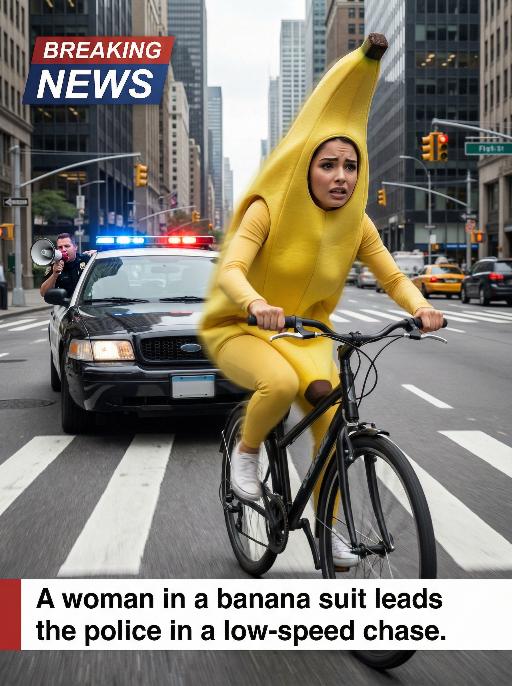
Banana Man AI effects generated image

Banana Man

Ultra-realistic breaking news photo: In this uploaded photo, the figure (with unchanged facial features, gender and age) is wearing a full-body banana costume and is frantically riding a bicycle at high speed on a busy city street, with a frightened but determined expression on their face. The main subject is centered and prominent, and the main character occupies 80% of the frame, being closely pursued by a black police car with blue and red flashing lights. A police officer leans out of the car window and shouts loudly through a megaphone. The scene is set in the daytime, with skyscrapers, crosswalks and traffic signals in the background. The dynamic blur effect of the bicycle wheels and the police car conveys the tense atmosphere during the low-speed chase. There is a large title text in the upper left corner of the picture (with a style consistent with the design style of news live broadcasts): BREAKING NEWS; At the bottom, there is a text title layout (with a style consistent with the design style of news live broadcasts): A woman in a banana suit leads the police in a low-speed chase. Style: Ultra-realistic, cinematic, comedy style, high detail, 4K resolution.

Shark Dance

Main scene: The image in the uploaded picture (species, age, gender remain unchanged, presented in an anthropomorphic standing posture with the front two paws raised and the back two legs standing), beside it are four similar cute cats in an anthropomorphic standing posture standing neatly and evenly beside it (including Persian cats, orange cats, silver gradient cats and golden gradient cats), all characters (height proportions remain consistent) are wearing different cute cartoon jumpsuits (cartoon character pajamas, with bees, tigers, dinosaurs, seals, pandas) in plush fabric (revealing the characters' faces), ultra-realistic three-dimensional rendering, cute and soothing style, the protagonist occupies 80% of the main space of the picture, evenly distributed in the center of the picture, presented in a frontal standing posture, with natural front-back layers; using mid-shot horizontal composition, shot from a horizontal perspective at the same height as the protagonist's image; the light is a soft indoor diffusion effect, the transition of light and shadow is natural, without strong contrast, overall bright and warm; the clothing uses fresh and bright colors (yellow, green, blue, brown), the background is a warm and cute living room environment, background elements account for 20% of the picture; rich details, fluffy and fine fur texture, clear clothing texture, 8K high resolution, bright and harmonious picture colors.

Load more

Next-Gen Multi-Model AI Video Architecture

Vivago AI isn't just one engine—it’s a unified hub for the world’s most advanced video AI. Whether you need cinematic realism or high-speed social content, we provide the right model for your creative vision.

Free Generate

Beauty and Dolphins

Vacation Time

Stellar Tear

Fish Tank Supervisor

Cinematic Quality & Precision Control

Enables 4K resolution with multi-lens motion control, generating delicate scene via text prompts for customized cinematography.​

TRY NOW

Dynamic AV Sync

Auto-generates original audio to avoid copyright issues. Build 3D immersive environments through layered sound design automatically.

TRY NOW

OpenAI Sora 2

​Advanced visual storytelling with unparalleled physics and consistency.

TRY NOW

Kling v2.6 Pro

Industry-leading cinematic image animation and motion control.

TRY NOW

Google Veo 3 & 3.1

Ultra-fast generation with enhanced realism for creative workflows.

TRY NOW

Vivago AI 2.0

Our proprietary model optimized for efficiency, speed, and cost-effective generation.

TRY NOW

Users' Voice

We listen carefully to the opinions of every user.
Free Generate
Contact Us
I tried the Lip Sync feature inside Vivago.ai’s AI Video Generator for my educational podcast, and the results were stunning! The avatar's lip movements perfectly matched my audio recording, creating a professional AI-generated video without complex editing. Compared with tools like OpenAI Sora 2 and Google Veo 3.1, Vivago Image-to-Video delivers fast, studio-quality results online. It saved me hours of post-production work.
ElenaM (Spain)
Vivago’s Image-to-Video AI transformed my marketing workflow. I uploaded a product image and described the launch scene in text, and it generated a 10-second cinematic AI video with background music and dynamic visuals. The output quality rivals Kling v2.6 Pro and Google Veo 3 Fast. It’s now my go-to AI video generator for social media ads and product campaigns.
KenjiT (Japan)
As a digital artist, I use Vivago.ai 2.0 daily for Image-to-Image and AI Image-to-Video creation. The e-book covers and animated visuals I generate for clients look cinematic and professional. Unlike many standalone AI tools, Vivago integrates multiple leading models into one platform, making it easier to create copyright-safe AI images and videos for publishing.
ChenL (China)
I tried the Lip Sync feature inside Vivago.ai’s AI Video Generator for my educational podcast, and the results were stunning! The avatar's lip movements perfectly matched my audio recording, creating a professional AI-generated video without complex editing. Compared with tools like OpenAI Sora 2 and Google Veo 3.1, Vivago Image-to-Video delivers fast, studio-quality results online. It saved me hours of post-production work.
ElenaM (Spain)
Vivago’s Image-to-Video AI transformed my marketing workflow. I uploaded a product image and described the launch scene in text, and it generated a 10-second cinematic AI video with background music and dynamic visuals. The output quality rivals Kling v2.6 Pro and Google Veo 3 Fast. It’s now my go-to AI video generator for social media ads and product campaigns.
KenjiT (Japan)
As a digital artist, I use Vivago.ai 2.0 daily for Image-to-Image and AI Image-to-Video creation. The e-book covers and animated visuals I generate for clients look cinematic and professional. Unlike many standalone AI tools, Vivago integrates multiple leading models into one platform, making it easier to create copyright-safe AI images and videos for publishing.
ChenL (China)
I absolutely love Vivago’s AI Image-to-Video Generator. As a travel blogger, static images often fail to capture real atmosphere, but Vivago helps me turn photos into vivid cinematic AI videos with motion effects. It feels comparable to OpenAI Sora 2 and Google Veo 3.1, but more accessible and faster for creators who need high-quality AI videos online.
LiamK (Australia)
I tried the Lip Sync feature inside Vivago.ai’s AI Video Generator for my educational podcast, and the results were stunning! The avatar's lip movements perfectly matched my audio recording, creating a professional AI-generated video without complex editing. Compared with tools like OpenAI Sora 2 and Google Veo 3.1, Vivago Image-to-Video delivers fast, studio-quality results online. It saved me hours of post-production work.
ElenaM (Spain)
Vivago’s Image-to-Video AI transformed my marketing workflow. I uploaded a product image and described the launch scene in text, and it generated a 10-second cinematic AI video with background music and dynamic visuals. The output quality rivals Kling v2.6 Pro and Google Veo 3 Fast. It’s now my go-to AI video generator for social media ads and product campaigns.
KenjiT (Japan)
As a digital artist, I use Vivago.ai 2.0 daily for Image-to-Image and AI Image-to-Video creation. The e-book covers and animated visuals I generate for clients look cinematic and professional. Unlike many standalone AI tools, Vivago integrates multiple leading models into one platform, making it easier to create copyright-safe AI images and videos for publishing.
ChenL (China)
I absolutely love Vivago’s AI Image-to-Video Generator. As a travel blogger, static images often fail to capture real atmosphere, but Vivago helps me turn photos into vivid cinematic AI videos with motion effects. It feels comparable to OpenAI Sora 2 and Google Veo 3.1, but more accessible and faster for creators who need high-quality AI videos online.
LiamK (Australia)
Using Vivago.ai’s Image-to-Video AI has greatly enhanced my classroom teaching. I transform textbook notes into historical AI videos with cinematic filters and dynamic animations. Compared with tools like Kling v2.6 Pro and Google Veo 3 Fast, Vivago offers faster generation and easier parameter control for educators who need reliable AI video creation.
RajivG (India)
I frequently create AI videos on Vivago and publish them on TikTok and YouTube Shorts. The AI video templates and trending content ideas help me produce viral-ready clips quickly. With Vivago’s integrated models—including advanced video engines similar to OpenAI Sora 2—I can generate anime-style and cinematic social media videos that drive high engagement.
MarieJ (Spain)
What attracts me most about Vivago.ai is not only the powerful AI Video Generator but also the active AIGC creator community. It combines AI Image-to-Video, Text-to-Video, and leading model integrations like Google Veo 3.1 into one creative platform.
TomW (India)
At first, I was hesitant about using AI video tools. But after trying Vivago Image-to-Video, I realized how easy it is to create professional AI-generated videos online. I just upload an image, add a short prompt, and adjust a few settings. The results are cinematic and copyright-safe, which is essential for commercial projects.
HectorC (Mexico)
Using Vivago.ai’s Image-to-Video AI has greatly enhanced my classroom teaching. I transform textbook notes into historical AI videos with cinematic filters and dynamic animations. Compared with tools like Kling v2.6 Pro and Google Veo 3 Fast, Vivago offers faster generation and easier parameter control for educators who need reliable AI video creation.
RajivG (India)
I frequently create AI videos on Vivago and publish them on TikTok and YouTube Shorts. The AI video templates and trending content ideas help me produce viral-ready clips quickly. With Vivago’s integrated models—including advanced video engines similar to OpenAI Sora 2—I can generate anime-style and cinematic social media videos that drive high engagement.
MarieJ (Spain)
What attracts me most about Vivago.ai is not only the powerful AI Video Generator but also the active AIGC creator community. It combines AI Image-to-Video, Text-to-Video, and leading model integrations like Google Veo 3.1 into one creative platform.
TomW (India)
At first, I was hesitant about using AI video tools. But after trying Vivago Image-to-Video, I realized how easy it is to create professional AI-generated videos online. I just upload an image, add a short prompt, and adjust a few settings. The results are cinematic and copyright-safe, which is essential for commercial projects.
HectorC (Mexico)