Image to Video

Transform text into stunning visuals with vivago.ai's AI image/video generator. Explore curated effects, professional editing tools, and seamless creativity for high-quality content. Ideal for innovators and creators.

Recreate
arrow

FAQs

How do I animate static images using vivago.ai?

Upload any image (JPG/PNG), and our AI models will automatically detect content layers and generate 5/10-second video clips with dynamic motion patterns.

Can I control specific movement directions?

Yes. Combine image uploads with text prompts like 'swaying leaves left-to-right' or 'a girl waves her hands'.

What if AI-generated videos don't match my expectation?

Utilize iterative refinement cycles: 1) Try a few more times, 2) Modify prompts, 3) Visit the Explore section to use templates for more consistent results.

What membership benefits does Pro offer?

Pro membership offers better outcomes, more generation credits, and premium features. Details available at: https://vivago.ai/subscribe

More From VIVAGO AI

Polaroid

A photorealistic collage of two hand-held Polaroid photos placed randomly in a staggered upper and lower arrangement. The two photos feature different facial expressions and posing gestures of the subject(s): The main subject(s) in each Polaroid are the figure(s) from the uploaded image, with their facial features and the number of figures unchanged. The figure(s) wear a white fluffy Santa hat, a brown-and-white striped scarf, a white sweater adorned with golden star embellishments, and brown gloves—striking a pose of gently touching the cheek with one hand in one photo, and making a peace sign with one hand in the other. The background of each Polaroid is solid black, overlaid with white snowflake patterns and gold/black star motifs. The scene outside the Polaroids is set against a green Christmas tree, decorated with the words Merry Christmas in a gold glittering diamond texture and glossy red Christmas baubles. The lighting is warm-toned Christmas ambient light, creating a cozy winter vibe. The overall style features authentic Polaroid film texture with intact white Polaroid borders and rich fine details; the focus is sharp with a soft, blurred background. The edges of the Polaroid photos are accented with Christmas decorative elements, including gold star stickers and snowflake patterns.

Battle

These two individuals had angry and serious expressions, raised their fists, and assumed a fighting stance. They began to engage in a fierce struggle, launching a fierce confrontation. They quickly and powerfully punched each other's faces (one person hit the other's face three times in a row with a powerful punch, and the other person, in an angry state, roared and forcefully hit back three times). They also kicked each other's bodies with their feet. The camera captured the intensity of their movements, focusing on the tension of their bodies and the impact force generated by each punch. The background remained still, and the camera followed the movements of the characters, causing the dynamic confrontation between the two fighters to stand out, with powerful punches, the state of the boxers, and an intense and tense atmosphere.

Snow Film

Convert the reference image into a three-frame film storyboard, and into a three-frame film spliced storyboard with a three-screen vertical layout (top, middle, bottom) for storyboard photography, using close-up, medium close-up, medium shot or long shot for each screen respectively. The uploaded figure appears in every single frame, dressed in a vintage grey coat with a haute couture finish, standing in a snow-covered winter forest with a transparent umbrella as snowflakes fall. The scene features a cool color palette and exquisitely detailed visuals, with the facial features retouched and softened for a polished look. Shot in a realistic style, the entire series exudes a quiet and elegant mood, coupled with a sophisticated photographic quality, strong cinematic flair and artistic touch.

Noble Queen AI effects generated image

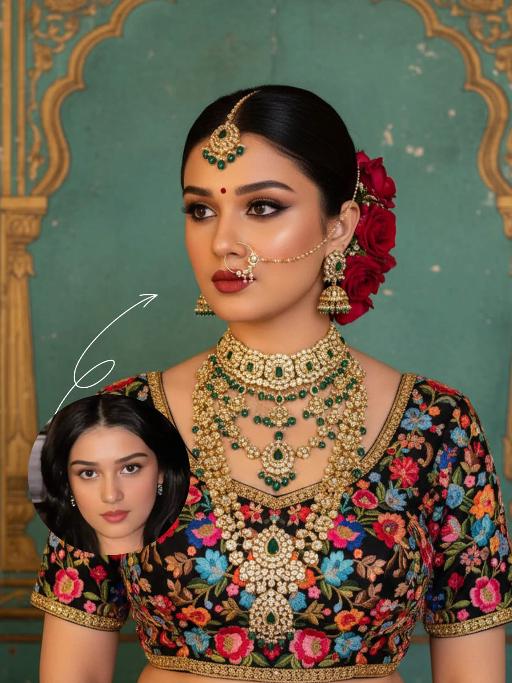
Noble Queen

The identity of the uploaded portrait is strictly preserved (retaining facial contours, authentic Indian skin tone, hairstyle and age). This is a bust portrait with a 3:4 aspect ratio, featuring an elegant and opulent Indian bride with rich, exquisite makeup: smoldering smoky eyes paired with a matte vintage red lip, and a red crystal bindi adorned on her forehead. Her hair is styled into a sleek high bun, with lush clusters of red roses dotted on both sides and golden beading interspersed among the tresses. An ornate maang tikka inlaid with emeralds and pearls adorns her forehead, a delicately openwork gold nath graces her nostril, multi-layered dangling gold bead earrings frame her ears, and four layers of elaborate heavy gold necklaces are stacked around her neck. Ranging from a choker to a long necklace, they are inlaid with emeralds, pearls and micro-diamonds in sequence, exuding rich and luxurious layering. She is wearing a black satin blouse, fully embellished with colorful floral embroidery in red, pink, blue and orange, and trimmed with a golden border on the edges. The background is a retro painted wall in Indian palace style: with a weathered turquoise base, it is adorned with golden carved arches and patterns on top, boasting rich, saturated colors with a timeless vintage texture. Professional portrait lighting is adopted: a warm-toned key light illuminates the bride’s face and upper body, while fill light defines her contours, highlighting the luster of the gold jewelry and the color layering of the embroidery, and creating a strong atmosphere of South Asian palace luxury. The style is a retro Indian royal bridal portrait, with ultra-high definition and delicate details, rich and saturated colors, and abundant intricate textures that perfectly restore the aesthetics of traditional aristocracy.

Gilded Glow AI effects generated image

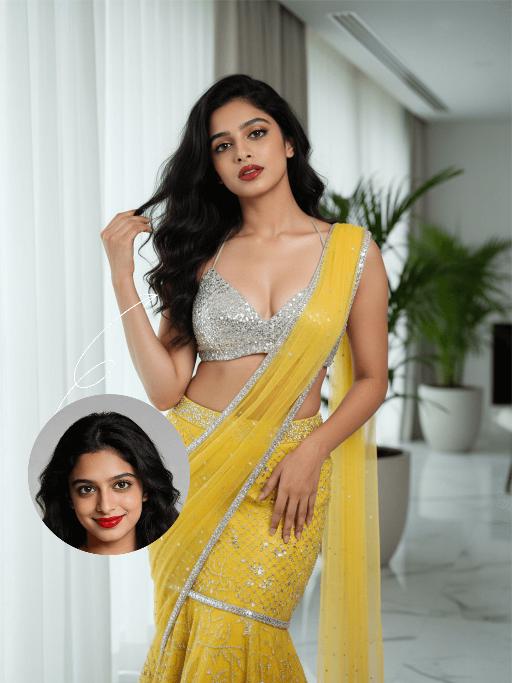
Gilded Glow

The identity of the uploaded portrait is strictly locked (retaining facial contours, authentic Indian skin tone, hairstyle and age). This is a bust portrait featuring a young Indian woman with a stunning hourglass figure, boasting an elegant waist-to-hip ratio and taut abdominal lines, with her full body curves perfectly accentuated. She has voluminous, big wavy long black curls, and her makeup is exquisitely alluring: smoldering cat eyes paired with pearlescent highlighter, full and dewy red lips, a lazy and captivating gaze, and an expression exuding relaxed yet sensual tension. She is dressed in a yellow beaded saree set: the strapless crop top is fully encrusted with silver micro-diamonds, its tailored fit accentuating her voluptuous bust; the high-waisted bodycon mermaid saree skirt features a bright yellow tulle fabric embellished with silver rhinestones and beadwork, edged with a silver diamond trim, and is paired with a matching sheer tulle shawl draped over her shoulders. The overall look is opulent and brimming with a sensual aura. She stands front-on in a modern light luxury interior space, her body slightly turned to highlight her waist-to-hip curves. One hand gently tousles her hair, while the other rests naturally on her hip, her gaze fixed directly on the camera, radiating intense allure. The background features floor-to-ceiling windows with white semi-sheer curtains, a large green plant placed beside them, and a white marble floor, bathed in soft, bright light. Soft natural light combined with studio fill light is adopted: the key light illuminates the subject’s entire body, enhancing the sparkling luster of the saree’s diamond embellishments and the delicate texture of her skin, creating an atmosphere of lazy luxury infused with intense sensual tension. The style is modern Indian fashion portraiture, with a high-definition, exquisitely detailed frame and bright, vivid colors, focusing on highlighting the subject’s stunning figure, captivating charm and opulent ensemble.

Love AI effects generated image

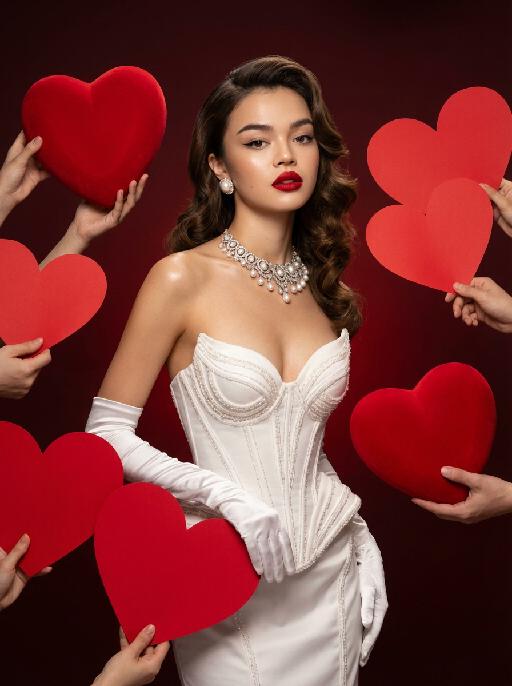
Love

Medium shot, the character in the uploaded picture (unchanged facial features, gender and age) with a vintage Hollywood big wavy hairstyle, wearing a strapless white corset high couture gown, paired with long white satin gloves, pearl stud earrings and a high couture custom necklace. The character has exquisite makeup with classic red lip color and cat eye makeup, profound eyes and an elegant expression. Surrounded by oversized, bright red three-dimensional velvet heart-shaped props held up by multiple hands, with a gradient low-saturation dark red background. Also, numerous hands holding large, vivid red paper heart props are around the character. Lighting & Tone: Adopt vintage Hollywood-style soft studio lighting, create clear and luminous skin complexion, form a striking contrast between the white costume and the bold red background/heart patterns, with bright lighting contrast, rich and retro color palette, smooth and glossy skin texture, presenting professional fashion photography aesthetics and avant-garde fashion photography artistic sense.

Santa Claus

The facial features of the uploaded character remain unchanged. The scene transitions with both camera rotation and stunning explosive magic element effects—incorporating dazzling special effects during the transition, including shimmering golden particles, brilliant golden explosive magic effects, falling snowflakes, and swirling red ribbons. After spinning rapidly on the spot, the character’s outfit transforms into a cool version of Santa Claus attire. The character beams with a happy smile, dressed in a classic red-and-white Christmas suit trimmed with white fluff, wearing black sunglasses, a Santa hat, and carrying a large-capacity Christmas backpack stuffed with gifts on the back. The character rides a retro cruising motorcycle (Harley-style) speeding from the distance to the front of the screen. The motorcycle boasts a deep burgundy color paired with a metallic chrome finish, with its wheels in a burnout state and white smoke billowing from the ground. Scene: A nighttime European-style urban street lined with vintage buildings and warm yellow street lamps. The background features blurred vehicles and pedestrians, with the lights creating a beautiful bokeh effect. Style & Texture: Ultra-realistic style with high details and strong light-shadow contrast. Dynamic blur enhances the sense of motion, and the fluffy texture of the clothing as well as the metallic luster of the motorcycle are depicted in exquisite detail. The overall style showcases cutting-edge fashion photography and avant-garde art, reaching a film-level realistic standard.

Load more

Next-Gen Multi-Model AI Video Architecture

Vivago AI isn't just one engine—it’s a unified hub for the world’s most advanced video AI. Whether you need cinematic realism or high-speed social content, we provide the right model for your creative vision.

Free Generate

Beauty and Dolphins

Vacation Time

Stellar Tear

Fish Tank Supervisor

Cinematic Quality & Precision Control

Enables 4K resolution with multi-lens motion control, generating delicate scene via text prompts for customized cinematography.​

TRY NOW

Dynamic AV Sync

Auto-generates original audio to avoid copyright issues. Build 3D immersive environments through layered sound design automatically.

TRY NOW

OpenAI Sora 2

​Advanced visual storytelling with unparalleled physics and consistency.

TRY NOW

Kling v2.6 Pro

Industry-leading cinematic image animation and motion control.

TRY NOW

Google Veo 3 & 3.1

Ultra-fast generation with enhanced realism for creative workflows.

TRY NOW

Vivago AI 2.0

Our proprietary model optimized for efficiency, speed, and cost-effective generation.
TRY NOW

Users' Voice

We listen carefully to the opinions of every user.
Free Generate
Contact Us
I tried the Lip Sync feature inside Vivago.ai’s AI Video Generator for my educational podcast, and the results were stunning! The avatar's lip movements perfectly matched my audio recording, creating a professional AI-generated video without complex editing. Compared with tools like OpenAI Sora 2 and Google Veo 3.1, Vivago Image-to-Video delivers fast, studio-quality results online. It saved me hours of post-production work.
ElenaM (Spain)
Vivago’s Image-to-Video AI transformed my marketing workflow. I uploaded a product image and described the launch scene in text, and it generated a 10-second cinematic AI video with background music and dynamic visuals. The output quality rivals Kling v2.6 Pro and Google Veo 3 Fast. It’s now my go-to AI video generator for social media ads and product campaigns.
KenjiT (Japan)
As a digital artist, I use Vivago.ai 2.0 daily for Image-to-Image and AI Image-to-Video creation. The e-book covers and animated visuals I generate for clients look cinematic and professional. Unlike many standalone AI tools, Vivago integrates multiple leading models into one platform, making it easier to create copyright-safe AI images and videos for publishing.
ChenL (China)
I tried the Lip Sync feature inside Vivago.ai’s AI Video Generator for my educational podcast, and the results were stunning! The avatar's lip movements perfectly matched my audio recording, creating a professional AI-generated video without complex editing. Compared with tools like OpenAI Sora 2 and Google Veo 3.1, Vivago Image-to-Video delivers fast, studio-quality results online. It saved me hours of post-production work.
ElenaM (Spain)
Vivago’s Image-to-Video AI transformed my marketing workflow. I uploaded a product image and described the launch scene in text, and it generated a 10-second cinematic AI video with background music and dynamic visuals. The output quality rivals Kling v2.6 Pro and Google Veo 3 Fast. It’s now my go-to AI video generator for social media ads and product campaigns.
KenjiT (Japan)
As a digital artist, I use Vivago.ai 2.0 daily for Image-to-Image and AI Image-to-Video creation. The e-book covers and animated visuals I generate for clients look cinematic and professional. Unlike many standalone AI tools, Vivago integrates multiple leading models into one platform, making it easier to create copyright-safe AI images and videos for publishing.
ChenL (China)
I absolutely love Vivago’s AI Image-to-Video Generator. As a travel blogger, static images often fail to capture real atmosphere, but Vivago helps me turn photos into vivid cinematic AI videos with motion effects. It feels comparable to OpenAI Sora 2 and Google Veo 3.1, but more accessible and faster for creators who need high-quality AI videos online.
LiamK (Australia)
I tried the Lip Sync feature inside Vivago.ai’s AI Video Generator for my educational podcast, and the results were stunning! The avatar's lip movements perfectly matched my audio recording, creating a professional AI-generated video without complex editing. Compared with tools like OpenAI Sora 2 and Google Veo 3.1, Vivago Image-to-Video delivers fast, studio-quality results online. It saved me hours of post-production work.
ElenaM (Spain)
Vivago’s Image-to-Video AI transformed my marketing workflow. I uploaded a product image and described the launch scene in text, and it generated a 10-second cinematic AI video with background music and dynamic visuals. The output quality rivals Kling v2.6 Pro and Google Veo 3 Fast. It’s now my go-to AI video generator for social media ads and product campaigns.
KenjiT (Japan)
As a digital artist, I use Vivago.ai 2.0 daily for Image-to-Image and AI Image-to-Video creation. The e-book covers and animated visuals I generate for clients look cinematic and professional. Unlike many standalone AI tools, Vivago integrates multiple leading models into one platform, making it easier to create copyright-safe AI images and videos for publishing.
ChenL (China)
I absolutely love Vivago’s AI Image-to-Video Generator. As a travel blogger, static images often fail to capture real atmosphere, but Vivago helps me turn photos into vivid cinematic AI videos with motion effects. It feels comparable to OpenAI Sora 2 and Google Veo 3.1, but more accessible and faster for creators who need high-quality AI videos online.
LiamK (Australia)
Using Vivago.ai’s Image-to-Video AI has greatly enhanced my classroom teaching. I transform textbook notes into historical AI videos with cinematic filters and dynamic animations. Compared with tools like Kling v2.6 Pro and Google Veo 3 Fast, Vivago offers faster generation and easier parameter control for educators who need reliable AI video creation.
RajivG (India)
I frequently create AI videos on Vivago and publish them on TikTok and YouTube Shorts. The AI video templates and trending content ideas help me produce viral-ready clips quickly. With Vivago’s integrated models—including advanced video engines similar to OpenAI Sora 2—I can generate anime-style and cinematic social media videos that drive high engagement.
MarieJ (Spain)
What attracts me most about Vivago.ai is not only the powerful AI Video Generator but also the active AIGC creator community. It combines AI Image-to-Video, Text-to-Video, and leading model integrations like Google Veo 3.1 into one creative platform.
TomW (India)
At first, I was hesitant about using AI video tools. But after trying Vivago Image-to-Video, I realized how easy it is to create professional AI-generated videos online. I just upload an image, add a short prompt, and adjust a few settings. The results are cinematic and copyright-safe, which is essential for commercial projects.
HectorC (Mexico)
Using Vivago.ai’s Image-to-Video AI has greatly enhanced my classroom teaching. I transform textbook notes into historical AI videos with cinematic filters and dynamic animations. Compared with tools like Kling v2.6 Pro and Google Veo 3 Fast, Vivago offers faster generation and easier parameter control for educators who need reliable AI video creation.
RajivG (India)
I frequently create AI videos on Vivago and publish them on TikTok and YouTube Shorts. The AI video templates and trending content ideas help me produce viral-ready clips quickly. With Vivago’s integrated models—including advanced video engines similar to OpenAI Sora 2—I can generate anime-style and cinematic social media videos that drive high engagement.
MarieJ (Spain)
What attracts me most about Vivago.ai is not only the powerful AI Video Generator but also the active AIGC creator community. It combines AI Image-to-Video, Text-to-Video, and leading model integrations like Google Veo 3.1 into one creative platform.
TomW (India)
At first, I was hesitant about using AI video tools. But after trying Vivago Image-to-Video, I realized how easy it is to create professional AI-generated videos online. I just upload an image, add a short prompt, and adjust a few settings. The results are cinematic and copyright-safe, which is essential for commercial projects.
HectorC (Mexico)