Image to Video

Generate AI fighting scenes with VivaGo—transform text prompts into dynamic battles, martial arts, and action visuals. Create professional images/videos using curated AI effects and editing tools. Experience AI-powered creativity for striking results.

Recreate
arrow

FAQs

How to generate images/videos from text prompts?

Describe the visual content in natural language (e.g., 'A cyberpunk cat wearing neon goggles') and our AI models will create outputs. Complex prompts trigger multi-stage NLP parsing for enhanced accuracy.

How to refine unsatisfactory results?

Use our Prompt Bot - an AI-powered optimizer that suggests technical modifiers. Simply describe your ideas, desired changes ('more metallic texture'), then you will get optimized prompt variants.

When should I use reference images?

Upload references to: 1) Guide character consistency (e.g., faces/outfits), 2) Control motion patterns in videos using our feature matching algorithm. Supports JPG/PNG

What's the credit system?

Daily login grants 100 credits. Upgrade options: 1) Premium Membership, 2) Credit Packs. Details: https://vivago.ai/subscribe

More From VIVAGO AI

Love Always

Use the user uploaded image as the subject identity source only. Preserve the uploaded subject’s identity, recognizable appearance, and species. Do not force a specific gender, hairstyle, clothing type, or facial structure. Transform the uploaded subject into a peaceful indoor healing scene: reclining naturally on a soft leather sofa, in front of a warm vertical wooden wall, with a calm restful expression. Behind the uploaded subject stands a fixed divine figure of Jesus, ultra detailed and photorealistic, tall and compassionate, wearing a flowing white robe with delicate gold trim, realistic folds, soft luminous fabric, long wavy chestnut-brown hair, full beard, symmetrical refined facial features, warm merciful eyes, soft golden halo, subtle sacred glow. Tiny refined glowing particles in warm gold, ivory, and pale amber shimmer around Jesus’ halo, robe edges, shoulders, and hands, elegant and controlled, not excessive. Jesus gently places both hands on the uploaded subject’s shoulders and keeps them resting there continuously, symbolizing healing, blessing, comfort, and protection. Warm cinematic amber light fills the room. Medium-close composition, uploaded subject reclining in the foreground, Jesus standing behind, wooden wall background, leather sofa texture, sacred peaceful atmosphere, photorealistic, ultra detailed, high resolution, 8k, sharp focus, realistic skin and fabric texture, volumetric warm light, elegant composition. no extra arms, no deformed hands, no chaotic particles, no excessive sparkle, no new identity, no face replacement, no unrealistic anatomy, no distorted shoulders, no floating hands, no duplicated figures, no overexposed halo, no fantasy armor, no cartoon style, no anime style, no low resolution, no blurry face, no incorrect contact between hands and shoulders。

Temple AI effects generated image

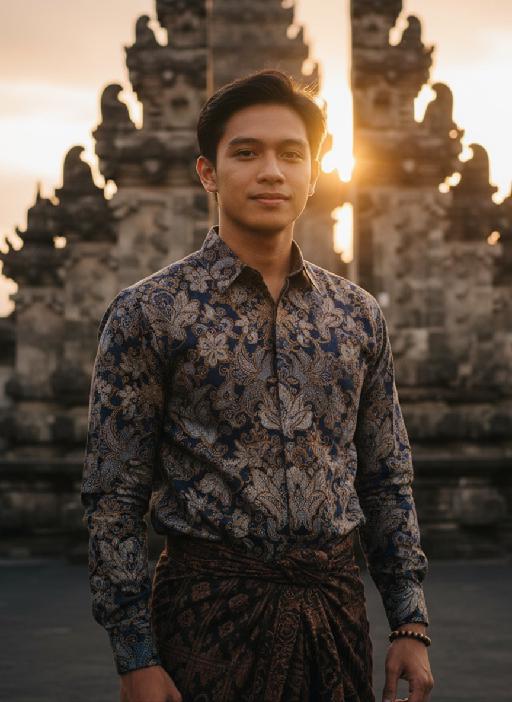
Temple

Strictly lock the facial features of the uploaded portrait (preserve facial contours, native Indonesian skin tone, hairstyle and age). close-up photorealistic half-body portrait, model occupies 3/4 of the frame, focus sharply on facial features and serene expression, minimal headroom with zero empty space above the head, the model as the absolute dominant subject, 30-year-old native Indonesian man, native skin tone and natural short black hair, wearing traditional Indonesian batik long-sleeve shirt with deep indigo and gold patterns + dark brown hand-woven sarong, simple wooden beaded bracelet on wrist, standing in front of ancient Balinese stone temple with intricate carvings and tiered meru towers, golden sunset light bathing the scene, soft warm backlighting, hazy orange-pink sky with gentle sun flare bokeh, calm and serene expression, gentle wind brushing his hair, strong nostalgic atmospheric mood, film grain texture, authentic Indonesian cultural details, ultra-detailed fabric and temple carvings, 3:4 aspect ratio, cinematic sunset ambiance

Snow Scene AI effects generated image

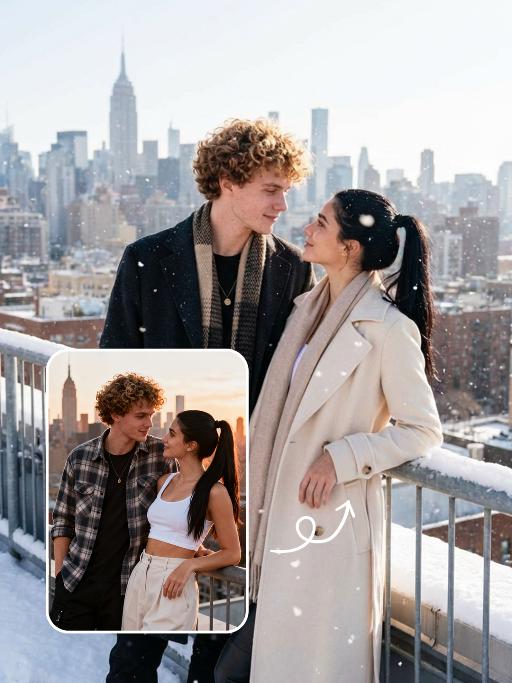
Snow Scene

Preserve the facial features of the figure in the image and transform the scene into a photo-realistic romantic winter snow photograph: the figure is wearing a matte black wool knee-length overcoat paired with a thick knit scarf in an interwoven coffee-brown and off-white check pattern (or a matte off-white wool waist-cinched double-breasted coat with gold buttons paired with a matching cashmere mid-length tassel scarf), set against a romantic outdoor scene with heavy snow falling. The lighting is bright natural light (noon sunlight), creating an exquisite and high-end atmosphere. Shoot with a 24mm wide-angle lens to highlight the immersive ambiance of the romantic realistic scene. Scene: Vintage red brick rooftops with light snow traces, frosted silver-toned metal railings with slightly melted snow on the edges; the New York skyline in the background, featuring a scattered mix of light gray glass curtain wall skyscrapers and vintage brownstone buildings with the clear spire of the Empire State Building, and fine snow falling gently. Photography: 85mm f/2.8 lens, winter side light, film texture, cool color tones. Image Quality: 8K ultra-detailed, realistic light and shadow. Atmosphere: A romantic and warm urban architectural snow scene bathed in the afterglow of the setting sun. Shooting Angle: Eye-level with a slight bird's-eye perspective.

Seagull AI effects generated image

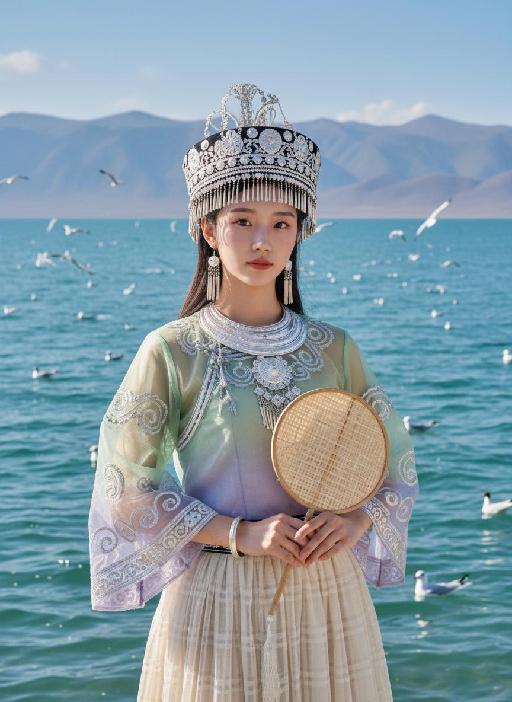
Seagull

Strictly lock facial features: fully preserving the original facial contours, skin texture, eye shape, lip shape, and youthful appearance with zero deviations allowed. Camera zoomed in for a tighter composition, eye-level perspective, half-body close-up (subject occupies 85% of the frame), a young East Asian woman with a gentle temperament stands facing forward, hands naturally holding a bamboo-woven round fan in front of her, posture dignified, expression gentle and calm, eyes soft looking at the camera; Facial state exactly as original: fresh nude makeup, transparent porcelain base, natural pink lips, soft eye makeup, no heavy colors. Sheer tulle clothing exactly as original: - Headdress: Traditional Miao silver headdress, black base with multiple layers of silver tassels and carvings, hanging pearl strings on both sides - Accessories: Multi-layered Miao silver collar, silver bracelets - Top: Sheer tulle Miao top with gradient from light green to light purple, round neck design, wide sleeves covered with scroll grass pattern embroidery, edged with silver patterns, presenting a light and semi-transparent texture - Skirt: Light beige sheer tulle plaid pleated long skirt, with strong drape and a light, flowing hem Lighting and image quality exactly as original: Bright outdoor natural light with soft diffusion, sheer tulle fabric showing transparent luster, silver ornaments showing natural highlights, high-definition and transparent image quality, fresh and soft colors, with delicate natural grain, restoring the film texture of the original image. Background exactly as original (partially cropped due to zoom): Plateau lake scene, azure blue water with sparkling waves, distant continuous gray-blue mountains, multiple black-headed gulls in the blue sky (some flying, some swimming on the water surface); the picture is dominated by light green, silver white and blue tones, strictly 1:1 replicate the original image's movements, clothing details and light and shadow atmosphere.

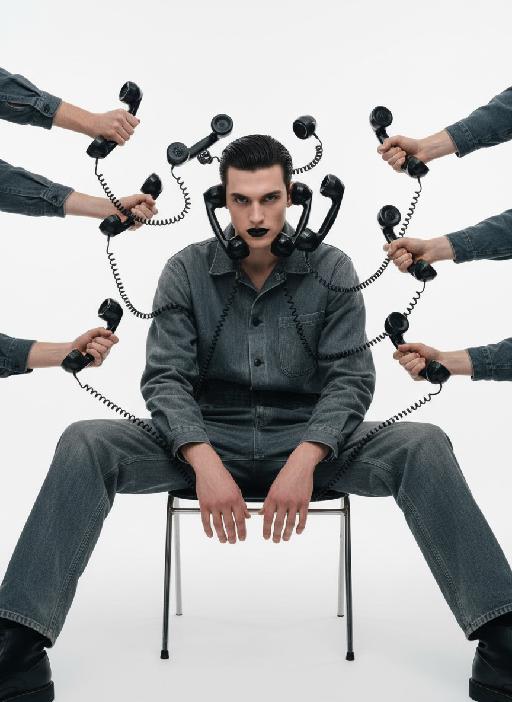
Telephone Ring AI effects generated image

Telephone Ring

"Shooting perspective and focal length: Frontal level view, using a medium telephoto lens (approximately 50mm), with an appropriate focal length, medium close-up shot, able to clearly present the upper body and hand details of the characters, and the picture has no obvious distortion. Equipment: Professional studio camera (such as Canon 5D series or Sony A7 series), combined with a studio lighting system. Character pose: The character is in a sitting position, with legs apart and knees bent, the upper body leaning forward and the head close to the camera; multiple arms extend from all around the frame, each hand holding an old-fashioned black wired telephone, multiple receivers randomly surround the character's head, creating a visual effect of being surrounded. Character expression: Eyes gaze at the camera, the gaze is slightly distant and cold, the facial expression is calm and undisturbed, conveying a restrained emotional tension. Lighting: Use studio hard light, the main light source comes from the front, supplemented by side lighting, forming a clear contrast of light and shade, highlighting the fabric texture and facial contours, the background is pure white, clean and without any color impurities. Style: Pioneer fashion photography, integrating surrealism and minimalism, creating an absurd yet highly tense atmosphere through strong visual impact. Clothing: A set of gray-blue distressed texture workwear, the fabric has fine textures, the fit is loose and firm, the lapel design combines toughness and retro charm. Hair style: Black short hair, using hair gel to comb backward, revealing a full forehead, the style is clean and neat with a sense of lines. Makeup: Matte texture pure black lipstick as the visual focus, the facial base makeup is even and transparent, only highlighting the lip color, the overall makeup is avant-garde and has a distinctive characteristic."

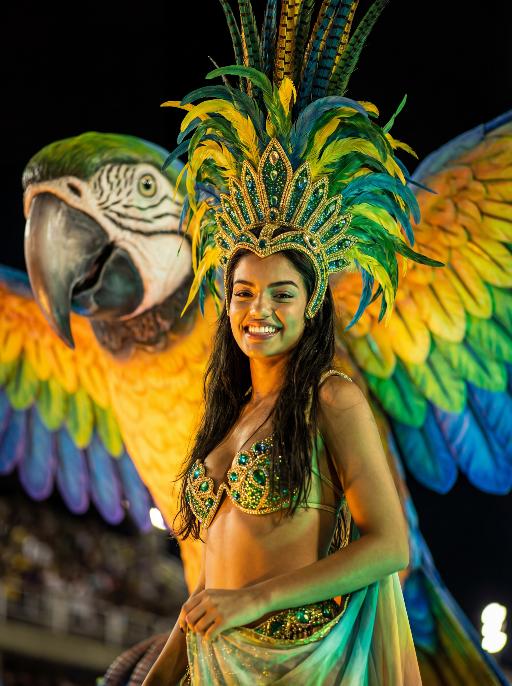
Feather Crown AI effects generated image

Feather Crown

Use the facial features, gender and age of the character in the uploaded picture exactly as they are, reimagined as a stunning Brazilian Carnival queen. Bust shot, the character occupies the largest proportion of the frame, sharp focus on face to clearly capture the confident and joyful expression details. stands proudly atop a giant, brightly colored macaw float (only the macaw's head and upper wings are visible in the background to complement the scene). The macaw is a large, realistic sculpture with dazzling green, yellow, and blue iridescent feathers, a sharp black beak, and sharp, lively eyes. wears an elaborate and exquisite traditional Brazilian Carnival costume: a grand colorful feather headdress (matching the macaw's tones) with delicate gold trim, a jeweled bikini top in green and gold, and the upper part of a flowing colorful skirt with gold and green accents visible at the shoulder and waist. Set during the Rio Carnival night parade, dramatic stage lighting—warm golden spotlights, neon green and blue fill lights—illuminates face and upper body, with the dark, atmospheric night background slightly blurred (bokeh effect) to emphasize the subject. The overall style is a high-end fashion cinematic photograph, rich saturated colors, ultra-sharp details, 8K resolution, shallow depth of field, professional portrait lighting.

Shark Dance

Main scene: The image in the uploaded picture (species, age, gender remain unchanged, presented in an anthropomorphic standing posture with the front two paws raised and the back two legs standing), beside it are four similar cute cats in an anthropomorphic standing posture standing neatly and evenly beside it (including Persian cats, orange cats, silver gradient cats and golden gradient cats), all characters (height proportions remain consistent) are wearing different cute cartoon jumpsuits (cartoon character pajamas, with bees, tigers, dinosaurs, seals, pandas) in plush fabric (revealing the characters' faces), ultra-realistic three-dimensional rendering, cute and soothing style, the protagonist occupies 80% of the main space of the picture, evenly distributed in the center of the picture, presented in a frontal standing posture, with natural front-back layers; using mid-shot horizontal composition, shot from a horizontal perspective at the same height as the protagonist's image; the light is a soft indoor diffusion effect, the transition of light and shadow is natural, without strong contrast, overall bright and warm; the clothing uses fresh and bright colors (yellow, green, blue, brown), the background is a warm and cute living room environment, background elements account for 20% of the picture; rich details, fluffy and fine fur texture, clear clothing texture, 8K high resolution, bright and harmonious picture colors.

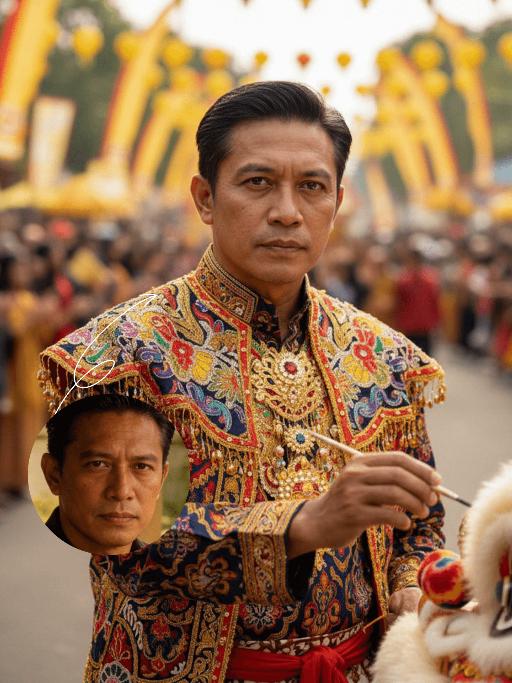
Lion Dance AI effects generated image

Lion Dance

Strictly lock the identity of the uploaded portrait (preserve facial contours, native Indian skin tone, hairstyle, and age). Aspect ratio 3:4, hyper-realistic photography, high definition and exquisite details, advanced light and shadow: A 40-year-old Indonesian man with a solemn, dignified demeanor, in the sacred ritual moment of dotting the eyes for traditional Indonesian lion dance. The figure is positioned exactly in the center of the frame, as the absolute main subject occupying more than 80% of the canvas; only a tiny corner of the traditional Indonesian lion dance head peeks into the edge of the frame, with an extremely small proportion. He is dressed in exquisite traditional Indonesian lion dance costume with classic ethnic patterns and delicate decorations, holding a delicate painting brush, his fingertips gently touching the eye-dotting position of the lion head, his arm slightly raised with a calm and steady posture. The background is a super bustling and lively festive scene with soft slight bokeh—filled with crowds of people in festive attires, colorful traditional lanterns, festive streamers, and lively parade elements, with bright festive ambient light and vibrant street decorations, presenting an extremely dynamic and jubilant festive atmosphere. Soft natural light outlines the man's firm facial lines and delicate hand details, the man's solemn ritualistic state forms a striking contrast with the lively background, the overall color palette is rich and bright with a sense of hierarchy, and all details of the character and costume are clear and textured

Load more

Next-Gen Multi-Model AI Video Architecture

Vivago AI isn't just one engine—it’s a unified hub for the world’s most advanced video AI. Whether you need cinematic realism or high-speed social content, we provide the right model for your creative vision.

Free Generate

Beauty and Dolphins

Vacation Time

Stellar Tear

Fish Tank Supervisor

Cinematic Quality & Precision Control

Enables 4K resolution with multi-lens motion control, generating delicate scene via text prompts for customized cinematography.​

TRY NOW

Dynamic AV Sync

Auto-generates original audio to avoid copyright issues. Build 3D immersive environments through layered sound design automatically.

TRY NOW

OpenAI Sora 2

​Advanced visual storytelling with unparalleled physics and consistency.

TRY NOW

Kling v2.6 Pro

Industry-leading cinematic image animation and motion control.

TRY NOW

Google Veo 3 & 3.1

Ultra-fast generation with enhanced realism for creative workflows.

TRY NOW

Vivago AI 2.0

Our proprietary model optimized for efficiency, speed, and cost-effective generation.

TRY NOW

Users' Voice

We listen carefully to the opinions of every user.
Free Generate
Contact Us
I tried the Lip Sync feature inside Vivago.ai’s AI Video Generator for my educational podcast, and the results were stunning! The avatar's lip movements perfectly matched my audio recording, creating a professional AI-generated video without complex editing. Compared with tools like OpenAI Sora 2 and Google Veo 3.1, Vivago Image-to-Video delivers fast, studio-quality results online. It saved me hours of post-production work.
ElenaM (Spain)
Vivago’s Image-to-Video AI transformed my marketing workflow. I uploaded a product image and described the launch scene in text, and it generated a 10-second cinematic AI video with background music and dynamic visuals. The output quality rivals Kling v2.6 Pro and Google Veo 3 Fast. It’s now my go-to AI video generator for social media ads and product campaigns.
KenjiT (Japan)
As a digital artist, I use Vivago.ai 2.0 daily for Image-to-Image and AI Image-to-Video creation. The e-book covers and animated visuals I generate for clients look cinematic and professional. Unlike many standalone AI tools, Vivago integrates multiple leading models into one platform, making it easier to create copyright-safe AI images and videos for publishing.
ChenL (China)
I tried the Lip Sync feature inside Vivago.ai’s AI Video Generator for my educational podcast, and the results were stunning! The avatar's lip movements perfectly matched my audio recording, creating a professional AI-generated video without complex editing. Compared with tools like OpenAI Sora 2 and Google Veo 3.1, Vivago Image-to-Video delivers fast, studio-quality results online. It saved me hours of post-production work.
ElenaM (Spain)
Vivago’s Image-to-Video AI transformed my marketing workflow. I uploaded a product image and described the launch scene in text, and it generated a 10-second cinematic AI video with background music and dynamic visuals. The output quality rivals Kling v2.6 Pro and Google Veo 3 Fast. It’s now my go-to AI video generator for social media ads and product campaigns.
KenjiT (Japan)
As a digital artist, I use Vivago.ai 2.0 daily for Image-to-Image and AI Image-to-Video creation. The e-book covers and animated visuals I generate for clients look cinematic and professional. Unlike many standalone AI tools, Vivago integrates multiple leading models into one platform, making it easier to create copyright-safe AI images and videos for publishing.
ChenL (China)
I absolutely love Vivago’s AI Image-to-Video Generator. As a travel blogger, static images often fail to capture real atmosphere, but Vivago helps me turn photos into vivid cinematic AI videos with motion effects. It feels comparable to OpenAI Sora 2 and Google Veo 3.1, but more accessible and faster for creators who need high-quality AI videos online.
LiamK (Australia)
I tried the Lip Sync feature inside Vivago.ai’s AI Video Generator for my educational podcast, and the results were stunning! The avatar's lip movements perfectly matched my audio recording, creating a professional AI-generated video without complex editing. Compared with tools like OpenAI Sora 2 and Google Veo 3.1, Vivago Image-to-Video delivers fast, studio-quality results online. It saved me hours of post-production work.
ElenaM (Spain)
Vivago’s Image-to-Video AI transformed my marketing workflow. I uploaded a product image and described the launch scene in text, and it generated a 10-second cinematic AI video with background music and dynamic visuals. The output quality rivals Kling v2.6 Pro and Google Veo 3 Fast. It’s now my go-to AI video generator for social media ads and product campaigns.
KenjiT (Japan)
As a digital artist, I use Vivago.ai 2.0 daily for Image-to-Image and AI Image-to-Video creation. The e-book covers and animated visuals I generate for clients look cinematic and professional. Unlike many standalone AI tools, Vivago integrates multiple leading models into one platform, making it easier to create copyright-safe AI images and videos for publishing.
ChenL (China)
I absolutely love Vivago’s AI Image-to-Video Generator. As a travel blogger, static images often fail to capture real atmosphere, but Vivago helps me turn photos into vivid cinematic AI videos with motion effects. It feels comparable to OpenAI Sora 2 and Google Veo 3.1, but more accessible and faster for creators who need high-quality AI videos online.
LiamK (Australia)
Using Vivago.ai’s Image-to-Video AI has greatly enhanced my classroom teaching. I transform textbook notes into historical AI videos with cinematic filters and dynamic animations. Compared with tools like Kling v2.6 Pro and Google Veo 3 Fast, Vivago offers faster generation and easier parameter control for educators who need reliable AI video creation.
RajivG (India)
I frequently create AI videos on Vivago and publish them on TikTok and YouTube Shorts. The AI video templates and trending content ideas help me produce viral-ready clips quickly. With Vivago’s integrated models—including advanced video engines similar to OpenAI Sora 2—I can generate anime-style and cinematic social media videos that drive high engagement.
MarieJ (Spain)
What attracts me most about Vivago.ai is not only the powerful AI Video Generator but also the active AIGC creator community. It combines AI Image-to-Video, Text-to-Video, and leading model integrations like Google Veo 3.1 into one creative platform.
TomW (India)
At first, I was hesitant about using AI video tools. But after trying Vivago Image-to-Video, I realized how easy it is to create professional AI-generated videos online. I just upload an image, add a short prompt, and adjust a few settings. The results are cinematic and copyright-safe, which is essential for commercial projects.
HectorC (Mexico)
Using Vivago.ai’s Image-to-Video AI has greatly enhanced my classroom teaching. I transform textbook notes into historical AI videos with cinematic filters and dynamic animations. Compared with tools like Kling v2.6 Pro and Google Veo 3 Fast, Vivago offers faster generation and easier parameter control for educators who need reliable AI video creation.
RajivG (India)
I frequently create AI videos on Vivago and publish them on TikTok and YouTube Shorts. The AI video templates and trending content ideas help me produce viral-ready clips quickly. With Vivago’s integrated models—including advanced video engines similar to OpenAI Sora 2—I can generate anime-style and cinematic social media videos that drive high engagement.
MarieJ (Spain)
What attracts me most about Vivago.ai is not only the powerful AI Video Generator but also the active AIGC creator community. It combines AI Image-to-Video, Text-to-Video, and leading model integrations like Google Veo 3.1 into one creative platform.
TomW (India)
At first, I was hesitant about using AI video tools. But after trying Vivago Image-to-Video, I realized how easy it is to create professional AI-generated videos online. I just upload an image, add a short prompt, and adjust a few settings. The results are cinematic and copyright-safe, which is essential for commercial projects.
HectorC (Mexico)