Image to Video

Transform text into stunning visuals with vivago.ai's AI image/video generator. Explore curated effects, professional editing tools, and seamless creativity for high-quality content. Ideal for innovators and creators.

Recreate
arrow

FAQs

How do I animate static images using vivago.ai?

Upload any image (JPG/PNG), and our AI models will automatically detect content layers and generate 5/10-second video clips with dynamic motion patterns.

Can I control specific movement directions?

Yes. Combine image uploads with text prompts like 'swaying leaves left-to-right' or 'a girl waves her hands'.

What if AI-generated videos don't match my expectation?

Utilize iterative refinement cycles: 1) Try a few more times, 2) Modify prompts, 3) Visit the Explore section to use templates for more consistent results.

What membership benefits does Pro offer?

Pro membership offers better outcomes, more generation credits, and premium features. Details available at: https://vivago.ai/subscribe

More From VIVAGO AI

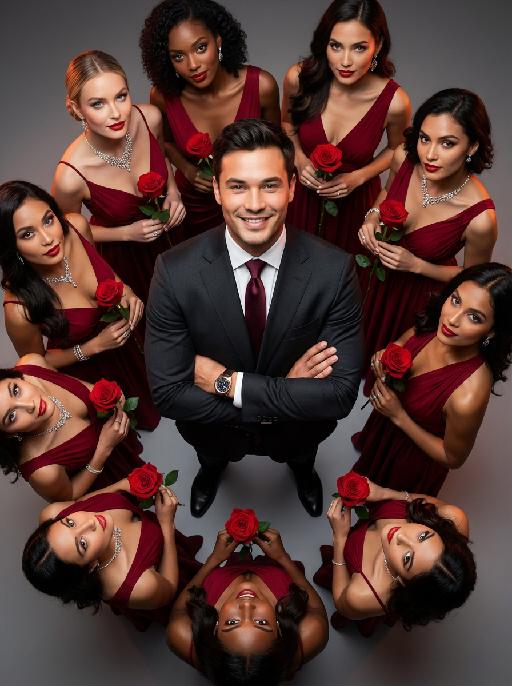
Women Surround AI effects generated image

Women Surround

The main figure in the uploaded picture, who is smiling confidently (with unchanged facial features, gender and age), is the subject. He is wearing a well-tailored high-end custom suit, with a red bow tie, a high-end watch, and crossed arms. Surrounding her are 8 to 9 beautiful women in fashionable red high-end custom dresses (wearing luxurious accessories), each holding a fresh red rose. These women are arranged in a circular pattern around the central figure on a deep purple red solid background. The color scheme indicates: high-intensity cinematic lighting effects, soft yet dramatic shadows, moderate contrast, rich depth of field effects, smooth skin texture, luxurious and romantic atmosphere, with a faint highlight on the facial features. Color hint: Predominantly rich deep red and dark black, natural and transparent skin tones, high saturation but not overexposed colors, unified and high-end color combinations with warm tones, bright light and shadow contrast. Style supplement: Fashion-forward art, fashion portrait photography, elegant and charming atmosphere, reminiscent of a luxurious Valentine's Day social event.

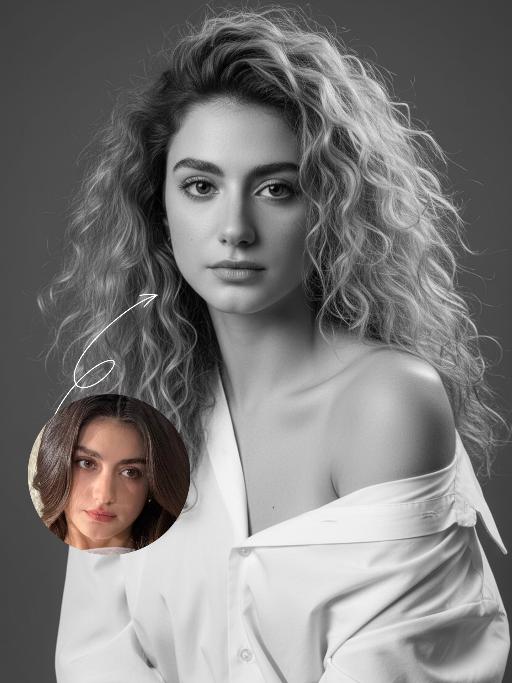
Minimal Chic AI effects generated image

Minimal Chic

Strict identity locking is based on the uploaded portrait, with the original facial features, fair skin tone and youthful vitality retained in a 1:1 ratio, reimagined with a striking Euro-American mixed-race aesthetic. The hair color is replaced with long wavy platinum blonde locks, styled in a naturally tousled and voluminous manner. This is a black-and-white artistic portrait photography piece featuring a young woman wearing an oversized white shirt that slips naturally off one shoulder; her platinum blonde tresses softly frame her delicate facial features, with strands gilded by sunlight to reveal an exquisite sheen, and her skin exudes a smooth, refined texture. She sits in an upright posture, facing the camera with a calm, pensive gaze and a relaxed expression that brims with narrative depth. Shot in a professional photo studio against a minimalist solid gray background, a soft, cinema-grade back rim light sculpts her three-dimensional facial contours, with a precise ray of hair light layered in to make each strand of the blonde hair distinct and translucent with clear gradations. Rich details are preserved in the shadow areas, and the highlights transition naturally, crafting an elegant and serene atmosphere. Boasting 8K ultra-realistic resolution and a high-contrast black-and-white aesthetic, the image features razor-sharp details where even pores and individual hair strands are clearly visible, with natural and authentic skin texture. The composition is minimalist with no extraneous elements; the overall style is elegant and sophisticated, blending refined luxury with compelling narrative quality, reaching the standard of professional commercial photography.

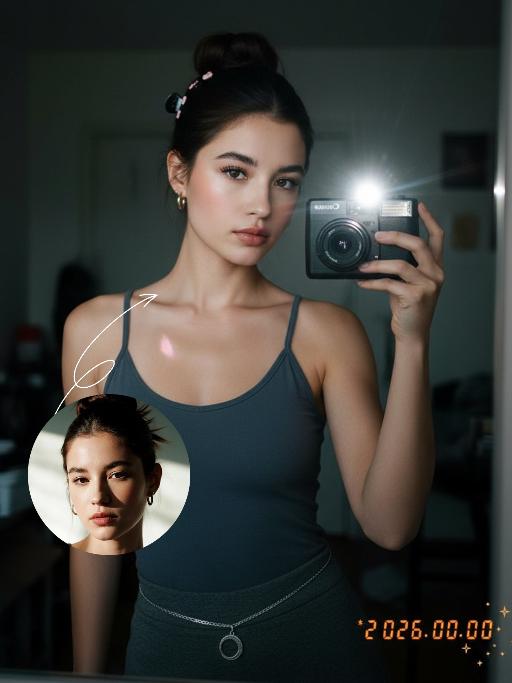
Darkroom Flash AI effects generated image

Darkroom Flash

Subject & Makeup: The figure from the uploaded image (unchanged facial features) with a cold and natural expression and a light, translucent makeup look; Shooting & Atmosphere: soft pink blush on the apples of the cheeks, nude pink lip gloss, long and curled false eyelashes, natural eyebrow shape; taking a selfie with a Canon retro point-and-shoot camera, with the camera’s flash shining directly into the lens (creating a distinct white lens flare), shot from a selfie perspective in front of an indoor mirror; a dim everyday room background (blurred furniture and decorations), a relaxed edgy-sweet portrait style, dark natural color tones, film photography texture, a retro natural film filter and film grain; Detail Embellishments: add an orange digital date watermark (2026.00.00) plus a small starburst decoration at the bottom right corner.

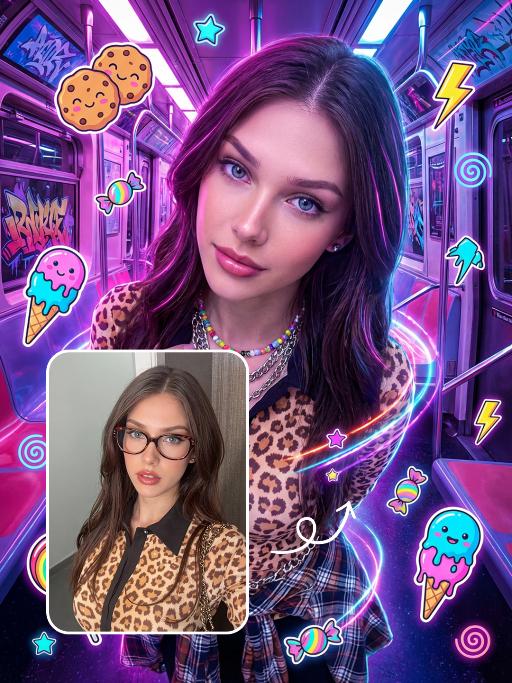
Punk Graffiti AI effects generated image

Punk Graffiti

先将上传的图片扩图成3:4比例的2k超清尺寸照片,然后将原图转换为垂直俯拍视角(俯视),半身人像,特写近景镜头从斜上方向下拍摄,主体为图中的人物形象特征保持不变,直视镜头,超写实摄影质感。背景是一个霓虹灯照亮的室内空间(类似于未来主义的地铁车厢),里面有着粉色/紫色的发光灯和涂鸦。写实美国人像、上半身写真、街头潮流服饰(豹纹、格纹元素潮流穿搭元素、佩戴彩色的配饰)、Y2K 在图像上覆盖上充满活力、可爱的卡通贴纸:微笑的饼干、滴着奶油的冰淇淋(蓝色/粉色)、棒棒糖、糖果、星星、闪电和漩涡。这些贴纸有着醒目的轮廓、鲜艳的霓虹色(粉色、蓝色、绿色、黄色)以及活泼的表情,与霓虹色的场景完美融合。整体风格融合了写实摄影与充满趣味的 Y2K 网络朋克美学元素,色彩饱和度高,霓虹灯效果耀眼,画面呈竖向构图。人物的皮肤轻微磨皮,皮肤自然美颜效果,面部妆容改成欧美流行风格的自然写实的潮流的妆容;人物的周围加上赛博的霓虹发光光效

Christmas Baby

Transform the figure in the uploaded image into a Christmas-themed style, standing upright and dressed in a retro Christmas knit sweater with red and green color-blocking (printed with white snowflake and reindeer patterns), a long red tasseled scarf, a cute Christmas hat, a full set of Christmas-themed clothing with Christmas pants, and cute fluffy slouch socks on its feet.Scene: A warm American home with a Christmas setup, featuring exquisite gift boxes placed on snow-dusted ground; the background is Christmas decor in a dominant red tone, with a Christmas wreath hung above adorned with red and gold baubles and white flowers, and Christmas trees on both sides dusted with a light layer of snow and decorated with red and gold baubles.Texture & Style: The frame is ultra-high-definition and delicate (cinematic texture at 8K level), with soft and bright lighting, vivid and festive colors, and clear details such as the sweater’s knit texture and the luster of apples. Shot in the style of high-end editorial fashion photography.

Load more

Next-Gen Multi-Model AI Video Architecture

Vivago AI isn't just one engine—it’s a unified hub for the world’s most advanced video AI. Whether you need cinematic realism or high-speed social content, we provide the right model for your creative vision.

Free Generate

Beauty and Dolphins

Vacation Time

Stellar Tear

Fish Tank Supervisor

Cinematic Quality & Precision Control

Enables 4K resolution with multi-lens motion control, generating delicate scene via text prompts for customized cinematography.​

TRY NOW

Dynamic AV Sync

Auto-generates original audio to avoid copyright issues. Build 3D immersive environments through layered sound design automatically.

TRY NOW

OpenAI Sora 2

​Advanced visual storytelling with unparalleled physics and consistency.

TRY NOW

Kling v2.6 Pro

Industry-leading cinematic image animation and motion control.

TRY NOW

Google Veo 3 & 3.1

Ultra-fast generation with enhanced realism for creative workflows.

TRY NOW

Vivago AI 2.0

Our proprietary model optimized for efficiency, speed, and cost-effective generation.
TRY NOW

Users' Voice

We listen carefully to the opinions of every user.
Free Generate
Contact Us
I tried the Lip Sync feature inside Vivago.ai’s AI Video Generator for my educational podcast, and the results were stunning! The avatar's lip movements perfectly matched my audio recording, creating a professional AI-generated video without complex editing. Compared with tools like OpenAI Sora 2 and Google Veo 3.1, Vivago Image-to-Video delivers fast, studio-quality results online. It saved me hours of post-production work.
ElenaM (Spain)
Vivago’s Image-to-Video AI transformed my marketing workflow. I uploaded a product image and described the launch scene in text, and it generated a 10-second cinematic AI video with background music and dynamic visuals. The output quality rivals Kling v2.6 Pro and Google Veo 3 Fast. It’s now my go-to AI video generator for social media ads and product campaigns.
KenjiT (Japan)
As a digital artist, I use Vivago.ai 2.0 daily for Image-to-Image and AI Image-to-Video creation. The e-book covers and animated visuals I generate for clients look cinematic and professional. Unlike many standalone AI tools, Vivago integrates multiple leading models into one platform, making it easier to create copyright-safe AI images and videos for publishing.
ChenL (China)
I tried the Lip Sync feature inside Vivago.ai’s AI Video Generator for my educational podcast, and the results were stunning! The avatar's lip movements perfectly matched my audio recording, creating a professional AI-generated video without complex editing. Compared with tools like OpenAI Sora 2 and Google Veo 3.1, Vivago Image-to-Video delivers fast, studio-quality results online. It saved me hours of post-production work.
ElenaM (Spain)
Vivago’s Image-to-Video AI transformed my marketing workflow. I uploaded a product image and described the launch scene in text, and it generated a 10-second cinematic AI video with background music and dynamic visuals. The output quality rivals Kling v2.6 Pro and Google Veo 3 Fast. It’s now my go-to AI video generator for social media ads and product campaigns.
KenjiT (Japan)
As a digital artist, I use Vivago.ai 2.0 daily for Image-to-Image and AI Image-to-Video creation. The e-book covers and animated visuals I generate for clients look cinematic and professional. Unlike many standalone AI tools, Vivago integrates multiple leading models into one platform, making it easier to create copyright-safe AI images and videos for publishing.
ChenL (China)
I absolutely love Vivago’s AI Image-to-Video Generator. As a travel blogger, static images often fail to capture real atmosphere, but Vivago helps me turn photos into vivid cinematic AI videos with motion effects. It feels comparable to OpenAI Sora 2 and Google Veo 3.1, but more accessible and faster for creators who need high-quality AI videos online.
LiamK (Australia)
I tried the Lip Sync feature inside Vivago.ai’s AI Video Generator for my educational podcast, and the results were stunning! The avatar's lip movements perfectly matched my audio recording, creating a professional AI-generated video without complex editing. Compared with tools like OpenAI Sora 2 and Google Veo 3.1, Vivago Image-to-Video delivers fast, studio-quality results online. It saved me hours of post-production work.
ElenaM (Spain)
Vivago’s Image-to-Video AI transformed my marketing workflow. I uploaded a product image and described the launch scene in text, and it generated a 10-second cinematic AI video with background music and dynamic visuals. The output quality rivals Kling v2.6 Pro and Google Veo 3 Fast. It’s now my go-to AI video generator for social media ads and product campaigns.
KenjiT (Japan)
As a digital artist, I use Vivago.ai 2.0 daily for Image-to-Image and AI Image-to-Video creation. The e-book covers and animated visuals I generate for clients look cinematic and professional. Unlike many standalone AI tools, Vivago integrates multiple leading models into one platform, making it easier to create copyright-safe AI images and videos for publishing.
ChenL (China)
I absolutely love Vivago’s AI Image-to-Video Generator. As a travel blogger, static images often fail to capture real atmosphere, but Vivago helps me turn photos into vivid cinematic AI videos with motion effects. It feels comparable to OpenAI Sora 2 and Google Veo 3.1, but more accessible and faster for creators who need high-quality AI videos online.
LiamK (Australia)
Using Vivago.ai’s Image-to-Video AI has greatly enhanced my classroom teaching. I transform textbook notes into historical AI videos with cinematic filters and dynamic animations. Compared with tools like Kling v2.6 Pro and Google Veo 3 Fast, Vivago offers faster generation and easier parameter control for educators who need reliable AI video creation.
RajivG (India)
I frequently create AI videos on Vivago and publish them on TikTok and YouTube Shorts. The AI video templates and trending content ideas help me produce viral-ready clips quickly. With Vivago’s integrated models—including advanced video engines similar to OpenAI Sora 2—I can generate anime-style and cinematic social media videos that drive high engagement.
MarieJ (Spain)
What attracts me most about Vivago.ai is not only the powerful AI Video Generator but also the active AIGC creator community. It combines AI Image-to-Video, Text-to-Video, and leading model integrations like Google Veo 3.1 into one creative platform.
TomW (India)
At first, I was hesitant about using AI video tools. But after trying Vivago Image-to-Video, I realized how easy it is to create professional AI-generated videos online. I just upload an image, add a short prompt, and adjust a few settings. The results are cinematic and copyright-safe, which is essential for commercial projects.
HectorC (Mexico)
Using Vivago.ai’s Image-to-Video AI has greatly enhanced my classroom teaching. I transform textbook notes into historical AI videos with cinematic filters and dynamic animations. Compared with tools like Kling v2.6 Pro and Google Veo 3 Fast, Vivago offers faster generation and easier parameter control for educators who need reliable AI video creation.
RajivG (India)
I frequently create AI videos on Vivago and publish them on TikTok and YouTube Shorts. The AI video templates and trending content ideas help me produce viral-ready clips quickly. With Vivago’s integrated models—including advanced video engines similar to OpenAI Sora 2—I can generate anime-style and cinematic social media videos that drive high engagement.
MarieJ (Spain)
What attracts me most about Vivago.ai is not only the powerful AI Video Generator but also the active AIGC creator community. It combines AI Image-to-Video, Text-to-Video, and leading model integrations like Google Veo 3.1 into one creative platform.
TomW (India)
At first, I was hesitant about using AI video tools. But after trying Vivago Image-to-Video, I realized how easy it is to create professional AI-generated videos online. I just upload an image, add a short prompt, and adjust a few settings. The results are cinematic and copyright-safe, which is essential for commercial projects.
HectorC (Mexico)