AI Video Enhance

Explore a cinematic Doom-inspired panorama with infrared glow and HDR contrast. Vivago.ai crafts hyperrealistic macro photography of glowing butterflies in nighttime long exposure, blending chaos and beauty with visuographic precision. Dive into the mesmerizing Hologen world through AI-powered creativity.

Recreate
arrow

FAQs

How to generate images/videos from text prompts?

Describe the visual content in natural language (e.g., 'A cyberpunk cat wearing neon goggles') and our AI models will create outputs. Complex prompts trigger multi-stage NLP parsing for enhanced accuracy.

How to refine unsatisfactory results?

Use our Prompt Bot - an AI-powered optimizer that suggests technical modifiers. Simply describe your ideas, desired changes ('more metallic texture'), then you will get optimized prompt variants.

When should I use reference images?

Upload references to: 1) Guide character consistency (e.g., faces/outfits), 2) Control motion patterns in videos using our feature matching algorithm. Supports JPG/PNG

What's the credit system?

Daily login grants 100 credits. Upgrade options: 1) Premium Membership, 2) Credit Packs. Details: https://vivago.ai/subscribe

More From VIVAGO AI

Love Always

Use the user uploaded image as the subject identity source only. Preserve the uploaded subject’s identity, recognizable appearance, and species. Do not force a specific gender, hairstyle, clothing type, or facial structure. Transform the uploaded subject into a peaceful indoor healing scene: reclining naturally on a soft leather sofa, in front of a warm vertical wooden wall, with a calm restful expression. Behind the uploaded subject stands a fixed divine figure of Jesus, ultra detailed and photorealistic, tall and compassionate, wearing a flowing white robe with delicate gold trim, realistic folds, soft luminous fabric, long wavy chestnut-brown hair, full beard, symmetrical refined facial features, warm merciful eyes, soft golden halo, subtle sacred glow. Tiny refined glowing particles in warm gold, ivory, and pale amber shimmer around Jesus’ halo, robe edges, shoulders, and hands, elegant and controlled, not excessive. Jesus gently places both hands on the uploaded subject’s shoulders and keeps them resting there continuously, symbolizing healing, blessing, comfort, and protection. Warm cinematic amber light fills the room. Medium-close composition, uploaded subject reclining in the foreground, Jesus standing behind, wooden wall background, leather sofa texture, sacred peaceful atmosphere, photorealistic, ultra detailed, high resolution, 8k, sharp focus, realistic skin and fabric texture, volumetric warm light, elegant composition. no extra arms, no deformed hands, no chaotic particles, no excessive sparkle, no new identity, no face replacement, no unrealistic anatomy, no distorted shoulders, no floating hands, no duplicated figures, no overexposed halo, no fantasy armor, no cartoon style, no anime style, no low resolution, no blurry face, no incorrect contact between hands and shoulders。

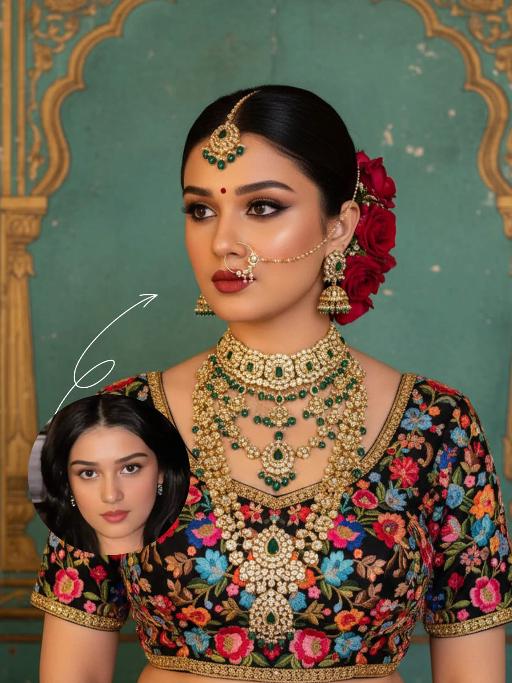
Noble Queen AI effects generated image

Noble Queen

The identity of the uploaded portrait is strictly preserved (retaining facial contours, authentic Indian skin tone, hairstyle and age). This is a bust portrait with a 3:4 aspect ratio, featuring an elegant and opulent Indian bride with rich, exquisite makeup: smoldering smoky eyes paired with a matte vintage red lip, and a red crystal bindi adorned on her forehead. Her hair is styled into a sleek high bun, with lush clusters of red roses dotted on both sides and golden beading interspersed among the tresses. An ornate maang tikka inlaid with emeralds and pearls adorns her forehead, a delicately openwork gold nath graces her nostril, multi-layered dangling gold bead earrings frame her ears, and four layers of elaborate heavy gold necklaces are stacked around her neck. Ranging from a choker to a long necklace, they are inlaid with emeralds, pearls and micro-diamonds in sequence, exuding rich and luxurious layering. She is wearing a black satin blouse, fully embellished with colorful floral embroidery in red, pink, blue and orange, and trimmed with a golden border on the edges. The background is a retro painted wall in Indian palace style: with a weathered turquoise base, it is adorned with golden carved arches and patterns on top, boasting rich, saturated colors with a timeless vintage texture. Professional portrait lighting is adopted: a warm-toned key light illuminates the bride’s face and upper body, while fill light defines her contours, highlighting the luster of the gold jewelry and the color layering of the embroidery, and creating a strong atmosphere of South Asian palace luxury. The style is a retro Indian royal bridal portrait, with ultra-high definition and delicate details, rich and saturated colors, and abundant intricate textures that perfectly restore the aesthetics of traditional aristocracy.

Three Frames

Film effect, three-screen split-frame photography (close-up, medium close-up, medium shot or long shot) in upper, middle and lower sections; cinematic Japanese-style film effect with three-screen split-frame photography in upper, middle and lower sections, set in a cold, lonely snowy scene on a clear day. A single figure with soft facial features, wearing an exquisitely tailored high-end red gown, a white mink fur hat and a white scarf, paired with sophisticated and textured accessories, stands in a vast white snowfield with snowflakes falling and snow accumulating on the scarf. The image boasts a strong cinematic texture. Upper screen: Extreme close-up of the head, with distinct individual eyelashes, fair and even skin, and snowflakes dotted on the eyelashes. Middle screen: Solo medium shot of the figure against the snowscape. Lower screen: Close-up of the figure leaning gently against a moose’s head with a soft smile, the details of the face and scarf in sharp focus, with a pale grey-blue sky and a single pine tree in the distance. Cinematic and realistic three-frame split-frame portrait: retain the facial features of the uploaded figure (with a fresh and translucent winter makeup look featuring silver shimmery eyeshadow, pink translucent blusher with fine glitter and light pink lip makeup—all on-trend winter styles in Western fashion, paired with a gentle and innocent expression, and fair, delicate skin). Soft diffused winter natural light highlights the soft texture of the skin and clothing. The figure leans affectionately beside a tame reindeer, with snow resting on the reindeer’s antlers and fur. The background features a snow-covered Christmas tree and an expanse of white snow, with fine snowflakes floating in the air. Soft natural cold light creates a fresh and translucent winter mood; a 50mm standard lens is used to preserve the delicate interactive details between the figure and the reindeer. The overall atmosphere is warm and healing, with ultra-high details and naturally saturated colors, in a horizontal composition. Avoid blurriness, disproportionate figure proportions and cluttered backgrounds.

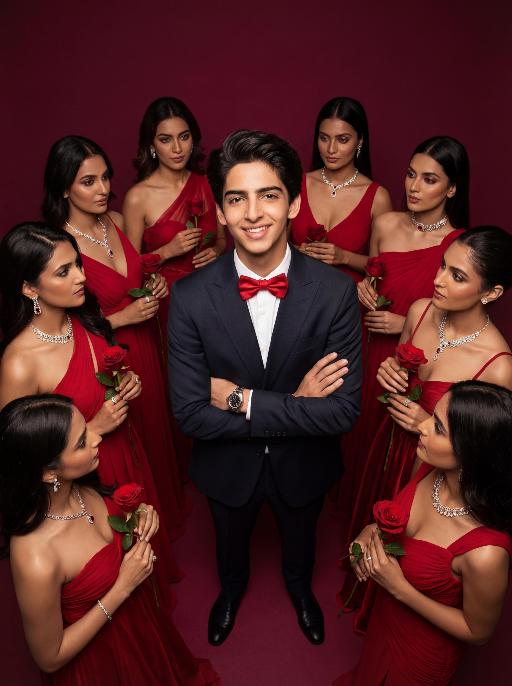
Women Surround AI effects generated image

Women Surround

Low-angle shot: The central figure from the uploaded image is the subject, with a confident smile, keeping original facial features, gender and age unchanged. He is dressed in a well-tailored high-end custom suit, paired with a red bow tie and a luxury watch, with his arms crossed over his chest. Surrounding him are 8 to 9 beautiful Indian women in stylish red high-end custom gowns, adorned with luxurious accessories, each holding a fresh red rose. These women are arranged in a circular formation around the central figure against a solid deep burgundy background. Lighting & Color Settings: High-quality cinematic lighting effects, soft yet dramatic shadows, moderate contrast, rich depth of field, smooth and translucent skin texture, creating an overall luxurious and romantic atmosphere, with a faint highlight on the facial features for enhancement. Color Hints: Dominated by rich deep red and pure black, natural and clear skin tones, highly saturated colors without overexposure, a cohesive high-end color palette with warm tones, and striking contrast between light and shadow. Style Supplement: Avant-garde fashion art style, fashion portrait photography, the overall atmosphere is elegant and charming, evoking the grandeur of a luxurious Valentine's Day celebrity gala.

Load more

Next-Gen Multi-Model AI Video Architecture

Vivago AI isn't just one engine—it’s a unified hub for the world’s most advanced video AI. Whether you need cinematic realism or high-speed social content, we provide the right model for your creative vision.

Free Generate

Beauty and Dolphins

Vacation Time

Stellar Tear

Fish Tank Supervisor

Cinematic Quality & Precision Control

Enables 4K resolution with multi-lens motion control, generating delicate scene via text prompts for customized cinematography.​

TRY NOW

Dynamic AV Sync

Auto-generates original audio to avoid copyright issues. Build 3D immersive environments through layered sound design automatically.

TRY NOW

OpenAI Sora 2

​Advanced visual storytelling with unparalleled physics and consistency.

TRY NOW

Kling v2.6 Pro

Industry-leading cinematic image animation and motion control.

TRY NOW

Google Veo 3 & 3.1

Ultra-fast generation with enhanced realism for creative workflows.

TRY NOW

Vivago AI 2.0

Our proprietary model optimized for efficiency, speed, and cost-effective generation.

TRY NOW

Users' Voice

We listen carefully to the opinions of every user.
Free Generate
Contact Us
I tried the Lip Sync feature inside Vivago.ai’s AI Video Generator for my educational podcast, and the results were stunning! The avatar's lip movements perfectly matched my audio recording, creating a professional AI-generated video without complex editing. Compared with tools like OpenAI Sora 2 and Google Veo 3.1, Vivago Image-to-Video delivers fast, studio-quality results online. It saved me hours of post-production work.
ElenaM (Spain)
Vivago’s Image-to-Video AI transformed my marketing workflow. I uploaded a product image and described the launch scene in text, and it generated a 10-second cinematic AI video with background music and dynamic visuals. The output quality rivals Kling v2.6 Pro and Google Veo 3 Fast. It’s now my go-to AI video generator for social media ads and product campaigns.
KenjiT (Japan)
As a digital artist, I use Vivago.ai 2.0 daily for Image-to-Image and AI Image-to-Video creation. The e-book covers and animated visuals I generate for clients look cinematic and professional. Unlike many standalone AI tools, Vivago integrates multiple leading models into one platform, making it easier to create copyright-safe AI images and videos for publishing.
ChenL (China)
I tried the Lip Sync feature inside Vivago.ai’s AI Video Generator for my educational podcast, and the results were stunning! The avatar's lip movements perfectly matched my audio recording, creating a professional AI-generated video without complex editing. Compared with tools like OpenAI Sora 2 and Google Veo 3.1, Vivago Image-to-Video delivers fast, studio-quality results online. It saved me hours of post-production work.
ElenaM (Spain)
Vivago’s Image-to-Video AI transformed my marketing workflow. I uploaded a product image and described the launch scene in text, and it generated a 10-second cinematic AI video with background music and dynamic visuals. The output quality rivals Kling v2.6 Pro and Google Veo 3 Fast. It’s now my go-to AI video generator for social media ads and product campaigns.
KenjiT (Japan)
As a digital artist, I use Vivago.ai 2.0 daily for Image-to-Image and AI Image-to-Video creation. The e-book covers and animated visuals I generate for clients look cinematic and professional. Unlike many standalone AI tools, Vivago integrates multiple leading models into one platform, making it easier to create copyright-safe AI images and videos for publishing.
ChenL (China)
I absolutely love Vivago’s AI Image-to-Video Generator. As a travel blogger, static images often fail to capture real atmosphere, but Vivago helps me turn photos into vivid cinematic AI videos with motion effects. It feels comparable to OpenAI Sora 2 and Google Veo 3.1, but more accessible and faster for creators who need high-quality AI videos online.
LiamK (Australia)
I tried the Lip Sync feature inside Vivago.ai’s AI Video Generator for my educational podcast, and the results were stunning! The avatar's lip movements perfectly matched my audio recording, creating a professional AI-generated video without complex editing. Compared with tools like OpenAI Sora 2 and Google Veo 3.1, Vivago Image-to-Video delivers fast, studio-quality results online. It saved me hours of post-production work.
ElenaM (Spain)
Vivago’s Image-to-Video AI transformed my marketing workflow. I uploaded a product image and described the launch scene in text, and it generated a 10-second cinematic AI video with background music and dynamic visuals. The output quality rivals Kling v2.6 Pro and Google Veo 3 Fast. It’s now my go-to AI video generator for social media ads and product campaigns.
KenjiT (Japan)
As a digital artist, I use Vivago.ai 2.0 daily for Image-to-Image and AI Image-to-Video creation. The e-book covers and animated visuals I generate for clients look cinematic and professional. Unlike many standalone AI tools, Vivago integrates multiple leading models into one platform, making it easier to create copyright-safe AI images and videos for publishing.
ChenL (China)
I absolutely love Vivago’s AI Image-to-Video Generator. As a travel blogger, static images often fail to capture real atmosphere, but Vivago helps me turn photos into vivid cinematic AI videos with motion effects. It feels comparable to OpenAI Sora 2 and Google Veo 3.1, but more accessible and faster for creators who need high-quality AI videos online.
LiamK (Australia)
Using Vivago.ai’s Image-to-Video AI has greatly enhanced my classroom teaching. I transform textbook notes into historical AI videos with cinematic filters and dynamic animations. Compared with tools like Kling v2.6 Pro and Google Veo 3 Fast, Vivago offers faster generation and easier parameter control for educators who need reliable AI video creation.
RajivG (India)
I frequently create AI videos on Vivago and publish them on TikTok and YouTube Shorts. The AI video templates and trending content ideas help me produce viral-ready clips quickly. With Vivago’s integrated models—including advanced video engines similar to OpenAI Sora 2—I can generate anime-style and cinematic social media videos that drive high engagement.
MarieJ (Spain)
What attracts me most about Vivago.ai is not only the powerful AI Video Generator but also the active AIGC creator community. It combines AI Image-to-Video, Text-to-Video, and leading model integrations like Google Veo 3.1 into one creative platform.
TomW (India)
At first, I was hesitant about using AI video tools. But after trying Vivago Image-to-Video, I realized how easy it is to create professional AI-generated videos online. I just upload an image, add a short prompt, and adjust a few settings. The results are cinematic and copyright-safe, which is essential for commercial projects.
HectorC (Mexico)
Using Vivago.ai’s Image-to-Video AI has greatly enhanced my classroom teaching. I transform textbook notes into historical AI videos with cinematic filters and dynamic animations. Compared with tools like Kling v2.6 Pro and Google Veo 3 Fast, Vivago offers faster generation and easier parameter control for educators who need reliable AI video creation.
RajivG (India)
I frequently create AI videos on Vivago and publish them on TikTok and YouTube Shorts. The AI video templates and trending content ideas help me produce viral-ready clips quickly. With Vivago’s integrated models—including advanced video engines similar to OpenAI Sora 2—I can generate anime-style and cinematic social media videos that drive high engagement.
MarieJ (Spain)
What attracts me most about Vivago.ai is not only the powerful AI Video Generator but also the active AIGC creator community. It combines AI Image-to-Video, Text-to-Video, and leading model integrations like Google Veo 3.1 into one creative platform.
TomW (India)
At first, I was hesitant about using AI video tools. But after trying Vivago Image-to-Video, I realized how easy it is to create professional AI-generated videos online. I just upload an image, add a short prompt, and adjust a few settings. The results are cinematic and copyright-safe, which is essential for commercial projects.
HectorC (Mexico)