Image to Video

Transform text into stunning visuals with vivago.ai's AI image/video generator. Explore curated effects, professional editing tools, and seamless creativity for high-quality content. Ideal for innovators and creators.

Recreate
arrow

FAQs

How do I animate static images using vivago.ai?

Upload any image (JPG/PNG), and our AI models will automatically detect content layers and generate 5/10-second video clips with dynamic motion patterns.

Can I control specific movement directions?

Yes. Combine image uploads with text prompts like 'swaying leaves left-to-right' or 'a girl waves her hands'.

What if AI-generated videos don't match my expectation?

Utilize iterative refinement cycles: 1) Try a few more times, 2) Modify prompts, 3) Visit the Explore section to use templates for more consistent results.

What membership benefits does Pro offer?

Pro membership offers better outcomes, more generation credits, and premium features. Details available at: https://vivago.ai/subscribe

More From VIVAGO AI

Feather Crown AI effects generated image

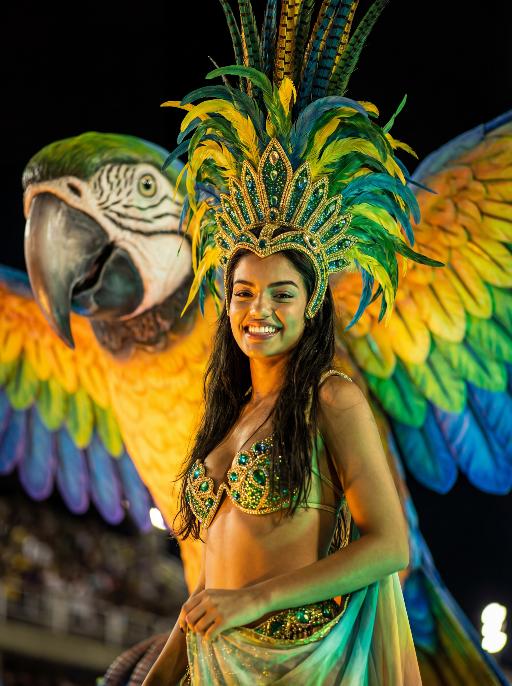
Feather Crown

Use the facial features, gender and age of the character in the uploaded picture exactly as they are, reimagined as a stunning Brazilian Carnival queen. Bust shot, the character occupies the largest proportion of the frame, sharp focus on face to clearly capture the confident and joyful expression details. stands proudly atop a giant, brightly colored macaw float (only the macaw's head and upper wings are visible in the background to complement the scene). The macaw is a large, realistic sculpture with dazzling green, yellow, and blue iridescent feathers, a sharp black beak, and sharp, lively eyes. wears an elaborate and exquisite traditional Brazilian Carnival costume: a grand colorful feather headdress (matching the macaw's tones) with delicate gold trim, a jeweled bikini top in green and gold, and the upper part of a flowing colorful skirt with gold and green accents visible at the shoulder and waist. Set during the Rio Carnival night parade, dramatic stage lighting—warm golden spotlights, neon green and blue fill lights—illuminates face and upper body, with the dark, atmospheric night background slightly blurred (bokeh effect) to emphasize the subject. The overall style is a high-end fashion cinematic photograph, rich saturated colors, ultra-sharp details, 8K resolution, shallow depth of field, professional portrait lighting.

StreetStart

The character in the uploaded picture (unchanged facial features, gender and age). She has short, wavy dark hair and a joyful, smiling expression, with warm brown eyes. She wears an elaborate Carnival costume: a large, ornate headdress made of layered feathers in teal, yellow, and red, adorned with gold and gemstone decorations. Her outfit includes a teal and gold bejeweled bikini top, matching arm cuffs, and a short, flared skirt made of teal feathers with gold accents. She is captured mid-dance, one arm extended forward and the other bent, radiating energy. In the background, other Carnival dancers in colorful feathered costumes are blurred, set against a sunlit street with festive decorations. The style is a high-detail anime illustration with bright, saturated colors, dynamic composition, and a lively, celebratory atmosphere.

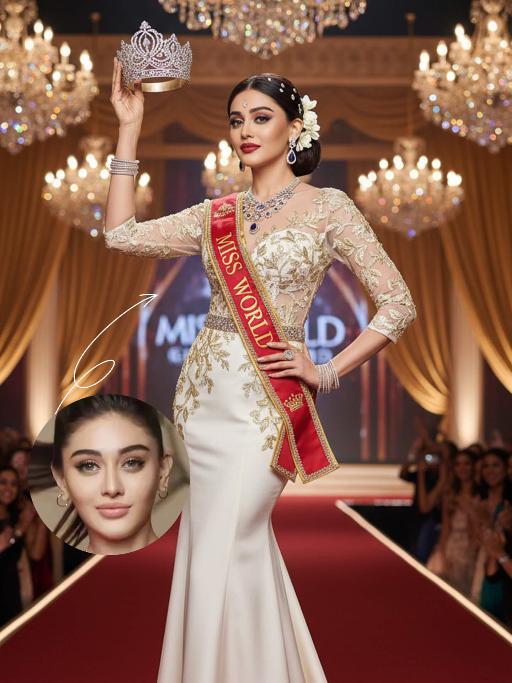
Miss World AI effects generated image

Miss World

The identity of the uploaded portrait is strictly preserved (retaining facial contours, authentic Indian skin tone, hairstyle and age). This is a full-body portrait with a 3:4 aspect ratio and a 1:6 head-to-body ratio to accentuate her tall and exquisite figure. The subject is a stunning and glamorous Indian Miss World champion with sophisticated and elegant makeup: deep three-dimensional eye makeup paired with a matte true red lip, a Swarovski crystal bindi adorned on her forehead, and a fresh, flawless base that exudes the high-end texture of a beauty pageant. Her hair is styled into an elegant low chignon with pearl hair chains twined around the ends and white gardenia petals dotted at the temples. She is wearing a tailor-made ivory white mermaid gown: the bodice features a lace patchwork sheer design fully embellished with golden vine embroidery, a diamond-paved waist cincher at the waist tightens the waistline to outline perfect body curves; the skirt is crafted from silk with an exquisite drape, and its floor-length cut exudes inherent grandeur. She holds the diamond-encrusted Miss World crown high in her right hand, and a red sash printed with the words Miss World is slung over her left shoulder, with golden traditional Indian totems embroidered along the sash’s edges. Accessory details: a multi-layered diamond clavicle chain around her neck, teardrop-shaped sapphire earrings at her ears, stacked platinum bangles on her wrists, and golden platform high heels on her feet. The background is the award stage of the Miss World final: dazzling crystal chandeliers hang overhead, golden backdrops drape on both sides, the blurred cheering crowd and sparkling flash halos fill the audience below, and the stage floor is covered with a red velvet carpet. Professional red carpet portrait lighting is adopted: the key light illuminates the subject’s entire body, fill light outlines the lace texture of the gown and the luster of the jewelry, and backlight creates a halo around the hair, building a glorious atmosphere of the championship-winning moment. The style is a high-end fashion beauty pageant portrait with 8K ultra-high definition, abundant details and bright, saturated colors, fully showcasing the confidence, elegance and championship aura of the Indian woman.

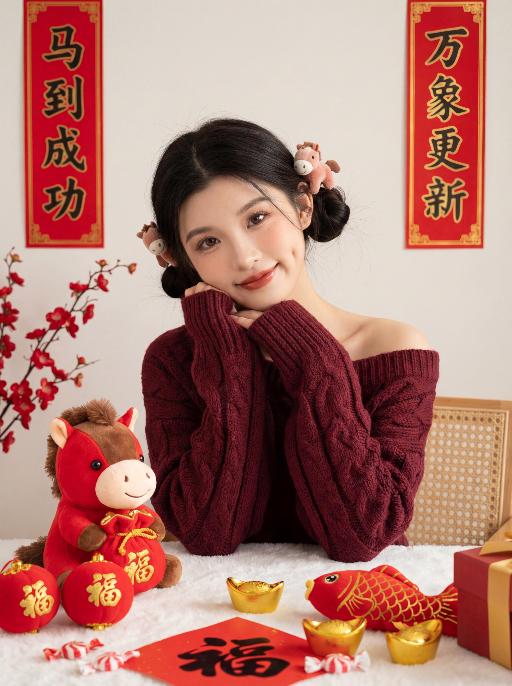
Lovely AI effects generated image

Lovely

zero deviation uploaded facial features (contours, eyes, lips, youthful look), young East Asian sweet girl, half-body sitting, elbows on table, body slightly right-tilted, head gently tilted, sweet smile with shallow dimples, direct eye contact, natural lively posture, two low rounded space buns, playful vibe, each bun adorned with small pony plush hair accessory, born-perfect base makeup, brownish-black wild eyebrows, earth-tone eye makeup, teardrop pearlescent under-eye highlight, sunflower curled long lashes, peach blush, mirror-finish reddish-brown lip glaze, cupid's bow highlighter, clean light texture, burgundy chunky cable-knit off-shoulder sweater, loose slouchy, wide cuffs, waist-length, white fluffy tablecloth, red plush pony (brown mane, red pouch with golden patterns) on table, red balls printed with golden 福 characters, golden ingots, red fish plush toy with golden scales, red paper with handwritten 福 characters, red-white candies, red-gold gift box corner, traditional Chinese New Year scene, off-white matte wall, red vertical couplets with golden borders, left couplet: 马到成功, right couplet: 万象更新, positions fixed, no character modification allowed, red plum blossom branch, light brown rattan chair edge, clean background, strong festive vibe, soft warm side-front natural light, no harsh shadows, texture highlighting, red-gold-off-white color palette, festive warm healing, Year of the Horse charm, 8K ultra HD, photorealistic, ultra-detailed, film texture, noise-free, clear transparent 负向提示词: Do not modify the content of the couplet characters, do not make typos, do not add or delete any strokes, do not use cursive script, do not use blurry fonts, do not distort the characters, do not add extra text, do not change the positions of the couplets, do not alter any characters in "马到成功" and "万象更新", do not cartoonize the characters, and do not artistically deform the characters.

Times Square AI effects generated image

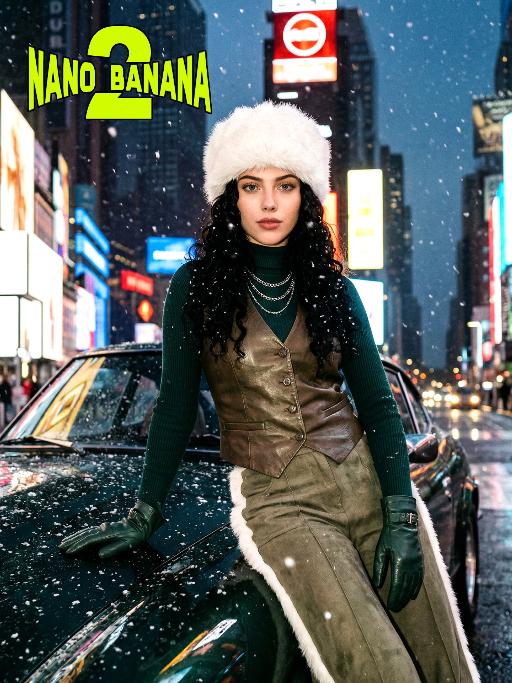
Times Square

[Scene] In the dark, snowy New York Times Square, during the winter night when it gets dark, heavy snow is falling, with snowflakes falling clearly. The iconic neon advertisements are shining in the background. The damp asphalt reflects the light of the neon lights. The towering skyscrapers are clearly visible in the snow and fog, with snowflakes flying all around. [Subject] The person in the uploaded picture (with facial features, gender, and age unchanged) has long black curly hair, is wearing a white fluffy artificial fur hat in a European style, has a European minimalist makeup look, and the golden light outlines a soft and natural expression, with a calm demeanor, presenting a handsome posture. Snowflakes fall on the person's hair and coat, and also on the person's body. [Posture] - Body: Sideways leaning against the engine hood of a dark green luxury retro sports car, the body's center of gravity tilts to the right, the torso slightly twisting to face the camera - Legs: Right knee bent; left leg straight down, foot on the ground - Arms: Right arm stretched downward, palm flat against the car hood to provide support, fingers slightly spread; left arm relaxed, hand on the left thigh - Head and gaze: Head remains upright, facing the camera directly, eyes forward, expression confident - Overall: A relaxed but energetic fashion editor posture, casual and cool atmosphere, elongated body lines to enhance visual effect [Clothing] Leading-edge autumn design: 1. Outer layer: A well-tailored leather fabric vest with silver chain details and perforated patterns, worn over a fitted dark green high-neck sweater; 2. Bottom: High-waisted dark green wide-leg work pants, with a white fur trim (coordinated with the white fur belt); 3. Accessories: Dark green long leather gloves, brim with white artificial fur trim, multi-layer silver chain necklace; 4. Footwear: Simple black ankle boots (partly visible), Y2K style, retro style, leather and metal texture. [Photography and Lighting] Mid-close-up shot, dark environment, using 35mm film photography style, Kodak Gold 200 film, warm golden backlight to outline the hair and snowflakes, soft fill light to retain the natural skin texture of the face, shallow depth of field blurs the background advertisements, film grain and soft bokeh effect when snow falls, strong light contrast, foreground with a lot of blurred and clear snowflakes falling. [Style] The image style is portrait, the edges of the picture add a similar film graininess effect, dark atmosphere, high-end fashion editor, hyper-realistic details, fashion avant-garde photography art, 8K resolution, no excessive smoothing processing, using blue-green and orange contrast for color grading - the style has a cinematic feel.

Midnight Neon AI effects generated image

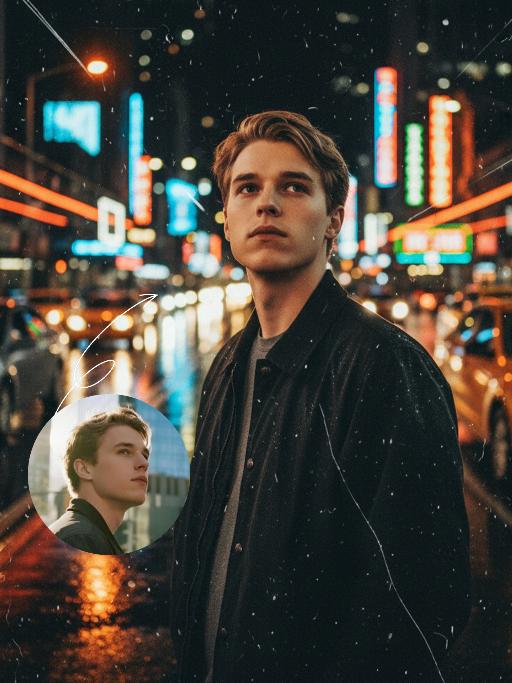
Midnight Neon

Professional retro film-style portrait photography, with the first uploaded portrait used in the frame for strict identity consistency (unchanged facial features, hairstyle, skin tone and age). The figure’s face is naturally retouched for a flawless skin texture, paired with dramatic light and shadow contrast on the facial features. In this street photography portrait, the figure stands at the center of a bustling city street on a rainy night (the vibrant night view of Tokyo’s busy thoroughfares), captured in a close-up shot and positioned right at the frame’s center. The traffic flow in the background (vehicles and pedestrians speeding by to create blurred dynamic streaks) and neon lights feature dynamic motion blur effects, with smudged texture overlays to enhance the narrative mood. The dim lighting boasts high contrast; the wet road surfaces reflect warm orange glows and cool-toned neon light, with soft bokeh spots cast by street lamps and car headlights. Color palette: based on black and white tones, the neon hues are processed with high saturation, dominated by dark shades to create a striking contrast between warm and cool tones. The image is enhanced with film grain texture, depth of field breakup details, cinematic black aesthetic, and ultra-realistic, ultra-fine textures, plus a lifelike effect of raindrops splattering on the lens. Shot with a slow shutter speed, a large aperture and a low shutter setting; an orange vertical digital date watermark (2026:00:00) is added to the bottom right corner.

Load more

Next-Gen Multi-Model AI Video Architecture

Vivago AI isn't just one engine—it’s a unified hub for the world’s most advanced video AI. Whether you need cinematic realism or high-speed social content, we provide the right model for your creative vision.

Free Generate

Beauty and Dolphins

Vacation Time

Stellar Tear

Fish Tank Supervisor

Cinematic Quality & Precision Control

Enables 4K resolution with multi-lens motion control, generating delicate scene via text prompts for customized cinematography.​

TRY NOW

Dynamic AV Sync

Auto-generates original audio to avoid copyright issues. Build 3D immersive environments through layered sound design automatically.

TRY NOW

OpenAI Sora 2

​Advanced visual storytelling with unparalleled physics and consistency.

TRY NOW

Kling v2.6 Pro

Industry-leading cinematic image animation and motion control.

TRY NOW

Google Veo 3 & 3.1

Ultra-fast generation with enhanced realism for creative workflows.

TRY NOW

Vivago AI 2.0

Our proprietary model optimized for efficiency, speed, and cost-effective generation.
TRY NOW

Users' Voice

We listen carefully to the opinions of every user.
Free Generate
Contact Us
I tried the Lip Sync feature inside Vivago.ai’s AI Video Generator for my educational podcast, and the results were stunning! The avatar's lip movements perfectly matched my audio recording, creating a professional AI-generated video without complex editing. Compared with tools like OpenAI Sora 2 and Google Veo 3.1, Vivago Image-to-Video delivers fast, studio-quality results online. It saved me hours of post-production work.
ElenaM (Spain)
Vivago’s Image-to-Video AI transformed my marketing workflow. I uploaded a product image and described the launch scene in text, and it generated a 10-second cinematic AI video with background music and dynamic visuals. The output quality rivals Kling v2.6 Pro and Google Veo 3 Fast. It’s now my go-to AI video generator for social media ads and product campaigns.
KenjiT (Japan)
As a digital artist, I use Vivago.ai 2.0 daily for Image-to-Image and AI Image-to-Video creation. The e-book covers and animated visuals I generate for clients look cinematic and professional. Unlike many standalone AI tools, Vivago integrates multiple leading models into one platform, making it easier to create copyright-safe AI images and videos for publishing.
ChenL (China)
I tried the Lip Sync feature inside Vivago.ai’s AI Video Generator for my educational podcast, and the results were stunning! The avatar's lip movements perfectly matched my audio recording, creating a professional AI-generated video without complex editing. Compared with tools like OpenAI Sora 2 and Google Veo 3.1, Vivago Image-to-Video delivers fast, studio-quality results online. It saved me hours of post-production work.
ElenaM (Spain)
Vivago’s Image-to-Video AI transformed my marketing workflow. I uploaded a product image and described the launch scene in text, and it generated a 10-second cinematic AI video with background music and dynamic visuals. The output quality rivals Kling v2.6 Pro and Google Veo 3 Fast. It’s now my go-to AI video generator for social media ads and product campaigns.
KenjiT (Japan)
As a digital artist, I use Vivago.ai 2.0 daily for Image-to-Image and AI Image-to-Video creation. The e-book covers and animated visuals I generate for clients look cinematic and professional. Unlike many standalone AI tools, Vivago integrates multiple leading models into one platform, making it easier to create copyright-safe AI images and videos for publishing.
ChenL (China)
I absolutely love Vivago’s AI Image-to-Video Generator. As a travel blogger, static images often fail to capture real atmosphere, but Vivago helps me turn photos into vivid cinematic AI videos with motion effects. It feels comparable to OpenAI Sora 2 and Google Veo 3.1, but more accessible and faster for creators who need high-quality AI videos online.
LiamK (Australia)
I tried the Lip Sync feature inside Vivago.ai’s AI Video Generator for my educational podcast, and the results were stunning! The avatar's lip movements perfectly matched my audio recording, creating a professional AI-generated video without complex editing. Compared with tools like OpenAI Sora 2 and Google Veo 3.1, Vivago Image-to-Video delivers fast, studio-quality results online. It saved me hours of post-production work.
ElenaM (Spain)
Vivago’s Image-to-Video AI transformed my marketing workflow. I uploaded a product image and described the launch scene in text, and it generated a 10-second cinematic AI video with background music and dynamic visuals. The output quality rivals Kling v2.6 Pro and Google Veo 3 Fast. It’s now my go-to AI video generator for social media ads and product campaigns.
KenjiT (Japan)
As a digital artist, I use Vivago.ai 2.0 daily for Image-to-Image and AI Image-to-Video creation. The e-book covers and animated visuals I generate for clients look cinematic and professional. Unlike many standalone AI tools, Vivago integrates multiple leading models into one platform, making it easier to create copyright-safe AI images and videos for publishing.
ChenL (China)
I absolutely love Vivago’s AI Image-to-Video Generator. As a travel blogger, static images often fail to capture real atmosphere, but Vivago helps me turn photos into vivid cinematic AI videos with motion effects. It feels comparable to OpenAI Sora 2 and Google Veo 3.1, but more accessible and faster for creators who need high-quality AI videos online.
LiamK (Australia)
Using Vivago.ai’s Image-to-Video AI has greatly enhanced my classroom teaching. I transform textbook notes into historical AI videos with cinematic filters and dynamic animations. Compared with tools like Kling v2.6 Pro and Google Veo 3 Fast, Vivago offers faster generation and easier parameter control for educators who need reliable AI video creation.
RajivG (India)
I frequently create AI videos on Vivago and publish them on TikTok and YouTube Shorts. The AI video templates and trending content ideas help me produce viral-ready clips quickly. With Vivago’s integrated models—including advanced video engines similar to OpenAI Sora 2—I can generate anime-style and cinematic social media videos that drive high engagement.
MarieJ (Spain)
What attracts me most about Vivago.ai is not only the powerful AI Video Generator but also the active AIGC creator community. It combines AI Image-to-Video, Text-to-Video, and leading model integrations like Google Veo 3.1 into one creative platform.
TomW (India)
At first, I was hesitant about using AI video tools. But after trying Vivago Image-to-Video, I realized how easy it is to create professional AI-generated videos online. I just upload an image, add a short prompt, and adjust a few settings. The results are cinematic and copyright-safe, which is essential for commercial projects.
HectorC (Mexico)
Using Vivago.ai’s Image-to-Video AI has greatly enhanced my classroom teaching. I transform textbook notes into historical AI videos with cinematic filters and dynamic animations. Compared with tools like Kling v2.6 Pro and Google Veo 3 Fast, Vivago offers faster generation and easier parameter control for educators who need reliable AI video creation.
RajivG (India)
I frequently create AI videos on Vivago and publish them on TikTok and YouTube Shorts. The AI video templates and trending content ideas help me produce viral-ready clips quickly. With Vivago’s integrated models—including advanced video engines similar to OpenAI Sora 2—I can generate anime-style and cinematic social media videos that drive high engagement.
MarieJ (Spain)
What attracts me most about Vivago.ai is not only the powerful AI Video Generator but also the active AIGC creator community. It combines AI Image-to-Video, Text-to-Video, and leading model integrations like Google Veo 3.1 into one creative platform.
TomW (India)
At first, I was hesitant about using AI video tools. But after trying Vivago Image-to-Video, I realized how easy it is to create professional AI-generated videos online. I just upload an image, add a short prompt, and adjust a few settings. The results are cinematic and copyright-safe, which is essential for commercial projects.
HectorC (Mexico)