Image to Video

Ignite your visuals with AI-generated dynamic flame effects. Create captivating fire animations featuring vibrant hues, mesmerizing movement, and lifelike flickering tendrils. Perfect for video projects, digital art, or branding. Powered by vivago.ai's advanced AI tools for realistic heat simulations and seamless integration. Transform prompts into blazing masterpieces with professional-grade flame effects.

Recreate
arrow

FAQs

How to generate images/videos from text prompts?

Describe the visual content in natural language (e.g., 'A cyberpunk cat wearing neon goggles') and our AI models will create outputs. Complex prompts trigger multi-stage NLP parsing for enhanced accuracy.

How to refine unsatisfactory results?

Use our Prompt Bot - an AI-powered optimizer that suggests technical modifiers. Simply describe your ideas, desired changes ('more metallic texture'), then you will get optimized prompt variants.

When should I use reference images?

Upload references to: 1) Guide character consistency (e.g., faces/outfits), 2) Control motion patterns in videos using our feature matching algorithm. Supports JPG/PNG

What's the credit system?

Daily login grants 100 credits. Upgrade options: 1) Premium Membership, 2) Credit Packs. Details: https://vivago.ai/subscribe

More From VIVAGO AI

Industry AI effects generated image

Industry

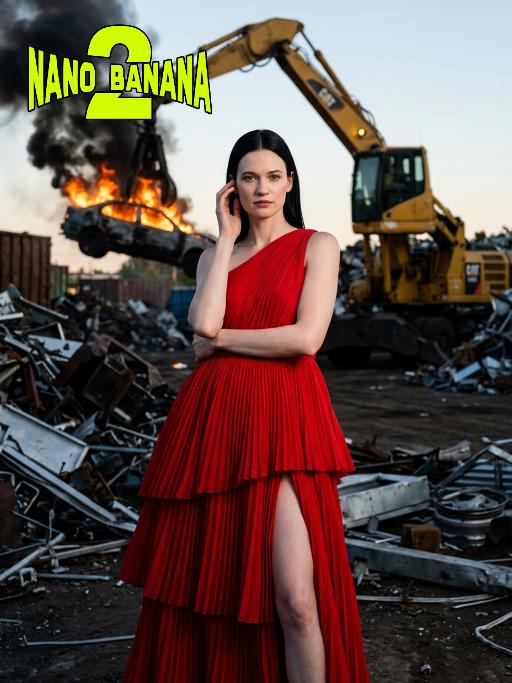
Panoramic shot: The person in the uploaded picture (with unchanged facial features, age and gender) has a refined makeup style. She stands in a junk recycling station covered with distorted metal fragments, wearing a red high-cut, layered, high-end tailored pleated evening gown. Her black straight hair is neatly and smoothly styled. The makeup is clean and transparent, exuding a cold and elegant atmosphere; the posture is elegant: one hand gently rests on the ear, the other arm crossed over the waist, the body slightly tilting towards the camera, the expression is cold and sharp, giving a sense of detachment. In the background, a yellow excavator lifts a burning car, thick smoke billowing upwards. The shooting uses a professional full-frame camera, a 135mm telephoto lens, horizontal perspective, side backlighting at dusk, a strong contrast between warm and cool light, high contrast, rich colors, a fashionable editing style, surreal industrial aesthetics, cinematic visual tension, ultra-fine and realistic effects, avant-garde fashion photography, cinematic realistic effects. The top-level strong contrast lighting effect (side lighting, the edges of the person's face are illuminated).

Journalist AI effects generated image

Journalist

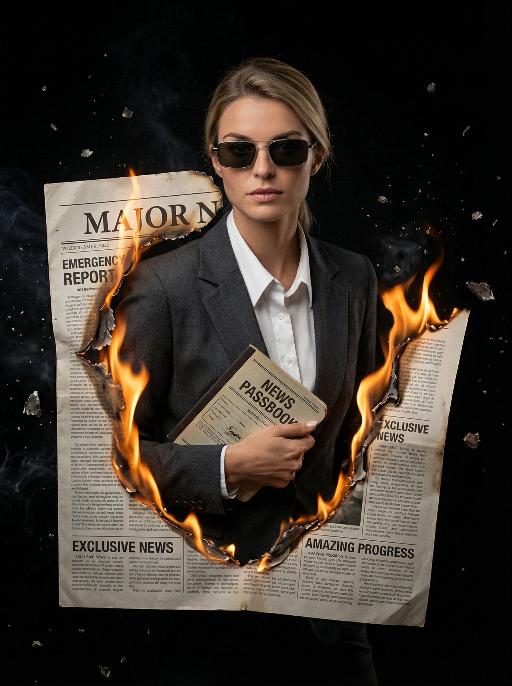
Masterpiece, ultra-realistic 8K images, with extremely rich details. The picture is clear and sharp. The main figure in the picture is the person from the uploaded image (with unchanged facial features, gender and age). The image shows the image of a reporter wearing modern rectangular sunglasses, wearing a dark gray suit jacket, a white collar shirt neatly and stably, holding a vintage news passbook, breaking out from a jagged gap at the "Major News" section of the newspaper cover. The realistic orange-yellow flames lick the charred edges of the newspaper, the floating ashes, presenting a dramatic cinematic contrast effect, a melancholic and urgent aesthetic style, a cinematic news documentary style, shallow depth of field effect, a black empty background, rich details on the newspaper (titles such as "Emergency Report", "Exclusive News", "Amazing Progress"), dynamic composition, professional news photography.

Dinner Party

Keep the facial features of the uploaded figure unchanged, with an elegant, noble and sophisticated retro makeup look: natural facial blurring for delicate, smooth skin, smudged diffused eyeliner, slender curved eyebrows, matte vintage red lipstick, light pink foundation, and defined exaggerated cheekbones – the makeup is exquisitely beautiful. The figure is dressed in a high-end custom elaborate gown crafted from red velvet with luxury diamond and pearl inlays, boasting a designer brand aesthetic of noble elegance, paired with delicate high-grade diamond accessories. Set the scene as an upscale Christmas dinner in a premium VIP venue with a Christmas tree in the background. At the bottom of the frame, place the large artistic typography "Merry Christmas!" with a sparkling golden texture and ultra-luxury playful English floral font; scatter small golden stars, silver snowflake patterns, and the secondary typography "A fashionable Christmas VIP dinner party" around the main text. Adopt a high-end magazine photoshoot style with avant-garde fashion, strong design sense, artistic appeal, retro charm and cinematic texture. Maintain the camera focal length for a close-up shot framing the figure’s upper body, shoot with a large aperture to create a blurred background and bokeh effect for other people. Apply film filters, flash lighting, dreamy soft focus, gentle glow, luminous halation, and Fuji film texture, with a dim light atmosphere. Decorate the four corners and edges of the frame with golden star and silver snowflake patterns.

Chinese Child

Ultra-realistic 8K portrait photography in ancient Chinese style; the figure from the uploaded image (unchanged facial features, gender and age) is seated on a stone, with two braids adorned with pink hair accessories, wearing a pale pink Hanfu with exquisite dark blue embroidery, hands folded, smiling and looking at the camera. Beside the figure are a cute red fox (also looking at the camera), a mini pine tree and a lantern, captured from a horizontal perspective. The scene is lit by soft photographic lighting plus the warm glow of the lantern. Color palette: pale pink of the Hanfu, orange of the fox, dark green of the pine tree, with a magical and deep forest and pine woodland night scene as the background. The work features an ultra-realistic photographic style, art photography studio aesthetic, professional studio lighting, premium texture, avant-garde artistic photography, and cinematic-level image quality, with special effects of falling leaves and fluttering fireflies added.

Lovely AI effects generated image

Lovely

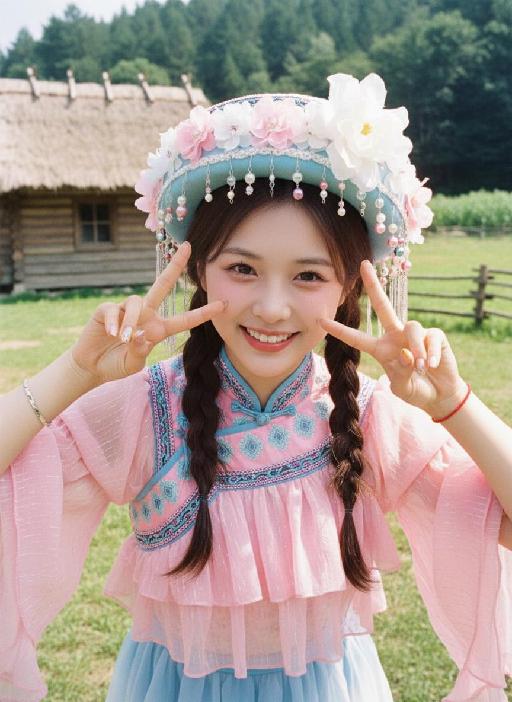
Strictly lock facial features: fully preserving the original facial contours, skin texture, eye shape, lip shape, and youthful appearance with zero deviations allowed. Fujifilm CCD camera soft light quality: Soft, diffused illumination with subtle film grain, gentle warm-toned color grading, low contrast, and a slightly hazy, dreamy retro aesthetic. Exact high-angle top-down shot with a 15° rightward tilt (camera positioned above, looking down and angled), half-body close-up (subject occupies 80% of the frame, ensuring elbows are fully visible in the shot), a young and sweet East Asian woman with a bright, healing smile showing teeth, eyes curved with warmth; makeup is fresh and sweet: pink blush, glossy lips, shimmery eye makeup; double braid hairstyle adorned with pink and white small bead ornaments. Action adjusted for full elbow visibility: Both hands raised to the cheeks, index fingers gently touching both sides of the cheeks in a peace sign gesture, elbows naturally bent and fully exposed on the left and right sides of the frame, upper body slightly leaning forward to enhance interaction with the camera. Wearing: - Headdress: Blue-pink color-blocked heavy ethnic-style hat, main body is a light blue three-dimensional cap shape, edge decorated with pink and white flowers, pearls, silver small tassels and colorful pom-poms, with a large white flower on the top - Accessories: Thin silver bracelet on the left hand, red string bracelet on the right hand - Clothing: Pink layered organza wide-sleeved top (with fine luster, showing fluffy folds), inner wear blue-pink color-blocked ethnic-style stand-up collar clothing (neckline with geometric patterns and blue laces), with the edge of the blue-white gradient skirt exposed at the bottom Background: Outdoor rural scene, left side is a log cabin (with thatched roof), right side is a wooden fence and green grass, with dense green trees in the distance; strong top-side backlight, creating obvious highlights and airy halos, the picture has a slight overexposure effect, the overall tone is dominated by pink, blue, and green, fresh, sweet, and dreamy, strictly 1:1 replicate the original image's movements, clothing details, and light and shadow tones.

Load more

Next-Gen Multi-Model AI Video Architecture

Vivago AI isn't just one engine—it’s a unified hub for the world’s most advanced video AI. Whether you need cinematic realism or high-speed social content, we provide the right model for your creative vision.

Free Generate

Beauty and Dolphins

Vacation Time

Stellar Tear

Fish Tank Supervisor

Cinematic Quality & Precision Control

Enables 4K resolution with multi-lens motion control, generating delicate scene via text prompts for customized cinematography.​

TRY NOW

Dynamic AV Sync

Auto-generates original audio to avoid copyright issues. Build 3D immersive environments through layered sound design automatically.

TRY NOW

OpenAI Sora 2

​Advanced visual storytelling with unparalleled physics and consistency.

TRY NOW

Kling v2.6 Pro

Industry-leading cinematic image animation and motion control.

TRY NOW

Google Veo 3 & 3.1

Ultra-fast generation with enhanced realism for creative workflows.

TRY NOW

Vivago AI 2.0

Our proprietary model optimized for efficiency, speed, and cost-effective generation.

TRY NOW

Users' Voice

We listen carefully to the opinions of every user.
Free Generate
Contact Us
I tried the Lip Sync feature inside Vivago.ai’s AI Video Generator for my educational podcast, and the results were stunning! The avatar's lip movements perfectly matched my audio recording, creating a professional AI-generated video without complex editing. Compared with tools like OpenAI Sora 2 and Google Veo 3.1, Vivago Image-to-Video delivers fast, studio-quality results online. It saved me hours of post-production work.
ElenaM (Spain)
Vivago’s Image-to-Video AI transformed my marketing workflow. I uploaded a product image and described the launch scene in text, and it generated a 10-second cinematic AI video with background music and dynamic visuals. The output quality rivals Kling v2.6 Pro and Google Veo 3 Fast. It’s now my go-to AI video generator for social media ads and product campaigns.
KenjiT (Japan)
As a digital artist, I use Vivago.ai 2.0 daily for Image-to-Image and AI Image-to-Video creation. The e-book covers and animated visuals I generate for clients look cinematic and professional. Unlike many standalone AI tools, Vivago integrates multiple leading models into one platform, making it easier to create copyright-safe AI images and videos for publishing.
ChenL (China)
I tried the Lip Sync feature inside Vivago.ai’s AI Video Generator for my educational podcast, and the results were stunning! The avatar's lip movements perfectly matched my audio recording, creating a professional AI-generated video without complex editing. Compared with tools like OpenAI Sora 2 and Google Veo 3.1, Vivago Image-to-Video delivers fast, studio-quality results online. It saved me hours of post-production work.
ElenaM (Spain)
Vivago’s Image-to-Video AI transformed my marketing workflow. I uploaded a product image and described the launch scene in text, and it generated a 10-second cinematic AI video with background music and dynamic visuals. The output quality rivals Kling v2.6 Pro and Google Veo 3 Fast. It’s now my go-to AI video generator for social media ads and product campaigns.
KenjiT (Japan)
As a digital artist, I use Vivago.ai 2.0 daily for Image-to-Image and AI Image-to-Video creation. The e-book covers and animated visuals I generate for clients look cinematic and professional. Unlike many standalone AI tools, Vivago integrates multiple leading models into one platform, making it easier to create copyright-safe AI images and videos for publishing.
ChenL (China)
I absolutely love Vivago’s AI Image-to-Video Generator. As a travel blogger, static images often fail to capture real atmosphere, but Vivago helps me turn photos into vivid cinematic AI videos with motion effects. It feels comparable to OpenAI Sora 2 and Google Veo 3.1, but more accessible and faster for creators who need high-quality AI videos online.
LiamK (Australia)
I tried the Lip Sync feature inside Vivago.ai’s AI Video Generator for my educational podcast, and the results were stunning! The avatar's lip movements perfectly matched my audio recording, creating a professional AI-generated video without complex editing. Compared with tools like OpenAI Sora 2 and Google Veo 3.1, Vivago Image-to-Video delivers fast, studio-quality results online. It saved me hours of post-production work.
ElenaM (Spain)
Vivago’s Image-to-Video AI transformed my marketing workflow. I uploaded a product image and described the launch scene in text, and it generated a 10-second cinematic AI video with background music and dynamic visuals. The output quality rivals Kling v2.6 Pro and Google Veo 3 Fast. It’s now my go-to AI video generator for social media ads and product campaigns.
KenjiT (Japan)
As a digital artist, I use Vivago.ai 2.0 daily for Image-to-Image and AI Image-to-Video creation. The e-book covers and animated visuals I generate for clients look cinematic and professional. Unlike many standalone AI tools, Vivago integrates multiple leading models into one platform, making it easier to create copyright-safe AI images and videos for publishing.
ChenL (China)
I absolutely love Vivago’s AI Image-to-Video Generator. As a travel blogger, static images often fail to capture real atmosphere, but Vivago helps me turn photos into vivid cinematic AI videos with motion effects. It feels comparable to OpenAI Sora 2 and Google Veo 3.1, but more accessible and faster for creators who need high-quality AI videos online.
LiamK (Australia)
Using Vivago.ai’s Image-to-Video AI has greatly enhanced my classroom teaching. I transform textbook notes into historical AI videos with cinematic filters and dynamic animations. Compared with tools like Kling v2.6 Pro and Google Veo 3 Fast, Vivago offers faster generation and easier parameter control for educators who need reliable AI video creation.
RajivG (India)
I frequently create AI videos on Vivago and publish them on TikTok and YouTube Shorts. The AI video templates and trending content ideas help me produce viral-ready clips quickly. With Vivago’s integrated models—including advanced video engines similar to OpenAI Sora 2—I can generate anime-style and cinematic social media videos that drive high engagement.
MarieJ (Spain)
What attracts me most about Vivago.ai is not only the powerful AI Video Generator but also the active AIGC creator community. It combines AI Image-to-Video, Text-to-Video, and leading model integrations like Google Veo 3.1 into one creative platform.
TomW (India)
At first, I was hesitant about using AI video tools. But after trying Vivago Image-to-Video, I realized how easy it is to create professional AI-generated videos online. I just upload an image, add a short prompt, and adjust a few settings. The results are cinematic and copyright-safe, which is essential for commercial projects.
HectorC (Mexico)
Using Vivago.ai’s Image-to-Video AI has greatly enhanced my classroom teaching. I transform textbook notes into historical AI videos with cinematic filters and dynamic animations. Compared with tools like Kling v2.6 Pro and Google Veo 3 Fast, Vivago offers faster generation and easier parameter control for educators who need reliable AI video creation.
RajivG (India)
I frequently create AI videos on Vivago and publish them on TikTok and YouTube Shorts. The AI video templates and trending content ideas help me produce viral-ready clips quickly. With Vivago’s integrated models—including advanced video engines similar to OpenAI Sora 2—I can generate anime-style and cinematic social media videos that drive high engagement.
MarieJ (Spain)
What attracts me most about Vivago.ai is not only the powerful AI Video Generator but also the active AIGC creator community. It combines AI Image-to-Video, Text-to-Video, and leading model integrations like Google Veo 3.1 into one creative platform.
TomW (India)
At first, I was hesitant about using AI video tools. But after trying Vivago Image-to-Video, I realized how easy it is to create professional AI-generated videos online. I just upload an image, add a short prompt, and adjust a few settings. The results are cinematic and copyright-safe, which is essential for commercial projects.
HectorC (Mexico)