Image to Video

Transform text into stunning visuals with vivago.ai's AI image/video generator. Explore curated effects, professional editing tools, and seamless creativity for high-quality content. Ideal for innovators and creators.

Recreate
arrow

FAQs

How do I animate static images using vivago.ai?

Upload any image (JPG/PNG), and our AI models will automatically detect content layers and generate 5/10-second video clips with dynamic motion patterns.

Can I control specific movement directions?

Yes. Combine image uploads with text prompts like 'swaying leaves left-to-right' or 'a girl waves her hands'.

What if AI-generated videos don't match my expectation?

Utilize iterative refinement cycles: 1) Try a few more times, 2) Modify prompts, 3) Visit the Explore section to use templates for more consistent results.

What membership benefits does Pro offer?

Pro membership offers better outcomes, more generation credits, and premium features. Details available at: https://vivago.ai/subscribe

More From VIVAGO AI

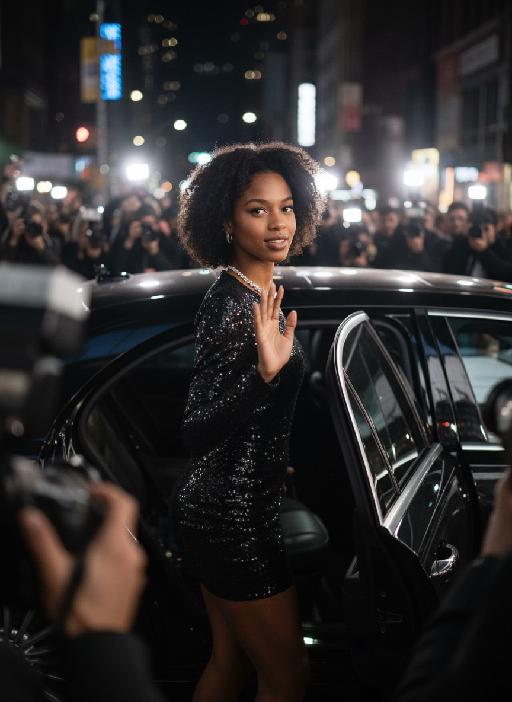
Hollywood Star AI effects generated image

Hollywood Star

A medium close-up shot from a frontal perspective with a slight upward tilt, the camera angle is slightly tilted forward. This shot was taken using a professional full-frame digital SLR camera and a 50mm f/1.2 wide-angle fixed-focus lens. The uploaded image shows a person (with unchanged facial features, gender, age, and hairstyle), wearing a tight black sequined sexy dress and wearing high-end custom accessories. This figure is preparing to get into a black luxury car with open doors. The figure turns halfway and looks at the camera, raising one hand and making a gentle waving or shielding gesture. The person has a relaxed and confident smile on their face, with bright and expressive eyes. The scene is on a night-time city street, illuminated by a group of paparazzi and a large number of flashes, creating a high-contrast light and shadow effect, with shadows and bright highlights, and the foreground also includes cameras and flashes, creating the feeling that the celebrity figure is surrounded by paparazzi and cameras. This aesthetic style is the street style of Hollywood celebrity paparazzi, featuring grainy film texture, clear focus on the subject, blurred background and dark tones. The person's face is illuminated by the flash, and the makeup characteristic of the figure is exaggerated false eyelashes, clear cheekbones, nude matte lip color and bright highlights used to enhance the three-dimensionality; the picture adds dark corners at the four corners and bright parts in the middle, creating a strong contrast between light and shadow.

Float Toast AI effects generated image

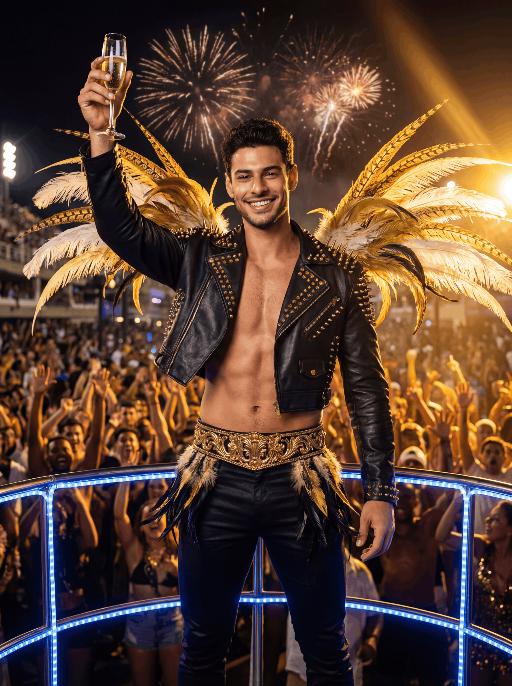
Float Toast

The character in the uploaded picture (unchanged facial features, gender and age). with short dark hair, light stubble, strong jawline, expressive eyebrows, and a bright confident smile, facing the camera directly. standing triumphantly on a Carnival float at night, raising a champagne flute high in celebration. wears a black leather cropped jacket decorated with gold studs and spikes, partially open at the chest, paired with fitted black pants and a wide ornate gold belt with intricate detailing. Black-and-gold feathered accents decorate hips, and large golden and white feathers extend dramatically from shoulders.Behind is a massive cheering Carnival crowd, hands raised in excitement. Fireworks explode in the dark night sky. Powerful golden stage lights beam across the scene, creating dramatic rim lighting and warm highlights. A blue LED-lit railing frames the foreground. The atmosphere is electrifying, luxurious, and celebratory. High-resolution cinematic photography, dramatic lighting, ultra-sharp focus, shallow depth of field, rich saturated colors, dynamic contrast, professional festival photography, 85mm lens, f/1.8, HDR, ultra-detailed skin texture

Goldfish AI effects generated image

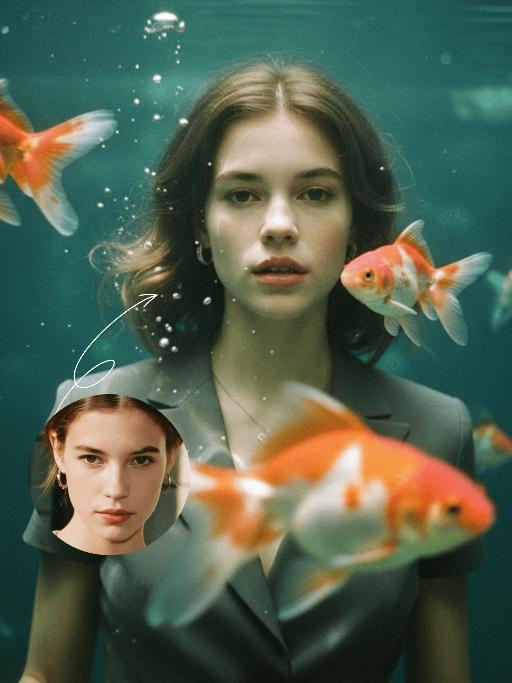
Goldfish

Underwater scene inside a large ecological fish tank, featuring the figure from the uploaded image (unchanged facial features, age and gender) with faint small freckles on the cheeks. Their hair floats and fans out in soft curls due to water buoyancy, with tiny water droplets clinging to the tips. Expression: Gaze fixed on the camera, lips slightly parted with a subtle breathy quality; eyebrows droop gently, conveying alienation and loneliness, with a taut jawline. Attire: Exquisitely tailored high-end summer couture, the fabric forming natural folds from water buoyancy, paired with sophisticated and delicate accessories. Composition: Close-up facial shot (the figure’s face occupies 80% of the frame). Multiple large orange-white/silver-white goldfish nuzzle the cheeks and circle the hair tips in an interactive way, with tiny air bubbles rising slowly beside the figure’s profile. Goldfish swim in the foreground with a blurred effect, and water ripples blur and smudge softly in the background. Shooting Angle: Eye-level close-up underwater perspective, with the lens positioned 3cm below the water surface to capture the broken light spots refracted by the water. Light & Shadow: Kodak Portra 400 film texture with fine yet distinct film grain and slight vignetting. Soft diffused cool cyan-green light filters through the underwater environment, with diamond-shaped light spots piercing through the water surface; weak light and shadow contrast yet gentle layered tones, with edges slightly blurred and smudged. Color Palette: A base of low-saturation dark tones (deep cyan + jet black + grayish green), accented by the warm orange-white/silver-white of the goldfish. A retro film tone with a subtle cyan-yellow cast, creating an overall hazy and lonely atmosphere, with striking contrast between light and shadow underwater.

Snow Film

Convert the reference image into a three-frame film storyboard, and into a three-frame film spliced storyboard with a three-screen vertical layout (top, middle, bottom) for storyboard photography, using close-up, medium close-up, medium shot or long shot for each screen respectively. The uploaded figure appears in every single frame, dressed in a vintage grey coat with a haute couture finish, standing in a snow-covered winter forest with a transparent umbrella as snowflakes fall. The scene features a cool color palette and exquisitely detailed visuals, with the facial features retouched and softened for a polished look. Shot in a realistic style, the entire series exudes a quiet and elegant mood, coupled with a sophisticated photographic quality, strong cinematic flair and artistic touch.

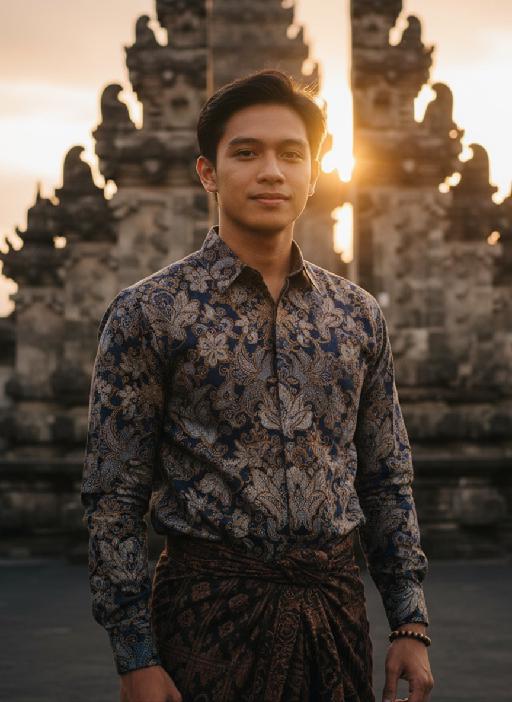
Temple AI effects generated image

Temple

Strictly lock the facial features of the uploaded portrait (preserve facial contours, native Indonesian skin tone, hairstyle and age). close-up photorealistic half-body portrait, model occupies 3/4 of the frame, focus sharply on facial features and serene expression, minimal headroom with zero empty space above the head, the model as the absolute dominant subject, 30-year-old native Indonesian man, native skin tone and natural short black hair, wearing traditional Indonesian batik long-sleeve shirt with deep indigo and gold patterns + dark brown hand-woven sarong, simple wooden beaded bracelet on wrist, standing in front of ancient Balinese stone temple with intricate carvings and tiered meru towers, golden sunset light bathing the scene, soft warm backlighting, hazy orange-pink sky with gentle sun flare bokeh, calm and serene expression, gentle wind brushing his hair, strong nostalgic atmospheric mood, film grain texture, authentic Indonesian cultural details, ultra-detailed fabric and temple carvings, 3:4 aspect ratio, cinematic sunset ambiance

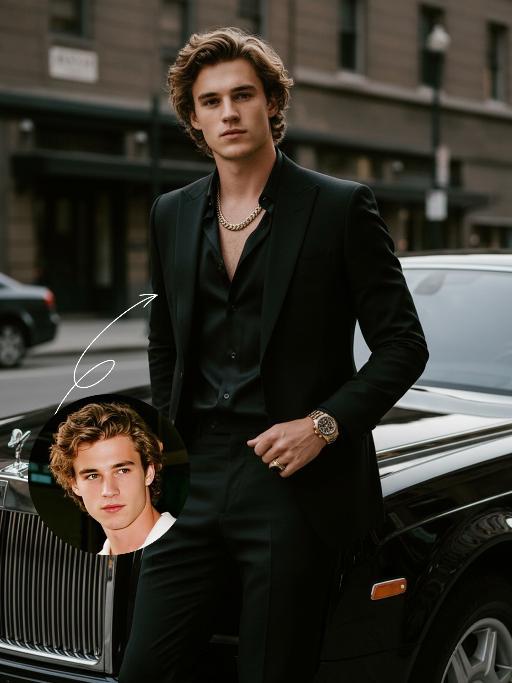
Elegant Gentle AI effects generated image

Elegant Gentle

Use the UPLOADED PORTRAIT for strict identity lock (keep face, hair, skin tone, age). Cinematic portrait of a man with a tall, dashing body, with the style of a mafia boss, standing alone with an aura of confidence and authority. He is beside a luxurious black Rolls-Royce car on a city street, a relaxed pose leaning against the car showing the Rolls-Royce logo with a classy style. All-black outfit: a neat suit, an open-collar black shirt with a luxurious necklace, formal pants, leather shoes, with a luxurious ring and a luxurious watch. His expression is serious and charismatic, radiating energy like a mafia boss. The atmosphere of the photo uses low saturation color grading with a dominance of pitch black and faded gray tones, giving a dark, elegant, and classy feel ala mafia movies. The background of the city building is blurred so that the main focus remains on the man and his car. Hyper-realistic, ultra-detailed, professional photography style.

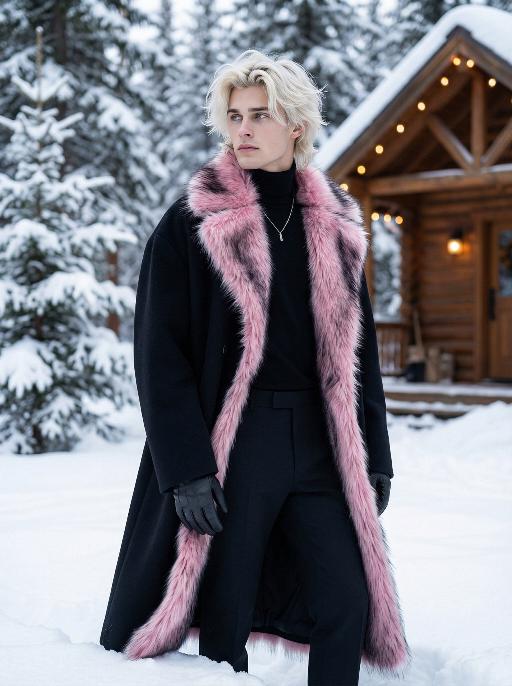
Snow Man AI effects generated image

Snow Man

Use the exact same facial features, gender, and age as the character in the uploaded image. Photorealistic fashion portrait, exact same facial features, gender and age as the character in the uploaded image. Platinum blonde, voluminous, slightly tousled hair with a wolf-cut style. Head turned to the left, gaze directed outward with a cool, ethereal expression. Dressed in an oversized, floor-length black wool coat with a dramatic, fluffy pink-and-black gradient fur trim along the edges, open to reveal a sleek black turtleneck and tailored black trousers. A delicate silver necklace adorns the neck, and black leather gloves cover the hands. The setting is a snowy, winter wonderland, with deep, fresh snow covering the ground and snow-laden evergreen trees in the background. A rustic wooden cabin with warm, glowing string lights is visible in the distance. Soft, cool natural daylight illuminates the scene, casting gentle shadows on the snow and clothing. The background is softly blurred, creating a shallow depth of field. The overall mood is avant-garde, ethereal, and effortlessly cool. High detail skin texture, cinematic lighting, 8K resolution, ultra-realistic, high-fashion editorial aesthetic, no text or watermarks.

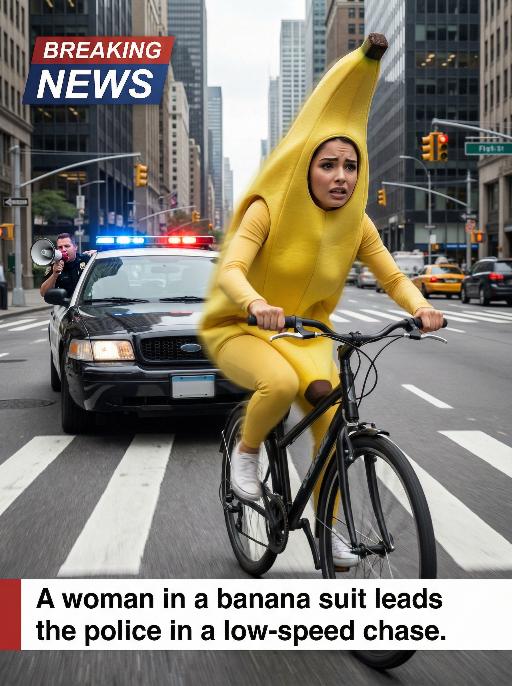
Banana Man AI effects generated image

Banana Man

Ultra-realistic breaking news photo: In this uploaded photo, the figure (with unchanged facial features, gender and age) is wearing a full-body banana costume and is frantically riding a bicycle at high speed on a busy city street, with a frightened but determined expression on their face. The main subject is centered and prominent, and the main character occupies 80% of the frame, being closely pursued by a black police car with blue and red flashing lights. A police officer leans out of the car window and shouts loudly through a megaphone. The scene is set in the daytime, with skyscrapers, crosswalks and traffic signals in the background. The dynamic blur effect of the bicycle wheels and the police car conveys the tense atmosphere during the low-speed chase. There is a large title text in the upper left corner of the picture (with a style consistent with the design style of news live broadcasts): BREAKING NEWS; At the bottom, there is a text title layout (with a style consistent with the design style of news live broadcasts): A woman in a banana suit leads the police in a low-speed chase. Style: Ultra-realistic, cinematic, comedy style, high detail, 4K resolution.

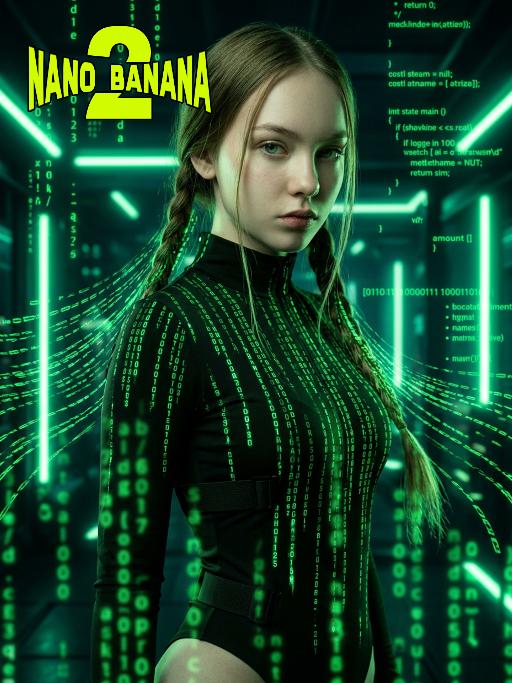
The Matrix AI effects generated image

The Matrix

Medium-close-up shot (showing the upper body of the protagonist, from above the thigh area): In the uploaded picture, the features (unchanged) and gender (also unchanged) of the character are clearly visible. Standing in the center of the frame, with a serious and cold expression, a flowing bright green digital coding stream is presented in his hair. Wearing a high-neck tight outfit, it is covered with a green matrix-like digital rain. It has a cyberpunk style, adopting the color scheme of "The Matrix", with a dark background, dramatic side light, and neon lights emitting bright green light, presenting a green matrix-like digital rain background in the dark environment. The skin texture is fine, the details are realistic, with a clear focus, a cinematic composition, and a style of avant-garde fashion photography. This is a masterpiece, of superior quality, surreal 8K image. There are also some green matrix-like digital rains in the foreground, with a large depth of field effect, and a wide aperture shooting.

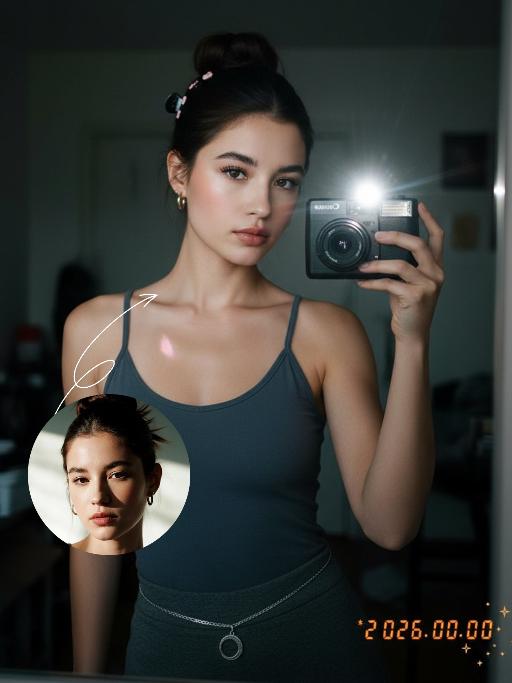
Darkroom Flash AI effects generated image

Darkroom Flash

Subject & Makeup: The figure from the uploaded image (unchanged facial features) with a cold and natural expression and a light, translucent makeup look; Shooting & Atmosphere: soft pink blush on the apples of the cheeks, nude pink lip gloss, long and curled false eyelashes, natural eyebrow shape; taking a selfie with a Canon retro point-and-shoot camera, with the camera’s flash shining directly into the lens (creating a distinct white lens flare), shot from a selfie perspective in front of an indoor mirror; a dim everyday room background (blurred furniture and decorations), a relaxed edgy-sweet portrait style, dark natural color tones, film photography texture, a retro natural film filter and film grain; Detail Embellishments: add an orange digital date watermark (2026.00.00) plus a small starburst decoration at the bottom right corner.

Night Chat

The uploaded figure (with unchanged facial features) is lit by a high-intensity flash fired directly at them, creating stark contrast between light and shadow, prominent highlights on the figure’s face, and a dark-toned background with blurred bokeh light spots. This is a medium close-up portrait: the figure leans out of a car window with their upper body, in an off-the-shoulder pose, their long dark brown curly hair tousled and flowing in the wind. They wear a loose white off-the-shoulder knit sweater, gaze straight at the camera with a lazy and cool expression. Shot from an eye-level perspective, the background features a nighttime urban street with slightly blurred traffic flow, warm yellow street lamp glows and red taillight bokeh, and a shallow depth of field with bokeh effects. The overall mood blends a warm color tone with a cool atmosphere, complemented by film texture and film grain, plus ultra-high-definition details. An orange vertical digital date watermark (2026:00:00) is added to the bottom right corner.

Load more

Next-Gen Multi-Model AI Video Architecture

Vivago AI isn't just one engine—it’s a unified hub for the world’s most advanced video AI. Whether you need cinematic realism or high-speed social content, we provide the right model for your creative vision.

Free Generate

Beauty and Dolphins

Vacation Time

Stellar Tear

Fish Tank Supervisor

Cinematic Quality & Precision Control

Enables 4K resolution with multi-lens motion control, generating delicate scene via text prompts for customized cinematography.​

TRY NOW

Dynamic AV Sync

Auto-generates original audio to avoid copyright issues. Build 3D immersive environments through layered sound design automatically.

TRY NOW

OpenAI Sora 2

​Advanced visual storytelling with unparalleled physics and consistency.

TRY NOW

Kling v2.6 Pro

Industry-leading cinematic image animation and motion control.

TRY NOW

Google Veo 3 & 3.1

Ultra-fast generation with enhanced realism for creative workflows.

TRY NOW

Vivago AI 2.0

Our proprietary model optimized for efficiency, speed, and cost-effective generation.
TRY NOW

Users' Voice

We listen carefully to the opinions of every user.
Free Generate
Contact Us
I tried the Lip Sync feature inside Vivago.ai’s AI Video Generator for my educational podcast, and the results were stunning! The avatar's lip movements perfectly matched my audio recording, creating a professional AI-generated video without complex editing. Compared with tools like OpenAI Sora 2 and Google Veo 3.1, Vivago Image-to-Video delivers fast, studio-quality results online. It saved me hours of post-production work.
ElenaM (Spain)
Vivago’s Image-to-Video AI transformed my marketing workflow. I uploaded a product image and described the launch scene in text, and it generated a 10-second cinematic AI video with background music and dynamic visuals. The output quality rivals Kling v2.6 Pro and Google Veo 3 Fast. It’s now my go-to AI video generator for social media ads and product campaigns.
KenjiT (Japan)
As a digital artist, I use Vivago.ai 2.0 daily for Image-to-Image and AI Image-to-Video creation. The e-book covers and animated visuals I generate for clients look cinematic and professional. Unlike many standalone AI tools, Vivago integrates multiple leading models into one platform, making it easier to create copyright-safe AI images and videos for publishing.
ChenL (China)
I tried the Lip Sync feature inside Vivago.ai’s AI Video Generator for my educational podcast, and the results were stunning! The avatar's lip movements perfectly matched my audio recording, creating a professional AI-generated video without complex editing. Compared with tools like OpenAI Sora 2 and Google Veo 3.1, Vivago Image-to-Video delivers fast, studio-quality results online. It saved me hours of post-production work.
ElenaM (Spain)
Vivago’s Image-to-Video AI transformed my marketing workflow. I uploaded a product image and described the launch scene in text, and it generated a 10-second cinematic AI video with background music and dynamic visuals. The output quality rivals Kling v2.6 Pro and Google Veo 3 Fast. It’s now my go-to AI video generator for social media ads and product campaigns.
KenjiT (Japan)
As a digital artist, I use Vivago.ai 2.0 daily for Image-to-Image and AI Image-to-Video creation. The e-book covers and animated visuals I generate for clients look cinematic and professional. Unlike many standalone AI tools, Vivago integrates multiple leading models into one platform, making it easier to create copyright-safe AI images and videos for publishing.
ChenL (China)
I absolutely love Vivago’s AI Image-to-Video Generator. As a travel blogger, static images often fail to capture real atmosphere, but Vivago helps me turn photos into vivid cinematic AI videos with motion effects. It feels comparable to OpenAI Sora 2 and Google Veo 3.1, but more accessible and faster for creators who need high-quality AI videos online.
LiamK (Australia)
I tried the Lip Sync feature inside Vivago.ai’s AI Video Generator for my educational podcast, and the results were stunning! The avatar's lip movements perfectly matched my audio recording, creating a professional AI-generated video without complex editing. Compared with tools like OpenAI Sora 2 and Google Veo 3.1, Vivago Image-to-Video delivers fast, studio-quality results online. It saved me hours of post-production work.
ElenaM (Spain)
Vivago’s Image-to-Video AI transformed my marketing workflow. I uploaded a product image and described the launch scene in text, and it generated a 10-second cinematic AI video with background music and dynamic visuals. The output quality rivals Kling v2.6 Pro and Google Veo 3 Fast. It’s now my go-to AI video generator for social media ads and product campaigns.
KenjiT (Japan)
As a digital artist, I use Vivago.ai 2.0 daily for Image-to-Image and AI Image-to-Video creation. The e-book covers and animated visuals I generate for clients look cinematic and professional. Unlike many standalone AI tools, Vivago integrates multiple leading models into one platform, making it easier to create copyright-safe AI images and videos for publishing.
ChenL (China)
I absolutely love Vivago’s AI Image-to-Video Generator. As a travel blogger, static images often fail to capture real atmosphere, but Vivago helps me turn photos into vivid cinematic AI videos with motion effects. It feels comparable to OpenAI Sora 2 and Google Veo 3.1, but more accessible and faster for creators who need high-quality AI videos online.
LiamK (Australia)
Using Vivago.ai’s Image-to-Video AI has greatly enhanced my classroom teaching. I transform textbook notes into historical AI videos with cinematic filters and dynamic animations. Compared with tools like Kling v2.6 Pro and Google Veo 3 Fast, Vivago offers faster generation and easier parameter control for educators who need reliable AI video creation.
RajivG (India)
I frequently create AI videos on Vivago and publish them on TikTok and YouTube Shorts. The AI video templates and trending content ideas help me produce viral-ready clips quickly. With Vivago’s integrated models—including advanced video engines similar to OpenAI Sora 2—I can generate anime-style and cinematic social media videos that drive high engagement.
MarieJ (Spain)
What attracts me most about Vivago.ai is not only the powerful AI Video Generator but also the active AIGC creator community. It combines AI Image-to-Video, Text-to-Video, and leading model integrations like Google Veo 3.1 into one creative platform.
TomW (India)
At first, I was hesitant about using AI video tools. But after trying Vivago Image-to-Video, I realized how easy it is to create professional AI-generated videos online. I just upload an image, add a short prompt, and adjust a few settings. The results are cinematic and copyright-safe, which is essential for commercial projects.
HectorC (Mexico)
Using Vivago.ai’s Image-to-Video AI has greatly enhanced my classroom teaching. I transform textbook notes into historical AI videos with cinematic filters and dynamic animations. Compared with tools like Kling v2.6 Pro and Google Veo 3 Fast, Vivago offers faster generation and easier parameter control for educators who need reliable AI video creation.
RajivG (India)
I frequently create AI videos on Vivago and publish them on TikTok and YouTube Shorts. The AI video templates and trending content ideas help me produce viral-ready clips quickly. With Vivago’s integrated models—including advanced video engines similar to OpenAI Sora 2—I can generate anime-style and cinematic social media videos that drive high engagement.
MarieJ (Spain)
What attracts me most about Vivago.ai is not only the powerful AI Video Generator but also the active AIGC creator community. It combines AI Image-to-Video, Text-to-Video, and leading model integrations like Google Veo 3.1 into one creative platform.
TomW (India)
At first, I was hesitant about using AI video tools. But after trying Vivago Image-to-Video, I realized how easy it is to create professional AI-generated videos online. I just upload an image, add a short prompt, and adjust a few settings. The results are cinematic and copyright-safe, which is essential for commercial projects.
HectorC (Mexico)