Image to Video

Transform text into stunning visuals with vivago.ai's AI image/video generator. Explore curated effects, professional editing tools, and seamless creativity for high-quality content. Ideal for innovators and creators.

Recreate
arrow

FAQs

How do I animate static images using vivago.ai?

Upload any image (JPG/PNG), and our AI models will automatically detect content layers and generate 5/10-second video clips with dynamic motion patterns.

Can I control specific movement directions?

Yes. Combine image uploads with text prompts like 'swaying leaves left-to-right' or 'a girl waves her hands'.

What if AI-generated videos don't match my expectation?

Utilize iterative refinement cycles: 1) Try a few more times, 2) Modify prompts, 3) Visit the Explore section to use templates for more consistent results.

What membership benefits does Pro offer?

Pro membership offers better outcomes, more generation credits, and premium features. Details available at: https://vivago.ai/subscribe

More From VIVAGO AI

Break Free AI effects generated image

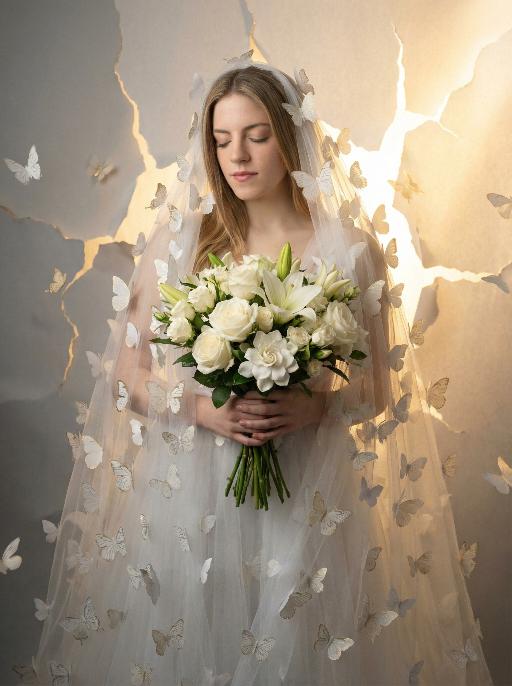
Break Free

Use the exact same facial features, gender, and age as the uploaded image.She faces the camera directly, head slightly lowered, eyes gently closed, holding a lush bouquet of white flowers with a tender and calm expression. Her sheer, flowing white tulle dress is intricately formed by countless delicate white and pale gold butterflies that flutter around her, filling the entire frame and creating an atmosphere of emerging from a cocoon, while outlining a soft, dreamy silhouette around her body. The background features a delicate torn paper texture, with soft, warm golden light pouring through the cracks. She stands at the threshold between dim, muted gray shadows and bright, radiant golden light. The color palette transitions from low-saturation gray tones to bright warm yellow and soft beige radiance, symbolizing a journey of transformation from restraint to blooming. Realistic portrait photography, soft and dreamy atmosphere, cinematic lighting with a strong sense of light and shadow, rich details, 8K resolution, ultra-realistic texture, elegant and emotionally evocative aesthetic, clean composition.

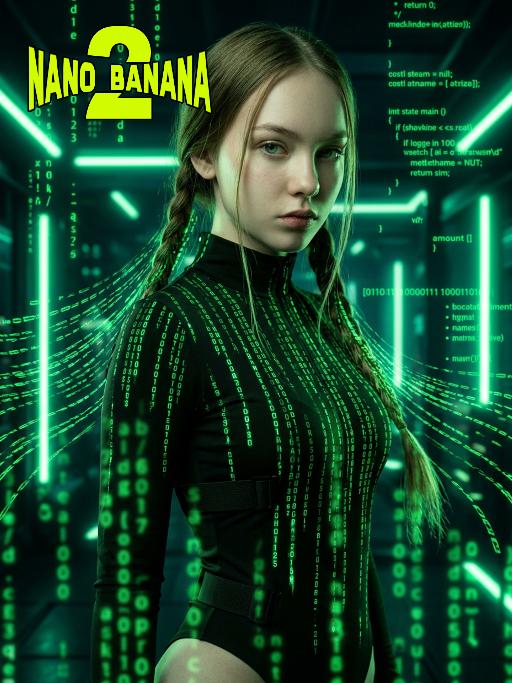
The Matrix AI effects generated image

The Matrix

Medium-close-up shot (showing the upper body of the protagonist, from above the thigh area): In the uploaded picture, the features (unchanged) and gender (also unchanged) of the character are clearly visible. Standing in the center of the frame, with a serious and cold expression, a flowing bright green digital coding stream is presented in his hair. Wearing a high-neck tight outfit, it is covered with a green matrix-like digital rain. It has a cyberpunk style, adopting the color scheme of "The Matrix", with a dark background, dramatic side light, and neon lights emitting bright green light, presenting a green matrix-like digital rain background in the dark environment. The skin texture is fine, the details are realistic, with a clear focus, a cinematic composition, and a style of avant-garde fashion photography. This is a masterpiece, of superior quality, surreal 8K image. There are also some green matrix-like digital rains in the foreground, with a large depth of field effect, and a wide aperture shooting.

Chinese Child

Ultra-realistic 8K portrait photography in ancient Chinese style; the figure from the uploaded image (unchanged facial features, gender and age) is seated on a stone, with two braids adorned with pink hair accessories, wearing a pale pink Hanfu with exquisite dark blue embroidery, hands folded, smiling and looking at the camera. Beside the figure are a cute red fox (also looking at the camera), a mini pine tree and a lantern, captured from a horizontal perspective. The scene is lit by soft photographic lighting plus the warm glow of the lantern. Color palette: pale pink of the Hanfu, orange of the fox, dark green of the pine tree, with a magical and deep forest and pine woodland night scene as the background. The work features an ultra-realistic photographic style, art photography studio aesthetic, professional studio lighting, premium texture, avant-garde artistic photography, and cinematic-level image quality, with special effects of falling leaves and fluttering fireflies added.

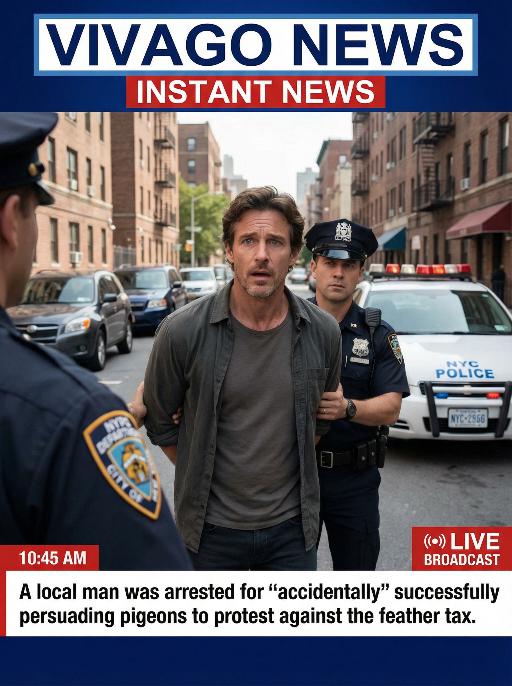
Arrest AI effects generated image

Arrest

Realistic real-time news screenshot: The main subject is the depicted person (with unchanged facial features, gender and age). The expression is shocked and confused. The person was arrested by two New York City police officers on a street in the city. The police tied his hands behind his back. The main figure occupies 80% of the overall picture. The background is a typical New York City street, featuring brick apartment buildings, parked vehicles and a New York City police car. Daylight natural light, over-the-shoulder news camera angle. There is a news caption at the bottom of the picture, stating: A local man was arrested for 'accidentally' successfully persuading pigeons to protest against the feather tax. There is a large title caption at the top of the picture: VIVAGO NEWS INSTANT NEWS. At the corner, there is a timestamp: 10:45 AM. Live broadcast. With a realistic news photography style, rich details, 8K resolution, and a cinematic aesthetic of news clips.

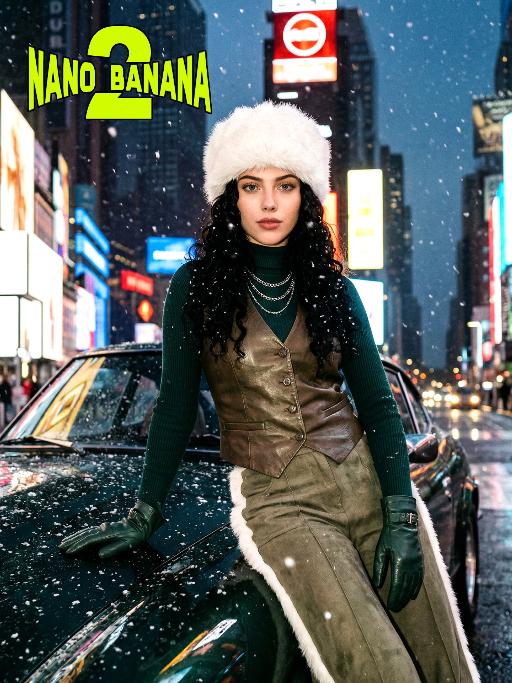
Times Square AI effects generated image

Times Square

[Scene] In the dark, snowy New York Times Square, during the winter night when it gets dark, heavy snow is falling, with snowflakes falling clearly. The iconic neon advertisements are shining in the background. The damp asphalt reflects the light of the neon lights. The towering skyscrapers are clearly visible in the snow and fog, with snowflakes flying all around. [Subject] The person in the uploaded picture (with facial features, gender, and age unchanged) has long black curly hair, is wearing a white fluffy artificial fur hat in a European style, has a European minimalist makeup look, and the golden light outlines a soft and natural expression, with a calm demeanor, presenting a handsome posture. Snowflakes fall on the person's hair and coat, and also on the person's body. [Posture] - Body: Sideways leaning against the engine hood of a dark green luxury retro sports car, the body's center of gravity tilts to the right, the torso slightly twisting to face the camera - Legs: Right knee bent; left leg straight down, foot on the ground - Arms: Right arm stretched downward, palm flat against the car hood to provide support, fingers slightly spread; left arm relaxed, hand on the left thigh - Head and gaze: Head remains upright, facing the camera directly, eyes forward, expression confident - Overall: A relaxed but energetic fashion editor posture, casual and cool atmosphere, elongated body lines to enhance visual effect [Clothing] Leading-edge autumn design: 1. Outer layer: A well-tailored leather fabric vest with silver chain details and perforated patterns, worn over a fitted dark green high-neck sweater; 2. Bottom: High-waisted dark green wide-leg work pants, with a white fur trim (coordinated with the white fur belt); 3. Accessories: Dark green long leather gloves, brim with white artificial fur trim, multi-layer silver chain necklace; 4. Footwear: Simple black ankle boots (partly visible), Y2K style, retro style, leather and metal texture. [Photography and Lighting] Mid-close-up shot, dark environment, using 35mm film photography style, Kodak Gold 200 film, warm golden backlight to outline the hair and snowflakes, soft fill light to retain the natural skin texture of the face, shallow depth of field blurs the background advertisements, film grain and soft bokeh effect when snow falls, strong light contrast, foreground with a lot of blurred and clear snowflakes falling. [Style] The image style is portrait, the edges of the picture add a similar film graininess effect, dark atmosphere, high-end fashion editor, hyper-realistic details, fashion avant-garde photography art, 8K resolution, no excessive smoothing processing, using blue-green and orange contrast for color grading - the style has a cinematic feel.

Travelling pets

The features of the figure in the uploaded image remain unchanged (the animal stands fully upright on its hind legs with a vertical torso and forelimbs hanging naturally at its sides; the original animal’s species, facial features and texture details are strictly preserved). The animal is dressed in a well-fitted black jacket, a matching pair of khaki cropped pants, retro hiking boots, and also wears a bucket hat with black-rimmed windproof sunglasses. The background is replaced with the scene of the Golden Mountains bathed in sunlight in Western Sichuan, with a glistening lake in front of the mountains reflecting the golden peaks. The figure stands on the shore in front of the lake, in an ultra-realistic photography style that blends avant-garde and fashion-forward pet photography aesthetics.

Cyberpunk 2026

The figure from the uploaded image (with unchanged facial features), captured in a medium close-up shot of the upper body, with hair dyed red and wearing black square-framed sunglasses (with transparent red lenses). The figure is dressed in a glossy black leather sportswear set (jacket + track pants) printed with the Chinese character "Fu" pattern, black gloves (holding a sparkler in one hand), and stylish cool black leather shoes, plus an ultra-cool helmet cap adorned with glowing lights that fit the contour of the cap as decorations. The figure stands on a neon-lit city street in cyberpunk style, set against a rainy night backdrop—featuring glowing Chinese neon signboards, wet road surfaces reflecting the lights, towering futuristic buildings, and a blend of blue/red/yellow neon lights. The image features subtle motion blur effects, realistic color grading (with a stark contrast between dark tones and neon hues), and a street photography style. There are fireworks blooming in the background sky, creating a festive atmosphere; the overall style boasts avant-garde photography, trendy fashion sense and a high-end sophisticated feel. At the bottom of the frame, the glowing artistic font "Cyberpunk 2026"—a large handwritten-style effect composed of blooming blue-purple fireworks—floats prominently, with decorative patterns of colorful blooming fireworks beside the text.

Load more

Next-Gen Multi-Model AI Video Architecture

Vivago AI isn't just one engine—it’s a unified hub for the world’s most advanced video AI. Whether you need cinematic realism or high-speed social content, we provide the right model for your creative vision.

Free Generate

Beauty and Dolphins

Vacation Time

Stellar Tear

Fish Tank Supervisor

Cinematic Quality & Precision Control

Enables 4K resolution with multi-lens motion control, generating delicate scene via text prompts for customized cinematography.​

TRY NOW

Dynamic AV Sync

Auto-generates original audio to avoid copyright issues. Build 3D immersive environments through layered sound design automatically.

TRY NOW

OpenAI Sora 2

​Advanced visual storytelling with unparalleled physics and consistency.

TRY NOW

Kling v2.6 Pro

Industry-leading cinematic image animation and motion control.

TRY NOW

Google Veo 3 & 3.1

Ultra-fast generation with enhanced realism for creative workflows.

TRY NOW

Vivago AI 2.0

Our proprietary model optimized for efficiency, speed, and cost-effective generation.
TRY NOW

Users' Voice

We listen carefully to the opinions of every user.
Free Generate
Contact Us
I tried the Lip Sync feature inside Vivago.ai’s AI Video Generator for my educational podcast, and the results were stunning! The avatar's lip movements perfectly matched my audio recording, creating a professional AI-generated video without complex editing. Compared with tools like OpenAI Sora 2 and Google Veo 3.1, Vivago Image-to-Video delivers fast, studio-quality results online. It saved me hours of post-production work.
ElenaM (Spain)
Vivago’s Image-to-Video AI transformed my marketing workflow. I uploaded a product image and described the launch scene in text, and it generated a 10-second cinematic AI video with background music and dynamic visuals. The output quality rivals Kling v2.6 Pro and Google Veo 3 Fast. It’s now my go-to AI video generator for social media ads and product campaigns.
KenjiT (Japan)
As a digital artist, I use Vivago.ai 2.0 daily for Image-to-Image and AI Image-to-Video creation. The e-book covers and animated visuals I generate for clients look cinematic and professional. Unlike many standalone AI tools, Vivago integrates multiple leading models into one platform, making it easier to create copyright-safe AI images and videos for publishing.
ChenL (China)
I tried the Lip Sync feature inside Vivago.ai’s AI Video Generator for my educational podcast, and the results were stunning! The avatar's lip movements perfectly matched my audio recording, creating a professional AI-generated video without complex editing. Compared with tools like OpenAI Sora 2 and Google Veo 3.1, Vivago Image-to-Video delivers fast, studio-quality results online. It saved me hours of post-production work.
ElenaM (Spain)
Vivago’s Image-to-Video AI transformed my marketing workflow. I uploaded a product image and described the launch scene in text, and it generated a 10-second cinematic AI video with background music and dynamic visuals. The output quality rivals Kling v2.6 Pro and Google Veo 3 Fast. It’s now my go-to AI video generator for social media ads and product campaigns.
KenjiT (Japan)
As a digital artist, I use Vivago.ai 2.0 daily for Image-to-Image and AI Image-to-Video creation. The e-book covers and animated visuals I generate for clients look cinematic and professional. Unlike many standalone AI tools, Vivago integrates multiple leading models into one platform, making it easier to create copyright-safe AI images and videos for publishing.
ChenL (China)
I absolutely love Vivago’s AI Image-to-Video Generator. As a travel blogger, static images often fail to capture real atmosphere, but Vivago helps me turn photos into vivid cinematic AI videos with motion effects. It feels comparable to OpenAI Sora 2 and Google Veo 3.1, but more accessible and faster for creators who need high-quality AI videos online.
LiamK (Australia)
I tried the Lip Sync feature inside Vivago.ai’s AI Video Generator for my educational podcast, and the results were stunning! The avatar's lip movements perfectly matched my audio recording, creating a professional AI-generated video without complex editing. Compared with tools like OpenAI Sora 2 and Google Veo 3.1, Vivago Image-to-Video delivers fast, studio-quality results online. It saved me hours of post-production work.
ElenaM (Spain)
Vivago’s Image-to-Video AI transformed my marketing workflow. I uploaded a product image and described the launch scene in text, and it generated a 10-second cinematic AI video with background music and dynamic visuals. The output quality rivals Kling v2.6 Pro and Google Veo 3 Fast. It’s now my go-to AI video generator for social media ads and product campaigns.
KenjiT (Japan)
As a digital artist, I use Vivago.ai 2.0 daily for Image-to-Image and AI Image-to-Video creation. The e-book covers and animated visuals I generate for clients look cinematic and professional. Unlike many standalone AI tools, Vivago integrates multiple leading models into one platform, making it easier to create copyright-safe AI images and videos for publishing.
ChenL (China)
I absolutely love Vivago’s AI Image-to-Video Generator. As a travel blogger, static images often fail to capture real atmosphere, but Vivago helps me turn photos into vivid cinematic AI videos with motion effects. It feels comparable to OpenAI Sora 2 and Google Veo 3.1, but more accessible and faster for creators who need high-quality AI videos online.
LiamK (Australia)
Using Vivago.ai’s Image-to-Video AI has greatly enhanced my classroom teaching. I transform textbook notes into historical AI videos with cinematic filters and dynamic animations. Compared with tools like Kling v2.6 Pro and Google Veo 3 Fast, Vivago offers faster generation and easier parameter control for educators who need reliable AI video creation.
RajivG (India)
I frequently create AI videos on Vivago and publish them on TikTok and YouTube Shorts. The AI video templates and trending content ideas help me produce viral-ready clips quickly. With Vivago’s integrated models—including advanced video engines similar to OpenAI Sora 2—I can generate anime-style and cinematic social media videos that drive high engagement.
MarieJ (Spain)
What attracts me most about Vivago.ai is not only the powerful AI Video Generator but also the active AIGC creator community. It combines AI Image-to-Video, Text-to-Video, and leading model integrations like Google Veo 3.1 into one creative platform.
TomW (India)
At first, I was hesitant about using AI video tools. But after trying Vivago Image-to-Video, I realized how easy it is to create professional AI-generated videos online. I just upload an image, add a short prompt, and adjust a few settings. The results are cinematic and copyright-safe, which is essential for commercial projects.
HectorC (Mexico)
Using Vivago.ai’s Image-to-Video AI has greatly enhanced my classroom teaching. I transform textbook notes into historical AI videos with cinematic filters and dynamic animations. Compared with tools like Kling v2.6 Pro and Google Veo 3 Fast, Vivago offers faster generation and easier parameter control for educators who need reliable AI video creation.
RajivG (India)
I frequently create AI videos on Vivago and publish them on TikTok and YouTube Shorts. The AI video templates and trending content ideas help me produce viral-ready clips quickly. With Vivago’s integrated models—including advanced video engines similar to OpenAI Sora 2—I can generate anime-style and cinematic social media videos that drive high engagement.
MarieJ (Spain)
What attracts me most about Vivago.ai is not only the powerful AI Video Generator but also the active AIGC creator community. It combines AI Image-to-Video, Text-to-Video, and leading model integrations like Google Veo 3.1 into one creative platform.
TomW (India)
At first, I was hesitant about using AI video tools. But after trying Vivago Image-to-Video, I realized how easy it is to create professional AI-generated videos online. I just upload an image, add a short prompt, and adjust a few settings. The results are cinematic and copyright-safe, which is essential for commercial projects.
HectorC (Mexico)