Advanced Image

Strict identity verification is carried out using the uploaded avatar (maintaining consistency in facial features, hair, skin tone and age). The composition frames the head and shoulders from the top of the head to the upper chest; the face is angled three-quarters to the left and slightly downward, with the chin gently tucked, eyes almost straight to the camera, a stern and cold expression, and lips firmly closed, featuring a sharp jawline and a straight nose. The short black hair is slightly tousled with a few strands falling onto the forehead, styled to have a subtle sheen to its texture. He is wearing a pure black long-sleeved turtleneck sweater with the collar snugly wrapped around the neck. Set against an off-white interior background, his left hand is raised with the index finger touching the temple, the other fingers curled, and a large, prominent silver signet ring adorns his finger, clearly visible against the black sleeve. Soft studio key light streams in from the upper left (the camera’s left), casting intense highlights on the left side of the face and deep shadows on the right side. The background gradients from grey to white, with a faint vertical gradient light strip on the right side. The entire image is in full black and white with no color, only grayscale tones, boasting extremely stark contrast and exquisitely sharp details. It features a studio lighting style, portrait photography aesthetics, and an avant-garde fashion black-and-white photography style.

Use Template
arrow

More From VIVAGO AI

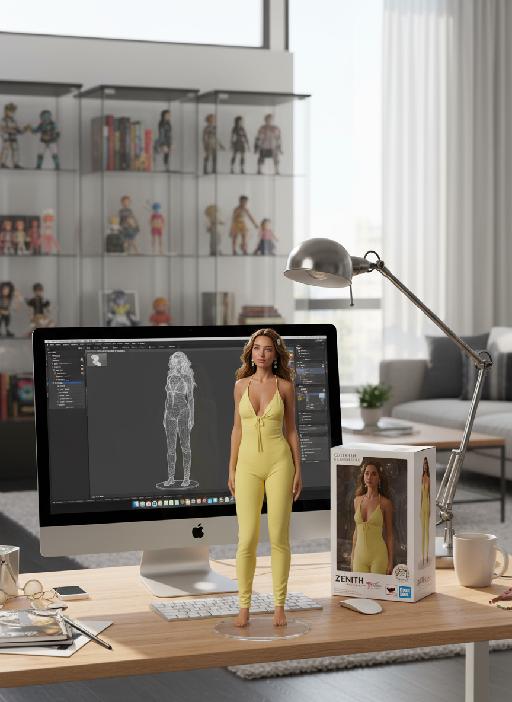
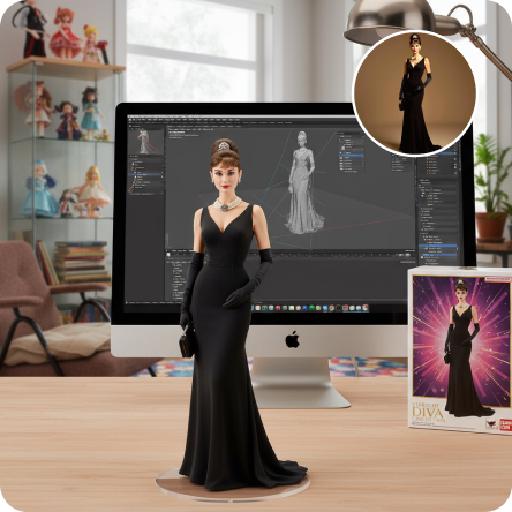
Figure AI effects generated image

Figure

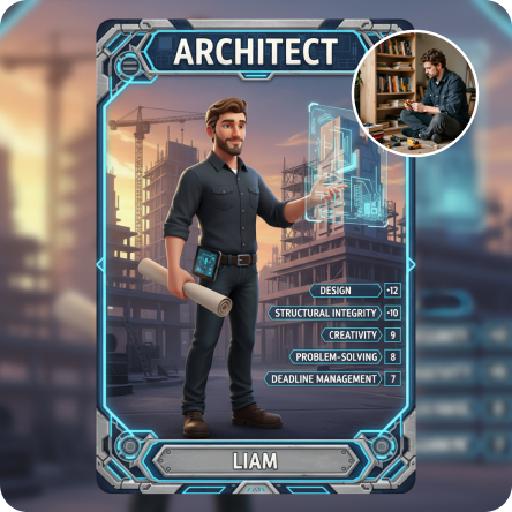
Create a 1/7 scale commercialized figure of the character in the illustration, in a realistic style and environment. Render the exact hairstyle and the same outfit with the uploaded figure. Render garments as molded plastic with engraved seams and sculpted folds; keep accessories as plastic parts. Fictionalize any brand text/logos while keeping layout and colors. Place the figure on a computer desk, using a circular transparent acrylic base without any text. On the Apple computer screen, display the Z Brush modeling process of the figure. Next to the Apple computer screen, place a BANDAl-style toy packaging box printed with the original artwork. The background shows a modern realistic room furnished with contemporary furniture, including a display cabinet filled with books, dolls, and scale figures, adding a casual and everyday atmosphere. Behind the Apple computer, place a desk lamp to add detail and depth to the scene.

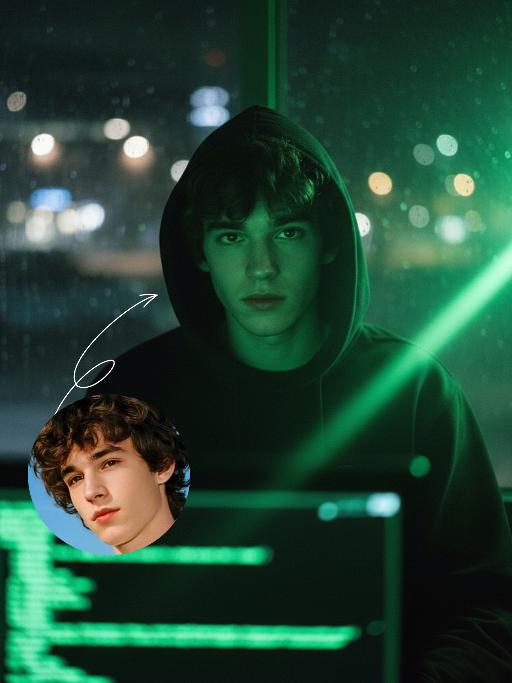
Hacker AI effects generated image

Hacker

A straight-on close-up headshot of the figure from the uploaded image (with unchanged facial features, age and gender), who sits centered and faces the camera directly, wearing a black hoodie with the hood up, their expression calm and focused. The figure’s face is cast in the green glow of code from a computer screen. A broad wash of soft, bright green side light slants in from the right side of the frame, creating a large-scale Tyndall effect that outlines their facial contours. The background features a blurred night view of the city in the rain outside the window (with traces of raindrops sliding down the glass), accompanied by warm bokeh lights; the foreground consists of a computer screen with glowing green code on it. Shot at eye level with a low-light, dark-toned palette, it embodies the dark-toned aesthetic of cyberpunk style. Main colors: black, blue-gray, neon green, low-saturation cool tones. Shallow depth of field blurs both the foreground and background, with the face in sharp focus. The work features an avant-garde fashion photography style, a film-like filter effect, and dramatic contrast between light and shadow.

Home Appliance

A realistic Instagram-style lifestyle photo. A model (man) faces the camera naturally, introducing a product at its true everyday scale. The product must always appear proportional to real-world use: small items (like a shaver or skincare bottle) are held naturally in one hand; medium items (like a laptop or backpack) are held with both hands, placed on a table, or on the lap; large items (like a refrigerator, washing machine, or furniture) are shown beside the model, with the model standing or sitting next to it, gesturing naturally. The model uses expressive gestures and a speaking expression (mouth slightly open as if explaining). Background is a realistic everyday setting (walk-in closet, bedroom, kitchen, street, or living room), clear and not blurred. Lighting is soft and natural, highlighting both the model and the product. The overall feel is candid, elegant, and Instagram-worthy.

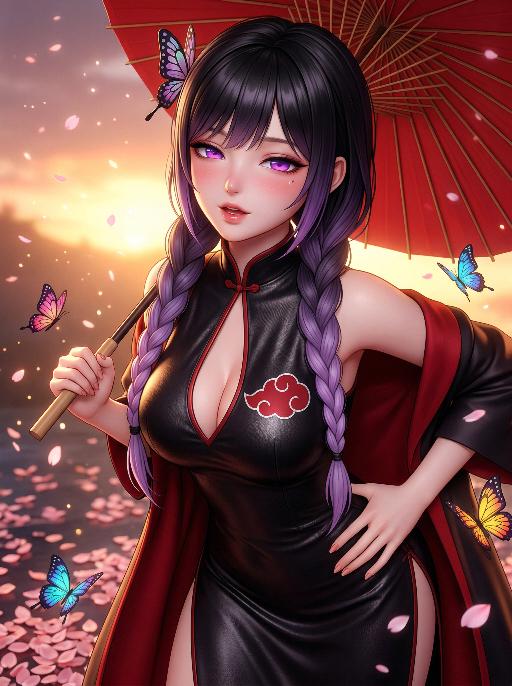
Butterfly Girl AI effects generated image

Butterfly Girl

"Masterpiece, highest quality, ultra-fine, 8K, realistic 3D anime style, cinematic rendering, The image in the uploaded picture is the main subject (maintaining the facial features, gender and age of the character), alone, beautiful face, charming expression, half-closed eyes, alluring gaze, open lips, faint blush, Purple eyes, fine eyelashes, black hair with purple gradient color, tied in a braid, butterfly-shaped hair accessory, Wearing a black leather qipao with a deep V neckline, on the chest has a red Akatuku cloud pattern logo, red cloak draped over the shoulders, Sexually appealing posture, slightly leaning forward, one hand on the hip, head tilted to one side, Holding a red paper umbrella, background has fallen cherry blossom petals and colorful butterflies, warm sunset light, soft glow, blurred effect, particles in the air, Dynamic angle, mid-shot, fine skin texture, smooth skin, soft focus, dramatic shadow, bright colors"

On the water

Use the uploaded portrait for strict facial features, gender, skin color, pupil color, clothing, hairstyle and gender locking. Select the main characters from the uploaded pictures. Have a natural expression, face the camera, and show a relaxed state. The camera suddenly switches from the front to the back of the character, changing from a frontal shot to a rear shot. Action: Face the camera, maintain a natural expression, suddenly turn around and leap, run on the water surface, as if possessing Chinese martial arts skills. When the character starts flying, the posture is to spread both arms and be in a flying state. The camera follows the character running on the water surface. The scene becomes a vast sea level, with a dreamy and beautiful scenery, with clouds and the sky in the distance.

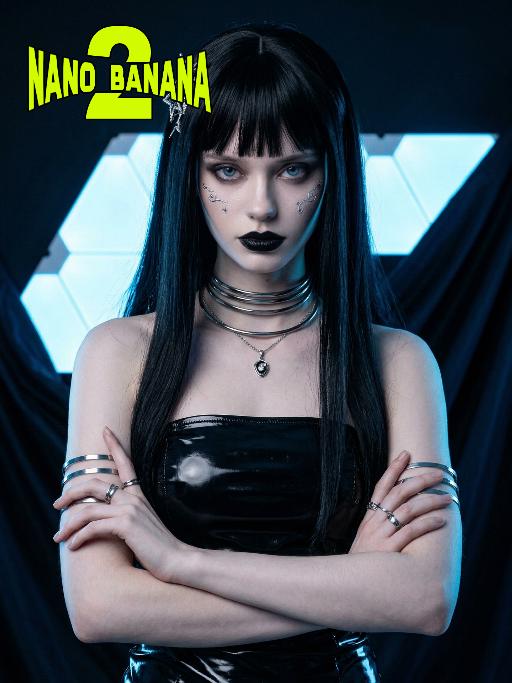
The future AI effects generated image

The future

Photorealistic cyberpunk portrait, dark gothic aesthetic, futuristic neon-lit studio setting. Setting: dark draped fabric backdrop, glowing blue neon hexagonal light panels, moody and futuristic atmosphere. Outfit: glossy black latex strapless dress, multiple thick silver choker necklaces, delicate pendant necklace, stacked silver arm cuffs on both arms, multiple silver rings on fingers. Hair: long straight black hair with blunt bangs, adorned with an intricate silver star-shaped hair accessory. Makeup: pale skin, dark smoky eyes, bold black lipstick, subtle silver face decals on the cheek. Pose: arms crossed over chest, confident and intense stance, sharp gaze directed at the camera. Lighting: cool blue neon rim lighting, high contrast, dramatic shadows, glossy reflections on latex and metallic accessories. Style: hyper-detailed, cinematic lighting, 8K ultra-realistic, sharp focus, no text or watermarks.

SereneNook

Shoot a 10-second (9:16) vertical one-take video showcasing a serene, sunlit indoor lounge area. The shot begins with a slightly elevated wide-angle view, presenting the entire scene: two wooden rocking chairs with beige cushions, a small side table with fruits and coffee cups, a floor lamp, and a large potted plant by the window. A young man in a simple white top and black pants enters the frame, holding a glass water jug. He walks to the table, bends down, and gently and steadily pours water into a small succulent plant on the table. After pouring, he straightens up, smiles slightly, and steps back to admire the scene. Natural light filters through sheer curtains into the room, casting soft shadows on the wooden floor and carpet. The camera remains stable for 10 seconds, smoothly capturing all actions in one continuous take, creating a warm, peaceful, and comfortable atmosphere. Add the sound of flowing water and soft background music to enhance the calm ambiance.

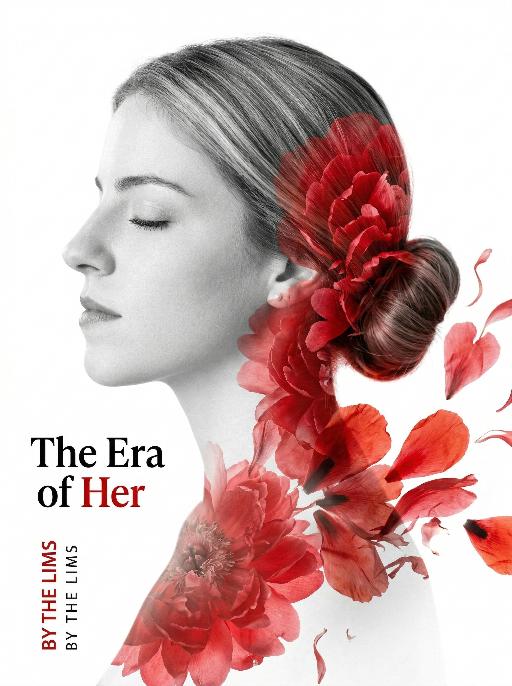
Silhouette AI effects generated image

Silhouette

Use the exact same facial features, gender, and age as the uploaded image. Double exposure portrait photography, minimalist aesthetic, high contrast, 8K resolution, ultra-detailed.A side profile of an elegant woman with her eyes gently closed, her silhouette rendered in soft grayscale tones. Her hair is styled in a neat bun.The silhouette is seamlessly blended with large, vibrant red floral petals (resembling peonies or poppies) that flow organically from her bun down her neck and shoulder, creating a delicate overlay effect. The petals drift and spread on the right side of the frame, as if rendered in an ink wash painting. The background is a pure, stark white, emphasizing the subject. On the left side of the frame, the text "The Era of Her" are displayed, alongside smaller vertical English text "BY THE LIMS" in black and red ink. The overall style is artistic and conceptual, with a strong visual contrast between the monochrome figure and the vivid red flowers, conveying themes of feminine power and beauty. The composition is clean and precise, with sharp focus on the intricate textures of the petals and the smooth contours of the face.

Load more

Next-Gen Multi-Model AI Video Architecture

Vivago AI isn't just one engine—it’s a unified hub for the world’s most advanced video AI. Whether you need cinematic realism or high-speed social content, we provide the right model for your creative vision.

Free Generate

Beauty and Dolphins

Vacation Time

Stellar Tear

Fish Tank Supervisor

Cinematic Quality & Precision Control

Enables 4K resolution with multi-lens motion control, generating delicate scene via text prompts for customized cinematography.​

TRY NOW

Dynamic AV Sync

Auto-generates original audio to avoid copyright issues. Build 3D immersive environments through layered sound design automatically.

TRY NOW

OpenAI Sora 2

​Advanced visual storytelling with unparalleled physics and consistency.

TRY NOW

Kling v2.6 Pro

Industry-leading cinematic image animation and motion control.

TRY NOW

Google Veo 3 & 3.1

Ultra-fast generation with enhanced realism for creative workflows.

TRY NOW

Vivago AI 2.0

Our proprietary model optimized for efficiency, speed, and cost-effective generation.

TRY NOW

Users' Voice

We listen carefully to the opinions of every user.
Free Generate
Contact Us
I tried the Lip Sync feature inside Vivago.ai’s AI Video Generator for my educational podcast, and the results were stunning! The avatar's lip movements perfectly matched my audio recording, creating a professional AI-generated video without complex editing. Compared with tools like OpenAI Sora 2 and Google Veo 3.1, Vivago Image-to-Video delivers fast, studio-quality results online. It saved me hours of post-production work.
ElenaM (Spain)
Vivago’s Image-to-Video AI transformed my marketing workflow. I uploaded a product image and described the launch scene in text, and it generated a 10-second cinematic AI video with background music and dynamic visuals. The output quality rivals Kling v2.6 Pro and Google Veo 3 Fast. It’s now my go-to AI video generator for social media ads and product campaigns.
KenjiT (Japan)
As a digital artist, I use Vivago.ai 2.0 daily for Image-to-Image and AI Image-to-Video creation. The e-book covers and animated visuals I generate for clients look cinematic and professional. Unlike many standalone AI tools, Vivago integrates multiple leading models into one platform, making it easier to create copyright-safe AI images and videos for publishing.
ChenL (China)
I tried the Lip Sync feature inside Vivago.ai’s AI Video Generator for my educational podcast, and the results were stunning! The avatar's lip movements perfectly matched my audio recording, creating a professional AI-generated video without complex editing. Compared with tools like OpenAI Sora 2 and Google Veo 3.1, Vivago Image-to-Video delivers fast, studio-quality results online. It saved me hours of post-production work.
ElenaM (Spain)
Vivago’s Image-to-Video AI transformed my marketing workflow. I uploaded a product image and described the launch scene in text, and it generated a 10-second cinematic AI video with background music and dynamic visuals. The output quality rivals Kling v2.6 Pro and Google Veo 3 Fast. It’s now my go-to AI video generator for social media ads and product campaigns.
KenjiT (Japan)
As a digital artist, I use Vivago.ai 2.0 daily for Image-to-Image and AI Image-to-Video creation. The e-book covers and animated visuals I generate for clients look cinematic and professional. Unlike many standalone AI tools, Vivago integrates multiple leading models into one platform, making it easier to create copyright-safe AI images and videos for publishing.
ChenL (China)
I absolutely love Vivago’s AI Image-to-Video Generator. As a travel blogger, static images often fail to capture real atmosphere, but Vivago helps me turn photos into vivid cinematic AI videos with motion effects. It feels comparable to OpenAI Sora 2 and Google Veo 3.1, but more accessible and faster for creators who need high-quality AI videos online.
LiamK (Australia)
I tried the Lip Sync feature inside Vivago.ai’s AI Video Generator for my educational podcast, and the results were stunning! The avatar's lip movements perfectly matched my audio recording, creating a professional AI-generated video without complex editing. Compared with tools like OpenAI Sora 2 and Google Veo 3.1, Vivago Image-to-Video delivers fast, studio-quality results online. It saved me hours of post-production work.
ElenaM (Spain)
Vivago’s Image-to-Video AI transformed my marketing workflow. I uploaded a product image and described the launch scene in text, and it generated a 10-second cinematic AI video with background music and dynamic visuals. The output quality rivals Kling v2.6 Pro and Google Veo 3 Fast. It’s now my go-to AI video generator for social media ads and product campaigns.
KenjiT (Japan)
As a digital artist, I use Vivago.ai 2.0 daily for Image-to-Image and AI Image-to-Video creation. The e-book covers and animated visuals I generate for clients look cinematic and professional. Unlike many standalone AI tools, Vivago integrates multiple leading models into one platform, making it easier to create copyright-safe AI images and videos for publishing.
ChenL (China)
I absolutely love Vivago’s AI Image-to-Video Generator. As a travel blogger, static images often fail to capture real atmosphere, but Vivago helps me turn photos into vivid cinematic AI videos with motion effects. It feels comparable to OpenAI Sora 2 and Google Veo 3.1, but more accessible and faster for creators who need high-quality AI videos online.
LiamK (Australia)
Using Vivago.ai’s Image-to-Video AI has greatly enhanced my classroom teaching. I transform textbook notes into historical AI videos with cinematic filters and dynamic animations. Compared with tools like Kling v2.6 Pro and Google Veo 3 Fast, Vivago offers faster generation and easier parameter control for educators who need reliable AI video creation.
RajivG (India)
I frequently create AI videos on Vivago and publish them on TikTok and YouTube Shorts. The AI video templates and trending content ideas help me produce viral-ready clips quickly. With Vivago’s integrated models—including advanced video engines similar to OpenAI Sora 2—I can generate anime-style and cinematic social media videos that drive high engagement.
MarieJ (Spain)
What attracts me most about Vivago.ai is not only the powerful AI Video Generator but also the active AIGC creator community. It combines AI Image-to-Video, Text-to-Video, and leading model integrations like Google Veo 3.1 into one creative platform.
TomW (India)
At first, I was hesitant about using AI video tools. But after trying Vivago Image-to-Video, I realized how easy it is to create professional AI-generated videos online. I just upload an image, add a short prompt, and adjust a few settings. The results are cinematic and copyright-safe, which is essential for commercial projects.
HectorC (Mexico)
Using Vivago.ai’s Image-to-Video AI has greatly enhanced my classroom teaching. I transform textbook notes into historical AI videos with cinematic filters and dynamic animations. Compared with tools like Kling v2.6 Pro and Google Veo 3 Fast, Vivago offers faster generation and easier parameter control for educators who need reliable AI video creation.
RajivG (India)
I frequently create AI videos on Vivago and publish them on TikTok and YouTube Shorts. The AI video templates and trending content ideas help me produce viral-ready clips quickly. With Vivago’s integrated models—including advanced video engines similar to OpenAI Sora 2—I can generate anime-style and cinematic social media videos that drive high engagement.
MarieJ (Spain)
What attracts me most about Vivago.ai is not only the powerful AI Video Generator but also the active AIGC creator community. It combines AI Image-to-Video, Text-to-Video, and leading model integrations like Google Veo 3.1 into one creative platform.
TomW (India)
At first, I was hesitant about using AI video tools. But after trying Vivago Image-to-Video, I realized how easy it is to create professional AI-generated videos online. I just upload an image, add a short prompt, and adjust a few settings. The results are cinematic and copyright-safe, which is essential for commercial projects.
HectorC (Mexico)