Image to Video

Create a heartwarming Happy Birthday Luban AI video with a character holding a custom message sign in elegant script. Gentle waving, smiling expressions, and background focus highlight the celebration. Craft personalized birthday visuals using Vivago.ai's AI effects, smooth animations, and professional editing tools for memorable moments.

Recreate
arrow

More From VIVAGO AI

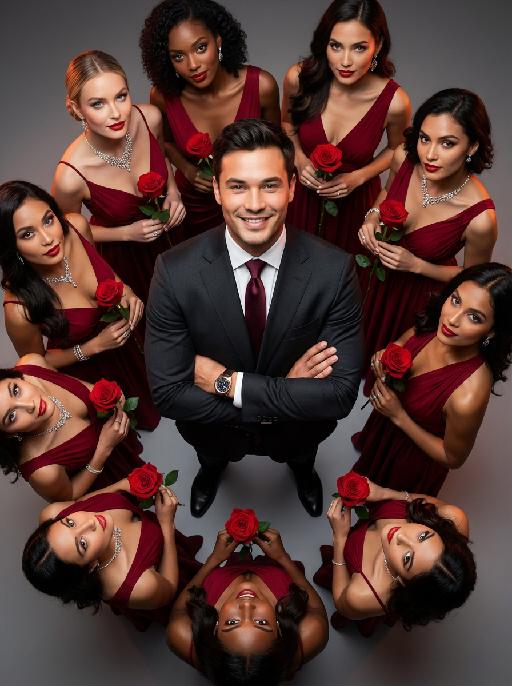
Women Surround AI effects generated image

Women Surround

The main figure in the uploaded picture, who is smiling confidently (with unchanged facial features, gender and age), is the subject. He is wearing a well-tailored high-end custom suit, with a red bow tie, a high-end watch, and crossed arms. Surrounding her are 8 to 9 beautiful women in fashionable red high-end custom dresses (wearing luxurious accessories), each holding a fresh red rose. These women are arranged in a circular pattern around the central figure on a deep purple red solid background. The color scheme indicates: high-intensity cinematic lighting effects, soft yet dramatic shadows, moderate contrast, rich depth of field effects, smooth skin texture, luxurious and romantic atmosphere, with a faint highlight on the facial features. Color hint: Predominantly rich deep red and dark black, natural and transparent skin tones, high saturation but not overexposed colors, unified and high-end color combinations with warm tones, bright light and shadow contrast. Style supplement: Fashion-forward art, fashion portrait photography, elegant and charming atmosphere, reminiscent of a luxurious Valentine's Day social event.

With Snowman

The person in the uploaded image retains their original facial features (with tiny snowflakes dusted on the hair strands), wearing a natural and fresh makeup look with a naturally blurred skin finish, and lying gently on the snow with a soft smile. They are dressed in an off-white plush coat paired with a plaid scarf in brown, gray and white tones; a mini snowman (adorned with a floral scarf and twig arms) stands beside them. The scene is a winter outdoor snowfield with bright yet soft sunlight, fine snowflakes floating in the air, and a blurred snowscape in pale blue tones in the background. The style is a high-definition portrait photo with soft light and shadow effects and lens bokeh (out-of-focus highlights) special effects, exuding an overall fresh and healing winter atmosphere. The colors are soft and natural (dominated by blue and white with warm tone accents), with rich details (the plush texture and snowflake texture are clearly rendered), featuring high resolution and exquisite image quality.

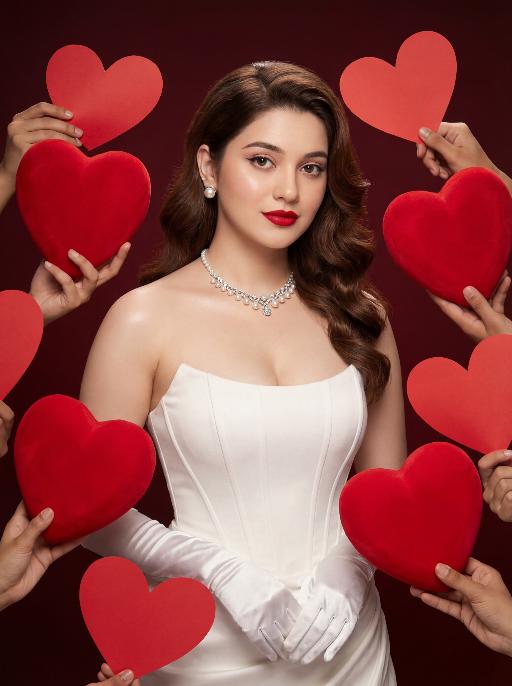
Love AI effects generated image

Love

Medium shot, the character in the uploaded picture (unchanged facial features, gender and age) with a vintage Hollywood big wavy hairstyle, wearing a strapless white corset high couture gown, paired with long white satin gloves, pearl stud earrings and a high couture custom necklace. The character has exquisite makeup with classic red lip color and cat eye makeup, profound eyes and an elegant expression. Surrounded by oversized, bright red three-dimensional velvet heart-shaped props held up by multiple hands, with a gradient low-saturation dark red background. Also, numerous hands holding large, vivid red paper heart props are around the character. Lighting & Tone: Adopt vintage Hollywood-style soft studio lighting, create clear and luminous skin complexion, form a striking contrast between the white costume and the bold red background/heart patterns, with bright lighting contrast, rich and retro color palette, smooth and glossy skin texture, presenting professional fashion photography aesthetics and avant-garde fashion photography artistic sense

Moving Figure

Create a 1/7 scale commercialized figure of the character in the illustration, in a realistic style and environment. Render the exact hairstyle and the same outfit with the uploaded figure. Render garments as molded plastic with engraved seams and sculpted folds; keep accessories as plastic parts. Fictionalize any brand text/logos while keeping layout and colors. Place the figure on a computer desk, using a circular transparent acrylic base without any text. On the Apple computer screen, display the Z Brush modeling process of the figure. Next to the Apple computer screen, place a BANDAl-style toy packaging box printed with the original artwork. The background shows a modern realistic room furnished with contemporary furniture, including a display cabinet filled with books, dolls, and scale figures, adding a casual and everyday atmosphere. Behind the Apple computer, place a desk lamp to add detail and depth to the scene.

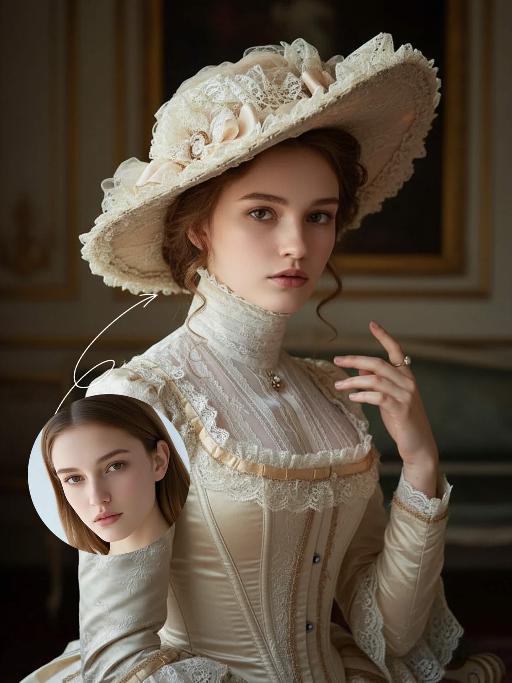
Noble Girl AI effects generated image

Noble Girl

Drawing on the facial features, facial proportion, hair styling direction, skin tone and age range of the uploaded avatar (with no emphasis on modern identity traits), the overall temperament is reimagined as that of a noble Victorian lady of the 19th century. The composition frames the figure from the top of the head to just below the chest, with the shot pulled back slightly and the subject occupying a relatively small portion of the frame. The height of the head accounts for approximately a quarter of the total frame height, positioned in the lower-middle area with natural proportions and no stretching or distortion, presenting an elegant and solemn classical portrait composition. She sits in a dignified and upright posture, her head turned gently to the right with her face in a three-quarter view and her chin slightly tucked. Her eyes are almost directly facing the camera, her gaze calm and restrained, reserved and introverted; her expression is solemn yet elegant, her lips naturally closed, and her facial features are distinct with well-proportioned contours. She wears an exquisite Victorian noble wide-brimmed hat that conforms to the aesthetic of European high society in the 19th century, crafted from pieced cream or ivory lace and fabric. The brim is adorned with delicate lace, ribbons and small ornaments, its structure elegantly intricate yet understated. Her hair is styled into a classic feminine coiffure of the same era, with soft, natural strands; a few curled tresses fall beside her temples and cheeks, blending seamlessly with the hat, boasting a delicate texture with a realistic sheen. She is dressed in a historically authentic Victorian court-style gown, featuring a high neckline that fits closely to the neck and a structured corseted bodice. The fabric is selected from silk, lace or brocade, in hues of cream, pale champagne or ivory. The cuffs, neckline and bust are embellished with elaborate lace and decorative details, with a precise cut and rich layering that fully embodies noble bearing. One of her hands is naturally raised near her face or gently resting on her chest, her fingers posed in an elegant and restrained manner. She adorns herself with a pearl ring or classical court-style jewelry, the ornaments understated and exquisite, in perfect harmony with the overall aesthetic. The lighting adopts the style of European classical court portrait painting: the key light shines softly from the upper left of the frame, with the subject’s face and upper body as the visual focal point, while the background is bathed in softer, dimmer light. The light and shadow contrast is clear with delicate gradations, recreating the light and texture of 19th-century academic and court portrait paintings. The background is set as a palace-style interior space, where the outlines of decorated walls, drapery and classical furniture can be faintly seen. The details are rendered in an understated way so as not to distract from the subject, and the background is softly blurred, creating a solemn and elegant aristocratic atmosphere. The entire image fuses ultra-realistic photography with the style of European classical oil painting, boasting a stable composition, ample negative space, rich textures and exquisite details. The low-saturation color palette is imbued with a retro charm, presenting a museum-grade visual effect of a court portrait—elegant, grand and historically authentic. It adheres to a vintage portrait photography style.

Shearling AI effects generated image

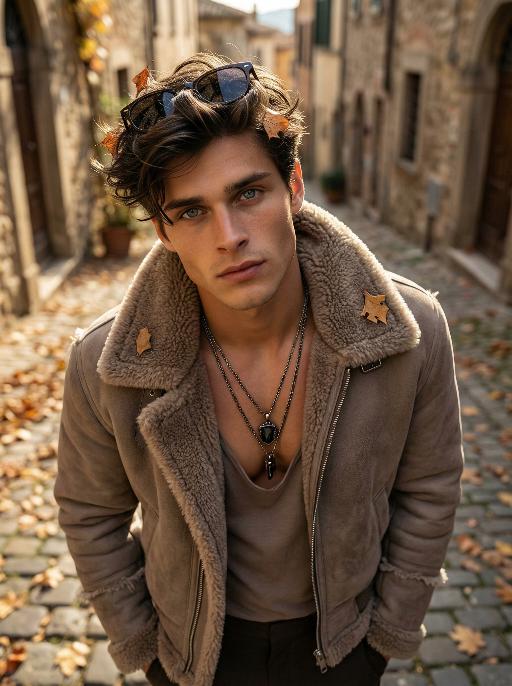
Shearling

Use the exact same facial features, gender, and age as the character in the uploaded image. Use the exact same facial features, gender, and age as the character in the uploaded image. Photorealistic fashion portrait, exact same facial features, gender and age as the character in the uploaded image. Voluminous, textured brownish-black hair with warm highlights, sunglasses perched atop the head. Shot from a high-angle, top-down perspective, with the figure tilting the head upward to gaze directly at the camera, a few dry autumn leaves caught in the hair. Dressed in a cropped, taupe shearling jacket with a thick, fluffy shearling collar and frayed shearling details on the sleeves, zipper partially unzipped to reveal a low-cut, muted taupe inner top. Layered necklaces adorn the neck: multiple metallic chains with a prominent dark pendant resting on the chest. The setting is a sun-dappled Italian street in autumn, with weathered stone buildings, cobblestone pavement, and scattered fallen leaves in the background. Soft, warm golden-hour sunlight filters through, casting gentle shadows on the face and clothing. The background is softly blurred, creating a shallow depth of field. The overall mood is sophisticated, rugged, and effortlessly cool. High detail skin texture, cinematic lighting, 8K resolution, ultra-realistic, high-fashion editorial aesthetic, no text or watermarks.

Load more

Next-Gen Multi-Model AI Video Architecture

Vivago AI isn't just one engine—it’s a unified hub for the world’s most advanced video AI. Whether you need cinematic realism or high-speed social content, we provide the right model for your creative vision.

Free Generate

Beauty and Dolphins

Vacation Time

Stellar Tear

Fish Tank Supervisor

Cinematic Quality & Precision Control

Enables 4K resolution with multi-lens motion control, generating delicate scene via text prompts for customized cinematography.​

TRY NOW

Dynamic AV Sync

Auto-generates original audio to avoid copyright issues. Build 3D immersive environments through layered sound design automatically.

TRY NOW

OpenAI Sora 2

​Advanced visual storytelling with unparalleled physics and consistency.

TRY NOW

Kling v2.6 Pro

Industry-leading cinematic image animation and motion control.

TRY NOW

Google Veo 3 & 3.1

Ultra-fast generation with enhanced realism for creative workflows.

TRY NOW

Vivago AI 2.0

Our proprietary model optimized for efficiency, speed, and cost-effective generation.

TRY NOW

Users' Voice

We listen carefully to the opinions of every user.
Free Generate
Contact Us
I tried the Lip Sync feature inside Vivago.ai’s AI Video Generator for my educational podcast, and the results were stunning! The avatar's lip movements perfectly matched my audio recording, creating a professional AI-generated video without complex editing. Compared with tools like OpenAI Sora 2 and Google Veo 3.1, Vivago Image-to-Video delivers fast, studio-quality results online. It saved me hours of post-production work.
ElenaM (Spain)
Vivago’s Image-to-Video AI transformed my marketing workflow. I uploaded a product image and described the launch scene in text, and it generated a 10-second cinematic AI video with background music and dynamic visuals. The output quality rivals Kling v2.6 Pro and Google Veo 3 Fast. It’s now my go-to AI video generator for social media ads and product campaigns.
KenjiT (Japan)
As a digital artist, I use Vivago.ai 2.0 daily for Image-to-Image and AI Image-to-Video creation. The e-book covers and animated visuals I generate for clients look cinematic and professional. Unlike many standalone AI tools, Vivago integrates multiple leading models into one platform, making it easier to create copyright-safe AI images and videos for publishing.
ChenL (China)
I tried the Lip Sync feature inside Vivago.ai’s AI Video Generator for my educational podcast, and the results were stunning! The avatar's lip movements perfectly matched my audio recording, creating a professional AI-generated video without complex editing. Compared with tools like OpenAI Sora 2 and Google Veo 3.1, Vivago Image-to-Video delivers fast, studio-quality results online. It saved me hours of post-production work.
ElenaM (Spain)
Vivago’s Image-to-Video AI transformed my marketing workflow. I uploaded a product image and described the launch scene in text, and it generated a 10-second cinematic AI video with background music and dynamic visuals. The output quality rivals Kling v2.6 Pro and Google Veo 3 Fast. It’s now my go-to AI video generator for social media ads and product campaigns.
KenjiT (Japan)
As a digital artist, I use Vivago.ai 2.0 daily for Image-to-Image and AI Image-to-Video creation. The e-book covers and animated visuals I generate for clients look cinematic and professional. Unlike many standalone AI tools, Vivago integrates multiple leading models into one platform, making it easier to create copyright-safe AI images and videos for publishing.
ChenL (China)
I absolutely love Vivago’s AI Image-to-Video Generator. As a travel blogger, static images often fail to capture real atmosphere, but Vivago helps me turn photos into vivid cinematic AI videos with motion effects. It feels comparable to OpenAI Sora 2 and Google Veo 3.1, but more accessible and faster for creators who need high-quality AI videos online.
LiamK (Australia)
I tried the Lip Sync feature inside Vivago.ai’s AI Video Generator for my educational podcast, and the results were stunning! The avatar's lip movements perfectly matched my audio recording, creating a professional AI-generated video without complex editing. Compared with tools like OpenAI Sora 2 and Google Veo 3.1, Vivago Image-to-Video delivers fast, studio-quality results online. It saved me hours of post-production work.
ElenaM (Spain)
Vivago’s Image-to-Video AI transformed my marketing workflow. I uploaded a product image and described the launch scene in text, and it generated a 10-second cinematic AI video with background music and dynamic visuals. The output quality rivals Kling v2.6 Pro and Google Veo 3 Fast. It’s now my go-to AI video generator for social media ads and product campaigns.
KenjiT (Japan)
As a digital artist, I use Vivago.ai 2.0 daily for Image-to-Image and AI Image-to-Video creation. The e-book covers and animated visuals I generate for clients look cinematic and professional. Unlike many standalone AI tools, Vivago integrates multiple leading models into one platform, making it easier to create copyright-safe AI images and videos for publishing.
ChenL (China)
I absolutely love Vivago’s AI Image-to-Video Generator. As a travel blogger, static images often fail to capture real atmosphere, but Vivago helps me turn photos into vivid cinematic AI videos with motion effects. It feels comparable to OpenAI Sora 2 and Google Veo 3.1, but more accessible and faster for creators who need high-quality AI videos online.
LiamK (Australia)
Using Vivago.ai’s Image-to-Video AI has greatly enhanced my classroom teaching. I transform textbook notes into historical AI videos with cinematic filters and dynamic animations. Compared with tools like Kling v2.6 Pro and Google Veo 3 Fast, Vivago offers faster generation and easier parameter control for educators who need reliable AI video creation.
RajivG (India)
I frequently create AI videos on Vivago and publish them on TikTok and YouTube Shorts. The AI video templates and trending content ideas help me produce viral-ready clips quickly. With Vivago’s integrated models—including advanced video engines similar to OpenAI Sora 2—I can generate anime-style and cinematic social media videos that drive high engagement.
MarieJ (Spain)
What attracts me most about Vivago.ai is not only the powerful AI Video Generator but also the active AIGC creator community. It combines AI Image-to-Video, Text-to-Video, and leading model integrations like Google Veo 3.1 into one creative platform.
TomW (India)
At first, I was hesitant about using AI video tools. But after trying Vivago Image-to-Video, I realized how easy it is to create professional AI-generated videos online. I just upload an image, add a short prompt, and adjust a few settings. The results are cinematic and copyright-safe, which is essential for commercial projects.
HectorC (Mexico)
Using Vivago.ai’s Image-to-Video AI has greatly enhanced my classroom teaching. I transform textbook notes into historical AI videos with cinematic filters and dynamic animations. Compared with tools like Kling v2.6 Pro and Google Veo 3 Fast, Vivago offers faster generation and easier parameter control for educators who need reliable AI video creation.
RajivG (India)
I frequently create AI videos on Vivago and publish them on TikTok and YouTube Shorts. The AI video templates and trending content ideas help me produce viral-ready clips quickly. With Vivago’s integrated models—including advanced video engines similar to OpenAI Sora 2—I can generate anime-style and cinematic social media videos that drive high engagement.
MarieJ (Spain)
What attracts me most about Vivago.ai is not only the powerful AI Video Generator but also the active AIGC creator community. It combines AI Image-to-Video, Text-to-Video, and leading model integrations like Google Veo 3.1 into one creative platform.
TomW (India)
At first, I was hesitant about using AI video tools. But after trying Vivago Image-to-Video, I realized how easy it is to create professional AI-generated videos online. I just upload an image, add a short prompt, and adjust a few settings. The results are cinematic and copyright-safe, which is essential for commercial projects.
HectorC (Mexico)