Text to Video

Capture a stunning Grand Canyon sunrise with AI-generated visuals. Vivago.ai transforms prompts into vivid landscapes, showcasing golden light reflecting off rugged cliffs and mist swirling above the canyon floor. Create professional-grade nature scenes with realistic textures, vibrant hues, and dynamic depth—perfect for elevating travel content, art projects, or digital storytelling.

Recreate
arrow

FAQs

How to generate images/videos from text prompts?

Describe the visual content in natural language (e.g., 'A cyberpunk cat wearing neon goggles') and our AI models will create outputs. Complex prompts trigger multi-stage NLP parsing for enhanced accuracy.

How to refine unsatisfactory results?

Use our Prompt Bot - an AI-powered optimizer that suggests technical modifiers. Simply describe your ideas, desired changes ('more metallic texture'), then you will get optimized prompt variants.

When should I use reference images?

Upload references to: 1) Guide character consistency (e.g., faces/outfits), 2) Control motion patterns in videos using our feature matching algorithm. Supports JPG/PNG

What's the credit system?

Daily login grants 100 credits. Upgrade options: 1) Premium Membership, 2) Credit Packs. Details: https://vivago.ai/subscribe

More From VIVAGO AI

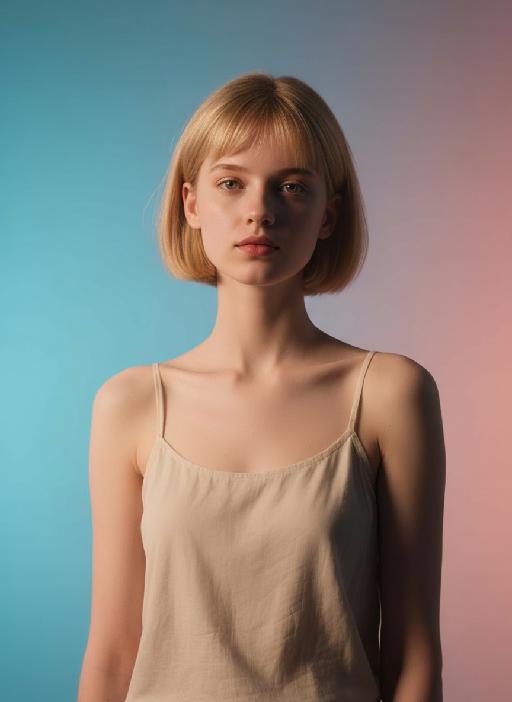
Fashion Art AI effects generated image

Fashion Art

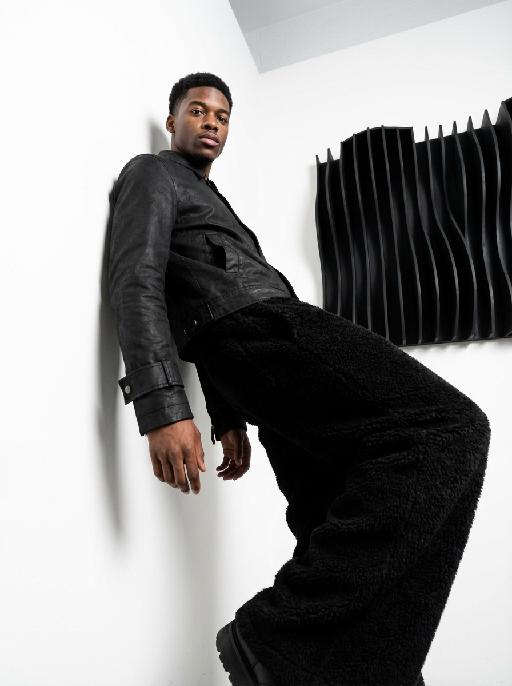
This is a set of professional minimalist style portrait works shot from a low angle. Using a 35mm wide-angle lens, a unique strong perspective distortion effect is presented. This work was taken with a Sony A7R V camera. The uploaded images show the image of the person (with facial features, age and gender unchanged), with neat short hair, matte makeup, highlighting a hard and angular outline, a cold and confident expression, and calm and avant-garde gaze directly at the camera. The body leans against a white matte wall, the right leg is bent and raised, the left arm is placed on the wall, and the right hand is naturally hanging down. Wearing a black worn-out high-end custom leather jacket (with detachable cuffs), a black inner layer, and loose and fluffy black wide-leg pants. The studio uses high-contrast hard light for illumination, with the main light forming a strong contrast line of light and dark in the front, deep shadows, and clear contours. The background is a white matte wall and some black three-dimensional abstract wave-shaped art installations, presenting a strong contrast in visual effect, high contrast, clear texture, and a fashionable and avant-garde photography art style, which can be regarded as a heavyweight work in the fashion world.

SereneNook

Shoot a 10-second (9:16) vertical one-take video showcasing a serene, sunlit indoor lounge area. The shot begins with a slightly elevated wide-angle view, presenting the entire scene: two wooden rocking chairs with beige cushions, a small side table with fruits and coffee cups, a floor lamp, and a large potted plant by the window. A young man in a simple white top and black pants enters the frame, holding a glass water jug. He walks to the table, bends down, and gently and steadily pours water into a small succulent plant on the table. After pouring, he straightens up, smiles slightly, and steps back to admire the scene. Natural light filters through sheer curtains into the room, casting soft shadows on the wooden floor and carpet. The camera remains stable for 10 seconds, smoothly capturing all actions in one continuous take, creating a warm, peaceful, and comfortable atmosphere. Add the sound of flowing water and soft background music to enhance the calm ambiance.

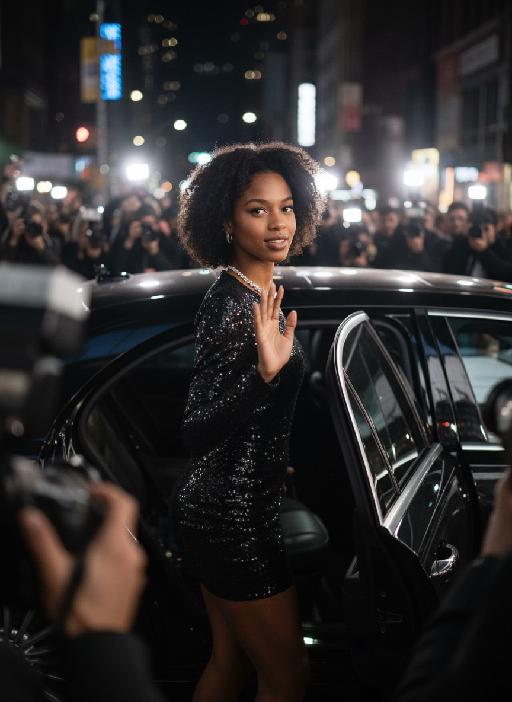
Hollywood Star AI effects generated image

Hollywood Star

A medium close-up shot from a frontal perspective with a slight upward tilt, the camera angle is slightly tilted forward. This shot was taken using a professional full-frame digital SLR camera and a 50mm f/1.2 wide-angle fixed-focus lens. The uploaded image shows a person (with unchanged facial features, gender, age, and hairstyle), wearing a tight black sequined sexy dress and wearing high-end custom accessories. This figure is preparing to get into a black luxury car with open doors. The figure turns halfway and looks at the camera, raising one hand and making a gentle waving or shielding gesture. The person has a relaxed and confident smile on their face, with bright and expressive eyes. The scene is on a night-time city street, illuminated by a group of paparazzi and a large number of flashes, creating a high-contrast light and shadow effect, with shadows and bright highlights, and the foreground also includes cameras and flashes, creating the feeling that the celebrity figure is surrounded by paparazzi and cameras. This aesthetic style is the street style of Hollywood celebrity paparazzi, featuring grainy film texture, clear focus on the subject, blurred background and dark tones. The person's face is illuminated by the flash, and the makeup characteristic of the figure is exaggerated false eyelashes, clear cheekbones, nude matte lip color and bright highlights used to enhance the three-dimensionality; the picture adds dark corners at the four corners and bright parts in the middle, creating a strong contrast between light and shadow.

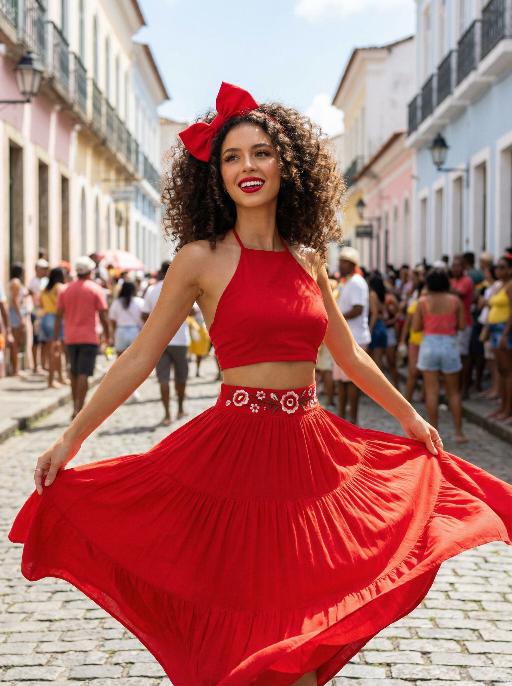
Samba AI effects generated image

Samba

Use the exact same facial features, gender, and age as the uploaded image. Vibrant street celebration scene in a colorful colonial town, pastel-colored buildings lining a sunlit cobblestone street. Voluminous curly dark brown hair adorned with a large, bright red bow at the crown. Smooth, warm light tan skin with a luminous, dewy finish. Bold, glamorous makeup: defined brows, winged eyeliner, long voluminous lashes, glossy cherry-red lipstick, and a subtle golden highlight on the cheekbones. Form-fitting red halter crop top, paired with a flowing, tiered red maxi skirt. The waistband of the skirt features a white base with vibrant red floral embroidery. Dynamic, joyful movement: arms outstretched, skirt billowing dramatically, capturing the energy of a festive street dance. Background filled with a lively crowd of celebrants, soft focus to keep the subject prominent. Bright, clear daylight, cinematic color grading, high detail, 8K ultra-realistic, vibrant and festive atmosphere, no obvious personal pronouns.

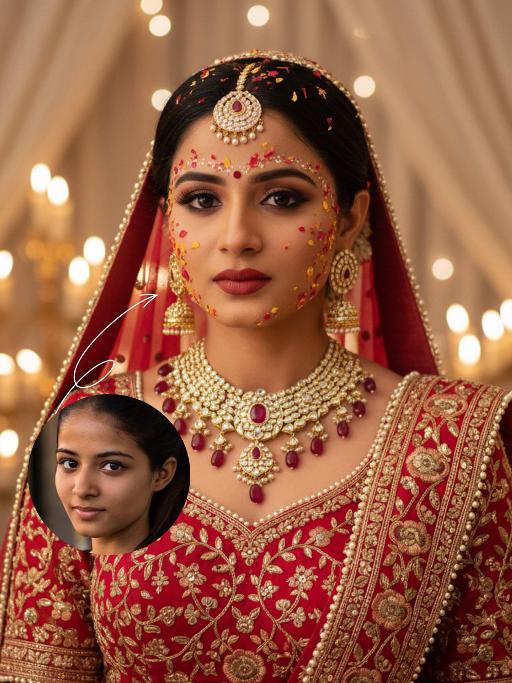
Bollywood AI effects generated image

Bollywood

The identity of the uploaded portrait is strictly preserved (retaining facial contours, authentic Indian skin tone, hairstyle and age). This is a close-up and bust portrait with a 3:4 aspect ratio, featuring a stunning traditional Indian bride around 30 years old with a gentle yet faintly sorrowful expression. Her makeup is exquisitely rich and dramatic: smoldering smoky eyes paired with a matte vintage red lip, a large red crystal bindi adorned on her forehead, and delicate red, yellow and gold Gulab Patti floral appliqués dotted across her forehead and cheeks, with a fresh, flawless and well-blended base makeup. Her jet-black hair is sleek and long (or styled into a neat chignon), with a rose-red dupatta edged with gold threadwork wrapped around her head; the dupatta is embroidered with intricate golden interlocking floral patterns along the hem and drapes softly over her shoulders. She is dressed in a red heavily hand-embroidered Lehenga Choli: the blouse is fully embellished with golden interlocking floral motifs and trimmed with a delicate pearl border. She wears large multi-layered openwork gold earrings with tiny dangling diamond accents, a stack of gold necklaces inlaid with rubies around her neck, and an ornate maang tikka encrusted with pearls and rubies atop her head. The background is a warm-hued wedding ceremony setting: soft candlelight (candles/fairy lights) glimmers all around, creamy white sheer drapes hang in hazy folds, and the blurred backdrop enhances the atmospheric feel. Bollywood cinematic lighting is adopted: warm golden soft light is cast from the side, outlining her facial contours and the delicate texture of the Gulab Patti, accentuating the luster of the gold jewelry, and creating a dreamy, hazy sense of ritual. The style is a vintage Bollywood bridal portrait, with rich, saturated colors, exquisitely detailed textures, and an immersive emotional atmosphere that evokes profound sentiment.

Load more

Next-Gen Multi-Model AI Video Architecture

Vivago AI isn't just one engine—it’s a unified hub for the world’s most advanced video AI. Whether you need cinematic realism or high-speed social content, we provide the right model for your creative vision.

Free Generate

Beauty and Dolphins

Vacation Time

Stellar Tear

Fish Tank Supervisor

Cinematic Quality & Precision Control

Enables 4K resolution with multi-lens motion control, generating delicate scene via text prompts for customized cinematography.​

TRY NOW

Dynamic AV Sync

Auto-generates original audio to avoid copyright issues. Build 3D immersive environments through layered sound design automatically.

TRY NOW

OpenAI Sora 2

​Advanced visual storytelling with unparalleled physics and consistency.

TRY NOW

Kling v2.6 Pro

Industry-leading cinematic image animation and motion control.

TRY NOW

Google Veo 3 & 3.1

Ultra-fast generation with enhanced realism for creative workflows.

TRY NOW

Vivago AI 2.0

Our proprietary model optimized for efficiency, speed, and cost-effective generation.

TRY NOW

Users' Voice

We listen carefully to the opinions of every user.
Free Generate
Contact Us
I tried the Lip Sync feature inside Vivago.ai’s AI Video Generator for my educational podcast, and the results were stunning! The avatar's lip movements perfectly matched my audio recording, creating a professional AI-generated video without complex editing. Compared with tools like OpenAI Sora 2 and Google Veo 3.1, Vivago Image-to-Video delivers fast, studio-quality results online. It saved me hours of post-production work.
ElenaM (Spain)
Vivago’s Image-to-Video AI transformed my marketing workflow. I uploaded a product image and described the launch scene in text, and it generated a 10-second cinematic AI video with background music and dynamic visuals. The output quality rivals Kling v2.6 Pro and Google Veo 3 Fast. It’s now my go-to AI video generator for social media ads and product campaigns.
KenjiT (Japan)
As a digital artist, I use Vivago.ai 2.0 daily for Image-to-Image and AI Image-to-Video creation. The e-book covers and animated visuals I generate for clients look cinematic and professional. Unlike many standalone AI tools, Vivago integrates multiple leading models into one platform, making it easier to create copyright-safe AI images and videos for publishing.
ChenL (China)
I tried the Lip Sync feature inside Vivago.ai’s AI Video Generator for my educational podcast, and the results were stunning! The avatar's lip movements perfectly matched my audio recording, creating a professional AI-generated video without complex editing. Compared with tools like OpenAI Sora 2 and Google Veo 3.1, Vivago Image-to-Video delivers fast, studio-quality results online. It saved me hours of post-production work.
ElenaM (Spain)
Vivago’s Image-to-Video AI transformed my marketing workflow. I uploaded a product image and described the launch scene in text, and it generated a 10-second cinematic AI video with background music and dynamic visuals. The output quality rivals Kling v2.6 Pro and Google Veo 3 Fast. It’s now my go-to AI video generator for social media ads and product campaigns.
KenjiT (Japan)
As a digital artist, I use Vivago.ai 2.0 daily for Image-to-Image and AI Image-to-Video creation. The e-book covers and animated visuals I generate for clients look cinematic and professional. Unlike many standalone AI tools, Vivago integrates multiple leading models into one platform, making it easier to create copyright-safe AI images and videos for publishing.
ChenL (China)
I absolutely love Vivago’s AI Image-to-Video Generator. As a travel blogger, static images often fail to capture real atmosphere, but Vivago helps me turn photos into vivid cinematic AI videos with motion effects. It feels comparable to OpenAI Sora 2 and Google Veo 3.1, but more accessible and faster for creators who need high-quality AI videos online.
LiamK (Australia)
I tried the Lip Sync feature inside Vivago.ai’s AI Video Generator for my educational podcast, and the results were stunning! The avatar's lip movements perfectly matched my audio recording, creating a professional AI-generated video without complex editing. Compared with tools like OpenAI Sora 2 and Google Veo 3.1, Vivago Image-to-Video delivers fast, studio-quality results online. It saved me hours of post-production work.
ElenaM (Spain)
Vivago’s Image-to-Video AI transformed my marketing workflow. I uploaded a product image and described the launch scene in text, and it generated a 10-second cinematic AI video with background music and dynamic visuals. The output quality rivals Kling v2.6 Pro and Google Veo 3 Fast. It’s now my go-to AI video generator for social media ads and product campaigns.
KenjiT (Japan)
As a digital artist, I use Vivago.ai 2.0 daily for Image-to-Image and AI Image-to-Video creation. The e-book covers and animated visuals I generate for clients look cinematic and professional. Unlike many standalone AI tools, Vivago integrates multiple leading models into one platform, making it easier to create copyright-safe AI images and videos for publishing.
ChenL (China)
I absolutely love Vivago’s AI Image-to-Video Generator. As a travel blogger, static images often fail to capture real atmosphere, but Vivago helps me turn photos into vivid cinematic AI videos with motion effects. It feels comparable to OpenAI Sora 2 and Google Veo 3.1, but more accessible and faster for creators who need high-quality AI videos online.
LiamK (Australia)
Using Vivago.ai’s Image-to-Video AI has greatly enhanced my classroom teaching. I transform textbook notes into historical AI videos with cinematic filters and dynamic animations. Compared with tools like Kling v2.6 Pro and Google Veo 3 Fast, Vivago offers faster generation and easier parameter control for educators who need reliable AI video creation.
RajivG (India)
I frequently create AI videos on Vivago and publish them on TikTok and YouTube Shorts. The AI video templates and trending content ideas help me produce viral-ready clips quickly. With Vivago’s integrated models—including advanced video engines similar to OpenAI Sora 2—I can generate anime-style and cinematic social media videos that drive high engagement.
MarieJ (Spain)
What attracts me most about Vivago.ai is not only the powerful AI Video Generator but also the active AIGC creator community. It combines AI Image-to-Video, Text-to-Video, and leading model integrations like Google Veo 3.1 into one creative platform.
TomW (India)
At first, I was hesitant about using AI video tools. But after trying Vivago Image-to-Video, I realized how easy it is to create professional AI-generated videos online. I just upload an image, add a short prompt, and adjust a few settings. The results are cinematic and copyright-safe, which is essential for commercial projects.
HectorC (Mexico)
Using Vivago.ai’s Image-to-Video AI has greatly enhanced my classroom teaching. I transform textbook notes into historical AI videos with cinematic filters and dynamic animations. Compared with tools like Kling v2.6 Pro and Google Veo 3 Fast, Vivago offers faster generation and easier parameter control for educators who need reliable AI video creation.
RajivG (India)
I frequently create AI videos on Vivago and publish them on TikTok and YouTube Shorts. The AI video templates and trending content ideas help me produce viral-ready clips quickly. With Vivago’s integrated models—including advanced video engines similar to OpenAI Sora 2—I can generate anime-style and cinematic social media videos that drive high engagement.
MarieJ (Spain)
What attracts me most about Vivago.ai is not only the powerful AI Video Generator but also the active AIGC creator community. It combines AI Image-to-Video, Text-to-Video, and leading model integrations like Google Veo 3.1 into one creative platform.
TomW (India)
At first, I was hesitant about using AI video tools. But after trying Vivago Image-to-Video, I realized how easy it is to create professional AI-generated videos online. I just upload an image, add a short prompt, and adjust a few settings. The results are cinematic and copyright-safe, which is essential for commercial projects.
HectorC (Mexico)