Text to Video

Transform text into spectral visuals with this AI-generated video prompt. Capture a ghostly figure in slow-motion, gliding through a moonlit cemetery. AI-powered tools enhance eerie shadows, tattered gowns, and chilling winds for cinematic horror. Perfect for crafting haunting scenes with dynamic camera movements, vivid details, and professional-grade effects. Elevate your supernatural storytelling effortlessly.

Recreate
arrow

FAQs

How to generate images/videos from text prompts?

Describe the visual content in natural language (e.g., 'A cyberpunk cat wearing neon goggles') and our AI models will create outputs. Complex prompts trigger multi-stage NLP parsing for enhanced accuracy.

How to refine unsatisfactory results?

Use our Prompt Bot - an AI-powered optimizer that suggests technical modifiers. Simply describe your ideas, desired changes ('more metallic texture'), then you will get optimized prompt variants.

When should I use reference images?

Upload references to: 1) Guide character consistency (e.g., faces/outfits), 2) Control motion patterns in videos using our feature matching algorithm. Supports JPG/PNG

What's the credit system?

Daily login grants 100 credits. Upgrade options: 1) Premium Membership, 2) Credit Packs. Details: https://vivago.ai/subscribe

More From VIVAGO AI

Romantic Castle

The facial features and the number of figures in the uploaded image remain unchanged; Expression: a sweet smile; Appearance & Adornments: voluminous chestnut wavy curls, exquisite natural makeup (soft eye makeup + pink-toned lip makeup), a headband of Mickey or Minnie Mouse crafted from silver sequins; Attire: an exquisitely tailored high-end evening gown, or an elegant haute couture coat paired with a scarf; Scene & Setting: night view of the Disney Castle, warm purple + golden lighting (brightness increased by 30%), golden blooming fireworks (brightness increased by 20%), dark blue sky, bokeh light spots; Lighting: enhanced ambient fill light, even and soft facial lighting with warm tones; Camera: Canon 5D4 + f/1.8 lens, highly detailed textures; 8K high definition; Style: avant-garde fashion photography, film grain texture, cinematic feel, ultra-realistic image quality; the figures have naturally blurred skin with a delicate texture and exquisite makeup; add warm and cozy bright yellow light spots around the frame; medium close-up bust shot.

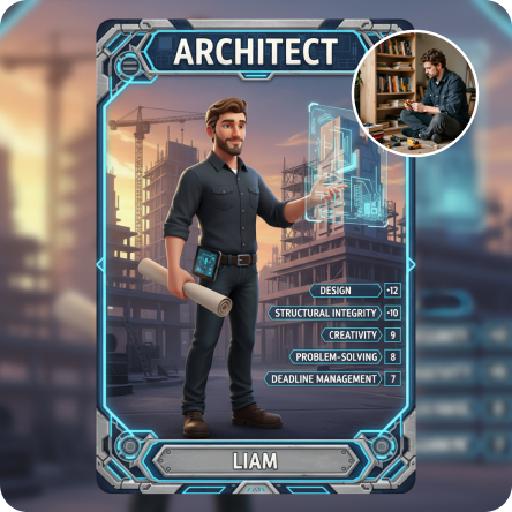
Moving Figure

Create a 1/7 scale commercialized figure of the character in the illustration, in a realistic style and environment. Render the exact hairstyle and the same outfit with the uploaded figure. Render garments as molded plastic with engraved seams and sculpted folds; keep accessories as plastic parts. Fictionalize any brand text/logos while keeping layout and colors. Place the figure on a computer desk, using a circular transparent acrylic base without any text. On the Apple computer screen, display the Z Brush modeling process of the figure. Next to the Apple computer screen, place a BANDAl-style toy packaging box printed with the original artwork. The background shows a modern realistic room furnished with contemporary furniture, including a display cabinet filled with books, dolls, and scale figures, adding a casual and everyday atmosphere. Behind the Apple computer, place a desk lamp to add detail and depth to the scene.

Girlfriend

In the uploaded picture, that person (with unchanged facial features) is wearing a well-tailored and high-quality black custom suit and a sophisticated watch. Next to her sits a beautiful woman in a flowing deep red strapless dress, wearing exquisite accessories, with the skirt extending all the way to the ground. This couple, filled with romantic atmosphere, is inside a huge deep red inflatable hot air balloon basket (decorated with abundant romantic roses). They bump their glasses together and gaze deeply into each other's eyes. Below is the cityscape of Paris, and on the left, the Eiffel Tower is clearly visible. Surrounding it are floating heart-shaped red hot air balloons. The scene is set at the golden hour of sunset, with the sky presenting a warm orange-yellow color. The soft background light creates a hazy film-like glow, with low color saturation, soft contrast between light and dark, creating a dreamy and luxurious atmosphere, with a high-end wedding photography style, fine texture, soft background blurring effect, and the top of the main hot air balloon has the glowing words "Happy Valentine's Day". It is a movie-like realistic scene, with movie-like effects, wide-angle lens shooting, a震撼 scene, and the light effect of the setting sun's afterglow.

Temple AI effects generated image

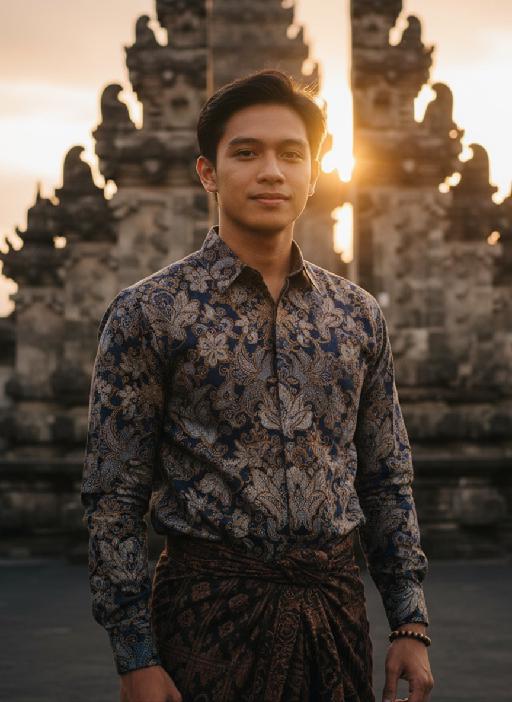
Temple

Strictly lock the facial features of the uploaded portrait (preserve facial contours, native Indonesian skin tone, hairstyle and age). close-up photorealistic half-body portrait, model occupies 3/4 of the frame, focus sharply on facial features and serene expression, minimal headroom with zero empty space above the head, the model as the absolute dominant subject, 30-year-old native Indonesian man, native skin tone and natural short black hair, wearing traditional Indonesian batik long-sleeve shirt with deep indigo and gold patterns + dark brown hand-woven sarong, simple wooden beaded bracelet on wrist, standing in front of ancient Balinese stone temple with intricate carvings and tiered meru towers, golden sunset light bathing the scene, soft warm backlighting, hazy orange-pink sky with gentle sun flare bokeh, calm and serene expression, gentle wind brushing his hair, strong nostalgic atmospheric mood, film grain texture, authentic Indonesian cultural details, ultra-detailed fabric and temple carvings, 3:4 aspect ratio, cinematic sunset ambiance

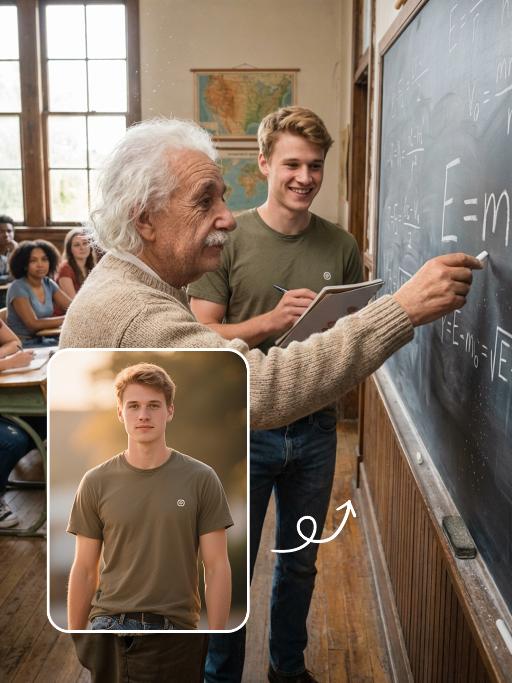
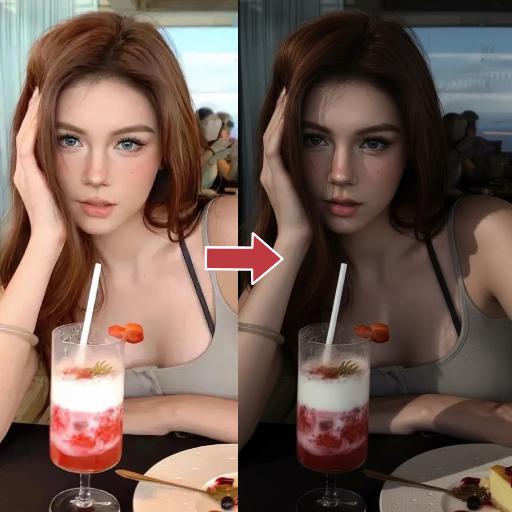
ColorFlow

Use the exact same facial features, gender, and age as the character in the uploaded image. Maintain his original identity and natural skin tone. must be clean-shaven (no beard, no mustache, smooth jawline). Preserve a youthful, handsome, and charismatic appearance. A young, muscular Brazilian samba performer at Rio Carnival, running toward the camera with arms wide open in celebration, smiling confidently with bright, expressive eyes. His face is clean-shaven, smooth, and youthful, highlighting strong cheekbones and a defined jawline. holds a large Brazilian flag in one hand, waving it proudly. wears an extravagant Carnival costume: a jeweled green-and-gold crown, elaborate emerald, gold, and sapphire beaded shoulder armor, layered gemstone necklaces, matching ornate wrist cuffs, and a wide decorated belt with intricate embroidery. Large blue, green, and yellow feathered wings extend dramatically from his back. is shirtless, revealing an athletic, well-defined physique with natural skin texture. wears fitted black pants decorated with subtle glitter details. Setting: the Sambadrome at night, filled with a massive cheering crowd. Fireworks explode in the dark sky, casting warm golden and orange highlights across the scene. Christ the Redeemer glows softly in the distant skyline. Confetti fills the air. A blue LED-lit railing in the foreground adds modern contrast lighting. Atmosphere: electrifying, triumphant, patriotic, vibrant, high-energy festival mood. Style: ultra-high-resolution cinematic photography, dramatic contrast lighting, strong rim light outlining his body and feathers, sharp focus on subject, shallow depth of field, 85mm lens, f/1.8, HDR, rich saturated colors, detailed natural skin texture, epic magazine-cover composition.

Women Surround AI effects generated image

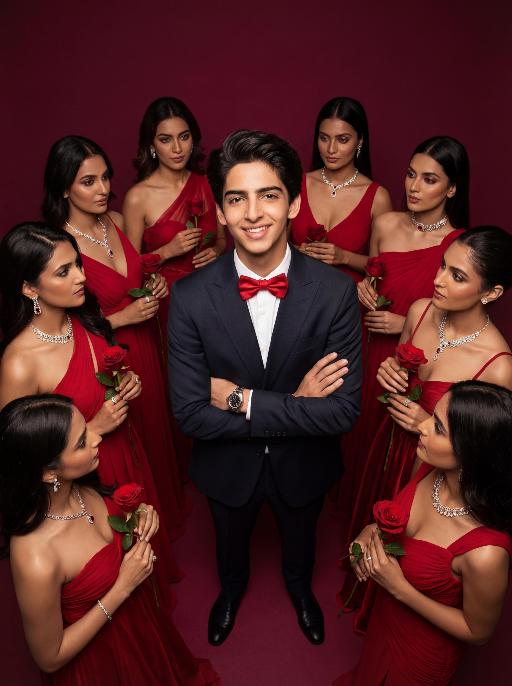
Women Surround

Low-angle shot: The central figure from the uploaded image is the subject, with a confident smile, keeping original facial features, gender and age unchanged. He is dressed in a well-tailored high-end custom suit, paired with a red bow tie and a luxury watch, with his arms crossed over his chest. Surrounding him are 8 to 9 beautiful Indian women in stylish red high-end custom gowns, adorned with luxurious accessories, each holding a fresh red rose. These women are arranged in a circular formation around the central figure against a solid deep burgundy background. Lighting & Color Settings: High-quality cinematic lighting effects, soft yet dramatic shadows, moderate contrast, rich depth of field, smooth and translucent skin texture, creating an overall luxurious and romantic atmosphere, with a faint highlight on the facial features for enhancement. Color Hints: Dominated by rich deep red and pure black, natural and clear skin tones, highly saturated colors without overexposure, a cohesive high-end color palette with warm tones, and striking contrast between light and shadow. Style Supplement: Avant-garde fashion art style, fashion portrait photography, the overall atmosphere is elegant and charming, evoking the grandeur of a luxurious Valentine's Day celebrity gala.

 Golden Leopard AI effects generated image

Golden Leopard

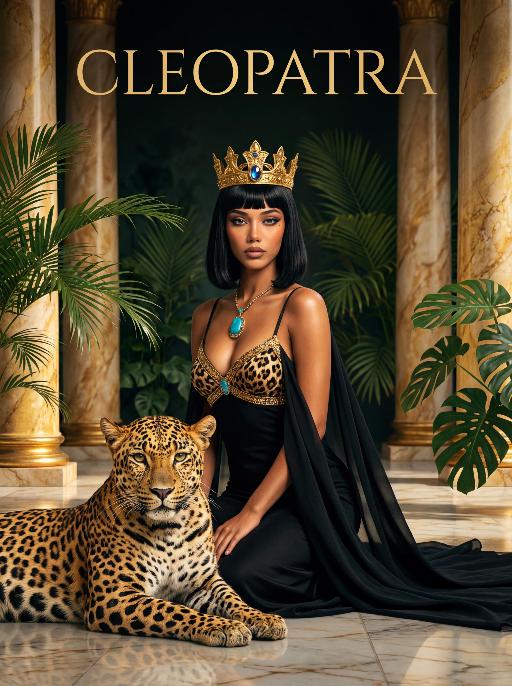
A striking woman embodying the persona of Cleopatra, kneeling gracefully beside a majestic leopard. She has a sleek black bob haircut with blunt bangs, a captivating gaze, and a regal, alluring expression. The leopard, with golden-brown fur and distinct black spots, lies calmly at her side, looking directly at the viewer with a calm, powerful demeanor. She wears a black spaghetti-strap gown with a leopard-print bodice, intricately trimmed with gold filigree and a large turquoise gem pendant at the center. A flowing black drape falls from her shoulders. Her head is adorned with a golden pharaoh-style crown set with a central blue gemstone. She kneels on a polished marble floor, one hand resting lightly on the ground beside her. The leopard rests at her knee, exuding a sense of quiet power and companionship. The setting is a lush, ancient Egyptian-inspired courtyard, framed by large, vibrant green tropical foliage (like palm fronds and monstera leaves) and flanked by tall, golden marble columns. Above her, the word "CLEOPATRA" is displayed in an elegant, golden serif font against the greenery. The image is rendered in a vintage Hollywood movie poster style, with dramatic, high-contrast lighting that highlights the sheen of the gold, the texture of the leopard's fur, and the richness of the black fabric. The color palette is opulent, featuring deep greens, luxurious golds, bold black, and the warm tones of the leopard's coat, creating a mysterious, regal, and timeless atmosphere. The overall aesthetic is cinematic, detailed, and evocative of ancient Egyptian grandeur and untamed power.

Load more

Next-Gen Multi-Model AI Video Architecture

Vivago AI isn't just one engine—it’s a unified hub for the world’s most advanced video AI. Whether you need cinematic realism or high-speed social content, we provide the right model for your creative vision.

Free Generate

Beauty and Dolphins

Vacation Time

Stellar Tear

Fish Tank Supervisor

Cinematic Quality & Precision Control

Enables 4K resolution with multi-lens motion control, generating delicate scene via text prompts for customized cinematography.​

TRY NOW

Dynamic AV Sync

Auto-generates original audio to avoid copyright issues. Build 3D immersive environments through layered sound design automatically.

TRY NOW

OpenAI Sora 2

​Advanced visual storytelling with unparalleled physics and consistency.

TRY NOW

Kling v2.6 Pro

Industry-leading cinematic image animation and motion control.

TRY NOW

Google Veo 3 & 3.1

Ultra-fast generation with enhanced realism for creative workflows.

TRY NOW

Vivago AI 2.0

Our proprietary model optimized for efficiency, speed, and cost-effective generation.

TRY NOW

Users' Voice

We listen carefully to the opinions of every user.
Free Generate
Contact Us
I tried the Lip Sync feature inside Vivago.ai’s AI Video Generator for my educational podcast, and the results were stunning! The avatar's lip movements perfectly matched my audio recording, creating a professional AI-generated video without complex editing. Compared with tools like OpenAI Sora 2 and Google Veo 3.1, Vivago Image-to-Video delivers fast, studio-quality results online. It saved me hours of post-production work.
ElenaM (Spain)
Vivago’s Image-to-Video AI transformed my marketing workflow. I uploaded a product image and described the launch scene in text, and it generated a 10-second cinematic AI video with background music and dynamic visuals. The output quality rivals Kling v2.6 Pro and Google Veo 3 Fast. It’s now my go-to AI video generator for social media ads and product campaigns.
KenjiT (Japan)
As a digital artist, I use Vivago.ai 2.0 daily for Image-to-Image and AI Image-to-Video creation. The e-book covers and animated visuals I generate for clients look cinematic and professional. Unlike many standalone AI tools, Vivago integrates multiple leading models into one platform, making it easier to create copyright-safe AI images and videos for publishing.
ChenL (China)
I tried the Lip Sync feature inside Vivago.ai’s AI Video Generator for my educational podcast, and the results were stunning! The avatar's lip movements perfectly matched my audio recording, creating a professional AI-generated video without complex editing. Compared with tools like OpenAI Sora 2 and Google Veo 3.1, Vivago Image-to-Video delivers fast, studio-quality results online. It saved me hours of post-production work.
ElenaM (Spain)
Vivago’s Image-to-Video AI transformed my marketing workflow. I uploaded a product image and described the launch scene in text, and it generated a 10-second cinematic AI video with background music and dynamic visuals. The output quality rivals Kling v2.6 Pro and Google Veo 3 Fast. It’s now my go-to AI video generator for social media ads and product campaigns.
KenjiT (Japan)
As a digital artist, I use Vivago.ai 2.0 daily for Image-to-Image and AI Image-to-Video creation. The e-book covers and animated visuals I generate for clients look cinematic and professional. Unlike many standalone AI tools, Vivago integrates multiple leading models into one platform, making it easier to create copyright-safe AI images and videos for publishing.
ChenL (China)
I absolutely love Vivago’s AI Image-to-Video Generator. As a travel blogger, static images often fail to capture real atmosphere, but Vivago helps me turn photos into vivid cinematic AI videos with motion effects. It feels comparable to OpenAI Sora 2 and Google Veo 3.1, but more accessible and faster for creators who need high-quality AI videos online.
LiamK (Australia)
I tried the Lip Sync feature inside Vivago.ai’s AI Video Generator for my educational podcast, and the results were stunning! The avatar's lip movements perfectly matched my audio recording, creating a professional AI-generated video without complex editing. Compared with tools like OpenAI Sora 2 and Google Veo 3.1, Vivago Image-to-Video delivers fast, studio-quality results online. It saved me hours of post-production work.
ElenaM (Spain)
Vivago’s Image-to-Video AI transformed my marketing workflow. I uploaded a product image and described the launch scene in text, and it generated a 10-second cinematic AI video with background music and dynamic visuals. The output quality rivals Kling v2.6 Pro and Google Veo 3 Fast. It’s now my go-to AI video generator for social media ads and product campaigns.
KenjiT (Japan)
As a digital artist, I use Vivago.ai 2.0 daily for Image-to-Image and AI Image-to-Video creation. The e-book covers and animated visuals I generate for clients look cinematic and professional. Unlike many standalone AI tools, Vivago integrates multiple leading models into one platform, making it easier to create copyright-safe AI images and videos for publishing.
ChenL (China)
I absolutely love Vivago’s AI Image-to-Video Generator. As a travel blogger, static images often fail to capture real atmosphere, but Vivago helps me turn photos into vivid cinematic AI videos with motion effects. It feels comparable to OpenAI Sora 2 and Google Veo 3.1, but more accessible and faster for creators who need high-quality AI videos online.
LiamK (Australia)
Using Vivago.ai’s Image-to-Video AI has greatly enhanced my classroom teaching. I transform textbook notes into historical AI videos with cinematic filters and dynamic animations. Compared with tools like Kling v2.6 Pro and Google Veo 3 Fast, Vivago offers faster generation and easier parameter control for educators who need reliable AI video creation.
RajivG (India)
I frequently create AI videos on Vivago and publish them on TikTok and YouTube Shorts. The AI video templates and trending content ideas help me produce viral-ready clips quickly. With Vivago’s integrated models—including advanced video engines similar to OpenAI Sora 2—I can generate anime-style and cinematic social media videos that drive high engagement.
MarieJ (Spain)
What attracts me most about Vivago.ai is not only the powerful AI Video Generator but also the active AIGC creator community. It combines AI Image-to-Video, Text-to-Video, and leading model integrations like Google Veo 3.1 into one creative platform.
TomW (India)
At first, I was hesitant about using AI video tools. But after trying Vivago Image-to-Video, I realized how easy it is to create professional AI-generated videos online. I just upload an image, add a short prompt, and adjust a few settings. The results are cinematic and copyright-safe, which is essential for commercial projects.
HectorC (Mexico)
Using Vivago.ai’s Image-to-Video AI has greatly enhanced my classroom teaching. I transform textbook notes into historical AI videos with cinematic filters and dynamic animations. Compared with tools like Kling v2.6 Pro and Google Veo 3 Fast, Vivago offers faster generation and easier parameter control for educators who need reliable AI video creation.
RajivG (India)
I frequently create AI videos on Vivago and publish them on TikTok and YouTube Shorts. The AI video templates and trending content ideas help me produce viral-ready clips quickly. With Vivago’s integrated models—including advanced video engines similar to OpenAI Sora 2—I can generate anime-style and cinematic social media videos that drive high engagement.
MarieJ (Spain)
What attracts me most about Vivago.ai is not only the powerful AI Video Generator but also the active AIGC creator community. It combines AI Image-to-Video, Text-to-Video, and leading model integrations like Google Veo 3.1 into one creative platform.
TomW (India)
At first, I was hesitant about using AI video tools. But after trying Vivago Image-to-Video, I realized how easy it is to create professional AI-generated videos online. I just upload an image, add a short prompt, and adjust a few settings. The results are cinematic and copyright-safe, which is essential for commercial projects.
HectorC (Mexico)