Text to Video

Create dynamic handheld footage with AI: Capture people using smartphones, scrolling news apps, watching videos, or reading. Smooth panning, tilting angles, soft ambient lighting, screen-glow illumination, and bustling backgrounds. Perfect for social media ads, tech reviews, or lifestyle content. Elevate visuals with vivago.ai's AI video effects for professional, modern scenes.

Recreate
arrow

FAQs

How to generate images/videos from text prompts?

Describe the visual content in natural language (e.g., 'A cyberpunk cat wearing neon goggles') and our AI models will create outputs. Complex prompts trigger multi-stage NLP parsing for enhanced accuracy.

How to refine unsatisfactory results?

Use our Prompt Bot - an AI-powered optimizer that suggests technical modifiers. Simply describe your ideas, desired changes ('more metallic texture'), then you will get optimized prompt variants.

When should I use reference images?

Upload references to: 1) Guide character consistency (e.g., faces/outfits), 2) Control motion patterns in videos using our feature matching algorithm. Supports JPG/PNG

What's the credit system?

Daily login grants 100 credits. Upgrade options: 1) Premium Membership, 2) Credit Packs. Details: https://vivago.ai/subscribe

More From VIVAGO AI

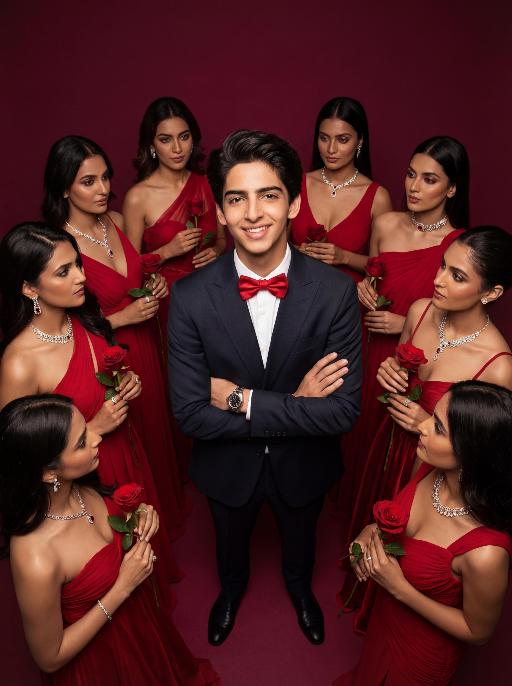
Women Surround AI effects generated image

Women Surround

Low-angle shot: The central figure from the uploaded image is the subject, with a confident smile, keeping original facial features, gender and age unchanged. He is dressed in a well-tailored high-end custom suit, paired with a red bow tie and a luxury watch, with his arms crossed over his chest. Surrounding him are 8 to 9 beautiful Indian women in stylish red high-end custom gowns, adorned with luxurious accessories, each holding a fresh red rose. These women are arranged in a circular formation around the central figure against a solid deep burgundy background. Lighting & Color Settings: High-quality cinematic lighting effects, soft yet dramatic shadows, moderate contrast, rich depth of field, smooth and translucent skin texture, creating an overall luxurious and romantic atmosphere, with a faint highlight on the facial features for enhancement. Color Hints: Dominated by rich deep red and pure black, natural and clear skin tones, highly saturated colors without overexposure, a cohesive high-end color palette with warm tones, and striking contrast between light and shadow. Style Supplement: Avant-garde fashion art style, fashion portrait photography, the overall atmosphere is elegant and charming, evoking the grandeur of a luxurious Valentine's Day celebrity gala.

Lens Heartbeat AI effects generated image

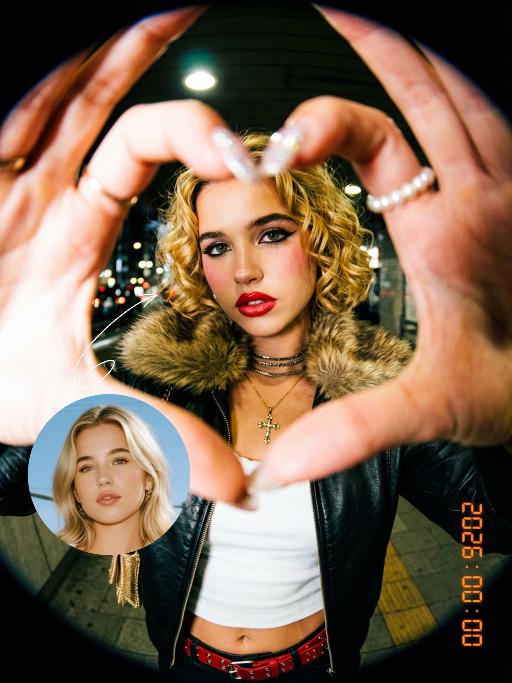
Lens Heartbeat

The uploaded figure (with unchanged facial features) forms a heart shape with both hands in front of the lens for a framed composition, featuring a shallow depth of field (the large, tilted hands in the foreground are slightly blurred). This is a portrait photoshoot in the ppgalclub style, with Japanese Shibuya Y2K fashion styling. Captured in a fisheye lens close-up (strong fisheye distortion with slight stretching at the frame edges) from a slightly low-angle perspective, the figure is centered to fill the entire frame. The figure has short, curly golden bob hair and bold makeup (thick black eyeliner + plump red lips + translucent pink-toned blush), leaning forward with the face facing the camera directly. The outfit includes a black leather vest with a fur collar, a white camisole, a red stud-embellished belt (with a cropped waist design), a golden cross necklace paired with multi-layered metal chokers, sequin-embellished nail art, pearl-encircled rings, and a small golden chain bag. The scene is set in a Shibuya underground passage at night, with dim artificial lighting and a high-intensity flash fired directly at the figure (creating stark light and shadow contrast, prominent highlights on the figure’s face, and a dark-toned background), plus blurred bokeh light spots in the background. The image features film grain texture, a highly saturated black/gold/red color scheme, and ultra-high-definition details; a black fisheye lens vignetting frames the entire image, and an orange vertical digital date watermark (2026:00:00) is added to the bottom right corner.

Goodnight Kiss

It presents a realistic and warm scene of the night. In the uploaded picture, the characters are standing upright (their facial features, gender and age remain unchanged. The picture shows the translucent effect of the souls of the deceased, with sacred light edges at the edges of the characters). The characters cover the sleeping person with a blanket, then bend down and gently kiss the sleeping person's forehead, creating a peaceful, intimate and warm atmosphere, filled with family love. Style: American family documentary photography, with retro warm tone filter, shallow depth of field, soft color combination, delicate light and shadow details, and a highly realistic style. Close-up shots of characters, moving shots, gradually focusing on mid-shot shots, action shots, and the advancement of camera focal length.

Advanced Image AI effects generated image

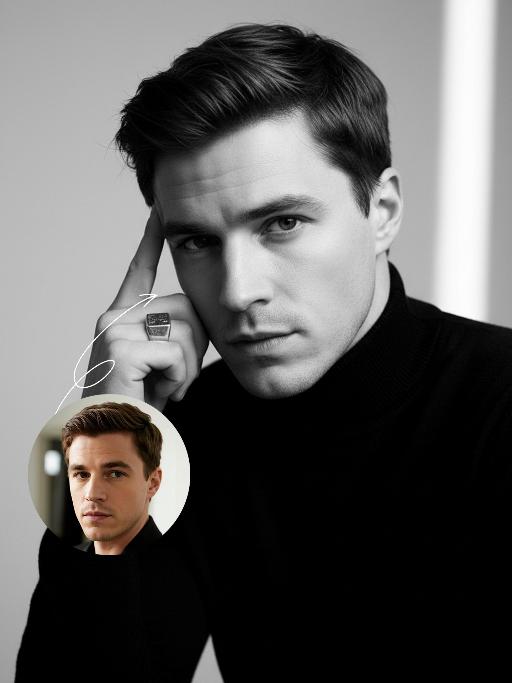
Advanced Image

Strict identity verification is carried out using the uploaded avatar (maintaining consistency in facial features, hair, skin tone and age). The composition frames the head and shoulders from the top of the head to the upper chest; the face is angled three-quarters to the left and slightly downward, with the chin gently tucked, eyes almost straight to the camera, a stern and cold expression, and lips firmly closed, featuring a sharp jawline and a straight nose. The short black hair is slightly tousled with a few strands falling onto the forehead, styled to have a subtle sheen to its texture. He is wearing a pure black long-sleeved turtleneck sweater with the collar snugly wrapped around the neck. Set against an off-white interior background, his left hand is raised with the index finger touching the temple, the other fingers curled, and a large, prominent silver signet ring adorns his finger, clearly visible against the black sleeve. Soft studio key light streams in from the upper left (the camera’s left), casting intense highlights on the left side of the face and deep shadows on the right side. The background gradients from grey to white, with a faint vertical gradient light strip on the right side. The entire image is in full black and white with no color, only grayscale tones, boasting extremely stark contrast and exquisitely sharp details. It features a studio lighting style, portrait photography aesthetics, and an avant-garde fashion black-and-white photography style.

Batik Groom AI effects generated image

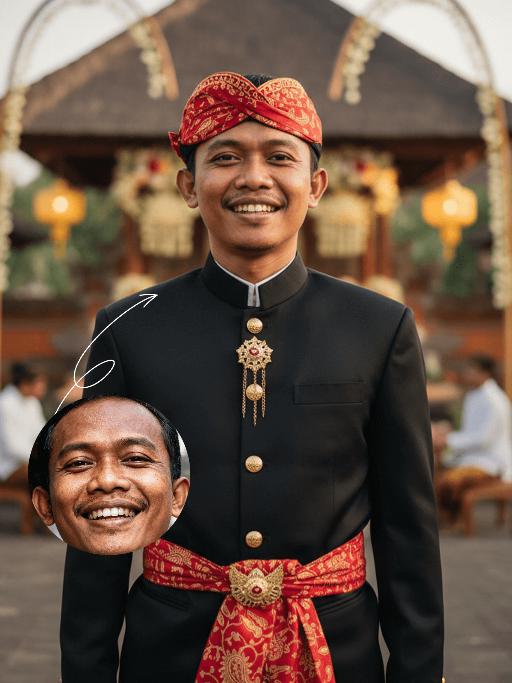
Batik Groom

Strictly lock the facial features of the uploaded portrait (preserve facial contours, native Indonesian skin tone, hairstyle and age). Extreme tight half-body close-up portrait, subject positioned in the upper two-thirds of the frame, occupying 90% of the vertical space, centered horizontally, hyper-realistic style, 4K ultra-high definition, soft warm golden hour tropical daylight, grand Balinese-Indonesian wedding atmosphere | A handsome young Indonesian groom with a warm, confident smile, standing front-facing in a modern-traditional wedding ensemble. He wears a tailored black Mandarin-collar jacket with polished gold button detailing, paired with a vibrant red batik-patterned (paisley motif) headwrap (iket) and waist sash (selendang) that drapes elegantly down his torso, plus a vintage gold chain with a fob accessory. The background is heavily blurred to prioritize the subject: a faint glimpse of the opulent Balinese wedding venue with a thatched-roof ceremonial pavilion (bale), tropical flower garlands, glowing traditional paper lanterns, and a distant crowd of guests in traditional attire, ensuring the focus remains entirely on the groom. Focus on the sharp tailoring of his outfit, the intricate batik patterns, and his joyful expression, with warm golden light enhancing the celebratory

Motorcycle Boy

Strict identity verification is performed using the uploaded portrait (maintaining consistency in facial features, hair, skin tone and age). A close-up shot is adopted, focusing on the upper body with the face positioned in a quarter-angle perspective. Create a realistic portrait of the man in the reference photo sitting on a sleek black sports motorcycle on a midnight street. The background features thick smoke illuminated by high-contrast lighting that accentuates the smoke. He is wearing a loose black T-shirt with a striking white graphic, a black leather jacket, loose black leather pants and black leather boots. His accessories include a black wristwatch, stylish ring ornaments and necklaces—a thin layered chain necklace paired with another chain. His right hand rests casually on the motorcycle, holding a clean, glossy black helmet with a clear visor. The motorcycle (a high-end, luxury model) boasts rich intricate details, including a large engine, a sturdy frame and gleaming chrome trimmings, evoking a modern and powerful impression. His expression is calm and confident as he stares directly at the camera. The overall style is cinematic and fashion-forward, featuring high resolution, hyper-realism, an editorial aesthetic, fashion photography, a contemporary fashion portrait style and a luxury brand photography style. The image highlights dramatic contrast between light and shadow, with sharp chiaroscuro defining his facial contours, sophisticated studio lighting, trend-setting fashion wear, and avant-garde fashion photography art.

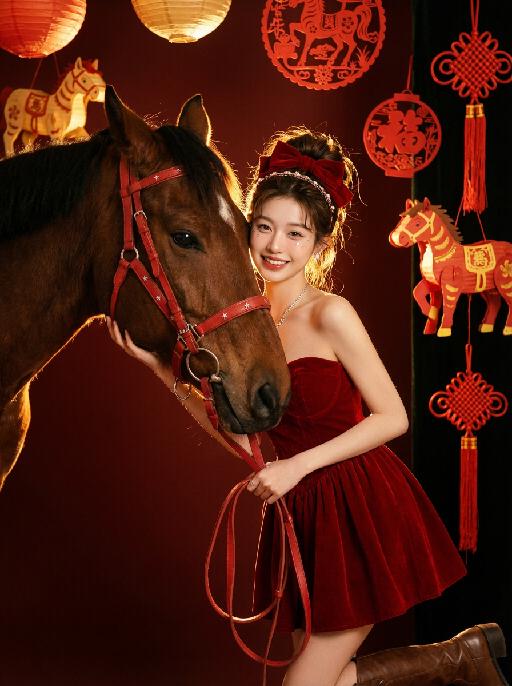
Horse Year AI effects generated image

Horse Year

Medium and long shot: The image in the uploaded picture (with unchanged facial features, gender and age, with hair coiled and wearing a red bow and hairband ornaments) is located on the right side of the frame, while the side head of a brown thoroughbred horse is on the left side. This work presents a sweet and dreamy theme characteristic of the Chinese Year of the Horse. The picture has a delicate film texture, with some exquisite and high-end decorations from indoor shooting, a thick festive atmosphere (paper lanterns, red paper cuttings, horse-year lanterns, Chinese knots, etc.) in the background; Color: Using professional indoor lighting, high-contrast warm light illuminates the face of the person and the side head of the horse, the highlighted hair light (contour light) forms a golden halo at the edge of the hair, the color is clean and bright, the horse contrasts strongly with the richly saturated white background, the light contrast is intense, creating a dreamy and warm atmosphere, with a fashionable and avant-garde photography artistic atmosphere; Color: The main color is a low-saturation clean dark red background, the horse, red leather (horses' reins, stars on the dress), low-saturation, high-quality and warm harmonious colors; Shooting angle: Horizontal perspective, the camera is at the same level as the face of the person in the uploaded picture and the side head of the horse, creating a natural and friendly interaction feeling; Character posture: The body slightly tilts towards the camera, holding a red leather strap in hand, the upper body gently leans against the brown horse, the head is close to the horse's face, with a sweet and brilliant smile, looking straight at the camera, the arms are naturally placed in front of the body, the posture is relaxed and intimate; Clothing: A high-end custom-designed red velvet strapless dress, wearing small and exquisite hair ornaments, around the eyes there is a delicate silver star powder makeup, wearing exquisite high-end custom accessories, wearing retro brown leather boots, fashionable and avant-garde, exquisite and elegant; The authenticity, artistry of the film, film-level ultra-high-definition 8K image quality, fashion magazine style, photography pioneer fashion artistic style, top lighting effects.

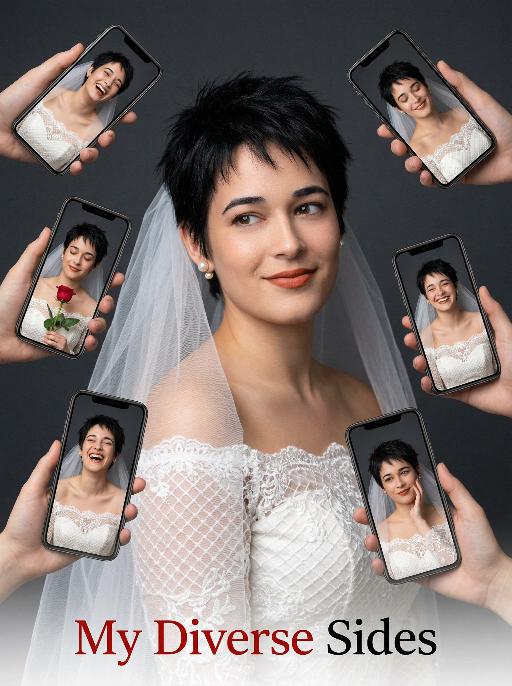
Diverse Faces AI effects generated image

Diverse Faces

Use the exact same facial features, gender, and age as the uploaded image. Hyper-realistic portrait photography, 8K resolution, high detail, clean minimalist aesthetic. A woman with short, spiky black hair, wearing a delicate off-shoulder white wedding dress with lace grid patterns and a sheer white veil. She has pearl stud earrings and warm terracotta lipstick, smiling gently while looking slightly to the side. Surrounding her, multiple hands hold smartphones (various iPhone models) that display different expressions and angles of her face: some show her laughing, some with closed eyes, with a red rose, others with varied joyful or pensive expressions, all in the same white wedding dress. The background is a smooth, matte dark charcoal gray studio backdrop, creating a strong contrast with the bright white sheer veil to make it stand out prominently. The lighting is soft and directional, with gentle highlights on the veil’s translucent texture to emphasize its delicate, airy appearance, while evenly illuminating the lace texture of the dress and her skin, focusing attention on the subject and the multi-screen collage effect. The overall atmosphere is playful, modern, and celebratory. Text at the bottom of the image: "My Diverse Sides", with the font color in red and black.

Load more

Next-Gen Multi-Model AI Video Architecture

Vivago AI isn't just one engine—it’s a unified hub for the world’s most advanced video AI. Whether you need cinematic realism or high-speed social content, we provide the right model for your creative vision.

Free Generate

Beauty and Dolphins

Vacation Time

Stellar Tear

Fish Tank Supervisor

Cinematic Quality & Precision Control

Enables 4K resolution with multi-lens motion control, generating delicate scene via text prompts for customized cinematography.​

TRY NOW

Dynamic AV Sync

Auto-generates original audio to avoid copyright issues. Build 3D immersive environments through layered sound design automatically.

TRY NOW

OpenAI Sora 2

​Advanced visual storytelling with unparalleled physics and consistency.

TRY NOW

Kling v2.6 Pro

Industry-leading cinematic image animation and motion control.

TRY NOW

Google Veo 3 & 3.1

Ultra-fast generation with enhanced realism for creative workflows.

TRY NOW

Vivago AI 2.0

Our proprietary model optimized for efficiency, speed, and cost-effective generation.

TRY NOW

Users' Voice

We listen carefully to the opinions of every user.
Free Generate
Contact Us
I tried the Lip Sync feature inside Vivago.ai’s AI Video Generator for my educational podcast, and the results were stunning! The avatar's lip movements perfectly matched my audio recording, creating a professional AI-generated video without complex editing. Compared with tools like OpenAI Sora 2 and Google Veo 3.1, Vivago Image-to-Video delivers fast, studio-quality results online. It saved me hours of post-production work.
ElenaM (Spain)
Vivago’s Image-to-Video AI transformed my marketing workflow. I uploaded a product image and described the launch scene in text, and it generated a 10-second cinematic AI video with background music and dynamic visuals. The output quality rivals Kling v2.6 Pro and Google Veo 3 Fast. It’s now my go-to AI video generator for social media ads and product campaigns.
KenjiT (Japan)
As a digital artist, I use Vivago.ai 2.0 daily for Image-to-Image and AI Image-to-Video creation. The e-book covers and animated visuals I generate for clients look cinematic and professional. Unlike many standalone AI tools, Vivago integrates multiple leading models into one platform, making it easier to create copyright-safe AI images and videos for publishing.
ChenL (China)
I tried the Lip Sync feature inside Vivago.ai’s AI Video Generator for my educational podcast, and the results were stunning! The avatar's lip movements perfectly matched my audio recording, creating a professional AI-generated video without complex editing. Compared with tools like OpenAI Sora 2 and Google Veo 3.1, Vivago Image-to-Video delivers fast, studio-quality results online. It saved me hours of post-production work.
ElenaM (Spain)
Vivago’s Image-to-Video AI transformed my marketing workflow. I uploaded a product image and described the launch scene in text, and it generated a 10-second cinematic AI video with background music and dynamic visuals. The output quality rivals Kling v2.6 Pro and Google Veo 3 Fast. It’s now my go-to AI video generator for social media ads and product campaigns.
KenjiT (Japan)
As a digital artist, I use Vivago.ai 2.0 daily for Image-to-Image and AI Image-to-Video creation. The e-book covers and animated visuals I generate for clients look cinematic and professional. Unlike many standalone AI tools, Vivago integrates multiple leading models into one platform, making it easier to create copyright-safe AI images and videos for publishing.
ChenL (China)
I absolutely love Vivago’s AI Image-to-Video Generator. As a travel blogger, static images often fail to capture real atmosphere, but Vivago helps me turn photos into vivid cinematic AI videos with motion effects. It feels comparable to OpenAI Sora 2 and Google Veo 3.1, but more accessible and faster for creators who need high-quality AI videos online.
LiamK (Australia)
I tried the Lip Sync feature inside Vivago.ai’s AI Video Generator for my educational podcast, and the results were stunning! The avatar's lip movements perfectly matched my audio recording, creating a professional AI-generated video without complex editing. Compared with tools like OpenAI Sora 2 and Google Veo 3.1, Vivago Image-to-Video delivers fast, studio-quality results online. It saved me hours of post-production work.
ElenaM (Spain)
Vivago’s Image-to-Video AI transformed my marketing workflow. I uploaded a product image and described the launch scene in text, and it generated a 10-second cinematic AI video with background music and dynamic visuals. The output quality rivals Kling v2.6 Pro and Google Veo 3 Fast. It’s now my go-to AI video generator for social media ads and product campaigns.
KenjiT (Japan)
As a digital artist, I use Vivago.ai 2.0 daily for Image-to-Image and AI Image-to-Video creation. The e-book covers and animated visuals I generate for clients look cinematic and professional. Unlike many standalone AI tools, Vivago integrates multiple leading models into one platform, making it easier to create copyright-safe AI images and videos for publishing.
ChenL (China)
I absolutely love Vivago’s AI Image-to-Video Generator. As a travel blogger, static images often fail to capture real atmosphere, but Vivago helps me turn photos into vivid cinematic AI videos with motion effects. It feels comparable to OpenAI Sora 2 and Google Veo 3.1, but more accessible and faster for creators who need high-quality AI videos online.
LiamK (Australia)
Using Vivago.ai’s Image-to-Video AI has greatly enhanced my classroom teaching. I transform textbook notes into historical AI videos with cinematic filters and dynamic animations. Compared with tools like Kling v2.6 Pro and Google Veo 3 Fast, Vivago offers faster generation and easier parameter control for educators who need reliable AI video creation.
RajivG (India)
I frequently create AI videos on Vivago and publish them on TikTok and YouTube Shorts. The AI video templates and trending content ideas help me produce viral-ready clips quickly. With Vivago’s integrated models—including advanced video engines similar to OpenAI Sora 2—I can generate anime-style and cinematic social media videos that drive high engagement.
MarieJ (Spain)
What attracts me most about Vivago.ai is not only the powerful AI Video Generator but also the active AIGC creator community. It combines AI Image-to-Video, Text-to-Video, and leading model integrations like Google Veo 3.1 into one creative platform.
TomW (India)
At first, I was hesitant about using AI video tools. But after trying Vivago Image-to-Video, I realized how easy it is to create professional AI-generated videos online. I just upload an image, add a short prompt, and adjust a few settings. The results are cinematic and copyright-safe, which is essential for commercial projects.
HectorC (Mexico)
Using Vivago.ai’s Image-to-Video AI has greatly enhanced my classroom teaching. I transform textbook notes into historical AI videos with cinematic filters and dynamic animations. Compared with tools like Kling v2.6 Pro and Google Veo 3 Fast, Vivago offers faster generation and easier parameter control for educators who need reliable AI video creation.
RajivG (India)
I frequently create AI videos on Vivago and publish them on TikTok and YouTube Shorts. The AI video templates and trending content ideas help me produce viral-ready clips quickly. With Vivago’s integrated models—including advanced video engines similar to OpenAI Sora 2—I can generate anime-style and cinematic social media videos that drive high engagement.
MarieJ (Spain)
What attracts me most about Vivago.ai is not only the powerful AI Video Generator but also the active AIGC creator community. It combines AI Image-to-Video, Text-to-Video, and leading model integrations like Google Veo 3.1 into one creative platform.
TomW (India)
At first, I was hesitant about using AI video tools. But after trying Vivago Image-to-Video, I realized how easy it is to create professional AI-generated videos online. I just upload an image, add a short prompt, and adjust a few settings. The results are cinematic and copyright-safe, which is essential for commercial projects.
HectorC (Mexico)