Image to Video

Transform text into stunning visuals with vivago.ai's AI image/video generator. Explore curated effects, professional editing tools, and seamless creativity for high-quality content. Ideal for innovators and creators.

Recreate
arrow

FAQs

How do I animate static images using vivago.ai?

Upload any image (JPG/PNG), and our AI models will automatically detect content layers and generate 5/10-second video clips with dynamic motion patterns.

Can I control specific movement directions?

Yes. Combine image uploads with text prompts like 'swaying leaves left-to-right' or 'a girl waves her hands'.

What if AI-generated videos don't match my expectation?

Utilize iterative refinement cycles: 1) Try a few more times, 2) Modify prompts, 3) Visit the Explore section to use templates for more consistent results.

What membership benefits does Pro offer?

Pro membership offers better outcomes, more generation credits, and premium features. Details available at: https://vivago.ai/subscribe

More From VIVAGO AI

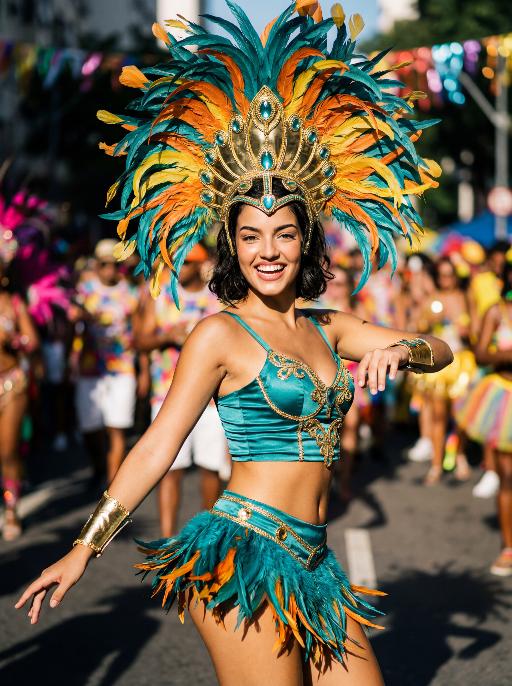
Street Carnival AI effects generated image

Street Carnival

The character in the uploaded picture (unchanged facial features, gender and age). Avant-garde portrait photography of a young Brazilian Carnival dancer, sharp focus on the subject, front-facing dynamic pose. has short wavy dark hair, warm brown eyes, and a genuine, joyful smile with visible teeth. wears an opulent Carnival costume: a towering, structured headdress crafted with layered iridescent teal, vivid tangerine, and sunflower yellow feathers, accented with polished gold metalwork and teal gemstone inlays. outfit features a form-fitting teal satin crop top with gold filigree trim, matching teal feather fringe mini skirt with gold hardware, and gold arm cuffs with teal bead detailing. Captured mid-dance on a sun-drenched Rio de Janeiro street during Carnival, one arm extended outward, the other bent at the elbow in a lively gesture. The background is heavily stylized with experimental shallow depth of field—blurred Carnival revellers in colorful costumes and festive street decorations create an abstract, textured backdrop. Pioneering photographic techniques: high-contrast natural daylight, bold color grading, hard directional light casting dramatic shadows, film grain texture, 35mm prime lens, f/1.4 aperture. The overall style is edgy, high-fashion avant-garde portraiture, ultra-detailed, 8K resolution, museum-quality, raw photographic aesthetic.

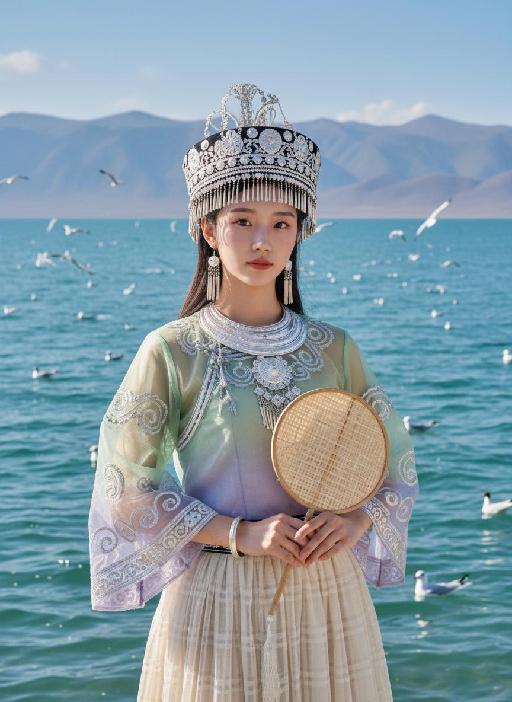
Seagull AI effects generated image

Seagull

Strictly lock facial features: fully preserving the original facial contours, skin texture, eye shape, lip shape, and youthful appearance with zero deviations allowed. Camera zoomed in for a tighter composition, eye-level perspective, half-body close-up (subject occupies 85% of the frame), a young East Asian woman with a gentle temperament stands facing forward, hands naturally holding a bamboo-woven round fan in front of her, posture dignified, expression gentle and calm, eyes soft looking at the camera; Facial state exactly as original: fresh nude makeup, transparent porcelain base, natural pink lips, soft eye makeup, no heavy colors. Sheer tulle clothing exactly as original: - Headdress: Traditional Miao silver headdress, black base with multiple layers of silver tassels and carvings, hanging pearl strings on both sides - Accessories: Multi-layered Miao silver collar, silver bracelets - Top: Sheer tulle Miao top with gradient from light green to light purple, round neck design, wide sleeves covered with scroll grass pattern embroidery, edged with silver patterns, presenting a light and semi-transparent texture - Skirt: Light beige sheer tulle plaid pleated long skirt, with strong drape and a light, flowing hem Lighting and image quality exactly as original: Bright outdoor natural light with soft diffusion, sheer tulle fabric showing transparent luster, silver ornaments showing natural highlights, high-definition and transparent image quality, fresh and soft colors, with delicate natural grain, restoring the film texture of the original image. Background exactly as original (partially cropped due to zoom): Plateau lake scene, azure blue water with sparkling waves, distant continuous gray-blue mountains, multiple black-headed gulls in the blue sky (some flying, some swimming on the water surface); the picture is dominated by light green, silver white and blue tones, strictly 1:1 replicate the original image's movements, clothing details and light and shadow atmosphere.

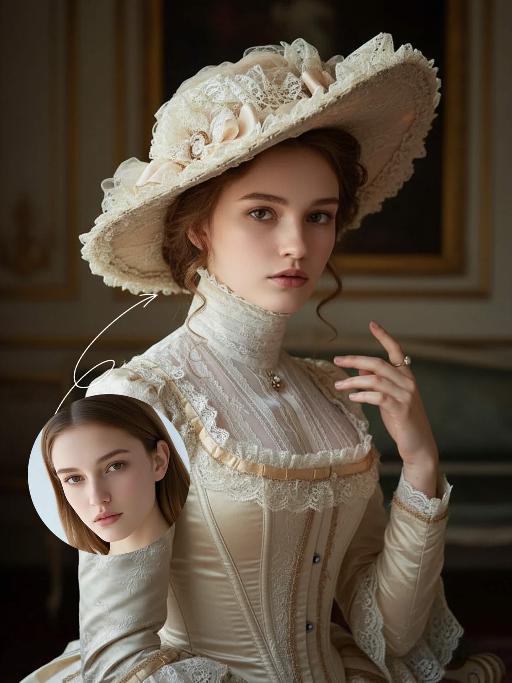
Noble Girl AI effects generated image

Noble Girl

Drawing on the facial features, facial proportion, hair styling direction, skin tone and age range of the uploaded avatar (with no emphasis on modern identity traits), the overall temperament is reimagined as that of a noble Victorian lady of the 19th century. The composition frames the figure from the top of the head to just below the chest, with the shot pulled back slightly and the subject occupying a relatively small portion of the frame. The height of the head accounts for approximately a quarter of the total frame height, positioned in the lower-middle area with natural proportions and no stretching or distortion, presenting an elegant and solemn classical portrait composition. She sits in a dignified and upright posture, her head turned gently to the right with her face in a three-quarter view and her chin slightly tucked. Her eyes are almost directly facing the camera, her gaze calm and restrained, reserved and introverted; her expression is solemn yet elegant, her lips naturally closed, and her facial features are distinct with well-proportioned contours. She wears an exquisite Victorian noble wide-brimmed hat that conforms to the aesthetic of European high society in the 19th century, crafted from pieced cream or ivory lace and fabric. The brim is adorned with delicate lace, ribbons and small ornaments, its structure elegantly intricate yet understated. Her hair is styled into a classic feminine coiffure of the same era, with soft, natural strands; a few curled tresses fall beside her temples and cheeks, blending seamlessly with the hat, boasting a delicate texture with a realistic sheen. She is dressed in a historically authentic Victorian court-style gown, featuring a high neckline that fits closely to the neck and a structured corseted bodice. The fabric is selected from silk, lace or brocade, in hues of cream, pale champagne or ivory. The cuffs, neckline and bust are embellished with elaborate lace and decorative details, with a precise cut and rich layering that fully embodies noble bearing. One of her hands is naturally raised near her face or gently resting on her chest, her fingers posed in an elegant and restrained manner. She adorns herself with a pearl ring or classical court-style jewelry, the ornaments understated and exquisite, in perfect harmony with the overall aesthetic. The lighting adopts the style of European classical court portrait painting: the key light shines softly from the upper left of the frame, with the subject’s face and upper body as the visual focal point, while the background is bathed in softer, dimmer light. The light and shadow contrast is clear with delicate gradations, recreating the light and texture of 19th-century academic and court portrait paintings. The background is set as a palace-style interior space, where the outlines of decorated walls, drapery and classical furniture can be faintly seen. The details are rendered in an understated way so as not to distract from the subject, and the background is softly blurred, creating a solemn and elegant aristocratic atmosphere. The entire image fuses ultra-realistic photography with the style of European classical oil painting, boasting a stable composition, ample negative space, rich textures and exquisite details. The low-saturation color palette is imbued with a retro charm, presenting a museum-grade visual effect of a court portrait—elegant, grand and historically authentic. It adheres to a vintage portrait photography style.

Shark Dance

Main scene: The image in the uploaded picture (species, age, gender remain unchanged, presented in an anthropomorphic standing posture with the front two paws raised and the back two legs standing), beside it are four similar cute cats in an anthropomorphic standing posture standing neatly and evenly beside it (including Persian cats, orange cats, silver gradient cats and golden gradient cats), all characters (height proportions remain consistent) are wearing different cute cartoon jumpsuits (cartoon character pajamas, with bees, tigers, dinosaurs, seals, pandas) in plush fabric (revealing the characters' faces), ultra-realistic three-dimensional rendering, cute and soothing style, the protagonist occupies 80% of the main space of the picture, evenly distributed in the center of the picture, presented in a frontal standing posture, with natural front-back layers; using mid-shot horizontal composition, shot from a horizontal perspective at the same height as the protagonist's image; the light is a soft indoor diffusion effect, the transition of light and shadow is natural, without strong contrast, overall bright and warm; the clothing uses fresh and bright colors (yellow, green, blue, brown), the background is a warm and cute living room environment, background elements account for 20% of the picture; rich details, fluffy and fine fur texture, clear clothing texture, 8K high resolution, bright and harmonious picture colors.

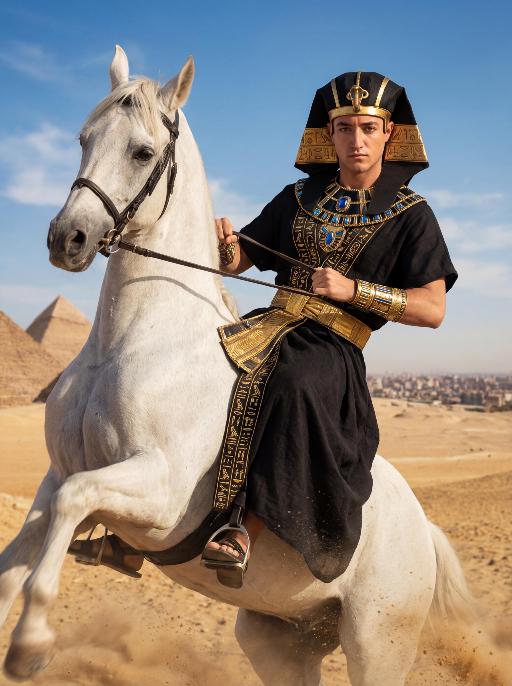
Desert Rider AI effects generated image

Desert Rider

The character in the uploaded picture (unchanged facial features, gender and age). A striking young man embodying the persona of an ancient Egyptian pharaoh, captured in a hyper-realistic, cinematic portrait. He has short dark hair, now adorned with an elaborate black and gold nemes headdress, featuring intricate golden hieroglyphic carvings and a central golden cobra symbol, replacing the original golden headdress, exuding divine authority. He is clad in a form-fitting, floor-length black linen robe, intricately embroidered with golden hieroglyphic patterns along the hem and sleeves, accented with a wide, textured golden belt at his waist. His accessories are opulent yet dark-toned: a massive, multi-layered black and gold pectoral necklace with blue gemstone inlays, and intricate golden arm cuffs on both wrists, replacing the original golden accessories. He is mounted atop a powerful white horse that rears dynamically in the desert, kicking up a spray of golden sand as it surges forward. He leans slightly back, gripping the reins tightly with both hands, his body steadying himself atop the horse, his gaze direct and unyielding toward the camera, radiating primal strength and pharaonic grandeur. The shot captures the dynamic motion of the horse and the commanding presence of the pharaoh. The setting is the vast, sun-drenched desert of ancient Egypt, with the majestic pyramids rising in the distance against a clear, bright blue sky dotted with fluffy white clouds. The desert sand stretches out to the horizon, with the warm, hazy air of the desert surrounding him, and the distant cityscape visible on the horizon. The image is rendered in a hyper-realistic, cinematic photography style, with dramatic, natural lighting that highlights the rich texture of the black linen, the subtle sheen of the golden embroidery, and the contours of his face and body, while the horse's legs are slightly blurred to convey the sense of motion. The color palette is rich and vivid, featuring deep blacks, radiant golds, vibrant blues, and earthy browns, creating a timeless, powerful, and awe-inspiring atmosphere. The overall aesthetic is bold, dynamic, and reminiscent of a grand historical epic film, blending ancient Egyptian grandeur with the raw energy of a desert ride.

Midnight Neon

Professional retro film-style portrait photography, with the first uploaded portrait used in the frame for strict identity consistency (unchanged facial features, hairstyle, skin tone and age). The figure’s face is naturally retouched for a flawless skin texture, paired with dramatic light and shadow contrast on the facial features. In this street photography portrait, the figure stands at the center of a bustling city street on a rainy night (the vibrant night view of Tokyo’s busy thoroughfares), captured in a close-up shot and positioned right at the frame’s center. The traffic flow in the background (vehicles and pedestrians speeding by to create blurred dynamic streaks) and neon lights feature dynamic motion blur effects, with smudged texture overlays to enhance the narrative mood. The dim lighting boasts high contrast; the wet road surfaces reflect warm orange glows and cool-toned neon light, with soft bokeh spots cast by street lamps and car headlights. Color palette: based on black and white tones, the neon hues are processed with high saturation, dominated by dark shades to create a striking contrast between warm and cool tones. The image is enhanced with film grain texture, depth of field breakup details, cinematic black aesthetic, and ultra-realistic, ultra-fine textures, plus a lifelike effect of raindrops splattering on the lens. Shot with a slow shutter speed, a large aperture and a low shutter setting; an orange vertical digital date watermark (2026:00:00) is added to the bottom right corner.

Christmas Baby

Transform the figure in the uploaded image into a Christmas-themed style, standing upright and dressed in a retro Christmas knit sweater with red and green color-blocking (printed with white snowflake and reindeer patterns), a long red tasseled scarf, a cute Christmas hat, a full set of Christmas-themed clothing with Christmas pants, and cute fluffy slouch socks on its feet.Scene: A warm American home with a Christmas setup, featuring exquisite gift boxes placed on snow-dusted ground; the background is Christmas decor in a dominant red tone, with a Christmas wreath hung above adorned with red and gold baubles and white flowers, and Christmas trees on both sides dusted with a light layer of snow and decorated with red and gold baubles.Texture & Style: The frame is ultra-high-definition and delicate (cinematic texture at 8K level), with soft and bright lighting, vivid and festive colors, and clear details such as the sweater’s knit texture and the luster of apples. Shot in the style of high-end editorial fashion photography.

Load more

Next-Gen Multi-Model AI Video Architecture

Vivago AI isn't just one engine—it’s a unified hub for the world’s most advanced video AI. Whether you need cinematic realism or high-speed social content, we provide the right model for your creative vision.

Free Generate

Beauty and Dolphins

Vacation Time

Stellar Tear

Fish Tank Supervisor

Cinematic Quality & Precision Control

Enables 4K resolution with multi-lens motion control, generating delicate scene via text prompts for customized cinematography.​

TRY NOW

Dynamic AV Sync

Auto-generates original audio to avoid copyright issues. Build 3D immersive environments through layered sound design automatically.

TRY NOW

OpenAI Sora 2

​Advanced visual storytelling with unparalleled physics and consistency.

TRY NOW

Kling v2.6 Pro

Industry-leading cinematic image animation and motion control.

TRY NOW

Google Veo 3 & 3.1

Ultra-fast generation with enhanced realism for creative workflows.

TRY NOW

Vivago AI 2.0

Our proprietary model optimized for efficiency, speed, and cost-effective generation.
TRY NOW

Users' Voice

We listen carefully to the opinions of every user.
Free Generate
Contact Us
I tried the Lip Sync feature inside Vivago.ai’s AI Video Generator for my educational podcast, and the results were stunning! The avatar's lip movements perfectly matched my audio recording, creating a professional AI-generated video without complex editing. Compared with tools like OpenAI Sora 2 and Google Veo 3.1, Vivago Image-to-Video delivers fast, studio-quality results online. It saved me hours of post-production work.
ElenaM (Spain)
Vivago’s Image-to-Video AI transformed my marketing workflow. I uploaded a product image and described the launch scene in text, and it generated a 10-second cinematic AI video with background music and dynamic visuals. The output quality rivals Kling v2.6 Pro and Google Veo 3 Fast. It’s now my go-to AI video generator for social media ads and product campaigns.
KenjiT (Japan)
As a digital artist, I use Vivago.ai 2.0 daily for Image-to-Image and AI Image-to-Video creation. The e-book covers and animated visuals I generate for clients look cinematic and professional. Unlike many standalone AI tools, Vivago integrates multiple leading models into one platform, making it easier to create copyright-safe AI images and videos for publishing.
ChenL (China)
I tried the Lip Sync feature inside Vivago.ai’s AI Video Generator for my educational podcast, and the results were stunning! The avatar's lip movements perfectly matched my audio recording, creating a professional AI-generated video without complex editing. Compared with tools like OpenAI Sora 2 and Google Veo 3.1, Vivago Image-to-Video delivers fast, studio-quality results online. It saved me hours of post-production work.
ElenaM (Spain)
Vivago’s Image-to-Video AI transformed my marketing workflow. I uploaded a product image and described the launch scene in text, and it generated a 10-second cinematic AI video with background music and dynamic visuals. The output quality rivals Kling v2.6 Pro and Google Veo 3 Fast. It’s now my go-to AI video generator for social media ads and product campaigns.
KenjiT (Japan)
As a digital artist, I use Vivago.ai 2.0 daily for Image-to-Image and AI Image-to-Video creation. The e-book covers and animated visuals I generate for clients look cinematic and professional. Unlike many standalone AI tools, Vivago integrates multiple leading models into one platform, making it easier to create copyright-safe AI images and videos for publishing.
ChenL (China)
I absolutely love Vivago’s AI Image-to-Video Generator. As a travel blogger, static images often fail to capture real atmosphere, but Vivago helps me turn photos into vivid cinematic AI videos with motion effects. It feels comparable to OpenAI Sora 2 and Google Veo 3.1, but more accessible and faster for creators who need high-quality AI videos online.
LiamK (Australia)
I tried the Lip Sync feature inside Vivago.ai’s AI Video Generator for my educational podcast, and the results were stunning! The avatar's lip movements perfectly matched my audio recording, creating a professional AI-generated video without complex editing. Compared with tools like OpenAI Sora 2 and Google Veo 3.1, Vivago Image-to-Video delivers fast, studio-quality results online. It saved me hours of post-production work.
ElenaM (Spain)
Vivago’s Image-to-Video AI transformed my marketing workflow. I uploaded a product image and described the launch scene in text, and it generated a 10-second cinematic AI video with background music and dynamic visuals. The output quality rivals Kling v2.6 Pro and Google Veo 3 Fast. It’s now my go-to AI video generator for social media ads and product campaigns.
KenjiT (Japan)
As a digital artist, I use Vivago.ai 2.0 daily for Image-to-Image and AI Image-to-Video creation. The e-book covers and animated visuals I generate for clients look cinematic and professional. Unlike many standalone AI tools, Vivago integrates multiple leading models into one platform, making it easier to create copyright-safe AI images and videos for publishing.
ChenL (China)
I absolutely love Vivago’s AI Image-to-Video Generator. As a travel blogger, static images often fail to capture real atmosphere, but Vivago helps me turn photos into vivid cinematic AI videos with motion effects. It feels comparable to OpenAI Sora 2 and Google Veo 3.1, but more accessible and faster for creators who need high-quality AI videos online.
LiamK (Australia)
Using Vivago.ai’s Image-to-Video AI has greatly enhanced my classroom teaching. I transform textbook notes into historical AI videos with cinematic filters and dynamic animations. Compared with tools like Kling v2.6 Pro and Google Veo 3 Fast, Vivago offers faster generation and easier parameter control for educators who need reliable AI video creation.
RajivG (India)
I frequently create AI videos on Vivago and publish them on TikTok and YouTube Shorts. The AI video templates and trending content ideas help me produce viral-ready clips quickly. With Vivago’s integrated models—including advanced video engines similar to OpenAI Sora 2—I can generate anime-style and cinematic social media videos that drive high engagement.
MarieJ (Spain)
What attracts me most about Vivago.ai is not only the powerful AI Video Generator but also the active AIGC creator community. It combines AI Image-to-Video, Text-to-Video, and leading model integrations like Google Veo 3.1 into one creative platform.
TomW (India)
At first, I was hesitant about using AI video tools. But after trying Vivago Image-to-Video, I realized how easy it is to create professional AI-generated videos online. I just upload an image, add a short prompt, and adjust a few settings. The results are cinematic and copyright-safe, which is essential for commercial projects.
HectorC (Mexico)
Using Vivago.ai’s Image-to-Video AI has greatly enhanced my classroom teaching. I transform textbook notes into historical AI videos with cinematic filters and dynamic animations. Compared with tools like Kling v2.6 Pro and Google Veo 3 Fast, Vivago offers faster generation and easier parameter control for educators who need reliable AI video creation.
RajivG (India)
I frequently create AI videos on Vivago and publish them on TikTok and YouTube Shorts. The AI video templates and trending content ideas help me produce viral-ready clips quickly. With Vivago’s integrated models—including advanced video engines similar to OpenAI Sora 2—I can generate anime-style and cinematic social media videos that drive high engagement.
MarieJ (Spain)
What attracts me most about Vivago.ai is not only the powerful AI Video Generator but also the active AIGC creator community. It combines AI Image-to-Video, Text-to-Video, and leading model integrations like Google Veo 3.1 into one creative platform.
TomW (India)
At first, I was hesitant about using AI video tools. But after trying Vivago Image-to-Video, I realized how easy it is to create professional AI-generated videos online. I just upload an image, add a short prompt, and adjust a few settings. The results are cinematic and copyright-safe, which is essential for commercial projects.
HectorC (Mexico)