Text to Video

Generate AI visuals of a camera ascending through clouds towards radiant sunlight. Transform text prompts into cinematic scenes with vivid skies, dynamic angles, and photorealistic lighting effects. Elevate your creative projects with vivago.ai's advanced AI tools for stunning cloudscapes and sunlit imagery.

Recreate
arrow

FAQs

How to generate images/videos from text prompts?

Describe the visual content in natural language (e.g., 'A cyberpunk cat wearing neon goggles') and our AI models will create outputs. Complex prompts trigger multi-stage NLP parsing for enhanced accuracy.

How to refine unsatisfactory results?

Use our Prompt Bot - an AI-powered optimizer that suggests technical modifiers. Simply describe your ideas, desired changes ('more metallic texture'), then you will get optimized prompt variants.

When should I use reference images?

Upload references to: 1) Guide character consistency (e.g., faces/outfits), 2) Control motion patterns in videos using our feature matching algorithm. Supports JPG/PNG

What's the credit system?

Daily login grants 100 credits. Upgrade options: 1) Premium Membership, 2) Credit Packs. Details: https://vivago.ai/subscribe

More From VIVAGO AI

Belly dance

The facial features of the uploaded figure remain unchanged, with natural skin retouching for a smooth complexion and exquisite facial makeup. The figure is dressed in a stunning navy blue off-the-shoulder deep V belly dance costume, which is densely inlaid with sparkling blue gemstones (each gemstone reflects light, emanating a dazzling radiance and showcasing a sleek texture) and diamonds. Its multi-layered ruffled high-slit skirt features intricate detailing of crystal waterfalls and dangling gemstone embellishments. The scene is set in a magnificent and opulent golden palace ballroom (with blurred dining tables and crystal chandeliers hanging in the background). Cinematic warm golden lighting focuses on the crystal adornments of the costume, highlighting their shimmering luster and the bright sparkles on the fabric. Quality: 8K ultra-high resolution, sharp and distinct textures of the crystals and costume, vivid and saturated colors, no blurriness at all. Shot Type: Medium Shot Portrait, framing the figure from the top of the head to the thighs to fully display the upper body and part of the lower body; Framing Distance: the figure is at a medium distance from the camera, with neither close-up magnified facial details nor a full panoramic view of the entire body.

MUSIC BOX

Create a close-up of a 1/7 scale figure of the characters, placed on a circular rotating music box base. The music box should have intricate details, with a smooth, elegant design, emphasizing its fine craftsmanship. The figure should capture the character's pose, facial expression, and features in high detail, with realistic textures for the clothing, accessories, hair, and face. The close-up shot should focus on the figure and music box, highlighting the fine details, such as the sculpting of the character’s outfit and accessories. The background should be a dreamy, soft-focus display window, with a magical ambiance that suggests a whimsical atmosphere. Soft, natural lighting should enhance the refined and timeless feel of the scene, bringing attention to the figure and music box in the foreground.

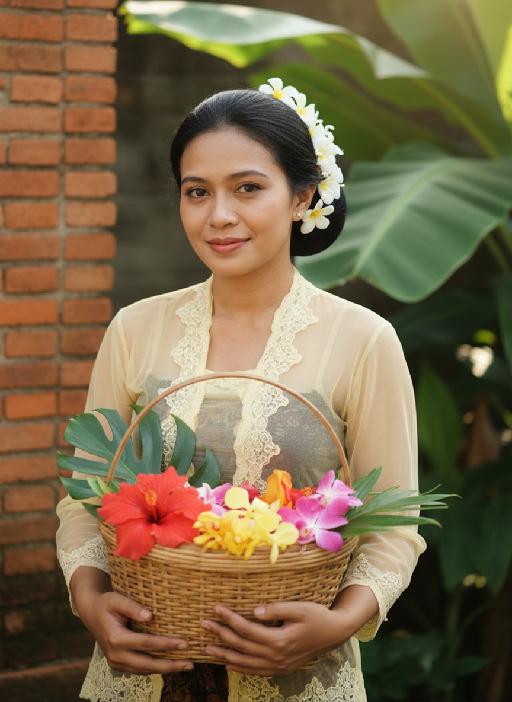
Kebaya AI effects generated image

Kebaya

Strictly lock the facial features of the uploaded portrait (preserve facial contours, native Indonesian skin tone, hairstyle and age). model occupies 3/4 of the frame, the model as the absolute dominant subject, close-up half-body portrait with minimal background space, no excessive empty space around the model, a charming half-body portrait of a young Indonesian lady in her early 20s, with a gentle smile and black hair elegantly updo decorated with white tiny flowers, dressed in a soft pale yellow sheer kebaya featuring delicate lace edging. She holds a rustic rattan basket brimming with colorful fresh blooms, set against a backdrop of a classic Indonesian red-brick dwelling with sprawling tropical banana foliage, bathed in soft golden natural sunlight, exuding a fresh, idyllic and authentic Indonesian rural charm, 3:4 aspect ratio, ultra-high detail, photorealistic

McDonald

Ultra-realistic photography, ultra-fine details, sharp focus, 8K resolution, surreal composition. Composition: A giant child (with an oversized head proportion, far larger than the buildings) is lying on the roof of a realistic McDonald’s restaurant. Foreground: The child is smiling while holding an oversized crispy fried chicken drumstick (facing the camera, an extremely close perspective with a strong sense of perspective). Background: A realistic urban street with pedestrians coming and going, under a blue sky with white clouds. Subject: The figure from the uploaded image (unchanged facial features, age and gender). Posture: Lying on the roof (holding an oversized fried chicken drumstick toward the camera with one hand). Outfit: A yellow short-sleeved shirt paired with red work pants (with the yellow McDonald’s "M" logo). Accessories: A red beret (with the yellow McDonald’s "M" logo). Shooting perspective: Eye-level or a slightly low angle, a realistic lifestyle photography perspective. Light and shadow: Bright daytime with natural sunlight, soft and ample light, and natural, distinct shadows (e.g., the child’s shadow cast on the buildings). Color scheme: Dominated by McDonald’s iconic red and yellow (for the child’s outfit), paired with the black, yellow and white of the buildings, the golden brown of the fried chicken drumstick, featuring bright, high-saturation realistic colors. Cinematic texture with a Fuji filter effect.

Crystal Ball

The uploaded figure is dressed in a full Christmas-style costume and is completely inside a giant transparent snow globe: She wears a red-and-green plush-edged bow hair accessory on her head; the upper body is a white long-sleeve shirt printed with red antler patterns, layered with a burgundy argyle cropped vest (adorned with golden bells at the collar), and the lower body is paired with a matching argyle pleated skirt embroidered with white snowflake patterns; on her feet are red over-the-knee plush boots, with the cuffs folded down to reveal the white plush lining. The figure is curled up on her knees, leaning against the items inside the snow globe. One hand gently rests on the edge of a Christmas stocking, while the other holds a golden star decorated with ribbons, with a sweet and lively expression. Inside the snow globe, there are a mini Christmas tree wrapped in fairy lights, a teddy bear doll wearing a scarf, golden star ornaments and cinnamon stick decorations; outside the snow globe stands a pine-branch Christmas tree dusted with snow, hung with red and white berries and golden bells, with the word "CHRISTMAS" printed in hot gold on the base. The scene is a cozy outdoor night snowscape, featuring several outdoor Christmas trees and decorations, warm string lights twinkling softly, and fluffy snowflakes drifting in the background, creating an overall warm and healing atmosphere. The style is realistic with a cinematic texture. The figure’s makeup is beautiful and natural, with a natural skin-smoothing effect that highlights an excellent skin condition. The camera moves in a rotating transition, with magical particle sparkles and falling white snowflakes added during the transition for a whimsical touch.

Romantic Castle

The facial features and the number of figures in the uploaded image remain unchanged; Expression: a sweet smile; Appearance & Adornments: voluminous chestnut wavy curls, exquisite natural makeup (soft eye makeup + pink-toned lip makeup), a headband of Mickey or Minnie Mouse crafted from silver sequins; Attire: an exquisitely tailored high-end evening gown, or an elegant haute couture coat paired with a scarf; Scene & Setting: night view of the Disney Castle, warm purple + golden lighting (brightness increased by 30%), golden blooming fireworks (brightness increased by 20%), dark blue sky, bokeh light spots; Lighting: enhanced ambient fill light, even and soft facial lighting with warm tones; Camera: Canon 5D4 + f/1.8 lens, highly detailed textures; 8K high definition; Style: avant-garde fashion photography, film grain texture, cinematic feel, ultra-realistic image quality; the figures have naturally blurred skin with a delicate texture and exquisite makeup; add warm and cozy bright yellow light spots around the frame; medium close-up bust shot.

Eid Wish AI effects generated image

Eid Wish

Maintain the exact same facial features, gender, and age of the person in the uploaded image, Photorealistic portrait, cinematic shot, a young Muslim boy wearing a white traditional thobe and white songkok hat, standing by a wooden balcony window at twilight, hands raised in gentle prayer, looking up with reverent expression, warm side lighting creating soft shadows and light contrast, background features the glowing green domes and minarets of Masjid an-Nabawi under a starry night sky with a crescent moon, floating Arabic calligraphy of "Allah" and elegant golden text "Ramadan Kareem", foreground includes an open Quran emitting soft glow, a bowl of dates, glowing incense, prayer beads, and ornate lit Ramadan lanterns, Sony A7R V camera, 8K resolution, sharp details, warm golden hour color grading, realistic texture of wood and fabric, no 3D cartoon elements, no digital art filters, pure photographic realism.

Moving Figure

Create a 1/7 scale commercialized figure of the character in the illustration, in a realistic style and environment. Render the exact hairstyle and the same outfit with the uploaded figure. Render garments as molded plastic with engraved seams and sculpted folds; keep accessories as plastic parts. Fictionalize any brand text/logos while keeping layout and colors. Place the figure on a computer desk, using a circular transparent acrylic base without any text. On the Apple computer screen, display the Z Brush modeling process of the figure. Next to the Apple computer screen, place a BANDAl-style toy packaging box printed with the original artwork. The background shows a modern realistic room furnished with contemporary furniture, including a display cabinet filled with books, dolls, and scale figures, adding a casual and everyday atmosphere. Behind the Apple computer, place a desk lamp to add detail and depth to the scene.

Load more

Next-Gen Multi-Model AI Video Architecture

Vivago AI isn't just one engine—it’s a unified hub for the world’s most advanced video AI. Whether you need cinematic realism or high-speed social content, we provide the right model for your creative vision.

Free Generate

Beauty and Dolphins

Vacation Time

Stellar Tear

Fish Tank Supervisor

Cinematic Quality & Precision Control

Enables 4K resolution with multi-lens motion control, generating delicate scene via text prompts for customized cinematography.​

TRY NOW

Dynamic AV Sync

Auto-generates original audio to avoid copyright issues. Build 3D immersive environments through layered sound design automatically.

TRY NOW

OpenAI Sora 2

​Advanced visual storytelling with unparalleled physics and consistency.

TRY NOW

Kling v2.6 Pro

Industry-leading cinematic image animation and motion control.

TRY NOW

Google Veo 3 & 3.1

Ultra-fast generation with enhanced realism for creative workflows.

TRY NOW

Vivago AI 2.0

Our proprietary model optimized for efficiency, speed, and cost-effective generation.

TRY NOW

Users' Voice

We listen carefully to the opinions of every user.
Free Generate
Contact Us
I tried the Lip Sync feature inside Vivago.ai’s AI Video Generator for my educational podcast, and the results were stunning! The avatar's lip movements perfectly matched my audio recording, creating a professional AI-generated video without complex editing. Compared with tools like OpenAI Sora 2 and Google Veo 3.1, Vivago Image-to-Video delivers fast, studio-quality results online. It saved me hours of post-production work.
ElenaM (Spain)
Vivago’s Image-to-Video AI transformed my marketing workflow. I uploaded a product image and described the launch scene in text, and it generated a 10-second cinematic AI video with background music and dynamic visuals. The output quality rivals Kling v2.6 Pro and Google Veo 3 Fast. It’s now my go-to AI video generator for social media ads and product campaigns.
KenjiT (Japan)
As a digital artist, I use Vivago.ai 2.0 daily for Image-to-Image and AI Image-to-Video creation. The e-book covers and animated visuals I generate for clients look cinematic and professional. Unlike many standalone AI tools, Vivago integrates multiple leading models into one platform, making it easier to create copyright-safe AI images and videos for publishing.
ChenL (China)
I tried the Lip Sync feature inside Vivago.ai’s AI Video Generator for my educational podcast, and the results were stunning! The avatar's lip movements perfectly matched my audio recording, creating a professional AI-generated video without complex editing. Compared with tools like OpenAI Sora 2 and Google Veo 3.1, Vivago Image-to-Video delivers fast, studio-quality results online. It saved me hours of post-production work.
ElenaM (Spain)
Vivago’s Image-to-Video AI transformed my marketing workflow. I uploaded a product image and described the launch scene in text, and it generated a 10-second cinematic AI video with background music and dynamic visuals. The output quality rivals Kling v2.6 Pro and Google Veo 3 Fast. It’s now my go-to AI video generator for social media ads and product campaigns.
KenjiT (Japan)
As a digital artist, I use Vivago.ai 2.0 daily for Image-to-Image and AI Image-to-Video creation. The e-book covers and animated visuals I generate for clients look cinematic and professional. Unlike many standalone AI tools, Vivago integrates multiple leading models into one platform, making it easier to create copyright-safe AI images and videos for publishing.
ChenL (China)
I absolutely love Vivago’s AI Image-to-Video Generator. As a travel blogger, static images often fail to capture real atmosphere, but Vivago helps me turn photos into vivid cinematic AI videos with motion effects. It feels comparable to OpenAI Sora 2 and Google Veo 3.1, but more accessible and faster for creators who need high-quality AI videos online.
LiamK (Australia)
I tried the Lip Sync feature inside Vivago.ai’s AI Video Generator for my educational podcast, and the results were stunning! The avatar's lip movements perfectly matched my audio recording, creating a professional AI-generated video without complex editing. Compared with tools like OpenAI Sora 2 and Google Veo 3.1, Vivago Image-to-Video delivers fast, studio-quality results online. It saved me hours of post-production work.
ElenaM (Spain)
Vivago’s Image-to-Video AI transformed my marketing workflow. I uploaded a product image and described the launch scene in text, and it generated a 10-second cinematic AI video with background music and dynamic visuals. The output quality rivals Kling v2.6 Pro and Google Veo 3 Fast. It’s now my go-to AI video generator for social media ads and product campaigns.
KenjiT (Japan)
As a digital artist, I use Vivago.ai 2.0 daily for Image-to-Image and AI Image-to-Video creation. The e-book covers and animated visuals I generate for clients look cinematic and professional. Unlike many standalone AI tools, Vivago integrates multiple leading models into one platform, making it easier to create copyright-safe AI images and videos for publishing.
ChenL (China)
I absolutely love Vivago’s AI Image-to-Video Generator. As a travel blogger, static images often fail to capture real atmosphere, but Vivago helps me turn photos into vivid cinematic AI videos with motion effects. It feels comparable to OpenAI Sora 2 and Google Veo 3.1, but more accessible and faster for creators who need high-quality AI videos online.
LiamK (Australia)
Using Vivago.ai’s Image-to-Video AI has greatly enhanced my classroom teaching. I transform textbook notes into historical AI videos with cinematic filters and dynamic animations. Compared with tools like Kling v2.6 Pro and Google Veo 3 Fast, Vivago offers faster generation and easier parameter control for educators who need reliable AI video creation.
RajivG (India)
I frequently create AI videos on Vivago and publish them on TikTok and YouTube Shorts. The AI video templates and trending content ideas help me produce viral-ready clips quickly. With Vivago’s integrated models—including advanced video engines similar to OpenAI Sora 2—I can generate anime-style and cinematic social media videos that drive high engagement.
MarieJ (Spain)
What attracts me most about Vivago.ai is not only the powerful AI Video Generator but also the active AIGC creator community. It combines AI Image-to-Video, Text-to-Video, and leading model integrations like Google Veo 3.1 into one creative platform.
TomW (India)
At first, I was hesitant about using AI video tools. But after trying Vivago Image-to-Video, I realized how easy it is to create professional AI-generated videos online. I just upload an image, add a short prompt, and adjust a few settings. The results are cinematic and copyright-safe, which is essential for commercial projects.
HectorC (Mexico)
Using Vivago.ai’s Image-to-Video AI has greatly enhanced my classroom teaching. I transform textbook notes into historical AI videos with cinematic filters and dynamic animations. Compared with tools like Kling v2.6 Pro and Google Veo 3 Fast, Vivago offers faster generation and easier parameter control for educators who need reliable AI video creation.
RajivG (India)
I frequently create AI videos on Vivago and publish them on TikTok and YouTube Shorts. The AI video templates and trending content ideas help me produce viral-ready clips quickly. With Vivago’s integrated models—including advanced video engines similar to OpenAI Sora 2—I can generate anime-style and cinematic social media videos that drive high engagement.
MarieJ (Spain)
What attracts me most about Vivago.ai is not only the powerful AI Video Generator but also the active AIGC creator community. It combines AI Image-to-Video, Text-to-Video, and leading model integrations like Google Veo 3.1 into one creative platform.
TomW (India)
At first, I was hesitant about using AI video tools. But after trying Vivago Image-to-Video, I realized how easy it is to create professional AI-generated videos online. I just upload an image, add a short prompt, and adjust a few settings. The results are cinematic and copyright-safe, which is essential for commercial projects.
HectorC (Mexico)