Image to Video

Transform text into stunning visuals with vivago.ai's AI image/video generator. Explore curated effects, professional editing tools, and seamless creativity for high-quality content. Ideal for innovators and creators.

Recreate
arrow

FAQs

How do I animate static images using vivago.ai?

Upload any image (JPG/PNG), and our AI models will automatically detect content layers and generate 5/10-second video clips with dynamic motion patterns.

Can I control specific movement directions?

Yes. Combine image uploads with text prompts like 'swaying leaves left-to-right' or 'a girl waves her hands'.

What if AI-generated videos don't match my expectation?

Utilize iterative refinement cycles: 1) Try a few more times, 2) Modify prompts, 3) Visit the Explore section to use templates for more consistent results.

What membership benefits does Pro offer?

Pro membership offers better outcomes, more generation credits, and premium features. Details available at: https://vivago.ai/subscribe

More From VIVAGO AI

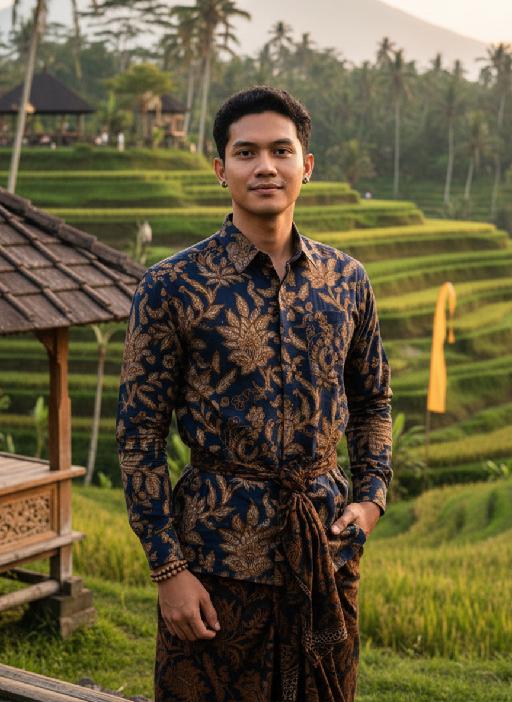
Bali Terraces AI effects generated image

Bali Terraces

Strictly lock the facial features of the uploaded portrait (preserve facial contours, native Indonesian skin tone, hairstyle and age completely), strictly restore classic native Indonesian facial features, warm healthy medium wheat skin tone, three-dimensional tough facial contours, deep bright eyes, neat short black hair with a slight natural curl, sharp jawline, confident calm expression with a faint smile, tall and straight figure; dressed in exquisite Indonesian traditional costumes - hand-woven navy blue Batik brocade long shirt with golden tropical floral patterns, matching dark brown hand-woven ikat sarong tied with a natural rattan waist belt, wearing simple retro Indonesian wooden bead bracelets and hand-carved teak wooden earrings (minimalist style); standing in the eye-catching iconic Balinese Ubud terraced rice fields (the most eye-catching Indonesian landscape background), with layered green rice terraces winding through the frame, Indonesian traditional bamboo pavilions with carved railings on the side, tall coconut trees and lush tropical foliage in the distance, faint outline of Mount Agung in the hazy sky, a few colorful Balinese traditional prayer flags fluttering in the breeze; the figure is centered in the frame, occupying a large dominant proportion, natural standing posture with one hand in the sarong pocket and the other lightly resting on the bamboo railing, casual and unrestrained; dappled warm tropical golden hour light falling on the figure and terraces, soft side light outlining the tough facial contours and clothing texture, light and shadow interweaving on the rice leaves to create a dynamic layered background, the sky with light orange-pink sunset glow; 3:4 vertical bust-to-waist composition, ultra-realistic photography style, 8K ultra-high definition, hyper-detailed (Batik fabric texture/ rice terrace layers/ wooden accessory carvings), rich saturated tropical colors, sharp focus on the figure, soft bokeh on the distant background (retaining the eye-catching sense of the terrace without cluttering), cinematic light and shadow, strong authentic Indonesian cultural style, the background is eye-catching and layered without overwhelming the character, masculine and sunny temperament, tropical Indonesian male charm. Medium-close-up shots, close-ups, and close-up portraits

Amusement Park

Two photo-realistic Polaroid photos held in hand (the figure has different facial expressions and poses in the two photos), randomly placed in a staggered upper and lower arrangement as a collage: the subject of each Polaroid is the figure in the uploaded image, with unchanged facial features and the same number of figures; the figure wears a white fluffy Christmas hat, a brown-and-white striped scarf, a white sweater adorned with golden star embellishments and brown gloves—one photo shows the figure touching the cheek gently with one hand, and the other shows the figure making a peace sign with one hand. The background of each Polaroid is black, overlaid with white snowflakes and gold/black star decorations; the scene outside the photos features a green Christmas tree with the words Merry Christmas in a golden diamond-glitter texture and shiny red Christmas baubles hanging on it. The lighting is warm Christmas ambient light, creating a cozy winter vibe; the style features Polaroid film texture with the classic white Polaroid borders retained and rich details throughout. The focus is sharp with a softly blurred background, and the edges of the Polaroid photos are decorated with festive Christmas elements, including golden star stickers and snowflake patterns.

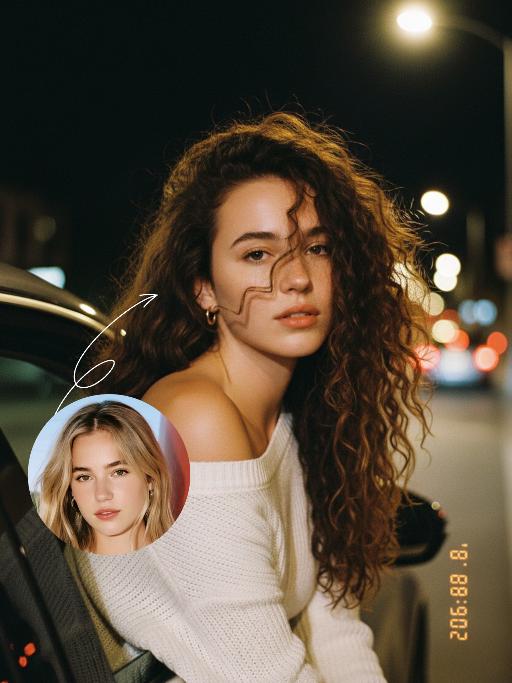
Night Chat AI effects generated image

Night Chat

The uploaded figure (with unchanged facial features) is lit by a high-intensity flash fired directly at them, creating stark contrast between light and shadow, prominent highlights on the figure’s face, and a dark-toned background with blurred bokeh light spots. This is a medium close-up portrait: the figure leans out of a car window with their upper body, in an off-the-shoulder pose, their long dark brown curly hair tousled and flowing in the wind. They wear a loose white off-the-shoulder knit sweater, gaze straight at the camera with a lazy and cool expression. Shot from an eye-level perspective, the background features a nighttime urban street with slightly blurred traffic flow, warm yellow street lamp glows and red taillight bokeh, and a shallow depth of field with bokeh effects. The overall mood blends a warm color tone with a cool atmosphere, complemented by film texture and film grain, plus ultra-high-definition details. An orange vertical digital date watermark (2026:00:00) is added to the bottom right corner.

Christmas Baby

Transform the figure in the uploaded image into a Christmas-themed style, standing upright and dressed in a retro Christmas knit sweater with red and green color-blocking (printed with white snowflake and reindeer patterns), a long red tasseled scarf, a cute Christmas hat, a full set of Christmas-themed clothing with Christmas pants, and cute fluffy slouch socks on its feet.Scene: A warm American home with a Christmas setup, featuring exquisite gift boxes placed on snow-dusted ground; the background is Christmas decor in a dominant red tone, with a Christmas wreath hung above adorned with red and gold baubles and white flowers, and Christmas trees on both sides dusted with a light layer of snow and decorated with red and gold baubles.Texture & Style: The frame is ultra-high-definition and delicate (cinematic texture at 8K level), with soft and bright lighting, vivid and festive colors, and clear details such as the sweater’s knit texture and the luster of apples. Shot in the style of high-end editorial fashion photography.

Boyfriend

In the uploaded picture, that person (with unchanged facial features, wearing a fine custom white high-end dress and adorned with exquisite luxurious accessories) is sitting, while beside him sits a handsome and elegant young man of the same ethnic background (wearing a fine custom black suit and wearing an expensive watch); under the glow of the setting sun, in this romantic scene, the two are sitting side by side on the terrace of an upscale restaurant, enjoying a romantic candlelight dinner. They are seated side by side at a table covered with a red tablecloth, with some exquisite food on the table, crystal wine glasses in front of them, a candle in the middle, a red rose vase in the center, rose petals scattered on the table, and behind them are many red flowers, exquisite golden "love" shape balloons and red decorative balloons. The background is an amazing city night view, with exquisite red Valentine's Day celebration balloons and romantic and warm lighting strings on the terrace; the edges of the entire picture present a soft and warm yellow heart-shaped particle light effect blur effect, filled with a warm and romantic Valentine's Day party atmosphere, just like bright colors, shallow depth of field effect, similar movie-like lighting, surrealistic photography, romantic and warm atmosphere, rich details, 8K resolution, the person's face illuminated by light, sharp contrast between light and dark, shallow depth of field effect.

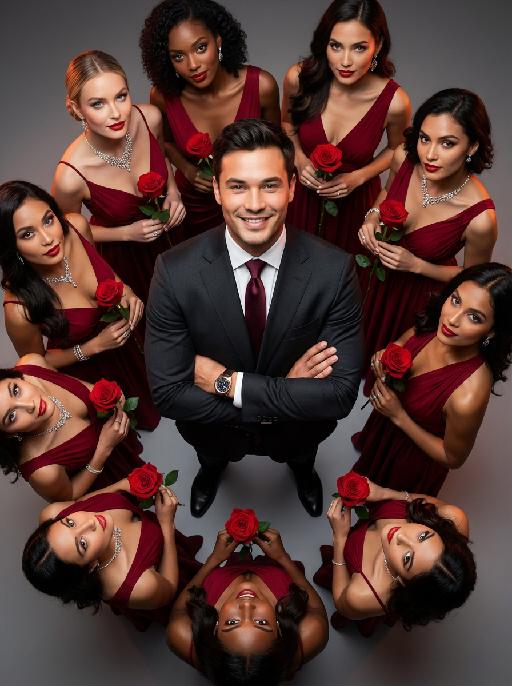
Women Surround AI effects generated image

Women Surround

The main figure in the uploaded picture, who is smiling confidently (with unchanged facial features, gender and age), is the subject. He is wearing a well-tailored high-end custom suit, with a red bow tie, a high-end watch, and crossed arms. Surrounding her are 8 to 9 beautiful women in fashionable red high-end custom dresses (wearing luxurious accessories), each holding a fresh red rose. These women are arranged in a circular pattern around the central figure on a deep purple red solid background. The color scheme indicates: high-intensity cinematic lighting effects, soft yet dramatic shadows, moderate contrast, rich depth of field effects, smooth skin texture, luxurious and romantic atmosphere, with a faint highlight on the facial features. Color hint: Predominantly rich deep red and dark black, natural and transparent skin tones, high saturation but not overexposed colors, unified and high-end color combinations with warm tones, bright light and shadow contrast. Style supplement: Fashion-forward art, fashion portrait photography, elegant and charming atmosphere, reminiscent of a luxurious Valentine's Day social event.

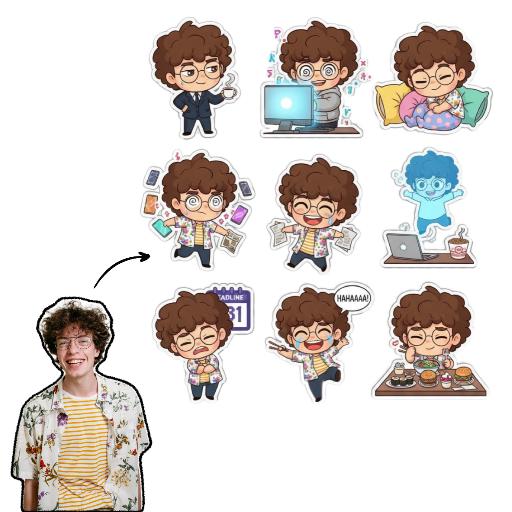
Sticker Pack AI effects generated image

Sticker Pack

Please create a set of 9 Chibi stickers featuring [the character in the reference image], arranged in a 3x3 grid.Design requirements:- Transparent background.- 1:1 square aspect ratio.- Consistent Chibi Ghibli cartoon style with vibrant colors.- Each sticker must have a unique action, expression, and theme, reflecting diverse emotions like “sassy, mischievous, cute, frantic”(e.g., rolling eyes, laughing hysterically on the floor, soul leaving body, petrified, throwing money, foodie mode, social anxiety attack). Incorporate elements related to office workers and internet memes.- Each character depiction must be complete, with no missing parts.- Each sticker must have a uniform white outline, giving it a sticker-like appearance.- No extraneous or detached elements in the image.- Strictly no text, or ensure any text is 100% accurate (no text preferred).

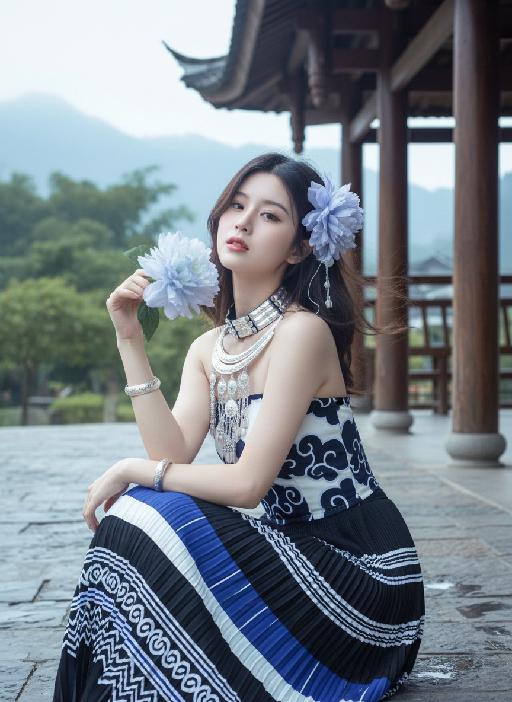
 Violet AI effects generated image

Violet

Strictly enforce facial feature lock: 100% identical to the first reference image, preserving every facial contour, skin texture, eye shape, lip shape, and youthful age with zero deviation. No artistic alteration allowed. Exact 1:1 copy of the original image, no creative interpretation or stylization permitted. A young East Asian woman with a cold, ethereal demeanor sits on damp bluestone paving, body angled 30° to the left, left arm folded across her torso, right hand gently gripping a large pale blue-white gradient flower, right elbow resting on her left forearm, left hand resting lightly on her right knee. She gazes at the camera with a detached, slightly lazy expression, lips pale pink and slightly parted. Her medium-length hair, a soft mix of dark brown and black, is adorned with large, ruffled light blue-purple gradient flower accessories on the right side, with a few strands of hair gently blowing in the breeze. She wears:A multi-layered Miao silver collar with delicate dangling silver beads. A wide, intricately carved silver bracelet on her right wrist. A slim silver bracelet on her left wrist. A strapless top with a crisp white base and bold dark blue swirling cloud motifs. A floor-length pleated skirt in a sharp black, white, and royal blue geometric pattern, with horizontal stripes and wave details on the hem Background is an exact replica of the original Dong-style wooden covered bridge: dark grey tiled roof, polished wooden pillars, distant lush green trees, and hazy mountain peaks under a soft, overcast sky. Precise lighting & tone lock (1:1 match to original):Soft, diffused morning backlight with a gentle, airy halo that wraps around the subject’s hair and shoulders, creating a subtle glow on the damp bluestone ground. The exact color palette of the original image is strictly preserved: cool, low-saturation tones dominated by crisp white, deep navy blue, and matte black, with a soft focus filter that gives the image a delicate, dreamlike cinematic quality. No over-saturation, color shifts, or harsh shadows are allowed. All elements must match the original image pixel-for-pixel; no creative additions or changes permitted.

Load more

Next-Gen Multi-Model AI Video Architecture

Vivago AI isn't just one engine—it’s a unified hub for the world’s most advanced video AI. Whether you need cinematic realism or high-speed social content, we provide the right model for your creative vision.

Free Generate

Beauty and Dolphins

Vacation Time

Stellar Tear

Fish Tank Supervisor

Cinematic Quality & Precision Control

Enables 4K resolution with multi-lens motion control, generating delicate scene via text prompts for customized cinematography.​

TRY NOW

Dynamic AV Sync

Auto-generates original audio to avoid copyright issues. Build 3D immersive environments through layered sound design automatically.

TRY NOW

OpenAI Sora 2

​Advanced visual storytelling with unparalleled physics and consistency.

TRY NOW

Kling v2.6 Pro

Industry-leading cinematic image animation and motion control.

TRY NOW

Google Veo 3 & 3.1

Ultra-fast generation with enhanced realism for creative workflows.

TRY NOW

Vivago AI 2.0

Our proprietary model optimized for efficiency, speed, and cost-effective generation.
TRY NOW

Users' Voice

We listen carefully to the opinions of every user.
Free Generate
Contact Us
I tried the Lip Sync feature inside Vivago.ai’s AI Video Generator for my educational podcast, and the results were stunning! The avatar's lip movements perfectly matched my audio recording, creating a professional AI-generated video without complex editing. Compared with tools like OpenAI Sora 2 and Google Veo 3.1, Vivago Image-to-Video delivers fast, studio-quality results online. It saved me hours of post-production work.
ElenaM (Spain)
Vivago’s Image-to-Video AI transformed my marketing workflow. I uploaded a product image and described the launch scene in text, and it generated a 10-second cinematic AI video with background music and dynamic visuals. The output quality rivals Kling v2.6 Pro and Google Veo 3 Fast. It’s now my go-to AI video generator for social media ads and product campaigns.
KenjiT (Japan)
As a digital artist, I use Vivago.ai 2.0 daily for Image-to-Image and AI Image-to-Video creation. The e-book covers and animated visuals I generate for clients look cinematic and professional. Unlike many standalone AI tools, Vivago integrates multiple leading models into one platform, making it easier to create copyright-safe AI images and videos for publishing.
ChenL (China)
I tried the Lip Sync feature inside Vivago.ai’s AI Video Generator for my educational podcast, and the results were stunning! The avatar's lip movements perfectly matched my audio recording, creating a professional AI-generated video without complex editing. Compared with tools like OpenAI Sora 2 and Google Veo 3.1, Vivago Image-to-Video delivers fast, studio-quality results online. It saved me hours of post-production work.
ElenaM (Spain)
Vivago’s Image-to-Video AI transformed my marketing workflow. I uploaded a product image and described the launch scene in text, and it generated a 10-second cinematic AI video with background music and dynamic visuals. The output quality rivals Kling v2.6 Pro and Google Veo 3 Fast. It’s now my go-to AI video generator for social media ads and product campaigns.
KenjiT (Japan)
As a digital artist, I use Vivago.ai 2.0 daily for Image-to-Image and AI Image-to-Video creation. The e-book covers and animated visuals I generate for clients look cinematic and professional. Unlike many standalone AI tools, Vivago integrates multiple leading models into one platform, making it easier to create copyright-safe AI images and videos for publishing.
ChenL (China)
I absolutely love Vivago’s AI Image-to-Video Generator. As a travel blogger, static images often fail to capture real atmosphere, but Vivago helps me turn photos into vivid cinematic AI videos with motion effects. It feels comparable to OpenAI Sora 2 and Google Veo 3.1, but more accessible and faster for creators who need high-quality AI videos online.
LiamK (Australia)
I tried the Lip Sync feature inside Vivago.ai’s AI Video Generator for my educational podcast, and the results were stunning! The avatar's lip movements perfectly matched my audio recording, creating a professional AI-generated video without complex editing. Compared with tools like OpenAI Sora 2 and Google Veo 3.1, Vivago Image-to-Video delivers fast, studio-quality results online. It saved me hours of post-production work.
ElenaM (Spain)
Vivago’s Image-to-Video AI transformed my marketing workflow. I uploaded a product image and described the launch scene in text, and it generated a 10-second cinematic AI video with background music and dynamic visuals. The output quality rivals Kling v2.6 Pro and Google Veo 3 Fast. It’s now my go-to AI video generator for social media ads and product campaigns.
KenjiT (Japan)
As a digital artist, I use Vivago.ai 2.0 daily for Image-to-Image and AI Image-to-Video creation. The e-book covers and animated visuals I generate for clients look cinematic and professional. Unlike many standalone AI tools, Vivago integrates multiple leading models into one platform, making it easier to create copyright-safe AI images and videos for publishing.
ChenL (China)
I absolutely love Vivago’s AI Image-to-Video Generator. As a travel blogger, static images often fail to capture real atmosphere, but Vivago helps me turn photos into vivid cinematic AI videos with motion effects. It feels comparable to OpenAI Sora 2 and Google Veo 3.1, but more accessible and faster for creators who need high-quality AI videos online.
LiamK (Australia)
Using Vivago.ai’s Image-to-Video AI has greatly enhanced my classroom teaching. I transform textbook notes into historical AI videos with cinematic filters and dynamic animations. Compared with tools like Kling v2.6 Pro and Google Veo 3 Fast, Vivago offers faster generation and easier parameter control for educators who need reliable AI video creation.
RajivG (India)
I frequently create AI videos on Vivago and publish them on TikTok and YouTube Shorts. The AI video templates and trending content ideas help me produce viral-ready clips quickly. With Vivago’s integrated models—including advanced video engines similar to OpenAI Sora 2—I can generate anime-style and cinematic social media videos that drive high engagement.
MarieJ (Spain)
What attracts me most about Vivago.ai is not only the powerful AI Video Generator but also the active AIGC creator community. It combines AI Image-to-Video, Text-to-Video, and leading model integrations like Google Veo 3.1 into one creative platform.
TomW (India)
At first, I was hesitant about using AI video tools. But after trying Vivago Image-to-Video, I realized how easy it is to create professional AI-generated videos online. I just upload an image, add a short prompt, and adjust a few settings. The results are cinematic and copyright-safe, which is essential for commercial projects.
HectorC (Mexico)
Using Vivago.ai’s Image-to-Video AI has greatly enhanced my classroom teaching. I transform textbook notes into historical AI videos with cinematic filters and dynamic animations. Compared with tools like Kling v2.6 Pro and Google Veo 3 Fast, Vivago offers faster generation and easier parameter control for educators who need reliable AI video creation.
RajivG (India)
I frequently create AI videos on Vivago and publish them on TikTok and YouTube Shorts. The AI video templates and trending content ideas help me produce viral-ready clips quickly. With Vivago’s integrated models—including advanced video engines similar to OpenAI Sora 2—I can generate anime-style and cinematic social media videos that drive high engagement.
MarieJ (Spain)
What attracts me most about Vivago.ai is not only the powerful AI Video Generator but also the active AIGC creator community. It combines AI Image-to-Video, Text-to-Video, and leading model integrations like Google Veo 3.1 into one creative platform.
TomW (India)
At first, I was hesitant about using AI video tools. But after trying Vivago Image-to-Video, I realized how easy it is to create professional AI-generated videos online. I just upload an image, add a short prompt, and adjust a few settings. The results are cinematic and copyright-safe, which is essential for commercial projects.
HectorC (Mexico)