Text to Image

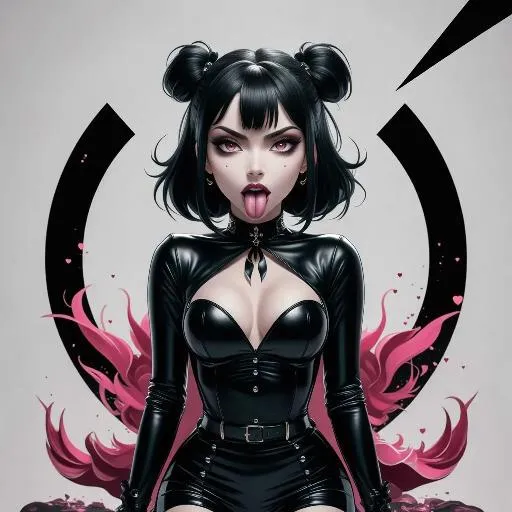
Generate an anime-style goth character with AI: bold tsundere student in tight black outfit, blushing with desire, playful tongue-out expression, and thick lips. Perfect for AI anime art, manga visuals, or edgy character designs. Explore vivago.ai's AI effects for dynamic anime creations on white backgrounds.

Recreate
arrow
Text to Image

FAQs

How to generate images/videos from text prompts?

Describe the visual content in natural language (e.g., 'A cyberpunk cat wearing neon goggles') and our AI models will create outputs. Complex prompts trigger multi-stage NLP parsing for enhanced accuracy.

How to refine unsatisfactory results?

Use our Prompt Bot - an AI-powered optimizer that suggests technical modifiers. Simply describe your ideas, desired changes ('more metallic texture'), then you will get optimized prompt variants.

When should I use reference images?

Upload references to: 1) Guide character consistency (e.g., faces/outfits), 2) Control motion patterns in videos using our feature matching algorithm. Supports JPG/PNG

What's the credit system?

Daily login grants 100 credits. Upgrade options: 1) Premium Membership, 2) Credit Packs. Details: https://vivago.ai/subscribe

More From VIVAGO AI

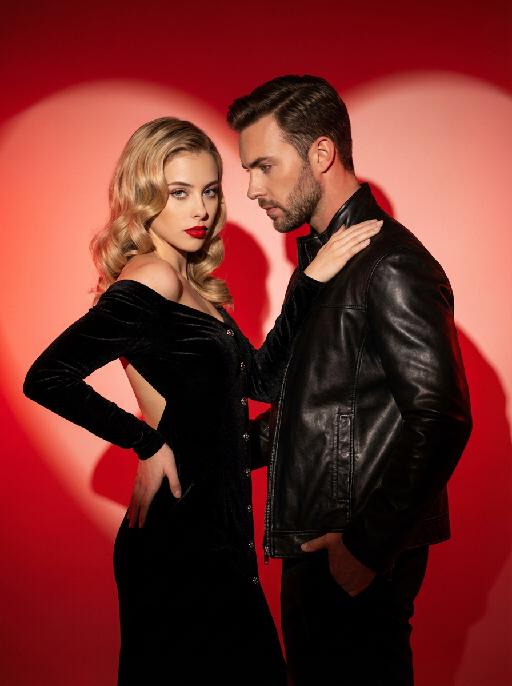
Couple AI effects generated image

Couple

This charming couple posed in the studio for the photo: In the uploaded pictures, these individuals (with unchanged facial features, gender and age) were wearing a black velvet high-end custom high-shoulder back off-the-shoulder dress (wearing exquisite and sophisticated accessories), decorated with metal buttons, with red lips, having a retro wavy hairstyle, with one hand on their own hips and the other on their partner's shoulder (with unchanged facial features, gender and age), with a cold yet charming expression; The other person was wearing a stylish custom black leather jacket, one hand in the pocket, slightly leaning forward, naturally gazing at the other person, with a natural and elegant expression, presenting a natural and elegant atmosphere; The background was a red gradient color, with strong light and shadow contrast, heart-shaped bright red light and shadow, high-contrast warm tones, and sharp black-red color contrast, exuding the luxurious charm of old Hollywood, filled with a sexy and elegant atmosphere. This was a professional studio photo shoot, the photos were clear and sharp, with an avant-garde photography art style, the edges of the characters were illuminated by red lights.

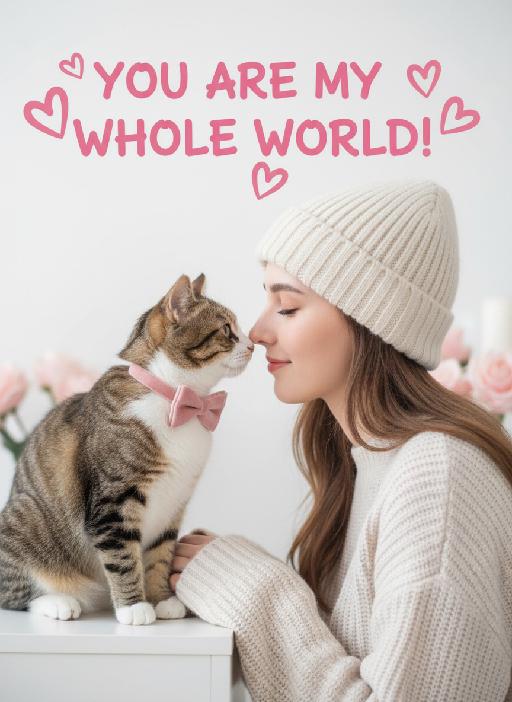
Pet's Love AI effects generated image

Pet's Love

Close-up shots, side-view angles, symmetrical composition: The characters in the uploaded two pictures are neatly arranged within the frame. The character in the first picture uploaded (whose facial features, gender and age remain unchanged, wearing a cream-colored knitted warm hat and knitted sweater) is presented from a side view, with eyes closed, facing the pet in the second uploaded picture. The tip of this character's nose touches the tip of the pet's nose (the species characteristics of the pet remain unchanged, wearing a pink velvet bow); this is a romantic Valentine's Day interaction scene with symmetrical close-up composition, soft and uniform lighting, high brightness and softness, low contrast, slightly blurred background effect, elegant tones (with light and pale gray as background colors), and pink rose color. It has the texture of a fresh Japanese film, with a clean blank background, creating a sweet and soothing Valentine's Day atmosphere, fashionable photography, avant-garde photography art. An oversized pink artistic design headline text is added above: "YOU ARE MY WHOLE WORLD!" Surrounding it are some unique pink heart-shaped graffiti decorations. Like a movie's light and shadow contrast

Noble Person

The figure from the uploaded image (with consistent facial features, hair, skin tone and age) sits confidently on an ornate golden vintage chair, holding a glass of white wine in one hand, with the other hand resting elegantly and naturally on the chair. He looks at the camera with a confident, cold and elegant expression, dressed in a dark gray haute couture suit with a white shirt underneath and an elegant textured cravat. He wears sunglasses and a watch, exuding an air of refinement, calmness and self-assurance. The background is a luxurious hotel setting with warm lighting, hanging chandeliers and floral accents, creating a retro, elegant, noble and lavish atmosphere. Captured in a medium shot from a slightly low, side angle relative to the subject, the image presents a cinematic portrayal of stylish living, featuring portrait photography aesthetics and an avant-garde fashion photography art style, with high-end cinematic texture, ultra-high definition quality, an overall cool color tone, cinema-grade image quality, a film-like filter, and dramatic lighting contrast.

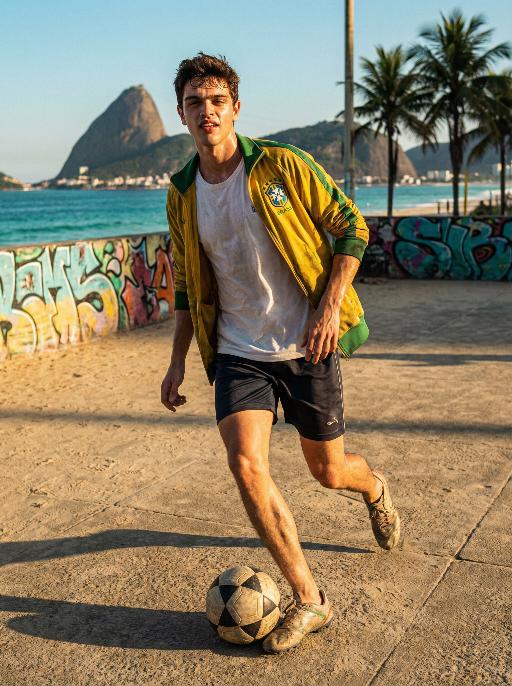
Football AI effects generated image

Football

Use the exact same facial features, gender, and age as the character in the uploaded image. Photorealistic street soccer portrait in Rio de Janeiro, vibrant and intense atmosphere, full-body dynamic action shot. Setting: outdoor soccer pitch next to Copacabana Beach, distant coastline and mountain silhouettes visible, sandy or concrete ground, colorful graffiti wall in background, turquoise ocean under clear sky. Style: barefoot or worn soccer cleats, casual sportswear with Brazilian national team colors — yellow and green accents, open training jacket, not full team jersey, natural muscle definition, subtle sweat sheen on sunlit skin. Action: dynamic dribbling moment frozen in time, head tilted up with confident wild gaze toward camera, slight squint under strong sunlight, full body tension and natural physicality. Lighting: bright golden hour sunlight, high saturation, warm color palette, strong highlights and soft shadows, cinematic contrast. Composition: low-angle shot for powerful presence, horizontal framing, sharp focus on subject, slight motion blur for dynamism, shallow depth of field, 8K ultra-detailed, realistic skin texture, no text or watermarks.

Document AI effects generated image

Document

An official reference document marked with "Violation of Agreement" contains a black-and-white photo with a retro movie-like texture (accounting for 60% of the overall picture): In the photo, there is a successful person dressed in stylish black high-end clothing (with the original figure as the main subject, without any changes to facial features) standing alone, with palm trees and the setting sun in the background. The document is made from an old newspaper and placed on a wooden tabletop background (accounting for 95% of the overall picture). This scene is both realistic and ironic. This is an official notice issued by the fictional "International Culinary Standards Department", with the event report number "Awaiting Diplomatic Apology" and the status "Pending Processing". This event is described in bold as a ridiculous culinary "crime" (ordering chicken nuggets at an upscale dinner party). The text has been modified with a red marker. The circular official seal features an eagle's emblem and the words "Culinary Crime". The title part is covered with a leather sticker with a retro printed pattern. It has a retro printed texture and clear focus. The resolution is 8K. It adopts a retro design style, with a humorous, satirical style and a retro artistic beauty.

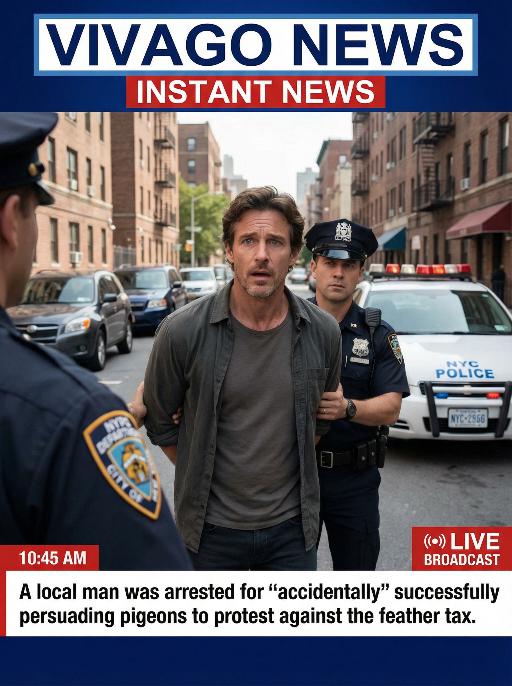
Arrest AI effects generated image

Arrest

Realistic real-time news screenshot: The main subject is the depicted person (with unchanged facial features, gender and age). The expression is shocked and confused. The person was arrested by two New York City police officers on a street in the city. The police tied his hands behind his back. The main figure occupies 80% of the overall picture. The background is a typical New York City street, featuring brick apartment buildings, parked vehicles and a New York City police car. Daylight natural light, over-the-shoulder news camera angle. There is a news caption at the bottom of the picture, stating: A local man was arrested for 'accidentally' successfully persuading pigeons to protest against the feather tax. There is a large title caption at the top of the picture: VIVAGO NEWS INSTANT NEWS. At the corner, there is a timestamp: 10:45 AM. Live broadcast. With a realistic news photography style, rich details, 8K resolution, and a cinematic aesthetic of news clips.

Load more

Next-Gen Multi-Model AI Video Architecture

Vivago AI isn't just one engine—it’s a unified hub for the world’s most advanced video AI. Whether you need cinematic realism or high-speed social content, we provide the right model for your creative vision.

Free Generate

Beauty and Dolphins

Vacation Time

Stellar Tear

Fish Tank Supervisor

Cinematic Quality & Precision Control

Enables 4K resolution with multi-lens motion control, generating delicate scene via text prompts for customized cinematography.​

TRY NOW

Dynamic AV Sync

Auto-generates original audio to avoid copyright issues. Build 3D immersive environments through layered sound design automatically.

TRY NOW

OpenAI Sora 2

​Advanced visual storytelling with unparalleled physics and consistency.

TRY NOW

Kling v2.6 Pro

Industry-leading cinematic image animation and motion control.

TRY NOW

Google Veo 3 & 3.1

Ultra-fast generation with enhanced realism for creative workflows.

TRY NOW

Vivago AI 2.0

Our proprietary model optimized for efficiency, speed, and cost-effective generation.

TRY NOW

Users' Voice

We listen carefully to the opinions of every user.
Free Generate
Contact Us
I tried the Lip Sync feature inside Vivago.ai’s AI Video Generator for my educational podcast, and the results were stunning! The avatar's lip movements perfectly matched my audio recording, creating a professional AI-generated video without complex editing. Compared with tools like OpenAI Sora 2 and Google Veo 3.1, Vivago Image-to-Video delivers fast, studio-quality results online. It saved me hours of post-production work.
ElenaM (Spain)
Vivago’s Image-to-Video AI transformed my marketing workflow. I uploaded a product image and described the launch scene in text, and it generated a 10-second cinematic AI video with background music and dynamic visuals. The output quality rivals Kling v2.6 Pro and Google Veo 3 Fast. It’s now my go-to AI video generator for social media ads and product campaigns.
KenjiT (Japan)
As a digital artist, I use Vivago.ai 2.0 daily for Image-to-Image and AI Image-to-Video creation. The e-book covers and animated visuals I generate for clients look cinematic and professional. Unlike many standalone AI tools, Vivago integrates multiple leading models into one platform, making it easier to create copyright-safe AI images and videos for publishing.
ChenL (China)
I tried the Lip Sync feature inside Vivago.ai’s AI Video Generator for my educational podcast, and the results were stunning! The avatar's lip movements perfectly matched my audio recording, creating a professional AI-generated video without complex editing. Compared with tools like OpenAI Sora 2 and Google Veo 3.1, Vivago Image-to-Video delivers fast, studio-quality results online. It saved me hours of post-production work.
ElenaM (Spain)
Vivago’s Image-to-Video AI transformed my marketing workflow. I uploaded a product image and described the launch scene in text, and it generated a 10-second cinematic AI video with background music and dynamic visuals. The output quality rivals Kling v2.6 Pro and Google Veo 3 Fast. It’s now my go-to AI video generator for social media ads and product campaigns.
KenjiT (Japan)
As a digital artist, I use Vivago.ai 2.0 daily for Image-to-Image and AI Image-to-Video creation. The e-book covers and animated visuals I generate for clients look cinematic and professional. Unlike many standalone AI tools, Vivago integrates multiple leading models into one platform, making it easier to create copyright-safe AI images and videos for publishing.
ChenL (China)
I absolutely love Vivago’s AI Image-to-Video Generator. As a travel blogger, static images often fail to capture real atmosphere, but Vivago helps me turn photos into vivid cinematic AI videos with motion effects. It feels comparable to OpenAI Sora 2 and Google Veo 3.1, but more accessible and faster for creators who need high-quality AI videos online.
LiamK (Australia)
I tried the Lip Sync feature inside Vivago.ai’s AI Video Generator for my educational podcast, and the results were stunning! The avatar's lip movements perfectly matched my audio recording, creating a professional AI-generated video without complex editing. Compared with tools like OpenAI Sora 2 and Google Veo 3.1, Vivago Image-to-Video delivers fast, studio-quality results online. It saved me hours of post-production work.
ElenaM (Spain)
Vivago’s Image-to-Video AI transformed my marketing workflow. I uploaded a product image and described the launch scene in text, and it generated a 10-second cinematic AI video with background music and dynamic visuals. The output quality rivals Kling v2.6 Pro and Google Veo 3 Fast. It’s now my go-to AI video generator for social media ads and product campaigns.
KenjiT (Japan)
As a digital artist, I use Vivago.ai 2.0 daily for Image-to-Image and AI Image-to-Video creation. The e-book covers and animated visuals I generate for clients look cinematic and professional. Unlike many standalone AI tools, Vivago integrates multiple leading models into one platform, making it easier to create copyright-safe AI images and videos for publishing.
ChenL (China)
I absolutely love Vivago’s AI Image-to-Video Generator. As a travel blogger, static images often fail to capture real atmosphere, but Vivago helps me turn photos into vivid cinematic AI videos with motion effects. It feels comparable to OpenAI Sora 2 and Google Veo 3.1, but more accessible and faster for creators who need high-quality AI videos online.
LiamK (Australia)
Using Vivago.ai’s Image-to-Video AI has greatly enhanced my classroom teaching. I transform textbook notes into historical AI videos with cinematic filters and dynamic animations. Compared with tools like Kling v2.6 Pro and Google Veo 3 Fast, Vivago offers faster generation and easier parameter control for educators who need reliable AI video creation.
RajivG (India)
I frequently create AI videos on Vivago and publish them on TikTok and YouTube Shorts. The AI video templates and trending content ideas help me produce viral-ready clips quickly. With Vivago’s integrated models—including advanced video engines similar to OpenAI Sora 2—I can generate anime-style and cinematic social media videos that drive high engagement.
MarieJ (Spain)
What attracts me most about Vivago.ai is not only the powerful AI Video Generator but also the active AIGC creator community. It combines AI Image-to-Video, Text-to-Video, and leading model integrations like Google Veo 3.1 into one creative platform.
TomW (India)
At first, I was hesitant about using AI video tools. But after trying Vivago Image-to-Video, I realized how easy it is to create professional AI-generated videos online. I just upload an image, add a short prompt, and adjust a few settings. The results are cinematic and copyright-safe, which is essential for commercial projects.
HectorC (Mexico)
Using Vivago.ai’s Image-to-Video AI has greatly enhanced my classroom teaching. I transform textbook notes into historical AI videos with cinematic filters and dynamic animations. Compared with tools like Kling v2.6 Pro and Google Veo 3 Fast, Vivago offers faster generation and easier parameter control for educators who need reliable AI video creation.
RajivG (India)
I frequently create AI videos on Vivago and publish them on TikTok and YouTube Shorts. The AI video templates and trending content ideas help me produce viral-ready clips quickly. With Vivago’s integrated models—including advanced video engines similar to OpenAI Sora 2—I can generate anime-style and cinematic social media videos that drive high engagement.
MarieJ (Spain)
What attracts me most about Vivago.ai is not only the powerful AI Video Generator but also the active AIGC creator community. It combines AI Image-to-Video, Text-to-Video, and leading model integrations like Google Veo 3.1 into one creative platform.
TomW (India)
At first, I was hesitant about using AI video tools. But after trying Vivago Image-to-Video, I realized how easy it is to create professional AI-generated videos online. I just upload an image, add a short prompt, and adjust a few settings. The results are cinematic and copyright-safe, which is essential for commercial projects.
HectorC (Mexico)