Image to Image

Capture stunning white and grey Puma shoes in a lush green field. Perfect for product photography, highlighting pristine sneakers with a natural grassy backdrop and scattered leaves for professional, appealing visual content.

Recreate
arrow
Image to Image

FAQs

How to generate images/videos from text prompts?

Describe the visual content in natural language (e.g., 'A cyberpunk cat wearing neon goggles') and our AI models will create outputs. Complex prompts trigger multi-stage NLP parsing for enhanced accuracy.

How to refine unsatisfactory results?

Use our Prompt Bot - an AI-powered optimizer that suggests technical modifiers. Simply describe your ideas, desired changes ('more metallic texture'), then you will get optimized prompt variants.

When should I use reference images?

Upload references to: 1) Guide character consistency (e.g., faces/outfits), 2) Control motion patterns in videos using our feature matching algorithm. Supports JPG/PNG

What's the credit system?

Daily login grants 100 credits. Upgrade options: 1) Premium Membership, 2) Credit Packs. Details: https://vivago.ai/subscribe

More From VIVAGO AI

On the water

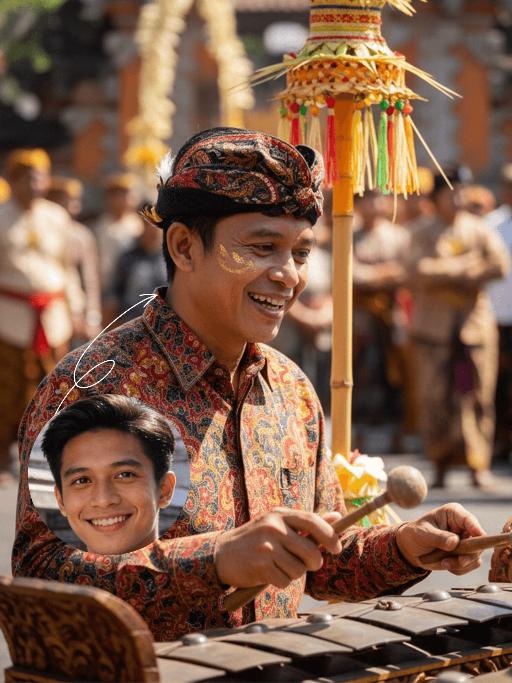
Use the uploaded portrait for strict facial features, gender, skin color, pupil color, clothing, hairstyle and gender locking. Select the main characters from the uploaded pictures. Have a natural expression, face the camera, and show a relaxed state. The camera suddenly switches from the front to the back of the character, changing from a frontal shot to a rear shot. Action: Face the camera, maintain a natural expression, suddenly turn around and leap, run on the water surface, as if possessing Chinese martial arts skills. When the character starts flying, the posture is to spread both arms and be in a flying state. The camera follows the character running on the water surface. The scene becomes a vast sea level, with a dreamy and beautiful scenery, with clouds and the sky in the distance.

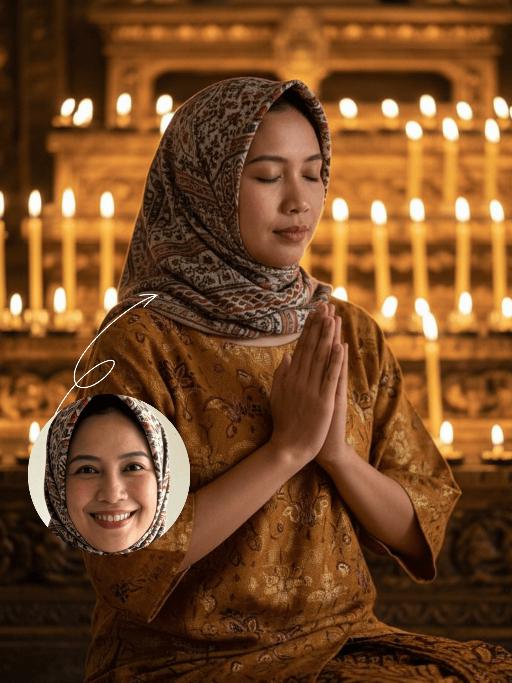
Sari photo

Strictly preserve the uploaded model’s facial features, contour, native Indonesian skin tone, hairstyle and age 100%. Create an ultra-realistic high-fashion Indonesian bridal portrait, the model smiles softly and brightly at the camera, exuding elegant romantic bridal grace. The model wears a vibrant red & gold ornate Indonesian bridal kebaya (heavy luxury songket fabric, intricate gold thread embroidery, ruby & sapphire inlays, layered ruffled hem), paired with a matching songket skirt with golden batik motifs and red embroidered inner camisole. Opulent Indonesian bridal gold jewelry set: gem-inlaid choker, cascading chandelier earrings, stacked krisan bangles, gem-encrusted rings, traditional sanggul headdress with gold ornaments, fresh jasmine flowers and gem pins. Full-body elegant dignified posture, one hand gently resting on an architectural pillar; grand Javanese/Balinese Indonesian palace interior with carved wood, ornate stone columns, batik tapestries, red & gold flower petals on the floor and soft candlelight around. Warm golden natural light, 4K photorealistic textures, cinematic color grading, luxury editorial photography style, highly saturated warm tones, sharp focus on the model’s smile and facial features, clear songket fabric texture and dazzling jewelry luster, subtle radiant skin finish, the portrait embodies Indonesian bridal opulence and gentle elegance.

Bali Queen AI effects generated image

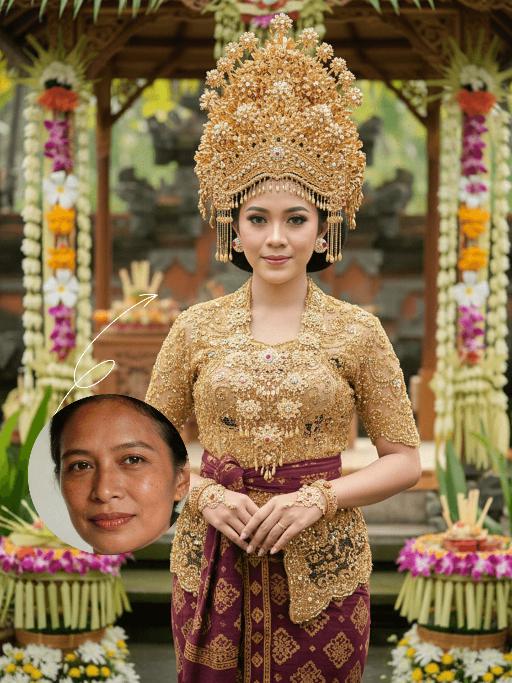
Bali Queen

Strictly lock the facial features of the uploaded portrait (preserve facial contours, native Indonesian skin tone, hairstyle and age). Half-body portrait photography, the subject is centered in the frame, not positioned too low, hyper-realistic style, 4K ultra-high definition, soft warm tropical daylight, authentic Balinese wedding cultural atmosphere | A young Indonesian Balinese woman with a poised, elegant expression, standing front-facing in a traditional Balinese bridal outfit. She wears an extremely elaborate, oversized golden beaded and embroidered ceremonial headdress (Bali crown) adorned with intricate floral and gem details, a matching golden beaded and embroidered short-sleeve top, and a deep maroon batik-patterned sarong skirt with gold trim. She accessorizes with layered golden necklaces, bracelets, and a ceremonial handpiece, with her hands gracefully clasped in front of her torso. The background is a softly blurred authentic Balinese wedding ceremony setting: a sacred bamboo and palm-frond ceremonial pavilion (bale agung) decorated with vibrant tropical flowers (frangipani, orchids, and jasmine), a carved wooden altar adorned with traditional offerings, and lush green tropical foliage, creating a romantic and culturally immersive wedding atmosphere. Focus on the intricate details of the golden beadwork, the ornate headdress, and the timeless cultural elegance of the Balinese wedding tradition, with warm diffused sunlight enhancing the opulence of the bridal attire

Lens Heartbeat

The uploaded figure (with unchanged facial features) forms a heart shape with both hands in front of the lens for a framed composition, featuring a shallow depth of field (the large, tilted hands in the foreground are slightly blurred). This is a portrait photoshoot in the ppgalclub style, with Japanese Shibuya Y2K fashion styling. Captured in a fisheye lens close-up (strong fisheye distortion with slight stretching at the frame edges) from a slightly low-angle perspective, the figure is centered to fill the entire frame. The figure has short, curly golden bob hair and bold makeup (thick black eyeliner + plump red lips + translucent pink-toned blush), leaning forward with the face facing the camera directly. The outfit includes a black leather vest with a fur collar, a white camisole, a red stud-embellished belt (with a cropped waist design), a golden cross necklace paired with multi-layered metal chokers, sequin-embellished nail art, pearl-encircled rings, and a small golden chain bag. The scene is set in a Shibuya underground passage at night, with dim artificial lighting and a high-intensity flash fired directly at the figure (creating stark light and shadow contrast, prominent highlights on the figure’s face, and a dark-toned background), plus blurred bokeh light spots in the background. The image features film grain texture, a highly saturated black/gold/red color scheme, and ultra-high-definition details; a black fisheye lens vignetting frames the entire image, and an orange vertical digital date watermark (2026:00:00) is added to the bottom right corner.

Times Square AI effects generated image

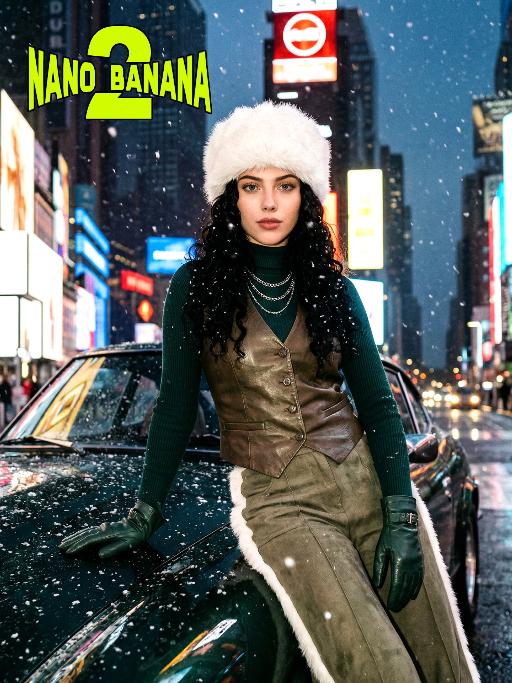
Times Square

[Scene] In the dark, snowy New York Times Square, during the winter night when it gets dark, heavy snow is falling, with snowflakes falling clearly. The iconic neon advertisements are shining in the background. The damp asphalt reflects the light of the neon lights. The towering skyscrapers are clearly visible in the snow and fog, with snowflakes flying all around. [Subject] The person in the uploaded picture (with facial features, gender, and age unchanged) has long black curly hair, is wearing a white fluffy artificial fur hat in a European style, has a European minimalist makeup look, and the golden light outlines a soft and natural expression, with a calm demeanor, presenting a handsome posture. Snowflakes fall on the person's hair and coat, and also on the person's body. [Posture] - Body: Sideways leaning against the engine hood of a dark green luxury retro sports car, the body's center of gravity tilts to the right, the torso slightly twisting to face the camera - Legs: Right knee bent; left leg straight down, foot on the ground - Arms: Right arm stretched downward, palm flat against the car hood to provide support, fingers slightly spread; left arm relaxed, hand on the left thigh - Head and gaze: Head remains upright, facing the camera directly, eyes forward, expression confident - Overall: A relaxed but energetic fashion editor posture, casual and cool atmosphere, elongated body lines to enhance visual effect [Clothing] Leading-edge autumn design: 1. Outer layer: A well-tailored leather fabric vest with silver chain details and perforated patterns, worn over a fitted dark green high-neck sweater; 2. Bottom: High-waisted dark green wide-leg work pants, with a white fur trim (coordinated with the white fur belt); 3. Accessories: Dark green long leather gloves, brim with white artificial fur trim, multi-layer silver chain necklace; 4. Footwear: Simple black ankle boots (partly visible), Y2K style, retro style, leather and metal texture. [Photography and Lighting] Mid-close-up shot, dark environment, using 35mm film photography style, Kodak Gold 200 film, warm golden backlight to outline the hair and snowflakes, soft fill light to retain the natural skin texture of the face, shallow depth of field blurs the background advertisements, film grain and soft bokeh effect when snow falls, strong light contrast, foreground with a lot of blurred and clear snowflakes falling. [Style] The image style is portrait, the edges of the picture add a similar film graininess effect, dark atmosphere, high-end fashion editor, hyper-realistic details, fashion avant-garde photography art, 8K resolution, no excessive smoothing processing, using blue-green and orange contrast for color grading - the style has a cinematic feel.

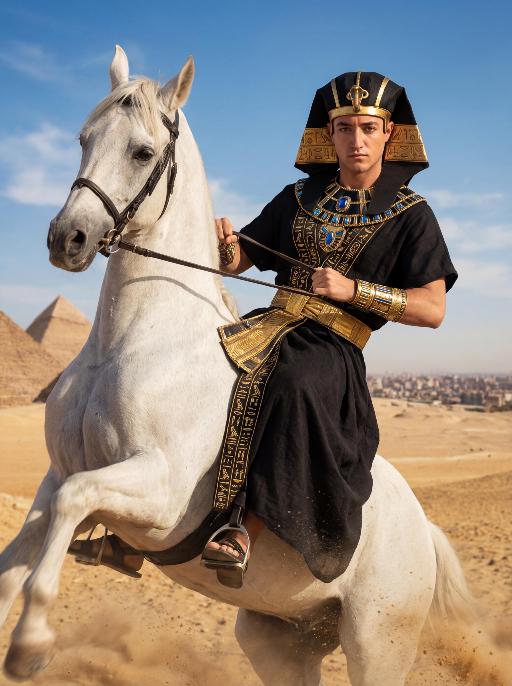
Desert Rider AI effects generated image

Desert Rider

The character in the uploaded picture (unchanged facial features, gender and age). A striking young man embodying the persona of an ancient Egyptian pharaoh, captured in a hyper-realistic, cinematic portrait. He has short dark hair, now adorned with an elaborate black and gold nemes headdress, featuring intricate golden hieroglyphic carvings and a central golden cobra symbol, replacing the original golden headdress, exuding divine authority. He is clad in a form-fitting, floor-length black linen robe, intricately embroidered with golden hieroglyphic patterns along the hem and sleeves, accented with a wide, textured golden belt at his waist. His accessories are opulent yet dark-toned: a massive, multi-layered black and gold pectoral necklace with blue gemstone inlays, and intricate golden arm cuffs on both wrists, replacing the original golden accessories. He is mounted atop a powerful white horse that rears dynamically in the desert, kicking up a spray of golden sand as it surges forward. He leans slightly back, gripping the reins tightly with both hands, his body steadying himself atop the horse, his gaze direct and unyielding toward the camera, radiating primal strength and pharaonic grandeur. The shot captures the dynamic motion of the horse and the commanding presence of the pharaoh. The setting is the vast, sun-drenched desert of ancient Egypt, with the majestic pyramids rising in the distance against a clear, bright blue sky dotted with fluffy white clouds. The desert sand stretches out to the horizon, with the warm, hazy air of the desert surrounding him, and the distant cityscape visible on the horizon. The image is rendered in a hyper-realistic, cinematic photography style, with dramatic, natural lighting that highlights the rich texture of the black linen, the subtle sheen of the golden embroidery, and the contours of his face and body, while the horse's legs are slightly blurred to convey the sense of motion. The color palette is rich and vivid, featuring deep blacks, radiant golds, vibrant blues, and earthy browns, creating a timeless, powerful, and awe-inspiring atmosphere. The overall aesthetic is bold, dynamic, and reminiscent of a grand historical epic film, blending ancient Egyptian grandeur with the raw energy of a desert ride.

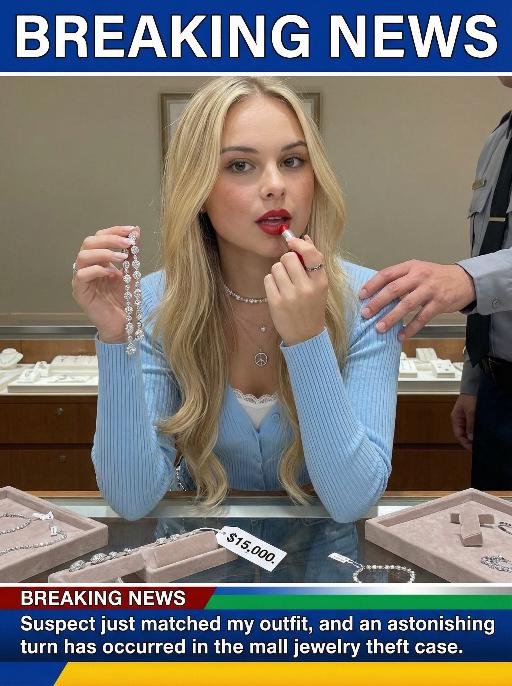
Jewelry Theft AI effects generated image

Jewelry Theft

An interesting breaking news photo has been released. In the picture, the person depicted (with their facial features, gender and age remaining unchanged) is caught in the act of stealing when she is captured on camera. One hand is holding a string of diamond earrings, and the other hand is holding a lipstick, as if nothing has happened as she is applying it to her lips. The main figure occupies 80% of the overall picture. The jewelry counter is in a mess, with velvet jewelry pads scattered around, and a fallen price tag that reads "$15,000". Outside the frame, a security guard's hand is reaching towards her shoulder. Above the picture, there is a prominent large headline text (blue background with white characters): BREAKING NEWS;Below the picture, there is a news text (in red, blue and black color combination): Suspect just matched my outfit and an astonishing turn has occurred in the mall jewelry theft case.

Load more

Next-Gen Multi-Model AI Video Architecture

Vivago AI isn't just one engine—it’s a unified hub for the world’s most advanced video AI. Whether you need cinematic realism or high-speed social content, we provide the right model for your creative vision.

Free Generate

Beauty and Dolphins

Vacation Time

Stellar Tear

Fish Tank Supervisor

Cinematic Quality & Precision Control

Enables 4K resolution with multi-lens motion control, generating delicate scene via text prompts for customized cinematography.​

TRY NOW

Dynamic AV Sync

Auto-generates original audio to avoid copyright issues. Build 3D immersive environments through layered sound design automatically.

TRY NOW

OpenAI Sora 2

​Advanced visual storytelling with unparalleled physics and consistency.

TRY NOW

Kling v2.6 Pro

Industry-leading cinematic image animation and motion control.

TRY NOW

Google Veo 3 & 3.1

Ultra-fast generation with enhanced realism for creative workflows.

TRY NOW

Vivago AI 2.0

Our proprietary model optimized for efficiency, speed, and cost-effective generation.

TRY NOW

Users' Voice

We listen carefully to the opinions of every user.
Free Generate
Contact Us
I tried the Lip Sync feature inside Vivago.ai’s AI Video Generator for my educational podcast, and the results were stunning! The avatar's lip movements perfectly matched my audio recording, creating a professional AI-generated video without complex editing. Compared with tools like OpenAI Sora 2 and Google Veo 3.1, Vivago Image-to-Video delivers fast, studio-quality results online. It saved me hours of post-production work.
ElenaM (Spain)
Vivago’s Image-to-Video AI transformed my marketing workflow. I uploaded a product image and described the launch scene in text, and it generated a 10-second cinematic AI video with background music and dynamic visuals. The output quality rivals Kling v2.6 Pro and Google Veo 3 Fast. It’s now my go-to AI video generator for social media ads and product campaigns.
KenjiT (Japan)
As a digital artist, I use Vivago.ai 2.0 daily for Image-to-Image and AI Image-to-Video creation. The e-book covers and animated visuals I generate for clients look cinematic and professional. Unlike many standalone AI tools, Vivago integrates multiple leading models into one platform, making it easier to create copyright-safe AI images and videos for publishing.
ChenL (China)
I tried the Lip Sync feature inside Vivago.ai’s AI Video Generator for my educational podcast, and the results were stunning! The avatar's lip movements perfectly matched my audio recording, creating a professional AI-generated video without complex editing. Compared with tools like OpenAI Sora 2 and Google Veo 3.1, Vivago Image-to-Video delivers fast, studio-quality results online. It saved me hours of post-production work.
ElenaM (Spain)
Vivago’s Image-to-Video AI transformed my marketing workflow. I uploaded a product image and described the launch scene in text, and it generated a 10-second cinematic AI video with background music and dynamic visuals. The output quality rivals Kling v2.6 Pro and Google Veo 3 Fast. It’s now my go-to AI video generator for social media ads and product campaigns.
KenjiT (Japan)
As a digital artist, I use Vivago.ai 2.0 daily for Image-to-Image and AI Image-to-Video creation. The e-book covers and animated visuals I generate for clients look cinematic and professional. Unlike many standalone AI tools, Vivago integrates multiple leading models into one platform, making it easier to create copyright-safe AI images and videos for publishing.
ChenL (China)
I absolutely love Vivago’s AI Image-to-Video Generator. As a travel blogger, static images often fail to capture real atmosphere, but Vivago helps me turn photos into vivid cinematic AI videos with motion effects. It feels comparable to OpenAI Sora 2 and Google Veo 3.1, but more accessible and faster for creators who need high-quality AI videos online.
LiamK (Australia)
I tried the Lip Sync feature inside Vivago.ai’s AI Video Generator for my educational podcast, and the results were stunning! The avatar's lip movements perfectly matched my audio recording, creating a professional AI-generated video without complex editing. Compared with tools like OpenAI Sora 2 and Google Veo 3.1, Vivago Image-to-Video delivers fast, studio-quality results online. It saved me hours of post-production work.
ElenaM (Spain)
Vivago’s Image-to-Video AI transformed my marketing workflow. I uploaded a product image and described the launch scene in text, and it generated a 10-second cinematic AI video with background music and dynamic visuals. The output quality rivals Kling v2.6 Pro and Google Veo 3 Fast. It’s now my go-to AI video generator for social media ads and product campaigns.
KenjiT (Japan)
As a digital artist, I use Vivago.ai 2.0 daily for Image-to-Image and AI Image-to-Video creation. The e-book covers and animated visuals I generate for clients look cinematic and professional. Unlike many standalone AI tools, Vivago integrates multiple leading models into one platform, making it easier to create copyright-safe AI images and videos for publishing.
ChenL (China)
I absolutely love Vivago’s AI Image-to-Video Generator. As a travel blogger, static images often fail to capture real atmosphere, but Vivago helps me turn photos into vivid cinematic AI videos with motion effects. It feels comparable to OpenAI Sora 2 and Google Veo 3.1, but more accessible and faster for creators who need high-quality AI videos online.
LiamK (Australia)
Using Vivago.ai’s Image-to-Video AI has greatly enhanced my classroom teaching. I transform textbook notes into historical AI videos with cinematic filters and dynamic animations. Compared with tools like Kling v2.6 Pro and Google Veo 3 Fast, Vivago offers faster generation and easier parameter control for educators who need reliable AI video creation.
RajivG (India)
I frequently create AI videos on Vivago and publish them on TikTok and YouTube Shorts. The AI video templates and trending content ideas help me produce viral-ready clips quickly. With Vivago’s integrated models—including advanced video engines similar to OpenAI Sora 2—I can generate anime-style and cinematic social media videos that drive high engagement.
MarieJ (Spain)
What attracts me most about Vivago.ai is not only the powerful AI Video Generator but also the active AIGC creator community. It combines AI Image-to-Video, Text-to-Video, and leading model integrations like Google Veo 3.1 into one creative platform.
TomW (India)
At first, I was hesitant about using AI video tools. But after trying Vivago Image-to-Video, I realized how easy it is to create professional AI-generated videos online. I just upload an image, add a short prompt, and adjust a few settings. The results are cinematic and copyright-safe, which is essential for commercial projects.
HectorC (Mexico)
Using Vivago.ai’s Image-to-Video AI has greatly enhanced my classroom teaching. I transform textbook notes into historical AI videos with cinematic filters and dynamic animations. Compared with tools like Kling v2.6 Pro and Google Veo 3 Fast, Vivago offers faster generation and easier parameter control for educators who need reliable AI video creation.
RajivG (India)
I frequently create AI videos on Vivago and publish them on TikTok and YouTube Shorts. The AI video templates and trending content ideas help me produce viral-ready clips quickly. With Vivago’s integrated models—including advanced video engines similar to OpenAI Sora 2—I can generate anime-style and cinematic social media videos that drive high engagement.
MarieJ (Spain)
What attracts me most about Vivago.ai is not only the powerful AI Video Generator but also the active AIGC creator community. It combines AI Image-to-Video, Text-to-Video, and leading model integrations like Google Veo 3.1 into one creative platform.
TomW (India)
At first, I was hesitant about using AI video tools. But after trying Vivago Image-to-Video, I realized how easy it is to create professional AI-generated videos online. I just upload an image, add a short prompt, and adjust a few settings. The results are cinematic and copyright-safe, which is essential for commercial projects.
HectorC (Mexico)