Text to Image

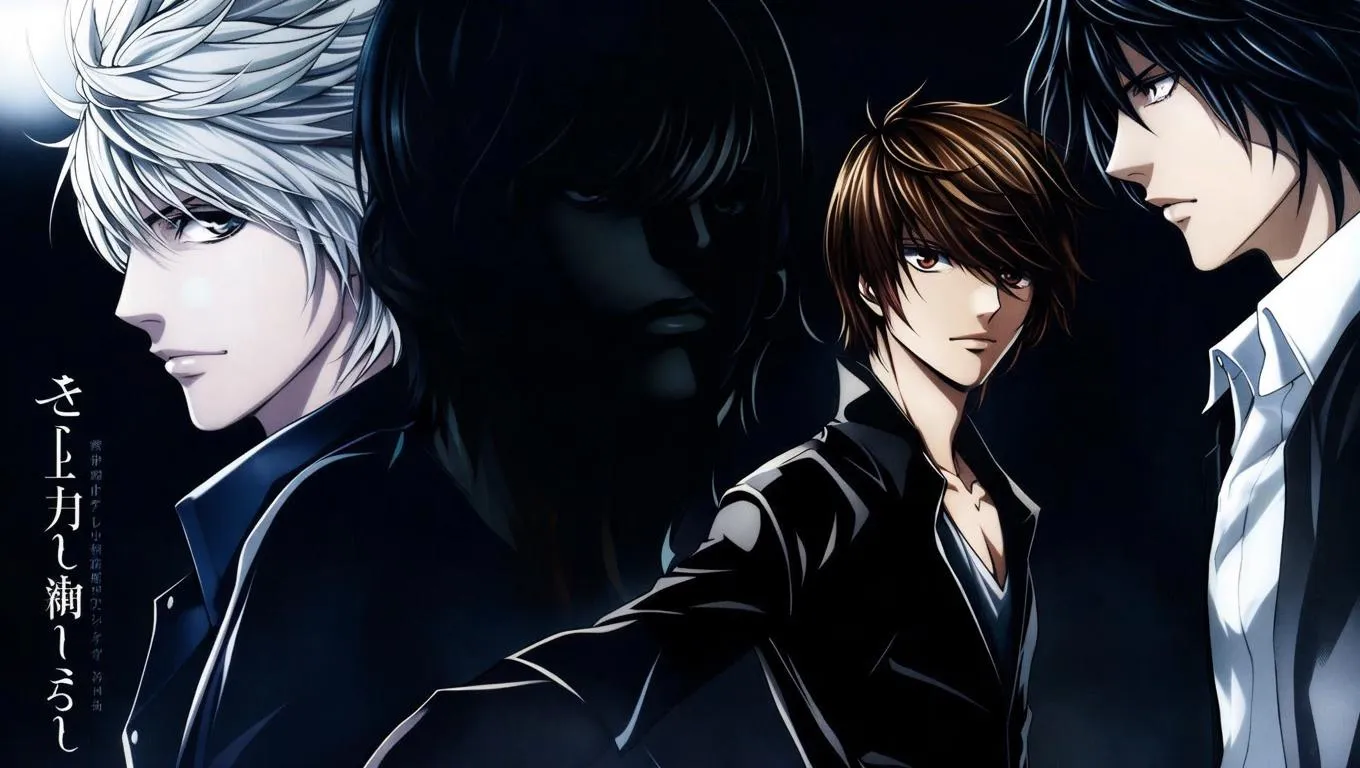
Generate Death Note anime scenes with authentic manga-style visuals using AI. Create AI-generated images that mirror the original series' dynamic panels and dark atmosphere. Perfect for fans seeking high-quality, text-to-image anime art with intricate details and thrilling suspense.

Recreate
arrow
Text to Image

FAQs

How to generate images/videos from text prompts?

Describe the visual content in natural language (e.g., 'A cyberpunk cat wearing neon goggles') and our AI models will create outputs. Complex prompts trigger multi-stage NLP parsing for enhanced accuracy.

How to refine unsatisfactory results?

Use our Prompt Bot - an AI-powered optimizer that suggests technical modifiers. Simply describe your ideas, desired changes ('more metallic texture'), then you will get optimized prompt variants.

When should I use reference images?

Upload references to: 1) Guide character consistency (e.g., faces/outfits), 2) Control motion patterns in videos using our feature matching algorithm. Supports JPG/PNG

What's the credit system?

Daily login grants 100 credits. Upgrade options: 1) Premium Membership, 2) Credit Packs. Details: https://vivago.ai/subscribe

More From VIVAGO AI

Uncertainty

Hyper-realistic photography: The two uploaded images depict the characters in the same scene. The first character (with unchanged facial features, expressions and age) has long curly hair and light brown hair, touching the deep red wall beautifully and charmingly, wearing a tight and sexy red nightgown. The other character (with unchanged facial features, expressions and age) is wearing a smooth and loose black patterned shirt. There is an intimate and passionate eye contact between the two characters, creating a sexy and romantic atmosphere. The dim modern bedroom background features dark-colored bed sheets and red neon signs shining on the walls; lighting adjustment suggestion: high-end film-level lighting, strong contrast of light and dark, soft melancholic shadows, deep and rich shadows, subtle highlights on the skin, shallow depth of field, clearly focused on the couple; color tone suggestion: warm and melancholic color combination, mainly saturated red and dark black, natural skin with warm tones, rich immersive color grading, fashion-forward photography, extreme ambiguous atmosphere, high-definition film style. Dark interior and red light and shadow

Garden Lover

Two medium-distance close-up shots of people (their appearances, ages and genders remain unchanged. The older of the two has a semi-transparent effect on their clothing and has warm-toned light effects) stand side by side in white clothing, with a natural posture, facing forward, and their body proportions are very realistic. They stand in front of an American suburban house, which is a vintage old house with a beautiful garden. The warm golden light, soft background light and side light create a hazy film-like atmosphere, conveying a warm, soothing and nostalgic tone. Shot from a medium close-up angle, the shallow depth of field effect highlights the characters. The soft warm light, delicate skin and fabric textures, natural and realistic composition, ultra-realistic high-definition quality and real film texture.

Eid Wish AI effects generated image

Eid Wish

Maintain the exact same facial features, gender, and age of the person in the uploaded image, Photorealistic portrait, cinematic shot, a young Muslim boy wearing a white traditional thobe and white songkok hat, standing by a wooden balcony window at twilight, hands raised in gentle prayer, looking up with reverent expression, warm side lighting creating soft shadows and light contrast, background features the glowing green domes and minarets of Masjid an-Nabawi under a starry night sky with a crescent moon, floating Arabic calligraphy of "Allah" and elegant golden text "Ramadan Kareem", foreground includes an open Quran emitting soft glow, a bowl of dates, glowing incense, prayer beads, and ornate lit Ramadan lanterns, Sony A7R V camera, 8K resolution, sharp details, warm golden hour color grading, realistic texture of wood and fabric, no 3D cartoon elements, no digital art filters, pure photographic realism.

McDonald

Ultra-realistic photography, ultra-fine details, sharp focus, 8K resolution, surreal composition. Composition: A giant child (with an oversized head proportion, far larger than the buildings) is lying on the roof of a realistic McDonald’s restaurant. Foreground: The child is smiling while holding an oversized crispy fried chicken drumstick (facing the camera, an extremely close perspective with a strong sense of perspective). Background: A realistic urban street with pedestrians coming and going, under a blue sky with white clouds. Subject: The figure from the uploaded image (unchanged facial features, age and gender). Posture: Lying on the roof (holding an oversized fried chicken drumstick toward the camera with one hand). Outfit: A yellow short-sleeved shirt paired with red work pants (with the yellow McDonald’s "M" logo). Accessories: A red beret (with the yellow McDonald’s "M" logo). Shooting perspective: Eye-level or a slightly low angle, a realistic lifestyle photography perspective. Light and shadow: Bright daytime with natural sunlight, soft and ample light, and natural, distinct shadows (e.g., the child’s shadow cast on the buildings). Color scheme: Dominated by McDonald’s iconic red and yellow (for the child’s outfit), paired with the black, yellow and white of the buildings, the golden brown of the fried chicken drumstick, featuring bright, high-saturation realistic colors. Cinematic texture with a Fuji filter effect.

FinalGlam

Use the exact same facial features, gender, and age as the character in the uploaded image. Masterpiece, best quality, ultra-detailed, photorealistic full-body shot, a stunning Brazilian woman dancing samba at Rio Carnival, energetic and graceful dance pose, long wavy dark hair, beautiful facial features, glamorous carnival makeup, golden tan skin, wearing a luxurious and vibrant Rio Carnival costume: sequined and beaded bodysuit in green, yellow, and blue, long elegant skirt that fully covers the hips and buttocks (no exposure, modest and decent), large dramatic feather headdress with gold and blue feathers, feathered hip details (subtly integrated with the skirt, no exposed skin), sparkling jewelry. Background is the lively Sambadrome at night, colorful lights, cheering crowd, fireworks in the night sky, festive confetti floating in the air, dynamic motion blur, warm cinematic lighting, strong rim light, vibrant saturated colors, shallow depth of field, 8K, ultra-realistic.

Moving Figure

Create a 1/7 scale commercialized figure of the character in the illustration, in a realistic style and environment. Render the exact hairstyle and the same outfit with the uploaded figure. Render garments as molded plastic with engraved seams and sculpted folds; keep accessories as plastic parts. Fictionalize any brand text/logos while keeping layout and colors. Place the figure on a computer desk, using a circular transparent acrylic base without any text. On the Apple computer screen, display the Z Brush modeling process of the figure. Next to the Apple computer screen, place a BANDAl-style toy packaging box printed with the original artwork. The background shows a modern realistic room furnished with contemporary furniture, including a display cabinet filled with books, dolls, and scale figures, adding a casual and everyday atmosphere. Behind the Apple computer, place a desk lamp to add detail and depth to the scene.

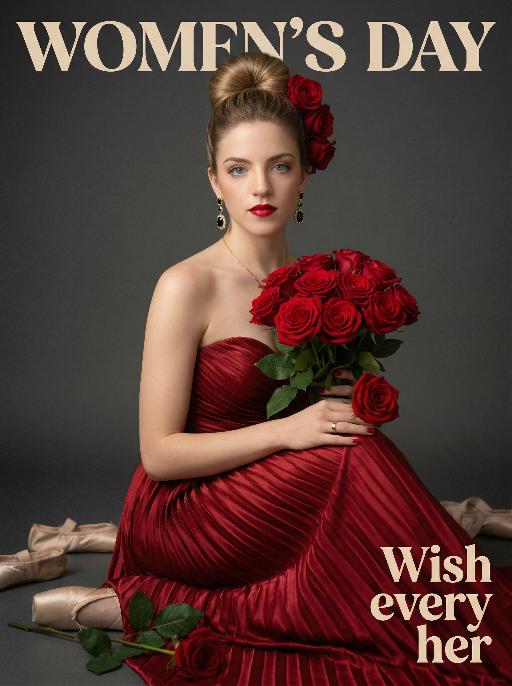
Queen AI effects generated image

Queen

Use the exact same facial features, gender, and age as the uploaded image.Hyper-realistic half-body portrait photography, cinematic lighting, 8K resolution, shallow depth of field, rich and warm color palette. her hair styled in an elegant high bun with a few red roses tucked into the side of her hair. She wears dangling gold earrings with black gemstones, a thin gold necklace, and a gold ring on her right hand. Her makeup is sophisticated, featuring bold red lipstick and defined eyes. She is dressed in a strapless, floor-length gown made of deep red pleated satin fabric, the texture of the folds is extremely detailed. She holds a lush bouquet of fully bloomed red roses with green leaves in her arms, one rose resting gently on her right hand. She sits gracefully, looking directly at the camera with a calm and alluring expression. The background is a smooth, matte dark gray studio backdrop. On the dark floor around her, there are scattered ballet pointe shoes and a single fallen rose with green leaves. The overall style is vintage and luxurious, with soft directional lighting highlighting the sheen of the satin and the velvety texture of the rose petals, creating a strong sense of drama and elegance..The text "WOMEN'S DAY" is displayed at the top in large, bold, stylized artistic font.The text "Wish every her" is positioned in the lower right corner in a complementary artistic font.

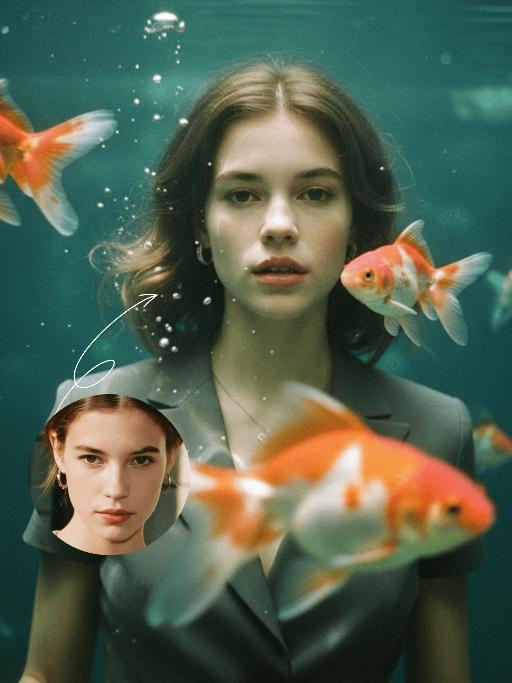
Goldfish AI effects generated image

Goldfish

Underwater scene inside a large ecological fish tank, featuring the figure from the uploaded image (unchanged facial features, age and gender) with faint small freckles on the cheeks. Their hair floats and fans out in soft curls due to water buoyancy, with tiny water droplets clinging to the tips. Expression: Gaze fixed on the camera, lips slightly parted with a subtle breathy quality; eyebrows droop gently, conveying alienation and loneliness, with a taut jawline. Attire: Exquisitely tailored high-end summer couture, the fabric forming natural folds from water buoyancy, paired with sophisticated and delicate accessories. Composition: Close-up facial shot (the figure’s face occupies 80% of the frame). Multiple large orange-white/silver-white goldfish nuzzle the cheeks and circle the hair tips in an interactive way, with tiny air bubbles rising slowly beside the figure’s profile. Goldfish swim in the foreground with a blurred effect, and water ripples blur and smudge softly in the background. Shooting Angle: Eye-level close-up underwater perspective, with the lens positioned 3cm below the water surface to capture the broken light spots refracted by the water. Light & Shadow: Kodak Portra 400 film texture with fine yet distinct film grain and slight vignetting. Soft diffused cool cyan-green light filters through the underwater environment, with diamond-shaped light spots piercing through the water surface; weak light and shadow contrast yet gentle layered tones, with edges slightly blurred and smudged. Color Palette: A base of low-saturation dark tones (deep cyan + jet black + grayish green), accented by the warm orange-white/silver-white of the goldfish. A retro film tone with a subtle cyan-yellow cast, creating an overall hazy and lonely atmosphere, with striking contrast between light and shadow underwater.

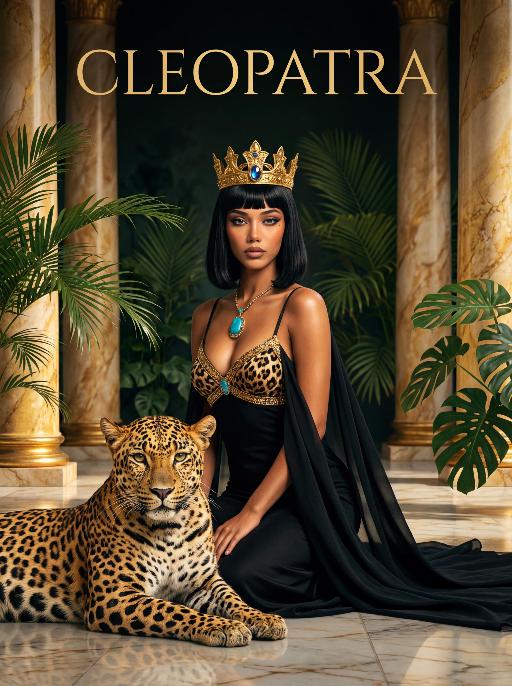
 Golden Leopard AI effects generated image

Golden Leopard

A striking woman embodying the persona of Cleopatra, kneeling gracefully beside a majestic leopard. She has a sleek black bob haircut with blunt bangs, a captivating gaze, and a regal, alluring expression. The leopard, with golden-brown fur and distinct black spots, lies calmly at her side, looking directly at the viewer with a calm, powerful demeanor. She wears a black spaghetti-strap gown with a leopard-print bodice, intricately trimmed with gold filigree and a large turquoise gem pendant at the center. A flowing black drape falls from her shoulders. Her head is adorned with a golden pharaoh-style crown set with a central blue gemstone. She kneels on a polished marble floor, one hand resting lightly on the ground beside her. The leopard rests at her knee, exuding a sense of quiet power and companionship. The setting is a lush, ancient Egyptian-inspired courtyard, framed by large, vibrant green tropical foliage (like palm fronds and monstera leaves) and flanked by tall, golden marble columns. Above her, the word "CLEOPATRA" is displayed in an elegant, golden serif font against the greenery. The image is rendered in a vintage Hollywood movie poster style, with dramatic, high-contrast lighting that highlights the sheen of the gold, the texture of the leopard's fur, and the richness of the black fabric. The color palette is opulent, featuring deep greens, luxurious golds, bold black, and the warm tones of the leopard's coat, creating a mysterious, regal, and timeless atmosphere. The overall aesthetic is cinematic, detailed, and evocative of ancient Egyptian grandeur and untamed power.

Elegance AI effects generated image

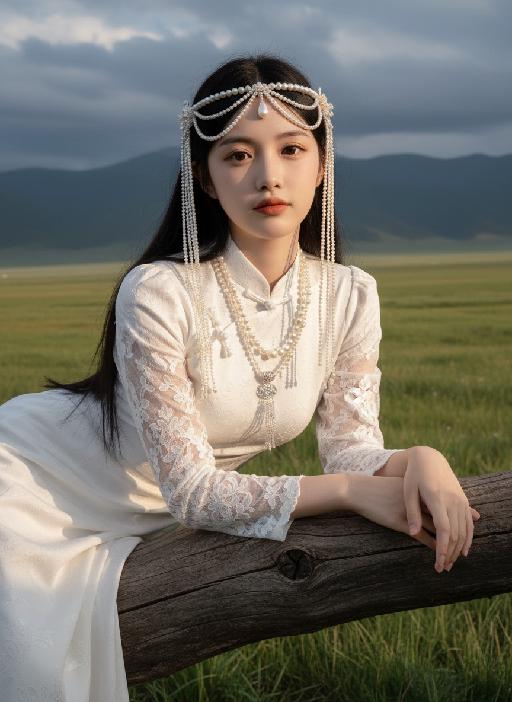
Elegance

Strictly lock facial features: fully preserving the original facial contours, skin texture, eye shape, lip shape, and youthful appearance with zero deviations allowed. Eye-level perspective, half-body close-up (subject occupies 80% of the frame to optimize proportion and visual focus, with a well-proportioned slender figure that highlights the graceful lines of the body), a young East Asian woman with a cold temperament, lying prone on a thick log beam, hands resting naturally on both sides of the beam, body slightly forward, expression gentle and calm; makeup is a fresh nude look: transparent base, warm bean paste red lips, natural and soft eye makeup; long straight black hair, fluffy and shiny. Wearing: - Headdress: Pearl tassel forehead ornament, main body is a pearl-woven headband with a teardrop-shaped pearl in the center, hanging multiple layers of extra-long white pearl tassels on both sides - Accessories: Multi-layered pearl necklace, strung with pearls of varying sizes, paired with a silver carved pendant Clothing: - White Chinese-style stand-up collar top with jacquard texture and puff short sleeves - Inner wear white lace see-through long sleeves, full of delicate white floral embroidery on the sleeves - Matching white long skirt Background: Plateau meadow scene, foreground is green grass, distant continuous dark gray-blue mountains, sky filled with layered dark clouds; soft golden sunlight breaks through the gaps in the dark clouds, casting warm highlights on the pearl ornaments, hair strands, jacquard fabric and lace embroidery, while leaving soft, faint shadows on the log beam and the grass beneath, adding a three-dimensional contrast to the cool-toned scene. Cool-toned diffused natural light blended with warm sunlight spots, the picture is transparent and clean, presenting a cold and fairy-like atmosphere, strictly 1:1 replicate the original image's movements, clothing details, and light and shadow tones

Load more

Next-Gen Multi-Model AI Video Architecture

Vivago AI isn't just one engine—it’s a unified hub for the world’s most advanced video AI. Whether you need cinematic realism or high-speed social content, we provide the right model for your creative vision.

Free Generate

Beauty and Dolphins

Vacation Time

Stellar Tear

Fish Tank Supervisor

Cinematic Quality & Precision Control

Enables 4K resolution with multi-lens motion control, generating delicate scene via text prompts for customized cinematography.​

TRY NOW

Dynamic AV Sync

Auto-generates original audio to avoid copyright issues. Build 3D immersive environments through layered sound design automatically.

TRY NOW

OpenAI Sora 2

​Advanced visual storytelling with unparalleled physics and consistency.

TRY NOW

Kling v2.6 Pro

Industry-leading cinematic image animation and motion control.

TRY NOW

Google Veo 3 & 3.1

Ultra-fast generation with enhanced realism for creative workflows.

TRY NOW

Vivago AI 2.0

Our proprietary model optimized for efficiency, speed, and cost-effective generation.

TRY NOW

Users' Voice

We listen carefully to the opinions of every user.
Free Generate
Contact Us
I tried the Lip Sync feature inside Vivago.ai’s AI Video Generator for my educational podcast, and the results were stunning! The avatar's lip movements perfectly matched my audio recording, creating a professional AI-generated video without complex editing. Compared with tools like OpenAI Sora 2 and Google Veo 3.1, Vivago Image-to-Video delivers fast, studio-quality results online. It saved me hours of post-production work.
ElenaM (Spain)
Vivago’s Image-to-Video AI transformed my marketing workflow. I uploaded a product image and described the launch scene in text, and it generated a 10-second cinematic AI video with background music and dynamic visuals. The output quality rivals Kling v2.6 Pro and Google Veo 3 Fast. It’s now my go-to AI video generator for social media ads and product campaigns.
KenjiT (Japan)
As a digital artist, I use Vivago.ai 2.0 daily for Image-to-Image and AI Image-to-Video creation. The e-book covers and animated visuals I generate for clients look cinematic and professional. Unlike many standalone AI tools, Vivago integrates multiple leading models into one platform, making it easier to create copyright-safe AI images and videos for publishing.
ChenL (China)
I tried the Lip Sync feature inside Vivago.ai’s AI Video Generator for my educational podcast, and the results were stunning! The avatar's lip movements perfectly matched my audio recording, creating a professional AI-generated video without complex editing. Compared with tools like OpenAI Sora 2 and Google Veo 3.1, Vivago Image-to-Video delivers fast, studio-quality results online. It saved me hours of post-production work.
ElenaM (Spain)
Vivago’s Image-to-Video AI transformed my marketing workflow. I uploaded a product image and described the launch scene in text, and it generated a 10-second cinematic AI video with background music and dynamic visuals. The output quality rivals Kling v2.6 Pro and Google Veo 3 Fast. It’s now my go-to AI video generator for social media ads and product campaigns.
KenjiT (Japan)
As a digital artist, I use Vivago.ai 2.0 daily for Image-to-Image and AI Image-to-Video creation. The e-book covers and animated visuals I generate for clients look cinematic and professional. Unlike many standalone AI tools, Vivago integrates multiple leading models into one platform, making it easier to create copyright-safe AI images and videos for publishing.
ChenL (China)
I absolutely love Vivago’s AI Image-to-Video Generator. As a travel blogger, static images often fail to capture real atmosphere, but Vivago helps me turn photos into vivid cinematic AI videos with motion effects. It feels comparable to OpenAI Sora 2 and Google Veo 3.1, but more accessible and faster for creators who need high-quality AI videos online.
LiamK (Australia)
I tried the Lip Sync feature inside Vivago.ai’s AI Video Generator for my educational podcast, and the results were stunning! The avatar's lip movements perfectly matched my audio recording, creating a professional AI-generated video without complex editing. Compared with tools like OpenAI Sora 2 and Google Veo 3.1, Vivago Image-to-Video delivers fast, studio-quality results online. It saved me hours of post-production work.
ElenaM (Spain)
Vivago’s Image-to-Video AI transformed my marketing workflow. I uploaded a product image and described the launch scene in text, and it generated a 10-second cinematic AI video with background music and dynamic visuals. The output quality rivals Kling v2.6 Pro and Google Veo 3 Fast. It’s now my go-to AI video generator for social media ads and product campaigns.
KenjiT (Japan)
As a digital artist, I use Vivago.ai 2.0 daily for Image-to-Image and AI Image-to-Video creation. The e-book covers and animated visuals I generate for clients look cinematic and professional. Unlike many standalone AI tools, Vivago integrates multiple leading models into one platform, making it easier to create copyright-safe AI images and videos for publishing.
ChenL (China)
I absolutely love Vivago’s AI Image-to-Video Generator. As a travel blogger, static images often fail to capture real atmosphere, but Vivago helps me turn photos into vivid cinematic AI videos with motion effects. It feels comparable to OpenAI Sora 2 and Google Veo 3.1, but more accessible and faster for creators who need high-quality AI videos online.
LiamK (Australia)
Using Vivago.ai’s Image-to-Video AI has greatly enhanced my classroom teaching. I transform textbook notes into historical AI videos with cinematic filters and dynamic animations. Compared with tools like Kling v2.6 Pro and Google Veo 3 Fast, Vivago offers faster generation and easier parameter control for educators who need reliable AI video creation.
RajivG (India)
I frequently create AI videos on Vivago and publish them on TikTok and YouTube Shorts. The AI video templates and trending content ideas help me produce viral-ready clips quickly. With Vivago’s integrated models—including advanced video engines similar to OpenAI Sora 2—I can generate anime-style and cinematic social media videos that drive high engagement.
MarieJ (Spain)
What attracts me most about Vivago.ai is not only the powerful AI Video Generator but also the active AIGC creator community. It combines AI Image-to-Video, Text-to-Video, and leading model integrations like Google Veo 3.1 into one creative platform.
TomW (India)
At first, I was hesitant about using AI video tools. But after trying Vivago Image-to-Video, I realized how easy it is to create professional AI-generated videos online. I just upload an image, add a short prompt, and adjust a few settings. The results are cinematic and copyright-safe, which is essential for commercial projects.
HectorC (Mexico)
Using Vivago.ai’s Image-to-Video AI has greatly enhanced my classroom teaching. I transform textbook notes into historical AI videos with cinematic filters and dynamic animations. Compared with tools like Kling v2.6 Pro and Google Veo 3 Fast, Vivago offers faster generation and easier parameter control for educators who need reliable AI video creation.
RajivG (India)
I frequently create AI videos on Vivago and publish them on TikTok and YouTube Shorts. The AI video templates and trending content ideas help me produce viral-ready clips quickly. With Vivago’s integrated models—including advanced video engines similar to OpenAI Sora 2—I can generate anime-style and cinematic social media videos that drive high engagement.
MarieJ (Spain)
What attracts me most about Vivago.ai is not only the powerful AI Video Generator but also the active AIGC creator community. It combines AI Image-to-Video, Text-to-Video, and leading model integrations like Google Veo 3.1 into one creative platform.
TomW (India)
At first, I was hesitant about using AI video tools. But after trying Vivago Image-to-Video, I realized how easy it is to create professional AI-generated videos online. I just upload an image, add a short prompt, and adjust a few settings. The results are cinematic and copyright-safe, which is essential for commercial projects.
HectorC (Mexico)