Text to Image

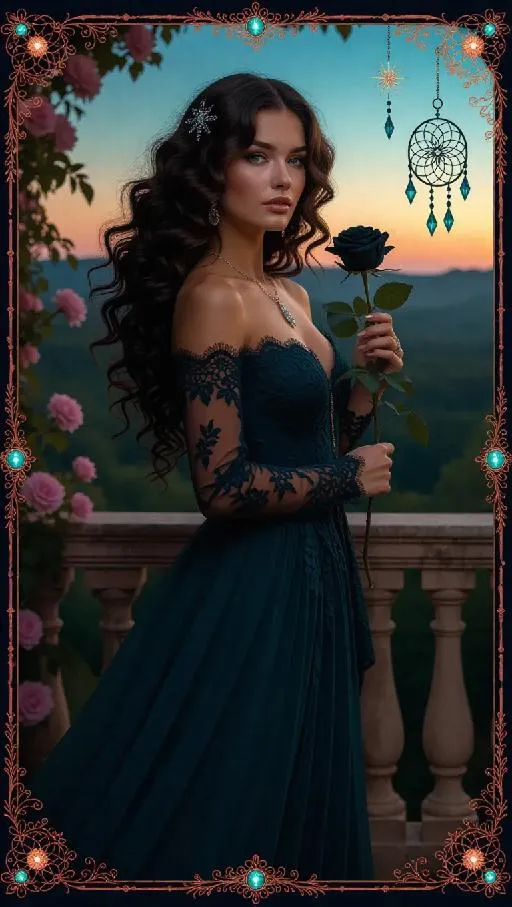
A mysterious queen with flowing curly hair in shades of teal, wearing a bohemian gown with lace overlay, holds a black rose while standing on an antique balcony overlooking an early evening sky. The background showcases a thick, enchanted forest with softly glowing flowers. The card border features whimsical dreamcatcher and star motifs, accented with coral and teal decorations, and adorned with sparkling moonstones.

Recreate
arrow
Text to Image

More From VIVAGO AI

House On Fire AI effects generated image

House On Fire

This is a realistic breaking news photo. In the middle of the picture is the uploaded figure (with the facial features, gender and age unchanged), standing in the middle of the frame, with coal dust all over his face, looking sad. He is wrapped in a gray and beige striped plush blanket and holding a slice of Italian pepperoni pizza, looking confused and sad. In the background, a two-story suburban house is engulfed in flames, and firefighters are using water hoses to put out the fire. The silhouette of a fire engine can be seen. The scene takes place on a residential street during the day. Above there is a prominent large red and white news headline: "BREAKING NEWS". In the middle and lower part of the picture, there is a news caption that reads: "House on fire while resident 'just started eating'", "LIVE BROADCAST", "11:47 AM".

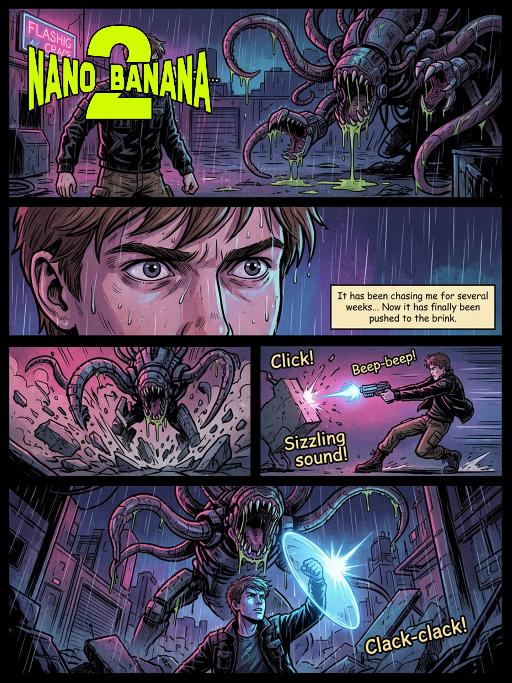
Storyboard AI effects generated image

Storyboard

American comic book pages, film narrative techniques, film storyboard aesthetic, dramatic widescreen composition, melancholic light-dark contrast and shadowing, high-contrast shadows, rough textures, dynamic action scenes, emotionally intense close-up shots, epic panoramic shots, retro-futuristic horror atmosphere, bold line art, soft color combinations with neon tones, professional comic book illustrations, 8K resolution, ultra-detailed environment, sound effects annotations, dialog boxes, film lens halos, depth-of-field effects. Page 1: A panoramic close-up shot of the night, in the picture is a rain-soaked and abandoned industrial area. A young heroic figure (with the character in the previous picture as the main body, maintaining facial features, gender, and age unchanged), with rough outlines, brown short hair, wearing a worn-out black tactical jacket, work pants, and combat boots), stands at the front of the picture, facing away from the flashing neon sign. His expression is stern, one hand holding a glowing plasma pistol. In the shadows, a huge mechanical monster creature looms - with twisted tentacles and metal mouths dripping viscous acid. Sound effect: "Whoo..." Page 2: Close-up shot of the protagonist's face, sweat and rain meeting on his forehead. His gaze is tightly fixed on the monster, his pupils enlarged due to fear and determination. Dialog box content: "It has been chasing me for several weeks... Now it has finally been pushed to the brink." Page 3: Medium shot showing the monster charging forward, its tentacles violently crashing against the concrete ground, raising a large amount of debris. The hero quickly turns sideways to dodge, shooting at close range. Sound effect: "Click!" "Beep-beep!" "Sizzling sound!" Page 4: Full-page opening shot, shot from the protagonist's perspective at a low angle. The monster stands high above him, opening its mouth to prepare to devour him. The protagonist raises a shining energy shield, the light shining on his face casting a desperate blue shadow. The industrial area collapses around them, rain pouring down. Sound effect: "Clack-clack!" -- Style: Film-style comic style -- Aspect ratio: 2.39:1 -- Color: Dim neon color -- Line drawing: Rough -- Shadows: Light-dark contrast -- Layout: Multiple-panel -- Character: 1 -- Monster: 1 -- Weapon: Plasma pistol -- Environment: Industrial ruins -- Atmosphere: Tense and terrifying -- Action: High energy -- Dialogue: Yes -- Sound effects: Yes -- Lens halo: Yes -- Depth of field: Yes

Minimal Chic AI effects generated image

Minimal Chic

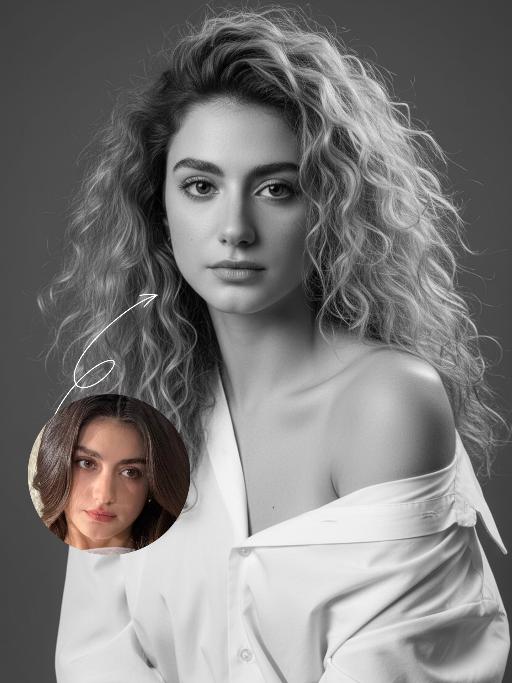
Strict identity locking is based on the uploaded portrait, with the original facial features, fair skin tone and youthful vitality retained in a 1:1 ratio, reimagined with a striking Euro-American mixed-race aesthetic. The hair color is replaced with long wavy platinum blonde locks, styled in a naturally tousled and voluminous manner. This is a black-and-white artistic portrait photography piece featuring a young woman wearing an oversized white shirt that slips naturally off one shoulder; her platinum blonde tresses softly frame her delicate facial features, with strands gilded by sunlight to reveal an exquisite sheen, and her skin exudes a smooth, refined texture. She sits in an upright posture, facing the camera with a calm, pensive gaze and a relaxed expression that brims with narrative depth. Shot in a professional photo studio against a minimalist solid gray background, a soft, cinema-grade back rim light sculpts her three-dimensional facial contours, with a precise ray of hair light layered in to make each strand of the blonde hair distinct and translucent with clear gradations. Rich details are preserved in the shadow areas, and the highlights transition naturally, crafting an elegant and serene atmosphere. Boasting 8K ultra-realistic resolution and a high-contrast black-and-white aesthetic, the image features razor-sharp details where even pores and individual hair strands are clearly visible, with natural and authentic skin texture. The composition is minimalist with no extraneous elements; the overall style is elegant and sophisticated, blending refined luxury with compelling narrative quality, reaching the standard of professional commercial photography.

White Lion AI effects generated image

White Lion

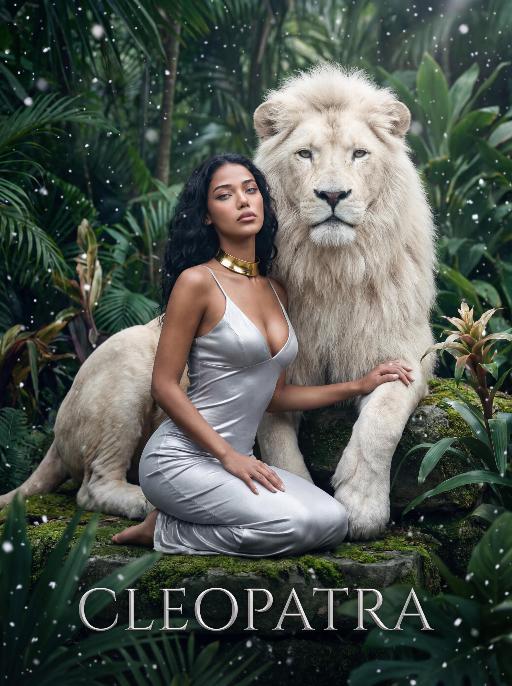
The character in the uploaded picture (unchanged facial features, gender and age). A striking woman embodying the persona of Cleopatra, seated gracefully beside a majestic white lion. She has long, wavy black hair cascading in soft waves, her eyes wide open, head tilted slightly upward, exuding an air of disdain and supreme confidence, as if looking down on all before her. The white lion, with its pure white fur and powerful build, sits calmly behind her, one paw resting gently on her shoulder, looking directly at the viewer with a calm, noble demeanor. She wears a form-fitting silver spaghetti-strap dress with a deep V-neckline, accentuating her figure. Around her neck, she wears a bold gold choker necklace. She kneels on a moss-covered stone in a lush, dense tropical jungle, one hand resting lightly on the lion's leg. The scene is filled with large, vibrant green tropical foliage (like palm fronds and monstera leaves), and delicate snowflakes are falling gently, creating a surreal and magical atmosphere. The setting is a mysterious, ancient jungle, with the air filled with falling snow, contrasting the lush greenery with the cool white of the snowflakes. At the bottom of the image, the word "CLEOPATRA" is displayed in an elegant, silver serif font. The image is rendered in a cinematic, fantasy art style, with dramatic, high-contrast lighting that highlights the sheen of the silver dress, the texture of the lion's white fur, and the richness of the green jungle. The color palette is ethereal, featuring deep greens, cool whites, and the metallic sheen of the silver and gold, creating a mysterious, regal, and timeless atmosphere. The overall aesthetic is detailed, evocative, and reminiscent of a fantasy movie poster

Moving Figure

Create a 1/7 scale commercialized figure of the character in the illustration, in a realistic style and environment. Render the exact hairstyle and the same outfit with the uploaded figure. Render garments as molded plastic with engraved seams and sculpted folds; keep accessories as plastic parts. Fictionalize any brand text/logos while keeping layout and colors. Place the figure on a computer desk, using a circular transparent acrylic base without any text. On the Apple computer screen, display the Z Brush modeling process of the figure. Next to the Apple computer screen, place a BANDAl-style toy packaging box printed with the original artwork. The background shows a modern realistic room furnished with contemporary furniture, including a display cabinet filled with books, dolls, and scale figures, adding a casual and everyday atmosphere. Behind the Apple computer, place a desk lamp to add detail and depth to the scene.

Load more

Next-Gen Multi-Model AI Video Architecture

Vivago AI isn't just one engine—it’s a unified hub for the world’s most advanced video AI. Whether you need cinematic realism or high-speed social content, we provide the right model for your creative vision.

Free Generate

Beauty and Dolphins

Vacation Time

Stellar Tear

Fish Tank Supervisor

Cinematic Quality & Precision Control

Enables 4K resolution with multi-lens motion control, generating delicate scene via text prompts for customized cinematography.​

TRY NOW

Dynamic AV Sync

Auto-generates original audio to avoid copyright issues. Build 3D immersive environments through layered sound design automatically.

TRY NOW

OpenAI Sora 2

​Advanced visual storytelling with unparalleled physics and consistency.

TRY NOW

Kling v2.6 Pro

Industry-leading cinematic image animation and motion control.

TRY NOW

Google Veo 3 & 3.1

Ultra-fast generation with enhanced realism for creative workflows.

TRY NOW

Vivago AI 2.0

Our proprietary model optimized for efficiency, speed, and cost-effective generation.

TRY NOW

Users' Voice

We listen carefully to the opinions of every user.
Free Generate
Contact Us
I tried the Lip Sync feature inside Vivago.ai’s AI Video Generator for my educational podcast, and the results were stunning! The avatar's lip movements perfectly matched my audio recording, creating a professional AI-generated video without complex editing. Compared with tools like OpenAI Sora 2 and Google Veo 3.1, Vivago Image-to-Video delivers fast, studio-quality results online. It saved me hours of post-production work.
ElenaM (Spain)
Vivago’s Image-to-Video AI transformed my marketing workflow. I uploaded a product image and described the launch scene in text, and it generated a 10-second cinematic AI video with background music and dynamic visuals. The output quality rivals Kling v2.6 Pro and Google Veo 3 Fast. It’s now my go-to AI video generator for social media ads and product campaigns.
KenjiT (Japan)
As a digital artist, I use Vivago.ai 2.0 daily for Image-to-Image and AI Image-to-Video creation. The e-book covers and animated visuals I generate for clients look cinematic and professional. Unlike many standalone AI tools, Vivago integrates multiple leading models into one platform, making it easier to create copyright-safe AI images and videos for publishing.
ChenL (China)
I tried the Lip Sync feature inside Vivago.ai’s AI Video Generator for my educational podcast, and the results were stunning! The avatar's lip movements perfectly matched my audio recording, creating a professional AI-generated video without complex editing. Compared with tools like OpenAI Sora 2 and Google Veo 3.1, Vivago Image-to-Video delivers fast, studio-quality results online. It saved me hours of post-production work.
ElenaM (Spain)
Vivago’s Image-to-Video AI transformed my marketing workflow. I uploaded a product image and described the launch scene in text, and it generated a 10-second cinematic AI video with background music and dynamic visuals. The output quality rivals Kling v2.6 Pro and Google Veo 3 Fast. It’s now my go-to AI video generator for social media ads and product campaigns.
KenjiT (Japan)
As a digital artist, I use Vivago.ai 2.0 daily for Image-to-Image and AI Image-to-Video creation. The e-book covers and animated visuals I generate for clients look cinematic and professional. Unlike many standalone AI tools, Vivago integrates multiple leading models into one platform, making it easier to create copyright-safe AI images and videos for publishing.
ChenL (China)
I absolutely love Vivago’s AI Image-to-Video Generator. As a travel blogger, static images often fail to capture real atmosphere, but Vivago helps me turn photos into vivid cinematic AI videos with motion effects. It feels comparable to OpenAI Sora 2 and Google Veo 3.1, but more accessible and faster for creators who need high-quality AI videos online.
LiamK (Australia)
I tried the Lip Sync feature inside Vivago.ai’s AI Video Generator for my educational podcast, and the results were stunning! The avatar's lip movements perfectly matched my audio recording, creating a professional AI-generated video without complex editing. Compared with tools like OpenAI Sora 2 and Google Veo 3.1, Vivago Image-to-Video delivers fast, studio-quality results online. It saved me hours of post-production work.
ElenaM (Spain)
Vivago’s Image-to-Video AI transformed my marketing workflow. I uploaded a product image and described the launch scene in text, and it generated a 10-second cinematic AI video with background music and dynamic visuals. The output quality rivals Kling v2.6 Pro and Google Veo 3 Fast. It’s now my go-to AI video generator for social media ads and product campaigns.
KenjiT (Japan)
As a digital artist, I use Vivago.ai 2.0 daily for Image-to-Image and AI Image-to-Video creation. The e-book covers and animated visuals I generate for clients look cinematic and professional. Unlike many standalone AI tools, Vivago integrates multiple leading models into one platform, making it easier to create copyright-safe AI images and videos for publishing.
ChenL (China)
I absolutely love Vivago’s AI Image-to-Video Generator. As a travel blogger, static images often fail to capture real atmosphere, but Vivago helps me turn photos into vivid cinematic AI videos with motion effects. It feels comparable to OpenAI Sora 2 and Google Veo 3.1, but more accessible and faster for creators who need high-quality AI videos online.
LiamK (Australia)
Using Vivago.ai’s Image-to-Video AI has greatly enhanced my classroom teaching. I transform textbook notes into historical AI videos with cinematic filters and dynamic animations. Compared with tools like Kling v2.6 Pro and Google Veo 3 Fast, Vivago offers faster generation and easier parameter control for educators who need reliable AI video creation.
RajivG (India)
I frequently create AI videos on Vivago and publish them on TikTok and YouTube Shorts. The AI video templates and trending content ideas help me produce viral-ready clips quickly. With Vivago’s integrated models—including advanced video engines similar to OpenAI Sora 2—I can generate anime-style and cinematic social media videos that drive high engagement.
MarieJ (Spain)
What attracts me most about Vivago.ai is not only the powerful AI Video Generator but also the active AIGC creator community. It combines AI Image-to-Video, Text-to-Video, and leading model integrations like Google Veo 3.1 into one creative platform.
TomW (India)
At first, I was hesitant about using AI video tools. But after trying Vivago Image-to-Video, I realized how easy it is to create professional AI-generated videos online. I just upload an image, add a short prompt, and adjust a few settings. The results are cinematic and copyright-safe, which is essential for commercial projects.
HectorC (Mexico)
Using Vivago.ai’s Image-to-Video AI has greatly enhanced my classroom teaching. I transform textbook notes into historical AI videos with cinematic filters and dynamic animations. Compared with tools like Kling v2.6 Pro and Google Veo 3 Fast, Vivago offers faster generation and easier parameter control for educators who need reliable AI video creation.
RajivG (India)
I frequently create AI videos on Vivago and publish them on TikTok and YouTube Shorts. The AI video templates and trending content ideas help me produce viral-ready clips quickly. With Vivago’s integrated models—including advanced video engines similar to OpenAI Sora 2—I can generate anime-style and cinematic social media videos that drive high engagement.
MarieJ (Spain)
What attracts me most about Vivago.ai is not only the powerful AI Video Generator but also the active AIGC creator community. It combines AI Image-to-Video, Text-to-Video, and leading model integrations like Google Veo 3.1 into one creative platform.
TomW (India)
At first, I was hesitant about using AI video tools. But after trying Vivago Image-to-Video, I realized how easy it is to create professional AI-generated videos online. I just upload an image, add a short prompt, and adjust a few settings. The results are cinematic and copyright-safe, which is essential for commercial projects.
HectorC (Mexico)