Text to Image

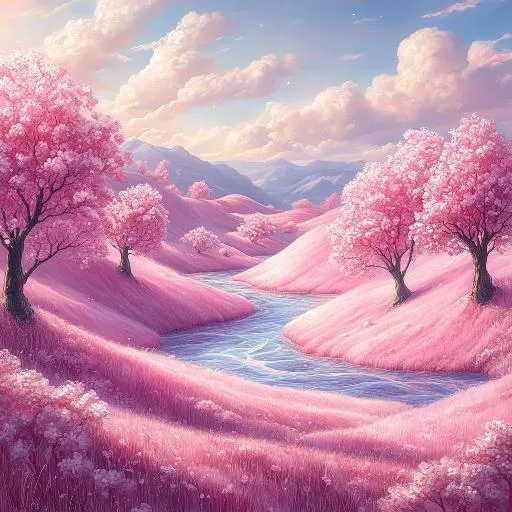
Generate a mesmerizing AI image of a whimsical pink world with cotton candy hills, bubblegum trees, and rose quartz rivers. Create stunning visuals in impressionistic pastel art style for surreal, dreamy landscapes. Perfect for AI-generated fantasy scenes and imaginative digital artwork.

Recreate
arrow
Text to Image

FAQs

How to generate images/videos from text prompts?

Describe the visual content in natural language (e.g., 'A cyberpunk cat wearing neon goggles') and our AI models will create outputs. Complex prompts trigger multi-stage NLP parsing for enhanced accuracy.

How to refine unsatisfactory results?

Use our Prompt Bot - an AI-powered optimizer that suggests technical modifiers. Simply describe your ideas, desired changes ('more metallic texture'), then you will get optimized prompt variants.

When should I use reference images?

Upload references to: 1) Guide character consistency (e.g., faces/outfits), 2) Control motion patterns in videos using our feature matching algorithm. Supports JPG/PNG

What's the credit system?

Daily login grants 100 credits. Upgrade options: 1) Premium Membership, 2) Credit Packs. Details: https://vivago.ai/subscribe

More From VIVAGO AI

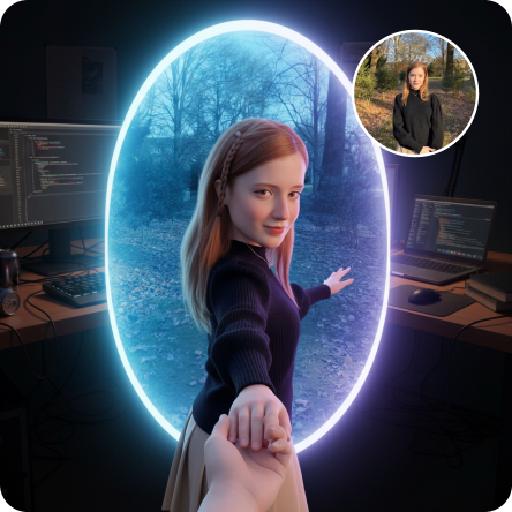
Follow Me Portal AI effects generated image

Follow Me Portal

A 3D chibi-style version of the person in the photo is stepping through a glowing portal, reaching out and holding the viewer’s hand. As the character pulls the viewer forward, they turn back with a dynamic glance, inviting the viewer into their world.Behind the portal is the viewer’s real-life environment: a typical programmer’s study with a desk, monitor, and laptop, rendered in realistic detail. Inside the portal lies the character’s 3D chibi world, inspired by the photo, with a cool blue color scheme that sharply contrasts with the real-world surroundings.The portal itself is a perfectly elliptical frame glowing with mysterious blue and purple light, positioned at the center of the image as a gateway between the two worlds.The scene is captured from a third-person perspective, clearly showing the viewer’s hand being pulled into the character’s world.

Pet Samba

"Medium shot close-up: In the uploaded photo (while maintaining the facial features, gender, age and species of the person in the uploaded image, and setting the background as a beach scene in Brazil), the main figure presents a super cute anthropomorphic standing posture (with the front two paws raised and the back two legs standing). Accessories: Beach attire in the style of the Brazilian Carnival: Wearing a cute bikini top and a short skirt, with a colorful feather headdress on the head (green and yellow), and a garland around the neck (yellow hibiscus and white flowers); Scene: The scene of a tropical Brazilian beach: - Underfoot is the golden fine sand, the azure waves gently lapping against the shore. In the distance, the palm trees sway in the gentle breeze. Soft white clouds float in the blue sky. In the warm afternoon, the golden sunlight gently falls on the river otters and the beach. Style and lighting: Vivid and cheerful color combination (main colors are yellow, green, blue, and orange), 8K high resolution, highlighting the main subject, shallow depth of field to blur the background of the beach; Composition: Medium shot. The main figure is centered in the frame, wearing small slippers on their feet, which match the color scheme of the clothing."

Kimono kiss

Medium-close-up shot: Place the characters from the uploaded two pictures in the same scene, keeping the composition of the characters centered. The main character should occupy 80% of the overall picture. All the characters are wearing traditional Japanese kimonos and standing in front of a magnificent wooden pagoda-style temple. Around them are blooming pink cherry trees. It is a sunny spring day, and the gentle natural sunlight filters through the branches, creating a shallow depth of field effect, causing the background to be blurred (i.e., the "blur" effect), creating a cinematic-like light and shadow effect. Using 8K resolution, the details are extremely rich, making it a professional photography work. The romantic effect of falling cherry blossoms, with some cherry petals in the foreground, the picture softly diffuses light, with a soft focus filter, creating a romantic and peaceful atmosphere. One of the characters is wearing a light pink kimono with exquisite floral embroidery and a luxurious belt with floral patterns. Her hair is loose curls, and there is a pink cherry blossom hairpin on the top. The other character is wearing a light gray kimono, paired with the same belt, standing side by side, looking straight at the camera, with a calm expression. The shooting angle is slightly lower, using a film grain effect, and using Kodak Velvia 400 film material.

Snow Film

Convert the reference image into a three-frame film storyboard, and into a three-frame film spliced storyboard with a three-screen vertical layout (top, middle, bottom) for storyboard photography, using close-up, medium close-up, medium shot or long shot for each screen respectively. The uploaded figure appears in every single frame, dressed in a vintage grey coat with a haute couture finish, standing in a snow-covered winter forest with a transparent umbrella as snowflakes fall. The scene features a cool color palette and exquisitely detailed visuals, with the facial features retouched and softened for a polished look. Shot in a realistic style, the entire series exudes a quiet and elegant mood, coupled with a sophisticated photographic quality, strong cinematic flair and artistic touch.

Noir Portrait AI effects generated image

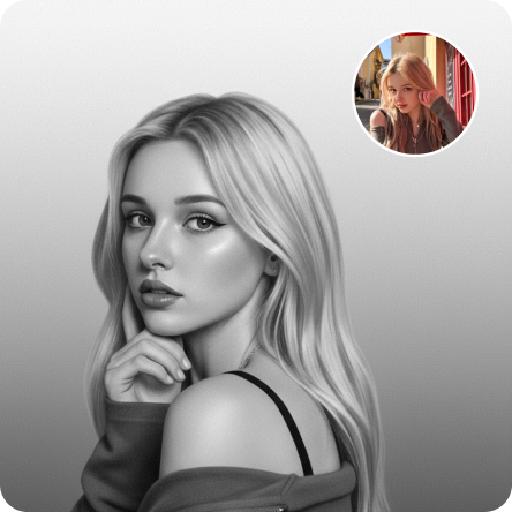
Noir Portrait

Generate black-and-white portrait artworks from the uploaded photos, using editing and artistic photography styles.The background presents a soft gradient effect, transitioning from medium gray to nearly pure white, creating a sense of layering and a quiet atmosphere. The fine film grain texture simulates the soft texture of photography, evoking the classic black-and-white photography. His face, with the outline of the light, evokes a sense of mystery, intimacy and elegance.A gentle directed beam of light diffused softly, caressing the curve of his cheek or flashing light spots in his eyes - this was the emotional core of the picture. The remaining part is occupied by a large amount of negative space, deliberately maintaining simplicity to allow the picture to breathe freely. There are no words or signs in the picture - only the interweaving of light and shadow with emotions. Change the pose for each photo.

Queen of Gold AI effects generated image

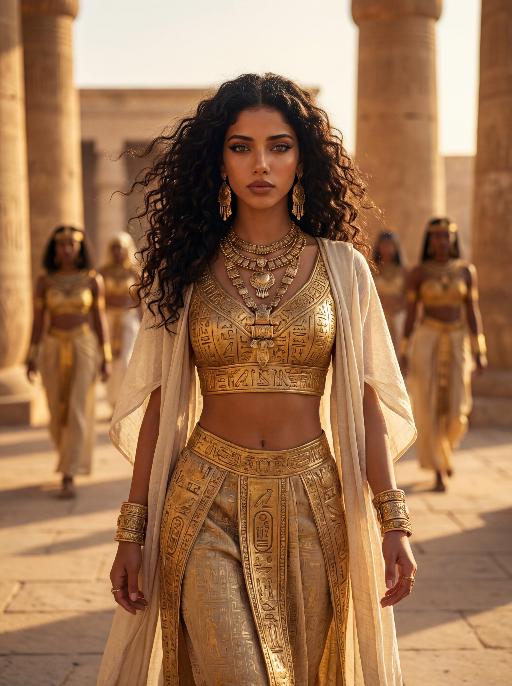
Queen of Gold

The character in the uploaded picture (unchanged facial features, gender and age). A striking young woman embodying the persona of an ancient Egyptian queen, captured in a hyper-realistic, cinematic portrait. She has voluminous dark curly hair flowing in the wind, a captivating gaze, and a regal, confident expression. She wears an opulent, intricately carved golden crop top with hieroglyphic engravings, paired with a matching golden skirt featuring detailed Egyptian motifs. Layered, flowing off-white fabric drapes over her shoulders, adding movement and elegance. Her accessories are lavish: multiple layered golden necklaces with ornate pendants, large golden earrings, and thick golden bracelets on her wrists. She walks forward with a confident stride, radiating power and grace, as if leading a procession. The setting is the grand courtyard of an ancient Egyptian palace or temple, with massive stone columns and sun-drenched stone floors. Blurred figures of attendants in similar golden attire follow in the background, creating a sense of scale and majesty. The warm, golden light of the setting sun bathes the scene, casting a majestic glow over the entire environment. The image is rendered in a hyper-realistic, epic historical drama style, with dramatic, cinematic lighting that highlights the intricate details of the golden regalia, the texture of the fabric, and the weathered stone of the palace. The color palette is rich and opulent, featuring deep golds, warm earth tones, and the soft off-white of the draped fabric, creating a timeless, majestic, and awe-inspiring atmosphere. The overall aesthetic is detailed, lifelike, and reminiscent of a scene from a grand historical epic film or a high-fashion editorial photoshoot set in ancient Egypt

Snow Scene AI effects generated image

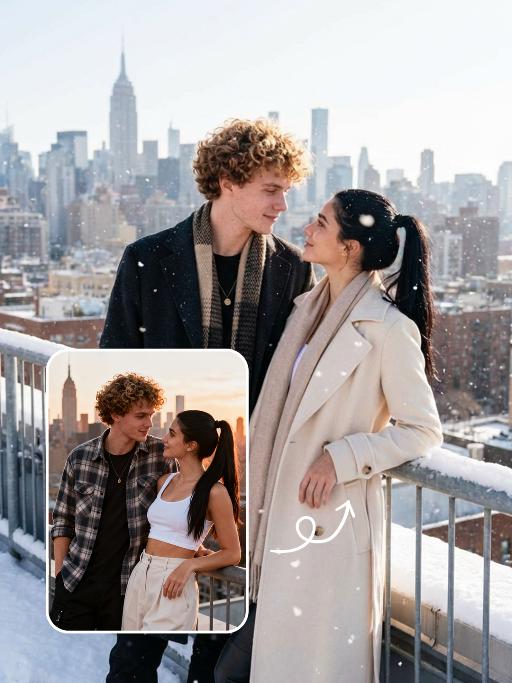
Snow Scene

Preserve the facial features of the figure in the image and transform the scene into a photo-realistic romantic winter snow photograph: the figure is wearing a matte black wool knee-length overcoat paired with a thick knit scarf in an interwoven coffee-brown and off-white check pattern (or a matte off-white wool waist-cinched double-breasted coat with gold buttons paired with a matching cashmere mid-length tassel scarf), set against a romantic outdoor scene with heavy snow falling. The lighting is bright natural light (noon sunlight), creating an exquisite and high-end atmosphere. Shoot with a 24mm wide-angle lens to highlight the immersive ambiance of the romantic realistic scene. Scene: Vintage red brick rooftops with light snow traces, frosted silver-toned metal railings with slightly melted snow on the edges; the New York skyline in the background, featuring a scattered mix of light gray glass curtain wall skyscrapers and vintage brownstone buildings with the clear spire of the Empire State Building, and fine snow falling gently. Photography: 85mm f/2.8 lens, winter side light, film texture, cool color tones. Image Quality: 8K ultra-detailed, realistic light and shadow. Atmosphere: A romantic and warm urban architectural snow scene bathed in the afterglow of the setting sun. Shooting Angle: Eye-level with a slight bird's-eye perspective.

Candied Haws AI effects generated image

Candied Haws

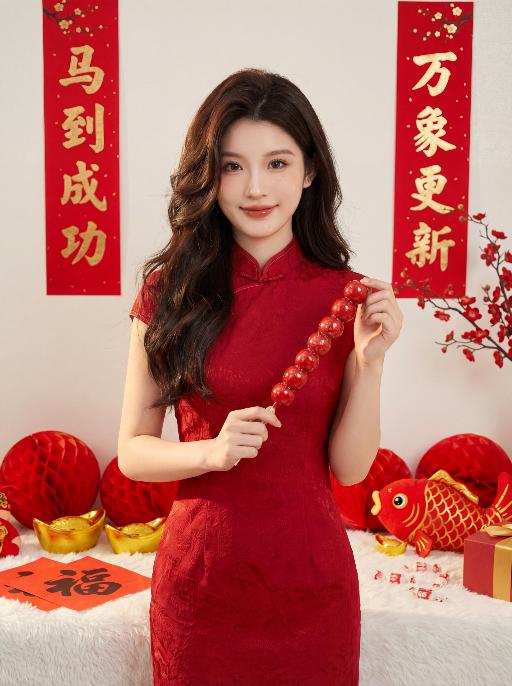
100% facial feature lock, zero deviation uploaded portrait (contours, eyes, lips, skin tone, youthful look), no facial distortion/over-smoothing, young East Asian sweet girl, standing half-body shot, standing upright, both hands holding a string of red sugar-coated hawthorns (bingtanghulu) raised at chest level, natural and lively grip, gentle and lively posture, born-perfect base makeup, brownish-black wild eyebrows, earth-tone eye makeup, teardrop pearlescent under-eye highlights, sunflower curled long lashes, peach blush, mirror-finish reddish-brown lip glaze, cupid's bow highlighter, clean light texture, voluminous dark brown soft layered loose waves, no hair accessories, red jacquard cheongsam, stand collar, delicate textured fabric, slim-fit silhouette, festive and elegant, white fluffy tablecloth, red honeycomb-pattern Fu character balls, glossy golden ingots, red fish plush toy (gold scales, red unicorn horn), red paper with handwritten Fu characters, red-white candies, red-gold gift box corner, traditional Chinese New Year scene, off-white matte wall, red gilded vertical couplets, left couplet: 马到成功, right couplet: 万象更新, positions fixed, no character changes/blurred text, red plum blossom branch, clean uncluttered background, warm soft side-front natural light, subtle shadow contrast, enhance clothing & couplet 3D texture, no harsh shadows, red-gold-off-white color palette, festive warm healing vibe, Year of the Horse charm, 8K ultra HD, photorealistic, ultra-detailed, cinematic film grain, HDR, color accuracy 100%, noise-free, clear transparent 负向提示词: no swapped couplet positions, no modified couplet characters, no character blocking couplet text, no blurred couplet text, no sitting pose, no burgundy sweater, no hair bow/clips, no facial distortion/over-smoothing, no messy background, no stiff posture, no unnatural hand movements, no light brown rattan chair, no white new Chinese-style top, no red paper-cut pony ornament

Diwali AI effects generated image

Diwali

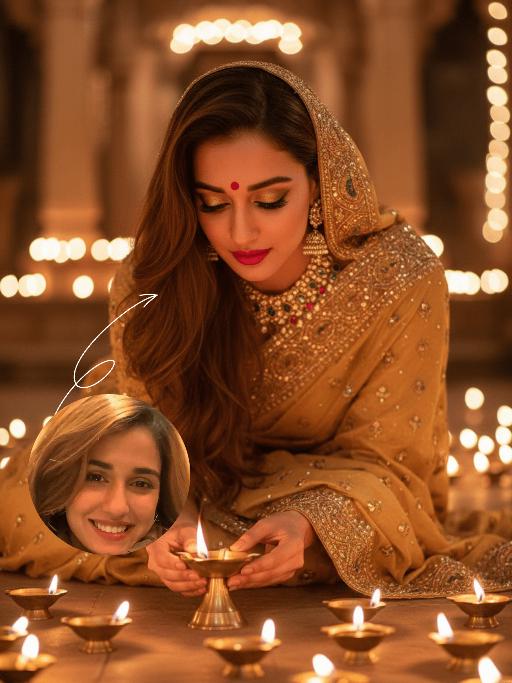
The identity of the uploaded portrait is strictly preserved (retaining facial contours, authentic Indian skin tone, hairstyle and age). This is a bust portrait that captures the original natural features of the Indian woman in the reference image: she has a delicate and fair face with a vermilion red bindi on her forehead and a colorful gemstone maang tikka adorning her brow, complemented by exquisitely elaborate eye makeup and full, vivid lip color, with a gentle and devout expression. She is dressed in a traditional sari with intricate golden embroidery, its edges adorned with elaborate patterns and paired with a matching headscarf; the overall color palette echoes the warm luminous ambiance of Diwali. Leaning forward gently, she places a lit brass oil lamp carefully with both hands, her gaze fixed intently on the wick, her expression serene and filled with reverence. Her face takes up a moderate proportion of the frame, allowing the delicate makeup details and her devout demeanor to be seen clearly. Set in an indoor space on Diwali night, the floor is covered with lit brass oil lamps, whose warm yellow candlelight casts a soft halo all around. The background is softly blurred to highlight the figure’s interaction with the oil lamp. With the warm glow of the oil lamps as the primary light source, the light gently outlines her facial contours and the textured details of her attire, creating a warm and tranquil festive atmosphere with rich, warm hues. Boasting 8K ultra-high definition resolution and commercial-grade portrait quality, the image features crisp, sharp details and rich color layering, emphasizing the theme of "light" in Diwali and the profound piety of the figure.

Load more

Next-Gen Multi-Model AI Video Architecture

Vivago AI isn't just one engine—it’s a unified hub for the world’s most advanced video AI. Whether you need cinematic realism or high-speed social content, we provide the right model for your creative vision.

Free Generate

Beauty and Dolphins

Vacation Time

Stellar Tear

Fish Tank Supervisor

Cinematic Quality & Precision Control

Enables 4K resolution with multi-lens motion control, generating delicate scene via text prompts for customized cinematography.​

TRY NOW

Dynamic AV Sync

Auto-generates original audio to avoid copyright issues. Build 3D immersive environments through layered sound design automatically.

TRY NOW

OpenAI Sora 2

​Advanced visual storytelling with unparalleled physics and consistency.

TRY NOW

Kling v2.6 Pro

Industry-leading cinematic image animation and motion control.

TRY NOW

Google Veo 3 & 3.1

Ultra-fast generation with enhanced realism for creative workflows.

TRY NOW

Vivago AI 2.0

Our proprietary model optimized for efficiency, speed, and cost-effective generation.

TRY NOW

Users' Voice

We listen carefully to the opinions of every user.
Free Generate
Contact Us
I tried the Lip Sync feature inside Vivago.ai’s AI Video Generator for my educational podcast, and the results were stunning! The avatar's lip movements perfectly matched my audio recording, creating a professional AI-generated video without complex editing. Compared with tools like OpenAI Sora 2 and Google Veo 3.1, Vivago Image-to-Video delivers fast, studio-quality results online. It saved me hours of post-production work.
ElenaM (Spain)
Vivago’s Image-to-Video AI transformed my marketing workflow. I uploaded a product image and described the launch scene in text, and it generated a 10-second cinematic AI video with background music and dynamic visuals. The output quality rivals Kling v2.6 Pro and Google Veo 3 Fast. It’s now my go-to AI video generator for social media ads and product campaigns.
KenjiT (Japan)
As a digital artist, I use Vivago.ai 2.0 daily for Image-to-Image and AI Image-to-Video creation. The e-book covers and animated visuals I generate for clients look cinematic and professional. Unlike many standalone AI tools, Vivago integrates multiple leading models into one platform, making it easier to create copyright-safe AI images and videos for publishing.
ChenL (China)
I tried the Lip Sync feature inside Vivago.ai’s AI Video Generator for my educational podcast, and the results were stunning! The avatar's lip movements perfectly matched my audio recording, creating a professional AI-generated video without complex editing. Compared with tools like OpenAI Sora 2 and Google Veo 3.1, Vivago Image-to-Video delivers fast, studio-quality results online. It saved me hours of post-production work.
ElenaM (Spain)
Vivago’s Image-to-Video AI transformed my marketing workflow. I uploaded a product image and described the launch scene in text, and it generated a 10-second cinematic AI video with background music and dynamic visuals. The output quality rivals Kling v2.6 Pro and Google Veo 3 Fast. It’s now my go-to AI video generator for social media ads and product campaigns.
KenjiT (Japan)
As a digital artist, I use Vivago.ai 2.0 daily for Image-to-Image and AI Image-to-Video creation. The e-book covers and animated visuals I generate for clients look cinematic and professional. Unlike many standalone AI tools, Vivago integrates multiple leading models into one platform, making it easier to create copyright-safe AI images and videos for publishing.
ChenL (China)
I absolutely love Vivago’s AI Image-to-Video Generator. As a travel blogger, static images often fail to capture real atmosphere, but Vivago helps me turn photos into vivid cinematic AI videos with motion effects. It feels comparable to OpenAI Sora 2 and Google Veo 3.1, but more accessible and faster for creators who need high-quality AI videos online.
LiamK (Australia)
I tried the Lip Sync feature inside Vivago.ai’s AI Video Generator for my educational podcast, and the results were stunning! The avatar's lip movements perfectly matched my audio recording, creating a professional AI-generated video without complex editing. Compared with tools like OpenAI Sora 2 and Google Veo 3.1, Vivago Image-to-Video delivers fast, studio-quality results online. It saved me hours of post-production work.
ElenaM (Spain)
Vivago’s Image-to-Video AI transformed my marketing workflow. I uploaded a product image and described the launch scene in text, and it generated a 10-second cinematic AI video with background music and dynamic visuals. The output quality rivals Kling v2.6 Pro and Google Veo 3 Fast. It’s now my go-to AI video generator for social media ads and product campaigns.
KenjiT (Japan)
As a digital artist, I use Vivago.ai 2.0 daily for Image-to-Image and AI Image-to-Video creation. The e-book covers and animated visuals I generate for clients look cinematic and professional. Unlike many standalone AI tools, Vivago integrates multiple leading models into one platform, making it easier to create copyright-safe AI images and videos for publishing.
ChenL (China)
I absolutely love Vivago’s AI Image-to-Video Generator. As a travel blogger, static images often fail to capture real atmosphere, but Vivago helps me turn photos into vivid cinematic AI videos with motion effects. It feels comparable to OpenAI Sora 2 and Google Veo 3.1, but more accessible and faster for creators who need high-quality AI videos online.
LiamK (Australia)
Using Vivago.ai’s Image-to-Video AI has greatly enhanced my classroom teaching. I transform textbook notes into historical AI videos with cinematic filters and dynamic animations. Compared with tools like Kling v2.6 Pro and Google Veo 3 Fast, Vivago offers faster generation and easier parameter control for educators who need reliable AI video creation.
RajivG (India)
I frequently create AI videos on Vivago and publish them on TikTok and YouTube Shorts. The AI video templates and trending content ideas help me produce viral-ready clips quickly. With Vivago’s integrated models—including advanced video engines similar to OpenAI Sora 2—I can generate anime-style and cinematic social media videos that drive high engagement.
MarieJ (Spain)
What attracts me most about Vivago.ai is not only the powerful AI Video Generator but also the active AIGC creator community. It combines AI Image-to-Video, Text-to-Video, and leading model integrations like Google Veo 3.1 into one creative platform.
TomW (India)
At first, I was hesitant about using AI video tools. But after trying Vivago Image-to-Video, I realized how easy it is to create professional AI-generated videos online. I just upload an image, add a short prompt, and adjust a few settings. The results are cinematic and copyright-safe, which is essential for commercial projects.
HectorC (Mexico)
Using Vivago.ai’s Image-to-Video AI has greatly enhanced my classroom teaching. I transform textbook notes into historical AI videos with cinematic filters and dynamic animations. Compared with tools like Kling v2.6 Pro and Google Veo 3 Fast, Vivago offers faster generation and easier parameter control for educators who need reliable AI video creation.
RajivG (India)
I frequently create AI videos on Vivago and publish them on TikTok and YouTube Shorts. The AI video templates and trending content ideas help me produce viral-ready clips quickly. With Vivago’s integrated models—including advanced video engines similar to OpenAI Sora 2—I can generate anime-style and cinematic social media videos that drive high engagement.
MarieJ (Spain)
What attracts me most about Vivago.ai is not only the powerful AI Video Generator but also the active AIGC creator community. It combines AI Image-to-Video, Text-to-Video, and leading model integrations like Google Veo 3.1 into one creative platform.
TomW (India)
At first, I was hesitant about using AI video tools. But after trying Vivago Image-to-Video, I realized how easy it is to create professional AI-generated videos online. I just upload an image, add a short prompt, and adjust a few settings. The results are cinematic and copyright-safe, which is essential for commercial projects.
HectorC (Mexico)