Text to Image

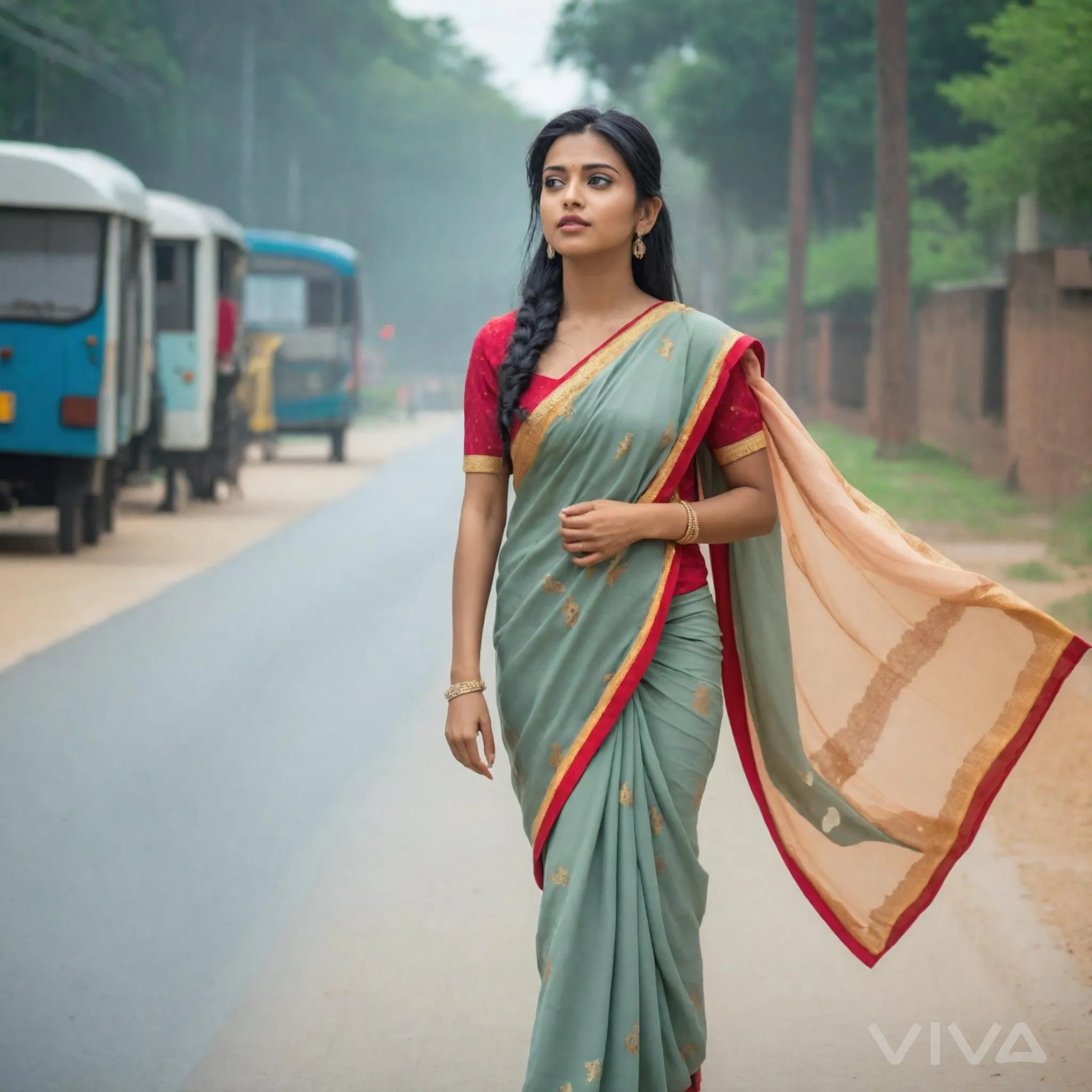
Create AI-generated visuals of a traditional saree-clad Indian woman walking gracefully on a vibrant road. Ideal for cultural storytelling, fashion inspiration, or South Asian-themed content with vivago.ai's advanced image tools and professional editing effects.

Recreate
arrow
Text to Image

FAQs

How to generate images/videos from text prompts?

Describe the visual content in natural language (e.g., 'A cyberpunk cat wearing neon goggles') and our AI models will create outputs. Complex prompts trigger multi-stage NLP parsing for enhanced accuracy.

How to refine unsatisfactory results?

Use our Prompt Bot - an AI-powered optimizer that suggests technical modifiers. Simply describe your ideas, desired changes ('more metallic texture'), then you will get optimized prompt variants.

When should I use reference images?

Upload references to: 1) Guide character consistency (e.g., faces/outfits), 2) Control motion patterns in videos using our feature matching algorithm. Supports JPG/PNG

What's the credit system?

Daily login grants 100 credits. Upgrade options: 1) Premium Membership, 2) Credit Packs. Details: https://vivago.ai/subscribe

More From VIVAGO AI

Colorful Baby

"Create an AI-generated image based on the provided reference image. The subject's appearance (facial features, hairstyle, clothing, and overall temperament) should remain unchanged, as provided by the user, and the background must stay identical to the one in the reference image without modification. The posture of the subject should closely resemble the gesture in reference image 2, with the following detailed description: both hands are fully open, raised to shoulder height, with the palms facing forward and fingers spread out towards the screen. The left hand is slightly raised, with fingers slightly curled, while the palm remains open. A small amount of yellow paint is applied, evenly spread across the palm and part of the fingertips. The right hand is positioned similarly to the left, slightly more parallel to the body, with less finger curvature, and the palm faces the screen. A small amount of red paint is applied, evenly spread across the palm and fingertips. The paint on both hands should be evenly applied and natural, without excess, maintaining a relaxed and natural gesture. The background should match the environment from the reference image. The resulting image should have a higher resolution and finer textures, ensuring the paint on the hands looks natural and not overdone, while maintaining an artistic and relaxed style."

Romantic Snow

Keep the facial features of the uploaded person unchanged (with natural facial blurring and exquisite makeup). Transform the scene into a romantic heavy snow scene in winter (with a realistic full-screen snowfall effect). The person strikes a relaxed leaning pose—lightly resting against a snow-covered stone balustrade, with one hand casually placed on the edge of the balustrade and the other hanging loosely by the side, the overall posture elegant and stretched. The person is wearing a light gray turtleneck ribbed knit dress paired with a khaki haute couture coat with a sophisticated design, standing by the River Thames in London. In the background are Westminster Bridge (dusted with some snow), the Houses of Parliament and Big Ben (both dusted with some snow) with a soft background bokeh effect. Golden afterglow shines in from the side, casting a halo on the hair; a gentle breeze stirs and tousles the strands of hair. The style is avant-garde fashion photography art, with the film texture of Kodak Portra 400, shot with an 85mm f/1.4 lens (creating a shallow depth of field). The image is processed with warm tones, retaining natural skin texture (without plastic-like smoothness) and a cinematic luster, with clear details of the clothing fabrics. The shot is taken from an eye-level (slightly flat-angle) perspective, with the lens basically at the same horizontal level as the person’s line of sight—this perspective clearly showcases the person’s state while also harmoniously presenting the snow-covered architectural background and the heavy snow environment. The person is adorned with exquisite jewelry including a ring and a delicate designer necklace.

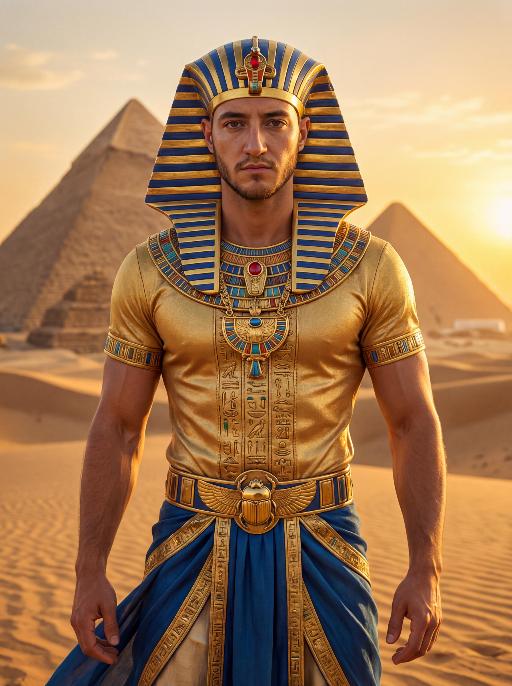
Pharaoh Gold AI effects generated image

Pharaoh Gold

The character in the uploaded picture (unchanged facial features, gender and age). A striking male model embodying the persona of an ancient Egyptian pharaoh, captured in a hyper-realistic portrait. He wears an ornate golden nemes headdress with blue and gold stripes, adorned with a central red gem. His gaze is direct and commanding, exuding a sense of divine authority and regal power. He wears a form-fitting, short-sleeved golden tunic with intricate hieroglyphic embroidery and colorful inlays, showcasing a chiseled, muscular physique beneath the luxurious fabric. His accessories are opulent: a massive, intricately carved golden pectoral necklace with colorful inlays, and a wide golden belt featuring a scarab motif at its center. He wears flowing blue fabric at his waist, trimmed with elaborate gold detailing. He stands regally in the vast, sun-drenched desert of ancient Egypt, his posture upright and confident, radiating primal strength and pharaonic grandeur. The setting is the iconic Egyptian desert, with the majestic pyramids rising in the distance against a clear, golden sky. The desert sand stretches out to the horizon, with the warm, hazy air of the desert surrounding him. The image is rendered in a hyper-realistic, true-to-life portrait photography style, with soft, natural golden-hour lighting that highlights the sheen of the gold, the texture of the fabric, and the stark beauty of the desert and pyramids. The color palette is rich and opulent, featuring deep golds, vibrant blues, and earthy browns, creating a timeless, majestic, and awe-inspiring atmosphere. The overall aesthetic is detailed, lifelike, and reminiscent of a high-fashion editorial photoshoot set in ancient Egypt

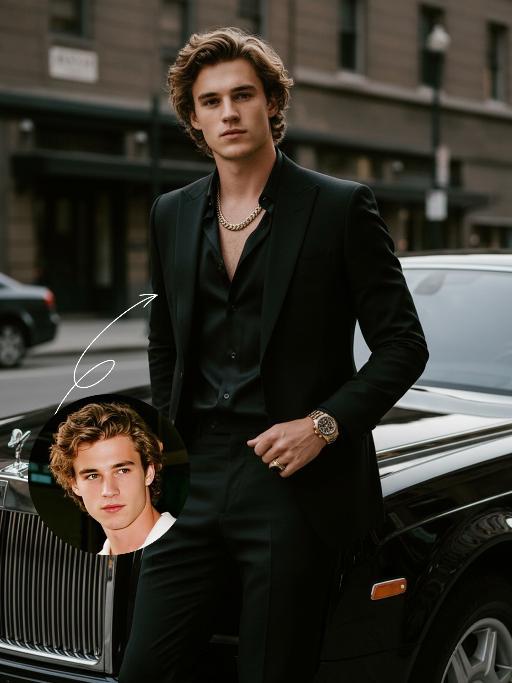
Elegant Gentle AI effects generated image

Elegant Gentle

Use the UPLOADED PORTRAIT for strict identity lock (keep face, hair, skin tone, age). Cinematic portrait of a man with a tall, dashing body, with the style of a mafia boss, standing alone with an aura of confidence and authority. He is beside a luxurious black Rolls-Royce car on a city street, a relaxed pose leaning against the car showing the Rolls-Royce logo with a classy style. All-black outfit: a neat suit, an open-collar black shirt with a luxurious necklace, formal pants, leather shoes, with a luxurious ring and a luxurious watch. His expression is serious and charismatic, radiating energy like a mafia boss. The atmosphere of the photo uses low saturation color grading with a dominance of pitch black and faded gray tones, giving a dark, elegant, and classy feel ala mafia movies. The background of the city building is blurred so that the main focus remains on the man and his car. Hyper-realistic, ultra-detailed, professional photography style.

Boyfriend

In the uploaded picture, that person (with unchanged facial features, wearing a fine custom white high-end dress and adorned with exquisite luxurious accessories) is sitting, while beside him sits a handsome and elegant young man of the same ethnic background (wearing a fine custom black suit and wearing an expensive watch); under the glow of the setting sun, in this romantic scene, the two are sitting side by side on the terrace of an upscale restaurant, enjoying a romantic candlelight dinner. They are seated side by side at a table covered with a red tablecloth, with some exquisite food on the table, crystal wine glasses in front of them, a candle in the middle, a red rose vase in the center, rose petals scattered on the table, and behind them are many red flowers, exquisite golden "love" shape balloons and red decorative balloons. The background is an amazing city night view, with exquisite red Valentine's Day celebration balloons and romantic and warm lighting strings on the terrace; the edges of the entire picture present a soft and warm yellow heart-shaped particle light effect blur effect, filled with a warm and romantic Valentine's Day party atmosphere, just like bright colors, shallow depth of field effect, similar movie-like lighting, surrealistic photography, romantic and warm atmosphere, rich details, 8K resolution, the person's face illuminated by light, sharp contrast between light and dark, shallow depth of field effect.

Festive Fare AI effects generated image

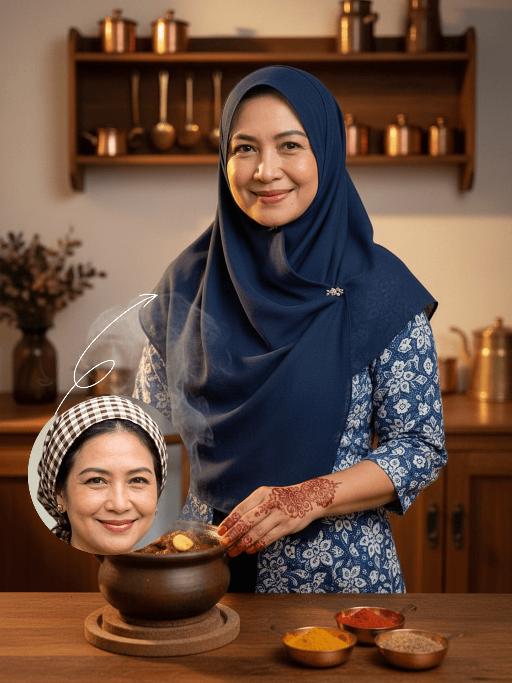
Festive Fare

Strictly lock the identity of the uploaded portrait (preserve facial contours, native Indian skin tone, hairstyle, and age). Aspect ratio 3:4, photorealistic style, high-definition and detailed: The subject is a smiling Indonesian woman positioned centrally in the frame, wearing a dark blue hijab and a blue-and-white patterned traditional outfit, preparing Eid al-Fitr feast in a cozy, rustic Indonesian kitchen. Her hands, adorned with intricate reddish-brown Henna patterns, gently rest on a small, partially visible steaming pot of Rendang (spiced beef stew) with a tiny portion of ginger chunks, ensuring food occupies only a very small portion of the frame. The background features wooden cabinets and vintage copper utensils, with a minimal arrangement of small brass cookware and tiny copper bowls holding vibrant spices like turmeric powder, red chili powder, and cumin. Warm, golden lighting creates a festive and inviting Eid atmosphere, highlighting the colorful contrast between the Henna art and the rich, subtle spices, while keeping the focus firmly on the central figure

Heart Shape AI effects generated image

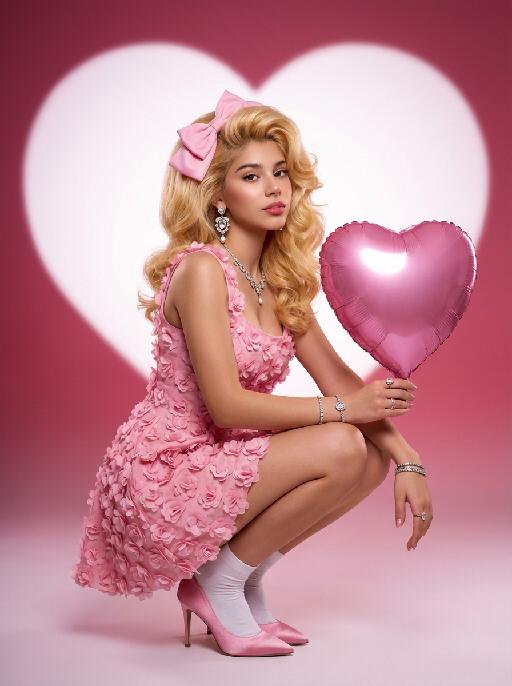
Heart Shape

Medium-close-up shot: An extremely charming portrait of a person. In the uploaded picture, the person's facial features, gender and age remain unchanged, but their hairstyle is changed to resemble Marilyn Monroe's golden hair. The facial makeup is exquisite, with natural skin smoothing, and they are wearing a large pink bow. They are gracefully squatting on the ground, holding a shiny pink heart-shaped balloon in their hand. They are wearing a pink retro one-piece dress with three-dimensional floral appliques, wearing white ankle socks, and standing on pink satin high heels. They are adorned with luxurious high-end custom accessories. The background is a gradient color from deep pink to light pink. Behind her is a huge, soft, bright white heart-shaped light projection in a film festival color scheme, with a super realistic style, representing avant-garde photography art.

Load more

Next-Gen Multi-Model AI Video Architecture

Vivago AI isn't just one engine—it’s a unified hub for the world’s most advanced video AI. Whether you need cinematic realism or high-speed social content, we provide the right model for your creative vision.

Free Generate

Beauty and Dolphins

Vacation Time

Stellar Tear

Fish Tank Supervisor

Cinematic Quality & Precision Control

Enables 4K resolution with multi-lens motion control, generating delicate scene via text prompts for customized cinematography.​

TRY NOW

Dynamic AV Sync

Auto-generates original audio to avoid copyright issues. Build 3D immersive environments through layered sound design automatically.

TRY NOW

OpenAI Sora 2

​Advanced visual storytelling with unparalleled physics and consistency.

TRY NOW

Kling v2.6 Pro

Industry-leading cinematic image animation and motion control.

TRY NOW

Google Veo 3 & 3.1

Ultra-fast generation with enhanced realism for creative workflows.

TRY NOW

Vivago AI 2.0

Our proprietary model optimized for efficiency, speed, and cost-effective generation.

TRY NOW

Users' Voice

We listen carefully to the opinions of every user.
Free Generate
Contact Us
I tried the Lip Sync feature inside Vivago.ai’s AI Video Generator for my educational podcast, and the results were stunning! The avatar's lip movements perfectly matched my audio recording, creating a professional AI-generated video without complex editing. Compared with tools like OpenAI Sora 2 and Google Veo 3.1, Vivago Image-to-Video delivers fast, studio-quality results online. It saved me hours of post-production work.
ElenaM (Spain)
Vivago’s Image-to-Video AI transformed my marketing workflow. I uploaded a product image and described the launch scene in text, and it generated a 10-second cinematic AI video with background music and dynamic visuals. The output quality rivals Kling v2.6 Pro and Google Veo 3 Fast. It’s now my go-to AI video generator for social media ads and product campaigns.
KenjiT (Japan)
As a digital artist, I use Vivago.ai 2.0 daily for Image-to-Image and AI Image-to-Video creation. The e-book covers and animated visuals I generate for clients look cinematic and professional. Unlike many standalone AI tools, Vivago integrates multiple leading models into one platform, making it easier to create copyright-safe AI images and videos for publishing.
ChenL (China)
I tried the Lip Sync feature inside Vivago.ai’s AI Video Generator for my educational podcast, and the results were stunning! The avatar's lip movements perfectly matched my audio recording, creating a professional AI-generated video without complex editing. Compared with tools like OpenAI Sora 2 and Google Veo 3.1, Vivago Image-to-Video delivers fast, studio-quality results online. It saved me hours of post-production work.
ElenaM (Spain)
Vivago’s Image-to-Video AI transformed my marketing workflow. I uploaded a product image and described the launch scene in text, and it generated a 10-second cinematic AI video with background music and dynamic visuals. The output quality rivals Kling v2.6 Pro and Google Veo 3 Fast. It’s now my go-to AI video generator for social media ads and product campaigns.
KenjiT (Japan)
As a digital artist, I use Vivago.ai 2.0 daily for Image-to-Image and AI Image-to-Video creation. The e-book covers and animated visuals I generate for clients look cinematic and professional. Unlike many standalone AI tools, Vivago integrates multiple leading models into one platform, making it easier to create copyright-safe AI images and videos for publishing.
ChenL (China)
I absolutely love Vivago’s AI Image-to-Video Generator. As a travel blogger, static images often fail to capture real atmosphere, but Vivago helps me turn photos into vivid cinematic AI videos with motion effects. It feels comparable to OpenAI Sora 2 and Google Veo 3.1, but more accessible and faster for creators who need high-quality AI videos online.
LiamK (Australia)
I tried the Lip Sync feature inside Vivago.ai’s AI Video Generator for my educational podcast, and the results were stunning! The avatar's lip movements perfectly matched my audio recording, creating a professional AI-generated video without complex editing. Compared with tools like OpenAI Sora 2 and Google Veo 3.1, Vivago Image-to-Video delivers fast, studio-quality results online. It saved me hours of post-production work.
ElenaM (Spain)
Vivago’s Image-to-Video AI transformed my marketing workflow. I uploaded a product image and described the launch scene in text, and it generated a 10-second cinematic AI video with background music and dynamic visuals. The output quality rivals Kling v2.6 Pro and Google Veo 3 Fast. It’s now my go-to AI video generator for social media ads and product campaigns.
KenjiT (Japan)
As a digital artist, I use Vivago.ai 2.0 daily for Image-to-Image and AI Image-to-Video creation. The e-book covers and animated visuals I generate for clients look cinematic and professional. Unlike many standalone AI tools, Vivago integrates multiple leading models into one platform, making it easier to create copyright-safe AI images and videos for publishing.
ChenL (China)
I absolutely love Vivago’s AI Image-to-Video Generator. As a travel blogger, static images often fail to capture real atmosphere, but Vivago helps me turn photos into vivid cinematic AI videos with motion effects. It feels comparable to OpenAI Sora 2 and Google Veo 3.1, but more accessible and faster for creators who need high-quality AI videos online.
LiamK (Australia)
Using Vivago.ai’s Image-to-Video AI has greatly enhanced my classroom teaching. I transform textbook notes into historical AI videos with cinematic filters and dynamic animations. Compared with tools like Kling v2.6 Pro and Google Veo 3 Fast, Vivago offers faster generation and easier parameter control for educators who need reliable AI video creation.
RajivG (India)
I frequently create AI videos on Vivago and publish them on TikTok and YouTube Shorts. The AI video templates and trending content ideas help me produce viral-ready clips quickly. With Vivago’s integrated models—including advanced video engines similar to OpenAI Sora 2—I can generate anime-style and cinematic social media videos that drive high engagement.
MarieJ (Spain)
What attracts me most about Vivago.ai is not only the powerful AI Video Generator but also the active AIGC creator community. It combines AI Image-to-Video, Text-to-Video, and leading model integrations like Google Veo 3.1 into one creative platform.
TomW (India)
At first, I was hesitant about using AI video tools. But after trying Vivago Image-to-Video, I realized how easy it is to create professional AI-generated videos online. I just upload an image, add a short prompt, and adjust a few settings. The results are cinematic and copyright-safe, which is essential for commercial projects.
HectorC (Mexico)
Using Vivago.ai’s Image-to-Video AI has greatly enhanced my classroom teaching. I transform textbook notes into historical AI videos with cinematic filters and dynamic animations. Compared with tools like Kling v2.6 Pro and Google Veo 3 Fast, Vivago offers faster generation and easier parameter control for educators who need reliable AI video creation.
RajivG (India)
I frequently create AI videos on Vivago and publish them on TikTok and YouTube Shorts. The AI video templates and trending content ideas help me produce viral-ready clips quickly. With Vivago’s integrated models—including advanced video engines similar to OpenAI Sora 2—I can generate anime-style and cinematic social media videos that drive high engagement.
MarieJ (Spain)
What attracts me most about Vivago.ai is not only the powerful AI Video Generator but also the active AIGC creator community. It combines AI Image-to-Video, Text-to-Video, and leading model integrations like Google Veo 3.1 into one creative platform.
TomW (India)
At first, I was hesitant about using AI video tools. But after trying Vivago Image-to-Video, I realized how easy it is to create professional AI-generated videos online. I just upload an image, add a short prompt, and adjust a few settings. The results are cinematic and copyright-safe, which is essential for commercial projects.
HectorC (Mexico)