Text to Image

An imposing ice sculpture of a dragon standing tall, illuminated by the golden rays of the setting sun, mid-glacier, 3D render, high quality, crystalline details, ethereal glow, icy reflections, dramatic shadows.

Recreate
arrow
Text to Image

More From VIVAGO AI

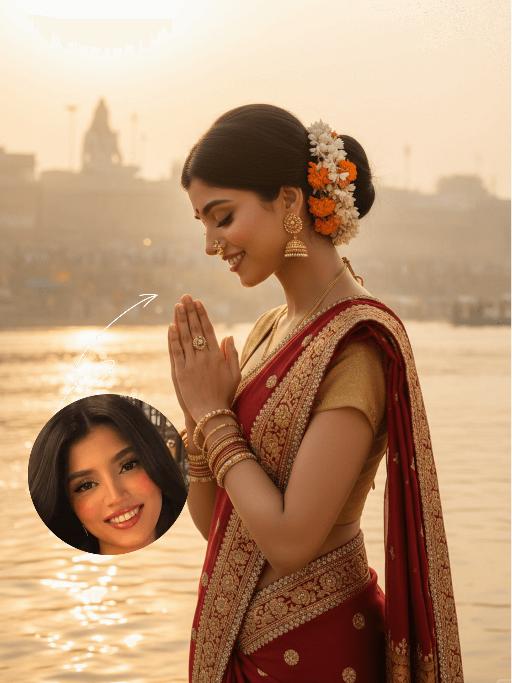
Pious AI effects generated image

Pious

The identity of the uploaded portrait is strictly preserved (retaining facial contours, authentic Indian skin tone, hairstyle and age). This is a bust portrait that captures the original look of the Indian woman in the reference image: her sleek black long hair is styled into a traditional bun adorned with fresh jasmine and marigold blooms, she wears a gold nose ring, layered bangles and delicate earrings, with simple yet solemn makeup and a red bindi dotting her forehead. She is dressed in a vibrant red traditional sari edged with gilded embroidery and sparkling rhinestones, paired with a form-fitting gold blouse underneath, the entire ensemble exuding opulence and a strong sense of ritual. The scene is set on the banks of the Ganges in Varanasi at dawn: a light mist shrouds the glistening river surface, the golden morning sun tints the water in a warm golden hue, ancient stone ghats and crowds of devotees praying at dawn are visible in the distance, and the faint silhouette of a Shiva statue looms in the background. With her hands pressed together in prayer at her chest, eyes gently closed and a serene, devout smile on her face, she leans forward slightly, immersed in the worship ritual. The soft morning sunlight casts a sacred golden halo around her, as if she emanates a faint glow of her own; the shimmering ripples on the water blend with her halo, creating a translucent and holy atmosphere. The frame is imbued with a profound sacred ritualism and a calm, tranquil aura, boasting rich and saturated colors, 8K ultra-high definition resolution, and the exquisite texture of a commercial-grade portrait photograph.

Bags

A realistic Instagram-style lifestyle photo. A model is sitting casually in a modern walk-in closet, surrounded by neatly arranged clothes, handbags, and shoes. Model faces the camera naturally, holding a product (Refer to the pictures uploaded by the user) and introducing it with expressive hand gestures. Model`s mouth is slightly open, suggesting model is speaking to the viewer. The camera angle is slightly zoomed-in, showing model`s upper body, the product, and part of the stylish closet behind model. The background should remain clear and detailed, not blurred, so that the clothes, shelves, and accessories in the closet are visible. Lighting is soft and natural, enhancing the cozy and elegant atmosphere. The overall look should feel candid, authentic, and Instagram-worthy, as if part of a product introduction in a real closet setting.

Romantic Snow

Keep the facial features of the uploaded person unchanged (with natural facial blurring and exquisite makeup). Transform the scene into a romantic heavy snow scene in winter (with a realistic full-screen snowfall effect). The person strikes a relaxed leaning pose—lightly resting against a snow-covered stone balustrade, with one hand casually placed on the edge of the balustrade and the other hanging loosely by the side, the overall posture elegant and stretched. The person is wearing a light gray turtleneck ribbed knit dress paired with a khaki haute couture coat with a sophisticated design, standing by the River Thames in London. In the background are Westminster Bridge (dusted with some snow), the Houses of Parliament and Big Ben (both dusted with some snow) with a soft background bokeh effect. Golden afterglow shines in from the side, casting a halo on the hair; a gentle breeze stirs and tousles the strands of hair. The style is avant-garde fashion photography art, with the film texture of Kodak Portra 400, shot with an 85mm f/1.4 lens (creating a shallow depth of field). The image is processed with warm tones, retaining natural skin texture (without plastic-like smoothness) and a cinematic luster, with clear details of the clothing fabrics. The shot is taken from an eye-level (slightly flat-angle) perspective, with the lens basically at the same horizontal level as the person’s line of sight—this perspective clearly showcases the person’s state while also harmoniously presenting the snow-covered architectural background and the heavy snow environment. The person is adorned with exquisite jewelry including a ring and a delicate designer necklace.

Load more

Next-Gen Multi-Model AI Video Architecture

Vivago AI isn't just one engine—it’s a unified hub for the world’s most advanced video AI. Whether you need cinematic realism or high-speed social content, we provide the right model for your creative vision.

Free Generate

Beauty and Dolphins

Vacation Time

Stellar Tear

Fish Tank Supervisor

Cinematic Quality & Precision Control

Enables 4K resolution with multi-lens motion control, generating delicate scene via text prompts for customized cinematography.​

TRY NOW

Dynamic AV Sync

Auto-generates original audio to avoid copyright issues. Build 3D immersive environments through layered sound design automatically.

TRY NOW

OpenAI Sora 2

​Advanced visual storytelling with unparalleled physics and consistency.

TRY NOW

Kling v2.6 Pro

Industry-leading cinematic image animation and motion control.

TRY NOW

Google Veo 3 & 3.1

Ultra-fast generation with enhanced realism for creative workflows.

TRY NOW

Vivago AI 2.0

Our proprietary model optimized for efficiency, speed, and cost-effective generation.
TRY NOW

Users' Voice

We listen carefully to the opinions of every user.
Free Generate
Contact Us
I tried the Lip Sync feature inside Vivago.ai’s AI Video Generator for my educational podcast, and the results were stunning! The avatar's lip movements perfectly matched my audio recording, creating a professional AI-generated video without complex editing. Compared with tools like OpenAI Sora 2 and Google Veo 3.1, Vivago Image-to-Video delivers fast, studio-quality results online. It saved me hours of post-production work.
ElenaM (Spain)
Vivago’s Image-to-Video AI transformed my marketing workflow. I uploaded a product image and described the launch scene in text, and it generated a 10-second cinematic AI video with background music and dynamic visuals. The output quality rivals Kling v2.6 Pro and Google Veo 3 Fast. It’s now my go-to AI video generator for social media ads and product campaigns.
KenjiT (Japan)
As a digital artist, I use Vivago.ai 2.0 daily for Image-to-Image and AI Image-to-Video creation. The e-book covers and animated visuals I generate for clients look cinematic and professional. Unlike many standalone AI tools, Vivago integrates multiple leading models into one platform, making it easier to create copyright-safe AI images and videos for publishing.
ChenL (China)
I tried the Lip Sync feature inside Vivago.ai’s AI Video Generator for my educational podcast, and the results were stunning! The avatar's lip movements perfectly matched my audio recording, creating a professional AI-generated video without complex editing. Compared with tools like OpenAI Sora 2 and Google Veo 3.1, Vivago Image-to-Video delivers fast, studio-quality results online. It saved me hours of post-production work.
ElenaM (Spain)
Vivago’s Image-to-Video AI transformed my marketing workflow. I uploaded a product image and described the launch scene in text, and it generated a 10-second cinematic AI video with background music and dynamic visuals. The output quality rivals Kling v2.6 Pro and Google Veo 3 Fast. It’s now my go-to AI video generator for social media ads and product campaigns.
KenjiT (Japan)
As a digital artist, I use Vivago.ai 2.0 daily for Image-to-Image and AI Image-to-Video creation. The e-book covers and animated visuals I generate for clients look cinematic and professional. Unlike many standalone AI tools, Vivago integrates multiple leading models into one platform, making it easier to create copyright-safe AI images and videos for publishing.
ChenL (China)
I absolutely love Vivago’s AI Image-to-Video Generator. As a travel blogger, static images often fail to capture real atmosphere, but Vivago helps me turn photos into vivid cinematic AI videos with motion effects. It feels comparable to OpenAI Sora 2 and Google Veo 3.1, but more accessible and faster for creators who need high-quality AI videos online.
LiamK (Australia)
I tried the Lip Sync feature inside Vivago.ai’s AI Video Generator for my educational podcast, and the results were stunning! The avatar's lip movements perfectly matched my audio recording, creating a professional AI-generated video without complex editing. Compared with tools like OpenAI Sora 2 and Google Veo 3.1, Vivago Image-to-Video delivers fast, studio-quality results online. It saved me hours of post-production work.
ElenaM (Spain)
Vivago’s Image-to-Video AI transformed my marketing workflow. I uploaded a product image and described the launch scene in text, and it generated a 10-second cinematic AI video with background music and dynamic visuals. The output quality rivals Kling v2.6 Pro and Google Veo 3 Fast. It’s now my go-to AI video generator for social media ads and product campaigns.
KenjiT (Japan)
As a digital artist, I use Vivago.ai 2.0 daily for Image-to-Image and AI Image-to-Video creation. The e-book covers and animated visuals I generate for clients look cinematic and professional. Unlike many standalone AI tools, Vivago integrates multiple leading models into one platform, making it easier to create copyright-safe AI images and videos for publishing.
ChenL (China)
I absolutely love Vivago’s AI Image-to-Video Generator. As a travel blogger, static images often fail to capture real atmosphere, but Vivago helps me turn photos into vivid cinematic AI videos with motion effects. It feels comparable to OpenAI Sora 2 and Google Veo 3.1, but more accessible and faster for creators who need high-quality AI videos online.
LiamK (Australia)
Using Vivago.ai’s Image-to-Video AI has greatly enhanced my classroom teaching. I transform textbook notes into historical AI videos with cinematic filters and dynamic animations. Compared with tools like Kling v2.6 Pro and Google Veo 3 Fast, Vivago offers faster generation and easier parameter control for educators who need reliable AI video creation.
RajivG (India)
I frequently create AI videos on Vivago and publish them on TikTok and YouTube Shorts. The AI video templates and trending content ideas help me produce viral-ready clips quickly. With Vivago’s integrated models—including advanced video engines similar to OpenAI Sora 2—I can generate anime-style and cinematic social media videos that drive high engagement.
MarieJ (Spain)
What attracts me most about Vivago.ai is not only the powerful AI Video Generator but also the active AIGC creator community. It combines AI Image-to-Video, Text-to-Video, and leading model integrations like Google Veo 3.1 into one creative platform.
TomW (India)
At first, I was hesitant about using AI video tools. But after trying Vivago Image-to-Video, I realized how easy it is to create professional AI-generated videos online. I just upload an image, add a short prompt, and adjust a few settings. The results are cinematic and copyright-safe, which is essential for commercial projects.
HectorC (Mexico)
Using Vivago.ai’s Image-to-Video AI has greatly enhanced my classroom teaching. I transform textbook notes into historical AI videos with cinematic filters and dynamic animations. Compared with tools like Kling v2.6 Pro and Google Veo 3 Fast, Vivago offers faster generation and easier parameter control for educators who need reliable AI video creation.
RajivG (India)
I frequently create AI videos on Vivago and publish them on TikTok and YouTube Shorts. The AI video templates and trending content ideas help me produce viral-ready clips quickly. With Vivago’s integrated models—including advanced video engines similar to OpenAI Sora 2—I can generate anime-style and cinematic social media videos that drive high engagement.
MarieJ (Spain)
What attracts me most about Vivago.ai is not only the powerful AI Video Generator but also the active AIGC creator community. It combines AI Image-to-Video, Text-to-Video, and leading model integrations like Google Veo 3.1 into one creative platform.
TomW (India)
At first, I was hesitant about using AI video tools. But after trying Vivago Image-to-Video, I realized how easy it is to create professional AI-generated videos online. I just upload an image, add a short prompt, and adjust a few settings. The results are cinematic and copyright-safe, which is essential for commercial projects.
HectorC (Mexico)