Lamb
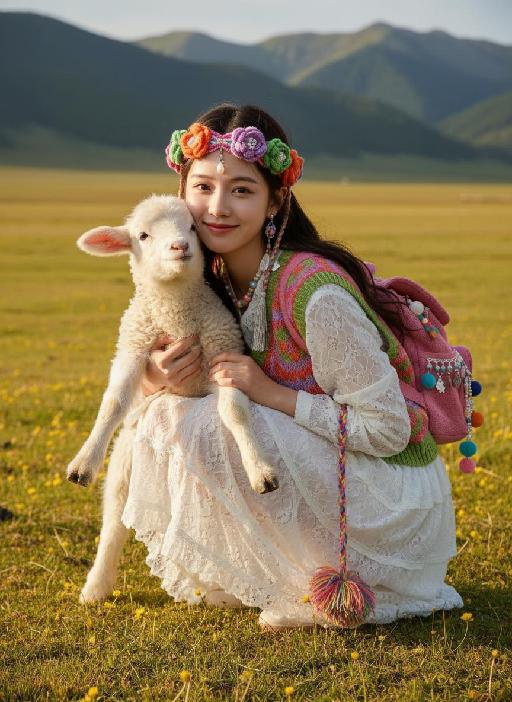
Strictly lock facial features: fully preserving the original facial contours, skin texture, eye shape, lip shape, and youthful appearance with zero deviations allowed. Eye-level perspective, half-body close-up (subject occupies 75% of the frame), a sweet and healing young East Asian woman squats on the grass, with intimate body language: gently supporting the lamb's front legs with both hands, palms pressing against the lamb's fluffy fur, and the other hand naturally protecting the lamb's back with slightly bent fingers, conveying a sense of comfort; leaning forward slightly, her cheek resting softly against the lamb's fluffy ear, shoulders relaxed and leaning toward the lamb to create a snuggling posture; detailed and warm expression: eyes bright and focused directly on the camera, smile warm and bright with eyes crinkling into crescents, showing a happy and affectionate mood toward both the lamb and the viewer. Lamb's state optimized in sync: the lamb snuggles relaxed in her arms, front paws resting gently on her arms, head slightly raised with a gentle and curious gaze, ears drooping naturally, and fluffy fur slightly wrinkling the cuffs of her shirt, presenting a relaxed state after being comforted. Wearing: - Headdress: Exotic bohemian-style colorful knitted floral headband, woven with pink, purple, orange, and green yarns, decorated with 3D fabric flowers, a delicate pearl teardrop forehead ornament, and tiny colorful pom-poms and silver tassels hanging down the sides, creating a vivid ethnic vibe - Earrings: Colorful beaded drop earrings - Necklace: Multi-layered colorful beaded necklace (white, pink, blue color block) - Accessories: Colorful braided traction rope (naturally hanging by her leg, with a colorful pom-pom at the end) Clothing: - Inner wear: White lace texture shirt (cuffs slightly wrinkled from the lamb's fur) - Outer wear: Pink-green-orange color-blocked knitted vest - Skirt: White layered lace skirt - Backpack: Pink knitted backpack (decorated with colorful pom-poms and pendants) Background: Plateau meadow scene, yellow-green grass dotted with small yellow flowers, distant continuous dark green mountains; warm golden sunlight shines from the upper side of the frame, creating distinct light and shadow contrast—bright highlights glow on the woman’s hair strands, the lamb’s fluffy fur, the knitted texture of the vest and headband, and the lace skirt, while soft natural shadows form on the woman’s neck, the gap between her arms and the lamb, and the grass beneath them, enhancing the three-dimensional sense of the entire scene. Enhanced interactive atmosphere: physical contact between the person and the lamb conveys intimacy, making the picture full of vitality and warm healing, strictly 1:1 replicating movement details and emotional connection