Text to Image

Generate AI-powered text message screenshots of Hayden simping for JJ with vivago.ai. Design humorous, dramatic chat simulations using customizable templates and AI tools. Ideal for viral social media content—instantly transform prompts into engaging visual stories with realistic texting effects.

Recreate
arrow
Text to Image

FAQs

How to generate images/videos from text prompts?

Describe the visual content in natural language (e.g., 'A cyberpunk cat wearing neon goggles') and our AI models will create outputs. Complex prompts trigger multi-stage NLP parsing for enhanced accuracy.

How to refine unsatisfactory results?

Use our Prompt Bot - an AI-powered optimizer that suggests technical modifiers. Simply describe your ideas, desired changes ('more metallic texture'), then you will get optimized prompt variants.

When should I use reference images?

Upload references to: 1) Guide character consistency (e.g., faces/outfits), 2) Control motion patterns in videos using our feature matching algorithm. Supports JPG/PNG

What's the credit system?

Daily login grants 100 credits. Upgrade options: 1) Premium Membership, 2) Credit Packs. Details: https://vivago.ai/subscribe

More From VIVAGO AI

Belly dance

The facial features of the uploaded figure remain unchanged, with natural skin retouching on the complexion and exquisite facial makeup applied. The figure is dressed in a stunning navy blue off-the-shoulder deep V belly dance costume, which is densely inlaid with sparkling blue gemstones (each gemstone reflects light, radiating a dazzling glow and showcasing a smooth texture) and diamonds. Its multi-layered ruffled high-slit skirt boasts intricate details of crystal waterfalls and dangling gemstone embellishments. The scene is set in a magnificent and opulent golden palace ballroom (with blurred dining tables and crystal chandeliers hanging in the background). Cinematic warm golden lighting focuses on the crystal decorations of the costume, highlighting their shimmering luster and the bright sparkles on the fabric. Quality specifications: 8K ultra-high resolution, clear textures of crystals and the costume, vivid and saturated colors, no blurriness whatsoever. Shot type: Medium Shot Portrait, framing the figure from the top of the head to the thighs, fully displaying the upper body and part of the lower body; Framing distance: the figure is at a medium distance from the camera, with neither a close-up magnifying facial details nor a full panoramic view of the entire body.

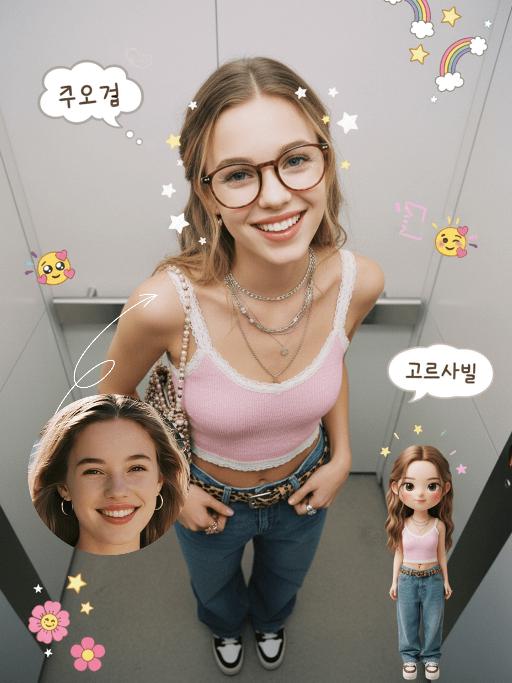
Emoji Plog AI effects generated image

Emoji Plog

The figure from the uploaded image (unchanged facial features, age and gender), create an image in a portrait photography style: a realistic Korean-style sweet and cool young girl (wearing brown-framed glasses, trendy Y2K clothing, and Y2K accessories including necklaces and rings) stands in the center of the frame, shot from a bird’s-eye view, with natural facial retouching and a fresh sheer makeup look. Her head takes up a large proportion of the frame with a strong sense of perspective, featuring the style of casual Instagram selfies plus a subtle decorative texture of cute Instagram emojis. The figure occupies 70% of the frame as the main subject; the negative space is dotted with cute light decorations such as colorful stars and doodles (iPhone emojis). In the bottom right corner is a large, cute 3D cartoon doppelgänger of the girl with the same outfit and pose, accounting for a quarter of the entire frame. Add white/yellow star stickers, cloud emoji speech bubbles with cute Korean text, and a number of lovely emojis to the frame. The scene is set inside an elevator with soft indoor natural light; the decorative elements include white/yellow stars. The work features an avant-garde fashion photography style and a magazine art cover aesthetic, with even soft indoor natural light and no harsh shadows, creating a warm and daily atmosphere. The main color palette is a soft low-saturation scheme (white/light gray/black), accented with bright shades of pink/yellow/leopard brown. The overall image is clean and bright, with a fresh film-like filter effect.

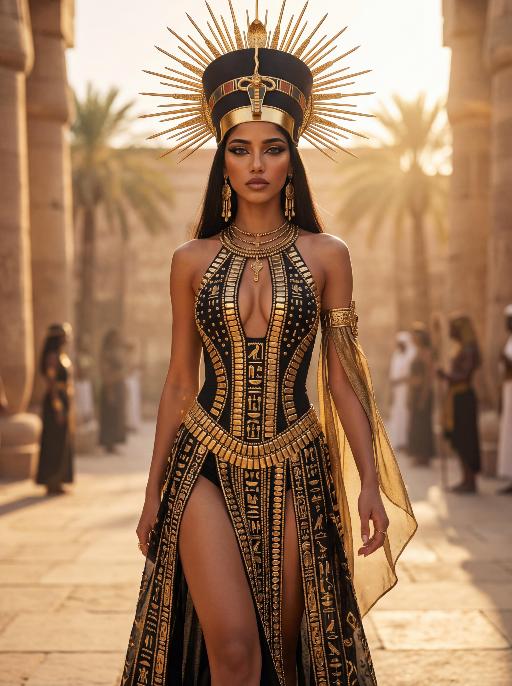
Solar Queen AI effects generated image

Solar Queen

The character in the uploaded picture (unchanged facial features, gender and age). A striking young woman embodying an ancient Egyptian-inspired high-fashion model, captured in a hyper-realistic, cinematic full-body portrait. She has long, straight dark hair, a regal, intense gaze, and bold, dramatic Egyptian-style makeup. She wears an opulent, sun-inspired ensemble in black and gold. Her head is adorned with a massive, elaborate headdress featuring a central black and gold crown, surrounded by radiating golden sun rays, creating a divine, solar aura. Her upper body is clad in a form-fitting, halter-style bodysuit with a deep, intricate cutout at the chest, crafted from black fabric and embellished with countless golden metallic plates, beads, and gemstones, forming geometric and hieroglyphic-inspired patterns. The bodysuit transitions into a high-slit skirt of the same black and gold design, cascading down her legs, revealing her thigh. She wears large, dangling golden earrings, multiple layered golden necklaces, and a detailed golden arm cuff on her right arm, from which a flowing black and gold fabric drapes. She walks forward with a confident, regal stride, her posture upright and commanding, radiating power, divine authority, and ancient mystique. The setting is a high-fashion runway set within a grand, sun-drenched ancient Egyptian courtyard. Massive stone columns and palm trees rise in the background, bathed in the warm, golden light of the setting sun, which creates a hazy, ethereal glow. Indistinct figures of other models in similar attire follow in the background, enhancing the sense of a grand procession. The image is rendered in a hyper-realistic, high-fashion editorial style, with sharp focus on the subject, soft bokeh on the background, and dramatic, cinematic lighting that accentuates the metallic sheen of the gold, the texture of the black fabric, and the intricate details of the headdress and embellishments. The color palette is rich and opulent, featuring deep blacks, radiant golds, and warm, sunlit tones, creating a timeless, powerful, and awe-inspiring atmosphere. The overall aesthetic is detailed, lifelike, and reminiscent of a cutting-edge fashion show set in ancient Egypt, blending historical grandeur with modern high fashion

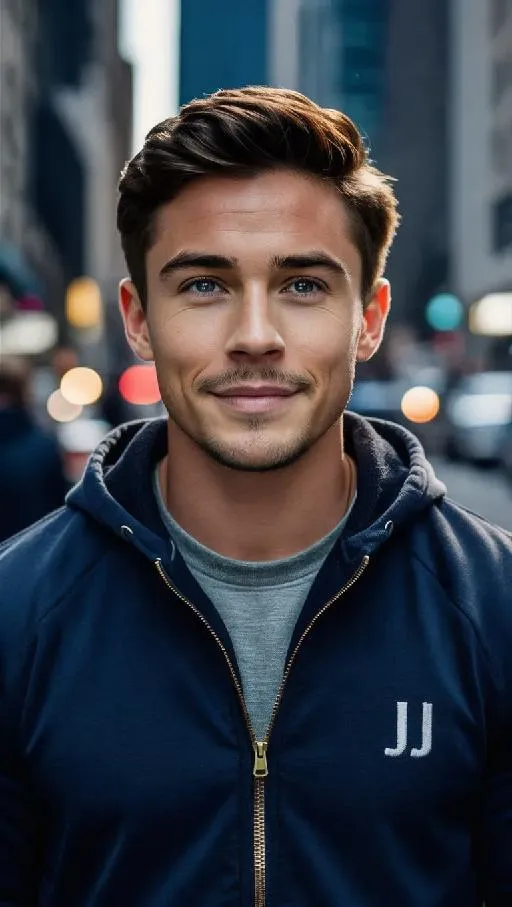
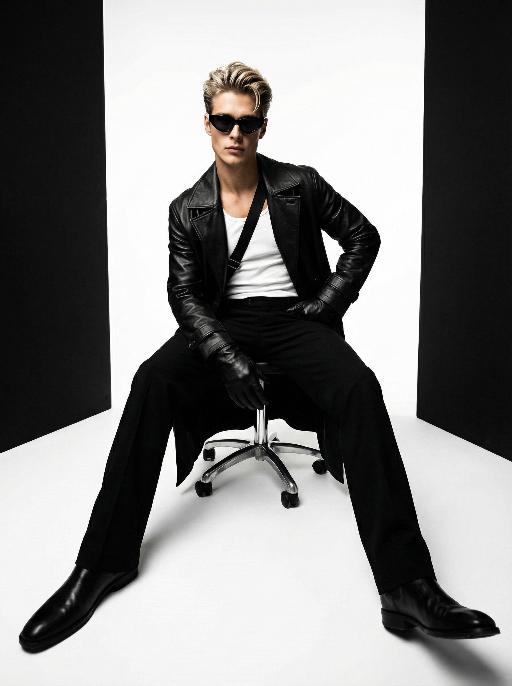
Throne of Noir AI effects generated image

Throne of Noir

Use the exact same facial features, gender, and age as the character in the uploaded image. Low-angle wide-angle shot, avant-garde art photography, high-end men's fashion portrait, handsome East Asian male, sleek back-combed messy hair, futuristic cat-eye black sunglasses, long black leather trench coat with strong drape, white tank top inner wear, black diagonal strap across the chest, black leather gloves, sitting on a metallic silver swivel office chair, one hand on hip, the other resting on the chair leg, legs spread and extended forward to emphasize long legs, minimalist studio, seamless pure white floor, symmetrical vertical black background panels on both sides, cinematic lighting with subtle warm and cool tonal contrast, rich black and white tones with natural depth and texture, ultra-sharp focus, commercial blockbuster texture, 8K, ultra-detailed, no redundant elements, vertical composition

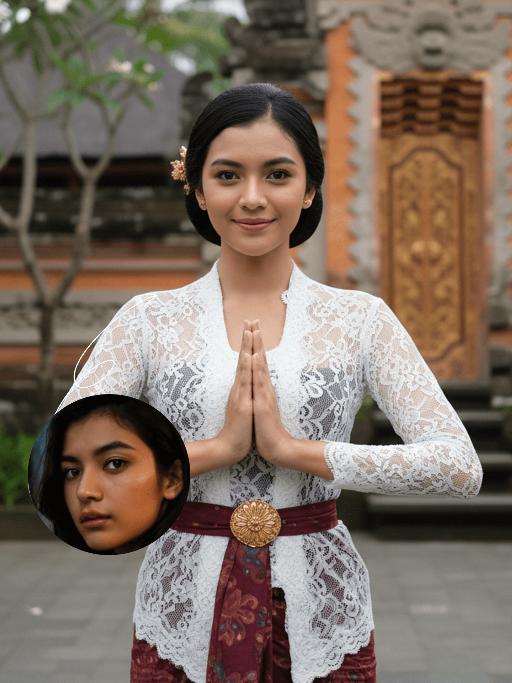
Kebaya Salute AI effects generated image

Kebaya Salute

Strictly lock the facial features of the uploaded portrait (preserve facial contours, native Indonesian skin tone, hairstyle and age). Half-body portrait photography, hyper-realistic style, 4K ultra-high definition, soft diffused tropical daylight, elegant Balinese cultural aesthetic | A young Indonesian Balinese woman with a gentle, warm smile, standing front-facing in a traditional Balinese greeting pose (hands pressed together in a 'salam' gesture). She wears a delicate white lace kebaya blouse with long sleeves, paired with a deep maroon batik-patterned sarong skirt, and an ornate golden embroidered waist sash (kemben) with a sunburst motif. Her hair is styled in a neat updo adorned with a small golden floral hairpin. The background is a softly blurred, authentic Balinese temple courtyard: weathered coral stone walls, lush tropical frangipani trees, and a glimpse of a carved wooden temple doorway, creating a serene, culturally immersive atmosphere. Focus on the intricate lace texture, the vibrant batik patterns, and her serene, welcoming expression

Shark Dance

Main scene: The image in the uploaded picture (species, age, gender remain unchanged, presented in an anthropomorphic standing posture with the front two paws raised and the back two legs standing), beside it are four similar cute cats in an anthropomorphic standing posture standing neatly and evenly beside it (including Persian cats, orange cats, silver gradient cats and golden gradient cats), all characters (height proportions remain consistent) are wearing different cute cartoon jumpsuits (cartoon character pajamas, with bees, tigers, dinosaurs, seals, pandas) in plush fabric (revealing the characters' faces), ultra-realistic three-dimensional rendering, cute and soothing style, the protagonist occupies 80% of the main space of the picture, evenly distributed in the center of the picture, presented in a frontal standing posture, with natural front-back layers; using mid-shot horizontal composition, shot from a horizontal perspective at the same height as the protagonist's image; the light is a soft indoor diffusion effect, the transition of light and shadow is natural, without strong contrast, overall bright and warm; the clothing uses fresh and bright colors (yellow, green, blue, brown), the background is a warm and cute living room environment, background elements account for 20% of the picture; rich details, fluffy and fine fur texture, clear clothing texture, 8K high resolution, bright and harmonious picture colors.

Romantic Snow

Keep the facial features of the uploaded person unchanged (with natural facial blurring and exquisite makeup). Transform the scene into a romantic heavy snow scene in winter (with a realistic full-screen snowfall effect). The person strikes a relaxed leaning pose—lightly resting against a snow-covered stone balustrade, with one hand casually placed on the edge of the balustrade and the other hanging loosely by the side, the overall posture elegant and stretched. The person is wearing a light gray turtleneck ribbed knit dress paired with a khaki haute couture coat with a sophisticated design, standing by the River Thames in London. In the background are Westminster Bridge (dusted with some snow), the Houses of Parliament and Big Ben (both dusted with some snow) with a soft background bokeh effect. Golden afterglow shines in from the side, casting a halo on the hair; a gentle breeze stirs and tousles the strands of hair. The style is avant-garde fashion photography art, with the film texture of Kodak Portra 400, shot with an 85mm f/1.4 lens (creating a shallow depth of field). The image is processed with warm tones, retaining natural skin texture (without plastic-like smoothness) and a cinematic luster, with clear details of the clothing fabrics. The shot is taken from an eye-level (slightly flat-angle) perspective, with the lens basically at the same horizontal level as the person’s line of sight—this perspective clearly showcases the person’s state while also harmoniously presenting the snow-covered architectural background and the heavy snow environment. The person is adorned with exquisite jewelry including a ring and a delicate designer necklace.

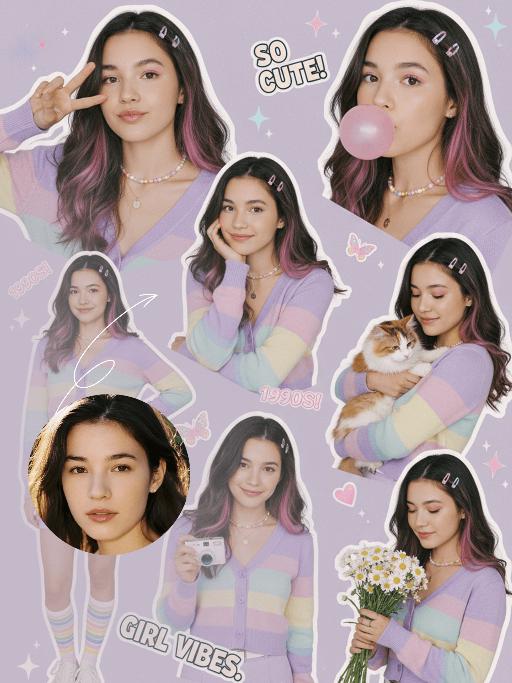
Collage Poster AI effects generated image

Collage Poster

Ultra-realistic vintage cute portrait collage in the late 2000s style, featuring a multi-panel layout that showcases 5 to 6 different poses of the figure from the uploaded image (with unchanged facial features, age and gender) and natural facial retouching with a fresh sheer makeup look: making a peace sign, blowing a pink bubble gum, resting her cheek on one hand while holding a small white camera, standing with one hand on her hip, cuddling a tabby cat, and holding a bouquet of daisies. The girl has long hair with pink-to-purple gradient streaks and a fresh, cute makeup look. Attire: A pastel rainbow gradient cardigan (with light purple/light yellow/light blue stripes), a light purple high-waisted mini skirt, a thin white waist belt, rainbow-striped athletic socks, and white casual sneakers. Accessories: A dopamine colorful Y2K necklace, delicate colorful floral hair clips, and a colorful pendant necklace. Shooting Angles: Mixed perspectives (close-up facial shots, bust shots, full-body shots), captured from the angles of casual natural lifestyle photography. Lighting: Bright and soft studio lighting with a textured translucent sheen, pale shadows, creating a fresh and warm atmosphere. Color Scheme: Macaron soft tones (light purple/light pink/light blue/light yellow) adorned with collage decorations (star/butterfly/heart stickers, sequins), featuring bright low-saturation hues that evoke a vintage cute early 2000s vibe. Layout: A playful scattered arrangement with the effect of vintage magazine clippings, accented with text elements such as "SO CUTE!", "1990S!", and "GIRL VIBES".

Pet Belly Dance

"The scene begins with a medium or close-up shot, clearly revealing the subject(s) from the image standing and dancing within the frame.\nAs the camera slowly pulls back, the full bodies of all the animals are gradually revealed. At the same time, they all stand upright and are dressed in bunny-girl-inspired outfits.\nThey begin to dance in an anthropomorphic manner: standing on two legs with their front paws placed on their hips, elegantly swaying their hips from side to side with a soft, subtly seductive rhythm. Their facial expressions are lively and playful, maintaining direct eye contact with the camera, accompanied by slight nods or head tilts to enhance the sense of interaction with the viewer.\nAll animals wear coordinated bunny-girl-themed costumes (with possible slight variations in color and details), which include:\nA form-fitting, waist-cinching bunny-style corset\nA veil or bunny ear accessory worn on the head\nA light, sheer scarf tied around the waist that flutters naturally with their dance movements\nNote:\nThe exact number of subjects must be determined based on the uploaded image.\nThe subject count could be one or multiple—please identify the precise number and use it clearly in the description."

Load more

Next-Gen Multi-Model AI Video Architecture

Vivago AI isn't just one engine—it’s a unified hub for the world’s most advanced video AI. Whether you need cinematic realism or high-speed social content, we provide the right model for your creative vision.

Free Generate

Beauty and Dolphins

Vacation Time

Stellar Tear

Fish Tank Supervisor

Cinematic Quality & Precision Control

Enables 4K resolution with multi-lens motion control, generating delicate scene via text prompts for customized cinematography.​

TRY NOW

Dynamic AV Sync

Auto-generates original audio to avoid copyright issues. Build 3D immersive environments through layered sound design automatically.

TRY NOW

OpenAI Sora 2

​Advanced visual storytelling with unparalleled physics and consistency.

TRY NOW

Kling v2.6 Pro

Industry-leading cinematic image animation and motion control.

TRY NOW

Google Veo 3 & 3.1

Ultra-fast generation with enhanced realism for creative workflows.

TRY NOW

Vivago AI 2.0

Our proprietary model optimized for efficiency, speed, and cost-effective generation.

TRY NOW

Users' Voice

We listen carefully to the opinions of every user.
Free Generate
Contact Us
I tried the Lip Sync feature inside Vivago.ai’s AI Video Generator for my educational podcast, and the results were stunning! The avatar's lip movements perfectly matched my audio recording, creating a professional AI-generated video without complex editing. Compared with tools like OpenAI Sora 2 and Google Veo 3.1, Vivago Image-to-Video delivers fast, studio-quality results online. It saved me hours of post-production work.
ElenaM (Spain)
Vivago’s Image-to-Video AI transformed my marketing workflow. I uploaded a product image and described the launch scene in text, and it generated a 10-second cinematic AI video with background music and dynamic visuals. The output quality rivals Kling v2.6 Pro and Google Veo 3 Fast. It’s now my go-to AI video generator for social media ads and product campaigns.
KenjiT (Japan)
As a digital artist, I use Vivago.ai 2.0 daily for Image-to-Image and AI Image-to-Video creation. The e-book covers and animated visuals I generate for clients look cinematic and professional. Unlike many standalone AI tools, Vivago integrates multiple leading models into one platform, making it easier to create copyright-safe AI images and videos for publishing.
ChenL (China)
I tried the Lip Sync feature inside Vivago.ai’s AI Video Generator for my educational podcast, and the results were stunning! The avatar's lip movements perfectly matched my audio recording, creating a professional AI-generated video without complex editing. Compared with tools like OpenAI Sora 2 and Google Veo 3.1, Vivago Image-to-Video delivers fast, studio-quality results online. It saved me hours of post-production work.
ElenaM (Spain)
Vivago’s Image-to-Video AI transformed my marketing workflow. I uploaded a product image and described the launch scene in text, and it generated a 10-second cinematic AI video with background music and dynamic visuals. The output quality rivals Kling v2.6 Pro and Google Veo 3 Fast. It’s now my go-to AI video generator for social media ads and product campaigns.
KenjiT (Japan)
As a digital artist, I use Vivago.ai 2.0 daily for Image-to-Image and AI Image-to-Video creation. The e-book covers and animated visuals I generate for clients look cinematic and professional. Unlike many standalone AI tools, Vivago integrates multiple leading models into one platform, making it easier to create copyright-safe AI images and videos for publishing.
ChenL (China)
I absolutely love Vivago’s AI Image-to-Video Generator. As a travel blogger, static images often fail to capture real atmosphere, but Vivago helps me turn photos into vivid cinematic AI videos with motion effects. It feels comparable to OpenAI Sora 2 and Google Veo 3.1, but more accessible and faster for creators who need high-quality AI videos online.
LiamK (Australia)
I tried the Lip Sync feature inside Vivago.ai’s AI Video Generator for my educational podcast, and the results were stunning! The avatar's lip movements perfectly matched my audio recording, creating a professional AI-generated video without complex editing. Compared with tools like OpenAI Sora 2 and Google Veo 3.1, Vivago Image-to-Video delivers fast, studio-quality results online. It saved me hours of post-production work.
ElenaM (Spain)
Vivago’s Image-to-Video AI transformed my marketing workflow. I uploaded a product image and described the launch scene in text, and it generated a 10-second cinematic AI video with background music and dynamic visuals. The output quality rivals Kling v2.6 Pro and Google Veo 3 Fast. It’s now my go-to AI video generator for social media ads and product campaigns.
KenjiT (Japan)
As a digital artist, I use Vivago.ai 2.0 daily for Image-to-Image and AI Image-to-Video creation. The e-book covers and animated visuals I generate for clients look cinematic and professional. Unlike many standalone AI tools, Vivago integrates multiple leading models into one platform, making it easier to create copyright-safe AI images and videos for publishing.
ChenL (China)
I absolutely love Vivago’s AI Image-to-Video Generator. As a travel blogger, static images often fail to capture real atmosphere, but Vivago helps me turn photos into vivid cinematic AI videos with motion effects. It feels comparable to OpenAI Sora 2 and Google Veo 3.1, but more accessible and faster for creators who need high-quality AI videos online.
LiamK (Australia)
Using Vivago.ai’s Image-to-Video AI has greatly enhanced my classroom teaching. I transform textbook notes into historical AI videos with cinematic filters and dynamic animations. Compared with tools like Kling v2.6 Pro and Google Veo 3 Fast, Vivago offers faster generation and easier parameter control for educators who need reliable AI video creation.
RajivG (India)
I frequently create AI videos on Vivago and publish them on TikTok and YouTube Shorts. The AI video templates and trending content ideas help me produce viral-ready clips quickly. With Vivago’s integrated models—including advanced video engines similar to OpenAI Sora 2—I can generate anime-style and cinematic social media videos that drive high engagement.
MarieJ (Spain)
What attracts me most about Vivago.ai is not only the powerful AI Video Generator but also the active AIGC creator community. It combines AI Image-to-Video, Text-to-Video, and leading model integrations like Google Veo 3.1 into one creative platform.
TomW (India)
At first, I was hesitant about using AI video tools. But after trying Vivago Image-to-Video, I realized how easy it is to create professional AI-generated videos online. I just upload an image, add a short prompt, and adjust a few settings. The results are cinematic and copyright-safe, which is essential for commercial projects.
HectorC (Mexico)
Using Vivago.ai’s Image-to-Video AI has greatly enhanced my classroom teaching. I transform textbook notes into historical AI videos with cinematic filters and dynamic animations. Compared with tools like Kling v2.6 Pro and Google Veo 3 Fast, Vivago offers faster generation and easier parameter control for educators who need reliable AI video creation.
RajivG (India)
I frequently create AI videos on Vivago and publish them on TikTok and YouTube Shorts. The AI video templates and trending content ideas help me produce viral-ready clips quickly. With Vivago’s integrated models—including advanced video engines similar to OpenAI Sora 2—I can generate anime-style and cinematic social media videos that drive high engagement.
MarieJ (Spain)
What attracts me most about Vivago.ai is not only the powerful AI Video Generator but also the active AIGC creator community. It combines AI Image-to-Video, Text-to-Video, and leading model integrations like Google Veo 3.1 into one creative platform.
TomW (India)
At first, I was hesitant about using AI video tools. But after trying Vivago Image-to-Video, I realized how easy it is to create professional AI-generated videos online. I just upload an image, add a short prompt, and adjust a few settings. The results are cinematic and copyright-safe, which is essential for commercial projects.
HectorC (Mexico)