Text to Image

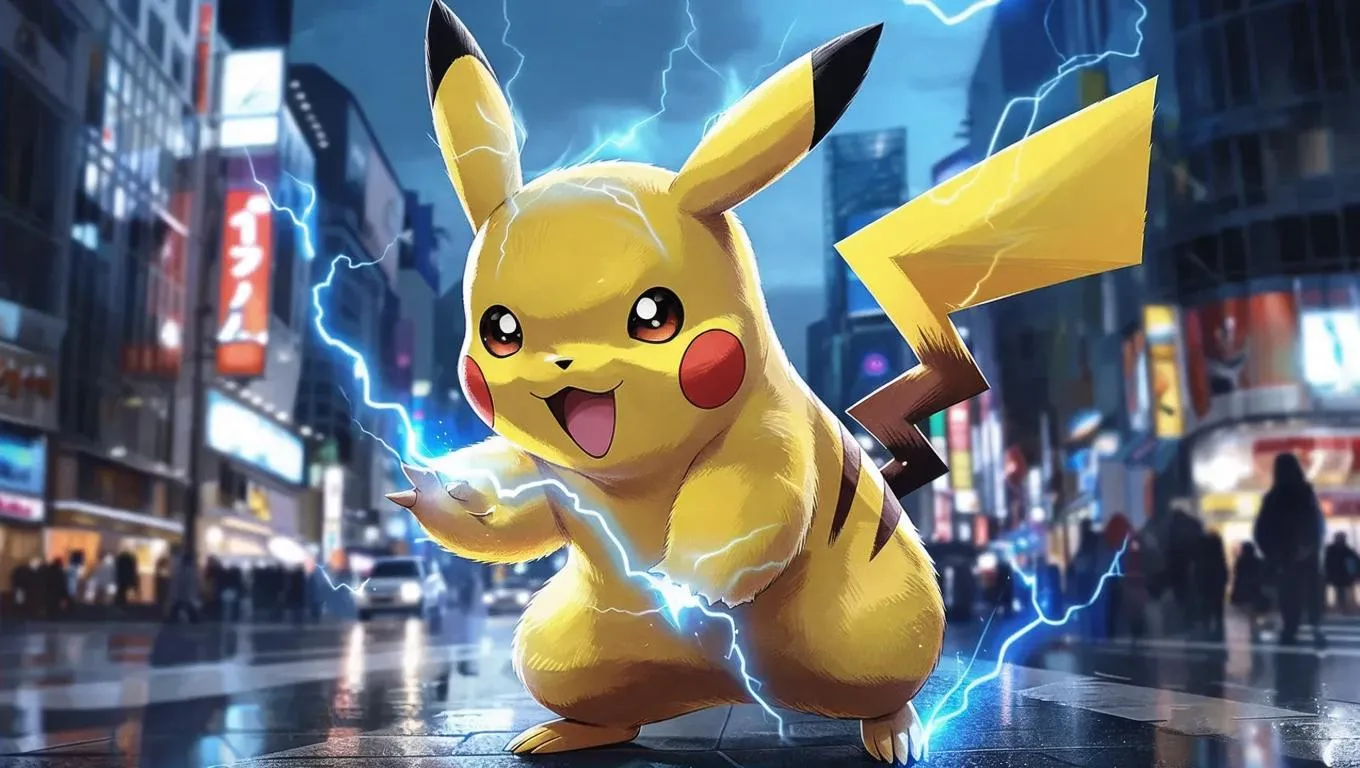
Generate iconic Pokémon Pikachu visuals with AI! Create cute electric mouse characters, vibrant digital artwork, or dynamic scenes using text prompts. Perfect for fans, designers, and content creators. Explore AI effects for anime-style transformations or realistic edits. Elevate your Pokémon projects with professional AI image generation tools.

Recreate
arrow
Text to Image

FAQs

How to generate images/videos from text prompts?

Describe the visual content in natural language (e.g., 'A cyberpunk cat wearing neon goggles') and our AI models will create outputs. Complex prompts trigger multi-stage NLP parsing for enhanced accuracy.

How to refine unsatisfactory results?

Use our Prompt Bot - an AI-powered optimizer that suggests technical modifiers. Simply describe your ideas, desired changes ('more metallic texture'), then you will get optimized prompt variants.

When should I use reference images?

Upload references to: 1) Guide character consistency (e.g., faces/outfits), 2) Control motion patterns in videos using our feature matching algorithm. Supports JPG/PNG

What's the credit system?

Daily login grants 100 credits. Upgrade options: 1) Premium Membership, 2) Credit Packs. Details: https://vivago.ai/subscribe

More From VIVAGO AI

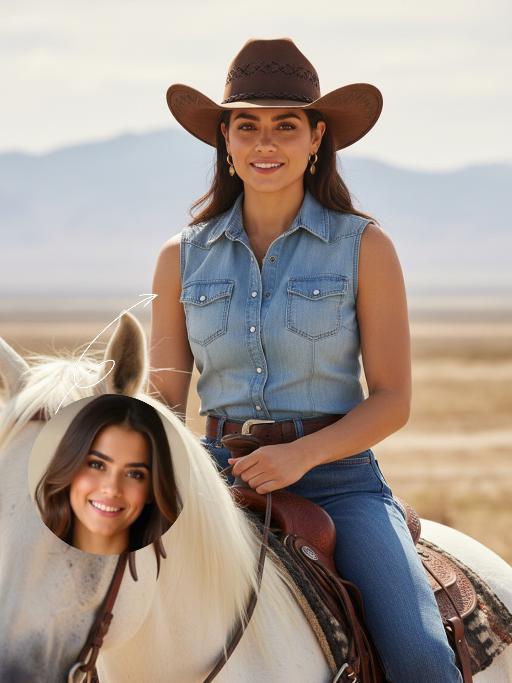
Cowgirl AI effects generated image

Cowgirl

Drawing on the facial structure, three-dimensional facial features, skin tone range and age vibe of the uploaded model’s image (without strict identity replication), a new female figure is created: a confident, warm and approachable woman with a Western cowgirl aesthetic, whose bearing is resilient yet not stern. A soft, natural and restrained smile graces her face – understated, yet enough to convey a poised, confident and gentle sense of strength. She is riding a magnificent white steed, with the horse’s front fully in clear view and its entire face featured in the frame; its coat is clean, bright and glowing with a natural sheen, with realistic texture and accurate proportions. The matching brown leather saddle and reins are exquisitely crafted with neat detailing, and the metal fittings catch the light with a natural shimmer, fully conforming to the structural norms of real equestrian gear. The image adopts a close-up composition, focusing sharply on the woman’s face and upper body to make her the clear focal point, while subtly preserving the natural interactive dynamic between the horse’s head and the rider. She wears a brown cowboy hat with clearly discernible embroidery detailing on the crown, a classic and refined staple of her look. Her top is a light blue denim-style sleeveless piece with a crisp cut and authentic fabric texture, showing natural brightness and tonal gradation in the light. Around her waist is a brown leather belt with distinct metal hardware; the slightly worn finish amplifies the authentic Western texture. She also adorns herself with delicate gold earrings and a necklace, which glimmer softly in the light – not overly showy, but just enough to enhance her feminine grace in perfect measure. The lighting is bright, soft natural daylight, with the key light striking the subject from a slight side angle directly in front, bathing her face in bright, translucent light, making her eyes clear and vivid, and lending her skin a healthy, natural complexion without heavy shadows dimming the midface. The overall color palette features warm earth tones; the woman and the white steed are slightly brighter than the background, naturally emerging as the visual focus. The background retains the vast, hazy ambiance of the Western wilderness – an expanse of arid open land, with distant mountain ranges fading in and out of view and a soft, misty sky, creating a cinematic sense of profound spatial depth. The photographic style is cinematic ultra-realism, echoing the aesthetic hallmarks of classic Western films. A shallow depth of field blurs the background slightly, highlighting the subject while imbuing the frame with a strong narrative quality. Complemented by 8K ultra-high resolution, the image is crisp and sharp, with an overall atmosphere that is warm, free, resilient and hopeful – a flawless portrayal of a bright, compelling cowgirl figure with a powerful sense of narrative and character.

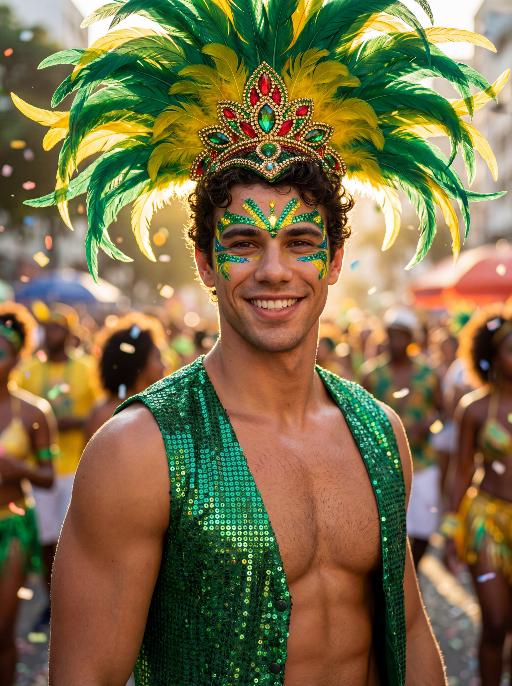
Reveller AI effects generated image

Reveller

Use the exact same facial features, gender, age, and natural skin tone as the character in the uploaded image. Do not alter, lighten, darken, or modify the original complexion in any way. Maintain his authentic skin color exactly as in the reference image. curly textured hair, radiant natural skin, and a confident, magnetic smile, standing proudly at Rio Carnival. wears an elaborate headdress made of large green and yellow feathers, with an ornate centerpiece featuring red, green, and gold jewel details. His face is painted with bold, symmetrical Carnival patterns in emerald green and vibrant yellow, with striking blue accents around the eyes, enhancing gaze. dressed in a shimmering emerald-green sequined vest that catches the light dramatically, partially open to reveal his athletic chest. Natural body highlights emphasize physique realistically without altering skin tone. Lighting: strong cinematic light contrast — warm golden sunlight illuminating one side of his face and torso, creating sculpted highlights, while preserving accurate skin color and natural undertones. Soft shadow adds depth and dimension without washing out or overexposing the complexion. Subtle rim lighting around the feathers enhances separation from the background. High dynamic range with true-to-life skin rendering. Background: a lively Rio street during Carnival, filled with a cheering crowd in colorful festive clothing. Confetti floats in the air. The crowd is slightly blurred (shallow depth of field), making the subject stand out sharply. Mood: vibrant, joyful, triumphant, powerful, charismatic. Style: high-resolution cinematic photography, poster-quality, ultra-sharp focus on subject, shallow depth of field, 85mm lens, HDR, rich saturated colors, dramatic contrast, professional fashion-editorial lighting, realistic skin texture, natural complexion fidelity, magazine cover composition.

Telephone Ring AI effects generated image

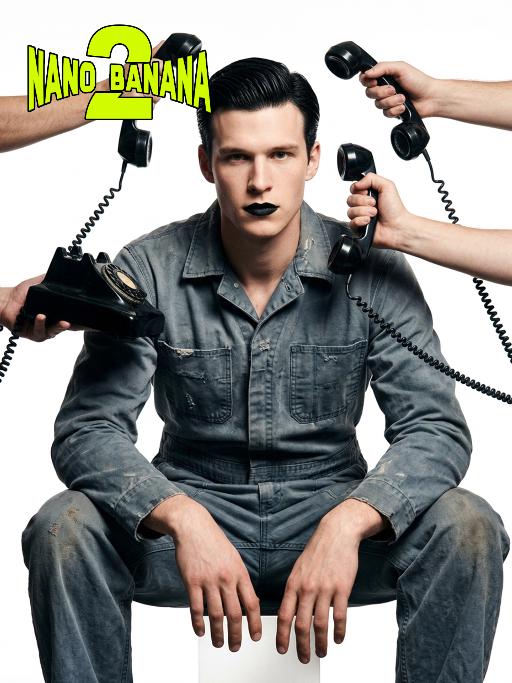
Telephone Ring

Shooting perspective and focal length: Frontal level view, using a medium telephoto lens (approximately 50mm), with an appropriate focal length, medium close-up shot, able to clearly present the upper body and hand details of the characters, and the picture has no obvious distortion. Equipment: Professional studio camera (such as Canon 5D series or Sony A7 series), combined with a studio lighting system. Character pose: The character is in a sitting position, with legs apart and knees bent, the upper body leaning forward and the head close to the camera; multiple arms extend from all around the frame, each hand holding an old-fashioned black wired telephone, multiple receivers randomly surround the character's head, creating a visual effect of being surrounded. Character expression: Eyes gaze at the camera, the gaze is slightly distant and cold, the facial expression is calm and undisturbed, conveying a restrained emotional tension. Lighting: Use studio hard light, the main light source comes from the front, supplemented by side lighting, forming a clear contrast of light and shade, highlighting the fabric texture and facial contours, the background is pure white, clean and without any color impurities. Style: Pioneer fashion photography, integrating surrealism and minimalism, creating an absurd yet highly tense atmosphere through strong visual impact. Clothing: A set of gray-blue distressed texture workwear, the fabric has fine textures, the fit is loose and firm, the lapel design combines toughness and retro charm. Hair style: Black short hair, using hair gel to comb backward, revealing a full forehead, the style is clean and neat with a sense of lines. Makeup: Matte texture pure black lipstick as the visual focus, the facial base makeup is even and transparent, only highlighting the lip color, the overall makeup is avant-garde and has a distinctive characteristic.

Goofy AI effects generated image

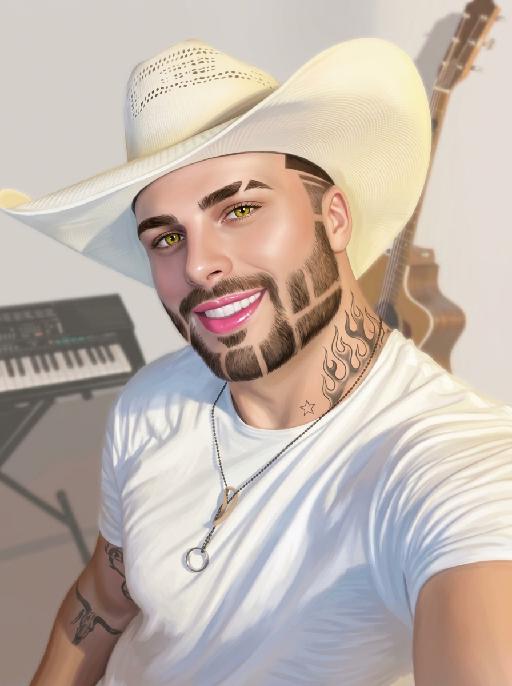
Goofy

The person's skin has a porcelain-like smoothness with a photo-retouching effect. The posture and facial features of the person in the uploaded picture remain unchanged (the posture is consistent, the hairstyle and clothing have not been modified, the hairstyle and clothing remain the same, and the picture background has not been altered). However, the triangular incision at the hairline + side straight shaving lines, sharp eyebrows + obvious broken eyebrows (with a mid-section cut-off gap) design, and also neat gaps with cut segments on the beard; the overall style of the entire picture has transformed into a portrait style that combines 60% digital painting style and 40% real photography style. The person's skin is as smooth and flawless as porcelain, having undergone deep beauty treatment. The eyes are gold-green contact lenses, the lips are painted with shiny pink lipstick, there is a tribal flame tattoo on the neck, and a small star tattoo on the collarbone. The background is the same as the original picture, with a bright filter added, presenting a low saturation and blurry effect, 8K resolution, and beautiful Instagram filter effect. The lines are simple and smooth, with a low overall contrast, a plain style but with bright and rich colors.

Diwali AI effects generated image

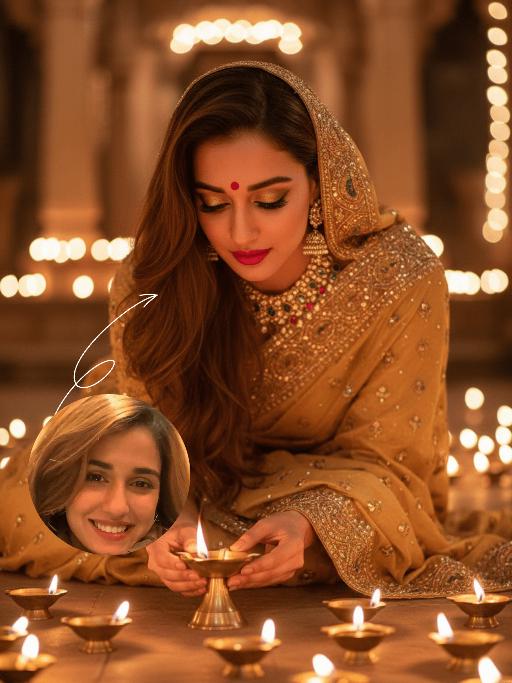
Diwali

The identity of the uploaded portrait is strictly preserved (retaining facial contours, authentic Indian skin tone, hairstyle and age). This is a bust portrait that captures the original natural features of the Indian woman in the reference image: she has a delicate and fair face with a vermilion red bindi on her forehead and a colorful gemstone maang tikka adorning her brow, complemented by exquisitely elaborate eye makeup and full, vivid lip color, with a gentle and devout expression. She is dressed in a traditional sari with intricate golden embroidery, its edges adorned with elaborate patterns and paired with a matching headscarf; the overall color palette echoes the warm luminous ambiance of Diwali. Leaning forward gently, she places a lit brass oil lamp carefully with both hands, her gaze fixed intently on the wick, her expression serene and filled with reverence. Her face takes up a moderate proportion of the frame, allowing the delicate makeup details and her devout demeanor to be seen clearly. Set in an indoor space on Diwali night, the floor is covered with lit brass oil lamps, whose warm yellow candlelight casts a soft halo all around. The background is softly blurred to highlight the figure’s interaction with the oil lamp. With the warm glow of the oil lamps as the primary light source, the light gently outlines her facial contours and the textured details of her attire, creating a warm and tranquil festive atmosphere with rich, warm hues. Boasting 8K ultra-high definition resolution and commercial-grade portrait quality, the image features crisp, sharp details and rich color layering, emphasizing the theme of "light" in Diwali and the profound piety of the figure.

Elegant AI effects generated image

Elegant

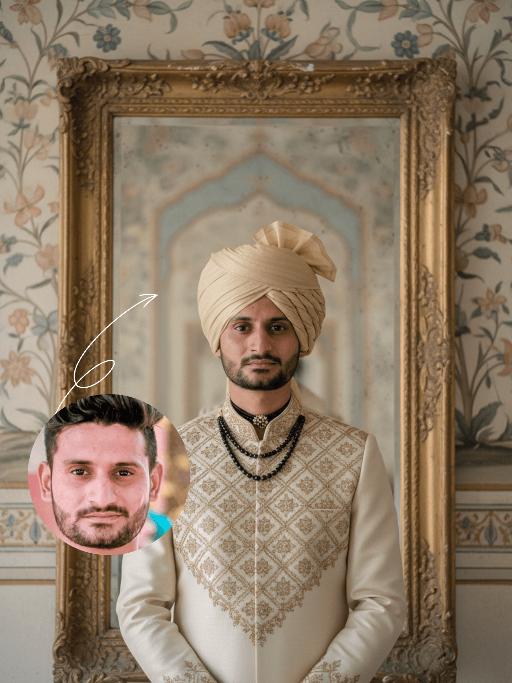
Strictly lock the uploaded portrait's identity (preserve facial contours, native Indian skin tone, hairstyle, age). Half-body portrait of a handsome young South Asian man with sharp features and a calm, regal demeanor. He wears a cream-and-gold traditional sherwani with intricate geometric embroidery, a matching soft gold turban, and a striking black beaded choker. Positioned before an 18th-century weathered carved mirror with a gilded frame, behind which lies a faded Mughal-style hand-painted mural in soft blues and golds. Soft, warm diffused light creates a cinematic atmosphere with delicate, layered shadows. The image exudes luxurious, retro romance, featuring a painterly film texture and a soft, desaturated palette of cream, gold, and light gray. Medium-format shot with shallow depth of field to highlight embroidery details and classical elegance

Trendy Stickers AI effects generated image

Trendy Stickers

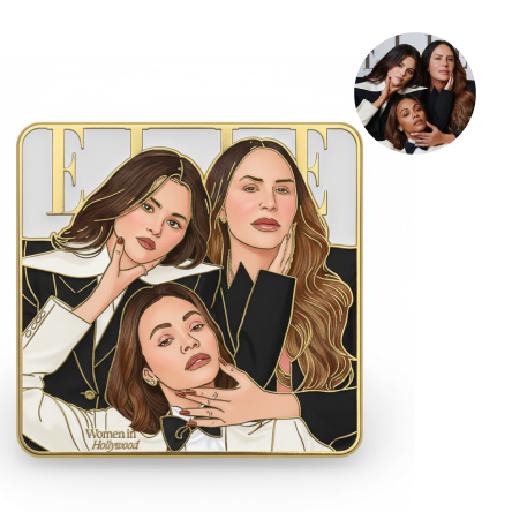
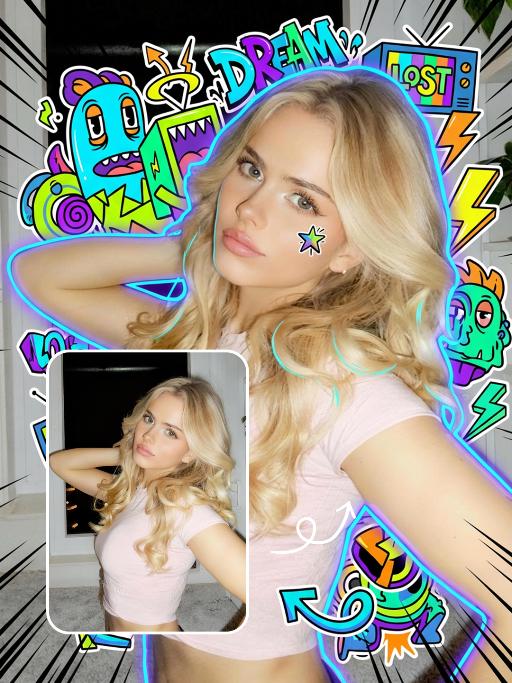
先将上传的图片扩图成3:4的2k超轻尺寸,然后在图片上加入创意涂鸦内容:不要使用固定元素,而是生成与您所识别的视觉主题相匹配的插画元素。如果是酷炫/前卫风格:可以使用箭头、螺栓、涂鸦标签、失真形状、广播盒或抽象的街头艺术怪兽。如果是可爱/甜蜜风格:可以使用独特的角色、心形、星星、糖果、闪光效果和圆形的有机形状。如果选择“虚幻”风格:运用流畅的线条、花瓣、天体以及神奇的漩涡元素。加入的元素风格:平面二维矢量图,粗犷的轮廓,类似贴纸的美感。鲜艳的色彩与写实照片形成对比或相得益彰。 画面的四个边角加入少量的短小的随机黑色动感的漫画式速度线条;人物的周围加上赛博的霓虹发光光效,人物的面部加入一个小涂鸦元素,人物的皮肤轻微磨皮,皮肤自然美颜效果,面部妆容改成欧美流行风格的自然写实的潮流的妆容;写实的人物与写实的场景风格保持不变。

Load more

Next-Gen Multi-Model AI Video Architecture

Vivago AI isn't just one engine—it’s a unified hub for the world’s most advanced video AI. Whether you need cinematic realism or high-speed social content, we provide the right model for your creative vision.

Free Generate

Beauty and Dolphins

Vacation Time

Stellar Tear

Fish Tank Supervisor

Cinematic Quality & Precision Control

Enables 4K resolution with multi-lens motion control, generating delicate scene via text prompts for customized cinematography.​

TRY NOW

Dynamic AV Sync

Auto-generates original audio to avoid copyright issues. Build 3D immersive environments through layered sound design automatically.

TRY NOW

OpenAI Sora 2

​Advanced visual storytelling with unparalleled physics and consistency.

TRY NOW

Kling v2.6 Pro

Industry-leading cinematic image animation and motion control.

TRY NOW

Google Veo 3 & 3.1

Ultra-fast generation with enhanced realism for creative workflows.

TRY NOW

Vivago AI 2.0

Our proprietary model optimized for efficiency, speed, and cost-effective generation.

TRY NOW

Users' Voice

We listen carefully to the opinions of every user.
Free Generate
Contact Us
I tried the Lip Sync feature inside Vivago.ai’s AI Video Generator for my educational podcast, and the results were stunning! The avatar's lip movements perfectly matched my audio recording, creating a professional AI-generated video without complex editing. Compared with tools like OpenAI Sora 2 and Google Veo 3.1, Vivago Image-to-Video delivers fast, studio-quality results online. It saved me hours of post-production work.
ElenaM (Spain)
Vivago’s Image-to-Video AI transformed my marketing workflow. I uploaded a product image and described the launch scene in text, and it generated a 10-second cinematic AI video with background music and dynamic visuals. The output quality rivals Kling v2.6 Pro and Google Veo 3 Fast. It’s now my go-to AI video generator for social media ads and product campaigns.
KenjiT (Japan)
As a digital artist, I use Vivago.ai 2.0 daily for Image-to-Image and AI Image-to-Video creation. The e-book covers and animated visuals I generate for clients look cinematic and professional. Unlike many standalone AI tools, Vivago integrates multiple leading models into one platform, making it easier to create copyright-safe AI images and videos for publishing.
ChenL (China)
I tried the Lip Sync feature inside Vivago.ai’s AI Video Generator for my educational podcast, and the results were stunning! The avatar's lip movements perfectly matched my audio recording, creating a professional AI-generated video without complex editing. Compared with tools like OpenAI Sora 2 and Google Veo 3.1, Vivago Image-to-Video delivers fast, studio-quality results online. It saved me hours of post-production work.
ElenaM (Spain)
Vivago’s Image-to-Video AI transformed my marketing workflow. I uploaded a product image and described the launch scene in text, and it generated a 10-second cinematic AI video with background music and dynamic visuals. The output quality rivals Kling v2.6 Pro and Google Veo 3 Fast. It’s now my go-to AI video generator for social media ads and product campaigns.
KenjiT (Japan)
As a digital artist, I use Vivago.ai 2.0 daily for Image-to-Image and AI Image-to-Video creation. The e-book covers and animated visuals I generate for clients look cinematic and professional. Unlike many standalone AI tools, Vivago integrates multiple leading models into one platform, making it easier to create copyright-safe AI images and videos for publishing.
ChenL (China)
I absolutely love Vivago’s AI Image-to-Video Generator. As a travel blogger, static images often fail to capture real atmosphere, but Vivago helps me turn photos into vivid cinematic AI videos with motion effects. It feels comparable to OpenAI Sora 2 and Google Veo 3.1, but more accessible and faster for creators who need high-quality AI videos online.
LiamK (Australia)
I tried the Lip Sync feature inside Vivago.ai’s AI Video Generator for my educational podcast, and the results were stunning! The avatar's lip movements perfectly matched my audio recording, creating a professional AI-generated video without complex editing. Compared with tools like OpenAI Sora 2 and Google Veo 3.1, Vivago Image-to-Video delivers fast, studio-quality results online. It saved me hours of post-production work.
ElenaM (Spain)
Vivago’s Image-to-Video AI transformed my marketing workflow. I uploaded a product image and described the launch scene in text, and it generated a 10-second cinematic AI video with background music and dynamic visuals. The output quality rivals Kling v2.6 Pro and Google Veo 3 Fast. It’s now my go-to AI video generator for social media ads and product campaigns.
KenjiT (Japan)
As a digital artist, I use Vivago.ai 2.0 daily for Image-to-Image and AI Image-to-Video creation. The e-book covers and animated visuals I generate for clients look cinematic and professional. Unlike many standalone AI tools, Vivago integrates multiple leading models into one platform, making it easier to create copyright-safe AI images and videos for publishing.
ChenL (China)
I absolutely love Vivago’s AI Image-to-Video Generator. As a travel blogger, static images often fail to capture real atmosphere, but Vivago helps me turn photos into vivid cinematic AI videos with motion effects. It feels comparable to OpenAI Sora 2 and Google Veo 3.1, but more accessible and faster for creators who need high-quality AI videos online.
LiamK (Australia)
Using Vivago.ai’s Image-to-Video AI has greatly enhanced my classroom teaching. I transform textbook notes into historical AI videos with cinematic filters and dynamic animations. Compared with tools like Kling v2.6 Pro and Google Veo 3 Fast, Vivago offers faster generation and easier parameter control for educators who need reliable AI video creation.
RajivG (India)
I frequently create AI videos on Vivago and publish them on TikTok and YouTube Shorts. The AI video templates and trending content ideas help me produce viral-ready clips quickly. With Vivago’s integrated models—including advanced video engines similar to OpenAI Sora 2—I can generate anime-style and cinematic social media videos that drive high engagement.
MarieJ (Spain)
What attracts me most about Vivago.ai is not only the powerful AI Video Generator but also the active AIGC creator community. It combines AI Image-to-Video, Text-to-Video, and leading model integrations like Google Veo 3.1 into one creative platform.
TomW (India)
At first, I was hesitant about using AI video tools. But after trying Vivago Image-to-Video, I realized how easy it is to create professional AI-generated videos online. I just upload an image, add a short prompt, and adjust a few settings. The results are cinematic and copyright-safe, which is essential for commercial projects.
HectorC (Mexico)
Using Vivago.ai’s Image-to-Video AI has greatly enhanced my classroom teaching. I transform textbook notes into historical AI videos with cinematic filters and dynamic animations. Compared with tools like Kling v2.6 Pro and Google Veo 3 Fast, Vivago offers faster generation and easier parameter control for educators who need reliable AI video creation.
RajivG (India)
I frequently create AI videos on Vivago and publish them on TikTok and YouTube Shorts. The AI video templates and trending content ideas help me produce viral-ready clips quickly. With Vivago’s integrated models—including advanced video engines similar to OpenAI Sora 2—I can generate anime-style and cinematic social media videos that drive high engagement.
MarieJ (Spain)
What attracts me most about Vivago.ai is not only the powerful AI Video Generator but also the active AIGC creator community. It combines AI Image-to-Video, Text-to-Video, and leading model integrations like Google Veo 3.1 into one creative platform.
TomW (India)
At first, I was hesitant about using AI video tools. But after trying Vivago Image-to-Video, I realized how easy it is to create professional AI-generated videos online. I just upload an image, add a short prompt, and adjust a few settings. The results are cinematic and copyright-safe, which is essential for commercial projects.
HectorC (Mexico)