Text to Image

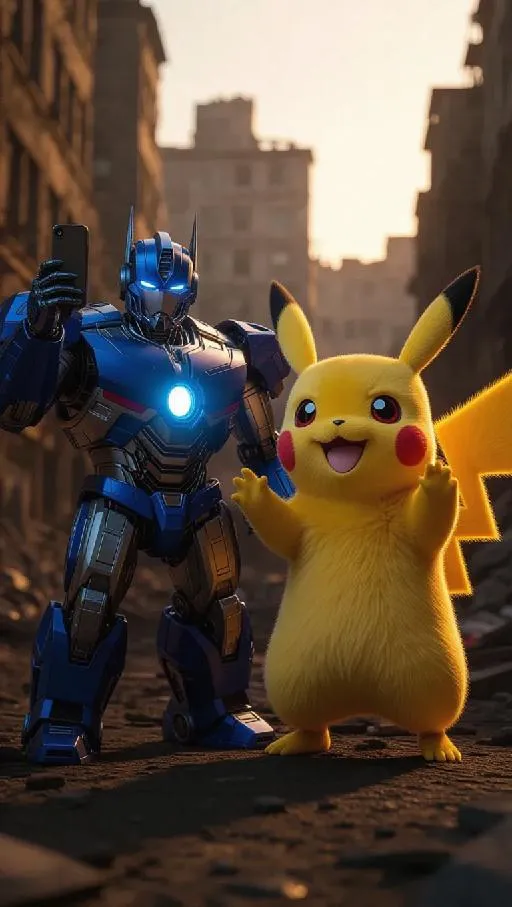
In a photorealistic 8K quality scene, Pikachu and Optimus Prime stand side by side, grinning as they take a selfie with their smartphones. Optimus Prime’s chest glows with a bright blue aura, while Pikachu is surrounded by crackling energy. The comical juxtaposition is set against a backdrop of a dusty gray, devastated city, remnants of Prime’s battles. Soft, warm light from the setting sun casts long shadows, adding a surreal, almost whimsical touch to the urban ruin.

Recreate
arrow
Text to Image

More From VIVAGO AI

Noble Girl AI effects generated image

Noble Girl

Drawing on the facial features, facial proportion, hair styling direction, skin tone and age range of the uploaded avatar (with no emphasis on modern identity traits), the overall temperament is reimagined as that of a noble Victorian lady of the 19th century. The composition frames the figure from the top of the head to just below the chest, with the shot pulled back slightly and the subject occupying a relatively small portion of the frame. The height of the head accounts for approximately a quarter of the total frame height, positioned in the lower-middle area with natural proportions and no stretching or distortion, presenting an elegant and solemn classical portrait composition. She sits in a dignified and upright posture, her head turned gently to the right with her face in a three-quarter view and her chin slightly tucked. Her eyes are almost directly facing the camera, her gaze calm and restrained, reserved and introverted; her expression is solemn yet elegant, her lips naturally closed, and her facial features are distinct with well-proportioned contours. She wears an exquisite Victorian noble wide-brimmed hat that conforms to the aesthetic of European high society in the 19th century, crafted from pieced cream or ivory lace and fabric. The brim is adorned with delicate lace, ribbons and small ornaments, its structure elegantly intricate yet understated. Her hair is styled into a classic feminine coiffure of the same era, with soft, natural strands; a few curled tresses fall beside her temples and cheeks, blending seamlessly with the hat, boasting a delicate texture with a realistic sheen. She is dressed in a historically authentic Victorian court-style gown, featuring a high neckline that fits closely to the neck and a structured corseted bodice. The fabric is selected from silk, lace or brocade, in hues of cream, pale champagne or ivory. The cuffs, neckline and bust are embellished with elaborate lace and decorative details, with a precise cut and rich layering that fully embodies noble bearing. One of her hands is naturally raised near her face or gently resting on her chest, her fingers posed in an elegant and restrained manner. She adorns herself with a pearl ring or classical court-style jewelry, the ornaments understated and exquisite, in perfect harmony with the overall aesthetic. The lighting adopts the style of European classical court portrait painting: the key light shines softly from the upper left of the frame, with the subject’s face and upper body as the visual focal point, while the background is bathed in softer, dimmer light. The light and shadow contrast is clear with delicate gradations, recreating the light and texture of 19th-century academic and court portrait paintings. The background is set as a palace-style interior space, where the outlines of decorated walls, drapery and classical furniture can be faintly seen. The details are rendered in an understated way so as not to distract from the subject, and the background is softly blurred, creating a solemn and elegant aristocratic atmosphere. The entire image fuses ultra-realistic photography with the style of European classical oil painting, boasting a stable composition, ample negative space, rich textures and exquisite details. The low-saturation color palette is imbued with a retro charm, presenting a museum-grade visual effect of a court portrait—elegant, grand and historically authentic. It adheres to a vintage portrait photography style.

White Horse AI effects generated image

White Horse

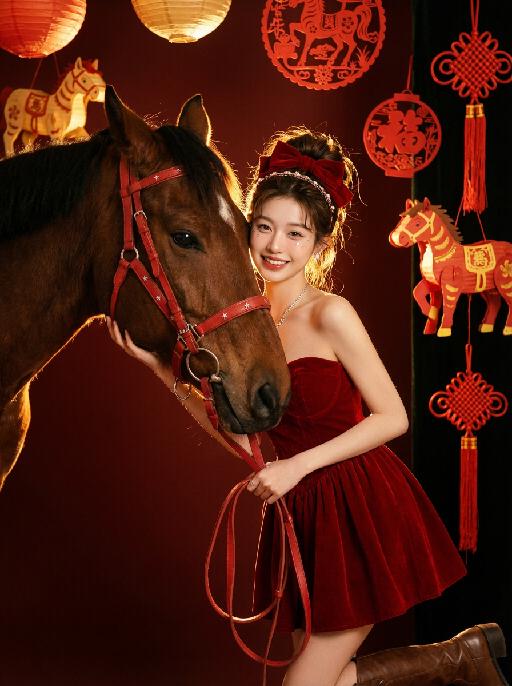
Medium close-up shot: The image in the uploaded picture (with facial features, gender and age unchanged) is located on the right side of the frame, while a close-up of the side head of a white horse is on the left side. This work presents a sweet and dreamy theme characteristic of the Chinese Year of the Horse, with a fairy-tale-like atmosphere and the festive atmosphere of the New Year. The picture has a delicate film texture; Color: Using professional indoor lighting, high-contrast warm light illuminates the person's face and the white horse, the prominent hair light (contour light) forms a golden halo at the edge of the hair, the color is clean and bright, the white horse contrasts strongly with the richly saturated red background, the light contrast is intense, creating a dreamy and warm atmosphere, with a fashionable and avant-garde photography art atmosphere; Color: The main color is a low-saturation dark red background, pure white horse, silver (horses' reins, stars on the skirt), low-saturation, high-quality and warm harmonious colors; Composition: Balanced medium close-up composition. The white steed (one side of the head) occupies the left half of the frame (about 45% - 50%), the person (upper body + head) occupies the right half of the frame (about 40% - 45%), the person and the steed are closely embraced, forming the visual center; Shooting angle: Horizontal perspective, the camera is at the same level as the person's face in the uploaded picture and the side head of the white horse, creating a natural and friendly interaction feeling; Person's posture: The body slightly tilts towards the camera, the upper body gently leans against the white horse, the head is close to the horse's face, with a sweet and brilliant smile, looking straight at the camera, the arms are naturally placed in front of the body, the posture is relaxed and intimate; Clothing: A high-end custom-designed white formal dress (covered with silver star sequins and glitter powder), wearing small and exquisite hair ornaments on the head, silver star glitter makeup around the eyes; Wearing exquisite high-end custom accessories; Fashionable and avant-garde, exquisite and elegant; Image content proportions: Horses (45% - 50%), People (40% - 45%), Red background (about 10%). Image content proportions: Horses (45% - 50%), People (40% - 45%), Red background (about 10%). The authenticity of the film, its artistic quality, the ultra-high-definition 8K image quality of the film, the style of fashion magazines, the avant-garde fashion art style of photography, and the top-notch lighting effects.

Floral Lady AI effects generated image

Floral Lady

Strictly preserve facial features, hairstyle and delicate makeup of reference portrait, young beautiful Indonesian woman with warm native Indonesian skin tone, long glossy light brown wavy hair with a vibrant red plumeria (Indonesian national flower) tucked behind the ear, soft winged eyeliner, dewy coral-red lips, smooth glowing skin; wearing a burgundy puff-sleeve top with classic Indonesian batik floral prints and ruched sweetheart neckline; accessorized with golden gemstone drop earrings, delicate gold heart-pendant necklace, layered gold clover charm bracelets; soft warm tropical natural light filtering through Indonesian indoor space, minimalist Balinese-style interior with wooden carvings and subtle rattan decor, blurred neutral background with soft bokeh; 3:4 vertical bust composition, figure centered and occupying large frame proportion, sharp focus on face and upper body, ultra-realistic, 8K, high definition, rich skin and fabric details, soft cinematic texture, authentic Indonesian feminine charm, warm and elegant atmosphere

Emoji Plog AI effects generated image

Emoji Plog

The figure from the uploaded image (unchanged facial features, age and gender), create an image in a portrait photography style: a realistic Korean-style sweet and cool young girl (wearing brown-framed glasses, trendy Y2K clothing, and Y2K accessories including necklaces and rings) stands in the center of the frame, shot from a bird’s-eye view, with natural facial retouching and a fresh sheer makeup look. Her head takes up a large proportion of the frame with a strong sense of perspective, featuring the style of casual Instagram selfies plus a subtle decorative texture of cute Instagram emojis. The figure occupies 70% of the frame as the main subject; the negative space is dotted with cute light decorations such as colorful stars and doodles (iPhone emojis). In the bottom right corner is a large, cute 3D cartoon doppelgänger of the girl with the same outfit and pose, accounting for a quarter of the entire frame. Add white/yellow star stickers, cloud emoji speech bubbles with cute Korean text, and a number of lovely emojis to the frame. The scene is set inside an elevator with soft indoor natural light; the decorative elements include white/yellow stars. The work features an avant-garde fashion photography style and a magazine art cover aesthetic, with even soft indoor natural light and no harsh shadows, creating a warm and daily atmosphere. The main color palette is a soft low-saturation scheme (white/light gray/black), accented with bright shades of pink/yellow/leopard brown. The overall image is clean and bright, with a fresh film-like filter effect.

Hollywood Star AI effects generated image

Hollywood Star

A medium close-up shot from a frontal perspective with a slight upward tilt, the camera angle is slightly tilted forward. This shot was taken using a professional full-frame digital SLR camera and a 50mm f/1.2 wide-angle fixed-focus lens. The uploaded image shows a person (with unchanged facial features, gender, age, and hairstyle), wearing a tight black sequined sexy dress and wearing high-end custom accessories. This figure is preparing to get into a black luxury car with open doors. The figure turns halfway and looks at the camera, raising one hand and making a gentle waving or shielding gesture. The person has a relaxed and confident smile on their face, with bright and expressive eyes. The scene is on a night-time city street, illuminated by a group of paparazzi and a large number of flashes, creating a high-contrast light and shadow effect, with shadows and bright highlights, and the foreground also includes cameras and flashes, creating the feeling that the celebrity figure is surrounded by paparazzi and cameras. This aesthetic style is the street style of Hollywood celebrity paparazzi, featuring grainy film texture, clear focus on the subject, blurred background and dark tones. The person's face is illuminated by the flash, and the makeup characteristic of the figure is exaggerated false eyelashes, clear cheekbones, nude matte lip color and bright highlights used to enhance the three-dimensionality; the picture adds dark corners at the four corners and bright parts in the middle, creating a strong contrast between light and shadow.

Queen AI effects generated image

Queen

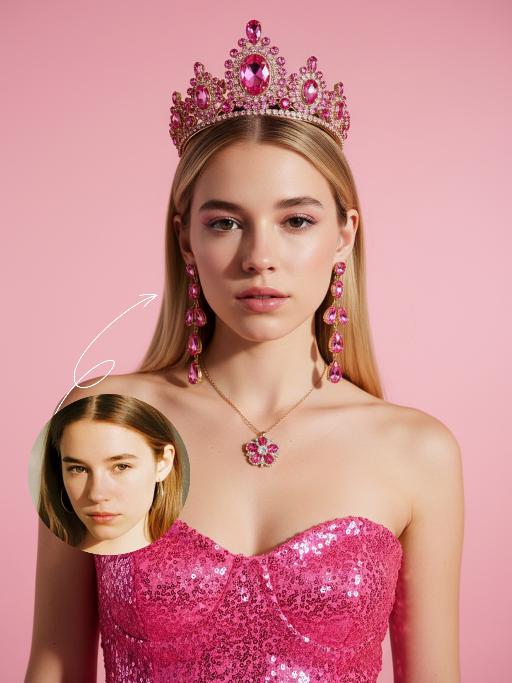
Use the exact same facial features, gender, and age as the uploaded image.Hyper-realistic half-body portrait photography, cinematic lighting, 8K resolution, shallow depth of field, rich and warm color palette. her hair styled in an elegant high bun with a few red roses tucked into the side of her hair. She wears dangling gold earrings with black gemstones, a thin gold necklace, and a gold ring on her right hand. Her makeup is sophisticated, featuring bold red lipstick and defined eyes. She is dressed in a strapless, floor-length gown made of deep red pleated satin fabric, the texture of the folds is extremely detailed. She holds a lush bouquet of fully bloomed red roses with green leaves in her arms, one rose resting gently on her right hand. She sits gracefully, looking directly at the camera with a calm and alluring expression. The background is a smooth, matte dark gray studio backdrop. On the dark floor around her, there are scattered ballet pointe shoes and a single fallen rose with green leaves. The overall style is vintage and luxurious, with soft directional lighting highlighting the sheen of the satin and the velvety texture of the rose petals, creating a strong sense of drama and elegance..The text "WOMEN'S DAY" is displayed at the top in large, bold, stylized artistic font.The text "Wish every her" is positioned in the lower right corner in a complementary artistic font.

Load more

Next-Gen Multi-Model AI Video Architecture

Vivago AI isn't just one engine—it’s a unified hub for the world’s most advanced video AI. Whether you need cinematic realism or high-speed social content, we provide the right model for your creative vision.

Free Generate

Beauty and Dolphins

Vacation Time

Stellar Tear

Fish Tank Supervisor

Cinematic Quality & Precision Control

Enables 4K resolution with multi-lens motion control, generating delicate scene via text prompts for customized cinematography.​

TRY NOW

Dynamic AV Sync

Auto-generates original audio to avoid copyright issues. Build 3D immersive environments through layered sound design automatically.

TRY NOW

OpenAI Sora 2

​Advanced visual storytelling with unparalleled physics and consistency.

TRY NOW

Kling v2.6 Pro

Industry-leading cinematic image animation and motion control.

TRY NOW

Google Veo 3 & 3.1

Ultra-fast generation with enhanced realism for creative workflows.

TRY NOW

Vivago AI 2.0

Our proprietary model optimized for efficiency, speed, and cost-effective generation.

TRY NOW

Users' Voice

We listen carefully to the opinions of every user.
Free Generate
Contact Us
I tried the Lip Sync feature inside Vivago.ai’s AI Video Generator for my educational podcast, and the results were stunning! The avatar's lip movements perfectly matched my audio recording, creating a professional AI-generated video without complex editing. Compared with tools like OpenAI Sora 2 and Google Veo 3.1, Vivago Image-to-Video delivers fast, studio-quality results online. It saved me hours of post-production work.
ElenaM (Spain)
Vivago’s Image-to-Video AI transformed my marketing workflow. I uploaded a product image and described the launch scene in text, and it generated a 10-second cinematic AI video with background music and dynamic visuals. The output quality rivals Kling v2.6 Pro and Google Veo 3 Fast. It’s now my go-to AI video generator for social media ads and product campaigns.
KenjiT (Japan)
As a digital artist, I use Vivago.ai 2.0 daily for Image-to-Image and AI Image-to-Video creation. The e-book covers and animated visuals I generate for clients look cinematic and professional. Unlike many standalone AI tools, Vivago integrates multiple leading models into one platform, making it easier to create copyright-safe AI images and videos for publishing.
ChenL (China)
I tried the Lip Sync feature inside Vivago.ai’s AI Video Generator for my educational podcast, and the results were stunning! The avatar's lip movements perfectly matched my audio recording, creating a professional AI-generated video without complex editing. Compared with tools like OpenAI Sora 2 and Google Veo 3.1, Vivago Image-to-Video delivers fast, studio-quality results online. It saved me hours of post-production work.
ElenaM (Spain)
Vivago’s Image-to-Video AI transformed my marketing workflow. I uploaded a product image and described the launch scene in text, and it generated a 10-second cinematic AI video with background music and dynamic visuals. The output quality rivals Kling v2.6 Pro and Google Veo 3 Fast. It’s now my go-to AI video generator for social media ads and product campaigns.
KenjiT (Japan)
As a digital artist, I use Vivago.ai 2.0 daily for Image-to-Image and AI Image-to-Video creation. The e-book covers and animated visuals I generate for clients look cinematic and professional. Unlike many standalone AI tools, Vivago integrates multiple leading models into one platform, making it easier to create copyright-safe AI images and videos for publishing.
ChenL (China)
I absolutely love Vivago’s AI Image-to-Video Generator. As a travel blogger, static images often fail to capture real atmosphere, but Vivago helps me turn photos into vivid cinematic AI videos with motion effects. It feels comparable to OpenAI Sora 2 and Google Veo 3.1, but more accessible and faster for creators who need high-quality AI videos online.
LiamK (Australia)
I tried the Lip Sync feature inside Vivago.ai’s AI Video Generator for my educational podcast, and the results were stunning! The avatar's lip movements perfectly matched my audio recording, creating a professional AI-generated video without complex editing. Compared with tools like OpenAI Sora 2 and Google Veo 3.1, Vivago Image-to-Video delivers fast, studio-quality results online. It saved me hours of post-production work.
ElenaM (Spain)
Vivago’s Image-to-Video AI transformed my marketing workflow. I uploaded a product image and described the launch scene in text, and it generated a 10-second cinematic AI video with background music and dynamic visuals. The output quality rivals Kling v2.6 Pro and Google Veo 3 Fast. It’s now my go-to AI video generator for social media ads and product campaigns.
KenjiT (Japan)
As a digital artist, I use Vivago.ai 2.0 daily for Image-to-Image and AI Image-to-Video creation. The e-book covers and animated visuals I generate for clients look cinematic and professional. Unlike many standalone AI tools, Vivago integrates multiple leading models into one platform, making it easier to create copyright-safe AI images and videos for publishing.
ChenL (China)
I absolutely love Vivago’s AI Image-to-Video Generator. As a travel blogger, static images often fail to capture real atmosphere, but Vivago helps me turn photos into vivid cinematic AI videos with motion effects. It feels comparable to OpenAI Sora 2 and Google Veo 3.1, but more accessible and faster for creators who need high-quality AI videos online.
LiamK (Australia)
Using Vivago.ai’s Image-to-Video AI has greatly enhanced my classroom teaching. I transform textbook notes into historical AI videos with cinematic filters and dynamic animations. Compared with tools like Kling v2.6 Pro and Google Veo 3 Fast, Vivago offers faster generation and easier parameter control for educators who need reliable AI video creation.
RajivG (India)
I frequently create AI videos on Vivago and publish them on TikTok and YouTube Shorts. The AI video templates and trending content ideas help me produce viral-ready clips quickly. With Vivago’s integrated models—including advanced video engines similar to OpenAI Sora 2—I can generate anime-style and cinematic social media videos that drive high engagement.
MarieJ (Spain)
What attracts me most about Vivago.ai is not only the powerful AI Video Generator but also the active AIGC creator community. It combines AI Image-to-Video, Text-to-Video, and leading model integrations like Google Veo 3.1 into one creative platform.
TomW (India)
At first, I was hesitant about using AI video tools. But after trying Vivago Image-to-Video, I realized how easy it is to create professional AI-generated videos online. I just upload an image, add a short prompt, and adjust a few settings. The results are cinematic and copyright-safe, which is essential for commercial projects.
HectorC (Mexico)
Using Vivago.ai’s Image-to-Video AI has greatly enhanced my classroom teaching. I transform textbook notes into historical AI videos with cinematic filters and dynamic animations. Compared with tools like Kling v2.6 Pro and Google Veo 3 Fast, Vivago offers faster generation and easier parameter control for educators who need reliable AI video creation.
RajivG (India)
I frequently create AI videos on Vivago and publish them on TikTok and YouTube Shorts. The AI video templates and trending content ideas help me produce viral-ready clips quickly. With Vivago’s integrated models—including advanced video engines similar to OpenAI Sora 2—I can generate anime-style and cinematic social media videos that drive high engagement.
MarieJ (Spain)
What attracts me most about Vivago.ai is not only the powerful AI Video Generator but also the active AIGC creator community. It combines AI Image-to-Video, Text-to-Video, and leading model integrations like Google Veo 3.1 into one creative platform.
TomW (India)
At first, I was hesitant about using AI video tools. But after trying Vivago Image-to-Video, I realized how easy it is to create professional AI-generated videos online. I just upload an image, add a short prompt, and adjust a few settings. The results are cinematic and copyright-safe, which is essential for commercial projects.
HectorC (Mexico)