Text to Image

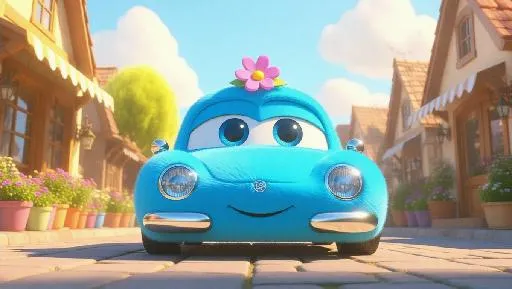
A sleek, Jellycat-style luxury car with soft, rounded edges and large, expressive eyes is parked outside a magical garden shop in a colorful, lively town. Its body is covered in plush, sky blue fur, with shiny silver paws and a tiny, sparkling flower on top. The bright blue sky above is dotted with fluffy clouds, and warm sunlight filters through, creating delicate shadows that highlight the car's friendly texture. The scene exudes a delightful, whimsical charm, perfect for a children's storybook.

Recreate
arrow
Text to Image

More From VIVAGO AI

Text to Image AI effects generated image

Text to Image

import numpy as np import matplotlib.pyplot as plt # Parameters width, height = 800, 800 zoom = 1.5 escape_radius = 10 iterations = 50 phi = (1 + np.sqrt(5)) / 2 # Golden ratio # Setup complex plane x = np.linspace(-zoom, zoom, width) y = np.linspace(-zoom, zoom, height) X, Y = np.meshgrid(x, y) Z = X + 1j * Y C = np.copy(Z) # Initialize arrays escape = np.zeros(Z.shape) angle = np.zeros(Z.shape) # Iteration loop for i in range(iterations): # Apply weird recursive fractal formula Z = (Z**phi * np.exp(1j * np.pi * Z)) / (1 + np.sin(Z)) # Mask of points that haven't escaped yet mask = np.abs(Z) < escape_radius # Store angle and iteration info angle[mask] = np.angle(Z[mask]) escape[mask] = i + 1 - np.log(np.log2(np.abs(Z[mask]) + 1e-10)) # smooth # Normalize and map to HSV hue = (angle % (2 * np.pi)) / (2 * np.pi) saturation = np.abs(np.sin(np.abs(Z))) value = np.clip(escape / iterations, 0, 1) # Combine HSV and convert to RGB HSV = np.stack((hue, saturation, value), axis=-1) RGB = plt.cm.hsv(HSV[..., 0]) * HSV[..., 1][..., None] RGB[..., :3] *= HSV[..., 2][..., None] # Apply brightness # Show result plt.figure(figsize=(8, 8)) plt.imshow(RGB, extent=(-zoom, zoom, -zoom, zoom)) plt.axis("off") plt.title("Alien Fractal Miner") plt.show()

Load more