Text to Image

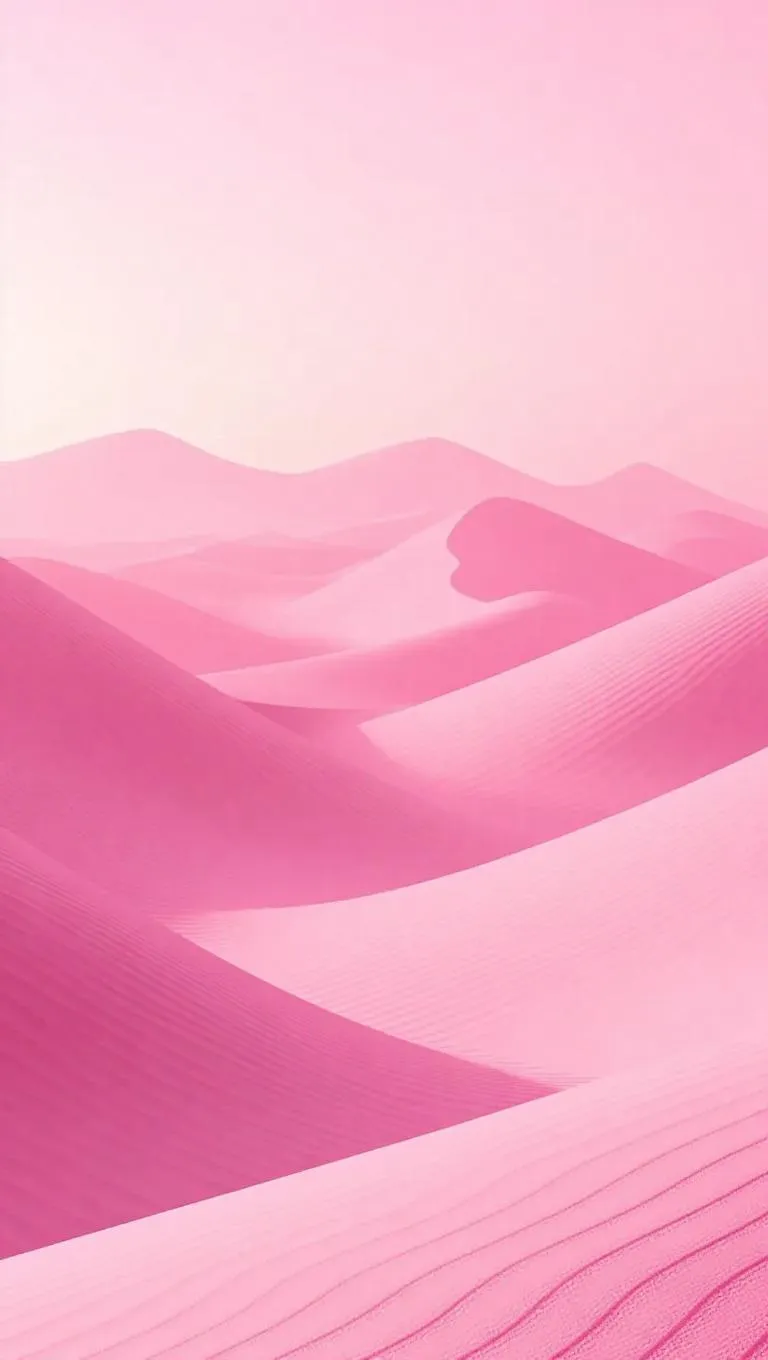
In an ethereal pink world, vast sand dunes with surfaces like pink topaz and grains of luminous quartz create a mystical desert. Pink mist hangs in the air, filtering soft, warm light that enhances the otherworldly atmosphere. The scene exudes a mysterious, magical realism style, blending the natural with the supernatural.

Recreate
arrow
Text to Image

More From VIVAGO AI

White Lion AI effects generated image

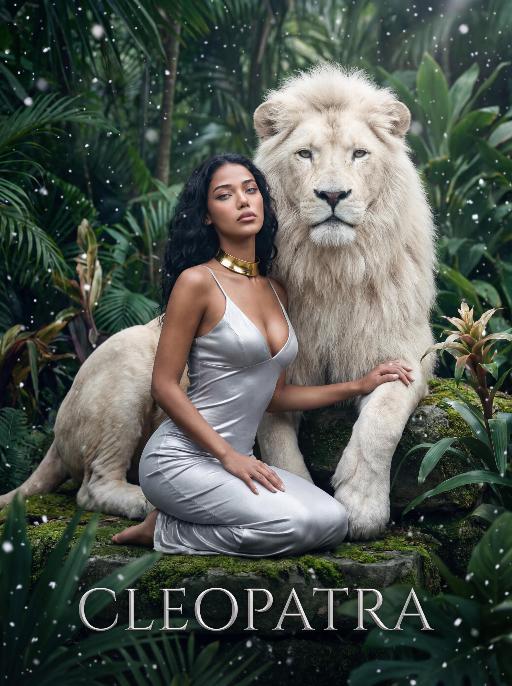
White Lion

The character in the uploaded picture (unchanged facial features, gender and age). A striking woman embodying the persona of Cleopatra, seated gracefully beside a majestic white lion. She has long, wavy black hair cascading in soft waves, her eyes wide open, head tilted slightly upward, exuding an air of disdain and supreme confidence, as if looking down on all before her. The white lion, with its pure white fur and powerful build, sits calmly behind her, one paw resting gently on her shoulder, looking directly at the viewer with a calm, noble demeanor. She wears a form-fitting silver spaghetti-strap dress with a deep V-neckline, accentuating her figure. Around her neck, she wears a bold gold choker necklace. She kneels on a moss-covered stone in a lush, dense tropical jungle, one hand resting lightly on the lion's leg. The scene is filled with large, vibrant green tropical foliage (like palm fronds and monstera leaves), and delicate snowflakes are falling gently, creating a surreal and magical atmosphere. The setting is a mysterious, ancient jungle, with the air filled with falling snow, contrasting the lush greenery with the cool white of the snowflakes. At the bottom of the image, the word "CLEOPATRA" is displayed in an elegant, silver serif font. The image is rendered in a cinematic, fantasy art style, with dramatic, high-contrast lighting that highlights the sheen of the silver dress, the texture of the lion's white fur, and the richness of the green jungle. The color palette is ethereal, featuring deep greens, cool whites, and the metallic sheen of the silver and gold, creating a mysterious, regal, and timeless atmosphere. The overall aesthetic is detailed, evocative, and reminiscent of a fantasy movie poster

Queen AI effects generated image

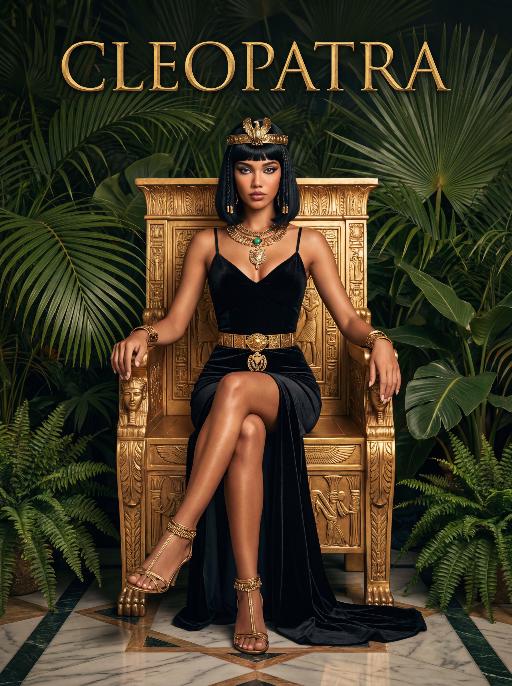
Queen

The character in the uploaded picture (unchanged facial features, gender and age).A striking woman embodying the persona of Cleopatra, seated regally on an ornate golden throne. She has a sleek black bob haircut with blunt bangs, a sharp, confident gaze, and a poised, authoritative expression. She wears a form-fitting black velvet spaghetti-strap gown with a high slit, revealing one leg. Her accessories are opulent: a golden pharaoh-style headdress with a central eagle motif, a layered gold necklace culminating in a large, ornate pendant, a wide gold belt with a matching large pendant, gold bracelets on both wrists, and gold ankle bracelets paired with strappy gold sandals. She sits with one leg crossed over the other, one hand resting on the throne's armrest, the other on her lap. The throne is intricately carved with gold accents and topped with golden finials. The setting is a lush, verdant tropical jungle, filled with large, vibrant green palm fronds and broad-leafed ferns that frame the scene. The floor is a polished marble surface with a geometric pattern. Above her, the word "CLEOPATRA" is displayed in an elegant, golden, serif font. The image is rendered in a vintage Hollywood movie poster style, with dramatic, high-contrast lighting that emphasizes the richness of the black velvet and the sheen of the gold. The color palette is rich and saturated, with deep greens, luxurious golds, and stark blacks, creating an opulent, mysterious, and timeless atmosphere. The overall aesthetic is cinematic, detailed, and evocative of ancient Egyptian grandeur.

Hair Style AI effects generated image

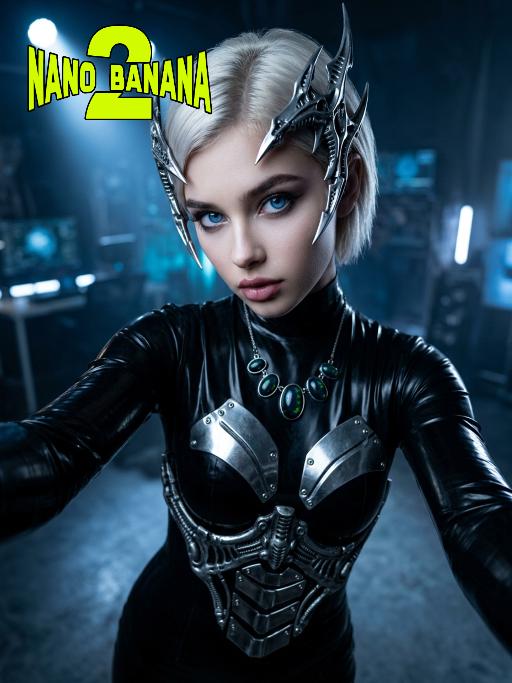
Hair Style

Medium close-up selfie shot: This is a set of fashion photography works with a futuristic theme, highlighting extremely futuristic silver metal headpieces and the model (the image of the model in this shot is consistent with the person in the uploaded picture, including facial features, gender and age). This is a fashion photography work belonging to the cyberpunk style. The model has platinum blonde, neatly trimmed short hair, wears a black latex tight-fitting dress, is equipped with silver metal armor plates, and has a Gothic-style exquisite makeup, exuding a sense of futurism and avant-garde. The accessories include sharp-edged biological mechanical headpieces and a necklace with glowing black opals. The model is in an energetic selfie pose, with her arms stretched forward to hold the camera, and the perspective is a high angle with a slight tilt. The background is a dark, melancholic photography studio, with cold blue spotlights penetrating the air. The overall style is simple, highly futuristic, and slightly intimidating. The photography effect is realistic, with a resolution of 8K, using film-level lighting.

White Clothes AI effects generated image

White Clothes

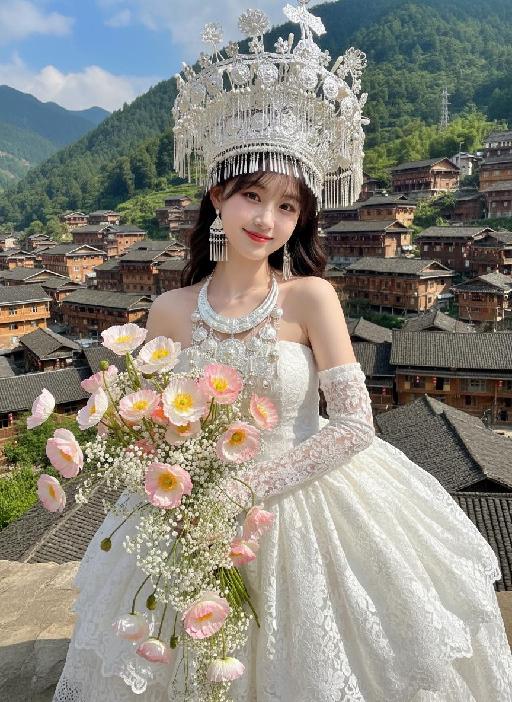
Strictly lock the facial features of the uploaded portrait (completely preserve facial contours, native skin tone, hairstyle and age). From a high-angle top-down perspective, a young and sweet East Asian woman tilts her body gently to the right, with a gentle and healing smile and bright, captivating eyes. She wears an ornate and intricate large-horned headdress of Miao silver ornaments, a multi-layered Miao silver necklace, a white lace strapless puffy dress, and long white lace gloves. Her hands hold a large bouquet of mixed pink-white gradient poppies and small white flowers, which falls naturally and extends toward the camera. The background features the cascading wooden stilted buildings of Xijiang Qianhu Miao Village in Guizhou, lush green mountains in the distance, and a fresh cloudy blue sky. Bright natural sunlight illuminates the entire scene, casting distinct soft shadows on the ground and the hem of the dress; warm sunlight creates gentle highlights on the Miao silver ornaments, lace fabric and flower petals, forming a clear light and shadow contrast. High-definition realistic portrait photography, soft and bright natural light, fresh and transparent colors, blending ethnic style with a fairy-tale vibe.

With Snowman

The person in the uploaded image retains their original facial features (with tiny snowflakes dusted on the hair strands), wearing a natural and fresh makeup look with a naturally blurred skin finish, and lying gently on the snow with a soft smile. They are dressed in an off-white plush coat paired with a plaid scarf in brown, gray and white tones; a mini snowman (adorned with a floral scarf and twig arms) stands beside them. The scene is a winter outdoor snowfield with bright yet soft sunlight, fine snowflakes floating in the air, and a blurred snowscape in pale blue tones in the background. The style is a high-definition portrait photo with soft light and shadow effects and lens bokeh (out-of-focus highlights) special effects, exuding an overall fresh and healing winter atmosphere. The colors are soft and natural (dominated by blue and white with warm tone accents), with rich details (the plush texture and snowflake texture are clearly rendered), featuring high resolution and exquisite image quality.

Diwali AI effects generated image

Diwali

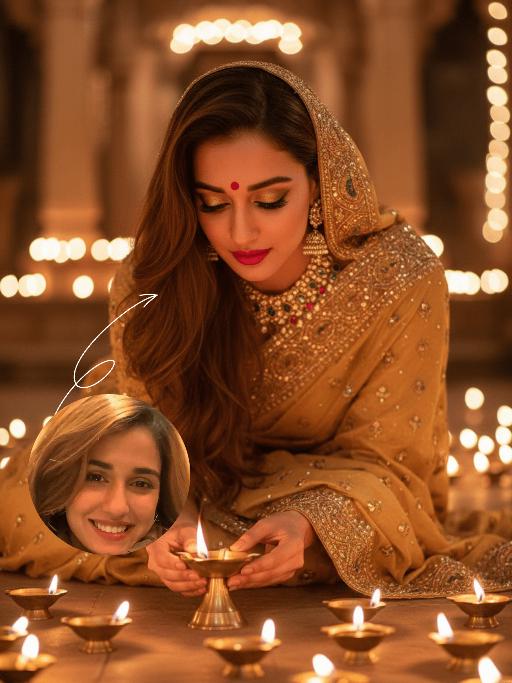
The identity of the uploaded portrait is strictly preserved (retaining facial contours, authentic Indian skin tone, hairstyle and age). This is a bust portrait that captures the original natural features of the Indian woman in the reference image: she has a delicate and fair face with a vermilion red bindi on her forehead and a colorful gemstone maang tikka adorning her brow, complemented by exquisitely elaborate eye makeup and full, vivid lip color, with a gentle and devout expression. She is dressed in a traditional sari with intricate golden embroidery, its edges adorned with elaborate patterns and paired with a matching headscarf; the overall color palette echoes the warm luminous ambiance of Diwali. Leaning forward gently, she places a lit brass oil lamp carefully with both hands, her gaze fixed intently on the wick, her expression serene and filled with reverence. Her face takes up a moderate proportion of the frame, allowing the delicate makeup details and her devout demeanor to be seen clearly. Set in an indoor space on Diwali night, the floor is covered with lit brass oil lamps, whose warm yellow candlelight casts a soft halo all around. The background is softly blurred to highlight the figure’s interaction with the oil lamp. With the warm glow of the oil lamps as the primary light source, the light gently outlines her facial contours and the textured details of her attire, creating a warm and tranquil festive atmosphere with rich, warm hues. Boasting 8K ultra-high definition resolution and commercial-grade portrait quality, the image features crisp, sharp details and rich color layering, emphasizing the theme of "light" in Diwali and the profound piety of the figure.

Golden 2026 AI effects generated image

Golden 2026

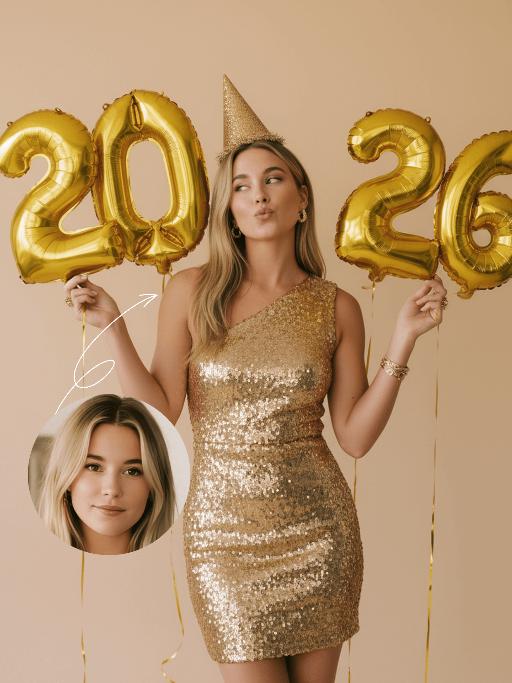
The figure from the uploaded image (with unchanged facial features, age and gender, natural skin retouching on the face, and a fresh, sheer makeup look). This is a fashion portrait photography piece with a centered composition and an eye-level shooting perspective, captured with a Canon EOS R5 camera paired with an 85mm f/1.4 lens. The figure holds golden number balloons (20 and 26) in each hand, with arms raised naturally, body slightly turned and head tilted gently. Their gaze is directed diagonally upward, with a playful pout and a relaxed expression, striking an elegant posture. They are dressed in a high-customized gold sequined one-shoulder slim-fit dress with a distinctive design, and wear a gold glitter party hat, paired with high-end, luxurious and exquisitely designed accessories (necklace, rings, earrings, bracelet). Set against a solid pale off-white background with soft warm studio lighting, the image features high-texture skin details and sharply defined sequin details, presenting a delicate and sophisticated visual effect. It adopts an avant-garde fashion photography style with high-end photographic quality and a low-saturation color palette.

The Matrix AI effects generated image

The Matrix

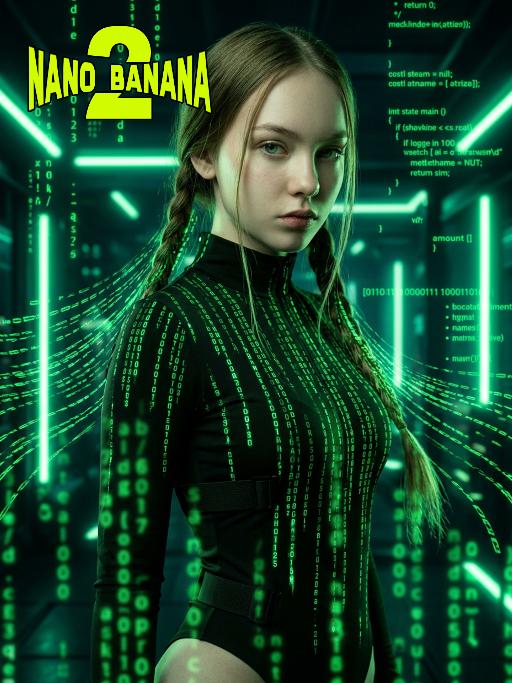
Medium-close-up shot (showing the upper body of the protagonist, from above the thigh area): In the uploaded picture, the features (unchanged) and gender (also unchanged) of the character are clearly visible. Standing in the center of the frame, with a serious and cold expression, a flowing bright green digital coding stream is presented in his hair. Wearing a high-neck tight outfit, it is covered with a green matrix-like digital rain. It has a cyberpunk style, adopting the color scheme of "The Matrix", with a dark background, dramatic side light, and neon lights emitting bright green light, presenting a green matrix-like digital rain background in the dark environment. The skin texture is fine, the details are realistic, with a clear focus, a cinematic composition, and a style of avant-garde fashion photography. This is a masterpiece, of superior quality, surreal 8K image. There are also some green matrix-like digital rains in the foreground, with a large depth of field effect, and a wide aperture shooting.

Uncertainty

Hyper-realistic photography: The two uploaded images depict the characters in the same scene. The first character (with unchanged facial features, expressions and age) has long curly hair and light brown hair, touching the deep red wall beautifully and charmingly, wearing a tight and sexy red nightgown. The other character (with unchanged facial features, expressions and age) is wearing a smooth and loose black patterned shirt. There is an intimate and passionate eye contact between the two characters, creating a sexy and romantic atmosphere. The dim modern bedroom background features dark-colored bed sheets and red neon signs shining on the walls; lighting adjustment suggestion: high-end film-level lighting, strong contrast of light and dark, soft melancholic shadows, deep and rich shadows, subtle highlights on the skin, shallow depth of field, clearly focused on the couple; color tone suggestion: warm and melancholic color combination, mainly saturated red and dark black, natural skin with warm tones, rich immersive color grading, fashion-forward photography, extreme ambiguous atmosphere, high-definition film style. Dark interior and red light and shadow

Load more

Next-Gen Multi-Model AI Video Architecture

Vivago AI isn't just one engine—it’s a unified hub for the world’s most advanced video AI. Whether you need cinematic realism or high-speed social content, we provide the right model for your creative vision.

Free Generate

Beauty and Dolphins

Vacation Time

Stellar Tear

Fish Tank Supervisor

Cinematic Quality & Precision Control

Enables 4K resolution with multi-lens motion control, generating delicate scene via text prompts for customized cinematography.​

TRY NOW

Dynamic AV Sync

Auto-generates original audio to avoid copyright issues. Build 3D immersive environments through layered sound design automatically.

TRY NOW

OpenAI Sora 2

​Advanced visual storytelling with unparalleled physics and consistency.

TRY NOW

Kling v2.6 Pro

Industry-leading cinematic image animation and motion control.

TRY NOW

Google Veo 3 & 3.1

Ultra-fast generation with enhanced realism for creative workflows.

TRY NOW

Vivago AI 2.0

Our proprietary model optimized for efficiency, speed, and cost-effective generation.

TRY NOW

Users' Voice

We listen carefully to the opinions of every user.
Free Generate
Contact Us
I tried the Lip Sync feature inside Vivago.ai’s AI Video Generator for my educational podcast, and the results were stunning! The avatar's lip movements perfectly matched my audio recording, creating a professional AI-generated video without complex editing. Compared with tools like OpenAI Sora 2 and Google Veo 3.1, Vivago Image-to-Video delivers fast, studio-quality results online. It saved me hours of post-production work.
ElenaM (Spain)
Vivago’s Image-to-Video AI transformed my marketing workflow. I uploaded a product image and described the launch scene in text, and it generated a 10-second cinematic AI video with background music and dynamic visuals. The output quality rivals Kling v2.6 Pro and Google Veo 3 Fast. It’s now my go-to AI video generator for social media ads and product campaigns.
KenjiT (Japan)
As a digital artist, I use Vivago.ai 2.0 daily for Image-to-Image and AI Image-to-Video creation. The e-book covers and animated visuals I generate for clients look cinematic and professional. Unlike many standalone AI tools, Vivago integrates multiple leading models into one platform, making it easier to create copyright-safe AI images and videos for publishing.
ChenL (China)
I tried the Lip Sync feature inside Vivago.ai’s AI Video Generator for my educational podcast, and the results were stunning! The avatar's lip movements perfectly matched my audio recording, creating a professional AI-generated video without complex editing. Compared with tools like OpenAI Sora 2 and Google Veo 3.1, Vivago Image-to-Video delivers fast, studio-quality results online. It saved me hours of post-production work.
ElenaM (Spain)
Vivago’s Image-to-Video AI transformed my marketing workflow. I uploaded a product image and described the launch scene in text, and it generated a 10-second cinematic AI video with background music and dynamic visuals. The output quality rivals Kling v2.6 Pro and Google Veo 3 Fast. It’s now my go-to AI video generator for social media ads and product campaigns.
KenjiT (Japan)
As a digital artist, I use Vivago.ai 2.0 daily for Image-to-Image and AI Image-to-Video creation. The e-book covers and animated visuals I generate for clients look cinematic and professional. Unlike many standalone AI tools, Vivago integrates multiple leading models into one platform, making it easier to create copyright-safe AI images and videos for publishing.
ChenL (China)
I absolutely love Vivago’s AI Image-to-Video Generator. As a travel blogger, static images often fail to capture real atmosphere, but Vivago helps me turn photos into vivid cinematic AI videos with motion effects. It feels comparable to OpenAI Sora 2 and Google Veo 3.1, but more accessible and faster for creators who need high-quality AI videos online.
LiamK (Australia)
I tried the Lip Sync feature inside Vivago.ai’s AI Video Generator for my educational podcast, and the results were stunning! The avatar's lip movements perfectly matched my audio recording, creating a professional AI-generated video without complex editing. Compared with tools like OpenAI Sora 2 and Google Veo 3.1, Vivago Image-to-Video delivers fast, studio-quality results online. It saved me hours of post-production work.
ElenaM (Spain)
Vivago’s Image-to-Video AI transformed my marketing workflow. I uploaded a product image and described the launch scene in text, and it generated a 10-second cinematic AI video with background music and dynamic visuals. The output quality rivals Kling v2.6 Pro and Google Veo 3 Fast. It’s now my go-to AI video generator for social media ads and product campaigns.
KenjiT (Japan)
As a digital artist, I use Vivago.ai 2.0 daily for Image-to-Image and AI Image-to-Video creation. The e-book covers and animated visuals I generate for clients look cinematic and professional. Unlike many standalone AI tools, Vivago integrates multiple leading models into one platform, making it easier to create copyright-safe AI images and videos for publishing.
ChenL (China)
I absolutely love Vivago’s AI Image-to-Video Generator. As a travel blogger, static images often fail to capture real atmosphere, but Vivago helps me turn photos into vivid cinematic AI videos with motion effects. It feels comparable to OpenAI Sora 2 and Google Veo 3.1, but more accessible and faster for creators who need high-quality AI videos online.
LiamK (Australia)
Using Vivago.ai’s Image-to-Video AI has greatly enhanced my classroom teaching. I transform textbook notes into historical AI videos with cinematic filters and dynamic animations. Compared with tools like Kling v2.6 Pro and Google Veo 3 Fast, Vivago offers faster generation and easier parameter control for educators who need reliable AI video creation.
RajivG (India)
I frequently create AI videos on Vivago and publish them on TikTok and YouTube Shorts. The AI video templates and trending content ideas help me produce viral-ready clips quickly. With Vivago’s integrated models—including advanced video engines similar to OpenAI Sora 2—I can generate anime-style and cinematic social media videos that drive high engagement.
MarieJ (Spain)
What attracts me most about Vivago.ai is not only the powerful AI Video Generator but also the active AIGC creator community. It combines AI Image-to-Video, Text-to-Video, and leading model integrations like Google Veo 3.1 into one creative platform.
TomW (India)
At first, I was hesitant about using AI video tools. But after trying Vivago Image-to-Video, I realized how easy it is to create professional AI-generated videos online. I just upload an image, add a short prompt, and adjust a few settings. The results are cinematic and copyright-safe, which is essential for commercial projects.
HectorC (Mexico)
Using Vivago.ai’s Image-to-Video AI has greatly enhanced my classroom teaching. I transform textbook notes into historical AI videos with cinematic filters and dynamic animations. Compared with tools like Kling v2.6 Pro and Google Veo 3 Fast, Vivago offers faster generation and easier parameter control for educators who need reliable AI video creation.
RajivG (India)
I frequently create AI videos on Vivago and publish them on TikTok and YouTube Shorts. The AI video templates and trending content ideas help me produce viral-ready clips quickly. With Vivago’s integrated models—including advanced video engines similar to OpenAI Sora 2—I can generate anime-style and cinematic social media videos that drive high engagement.
MarieJ (Spain)
What attracts me most about Vivago.ai is not only the powerful AI Video Generator but also the active AIGC creator community. It combines AI Image-to-Video, Text-to-Video, and leading model integrations like Google Veo 3.1 into one creative platform.
TomW (India)
At first, I was hesitant about using AI video tools. But after trying Vivago Image-to-Video, I realized how easy it is to create professional AI-generated videos online. I just upload an image, add a short prompt, and adjust a few settings. The results are cinematic and copyright-safe, which is essential for commercial projects.
HectorC (Mexico)