Text to Image

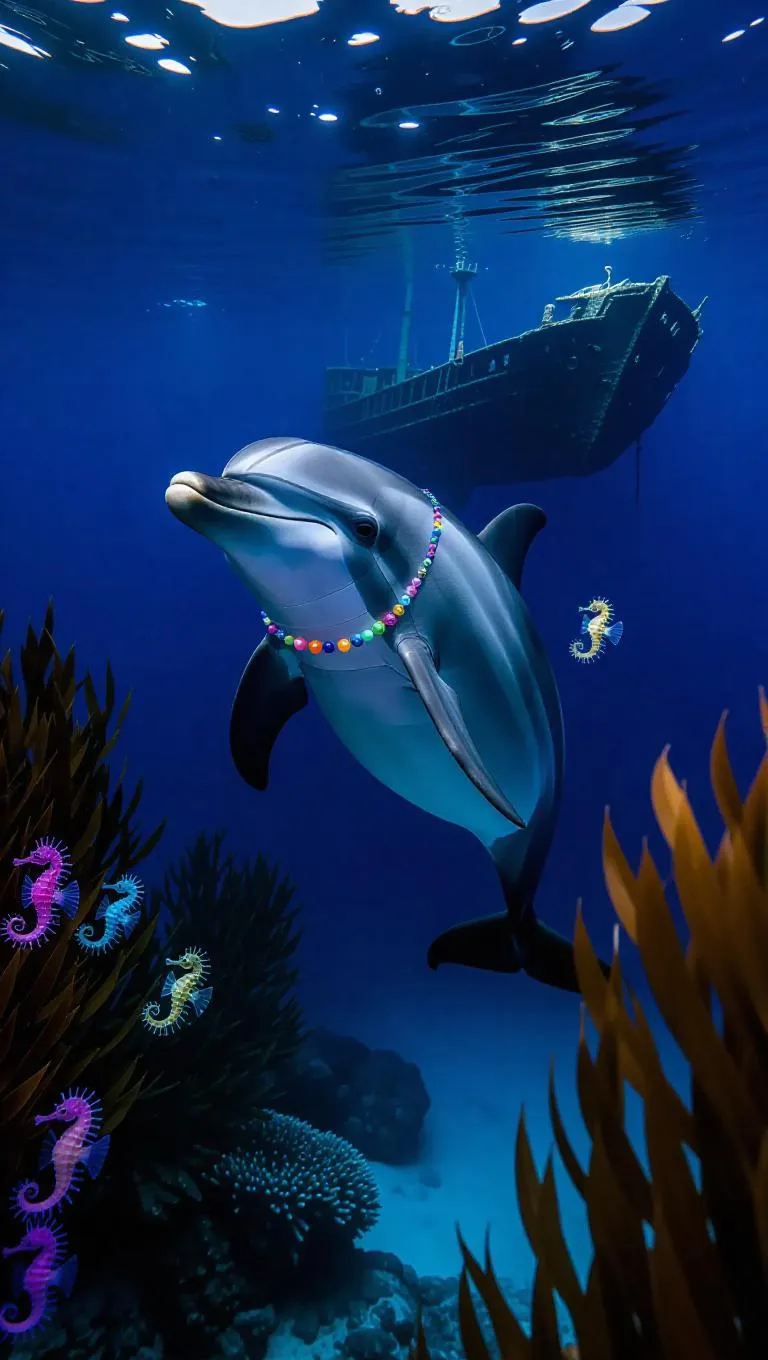
A curious dolphin swims through the deep blue waters of the Bahamas, its sleek body glimmering in the moonlight. The dolphin wears a colorful necklace with a tiny light, illuminating the surroundings. Around it, vibrant seaweed and playful seahorses create a lively scene. In the distance, a large shipwreck rests on the ocean floor, covered in marine life.

Recreate
arrow
Text to Image

More From VIVAGO AI

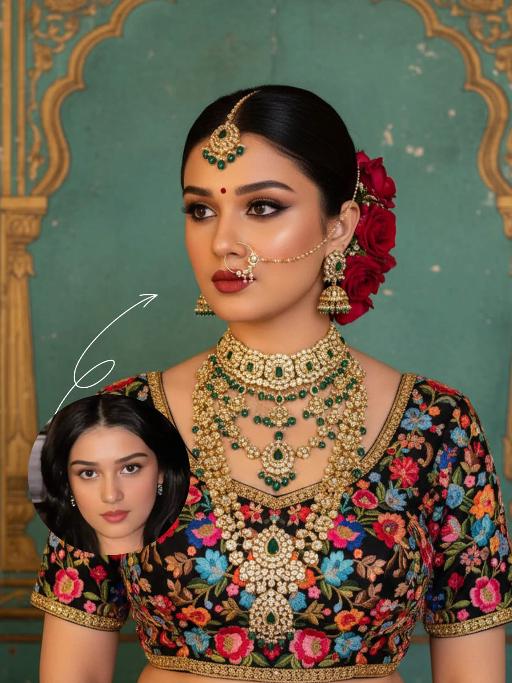
Noble Queen AI effects generated image

Noble Queen

The identity of the uploaded portrait is strictly preserved (retaining facial contours, authentic Indian skin tone, hairstyle and age). This is a bust portrait with a 3:4 aspect ratio, featuring an elegant and opulent Indian bride with rich, exquisite makeup: smoldering smoky eyes paired with a matte vintage red lip, and a red crystal bindi adorned on her forehead. Her hair is styled into a sleek high bun, with lush clusters of red roses dotted on both sides and golden beading interspersed among the tresses. An ornate maang tikka inlaid with emeralds and pearls adorns her forehead, a delicately openwork gold nath graces her nostril, multi-layered dangling gold bead earrings frame her ears, and four layers of elaborate heavy gold necklaces are stacked around her neck. Ranging from a choker to a long necklace, they are inlaid with emeralds, pearls and micro-diamonds in sequence, exuding rich and luxurious layering. She is wearing a black satin blouse, fully embellished with colorful floral embroidery in red, pink, blue and orange, and trimmed with a golden border on the edges. The background is a retro painted wall in Indian palace style: with a weathered turquoise base, it is adorned with golden carved arches and patterns on top, boasting rich, saturated colors with a timeless vintage texture. Professional portrait lighting is adopted: a warm-toned key light illuminates the bride’s face and upper body, while fill light defines her contours, highlighting the luster of the gold jewelry and the color layering of the embroidery, and creating a strong atmosphere of South Asian palace luxury. The style is a retro Indian royal bridal portrait, with ultra-high definition and delicate details, rich and saturated colors, and abundant intricate textures that perfectly restore the aesthetics of traditional aristocracy.

Cyberpunk 2026

The figure from the uploaded image (with unchanged facial features), captured in a medium close-up shot of the upper body, with hair dyed red and wearing black square-framed sunglasses (with transparent red lenses). The figure is dressed in a glossy black leather sportswear set (jacket + track pants) printed with the Chinese character "Fu" pattern, black gloves (holding a sparkler in one hand), and stylish cool black leather shoes, plus an ultra-cool helmet cap adorned with glowing lights that fit the contour of the cap as decorations. The figure stands on a neon-lit city street in cyberpunk style, set against a rainy night backdrop—featuring glowing Chinese neon signboards, wet road surfaces reflecting the lights, towering futuristic buildings, and a blend of blue/red/yellow neon lights. The image features subtle motion blur effects, realistic color grading (with a stark contrast between dark tones and neon hues), and a street photography style. There are fireworks blooming in the background sky, creating a festive atmosphere; the overall style boasts avant-garde photography, trendy fashion sense and a high-end sophisticated feel. At the bottom of the frame, the glowing artistic font "Cyberpunk 2026"—a large handwritten-style effect composed of blooming blue-purple fireworks—floats prominently, with decorative patterns of colorful blooming fireworks beside the text.

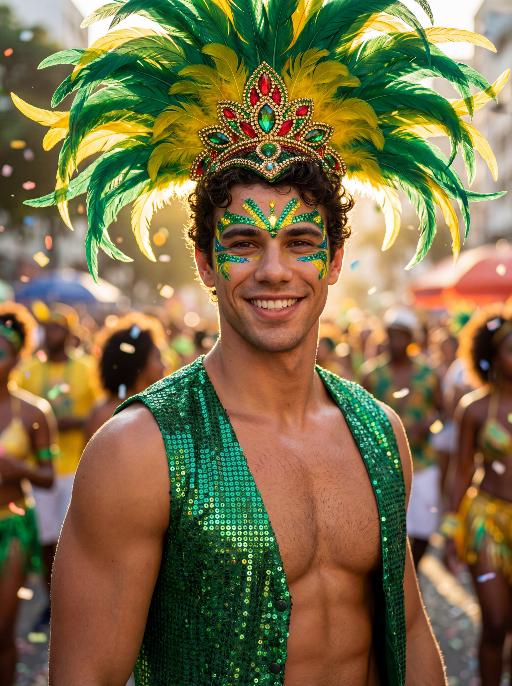
Reveller AI effects generated image

Reveller

Use the exact same facial features, gender, age, and natural skin tone as the character in the uploaded image. Do not alter, lighten, darken, or modify the original complexion in any way. Maintain his authentic skin color exactly as in the reference image. curly textured hair, radiant natural skin, and a confident, magnetic smile, standing proudly at Rio Carnival. wears an elaborate headdress made of large green and yellow feathers, with an ornate centerpiece featuring red, green, and gold jewel details. His face is painted with bold, symmetrical Carnival patterns in emerald green and vibrant yellow, with striking blue accents around the eyes, enhancing gaze. dressed in a shimmering emerald-green sequined vest that catches the light dramatically, partially open to reveal his athletic chest. Natural body highlights emphasize physique realistically without altering skin tone. Lighting: strong cinematic light contrast — warm golden sunlight illuminating one side of his face and torso, creating sculpted highlights, while preserving accurate skin color and natural undertones. Soft shadow adds depth and dimension without washing out or overexposing the complexion. Subtle rim lighting around the feathers enhances separation from the background. High dynamic range with true-to-life skin rendering. Background: a lively Rio street during Carnival, filled with a cheering crowd in colorful festive clothing. Confetti floats in the air. The crowd is slightly blurred (shallow depth of field), making the subject stand out sharply. Mood: vibrant, joyful, triumphant, powerful, charismatic. Style: high-resolution cinematic photography, poster-quality, ultra-sharp focus on subject, shallow depth of field, 85mm lens, HDR, rich saturated colors, dramatic contrast, professional fashion-editorial lighting, realistic skin texture, natural complexion fidelity, magazine cover composition.

Batik Fan AI effects generated image

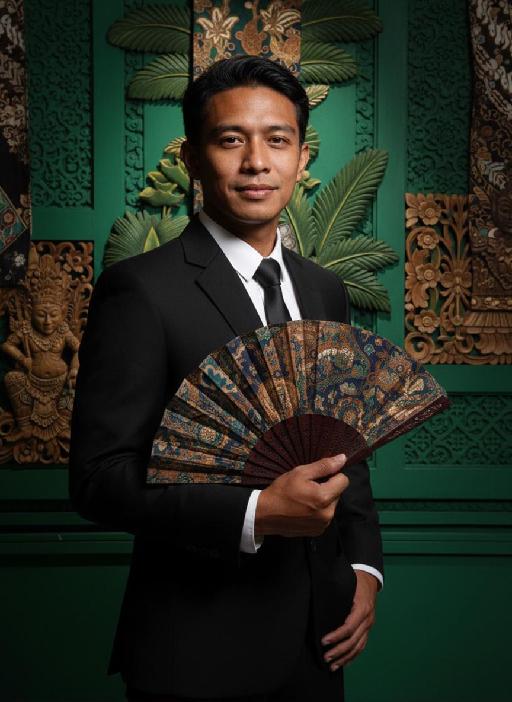
Batik Fan

Strictly lock the facial features of the uploaded portrait (preserve facial contours, native Indonesian skin tone, hairstyle and age). photorealistic 3:4 half-body portrait of a handsome young Indonesian man in his early 20s, with neat dark short hair and delicate facial features, wearing a sleek black tailored suit. He holds a **traditional Indonesian batik folding fan with intricate wax-print patterns and dark wooden ribs** in one hand, the other hand resting on his waist. Set against a **deep emerald green background adorned with intricate Balinese wooden carvings, batik wax-print fabric tapestries, tropical palm leaf motifs and traditional Javanese architectural details**, with a soft warm spotlight casting a gentle glow on his face and the fan, creating strong light and shadow contrast, exuding a **modern Indonesian-style elegant and luxurious ambiance**, ultra-high detail, cinematic texture, sharp focus

Christmas Baby

Transform the figure in the uploaded image into a Christmas-themed style, standing upright and dressed in a retro Christmas knit sweater with red and green color-blocking (printed with white snowflake and reindeer patterns), a long red tasseled scarf, a cute Christmas hat, a full set of Christmas-themed clothing with Christmas pants, and cute fluffy slouch socks on its feet.Scene: A warm American home with a Christmas setup, featuring exquisite gift boxes placed on snow-dusted ground; the background is Christmas decor in a dominant red tone, with a Christmas wreath hung above adorned with red and gold baubles and white flowers, and Christmas trees on both sides dusted with a light layer of snow and decorated with red and gold baubles.Texture & Style: The frame is ultra-high-definition and delicate (cinematic texture at 8K level), with soft and bright lighting, vivid and festive colors, and clear details such as the sweater’s knit texture and the luster of apples. Shot in the style of high-end editorial fashion photography.

Darkroom Flash AI effects generated image

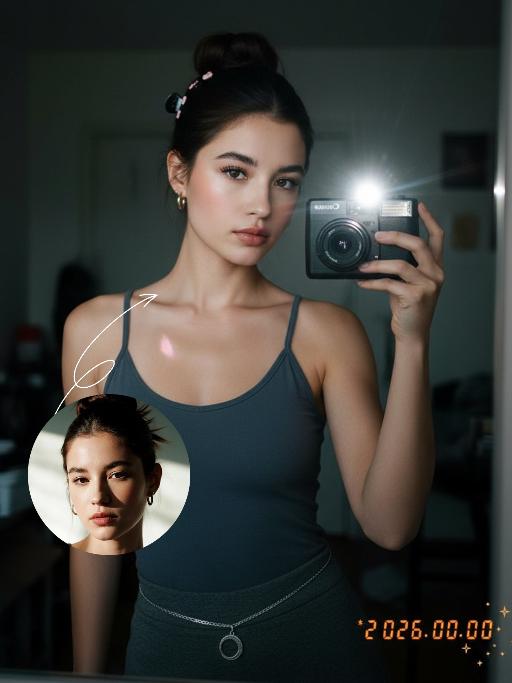
Darkroom Flash

Subject & Makeup: The figure from the uploaded image (unchanged facial features) with a cold and natural expression and a light, translucent makeup look; Shooting & Atmosphere: soft pink blush on the apples of the cheeks, nude pink lip gloss, long and curled false eyelashes, natural eyebrow shape; taking a selfie with a Canon retro point-and-shoot camera, with the camera’s flash shining directly into the lens (creating a distinct white lens flare), shot from a selfie perspective in front of an indoor mirror; a dim everyday room background (blurred furniture and decorations), a relaxed edgy-sweet portrait style, dark natural color tones, film photography texture, a retro natural film filter and film grain; Detail Embellishments: add an orange digital date watermark (2026.00.00) plus a small starburst decoration at the bottom right corner.

Load more

Next-Gen Multi-Model AI Video Architecture

Vivago AI isn't just one engine—it’s a unified hub for the world’s most advanced video AI. Whether you need cinematic realism or high-speed social content, we provide the right model for your creative vision.

Free Generate

Beauty and Dolphins

Vacation Time

Stellar Tear

Fish Tank Supervisor

Cinematic Quality & Precision Control

Enables 4K resolution with multi-lens motion control, generating delicate scene via text prompts for customized cinematography.​

TRY NOW

Dynamic AV Sync

Auto-generates original audio to avoid copyright issues. Build 3D immersive environments through layered sound design automatically.

TRY NOW

OpenAI Sora 2

​Advanced visual storytelling with unparalleled physics and consistency.

TRY NOW

Kling v2.6 Pro

Industry-leading cinematic image animation and motion control.

TRY NOW

Google Veo 3 & 3.1

Ultra-fast generation with enhanced realism for creative workflows.

TRY NOW

Vivago AI 2.0

Our proprietary model optimized for efficiency, speed, and cost-effective generation.

TRY NOW

Users' Voice

We listen carefully to the opinions of every user.
Free Generate
Contact Us
I tried the Lip Sync feature inside Vivago.ai’s AI Video Generator for my educational podcast, and the results were stunning! The avatar's lip movements perfectly matched my audio recording, creating a professional AI-generated video without complex editing. Compared with tools like OpenAI Sora 2 and Google Veo 3.1, Vivago Image-to-Video delivers fast, studio-quality results online. It saved me hours of post-production work.
ElenaM (Spain)
Vivago’s Image-to-Video AI transformed my marketing workflow. I uploaded a product image and described the launch scene in text, and it generated a 10-second cinematic AI video with background music and dynamic visuals. The output quality rivals Kling v2.6 Pro and Google Veo 3 Fast. It’s now my go-to AI video generator for social media ads and product campaigns.
KenjiT (Japan)
As a digital artist, I use Vivago.ai 2.0 daily for Image-to-Image and AI Image-to-Video creation. The e-book covers and animated visuals I generate for clients look cinematic and professional. Unlike many standalone AI tools, Vivago integrates multiple leading models into one platform, making it easier to create copyright-safe AI images and videos for publishing.
ChenL (China)
I tried the Lip Sync feature inside Vivago.ai’s AI Video Generator for my educational podcast, and the results were stunning! The avatar's lip movements perfectly matched my audio recording, creating a professional AI-generated video without complex editing. Compared with tools like OpenAI Sora 2 and Google Veo 3.1, Vivago Image-to-Video delivers fast, studio-quality results online. It saved me hours of post-production work.
ElenaM (Spain)
Vivago’s Image-to-Video AI transformed my marketing workflow. I uploaded a product image and described the launch scene in text, and it generated a 10-second cinematic AI video with background music and dynamic visuals. The output quality rivals Kling v2.6 Pro and Google Veo 3 Fast. It’s now my go-to AI video generator for social media ads and product campaigns.
KenjiT (Japan)
As a digital artist, I use Vivago.ai 2.0 daily for Image-to-Image and AI Image-to-Video creation. The e-book covers and animated visuals I generate for clients look cinematic and professional. Unlike many standalone AI tools, Vivago integrates multiple leading models into one platform, making it easier to create copyright-safe AI images and videos for publishing.
ChenL (China)
I absolutely love Vivago’s AI Image-to-Video Generator. As a travel blogger, static images often fail to capture real atmosphere, but Vivago helps me turn photos into vivid cinematic AI videos with motion effects. It feels comparable to OpenAI Sora 2 and Google Veo 3.1, but more accessible and faster for creators who need high-quality AI videos online.
LiamK (Australia)
I tried the Lip Sync feature inside Vivago.ai’s AI Video Generator for my educational podcast, and the results were stunning! The avatar's lip movements perfectly matched my audio recording, creating a professional AI-generated video without complex editing. Compared with tools like OpenAI Sora 2 and Google Veo 3.1, Vivago Image-to-Video delivers fast, studio-quality results online. It saved me hours of post-production work.
ElenaM (Spain)
Vivago’s Image-to-Video AI transformed my marketing workflow. I uploaded a product image and described the launch scene in text, and it generated a 10-second cinematic AI video with background music and dynamic visuals. The output quality rivals Kling v2.6 Pro and Google Veo 3 Fast. It’s now my go-to AI video generator for social media ads and product campaigns.
KenjiT (Japan)
As a digital artist, I use Vivago.ai 2.0 daily for Image-to-Image and AI Image-to-Video creation. The e-book covers and animated visuals I generate for clients look cinematic and professional. Unlike many standalone AI tools, Vivago integrates multiple leading models into one platform, making it easier to create copyright-safe AI images and videos for publishing.
ChenL (China)
I absolutely love Vivago’s AI Image-to-Video Generator. As a travel blogger, static images often fail to capture real atmosphere, but Vivago helps me turn photos into vivid cinematic AI videos with motion effects. It feels comparable to OpenAI Sora 2 and Google Veo 3.1, but more accessible and faster for creators who need high-quality AI videos online.
LiamK (Australia)
Using Vivago.ai’s Image-to-Video AI has greatly enhanced my classroom teaching. I transform textbook notes into historical AI videos with cinematic filters and dynamic animations. Compared with tools like Kling v2.6 Pro and Google Veo 3 Fast, Vivago offers faster generation and easier parameter control for educators who need reliable AI video creation.
RajivG (India)
I frequently create AI videos on Vivago and publish them on TikTok and YouTube Shorts. The AI video templates and trending content ideas help me produce viral-ready clips quickly. With Vivago’s integrated models—including advanced video engines similar to OpenAI Sora 2—I can generate anime-style and cinematic social media videos that drive high engagement.
MarieJ (Spain)
What attracts me most about Vivago.ai is not only the powerful AI Video Generator but also the active AIGC creator community. It combines AI Image-to-Video, Text-to-Video, and leading model integrations like Google Veo 3.1 into one creative platform.
TomW (India)
At first, I was hesitant about using AI video tools. But after trying Vivago Image-to-Video, I realized how easy it is to create professional AI-generated videos online. I just upload an image, add a short prompt, and adjust a few settings. The results are cinematic and copyright-safe, which is essential for commercial projects.
HectorC (Mexico)
Using Vivago.ai’s Image-to-Video AI has greatly enhanced my classroom teaching. I transform textbook notes into historical AI videos with cinematic filters and dynamic animations. Compared with tools like Kling v2.6 Pro and Google Veo 3 Fast, Vivago offers faster generation and easier parameter control for educators who need reliable AI video creation.
RajivG (India)
I frequently create AI videos on Vivago and publish them on TikTok and YouTube Shorts. The AI video templates and trending content ideas help me produce viral-ready clips quickly. With Vivago’s integrated models—including advanced video engines similar to OpenAI Sora 2—I can generate anime-style and cinematic social media videos that drive high engagement.
MarieJ (Spain)
What attracts me most about Vivago.ai is not only the powerful AI Video Generator but also the active AIGC creator community. It combines AI Image-to-Video, Text-to-Video, and leading model integrations like Google Veo 3.1 into one creative platform.
TomW (India)
At first, I was hesitant about using AI video tools. But after trying Vivago Image-to-Video, I realized how easy it is to create professional AI-generated videos online. I just upload an image, add a short prompt, and adjust a few settings. The results are cinematic and copyright-safe, which is essential for commercial projects.
HectorC (Mexico)