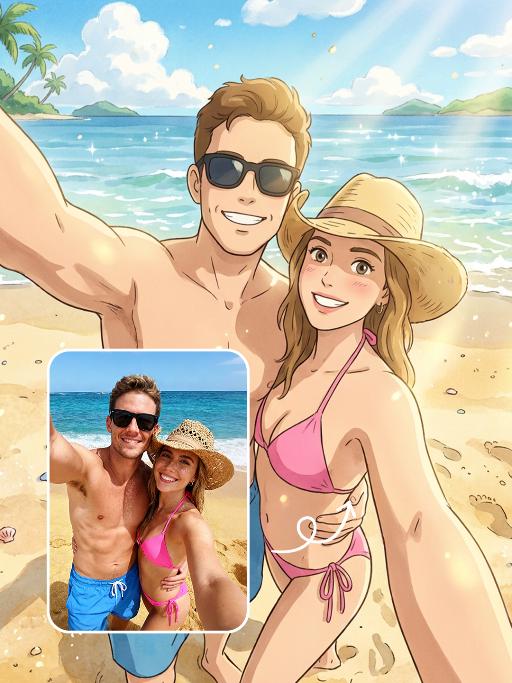
Text to Image

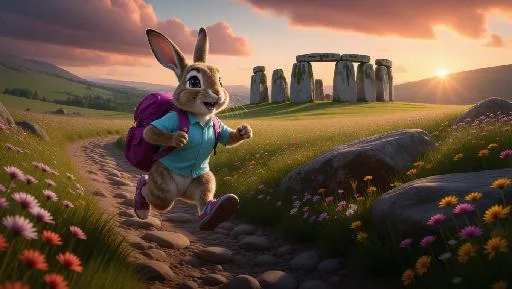
A cartoon rabbit leaps playfully on a rocky trail, holding a berry-colored backpack. The rabbit's light blue shirt and sporty sandals stand out against the muted greys of its surroundings. Behind the rabbit, an ancient stone circle looms mystically, and beyond it, a sprawling meadow stretches into the horizon. The meadow, carpeted in wildflowers, captivates the eye. The sky above is painted in fiery oranges, suggesting early evening, with the sun bidding farewell.

Recreate
arrow
Text to Image

More From VIVAGO AI

Gentleman

Strictly lock the facial features of the uploaded portrait (preserve facial contours, native Indonesian skin tone, hairstyle and age. medium shot, central composition of the model, the model's facial features, facial contours and hairstyle are 100% retained in their original state, the upper part of the head has a small amount of negative space. The model's daily casual wear seamlessly fades into a luxurious Indonesian groom's attire—dark luxury batik shirt, woven songket sarong, traditional songkok cap, and delicate gold necklaces and bracelets, with a natural gradient visual effect of clothing transformation. The background is a soft transition from a simple plain scene to a traditional Indonesian architectural scene, either a Javanese carved wooden palace or a Balinese temple courtyard, the model is positioned next to the traditional building. 4K ultra-high definition, photorealistic skin and fabric textures, soft natural light mixed with warm daylight illuminating the model, sharp focus on facial features, cinematic color grading, smooth and natural visual transition of clothing and background, the model stands upright with a dignified and relaxed posture, a warm gentle smile facing the camera, natural hand placement (one by the side, one slightly bent), the light highlights the delicate texture of batik, the luster of songket and the intricate carvings of traditional buildings, minimalist and advanced visual sense, no abrupt transitions

Polaroid

A photorealistic collage of two hand-held Polaroid photos placed randomly in a staggered upper and lower arrangement. The two photos feature different facial expressions and posing gestures of the subject(s): The main subject(s) in each Polaroid are the figure(s) from the uploaded image, with their facial features and the number of figures unchanged. The figure(s) wear a white fluffy Santa hat, a brown-and-white striped scarf, a white sweater adorned with golden star embellishments, and brown gloves—striking a pose of gently touching the cheek with one hand in one photo, and making a peace sign with one hand in the other. The background of each Polaroid is solid black, overlaid with white snowflake patterns and gold/black star motifs. The scene outside the Polaroids is set against a green Christmas tree, decorated with the words Merry Christmas in a gold glittering diamond texture and glossy red Christmas baubles. The lighting is warm-toned Christmas ambient light, creating a cozy winter vibe. The overall style features authentic Polaroid film texture with intact white Polaroid borders and rich fine details; the focus is sharp with a soft, blurred background. The edges of the Polaroid photos are accented with Christmas decorative elements, including gold star stickers and snowflake patterns.

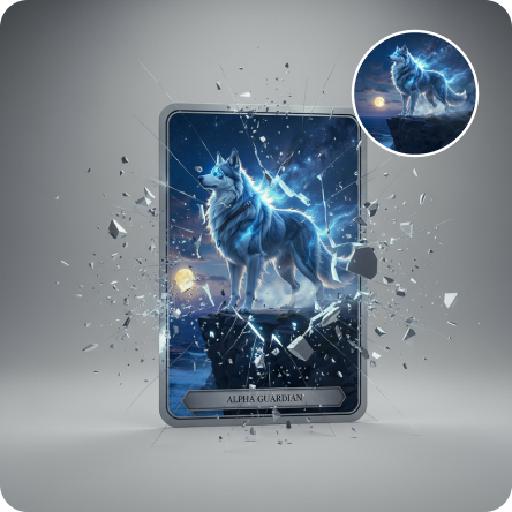
Crystal Ball

The uploaded figure is dressed in a full Christmas-style costume and is completely inside a giant transparent snow globe: She wears a red-and-green plush-edged bow hair accessory on her head; the upper body is a white long-sleeve shirt printed with red antler patterns, layered with a burgundy argyle cropped vest (adorned with golden bells at the collar), and the lower body is paired with a matching argyle pleated skirt embroidered with white snowflake patterns; on her feet are red over-the-knee plush boots, with the cuffs folded down to reveal the white plush lining. The figure is curled up on her knees, leaning against the items inside the snow globe. One hand gently rests on the edge of a Christmas stocking, while the other holds a golden star decorated with ribbons, with a sweet and lively expression. Inside the snow globe, there are a mini Christmas tree wrapped in fairy lights, a teddy bear doll wearing a scarf, golden star ornaments and cinnamon stick decorations; outside the snow globe stands a pine-branch Christmas tree dusted with snow, hung with red and white berries and golden bells, with the word "CHRISTMAS" printed in hot gold on the base. The scene is a cozy outdoor night snowscape, featuring several outdoor Christmas trees and decorations, warm string lights twinkling softly, and fluffy snowflakes drifting in the background, creating an overall warm and healing atmosphere. The style is realistic with a cinematic texture. The figure’s makeup is beautiful and natural, with a natural skin-smoothing effect that highlights an excellent skin condition. The camera moves in a rotating transition, with magical particle sparkles and falling white snowflakes added during the transition for a whimsical touch.

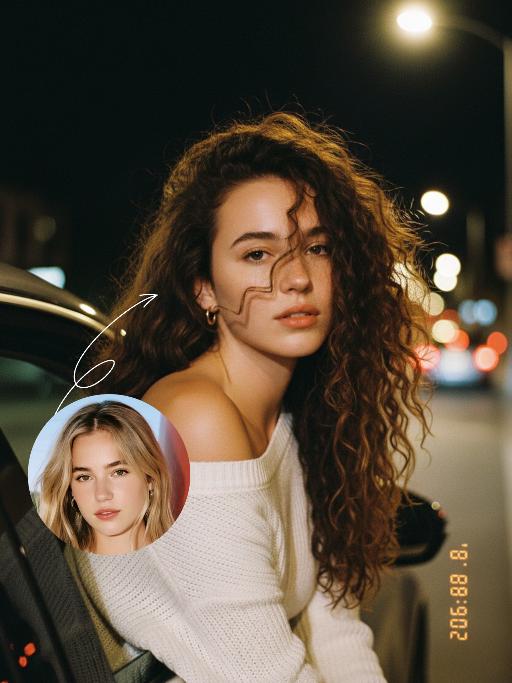
Night Chat AI effects generated image

Night Chat

The uploaded figure (with unchanged facial features) is lit by a high-intensity flash fired directly at them, creating stark contrast between light and shadow, prominent highlights on the figure’s face, and a dark-toned background with blurred bokeh light spots. This is a medium close-up portrait: the figure leans out of a car window with their upper body, in an off-the-shoulder pose, their long dark brown curly hair tousled and flowing in the wind. They wear a loose white off-the-shoulder knit sweater, gaze straight at the camera with a lazy and cool expression. Shot from an eye-level perspective, the background features a nighttime urban street with slightly blurred traffic flow, warm yellow street lamp glows and red taillight bokeh, and a shallow depth of field with bokeh effects. The overall mood blends a warm color tone with a cool atmosphere, complemented by film texture and film grain, plus ultra-high-definition details. An orange vertical digital date watermark (2026:00:00) is added to the bottom right corner.

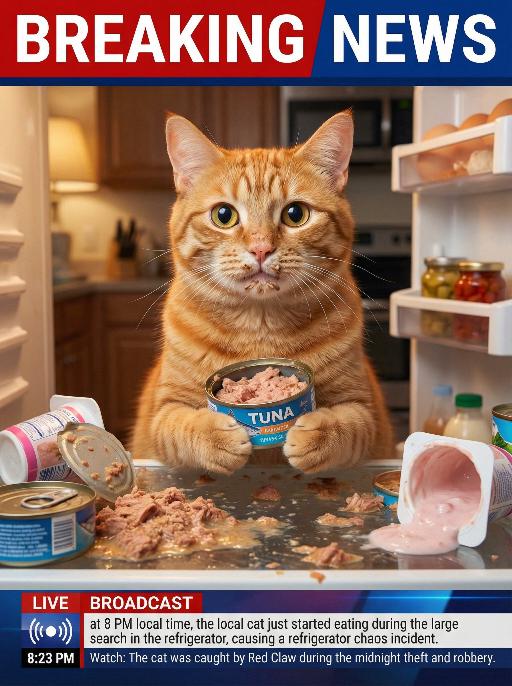
Thief Cat AI effects generated image

Thief Cat

The real-life footage of this news scene is extremely realistic, featuring some close-up shots that captured the image of the pet in the uploaded picture (the pet's features and species remained unchanged). The pet was sitting in an open and messy refrigerator, located in the center of the frame, occupying 80% of it. Its face was smeared with some cat food, and its paws were holding a half-eaten tuna can. Its eyes were wide open, looking very innocent, as if nothing had happened. The refrigerator was in a messy state, with cat food scattered everywhere, along with spilled wet food and overturned yogurt cups. The background of the kitchen was somewhat blurry, and the indoor light was warm. Above it was a prominent large red and white news headline: BREAKING NEWS. In the following picture, there was a news headline: LIVE BROADCAST, 8:23 PM, Watch: This pet was discovered stealing and robbing during the midnight snack search operation with red-claw's assistance.

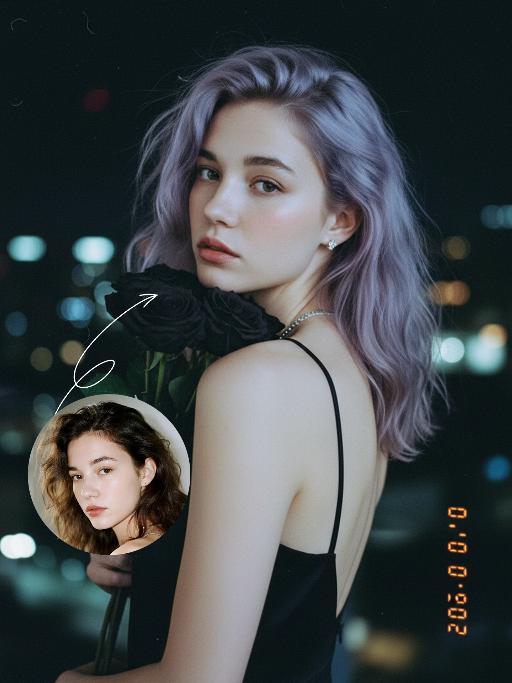
Black Rose AI effects generated image

Black Rose

Preserve the original facial features of the uploaded figure. An ultra-realistic portrait photograph, close-up shot with a shallow depth of field (blurred background). The figure from the uploaded image (unchanged facial features) has messy shoulder-length hair in ash purple taupe, green eyes, light pink blush, nude pink lips, and faint freckles scattered across the cheeks and shoulders. They are wearing a black strapless slip dress with thin shoulder straps, small stud earrings and a delicate chain necklace, holding a bouquet of black roses close to the cheek, and turning half their body to look at the camera. Shooting angle: eye-level perspective, dramatic contrasting light from a flash against the night scene, a cool-toned color palette (black, ash purple taupe, pale skin tone, urban night view background), a melancholic and dreamy atmosphere, high level of detail, film texture, retro color tones, vintage film portrait style, grain texture, film light leak effects, ultra-high-definition details. An orange vertical digital date watermark (2026:00:00) is added to the bottom right corner.

Load more

Next-Gen Multi-Model AI Video Architecture

Vivago AI isn't just one engine—it’s a unified hub for the world’s most advanced video AI. Whether you need cinematic realism or high-speed social content, we provide the right model for your creative vision.

Free Generate

Beauty and Dolphins

Vacation Time

Stellar Tear

Fish Tank Supervisor

Cinematic Quality & Precision Control

Enables 4K resolution with multi-lens motion control, generating delicate scene via text prompts for customized cinematography.​

TRY NOW

Dynamic AV Sync

Auto-generates original audio to avoid copyright issues. Build 3D immersive environments through layered sound design automatically.

TRY NOW

OpenAI Sora 2

​Advanced visual storytelling with unparalleled physics and consistency.

TRY NOW

Kling v2.6 Pro

Industry-leading cinematic image animation and motion control.

TRY NOW

Google Veo 3 & 3.1

Ultra-fast generation with enhanced realism for creative workflows.

TRY NOW

Vivago AI 2.0

Our proprietary model optimized for efficiency, speed, and cost-effective generation.

TRY NOW

Users' Voice

We listen carefully to the opinions of every user.
Free Generate
Contact Us
I tried the Lip Sync feature inside Vivago.ai’s AI Video Generator for my educational podcast, and the results were stunning! The avatar's lip movements perfectly matched my audio recording, creating a professional AI-generated video without complex editing. Compared with tools like OpenAI Sora 2 and Google Veo 3.1, Vivago Image-to-Video delivers fast, studio-quality results online. It saved me hours of post-production work.
ElenaM (Spain)
Vivago’s Image-to-Video AI transformed my marketing workflow. I uploaded a product image and described the launch scene in text, and it generated a 10-second cinematic AI video with background music and dynamic visuals. The output quality rivals Kling v2.6 Pro and Google Veo 3 Fast. It’s now my go-to AI video generator for social media ads and product campaigns.
KenjiT (Japan)
As a digital artist, I use Vivago.ai 2.0 daily for Image-to-Image and AI Image-to-Video creation. The e-book covers and animated visuals I generate for clients look cinematic and professional. Unlike many standalone AI tools, Vivago integrates multiple leading models into one platform, making it easier to create copyright-safe AI images and videos for publishing.
ChenL (China)
I tried the Lip Sync feature inside Vivago.ai’s AI Video Generator for my educational podcast, and the results were stunning! The avatar's lip movements perfectly matched my audio recording, creating a professional AI-generated video without complex editing. Compared with tools like OpenAI Sora 2 and Google Veo 3.1, Vivago Image-to-Video delivers fast, studio-quality results online. It saved me hours of post-production work.
ElenaM (Spain)
Vivago’s Image-to-Video AI transformed my marketing workflow. I uploaded a product image and described the launch scene in text, and it generated a 10-second cinematic AI video with background music and dynamic visuals. The output quality rivals Kling v2.6 Pro and Google Veo 3 Fast. It’s now my go-to AI video generator for social media ads and product campaigns.
KenjiT (Japan)
As a digital artist, I use Vivago.ai 2.0 daily for Image-to-Image and AI Image-to-Video creation. The e-book covers and animated visuals I generate for clients look cinematic and professional. Unlike many standalone AI tools, Vivago integrates multiple leading models into one platform, making it easier to create copyright-safe AI images and videos for publishing.
ChenL (China)
I absolutely love Vivago’s AI Image-to-Video Generator. As a travel blogger, static images often fail to capture real atmosphere, but Vivago helps me turn photos into vivid cinematic AI videos with motion effects. It feels comparable to OpenAI Sora 2 and Google Veo 3.1, but more accessible and faster for creators who need high-quality AI videos online.
LiamK (Australia)
I tried the Lip Sync feature inside Vivago.ai’s AI Video Generator for my educational podcast, and the results were stunning! The avatar's lip movements perfectly matched my audio recording, creating a professional AI-generated video without complex editing. Compared with tools like OpenAI Sora 2 and Google Veo 3.1, Vivago Image-to-Video delivers fast, studio-quality results online. It saved me hours of post-production work.
ElenaM (Spain)
Vivago’s Image-to-Video AI transformed my marketing workflow. I uploaded a product image and described the launch scene in text, and it generated a 10-second cinematic AI video with background music and dynamic visuals. The output quality rivals Kling v2.6 Pro and Google Veo 3 Fast. It’s now my go-to AI video generator for social media ads and product campaigns.
KenjiT (Japan)
As a digital artist, I use Vivago.ai 2.0 daily for Image-to-Image and AI Image-to-Video creation. The e-book covers and animated visuals I generate for clients look cinematic and professional. Unlike many standalone AI tools, Vivago integrates multiple leading models into one platform, making it easier to create copyright-safe AI images and videos for publishing.
ChenL (China)
I absolutely love Vivago’s AI Image-to-Video Generator. As a travel blogger, static images often fail to capture real atmosphere, but Vivago helps me turn photos into vivid cinematic AI videos with motion effects. It feels comparable to OpenAI Sora 2 and Google Veo 3.1, but more accessible and faster for creators who need high-quality AI videos online.
LiamK (Australia)
Using Vivago.ai’s Image-to-Video AI has greatly enhanced my classroom teaching. I transform textbook notes into historical AI videos with cinematic filters and dynamic animations. Compared with tools like Kling v2.6 Pro and Google Veo 3 Fast, Vivago offers faster generation and easier parameter control for educators who need reliable AI video creation.
RajivG (India)
I frequently create AI videos on Vivago and publish them on TikTok and YouTube Shorts. The AI video templates and trending content ideas help me produce viral-ready clips quickly. With Vivago’s integrated models—including advanced video engines similar to OpenAI Sora 2—I can generate anime-style and cinematic social media videos that drive high engagement.
MarieJ (Spain)
What attracts me most about Vivago.ai is not only the powerful AI Video Generator but also the active AIGC creator community. It combines AI Image-to-Video, Text-to-Video, and leading model integrations like Google Veo 3.1 into one creative platform.
TomW (India)
At first, I was hesitant about using AI video tools. But after trying Vivago Image-to-Video, I realized how easy it is to create professional AI-generated videos online. I just upload an image, add a short prompt, and adjust a few settings. The results are cinematic and copyright-safe, which is essential for commercial projects.
HectorC (Mexico)
Using Vivago.ai’s Image-to-Video AI has greatly enhanced my classroom teaching. I transform textbook notes into historical AI videos with cinematic filters and dynamic animations. Compared with tools like Kling v2.6 Pro and Google Veo 3 Fast, Vivago offers faster generation and easier parameter control for educators who need reliable AI video creation.
RajivG (India)
I frequently create AI videos on Vivago and publish them on TikTok and YouTube Shorts. The AI video templates and trending content ideas help me produce viral-ready clips quickly. With Vivago’s integrated models—including advanced video engines similar to OpenAI Sora 2—I can generate anime-style and cinematic social media videos that drive high engagement.
MarieJ (Spain)
What attracts me most about Vivago.ai is not only the powerful AI Video Generator but also the active AIGC creator community. It combines AI Image-to-Video, Text-to-Video, and leading model integrations like Google Veo 3.1 into one creative platform.
TomW (India)
At first, I was hesitant about using AI video tools. But after trying Vivago Image-to-Video, I realized how easy it is to create professional AI-generated videos online. I just upload an image, add a short prompt, and adjust a few settings. The results are cinematic and copyright-safe, which is essential for commercial projects.
HectorC (Mexico)