Text to Image

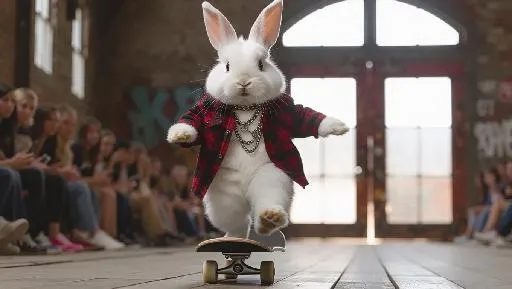
The fluffy rabbit, wearing a rebellious plaid shirt with chains and carrying a skateboard, hops down the runway with a rebellious grin. The camera follows its bold hops, capturing the movement of the shirt and the bunny's ears. The background remains a gritty, urban runway, highlighting the rabbit's edgy and fearless.

Recreate
arrow
Text to Image

More From VIVAGO AI

Battle

These two individuals had angry and serious expressions, raised their fists, and assumed a fighting stance. They began to engage in a fierce struggle, launching a fierce confrontation. They quickly and powerfully punched each other's faces (one person hit the other's face three times in a row with a powerful punch, and the other person, in an angry state, roared and forcefully hit back three times). They also kicked each other's bodies with their feet. The camera captured the intensity of their movements, focusing on the tension of their bodies and the impact force generated by each punch. The background remained still, and the camera followed the movements of the characters, causing the dynamic confrontation between the two fighters to stand out, with powerful punches, the state of the boxers, and an intense and tense atmosphere.

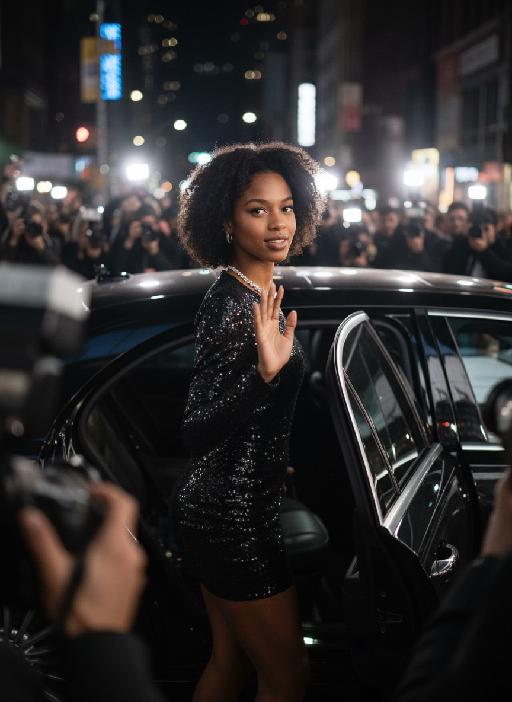
Hollywood Star AI effects generated image

Hollywood Star

A medium close-up shot from a frontal perspective with a slight upward tilt, the camera angle is slightly tilted forward. This shot was taken using a professional full-frame digital SLR camera and a 50mm f/1.2 wide-angle fixed-focus lens. The uploaded image shows a person (with unchanged facial features, gender, age, and hairstyle), wearing a tight black sequined sexy dress and wearing high-end custom accessories. This figure is preparing to get into a black luxury car with open doors. The figure turns halfway and looks at the camera, raising one hand and making a gentle waving or shielding gesture. The person has a relaxed and confident smile on their face, with bright and expressive eyes. The scene is on a night-time city street, illuminated by a group of paparazzi and a large number of flashes, creating a high-contrast light and shadow effect, with shadows and bright highlights, and the foreground also includes cameras and flashes, creating the feeling that the celebrity figure is surrounded by paparazzi and cameras. This aesthetic style is the street style of Hollywood celebrity paparazzi, featuring grainy film texture, clear focus on the subject, blurred background and dark tones. The person's face is illuminated by the flash, and the makeup characteristic of the figure is exaggerated false eyelashes, clear cheekbones, nude matte lip color and bright highlights used to enhance the three-dimensionality; the picture adds dark corners at the four corners and bright parts in the middle, creating a strong contrast between light and shadow.

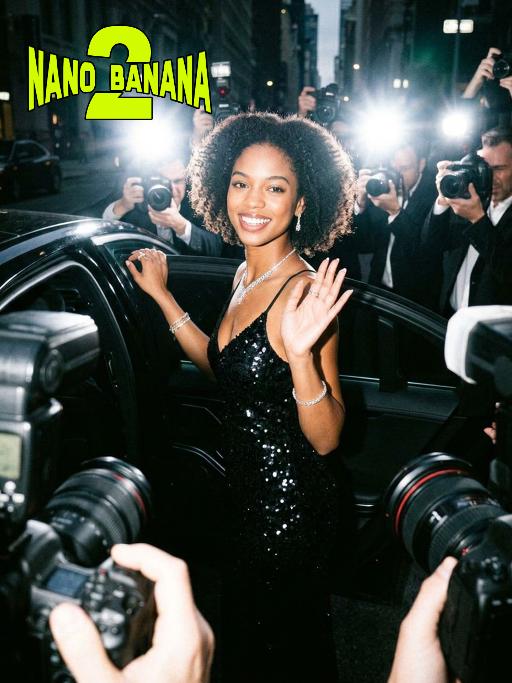
Hollywood Star AI effects generated image

Hollywood Star

A medium close-up shot from a frontal perspective with a slight upward tilt, the camera angle is slightly tilted forward. This shot was taken using a professional full-frame digital SLR camera and a 50mm f/1.2 wide-angle fixed-focus lens. The uploaded image shows a person (with unchanged facial features, gender, age, and hairstyle), wearing a tight black sequined sexy dress and wearing high-end custom accessories. This figure is preparing to get into a black luxury car with open doors. The figure turns halfway and looks at the camera, raising one hand and making a gentle waving or shielding gesture. The person has a relaxed and confident smile on their face, with bright and expressive eyes. The scene is on a night-time city street, illuminated by a group of paparazzi and a large number of flashes, creating a high-contrast light and shadow effect, with shadows and bright highlights, and the foreground also includes cameras and flashes, creating the feeling that the celebrity figure is surrounded by paparazzi and cameras. This aesthetic style is the street style of Hollywood celebrity paparazzi, featuring grainy film texture, clear focus on the subject, blurred background and dark tones. The person's face is illuminated by the flash, and the makeup characteristic of the figure is exaggerated false eyelashes, clear cheekbones, nude matte lip color and bright highlights used to enhance the three-dimensionality; the picture adds dark corners at the four corners and bright parts in the middle, creating a strong contrast between light and shadow.

Pet Movies

Based on the pet in the reference image, create a three-frame film montage storyboard with a vertical three-screen split composition (close-up, medium close-up, medium shot or long shot). Frame 1: A winter snow scene, with a vintage train heading into the distance through wind and snow. The pet stands by the railway tracks, its fur dusted with snowflakes, eyes fixed on the train’s direction. The frame exudes a cold and lonely mood, with the text Another winter has come centered on the image. Frame 2: In the snow, the pet tilts its head upward as snowflakes flutter down gently. The background is pure white and minimalist, striking a healing yet wistful atmosphere, with the text Can the new winter surpass the old winter centered on the image. Frame 3: A close-up of the pet, with clear and bright eyes, a snowflake dusted nose, and snowflakes swirling all around. The frame focuses on the dog’s expression, brimming with tenderness and longing, with the cinematic subtitle hope that you are well centered on the image. Overall Style: Winter narrative feeling, healing pet photography, cinematic storyboard composition, an atmosphere of subtle longing, cool color tones, and a calm and elegant mood.

Queen of Gold AI effects generated image

Queen of Gold

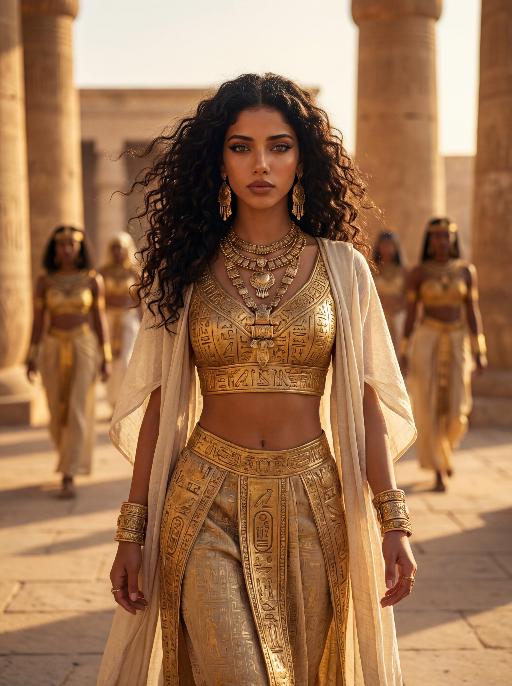
The character in the uploaded picture (unchanged facial features, gender and age). A striking young woman embodying the persona of an ancient Egyptian queen, captured in a hyper-realistic, cinematic portrait. She has voluminous dark curly hair flowing in the wind, a captivating gaze, and a regal, confident expression. She wears an opulent, intricately carved golden crop top with hieroglyphic engravings, paired with a matching golden skirt featuring detailed Egyptian motifs. Layered, flowing off-white fabric drapes over her shoulders, adding movement and elegance. Her accessories are lavish: multiple layered golden necklaces with ornate pendants, large golden earrings, and thick golden bracelets on her wrists. She walks forward with a confident stride, radiating power and grace, as if leading a procession. The setting is the grand courtyard of an ancient Egyptian palace or temple, with massive stone columns and sun-drenched stone floors. Blurred figures of attendants in similar golden attire follow in the background, creating a sense of scale and majesty. The warm, golden light of the setting sun bathes the scene, casting a majestic glow over the entire environment. The image is rendered in a hyper-realistic, epic historical drama style, with dramatic, cinematic lighting that highlights the intricate details of the golden regalia, the texture of the fabric, and the weathered stone of the palace. The color palette is rich and opulent, featuring deep golds, warm earth tones, and the soft off-white of the draped fabric, creating a timeless, majestic, and awe-inspiring atmosphere. The overall aesthetic is detailed, lifelike, and reminiscent of a scene from a grand historical epic film or a high-fashion editorial photoshoot set in ancient Egypt

Solemn AI effects generated image

Solemn

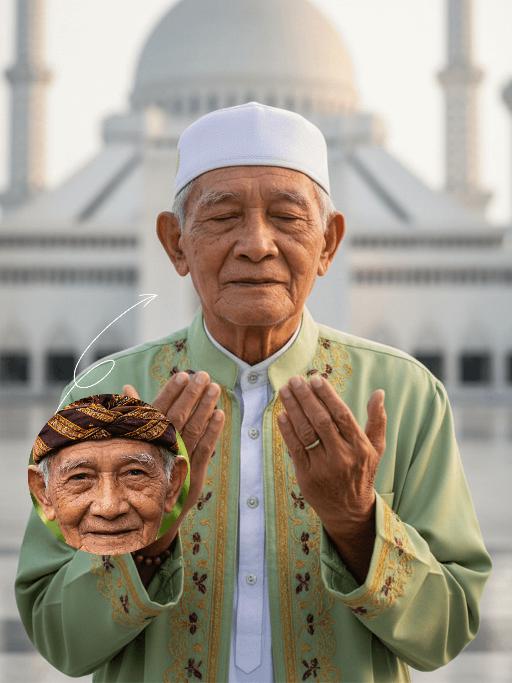
Strictly lock the identity of the uploaded portrait (preserve facial contours, native Indian skin tone, hairstyle, and age). Half-body close-up (upper body-focused) of a devout elderly Muslim man (aged 60-70) during Eid al-Fitr morning prayers, with the subject occupying a larger proportion of the frame and framed tightly with minimal negative space at the top. His face proportion is moderate but prominent, he maintains a serene, pious expression with hands in standard prayer position, his upper body centered in the frame. The background clearly shows the grand architecture of Istiqlal Mosque in Jakarta, bathed in soft, warm morning backlight, with the background composition adjusted to avoid excessive top blank space. Photorealistic style, sharp focus on both the subject (clear facial details) and the mosque background, deep emotional depth, 4K ultra-clear resolution, well-balanced composition between subject and background

Bollywood AI effects generated image

Bollywood

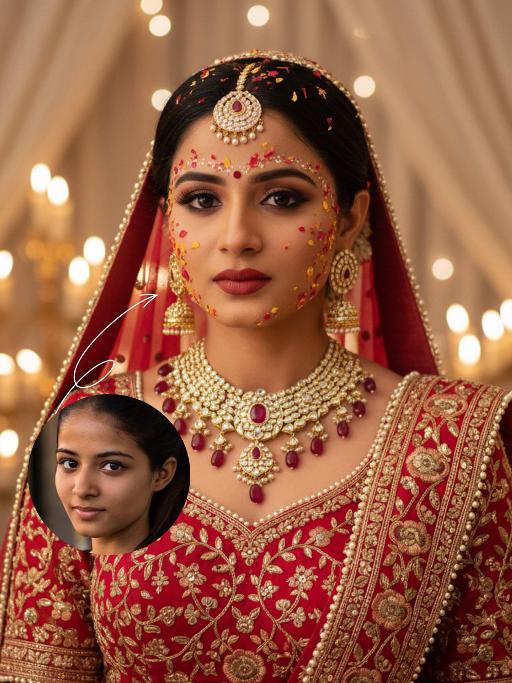
The identity of the uploaded portrait is strictly preserved (retaining facial contours, authentic Indian skin tone, hairstyle and age). This is a close-up and bust portrait with a 3:4 aspect ratio, featuring a stunning traditional Indian bride around 30 years old with a gentle yet faintly sorrowful expression. Her makeup is exquisitely rich and dramatic: smoldering smoky eyes paired with a matte vintage red lip, a large red crystal bindi adorned on her forehead, and delicate red, yellow and gold Gulab Patti floral appliqués dotted across her forehead and cheeks, with a fresh, flawless and well-blended base makeup. Her jet-black hair is sleek and long (or styled into a neat chignon), with a rose-red dupatta edged with gold threadwork wrapped around her head; the dupatta is embroidered with intricate golden interlocking floral patterns along the hem and drapes softly over her shoulders. She is dressed in a red heavily hand-embroidered Lehenga Choli: the blouse is fully embellished with golden interlocking floral motifs and trimmed with a delicate pearl border. She wears large multi-layered openwork gold earrings with tiny dangling diamond accents, a stack of gold necklaces inlaid with rubies around her neck, and an ornate maang tikka encrusted with pearls and rubies atop her head. The background is a warm-hued wedding ceremony setting: soft candlelight (candles/fairy lights) glimmers all around, creamy white sheer drapes hang in hazy folds, and the blurred backdrop enhances the atmospheric feel. Bollywood cinematic lighting is adopted: warm golden soft light is cast from the side, outlining her facial contours and the delicate texture of the Gulab Patti, accentuating the luster of the gold jewelry, and creating a dreamy, hazy sense of ritual. The style is a vintage Bollywood bridal portrait, with rich, saturated colors, exquisitely detailed textures, and an immersive emotional atmosphere that evokes profound sentiment.

Load more

Next-Gen Multi-Model AI Video Architecture

Vivago AI isn't just one engine—it’s a unified hub for the world’s most advanced video AI. Whether you need cinematic realism or high-speed social content, we provide the right model for your creative vision.

Free Generate

Beauty and Dolphins

Vacation Time

Stellar Tear

Fish Tank Supervisor

Cinematic Quality & Precision Control

Enables 4K resolution with multi-lens motion control, generating delicate scene via text prompts for customized cinematography.​

TRY NOW

Dynamic AV Sync

Auto-generates original audio to avoid copyright issues. Build 3D immersive environments through layered sound design automatically.

TRY NOW

OpenAI Sora 2

​Advanced visual storytelling with unparalleled physics and consistency.

TRY NOW

Kling v2.6 Pro

Industry-leading cinematic image animation and motion control.

TRY NOW

Google Veo 3 & 3.1

Ultra-fast generation with enhanced realism for creative workflows.

TRY NOW

Vivago AI 2.0

Our proprietary model optimized for efficiency, speed, and cost-effective generation.

TRY NOW

Users' Voice

We listen carefully to the opinions of every user.
Free Generate
Contact Us
I tried the Lip Sync feature inside Vivago.ai’s AI Video Generator for my educational podcast, and the results were stunning! The avatar's lip movements perfectly matched my audio recording, creating a professional AI-generated video without complex editing. Compared with tools like OpenAI Sora 2 and Google Veo 3.1, Vivago Image-to-Video delivers fast, studio-quality results online. It saved me hours of post-production work.
ElenaM (Spain)
Vivago’s Image-to-Video AI transformed my marketing workflow. I uploaded a product image and described the launch scene in text, and it generated a 10-second cinematic AI video with background music and dynamic visuals. The output quality rivals Kling v2.6 Pro and Google Veo 3 Fast. It’s now my go-to AI video generator for social media ads and product campaigns.
KenjiT (Japan)
As a digital artist, I use Vivago.ai 2.0 daily for Image-to-Image and AI Image-to-Video creation. The e-book covers and animated visuals I generate for clients look cinematic and professional. Unlike many standalone AI tools, Vivago integrates multiple leading models into one platform, making it easier to create copyright-safe AI images and videos for publishing.
ChenL (China)
I tried the Lip Sync feature inside Vivago.ai’s AI Video Generator for my educational podcast, and the results were stunning! The avatar's lip movements perfectly matched my audio recording, creating a professional AI-generated video without complex editing. Compared with tools like OpenAI Sora 2 and Google Veo 3.1, Vivago Image-to-Video delivers fast, studio-quality results online. It saved me hours of post-production work.
ElenaM (Spain)
Vivago’s Image-to-Video AI transformed my marketing workflow. I uploaded a product image and described the launch scene in text, and it generated a 10-second cinematic AI video with background music and dynamic visuals. The output quality rivals Kling v2.6 Pro and Google Veo 3 Fast. It’s now my go-to AI video generator for social media ads and product campaigns.
KenjiT (Japan)
As a digital artist, I use Vivago.ai 2.0 daily for Image-to-Image and AI Image-to-Video creation. The e-book covers and animated visuals I generate for clients look cinematic and professional. Unlike many standalone AI tools, Vivago integrates multiple leading models into one platform, making it easier to create copyright-safe AI images and videos for publishing.
ChenL (China)
I absolutely love Vivago’s AI Image-to-Video Generator. As a travel blogger, static images often fail to capture real atmosphere, but Vivago helps me turn photos into vivid cinematic AI videos with motion effects. It feels comparable to OpenAI Sora 2 and Google Veo 3.1, but more accessible and faster for creators who need high-quality AI videos online.
LiamK (Australia)
I tried the Lip Sync feature inside Vivago.ai’s AI Video Generator for my educational podcast, and the results were stunning! The avatar's lip movements perfectly matched my audio recording, creating a professional AI-generated video without complex editing. Compared with tools like OpenAI Sora 2 and Google Veo 3.1, Vivago Image-to-Video delivers fast, studio-quality results online. It saved me hours of post-production work.
ElenaM (Spain)
Vivago’s Image-to-Video AI transformed my marketing workflow. I uploaded a product image and described the launch scene in text, and it generated a 10-second cinematic AI video with background music and dynamic visuals. The output quality rivals Kling v2.6 Pro and Google Veo 3 Fast. It’s now my go-to AI video generator for social media ads and product campaigns.
KenjiT (Japan)
As a digital artist, I use Vivago.ai 2.0 daily for Image-to-Image and AI Image-to-Video creation. The e-book covers and animated visuals I generate for clients look cinematic and professional. Unlike many standalone AI tools, Vivago integrates multiple leading models into one platform, making it easier to create copyright-safe AI images and videos for publishing.
ChenL (China)
I absolutely love Vivago’s AI Image-to-Video Generator. As a travel blogger, static images often fail to capture real atmosphere, but Vivago helps me turn photos into vivid cinematic AI videos with motion effects. It feels comparable to OpenAI Sora 2 and Google Veo 3.1, but more accessible and faster for creators who need high-quality AI videos online.
LiamK (Australia)
Using Vivago.ai’s Image-to-Video AI has greatly enhanced my classroom teaching. I transform textbook notes into historical AI videos with cinematic filters and dynamic animations. Compared with tools like Kling v2.6 Pro and Google Veo 3 Fast, Vivago offers faster generation and easier parameter control for educators who need reliable AI video creation.
RajivG (India)
I frequently create AI videos on Vivago and publish them on TikTok and YouTube Shorts. The AI video templates and trending content ideas help me produce viral-ready clips quickly. With Vivago’s integrated models—including advanced video engines similar to OpenAI Sora 2—I can generate anime-style and cinematic social media videos that drive high engagement.
MarieJ (Spain)
What attracts me most about Vivago.ai is not only the powerful AI Video Generator but also the active AIGC creator community. It combines AI Image-to-Video, Text-to-Video, and leading model integrations like Google Veo 3.1 into one creative platform.
TomW (India)
At first, I was hesitant about using AI video tools. But after trying Vivago Image-to-Video, I realized how easy it is to create professional AI-generated videos online. I just upload an image, add a short prompt, and adjust a few settings. The results are cinematic and copyright-safe, which is essential for commercial projects.
HectorC (Mexico)
Using Vivago.ai’s Image-to-Video AI has greatly enhanced my classroom teaching. I transform textbook notes into historical AI videos with cinematic filters and dynamic animations. Compared with tools like Kling v2.6 Pro and Google Veo 3 Fast, Vivago offers faster generation and easier parameter control for educators who need reliable AI video creation.
RajivG (India)
I frequently create AI videos on Vivago and publish them on TikTok and YouTube Shorts. The AI video templates and trending content ideas help me produce viral-ready clips quickly. With Vivago’s integrated models—including advanced video engines similar to OpenAI Sora 2—I can generate anime-style and cinematic social media videos that drive high engagement.
MarieJ (Spain)
What attracts me most about Vivago.ai is not only the powerful AI Video Generator but also the active AIGC creator community. It combines AI Image-to-Video, Text-to-Video, and leading model integrations like Google Veo 3.1 into one creative platform.
TomW (India)
At first, I was hesitant about using AI video tools. But after trying Vivago Image-to-Video, I realized how easy it is to create professional AI-generated videos online. I just upload an image, add a short prompt, and adjust a few settings. The results are cinematic and copyright-safe, which is essential for commercial projects.
HectorC (Mexico)