Image to Image

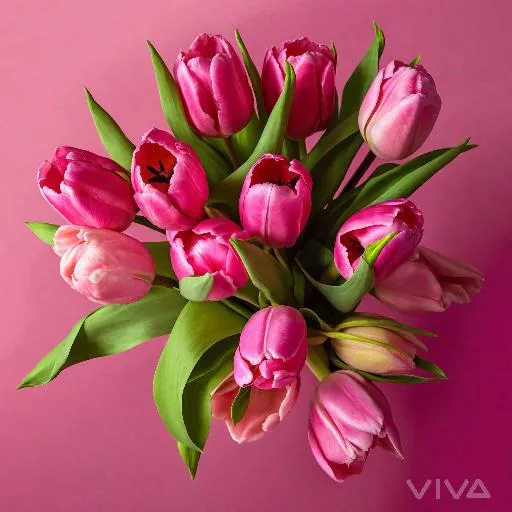
Transform text into stunning AI-generated floral wallpapers featuring vibrant pink bouquets of tulips and roses in a glass vase. Create harmonious compositions with depth, dimension, and a soft pink backdrop using Vivago.ai's advanced image generation tools.

Recreate
arrow
Image to Image

FAQs

How to generate images/videos from text prompts?

Describe the visual content in natural language (e.g., 'A cyberpunk cat wearing neon goggles') and our AI models will create outputs. Complex prompts trigger multi-stage NLP parsing for enhanced accuracy.

How to refine unsatisfactory results?

Use our Prompt Bot - an AI-powered optimizer that suggests technical modifiers. Simply describe your ideas, desired changes ('more metallic texture'), then you will get optimized prompt variants.

When should I use reference images?

Upload references to: 1) Guide character consistency (e.g., faces/outfits), 2) Control motion patterns in videos using our feature matching algorithm. Supports JPG/PNG

What's the credit system?

Daily login grants 100 credits. Upgrade options: 1) Premium Membership, 2) Credit Packs. Details: https://vivago.ai/subscribe

More From VIVAGO AI

Moving Figure

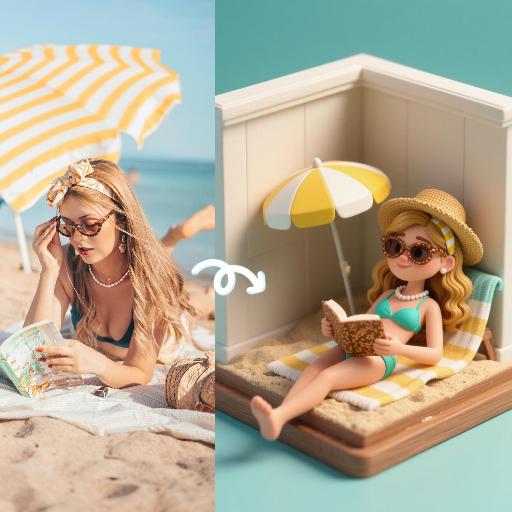
Create a 1/7 scale commercialized figure of the character in the illustration, in a realistic style and environment. Render the exact hairstyle and the same outfit with the uploaded figure. Render garments as molded plastic with engraved seams and sculpted folds; keep accessories as plastic parts. Fictionalize any brand text/logos while keeping layout and colors. Place the figure on a computer desk, using a circular transparent acrylic base without any text. On the Apple computer screen, display the Z Brush modeling process of the figure. Next to the Apple computer screen, place a BANDAl-style toy packaging box printed with the original artwork. The background shows a modern realistic room furnished with contemporary furniture, including a display cabinet filled with books, dolls, and scale figures, adding a casual and everyday atmosphere. Behind the Apple computer, place a desk lamp to add detail and depth to the scene.

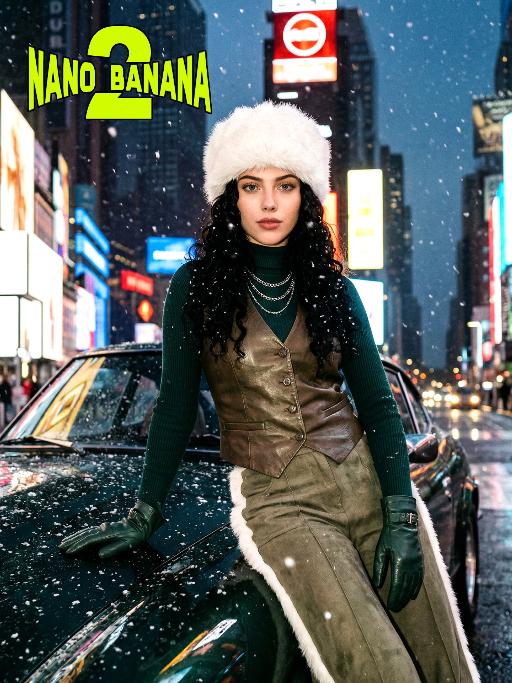
Times Square AI effects generated image

Times Square

[Scene] In the dark, snowy New York Times Square, during the winter night when it gets dark, heavy snow is falling, with snowflakes falling clearly. The iconic neon advertisements are shining in the background. The damp asphalt reflects the light of the neon lights. The towering skyscrapers are clearly visible in the snow and fog, with snowflakes flying all around. [Subject] The person in the uploaded picture (with facial features, gender, and age unchanged) has long black curly hair, is wearing a white fluffy artificial fur hat in a European style, has a European minimalist makeup look, and the golden light outlines a soft and natural expression, with a calm demeanor, presenting a handsome posture. Snowflakes fall on the person's hair and coat, and also on the person's body. [Posture] - Body: Sideways leaning against the engine hood of a dark green luxury retro sports car, the body's center of gravity tilts to the right, the torso slightly twisting to face the camera - Legs: Right knee bent; left leg straight down, foot on the ground - Arms: Right arm stretched downward, palm flat against the car hood to provide support, fingers slightly spread; left arm relaxed, hand on the left thigh - Head and gaze: Head remains upright, facing the camera directly, eyes forward, expression confident - Overall: A relaxed but energetic fashion editor posture, casual and cool atmosphere, elongated body lines to enhance visual effect [Clothing] Leading-edge autumn design: 1. Outer layer: A well-tailored leather fabric vest with silver chain details and perforated patterns, worn over a fitted dark green high-neck sweater; 2. Bottom: High-waisted dark green wide-leg work pants, with a white fur trim (coordinated with the white fur belt); 3. Accessories: Dark green long leather gloves, brim with white artificial fur trim, multi-layer silver chain necklace; 4. Footwear: Simple black ankle boots (partly visible), Y2K style, retro style, leather and metal texture. [Photography and Lighting] Mid-close-up shot, dark environment, using 35mm film photography style, Kodak Gold 200 film, warm golden backlight to outline the hair and snowflakes, soft fill light to retain the natural skin texture of the face, shallow depth of field blurs the background advertisements, film grain and soft bokeh effect when snow falls, strong light contrast, foreground with a lot of blurred and clear snowflakes falling. [Style] The image style is portrait, the edges of the picture add a similar film graininess effect, dark atmosphere, high-end fashion editor, hyper-realistic details, fashion avant-garde photography art, 8K resolution, no excessive smoothing processing, using blue-green and orange contrast for color grading - the style has a cinematic feel.

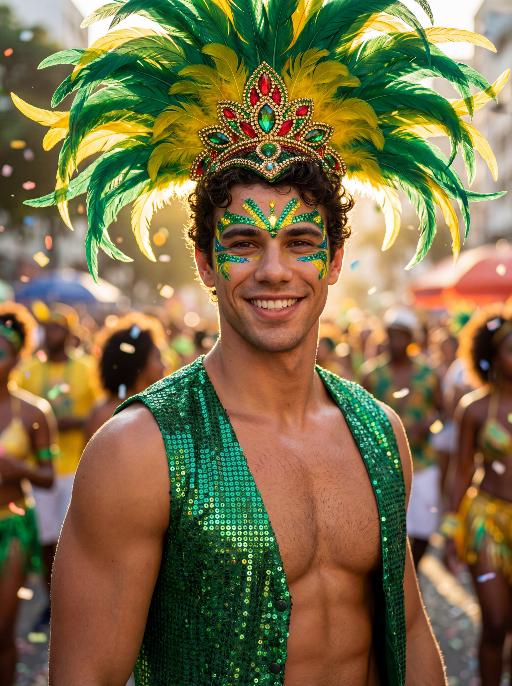
Reveller AI effects generated image

Reveller

Use the exact same facial features, gender, age, and natural skin tone as the character in the uploaded image. Do not alter, lighten, darken, or modify the original complexion in any way. Maintain his authentic skin color exactly as in the reference image. curly textured hair, radiant natural skin, and a confident, magnetic smile, standing proudly at Rio Carnival. wears an elaborate headdress made of large green and yellow feathers, with an ornate centerpiece featuring red, green, and gold jewel details. His face is painted with bold, symmetrical Carnival patterns in emerald green and vibrant yellow, with striking blue accents around the eyes, enhancing gaze. dressed in a shimmering emerald-green sequined vest that catches the light dramatically, partially open to reveal his athletic chest. Natural body highlights emphasize physique realistically without altering skin tone. Lighting: strong cinematic light contrast — warm golden sunlight illuminating one side of his face and torso, creating sculpted highlights, while preserving accurate skin color and natural undertones. Soft shadow adds depth and dimension without washing out or overexposing the complexion. Subtle rim lighting around the feathers enhances separation from the background. High dynamic range with true-to-life skin rendering. Background: a lively Rio street during Carnival, filled with a cheering crowd in colorful festive clothing. Confetti floats in the air. The crowd is slightly blurred (shallow depth of field), making the subject stand out sharply. Mood: vibrant, joyful, triumphant, powerful, charismatic. Style: high-resolution cinematic photography, poster-quality, ultra-sharp focus on subject, shallow depth of field, 85mm lens, HDR, rich saturated colors, dramatic contrast, professional fashion-editorial lighting, realistic skin texture, natural complexion fidelity, magazine cover composition.

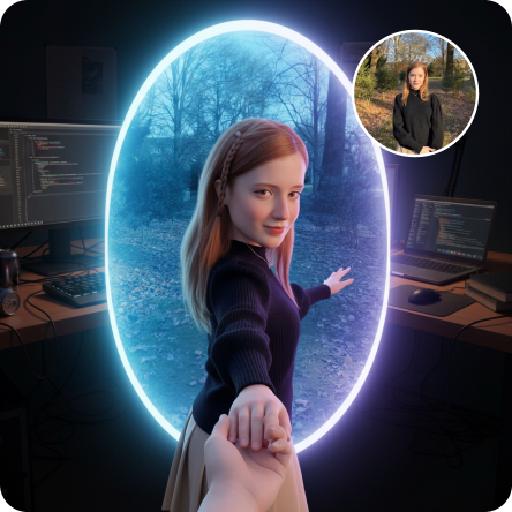
Follow Me Portal AI effects generated image

Follow Me Portal

A 3D chibi-style version of the person in the photo is stepping through a glowing portal, reaching out and holding the viewer’s hand. As the character pulls the viewer forward, they turn back with a dynamic glance, inviting the viewer into their world.Behind the portal is the viewer’s real-life environment: a typical programmer’s study with a desk, monitor, and laptop, rendered in realistic detail. Inside the portal lies the character’s 3D chibi world, inspired by the photo, with a cool blue color scheme that sharply contrasts with the real-world surroundings.The portal itself is a perfectly elliptical frame glowing with mysterious blue and purple light, positioned at the center of the image as a gateway between the two worlds.The scene is captured from a third-person perspective, clearly showing the viewer’s hand being pulled into the character’s world.

StreetStart

The character in the uploaded picture (unchanged facial features, gender and age). She has short, wavy dark hair and a joyful, smiling expression, with warm brown eyes. She wears an elaborate Carnival costume: a large, ornate headdress made of layered feathers in teal, yellow, and red, adorned with gold and gemstone decorations. Her outfit includes a teal and gold bejeweled bikini top, matching arm cuffs, and a short, flared skirt made of teal feathers with gold accents. She is captured mid-dance, one arm extended forward and the other bent, radiating energy. In the background, other Carnival dancers in colorful feathered costumes are blurred, set against a sunlit street with festive decorations. The style is a high-detail anime illustration with bright, saturated colors, dynamic composition, and a lively, celebratory atmosphere.

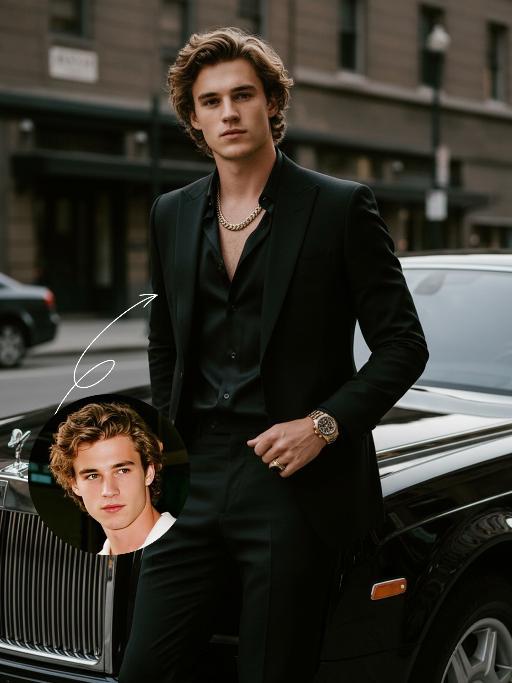
Elegant Gentle AI effects generated image

Elegant Gentle

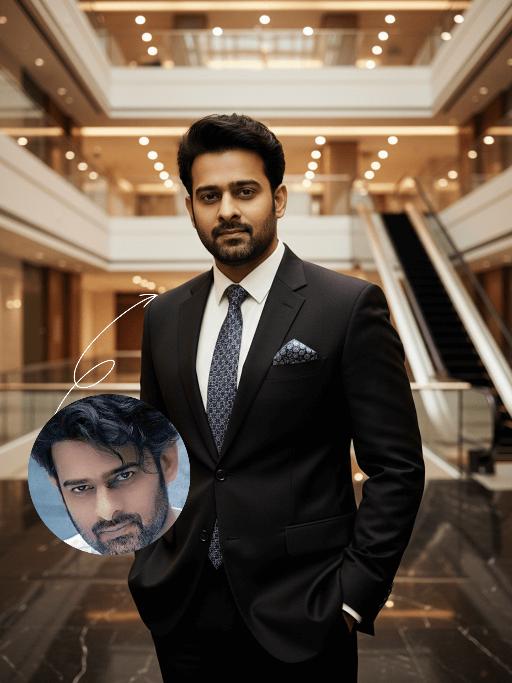
Use the UPLOADED PORTRAIT for strict identity lock (keep face, hair, skin tone, age). Cinematic portrait of a man with a tall, dashing body, with the style of a mafia boss, standing alone with an aura of confidence and authority. He is beside a luxurious black Rolls-Royce car on a city street, a relaxed pose leaning against the car showing the Rolls-Royce logo with a classy style. All-black outfit: a neat suit, an open-collar black shirt with a luxurious necklace, formal pants, leather shoes, with a luxurious ring and a luxurious watch. His expression is serious and charismatic, radiating energy like a mafia boss. The atmosphere of the photo uses low saturation color grading with a dominance of pitch black and faded gray tones, giving a dark, elegant, and classy feel ala mafia movies. The background of the city building is blurred so that the main focus remains on the man and his car. Hyper-realistic, ultra-detailed, professional photography style.

Brasilia

In the uploaded picture, the figure (with unchanged facial features, gender and age) is standing in the front of the building, dancing dynamically. He is wearing a magnificent and exquisite shirt and short scarf suit (made of black fabric and decorated with silver sequins), wearing stylish leather shoes, standing naturally. The background is the Three Powers Square in Brasilia, a famous architectural landmark of Brazil, with a rich atmosphere of the Rio Carnival festival. The dazzling festival lights and stage spotlights interweave to illuminate, fluttering the Brazilian flag and colorful festival flags. There is a strong color contrast. The scene transitions from dusk to night, with dreamy and magical lighting. The composition is wide-angle, with cinematic quality, 8K ultra-high definition, rich details, realistic photography. The picture is grand and lively, full of the grand and festive vitality.

FinalGlam

Use the exact same facial features, gender, and age as the character in the uploaded image. Masterpiece, best quality, ultra-detailed, photorealistic full-body shot, a stunning Brazilian woman dancing samba at Rio Carnival, energetic and graceful dance pose, long wavy dark hair, beautiful facial features, glamorous carnival makeup, golden tan skin, wearing a luxurious and vibrant Rio Carnival costume: sequined and beaded bodysuit in green, yellow, and blue, long elegant skirt that fully covers the hips and buttocks (no exposure, modest and decent), large dramatic feather headdress with gold and blue feathers, feathered hip details (subtly integrated with the skirt, no exposed skin), sparkling jewelry. Background is the lively Sambadrome at night, colorful lights, cheering crowd, fireworks in the night sky, festive confetti floating in the air, dynamic motion blur, warm cinematic lighting, strong rim light, vibrant saturated colors, shallow depth of field, 8K, ultra-realistic.

Magazine Cover AI effects generated image

Magazine Cover

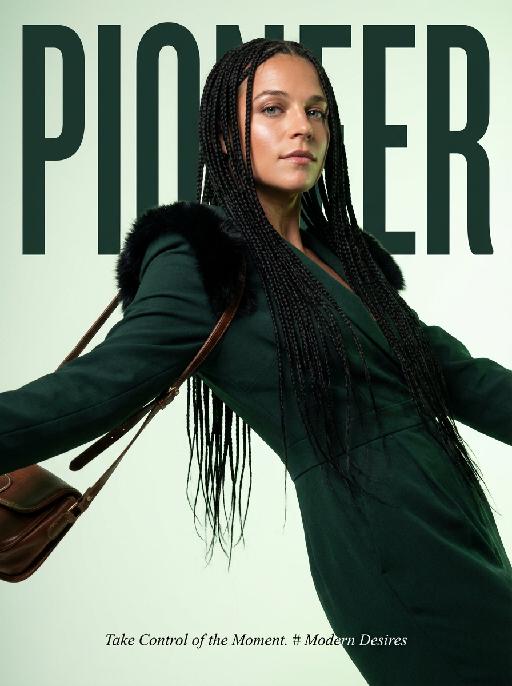
This is the cover of the high-end fashion magazine series, with the title in a large, dark green font: "PIONEER". The figure is in front of the text, captured in a medium close-up shot. The cover showcases a radiant image (with no changes in facial features, gender, or age), presented through the uploaded picture. She has several flowing and slender black braids, wearing a well-tailored dark green outfit, with soft black fur decorations on the shoulders, holding a retro high-end custom cross-body bag, her body in an inclined hanging position, arms stretched out, with an enchanting expression and exquisite makeup. The background is a gradient of pale green, the strong contrast of light highlights the facial contours and hair texture. The focal length is 50mm, captured with a professional portrait camera, clear focus, using an elegant editing style, with modern and avant-garde aesthetics. The small and exquisite text layout adds the content: "Take Control of the Moment. # Modern Desires"

Bollywood AI effects generated image

Bollywood

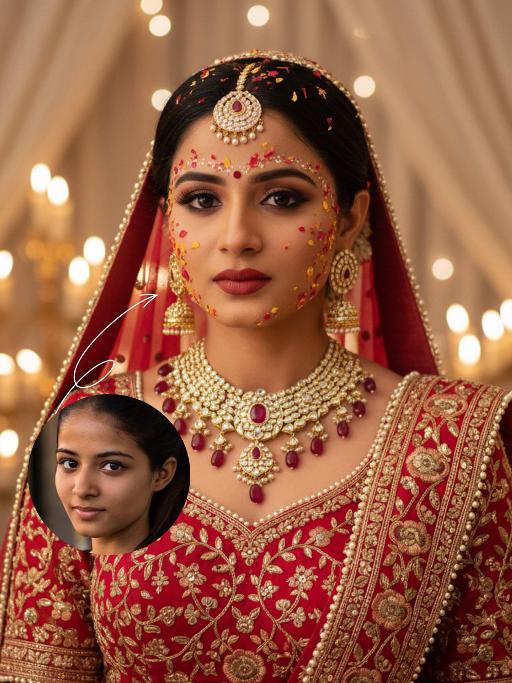
The identity of the uploaded portrait is strictly preserved (retaining facial contours, authentic Indian skin tone, hairstyle and age). This is a close-up and bust portrait with a 3:4 aspect ratio, featuring a stunning traditional Indian bride around 30 years old with a gentle yet faintly sorrowful expression. Her makeup is exquisitely rich and dramatic: smoldering smoky eyes paired with a matte vintage red lip, a large red crystal bindi adorned on her forehead, and delicate red, yellow and gold Gulab Patti floral appliqués dotted across her forehead and cheeks, with a fresh, flawless and well-blended base makeup. Her jet-black hair is sleek and long (or styled into a neat chignon), with a rose-red dupatta edged with gold threadwork wrapped around her head; the dupatta is embroidered with intricate golden interlocking floral patterns along the hem and drapes softly over her shoulders. She is dressed in a red heavily hand-embroidered Lehenga Choli: the blouse is fully embellished with golden interlocking floral motifs and trimmed with a delicate pearl border. She wears large multi-layered openwork gold earrings with tiny dangling diamond accents, a stack of gold necklaces inlaid with rubies around her neck, and an ornate maang tikka encrusted with pearls and rubies atop her head. The background is a warm-hued wedding ceremony setting: soft candlelight (candles/fairy lights) glimmers all around, creamy white sheer drapes hang in hazy folds, and the blurred backdrop enhances the atmospheric feel. Bollywood cinematic lighting is adopted: warm golden soft light is cast from the side, outlining her facial contours and the delicate texture of the Gulab Patti, accentuating the luster of the gold jewelry, and creating a dreamy, hazy sense of ritual. The style is a vintage Bollywood bridal portrait, with rich, saturated colors, exquisitely detailed textures, and an immersive emotional atmosphere that evokes profound sentiment.

Load more

Next-Gen Multi-Model AI Video Architecture

Vivago AI isn't just one engine—it’s a unified hub for the world’s most advanced video AI. Whether you need cinematic realism or high-speed social content, we provide the right model for your creative vision.

Free Generate

Beauty and Dolphins

Vacation Time

Stellar Tear

Fish Tank Supervisor

Cinematic Quality & Precision Control

Enables 4K resolution with multi-lens motion control, generating delicate scene via text prompts for customized cinematography.​

TRY NOW

Dynamic AV Sync

Auto-generates original audio to avoid copyright issues. Build 3D immersive environments through layered sound design automatically.

TRY NOW

OpenAI Sora 2

​Advanced visual storytelling with unparalleled physics and consistency.

TRY NOW

Kling v2.6 Pro

Industry-leading cinematic image animation and motion control.

TRY NOW

Google Veo 3 & 3.1

Ultra-fast generation with enhanced realism for creative workflows.

TRY NOW

Vivago AI 2.0

Our proprietary model optimized for efficiency, speed, and cost-effective generation.

TRY NOW

Users' Voice

We listen carefully to the opinions of every user.
Free Generate
Contact Us
I tried the Lip Sync feature inside Vivago.ai’s AI Video Generator for my educational podcast, and the results were stunning! The avatar's lip movements perfectly matched my audio recording, creating a professional AI-generated video without complex editing. Compared with tools like OpenAI Sora 2 and Google Veo 3.1, Vivago Image-to-Video delivers fast, studio-quality results online. It saved me hours of post-production work.
ElenaM (Spain)
Vivago’s Image-to-Video AI transformed my marketing workflow. I uploaded a product image and described the launch scene in text, and it generated a 10-second cinematic AI video with background music and dynamic visuals. The output quality rivals Kling v2.6 Pro and Google Veo 3 Fast. It’s now my go-to AI video generator for social media ads and product campaigns.
KenjiT (Japan)
As a digital artist, I use Vivago.ai 2.0 daily for Image-to-Image and AI Image-to-Video creation. The e-book covers and animated visuals I generate for clients look cinematic and professional. Unlike many standalone AI tools, Vivago integrates multiple leading models into one platform, making it easier to create copyright-safe AI images and videos for publishing.
ChenL (China)
I tried the Lip Sync feature inside Vivago.ai’s AI Video Generator for my educational podcast, and the results were stunning! The avatar's lip movements perfectly matched my audio recording, creating a professional AI-generated video without complex editing. Compared with tools like OpenAI Sora 2 and Google Veo 3.1, Vivago Image-to-Video delivers fast, studio-quality results online. It saved me hours of post-production work.
ElenaM (Spain)
Vivago’s Image-to-Video AI transformed my marketing workflow. I uploaded a product image and described the launch scene in text, and it generated a 10-second cinematic AI video with background music and dynamic visuals. The output quality rivals Kling v2.6 Pro and Google Veo 3 Fast. It’s now my go-to AI video generator for social media ads and product campaigns.
KenjiT (Japan)
As a digital artist, I use Vivago.ai 2.0 daily for Image-to-Image and AI Image-to-Video creation. The e-book covers and animated visuals I generate for clients look cinematic and professional. Unlike many standalone AI tools, Vivago integrates multiple leading models into one platform, making it easier to create copyright-safe AI images and videos for publishing.
ChenL (China)
I absolutely love Vivago’s AI Image-to-Video Generator. As a travel blogger, static images often fail to capture real atmosphere, but Vivago helps me turn photos into vivid cinematic AI videos with motion effects. It feels comparable to OpenAI Sora 2 and Google Veo 3.1, but more accessible and faster for creators who need high-quality AI videos online.
LiamK (Australia)
I tried the Lip Sync feature inside Vivago.ai’s AI Video Generator for my educational podcast, and the results were stunning! The avatar's lip movements perfectly matched my audio recording, creating a professional AI-generated video without complex editing. Compared with tools like OpenAI Sora 2 and Google Veo 3.1, Vivago Image-to-Video delivers fast, studio-quality results online. It saved me hours of post-production work.
ElenaM (Spain)
Vivago’s Image-to-Video AI transformed my marketing workflow. I uploaded a product image and described the launch scene in text, and it generated a 10-second cinematic AI video with background music and dynamic visuals. The output quality rivals Kling v2.6 Pro and Google Veo 3 Fast. It’s now my go-to AI video generator for social media ads and product campaigns.
KenjiT (Japan)
As a digital artist, I use Vivago.ai 2.0 daily for Image-to-Image and AI Image-to-Video creation. The e-book covers and animated visuals I generate for clients look cinematic and professional. Unlike many standalone AI tools, Vivago integrates multiple leading models into one platform, making it easier to create copyright-safe AI images and videos for publishing.
ChenL (China)
I absolutely love Vivago’s AI Image-to-Video Generator. As a travel blogger, static images often fail to capture real atmosphere, but Vivago helps me turn photos into vivid cinematic AI videos with motion effects. It feels comparable to OpenAI Sora 2 and Google Veo 3.1, but more accessible and faster for creators who need high-quality AI videos online.
LiamK (Australia)
Using Vivago.ai’s Image-to-Video AI has greatly enhanced my classroom teaching. I transform textbook notes into historical AI videos with cinematic filters and dynamic animations. Compared with tools like Kling v2.6 Pro and Google Veo 3 Fast, Vivago offers faster generation and easier parameter control for educators who need reliable AI video creation.
RajivG (India)
I frequently create AI videos on Vivago and publish them on TikTok and YouTube Shorts. The AI video templates and trending content ideas help me produce viral-ready clips quickly. With Vivago’s integrated models—including advanced video engines similar to OpenAI Sora 2—I can generate anime-style and cinematic social media videos that drive high engagement.
MarieJ (Spain)
What attracts me most about Vivago.ai is not only the powerful AI Video Generator but also the active AIGC creator community. It combines AI Image-to-Video, Text-to-Video, and leading model integrations like Google Veo 3.1 into one creative platform.
TomW (India)
At first, I was hesitant about using AI video tools. But after trying Vivago Image-to-Video, I realized how easy it is to create professional AI-generated videos online. I just upload an image, add a short prompt, and adjust a few settings. The results are cinematic and copyright-safe, which is essential for commercial projects.
HectorC (Mexico)
Using Vivago.ai’s Image-to-Video AI has greatly enhanced my classroom teaching. I transform textbook notes into historical AI videos with cinematic filters and dynamic animations. Compared with tools like Kling v2.6 Pro and Google Veo 3 Fast, Vivago offers faster generation and easier parameter control for educators who need reliable AI video creation.
RajivG (India)
I frequently create AI videos on Vivago and publish them on TikTok and YouTube Shorts. The AI video templates and trending content ideas help me produce viral-ready clips quickly. With Vivago’s integrated models—including advanced video engines similar to OpenAI Sora 2—I can generate anime-style and cinematic social media videos that drive high engagement.
MarieJ (Spain)
What attracts me most about Vivago.ai is not only the powerful AI Video Generator but also the active AIGC creator community. It combines AI Image-to-Video, Text-to-Video, and leading model integrations like Google Veo 3.1 into one creative platform.
TomW (India)
At first, I was hesitant about using AI video tools. But after trying Vivago Image-to-Video, I realized how easy it is to create professional AI-generated videos online. I just upload an image, add a short prompt, and adjust a few settings. The results are cinematic and copyright-safe, which is essential for commercial projects.
HectorC (Mexico)