Text to Image

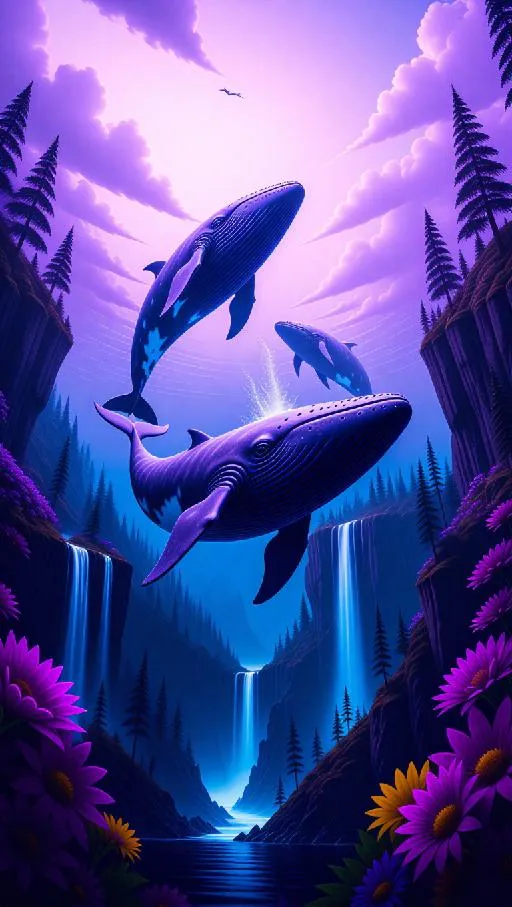
Transform your imagination into stunning AI-generated visuals with VivaGo. Create colossal whales swimming through lavender seas, their backs hosting vibrant ecosystems with waterfalls, swaying trees, and blooming flowers. Craft professional-grade fantasy scenes effortlessly using advanced AI effects and editing tools for breathtaking, otherworldly art.

Recreate
arrow
Text to Image

FAQs

How to generate images/videos from text prompts?

Describe the visual content in natural language (e.g., 'A cyberpunk cat wearing neon goggles') and our AI models will create outputs. Complex prompts trigger multi-stage NLP parsing for enhanced accuracy.

How to refine unsatisfactory results?

Use our Prompt Bot - an AI-powered optimizer that suggests technical modifiers. Simply describe your ideas, desired changes ('more metallic texture'), then you will get optimized prompt variants.

When should I use reference images?

Upload references to: 1) Guide character consistency (e.g., faces/outfits), 2) Control motion patterns in videos using our feature matching algorithm. Supports JPG/PNG

What's the credit system?

Daily login grants 100 credits. Upgrade options: 1) Premium Membership, 2) Credit Packs. Details: https://vivago.ai/subscribe

More From VIVAGO AI

Industry AI effects generated image

Industry

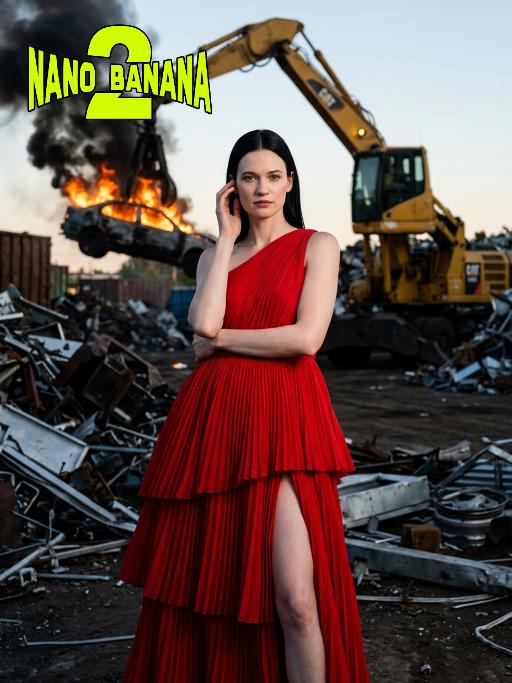
Panoramic shot: The person in the uploaded picture (with unchanged facial features, age and gender) has a refined makeup style. She stands in a junk recycling station covered with distorted metal fragments, wearing a red high-cut, layered, high-end tailored pleated evening gown. Her black straight hair is neatly and smoothly styled. The makeup is clean and transparent, exuding a cold and elegant atmosphere; the posture is elegant: one hand gently rests on the ear, the other arm crossed over the waist, the body slightly tilting towards the camera, the expression is cold and sharp, giving a sense of detachment. In the background, a yellow excavator lifts a burning car, thick smoke billowing upwards. The shooting uses a professional full-frame camera, a 135mm telephoto lens, horizontal perspective, side backlighting at dusk, a strong contrast between warm and cool light, high contrast, rich colors, a fashionable editing style, surreal industrial aesthetics, cinematic visual tension, ultra-fine and realistic effects, avant-garde fashion photography, cinematic realistic effects. The top-level strong contrast lighting effect (side lighting, the edges of the person's face are illuminated).

Snowfield

In the night snow, the figure from the uploaded image retains their original facial features and sits on the snow, wearing a sweater with white patterns, a red scarf, fluffy fleece pants and snow boots, holding a lit, sparkling handheld sparkler. The words "Hello 2026" are written in the snow. In the background, there are soft, blurred warm bokeh lights and blooming fireworks. The atmosphere is warm and healing, with a gentle light contrast between the cool blue-and-white snow scene and the warm sparks. Boasting rich details, the figure’s face is in sharp focus with natural shadows and realistic textures, exuding a sophisticated artistic photography aesthetic. Captured with an ultra-high-definition camera, the image features artistic photography styling, with the figure’s skin naturally retouched for a delicate finish. The shot is taken from a top-down perspective, with a full-screen realistic snowfall effect.

Lolita

Overhead shot: This is a realistic photographic image. The figure is a beautiful woman (her original facial features, gender and age are all preserved), she plays the role of an anime princess with pink hair, wearing a white rabbit ear on her head, sitting on a luxurious white floor, slightly leaning forward, one hand naturally resting on her leg, and the other hand holding a small and elegant pink and white decorated cream cake and passing it towards the camera. She looks straight at the camera, with a charming and playful expression on her face, her makeup is exquisite, there are teardrop-shaped decorations around her eyes, her lips are full and shiny, wearing a pink and white gradient style Lolita dress, with a deep V-neck (revealing the full chest lines), multiple layers of transparent tulle and ruffles, white stockings paired with bows, and wearing a pearl necklace and heart-shaped earrings. Around her is a luxurious European room, equipped with exquisite furniture, soft and warm lighting, dreamy blur effect, lens flare, flicker and flash effect, elegant color combination, ultra-fine details, 8K resolution, hyper-realistic style, all of which were captured by a 50mm f/1 digital single-lens reflex camera.

Diwali AI effects generated image

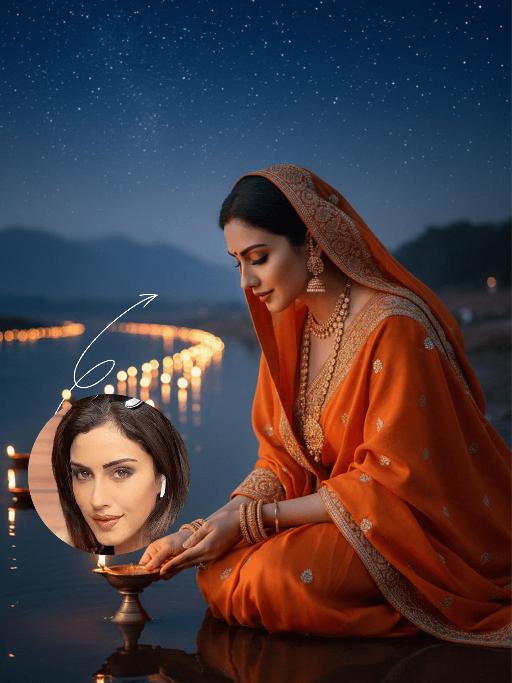
Diwali

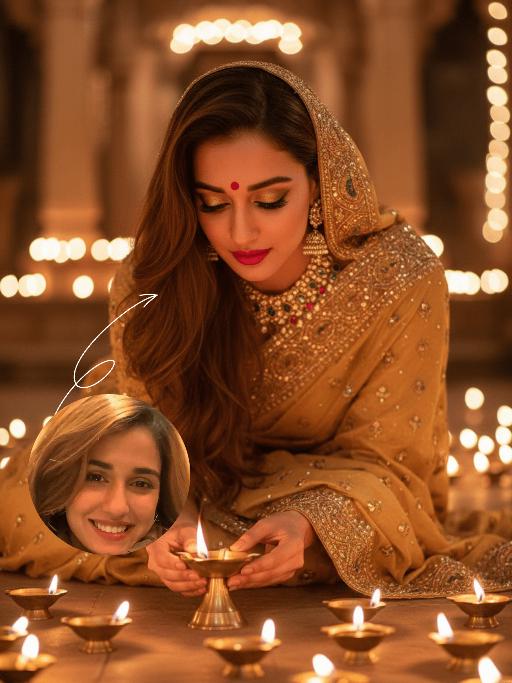
The identity of the uploaded portrait is strictly preserved (retaining facial contours, authentic Indian skin tone, hairstyle and age). This is a bust portrait that captures the original natural features of the Indian woman in the reference image: she has a delicate and fair face with a vermilion red bindi on her forehead and a colorful gemstone maang tikka adorning her brow, complemented by exquisitely elaborate eye makeup and full, vivid lip color, with a gentle and devout expression. She is dressed in a traditional sari with intricate golden embroidery, its edges adorned with elaborate patterns and paired with a matching headscarf; the overall color palette echoes the warm luminous ambiance of Diwali. Leaning forward gently, she places a lit brass oil lamp carefully with both hands, her gaze fixed intently on the wick, her expression serene and filled with reverence. Her face takes up a moderate proportion of the frame, allowing the delicate makeup details and her devout demeanor to be seen clearly. Set in an indoor space on Diwali night, the floor is covered with lit brass oil lamps, whose warm yellow candlelight casts a soft halo all around. The background is softly blurred to highlight the figure’s interaction with the oil lamp. With the warm glow of the oil lamps as the primary light source, the light gently outlines her facial contours and the textured details of her attire, creating a warm and tranquil festive atmosphere with rich, warm hues. Boasting 8K ultra-high definition resolution and commercial-grade portrait quality, the image features crisp, sharp details and rich color layering, emphasizing the theme of "light" in Diwali and the profound piety of the figure.

holy Ganges AI effects generated image

holy Ganges

The identity of the uploaded portrait is strictly preserved (retaining facial contours, authentic Indian skin tone, hairstyle and age). This is a bust portrait centered on an Indian woman in traditional attire, with elaborate makeup, a vermilion red bindi on her forehead, gold jewelry and an orange embroidered sari draped on her body, a matching headscarf falling gently over her shoulders. Kneeling on the banks of the Ganges (the Holy River), she sets a lit brass oil lamp afloat on the water. The composition juxtaposes the figure with rows of oil lamps on the river surface, distant hazy mountains and a glittering starry sky, forming a "human-deity-nature" juxtaposition that embodies the concept of harmony between humanity and nature. Leaning forward slightly, she gazes at the lamp wick with a gentle look, her expression devout and serene, her movements slow and solemn. The deep blue night sky is studded with countless stars, the silhouettes of distant mountains are faint and hazy, and the river surface shimmers with warm yellow reflections of candlelight, creating a tranquil and sacred Diwali atmosphere. Shot in 8K ultra-high definition, the portrait abounds in intricate details with distinct color layering, highlighting the striking contrast between the warm candlelight and the cool-toned background.

Load more

Next-Gen Multi-Model AI Video Architecture

Vivago AI isn't just one engine—it’s a unified hub for the world’s most advanced video AI. Whether you need cinematic realism or high-speed social content, we provide the right model for your creative vision.

Free Generate

Beauty and Dolphins

Vacation Time

Stellar Tear

Fish Tank Supervisor

Cinematic Quality & Precision Control

Enables 4K resolution with multi-lens motion control, generating delicate scene via text prompts for customized cinematography.​

TRY NOW

Dynamic AV Sync

Auto-generates original audio to avoid copyright issues. Build 3D immersive environments through layered sound design automatically.

TRY NOW

OpenAI Sora 2

​Advanced visual storytelling with unparalleled physics and consistency.

TRY NOW

Kling v2.6 Pro

Industry-leading cinematic image animation and motion control.

TRY NOW

Google Veo 3 & 3.1

Ultra-fast generation with enhanced realism for creative workflows.

TRY NOW

Vivago AI 2.0

Our proprietary model optimized for efficiency, speed, and cost-effective generation.

TRY NOW

Users' Voice

We listen carefully to the opinions of every user.
Free Generate
Contact Us
I tried the Lip Sync feature inside Vivago.ai’s AI Video Generator for my educational podcast, and the results were stunning! The avatar's lip movements perfectly matched my audio recording, creating a professional AI-generated video without complex editing. Compared with tools like OpenAI Sora 2 and Google Veo 3.1, Vivago Image-to-Video delivers fast, studio-quality results online. It saved me hours of post-production work.
ElenaM (Spain)
Vivago’s Image-to-Video AI transformed my marketing workflow. I uploaded a product image and described the launch scene in text, and it generated a 10-second cinematic AI video with background music and dynamic visuals. The output quality rivals Kling v2.6 Pro and Google Veo 3 Fast. It’s now my go-to AI video generator for social media ads and product campaigns.
KenjiT (Japan)
As a digital artist, I use Vivago.ai 2.0 daily for Image-to-Image and AI Image-to-Video creation. The e-book covers and animated visuals I generate for clients look cinematic and professional. Unlike many standalone AI tools, Vivago integrates multiple leading models into one platform, making it easier to create copyright-safe AI images and videos for publishing.
ChenL (China)
I tried the Lip Sync feature inside Vivago.ai’s AI Video Generator for my educational podcast, and the results were stunning! The avatar's lip movements perfectly matched my audio recording, creating a professional AI-generated video without complex editing. Compared with tools like OpenAI Sora 2 and Google Veo 3.1, Vivago Image-to-Video delivers fast, studio-quality results online. It saved me hours of post-production work.
ElenaM (Spain)
Vivago’s Image-to-Video AI transformed my marketing workflow. I uploaded a product image and described the launch scene in text, and it generated a 10-second cinematic AI video with background music and dynamic visuals. The output quality rivals Kling v2.6 Pro and Google Veo 3 Fast. It’s now my go-to AI video generator for social media ads and product campaigns.
KenjiT (Japan)
As a digital artist, I use Vivago.ai 2.0 daily for Image-to-Image and AI Image-to-Video creation. The e-book covers and animated visuals I generate for clients look cinematic and professional. Unlike many standalone AI tools, Vivago integrates multiple leading models into one platform, making it easier to create copyright-safe AI images and videos for publishing.
ChenL (China)
I absolutely love Vivago’s AI Image-to-Video Generator. As a travel blogger, static images often fail to capture real atmosphere, but Vivago helps me turn photos into vivid cinematic AI videos with motion effects. It feels comparable to OpenAI Sora 2 and Google Veo 3.1, but more accessible and faster for creators who need high-quality AI videos online.
LiamK (Australia)
I tried the Lip Sync feature inside Vivago.ai’s AI Video Generator for my educational podcast, and the results were stunning! The avatar's lip movements perfectly matched my audio recording, creating a professional AI-generated video without complex editing. Compared with tools like OpenAI Sora 2 and Google Veo 3.1, Vivago Image-to-Video delivers fast, studio-quality results online. It saved me hours of post-production work.
ElenaM (Spain)
Vivago’s Image-to-Video AI transformed my marketing workflow. I uploaded a product image and described the launch scene in text, and it generated a 10-second cinematic AI video with background music and dynamic visuals. The output quality rivals Kling v2.6 Pro and Google Veo 3 Fast. It’s now my go-to AI video generator for social media ads and product campaigns.
KenjiT (Japan)
As a digital artist, I use Vivago.ai 2.0 daily for Image-to-Image and AI Image-to-Video creation. The e-book covers and animated visuals I generate for clients look cinematic and professional. Unlike many standalone AI tools, Vivago integrates multiple leading models into one platform, making it easier to create copyright-safe AI images and videos for publishing.
ChenL (China)
I absolutely love Vivago’s AI Image-to-Video Generator. As a travel blogger, static images often fail to capture real atmosphere, but Vivago helps me turn photos into vivid cinematic AI videos with motion effects. It feels comparable to OpenAI Sora 2 and Google Veo 3.1, but more accessible and faster for creators who need high-quality AI videos online.
LiamK (Australia)
Using Vivago.ai’s Image-to-Video AI has greatly enhanced my classroom teaching. I transform textbook notes into historical AI videos with cinematic filters and dynamic animations. Compared with tools like Kling v2.6 Pro and Google Veo 3 Fast, Vivago offers faster generation and easier parameter control for educators who need reliable AI video creation.
RajivG (India)
I frequently create AI videos on Vivago and publish them on TikTok and YouTube Shorts. The AI video templates and trending content ideas help me produce viral-ready clips quickly. With Vivago’s integrated models—including advanced video engines similar to OpenAI Sora 2—I can generate anime-style and cinematic social media videos that drive high engagement.
MarieJ (Spain)
What attracts me most about Vivago.ai is not only the powerful AI Video Generator but also the active AIGC creator community. It combines AI Image-to-Video, Text-to-Video, and leading model integrations like Google Veo 3.1 into one creative platform.
TomW (India)
At first, I was hesitant about using AI video tools. But after trying Vivago Image-to-Video, I realized how easy it is to create professional AI-generated videos online. I just upload an image, add a short prompt, and adjust a few settings. The results are cinematic and copyright-safe, which is essential for commercial projects.
HectorC (Mexico)
Using Vivago.ai’s Image-to-Video AI has greatly enhanced my classroom teaching. I transform textbook notes into historical AI videos with cinematic filters and dynamic animations. Compared with tools like Kling v2.6 Pro and Google Veo 3 Fast, Vivago offers faster generation and easier parameter control for educators who need reliable AI video creation.
RajivG (India)
I frequently create AI videos on Vivago and publish them on TikTok and YouTube Shorts. The AI video templates and trending content ideas help me produce viral-ready clips quickly. With Vivago’s integrated models—including advanced video engines similar to OpenAI Sora 2—I can generate anime-style and cinematic social media videos that drive high engagement.
MarieJ (Spain)
What attracts me most about Vivago.ai is not only the powerful AI Video Generator but also the active AIGC creator community. It combines AI Image-to-Video, Text-to-Video, and leading model integrations like Google Veo 3.1 into one creative platform.
TomW (India)
At first, I was hesitant about using AI video tools. But after trying Vivago Image-to-Video, I realized how easy it is to create professional AI-generated videos online. I just upload an image, add a short prompt, and adjust a few settings. The results are cinematic and copyright-safe, which is essential for commercial projects.
HectorC (Mexico)