Text to Image

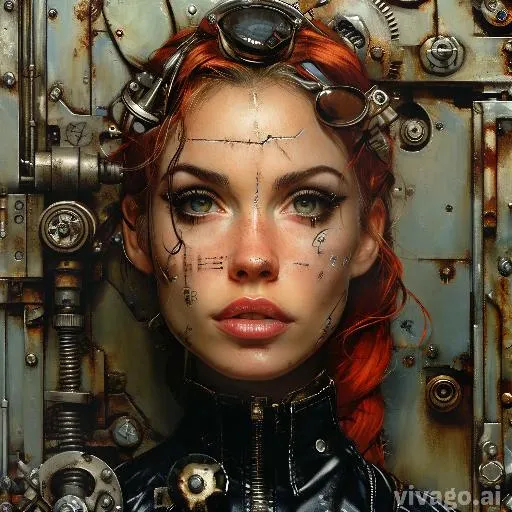
Create striking AI-generated women with a mechanical style using VivaGo.ai. Transform text prompts into cyberpunk-inspired, futuristic characters featuring robotic details, metallic textures, and high-tech aesthetics. Perfect for sci-fi visuals, concept art, and digital design projects. Experience seamless AI-powered creativity with professional-grade results.

Recreate
arrow
Text to Image

FAQs

How to generate images/videos from text prompts?

Describe the visual content in natural language (e.g., 'A cyberpunk cat wearing neon goggles') and our AI models will create outputs. Complex prompts trigger multi-stage NLP parsing for enhanced accuracy.

How to refine unsatisfactory results?

Use our Prompt Bot - an AI-powered optimizer that suggests technical modifiers. Simply describe your ideas, desired changes ('more metallic texture'), then you will get optimized prompt variants.

When should I use reference images?

Upload references to: 1) Guide character consistency (e.g., faces/outfits), 2) Control motion patterns in videos using our feature matching algorithm. Supports JPG/PNG

What's the credit system?

Daily login grants 100 credits. Upgrade options: 1) Premium Membership, 2) Credit Packs. Details: https://vivago.ai/subscribe

More From VIVAGO AI

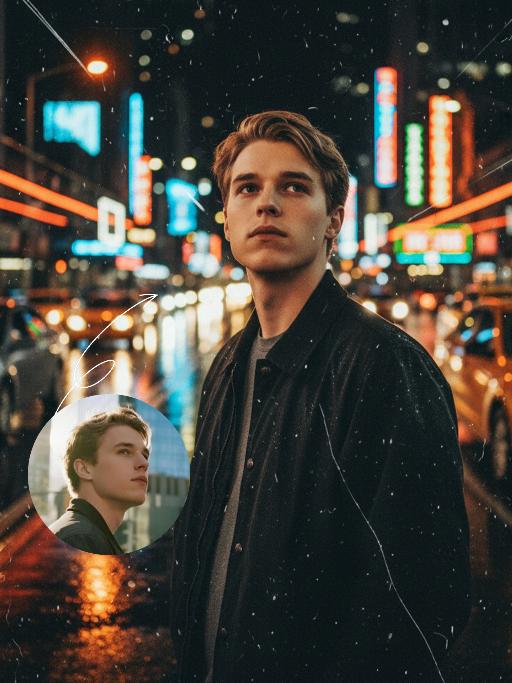
Midnight Neon AI effects generated image

Midnight Neon

Professional retro film-style portrait photography, with the first uploaded portrait used in the frame for strict identity consistency (unchanged facial features, hairstyle, skin tone and age). The figure’s face is naturally retouched for a flawless skin texture, paired with dramatic light and shadow contrast on the facial features. In this street photography portrait, the figure stands at the center of a bustling city street on a rainy night (the vibrant night view of Tokyo’s busy thoroughfares), captured in a close-up shot and positioned right at the frame’s center. The traffic flow in the background (vehicles and pedestrians speeding by to create blurred dynamic streaks) and neon lights feature dynamic motion blur effects, with smudged texture overlays to enhance the narrative mood. The dim lighting boasts high contrast; the wet road surfaces reflect warm orange glows and cool-toned neon light, with soft bokeh spots cast by street lamps and car headlights. Color palette: based on black and white tones, the neon hues are processed with high saturation, dominated by dark shades to create a striking contrast between warm and cool tones. The image is enhanced with film grain texture, depth of field breakup details, cinematic black aesthetic, and ultra-realistic, ultra-fine textures, plus a lifelike effect of raindrops splattering on the lens. Shot with a slow shutter speed, a large aperture and a low shutter setting; an orange vertical digital date watermark (2026:00:00) is added to the bottom right corner.

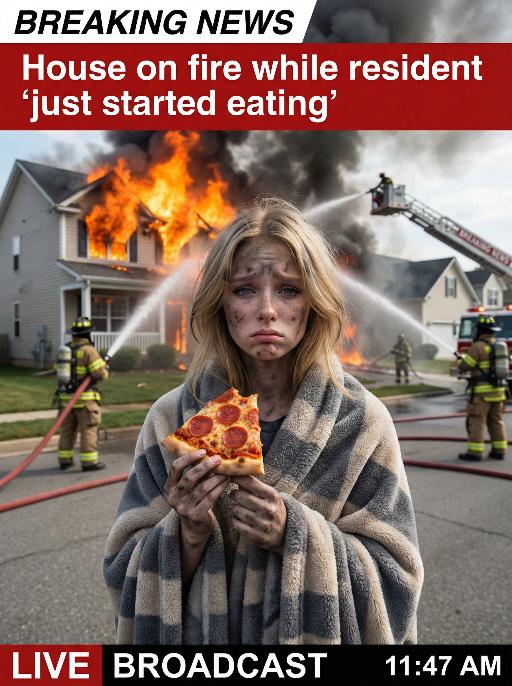
House On Fire AI effects generated image

House On Fire

This is a realistic breaking news photo. In the middle of the picture is the uploaded figure (with the facial features, gender and age unchanged), standing in the middle of the frame, with coal dust all over his face, looking sad. He is wrapped in a gray and beige striped plush blanket and holding a slice of Italian pepperoni pizza, looking confused and sad. In the background, a two-story suburban house is engulfed in flames, and firefighters are using water hoses to put out the fire. The silhouette of a fire engine can be seen. The scene takes place on a residential street during the day. Above there is a prominent large red and white news headline: "BREAKING NEWS". In the middle and lower part of the picture, there is a news caption that reads: "House on fire while resident 'just started eating'", "LIVE BROADCAST", "11:47 AM".

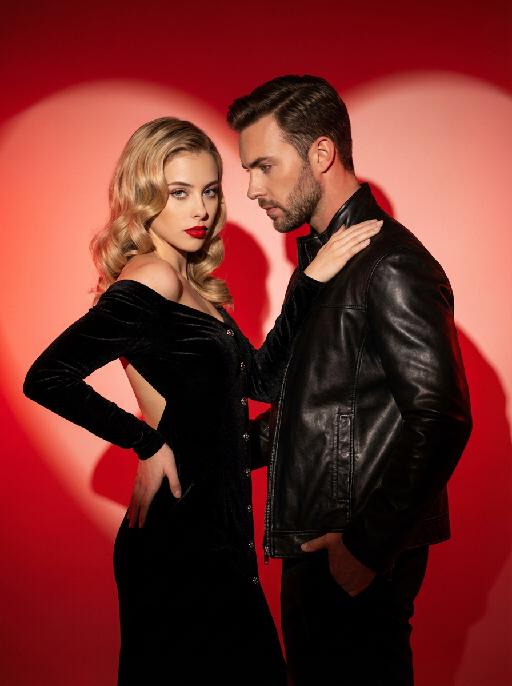
Couple AI effects generated image

Couple

This charming couple posed in the studio for the photo: In the uploaded pictures, these individuals (with unchanged facial features, gender and age) were wearing a black velvet high-end custom high-shoulder back off-the-shoulder dress (wearing exquisite and sophisticated accessories), decorated with metal buttons, with red lips, having a retro wavy hairstyle, with one hand on their own hips and the other on their partner's shoulder (with unchanged facial features, gender and age), with a cold yet charming expression; The other person was wearing a stylish custom black leather jacket, one hand in the pocket, slightly leaning forward, naturally gazing at the other person, with a natural and elegant expression, presenting a natural and elegant atmosphere; The background was a red gradient color, with strong light and shadow contrast, heart-shaped bright red light and shadow, high-contrast warm tones, and sharp black-red color contrast, exuding the luxurious charm of old Hollywood, filled with a sexy and elegant atmosphere. This was a professional studio photo shoot, the photos were clear and sharp, with an avant-garde photography art style, the edges of the characters were illuminated by red lights.

Christmas Eve

The subject is the figure in the uploaded image (with unchanged facial features), wearing a red Christmas hat, a red sweater with white snowflake patterns, a retro plaid Christmas midi skirt, and Christmas boots, standing naturally front-on in the center of the frame. The scene is set in front of a snow-covered rural wooden cabin, with a Christmas tree decorated with colorful fairy lights and baubles in the background, piles of exquisitely wrapped Christmas gifts on the ground, and snowflakes falling in the air. The scene is illuminated by warm yellow lighting (fairy lights on the cabin + Christmas tree lights), creating a warm and dreamy Christmas night atmosphere. Shot with an 85mm lens to highlight the soft texture of the figure’s fur, the knitted texture of the sweater, and the delicate details of the snowflakes in the image. 8K resolution with warm and saturated colors. Realistic photography style, full panoramic shot that shows the full body of the figure from the uploaded image.

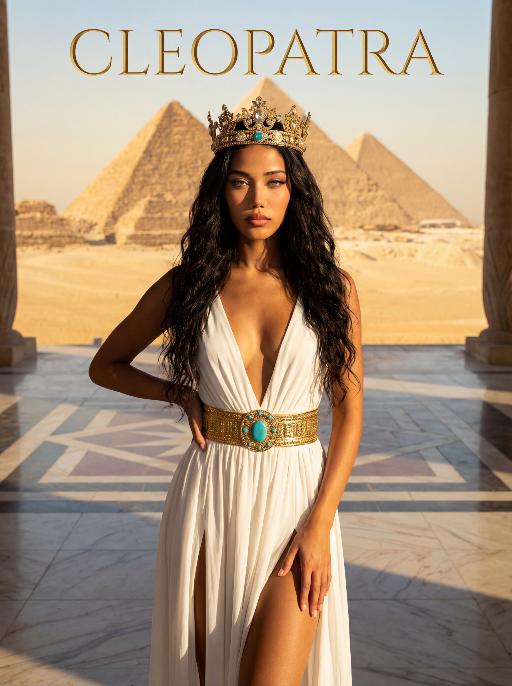
Pyramids AI effects generated image

Pyramids

The character in the uploaded picture (unchanged facial features, gender and age). A striking woman embodying the persona of Cleopatra, captured in a medium shot . She stands regally in an ancient Egyptian landscape, her body angled gracefully to accentuate her figure. One hand lightly brushes the flowing fabric of her gown, while the other rests gently on her hip, exuding a sense of poised elegance and allure. She has long, wavy black hair cascading in soft waves, her eyes wide open, head held high, radiating supreme confidence and regal authority. On her head, she wears an ornate golden Egyptian crown, adorned with intricate details and gemstones. She wears a flowing, form-fitting white gown with a deep V-neckline and high slits, cinched at the waist with a wide, ornate golden belt featuring a large turquoise gem at its center. The setting is the vast, sun-drenched desert of ancient Egypt, with the iconic Egyptian pyramids rising majestically in the distance against a clear, golden sky. The air is warm and hazy, with the desert sand stretching out to the horizon. The floor is a polished marble surface with a geometric pattern. Above her, the word "CLEOPATRA" is displayed in an elegant, golden, serif font. The image is rendered in a cinematic, epic historical drama style, with dramatic, high-contrast lighting that highlights the sheen of the golden crown and belt, the flowing texture of the white gown, and the stark beauty of the desert and pyramids. The color palette is rich and warm, featuring golden sands, deep blues of the sky, and the pure white of the gown, creating a timeless, majestic, and awe-inspiring atmosphere. The overall aesthetic is detailed, evocative, and reminiscent of a grand historical epic

Cool Boss AI effects generated image

Cool Boss

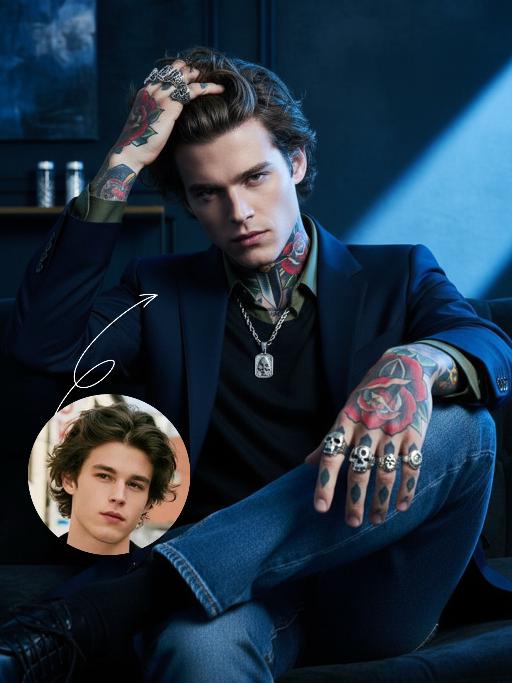
The first uploaded portrait is used for strict identity consistency (with unchanged facial features, hairstyle, skin tone and age). His body is covered in traditional American realistic tattoos – an intricate rose and dagger pattern adorns his neck, and delicate skull and poker card motifs feature on both hands, with sharp lines and rich, saturated colors. He wears multiple heavy metal-style rings on his fingers and a silver necklace. The frame employs dramatic lighting in bold blue and dark tones, with a large wash of soft side light slanting in from the right side of the frame to create an extensive tintype effect, which outlines his facial contours and the fine details of his tattoos. His facial expression is fraught with tension, and his eyes are as sharp as an eagle’s. Boasting 8K resolution, the overall style embodies high-end, fashion-forward artistic photography. The man, dressed in a tailored suit blazer set with a dark green shirt and matching suit trousers, sits on a sofa in an utterly relaxed posture. He stares directly at the camera, exuding poise and confidence. He then slowly shifts his weight, crossing one leg over the other, before running his fingers through his hair. The camera pans slightly to the left, capturing his subtle movements and the way light casts over his tattoos, further amplifying the dynamic feel of the frame.

Times Square AI effects generated image

Times Square

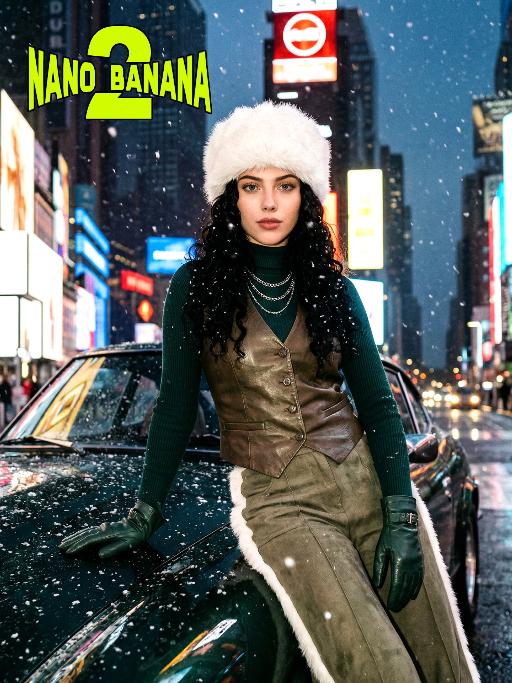
[Scene] In the dark, snowy New York Times Square, during the winter night when it gets dark, heavy snow is falling, with snowflakes falling clearly. The iconic neon advertisements are shining in the background. The damp asphalt reflects the light of the neon lights. The towering skyscrapers are clearly visible in the snow and fog, with snowflakes flying all around. [Subject] The person in the uploaded picture (with facial features, gender, and age unchanged) has long black curly hair, is wearing a white fluffy artificial fur hat in a European style, has a European minimalist makeup look, and the golden light outlines a soft and natural expression, with a calm demeanor, presenting a handsome posture. Snowflakes fall on the person's hair and coat, and also on the person's body. [Posture] - Body: Sideways leaning against the engine hood of a dark green luxury retro sports car, the body's center of gravity tilts to the right, the torso slightly twisting to face the camera - Legs: Right knee bent; left leg straight down, foot on the ground - Arms: Right arm stretched downward, palm flat against the car hood to provide support, fingers slightly spread; left arm relaxed, hand on the left thigh - Head and gaze: Head remains upright, facing the camera directly, eyes forward, expression confident - Overall: A relaxed but energetic fashion editor posture, casual and cool atmosphere, elongated body lines to enhance visual effect [Clothing] Leading-edge autumn design: 1. Outer layer: A well-tailored leather fabric vest with silver chain details and perforated patterns, worn over a fitted dark green high-neck sweater; 2. Bottom: High-waisted dark green wide-leg work pants, with a white fur trim (coordinated with the white fur belt); 3. Accessories: Dark green long leather gloves, brim with white artificial fur trim, multi-layer silver chain necklace; 4. Footwear: Simple black ankle boots (partly visible), Y2K style, retro style, leather and metal texture. [Photography and Lighting] Mid-close-up shot, dark environment, using 35mm film photography style, Kodak Gold 200 film, warm golden backlight to outline the hair and snowflakes, soft fill light to retain the natural skin texture of the face, shallow depth of field blurs the background advertisements, film grain and soft bokeh effect when snow falls, strong light contrast, foreground with a lot of blurred and clear snowflakes falling. [Style] The image style is portrait, the edges of the picture add a similar film graininess effect, dark atmosphere, high-end fashion editor, hyper-realistic details, fashion avant-garde photography art, 8K resolution, no excessive smoothing processing, using blue-green and orange contrast for color grading - the style has a cinematic feel.

Queen AI effects generated image

Queen

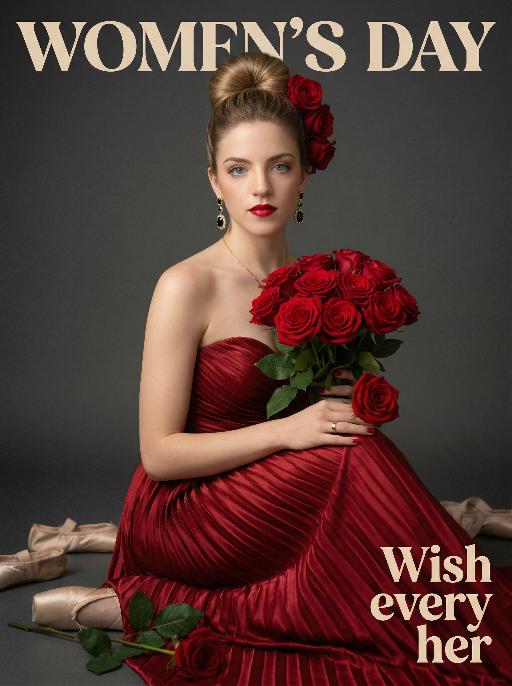
Use the exact same facial features, gender, and age as the uploaded image.Hyper-realistic half-body portrait photography, cinematic lighting, 8K resolution, shallow depth of field, rich and warm color palette. her hair styled in an elegant high bun with a few red roses tucked into the side of her hair. She wears dangling gold earrings with black gemstones, a thin gold necklace, and a gold ring on her right hand. Her makeup is sophisticated, featuring bold red lipstick and defined eyes. She is dressed in a strapless, floor-length gown made of deep red pleated satin fabric, the texture of the folds is extremely detailed. She holds a lush bouquet of fully bloomed red roses with green leaves in her arms, one rose resting gently on her right hand. She sits gracefully, looking directly at the camera with a calm and alluring expression. The background is a smooth, matte dark gray studio backdrop. On the dark floor around her, there are scattered ballet pointe shoes and a single fallen rose with green leaves. The overall style is vintage and luxurious, with soft directional lighting highlighting the sheen of the satin and the velvety texture of the rose petals, creating a strong sense of drama and elegance..The text "WOMEN'S DAY" is displayed at the top in large, bold, stylized artistic font.The text "Wish every her" is positioned in the lower right corner in a complementary artistic font.

Eid Wish AI effects generated image

Eid Wish

Maintain the exact same facial features, gender, and age of the person in the uploaded image, Photorealistic portrait, cinematic shot, a young Muslim boy wearing a white traditional thobe and white songkok hat, standing by a wooden balcony window at twilight, hands raised in gentle prayer, looking up with reverent expression, warm side lighting creating soft shadows and light contrast, background features the glowing green domes and minarets of Masjid an-Nabawi under a starry night sky with a crescent moon, floating Arabic calligraphy of "Allah" and elegant golden text "Ramadan Kareem", foreground includes an open Quran emitting soft glow, a bowl of dates, glowing incense, prayer beads, and ornate lit Ramadan lanterns, Sony A7R V camera, 8K resolution, sharp details, warm golden hour color grading, realistic texture of wood and fabric, no 3D cartoon elements, no digital art filters, pure photographic realism.

Float Toast AI effects generated image

Float Toast

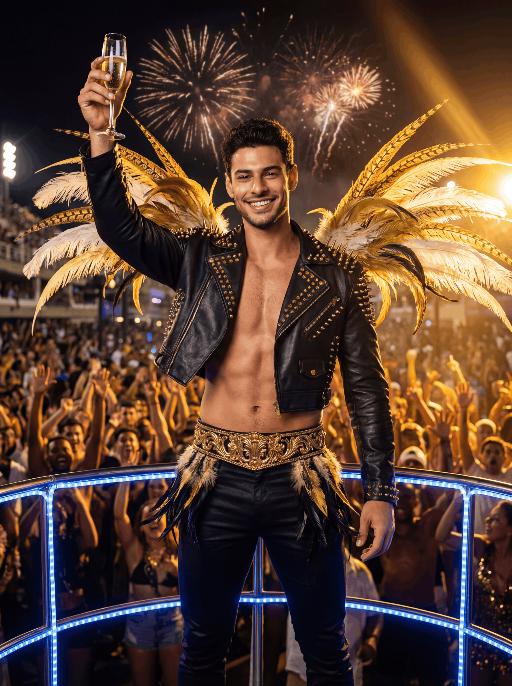
The character in the uploaded picture (unchanged facial features, gender and age). with short dark hair, light stubble, strong jawline, expressive eyebrows, and a bright confident smile, facing the camera directly. standing triumphantly on a Carnival float at night, raising a champagne flute high in celebration. wears a black leather cropped jacket decorated with gold studs and spikes, partially open at the chest, paired with fitted black pants and a wide ornate gold belt with intricate detailing. Black-and-gold feathered accents decorate hips, and large golden and white feathers extend dramatically from shoulders.Behind is a massive cheering Carnival crowd, hands raised in excitement. Fireworks explode in the dark night sky. Powerful golden stage lights beam across the scene, creating dramatic rim lighting and warm highlights. A blue LED-lit railing frames the foreground. The atmosphere is electrifying, luxurious, and celebratory. High-resolution cinematic photography, dramatic lighting, ultra-sharp focus, shallow depth of field, rich saturated colors, dynamic contrast, professional festival photography, 85mm lens, f/1.8, HDR, ultra-detailed skin texture

Hold Deceased

The two uploaded characters (with their facial features, age and gender remaining unchanged), the first uploaded image shows a person with a warm glowing edge effect), the two stand naturally side by side; the scene is an American country-style living room, with a burning stone fireplace, wooden furniture, vintage paintings and large windows with white curtains as the background. The entire scene is enveloped by soft and warm yellow light, creating a peaceful, warm and slightly nostalgic atmosphere. The camera is in medium shot and medium close-up, within the focal range, and the character proportions follow the laws of physical movement. The film has high-definition quality, hyper-realistic, all characters face forward, stand closely side by side, with realistic film texture. The shallow depth of field highlights the characters, the warm-toned soft light, fine skin and fabric textures, and the composition is natural and realistic.

Load more

Next-Gen Multi-Model AI Video Architecture

Vivago AI isn't just one engine—it’s a unified hub for the world’s most advanced video AI. Whether you need cinematic realism or high-speed social content, we provide the right model for your creative vision.

Free Generate

Beauty and Dolphins

Vacation Time

Stellar Tear

Fish Tank Supervisor

Cinematic Quality & Precision Control

Enables 4K resolution with multi-lens motion control, generating delicate scene via text prompts for customized cinematography.​

TRY NOW

Dynamic AV Sync

Auto-generates original audio to avoid copyright issues. Build 3D immersive environments through layered sound design automatically.

TRY NOW

OpenAI Sora 2

​Advanced visual storytelling with unparalleled physics and consistency.

TRY NOW

Kling v2.6 Pro

Industry-leading cinematic image animation and motion control.

TRY NOW

Google Veo 3 & 3.1

Ultra-fast generation with enhanced realism for creative workflows.

TRY NOW

Vivago AI 2.0

Our proprietary model optimized for efficiency, speed, and cost-effective generation.

TRY NOW

Users' Voice

We listen carefully to the opinions of every user.
Free Generate
Contact Us
I tried the Lip Sync feature inside Vivago.ai’s AI Video Generator for my educational podcast, and the results were stunning! The avatar's lip movements perfectly matched my audio recording, creating a professional AI-generated video without complex editing. Compared with tools like OpenAI Sora 2 and Google Veo 3.1, Vivago Image-to-Video delivers fast, studio-quality results online. It saved me hours of post-production work.
ElenaM (Spain)
Vivago’s Image-to-Video AI transformed my marketing workflow. I uploaded a product image and described the launch scene in text, and it generated a 10-second cinematic AI video with background music and dynamic visuals. The output quality rivals Kling v2.6 Pro and Google Veo 3 Fast. It’s now my go-to AI video generator for social media ads and product campaigns.
KenjiT (Japan)
As a digital artist, I use Vivago.ai 2.0 daily for Image-to-Image and AI Image-to-Video creation. The e-book covers and animated visuals I generate for clients look cinematic and professional. Unlike many standalone AI tools, Vivago integrates multiple leading models into one platform, making it easier to create copyright-safe AI images and videos for publishing.
ChenL (China)
I tried the Lip Sync feature inside Vivago.ai’s AI Video Generator for my educational podcast, and the results were stunning! The avatar's lip movements perfectly matched my audio recording, creating a professional AI-generated video without complex editing. Compared with tools like OpenAI Sora 2 and Google Veo 3.1, Vivago Image-to-Video delivers fast, studio-quality results online. It saved me hours of post-production work.
ElenaM (Spain)
Vivago’s Image-to-Video AI transformed my marketing workflow. I uploaded a product image and described the launch scene in text, and it generated a 10-second cinematic AI video with background music and dynamic visuals. The output quality rivals Kling v2.6 Pro and Google Veo 3 Fast. It’s now my go-to AI video generator for social media ads and product campaigns.
KenjiT (Japan)
As a digital artist, I use Vivago.ai 2.0 daily for Image-to-Image and AI Image-to-Video creation. The e-book covers and animated visuals I generate for clients look cinematic and professional. Unlike many standalone AI tools, Vivago integrates multiple leading models into one platform, making it easier to create copyright-safe AI images and videos for publishing.
ChenL (China)
I absolutely love Vivago’s AI Image-to-Video Generator. As a travel blogger, static images often fail to capture real atmosphere, but Vivago helps me turn photos into vivid cinematic AI videos with motion effects. It feels comparable to OpenAI Sora 2 and Google Veo 3.1, but more accessible and faster for creators who need high-quality AI videos online.
LiamK (Australia)
I tried the Lip Sync feature inside Vivago.ai’s AI Video Generator for my educational podcast, and the results were stunning! The avatar's lip movements perfectly matched my audio recording, creating a professional AI-generated video without complex editing. Compared with tools like OpenAI Sora 2 and Google Veo 3.1, Vivago Image-to-Video delivers fast, studio-quality results online. It saved me hours of post-production work.
ElenaM (Spain)
Vivago’s Image-to-Video AI transformed my marketing workflow. I uploaded a product image and described the launch scene in text, and it generated a 10-second cinematic AI video with background music and dynamic visuals. The output quality rivals Kling v2.6 Pro and Google Veo 3 Fast. It’s now my go-to AI video generator for social media ads and product campaigns.
KenjiT (Japan)
As a digital artist, I use Vivago.ai 2.0 daily for Image-to-Image and AI Image-to-Video creation. The e-book covers and animated visuals I generate for clients look cinematic and professional. Unlike many standalone AI tools, Vivago integrates multiple leading models into one platform, making it easier to create copyright-safe AI images and videos for publishing.
ChenL (China)
I absolutely love Vivago’s AI Image-to-Video Generator. As a travel blogger, static images often fail to capture real atmosphere, but Vivago helps me turn photos into vivid cinematic AI videos with motion effects. It feels comparable to OpenAI Sora 2 and Google Veo 3.1, but more accessible and faster for creators who need high-quality AI videos online.
LiamK (Australia)
Using Vivago.ai’s Image-to-Video AI has greatly enhanced my classroom teaching. I transform textbook notes into historical AI videos with cinematic filters and dynamic animations. Compared with tools like Kling v2.6 Pro and Google Veo 3 Fast, Vivago offers faster generation and easier parameter control for educators who need reliable AI video creation.
RajivG (India)
I frequently create AI videos on Vivago and publish them on TikTok and YouTube Shorts. The AI video templates and trending content ideas help me produce viral-ready clips quickly. With Vivago’s integrated models—including advanced video engines similar to OpenAI Sora 2—I can generate anime-style and cinematic social media videos that drive high engagement.
MarieJ (Spain)
What attracts me most about Vivago.ai is not only the powerful AI Video Generator but also the active AIGC creator community. It combines AI Image-to-Video, Text-to-Video, and leading model integrations like Google Veo 3.1 into one creative platform.
TomW (India)
At first, I was hesitant about using AI video tools. But after trying Vivago Image-to-Video, I realized how easy it is to create professional AI-generated videos online. I just upload an image, add a short prompt, and adjust a few settings. The results are cinematic and copyright-safe, which is essential for commercial projects.
HectorC (Mexico)
Using Vivago.ai’s Image-to-Video AI has greatly enhanced my classroom teaching. I transform textbook notes into historical AI videos with cinematic filters and dynamic animations. Compared with tools like Kling v2.6 Pro and Google Veo 3 Fast, Vivago offers faster generation and easier parameter control for educators who need reliable AI video creation.
RajivG (India)
I frequently create AI videos on Vivago and publish them on TikTok and YouTube Shorts. The AI video templates and trending content ideas help me produce viral-ready clips quickly. With Vivago’s integrated models—including advanced video engines similar to OpenAI Sora 2—I can generate anime-style and cinematic social media videos that drive high engagement.
MarieJ (Spain)
What attracts me most about Vivago.ai is not only the powerful AI Video Generator but also the active AIGC creator community. It combines AI Image-to-Video, Text-to-Video, and leading model integrations like Google Veo 3.1 into one creative platform.
TomW (India)
At first, I was hesitant about using AI video tools. But after trying Vivago Image-to-Video, I realized how easy it is to create professional AI-generated videos online. I just upload an image, add a short prompt, and adjust a few settings. The results are cinematic and copyright-safe, which is essential for commercial projects.
HectorC (Mexico)