Text to Image

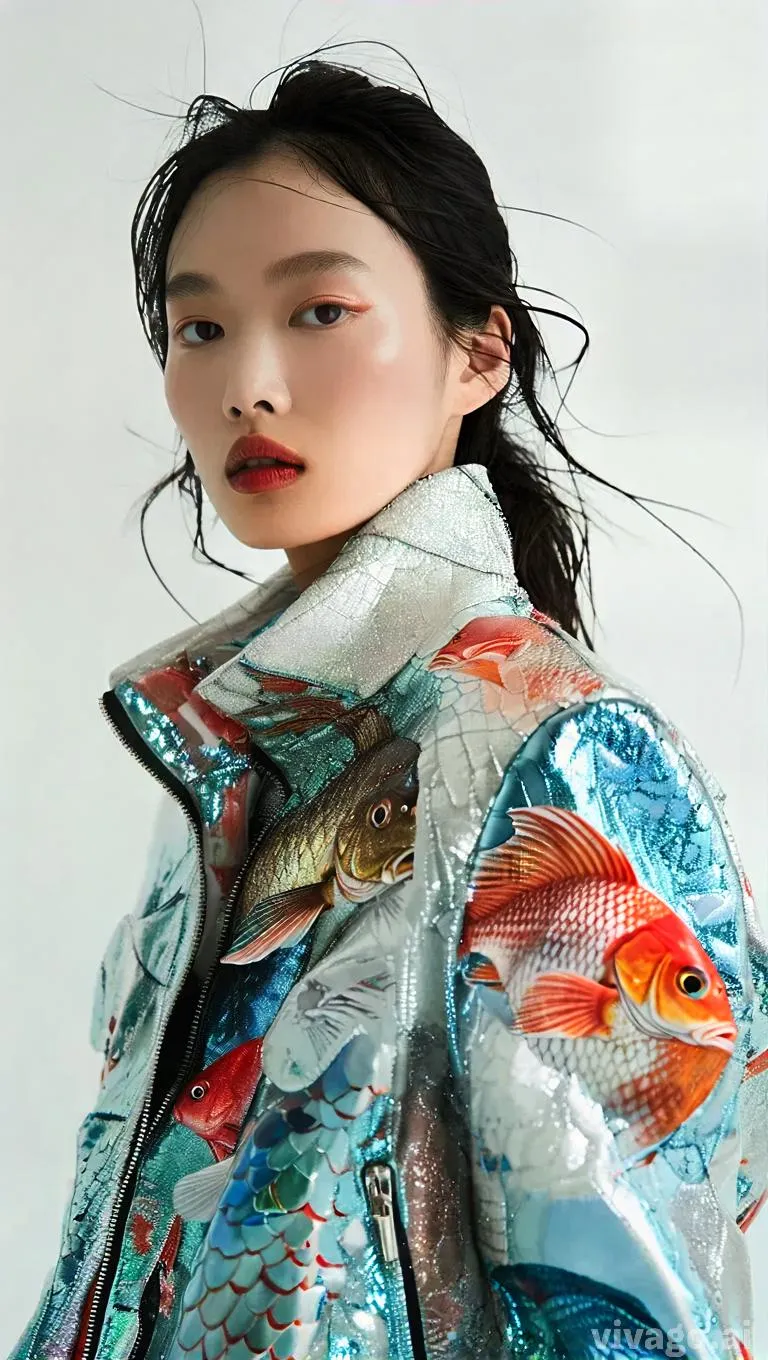
Create AI-generated posters of a Chinese fashion model in a fish leather jacket against a white background. Explore Vivago.ai's tools for unique, sustainable fashion visuals, minimalist design, and professional-grade creative content.

Recreate
arrow
Text to Image

FAQs

How to generate images/videos from text prompts?

Describe the visual content in natural language (e.g., 'A cyberpunk cat wearing neon goggles') and our AI models will create outputs. Complex prompts trigger multi-stage NLP parsing for enhanced accuracy.

How to refine unsatisfactory results?

Use our Prompt Bot - an AI-powered optimizer that suggests technical modifiers. Simply describe your ideas, desired changes ('more metallic texture'), then you will get optimized prompt variants.

When should I use reference images?

Upload references to: 1) Guide character consistency (e.g., faces/outfits), 2) Control motion patterns in videos using our feature matching algorithm. Supports JPG/PNG

What's the credit system?

Daily login grants 100 credits. Upgrade options: 1) Premium Membership, 2) Credit Packs. Details: https://vivago.ai/subscribe

More From VIVAGO AI

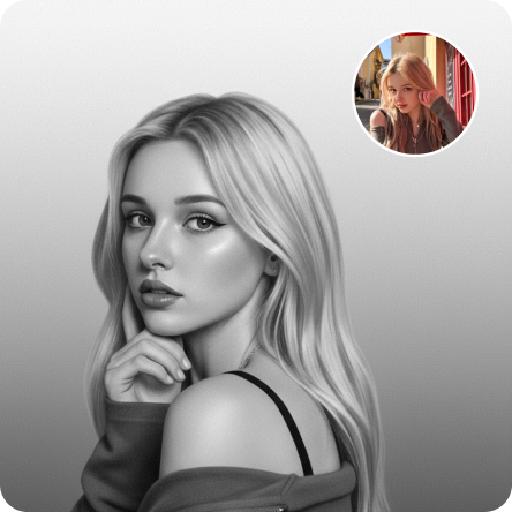
Noir Portrait AI effects generated image

Noir Portrait

Generate black-and-white portrait artworks from the uploaded photos, using editing and artistic photography styles.The background presents a soft gradient effect, transitioning from medium gray to nearly pure white, creating a sense of layering and a quiet atmosphere. The fine film grain texture simulates the soft texture of photography, evoking the classic black-and-white photography. His face, with the outline of the light, evokes a sense of mystery, intimacy and elegance.A gentle directed beam of light diffused softly, caressing the curve of his cheek or flashing light spots in his eyes - this was the emotional core of the picture. The remaining part is occupied by a large amount of negative space, deliberately maintaining simplicity to allow the picture to breathe freely. There are no words or signs in the picture - only the interweaving of light and shadow with emotions. Change the pose for each photo.

On the water

Use the uploaded portrait for strict facial features, gender, skin color, pupil color, clothing, hairstyle and gender locking. Select the main characters from the uploaded pictures. Have a natural expression, face the camera, and show a relaxed state. The camera suddenly switches from the front to the back of the character, changing from a frontal shot to a rear shot. Action: Face the camera, maintain a natural expression, suddenly turn around and leap, run on the water surface, as if possessing Chinese martial arts skills. When the character starts flying, the posture is to spread both arms and be in a flying state. The camera follows the character running on the water surface. The scene becomes a vast sea level, with a dreamy and beautiful scenery, with clouds and the sky in the distance.

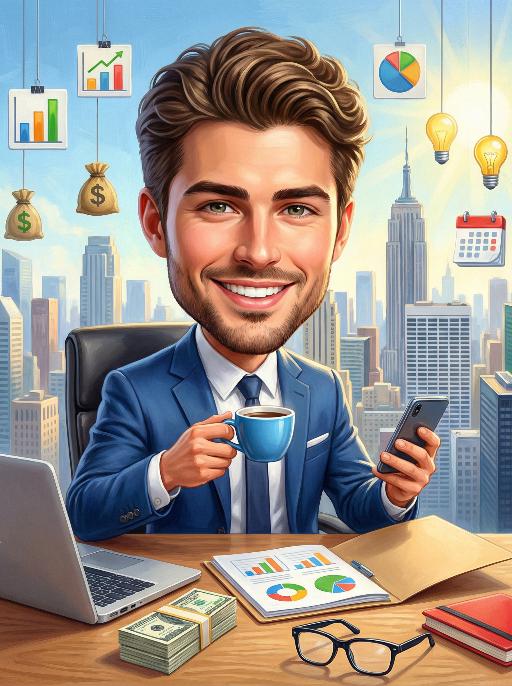
Finance AI effects generated image

Finance

3D realistic style oil painting: The figures in the uploaded picture retain the same facial features and gender. They are smiling confidently and sitting in front of a modern office desk. One hand holds a blue coffee cup, and the other hand holds a smart phone. There is a laptop, a stack of cash, a folder with charts, a pair of glasses, and a red notebook on the table. In the background, one can see a cityscape composed of skyscrapers, as well as hanging commercial icons such as bar graphs, pie charts, money bags, light bulbs, and calendars. This painting has a bright style, rich colors, and numerous details, creating an atmosphere of positive success. This is a high-resolution, professional-level commercial painting. Cartoon-like proportions, a 1:3 ratio of head to body, cute and friendly features, exaggerated head size, professional business attire, and modern office environment.

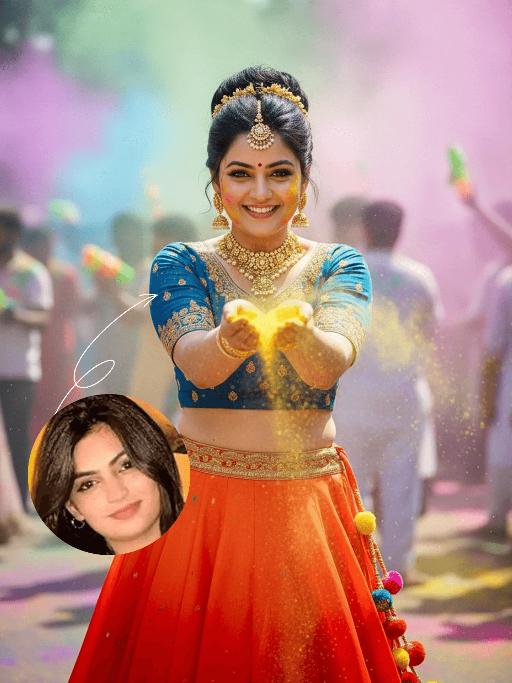
Holi Festival AI effects generated image

Holi Festival

The identity of the uploaded portrait is strictly preserved (retaining facial contours, authentic Indian skin tone, hairstyle and age), as is the original natural look of the Indian woman in the reference image. She has a delicate and fair face with a vermilion red bindi on her forehead, her jet-black hair styled into a high bun adorned with golden floral hair ornaments, and she wears exquisite gold earrings and a gold necklace. She is dressed in a vibrant traditional lehenga choli set: the blouse is a peacock blue embroidered cropped corset with golden patterns embellishing the cuffs and neckline; the skirt is a flared maxi with an orange-to-red gradient, paired with a gilded embroidered waistband. The skirt is dotted with colorful pom-pom trimmings, echoing the hues of Holi. Standing front-on, she holds a handful of bright yellow gulal in both hands and tosses it forward, with a brilliant smile on her face, bright eyes brimming with joy, and her body leaning slightly forward with the movement, exuding a vivid sense of dynamism. The scene is a lively Holi street celebration, where the surrounding crowd interacts with water guns and gulal, and colorful powder splatters in the air, forming a vivid, highly saturated multicolored backdrop. Lighting effect: Bright midday natural light renders the colors extremely saturated and vivid. The figure is enveloped in a halo of colored powder, with fine powder particles clearly visible on the edges of her hair and garments, capturing the authentic dynamic texture of a candid shot. Boasting 8K ultra-high definition resolution and commercial-grade portrait quality, the image features rich, bright and vivid colors and abundant fine details, highlighting the vibrant and joyful atmosphere of the festival.

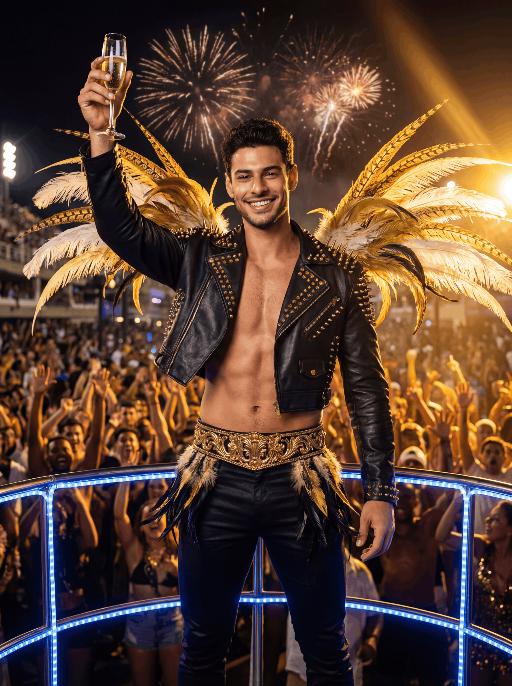
Float Toast AI effects generated image

Float Toast

The character in the uploaded picture (unchanged facial features, gender and age). with short dark hair, light stubble, strong jawline, expressive eyebrows, and a bright confident smile, facing the camera directly. standing triumphantly on a Carnival float at night, raising a champagne flute high in celebration. wears a black leather cropped jacket decorated with gold studs and spikes, partially open at the chest, paired with fitted black pants and a wide ornate gold belt with intricate detailing. Black-and-gold feathered accents decorate hips, and large golden and white feathers extend dramatically from shoulders.Behind is a massive cheering Carnival crowd, hands raised in excitement. Fireworks explode in the dark night sky. Powerful golden stage lights beam across the scene, creating dramatic rim lighting and warm highlights. A blue LED-lit railing frames the foreground. The atmosphere is electrifying, luxurious, and celebratory. High-resolution cinematic photography, dramatic lighting, ultra-sharp focus, shallow depth of field, rich saturated colors, dynamic contrast, professional festival photography, 85mm lens, f/1.8, HDR, ultra-detailed skin texture

Dinner Party

Keep the facial features of the uploaded figure unchanged, with an elegant, noble and sophisticated retro makeup look: natural facial blurring for delicate, smooth skin, smudged diffused eyeliner, slender curved eyebrows, matte vintage red lipstick, light pink foundation, and defined exaggerated cheekbones – the makeup is exquisitely beautiful. The figure is dressed in a high-end custom elaborate gown crafted from red velvet with luxury diamond and pearl inlays, boasting a designer brand aesthetic of noble elegance, paired with delicate high-grade diamond accessories. Set the scene as an upscale Christmas dinner in a premium VIP venue with a Christmas tree in the background. At the bottom of the frame, place the large artistic typography "Merry Christmas!" with a sparkling golden texture and ultra-luxury playful English floral font; scatter small golden stars, silver snowflake patterns, and the secondary typography "A fashionable Christmas VIP dinner party" around the main text. Adopt a high-end magazine photoshoot style with avant-garde fashion, strong design sense, artistic appeal, retro charm and cinematic texture. Maintain the camera focal length for a close-up shot framing the figure’s upper body, shoot with a large aperture to create a blurred background and bokeh effect for other people. Apply film filters, flash lighting, dreamy soft focus, gentle glow, luminous halation, and Fuji film texture, with a dim light atmosphere. Decorate the four corners and edges of the frame with golden star and silver snowflake patterns.

Load more

Next-Gen Multi-Model AI Video Architecture

Vivago AI isn't just one engine—it’s a unified hub for the world’s most advanced video AI. Whether you need cinematic realism or high-speed social content, we provide the right model for your creative vision.

Free Generate

Beauty and Dolphins

Vacation Time

Stellar Tear

Fish Tank Supervisor

Cinematic Quality & Precision Control

Enables 4K resolution with multi-lens motion control, generating delicate scene via text prompts for customized cinematography.​

TRY NOW

Dynamic AV Sync

Auto-generates original audio to avoid copyright issues. Build 3D immersive environments through layered sound design automatically.

TRY NOW

OpenAI Sora 2

​Advanced visual storytelling with unparalleled physics and consistency.

TRY NOW

Kling v2.6 Pro

Industry-leading cinematic image animation and motion control.

TRY NOW

Google Veo 3 & 3.1

Ultra-fast generation with enhanced realism for creative workflows.

TRY NOW

Vivago AI 2.0

Our proprietary model optimized for efficiency, speed, and cost-effective generation.

TRY NOW

Users' Voice

We listen carefully to the opinions of every user.
Free Generate
Contact Us
I tried the Lip Sync feature inside Vivago.ai’s AI Video Generator for my educational podcast, and the results were stunning! The avatar's lip movements perfectly matched my audio recording, creating a professional AI-generated video without complex editing. Compared with tools like OpenAI Sora 2 and Google Veo 3.1, Vivago Image-to-Video delivers fast, studio-quality results online. It saved me hours of post-production work.
ElenaM (Spain)
Vivago’s Image-to-Video AI transformed my marketing workflow. I uploaded a product image and described the launch scene in text, and it generated a 10-second cinematic AI video with background music and dynamic visuals. The output quality rivals Kling v2.6 Pro and Google Veo 3 Fast. It’s now my go-to AI video generator for social media ads and product campaigns.
KenjiT (Japan)
As a digital artist, I use Vivago.ai 2.0 daily for Image-to-Image and AI Image-to-Video creation. The e-book covers and animated visuals I generate for clients look cinematic and professional. Unlike many standalone AI tools, Vivago integrates multiple leading models into one platform, making it easier to create copyright-safe AI images and videos for publishing.
ChenL (China)
I tried the Lip Sync feature inside Vivago.ai’s AI Video Generator for my educational podcast, and the results were stunning! The avatar's lip movements perfectly matched my audio recording, creating a professional AI-generated video without complex editing. Compared with tools like OpenAI Sora 2 and Google Veo 3.1, Vivago Image-to-Video delivers fast, studio-quality results online. It saved me hours of post-production work.
ElenaM (Spain)
Vivago’s Image-to-Video AI transformed my marketing workflow. I uploaded a product image and described the launch scene in text, and it generated a 10-second cinematic AI video with background music and dynamic visuals. The output quality rivals Kling v2.6 Pro and Google Veo 3 Fast. It’s now my go-to AI video generator for social media ads and product campaigns.
KenjiT (Japan)
As a digital artist, I use Vivago.ai 2.0 daily for Image-to-Image and AI Image-to-Video creation. The e-book covers and animated visuals I generate for clients look cinematic and professional. Unlike many standalone AI tools, Vivago integrates multiple leading models into one platform, making it easier to create copyright-safe AI images and videos for publishing.
ChenL (China)
I absolutely love Vivago’s AI Image-to-Video Generator. As a travel blogger, static images often fail to capture real atmosphere, but Vivago helps me turn photos into vivid cinematic AI videos with motion effects. It feels comparable to OpenAI Sora 2 and Google Veo 3.1, but more accessible and faster for creators who need high-quality AI videos online.
LiamK (Australia)
I tried the Lip Sync feature inside Vivago.ai’s AI Video Generator for my educational podcast, and the results were stunning! The avatar's lip movements perfectly matched my audio recording, creating a professional AI-generated video without complex editing. Compared with tools like OpenAI Sora 2 and Google Veo 3.1, Vivago Image-to-Video delivers fast, studio-quality results online. It saved me hours of post-production work.
ElenaM (Spain)
Vivago’s Image-to-Video AI transformed my marketing workflow. I uploaded a product image and described the launch scene in text, and it generated a 10-second cinematic AI video with background music and dynamic visuals. The output quality rivals Kling v2.6 Pro and Google Veo 3 Fast. It’s now my go-to AI video generator for social media ads and product campaigns.
KenjiT (Japan)
As a digital artist, I use Vivago.ai 2.0 daily for Image-to-Image and AI Image-to-Video creation. The e-book covers and animated visuals I generate for clients look cinematic and professional. Unlike many standalone AI tools, Vivago integrates multiple leading models into one platform, making it easier to create copyright-safe AI images and videos for publishing.
ChenL (China)
I absolutely love Vivago’s AI Image-to-Video Generator. As a travel blogger, static images often fail to capture real atmosphere, but Vivago helps me turn photos into vivid cinematic AI videos with motion effects. It feels comparable to OpenAI Sora 2 and Google Veo 3.1, but more accessible and faster for creators who need high-quality AI videos online.
LiamK (Australia)
Using Vivago.ai’s Image-to-Video AI has greatly enhanced my classroom teaching. I transform textbook notes into historical AI videos with cinematic filters and dynamic animations. Compared with tools like Kling v2.6 Pro and Google Veo 3 Fast, Vivago offers faster generation and easier parameter control for educators who need reliable AI video creation.
RajivG (India)
I frequently create AI videos on Vivago and publish them on TikTok and YouTube Shorts. The AI video templates and trending content ideas help me produce viral-ready clips quickly. With Vivago’s integrated models—including advanced video engines similar to OpenAI Sora 2—I can generate anime-style and cinematic social media videos that drive high engagement.
MarieJ (Spain)
What attracts me most about Vivago.ai is not only the powerful AI Video Generator but also the active AIGC creator community. It combines AI Image-to-Video, Text-to-Video, and leading model integrations like Google Veo 3.1 into one creative platform.
TomW (India)
At first, I was hesitant about using AI video tools. But after trying Vivago Image-to-Video, I realized how easy it is to create professional AI-generated videos online. I just upload an image, add a short prompt, and adjust a few settings. The results are cinematic and copyright-safe, which is essential for commercial projects.
HectorC (Mexico)
Using Vivago.ai’s Image-to-Video AI has greatly enhanced my classroom teaching. I transform textbook notes into historical AI videos with cinematic filters and dynamic animations. Compared with tools like Kling v2.6 Pro and Google Veo 3 Fast, Vivago offers faster generation and easier parameter control for educators who need reliable AI video creation.
RajivG (India)
I frequently create AI videos on Vivago and publish them on TikTok and YouTube Shorts. The AI video templates and trending content ideas help me produce viral-ready clips quickly. With Vivago’s integrated models—including advanced video engines similar to OpenAI Sora 2—I can generate anime-style and cinematic social media videos that drive high engagement.
MarieJ (Spain)
What attracts me most about Vivago.ai is not only the powerful AI Video Generator but also the active AIGC creator community. It combines AI Image-to-Video, Text-to-Video, and leading model integrations like Google Veo 3.1 into one creative platform.
TomW (India)
At first, I was hesitant about using AI video tools. But after trying Vivago Image-to-Video, I realized how easy it is to create professional AI-generated videos online. I just upload an image, add a short prompt, and adjust a few settings. The results are cinematic and copyright-safe, which is essential for commercial projects.
HectorC (Mexico)