Image to Image

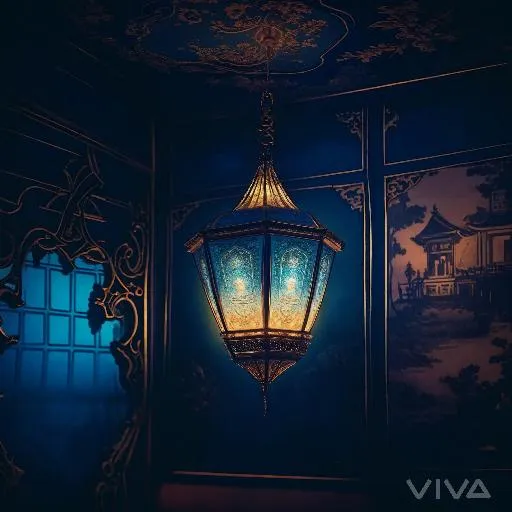
Create a serene AI-generated lantern scene with warm glow illuminating a vintage room. Featuring intricate blue wallpaper, soft lighting ambiance, and people admiring the atmosphere. Craft professional visuals using VivaGo's AI image generator. Transform your vision into stunning, inviting spaces effortlessly.

Recreate
arrow
Image to Image

FAQs

How to generate images/videos from text prompts?

Describe the visual content in natural language (e.g., 'A cyberpunk cat wearing neon goggles') and our AI models will create outputs. Complex prompts trigger multi-stage NLP parsing for enhanced accuracy.

How to refine unsatisfactory results?

Use our Prompt Bot - an AI-powered optimizer that suggests technical modifiers. Simply describe your ideas, desired changes ('more metallic texture'), then you will get optimized prompt variants.

When should I use reference images?

Upload references to: 1) Guide character consistency (e.g., faces/outfits), 2) Control motion patterns in videos using our feature matching algorithm. Supports JPG/PNG

What's the credit system?

Daily login grants 100 credits. Upgrade options: 1) Premium Membership, 2) Credit Packs. Details: https://vivago.ai/subscribe

More From VIVAGO AI

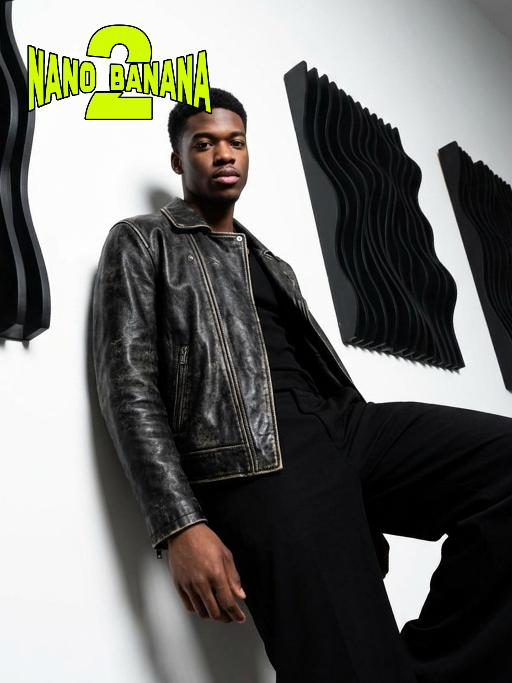
Fashion Art AI effects generated image

Fashion Art

This is a series of minimalist-style portrait photos taken from a low angle with wide-angle lenses, featuring a strong sense of perspective. Using a 35mm wide-angle lens, it presents a unique and intense perspective distortion effect. This work was shot with a Sony A7R V camera. The uploaded images show the image of the person (with facial features, age and gender unchanged), with neatly styled short hair, matte makeup, highlighting a hard and angular outline, a cold and confident expression, and calm and avant-garde eyes that look directly at the camera. The body leans against a white matte wall, with the right leg bent and raised, the left arm resting on the wall, and the right hand naturally hanging down. Wearing a black worn-out high-end custom leather jacket (with detachable cuffs), black inner clothing, and loose and fluffy black wide-leg pants. The studio uses high-contrast hard light for illumination, with the main light forming a strong contrast line of light and dark, deep shadows and clear contours. The background is a white matte wall, and there are some black three-dimensional abstract wave-shaped art installations, creating a strong contrast, high contrast, clear texture, and a fashionable and avant-garde photography art style, which can be regarded as a heavyweight work in the fashion world.

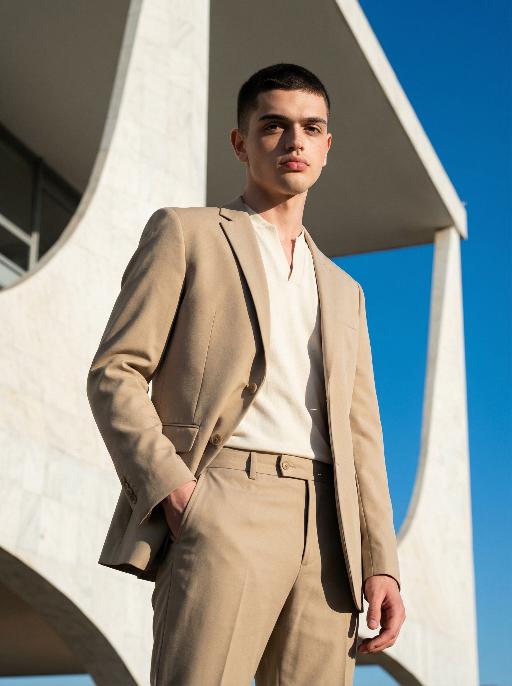
Brasília AI effects generated image

Brasília

Use the exact same facial features, gender, and age as the character in the uploaded image. Photorealistic modernist fashion portrait, Brasilia architectural aesthetic, Oscar Niemeyer style, rational, restrained, structural beauty. Setting: in front of massive white concrete curved structures, vast empty space, clean geometric lines, extremely clear blue sky, minimalist powerful architectural background. Outfit: structured sand or ivory white suit with sharp silhouette, minimalist collarless inner top or clean high-neck base, neat short haircut, refined facial features, no obvious accessories, pure and minimalist style. Pose & Expression: subject height occupies 9/10 of the frame, clear and detailed facial state — natural relaxed gaze, subtle calm expression, distinct facial contours and skin texture visible; dynamic posture with slight movement: one hand naturally hanging by the side, the other gently resting on the suit pocket, shoulder slightly tilted, body with a relaxed yet upright stance, adding subtle dynamism without losing restraint. Lighting: strong side light with clear rim light, distinct shadows cast on the building surface and the subject’s body, high contrast without loss of details, key light highlighting facial features to ensure clarity. Color tone: high dynamic range, cool white and highly pure blue sky, naturally slightly warm skin tone, sharp image, clear contrast. Composition: low-angle upward shot, 35mm or 50mm lens with mild wide perspective, close camera distance, strong architectural presence and sense of power, sharp focus on the subject’s face and upper body. Style: high detail, realistic skin texture, commercial fashion aesthetic, 8K ultra-realistic, no text or watermarks.

McDonald

Ultra-realistic photography, ultra-fine details, sharp focus, 8K resolution, surreal composition. Composition: A giant child (with an oversized head proportion, far larger than the buildings) is lying on the roof of a realistic McDonald’s restaurant. Foreground: The child is smiling while holding an oversized crispy fried chicken drumstick (facing the camera, an extremely close perspective with a strong sense of perspective). Background: A realistic urban street with pedestrians coming and going, under a blue sky with white clouds. Subject: The figure from the uploaded image (unchanged facial features, age and gender). Posture: Lying on the roof (holding an oversized fried chicken drumstick toward the camera with one hand). Outfit: A yellow short-sleeved shirt paired with red work pants (with the yellow McDonald’s "M" logo). Accessories: A red beret (with the yellow McDonald’s "M" logo). Shooting perspective: Eye-level or a slightly low angle, a realistic lifestyle photography perspective. Light and shadow: Bright daytime with natural sunlight, soft and ample light, and natural, distinct shadows (e.g., the child’s shadow cast on the buildings). Color scheme: Dominated by McDonald’s iconic red and yellow (for the child’s outfit), paired with the black, yellow and white of the buildings, the golden brown of the fried chicken drumstick, featuring bright, high-saturation realistic colors. Cinematic texture with a Fuji filter effect.

Fighting Giant

This is a scene of a combat competition ring with bright spotlights in the arena; photorealistic, high-definition details, natural colors, and the camera captures the close-quarters confrontation. The uploaded character, with an exaggerated expression, shouts loudly with an open mouth, stands barefoot on the left side of the combat ring in a fighting stance. On the right side of the ring is a tall, muscular tattooed combatant. Both of them glare and roar aggressively, facing off before the fight. The uploaded character suddenly jumps into the air, spins around to the right, and viciously kicks the combatant's head with their feet and legs. After being viciously kicked three times, the combatant is finally defeated and falls to the ground. The uploaded character smiles triumphantly and joyfully, stands in the middle of the ring to cheer and celebrate, with the surrounding audience clapping. The camera zooms in to a medium close-up to show the character's upper body.

Motorcycle Boy

Strict identity verification is performed using the uploaded portrait (maintaining consistency in facial features, hair, skin tone and age). A close-up shot is adopted, focusing on the upper body with the face positioned in a quarter-angle perspective. Create a realistic portrait of the man in the reference photo sitting on a sleek black sports motorcycle on a midnight street. The background features thick smoke illuminated by high-contrast lighting that accentuates the smoke. He is wearing a loose black T-shirt with a striking white graphic, a black leather jacket, loose black leather pants and black leather boots. His accessories include a black wristwatch, stylish ring ornaments and necklaces—a thin layered chain necklace paired with another chain. His right hand rests casually on the motorcycle, holding a clean, glossy black helmet with a clear visor. The motorcycle (a high-end, luxury model) boasts rich intricate details, including a large engine, a sturdy frame and gleaming chrome trimmings, evoking a modern and powerful impression. His expression is calm and confident as he stares directly at the camera. The overall style is cinematic and fashion-forward, featuring high resolution, hyper-realism, an editorial aesthetic, fashion photography, a contemporary fashion portrait style and a luxury brand photography style. The image highlights dramatic contrast between light and shadow, with sharp chiaroscuro defining his facial contours, sophisticated studio lighting, trend-setting fashion wear, and avant-garde fashion photography art.

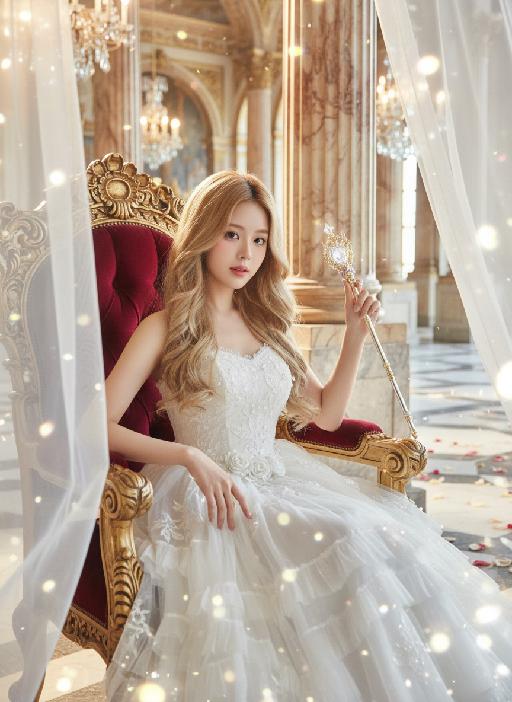
Princess AI effects generated image

Princess

Strictly lock the facial features of the uploaded portrait (completely preserve facial contours, native skin tone, hairstyle and age); medium shot (bust-up), young girl with light golden long curly hair, Korean sweet style looks, delicate facial features with clear nude makeup and light pink blush, proud and elegant princess demeanor, sitting gracefully on an ornate throne with one hand resting lightly on the armrest and the other gently holding a delicate scepter/flower, head tilted slightly with a haughty yet gentle gaze; wearing a white strapless tulle dress with multi-layered flowing tulle skirt, delicate white lace embroidery and subtle pearl decorations, exuding a noble and dreamy fairy-tale princess aura; background is a magnificent and dreamy royal palace hall with towering marble columns, intricate golden carvings, soft warm chandelier light casting a glowing halo around her, sheer white tulle curtains fluttering gently, scattered rose petals on the marble floor, distant palace arches blurred into a soft bokeh effect, air filled with sparkling light particles; overall **dreamy fairy-tale + French retro + royal palace princess atmosphere photo, soft and ethereal ambient light, warm romantic film texture, high saturation dreamy tones, cinematic lighting with glowing rim light, motion blur (light particles/curtains), rich texture details, 8K ultra-clear, realistic human photography, flawless, full of magical and noble royal princess charm

Parasol AI effects generated image

Parasol

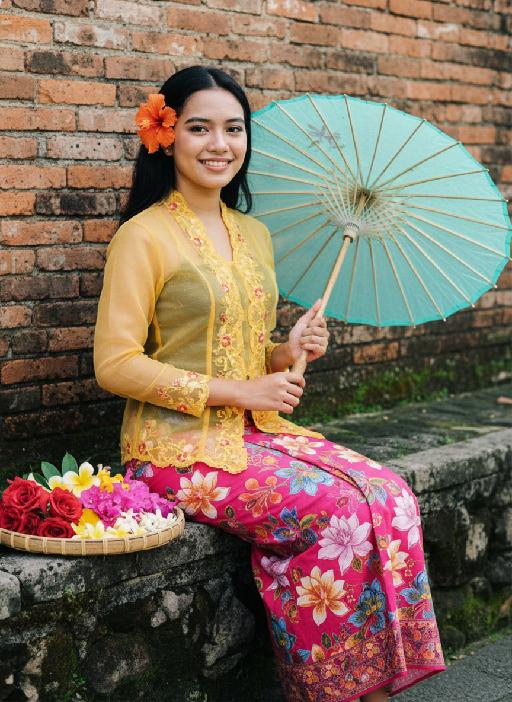
Strictly lock the facial features of the uploaded portrait (preserve facial contours, native Indonesian skin tone, hairstyle and age). photorealistic full-body portrait of a glamorous 20-year-old Peranakan (Nyonya) woman, wearing a vibrant yellow sheer Kebaya with intricate floral embroidery on the collar and cuffs, paired with a bold pink batik sarong skirt with large colorful flower patterns. Her long wavy black hair is adorned with a bright orange hibiscus hairpin, and she wears dramatic makeup with long lashes. She sits on a weathered stone ledge against a rustic red brick wall, holding a translucent light blue-green oiled paper umbrella in one hand, with a woven bamboo tray filled with colorful flower blooms beside her. **Extra bright, crisp natural daylight with strong, even illumination**, the entire figure has a subtle, luminous pearlescent sheen on skin and fabric that catches the light, vivid and saturated colors, retro Nyonya aesthetic, 4:5 aspect ratio, cinematic texture

Gentleman

Strictly lock the facial features of the uploaded portrait (preserve facial contours, native Indonesian skin tone, hairstyle and age. medium shot, central composition of the model, the model's facial features, facial contours and hairstyle are 100% retained in their original state, the upper part of the head has a small amount of negative space. The model's daily casual wear seamlessly fades into a luxurious Indonesian groom's attire—dark luxury batik shirt, woven songket sarong, traditional songkok cap, and delicate gold necklaces and bracelets, with a natural gradient visual effect of clothing transformation. The background is a soft transition from a simple plain scene to a traditional Indonesian architectural scene, either a Javanese carved wooden palace or a Balinese temple courtyard, the model is positioned next to the traditional building. 4K ultra-high definition, photorealistic skin and fabric textures, soft natural light mixed with warm daylight illuminating the model, sharp focus on facial features, cinematic color grading, smooth and natural visual transition of clothing and background, the model stands upright with a dignified and relaxed posture, a warm gentle smile facing the camera, natural hand placement (one by the side, one slightly bent), the light highlights the delicate texture of batik, the luster of songket and the intricate carvings of traditional buildings, minimalist and advanced visual sense, no abrupt transitions

Retro Fashion AI effects generated image

Retro Fashion

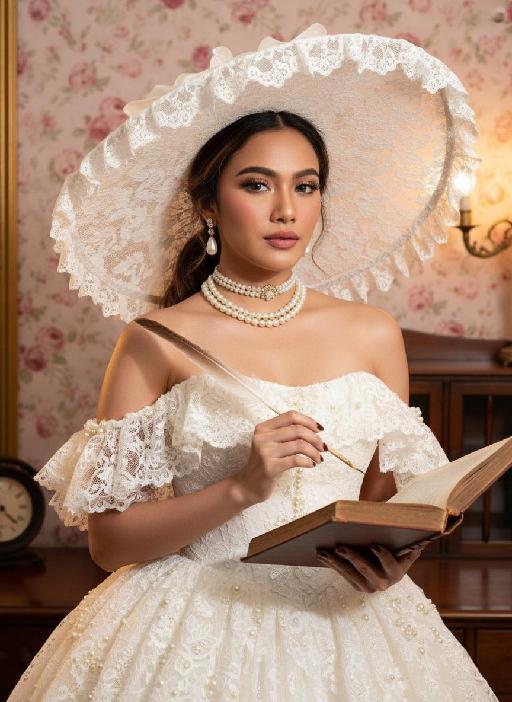
Strictly lock the facial features of the uploaded portrait (preserve facial contours, native Indonesian skin tone, hairstyle and age). photorealistic 3:4 half-body portrait of a delicate young woman in her early 20s, with soft vintage makeup, rosy blush, and black hair styled in an elegant updo peeking out from a hat. She wears an oversized white lace wide-brimmed hat with scalloped lace trim, a white strapless lace vintage ballgown adorned with pearl and ruffle embellishments, paired with a layered pearl choker necklace and pearl drop earrings with gold accents. She holds a vintage quill pen in one hand and an old open hardcover book in the other, set against a vintage opulent interior with a soft pink rose floral backdrop, dark wooden furniture, and warm golden ambient lighting, exuding classic Victorian vintage elegance, ultra-high detail, cinematic texture

Colorful Dance

"Create an AI-generated image based on the provided reference image. The subject's appearance (facial features, hairstyle, clothing, and overall temperament) should remain unchanged, as provided by the user, and the background must stay identical to the one in the reference image without modification. The posture of the subject should closely resemble the gesture in reference image 2, with the following detailed description: both hands are fully open, raised to shoulder height, with the palms facing forward and fingers spread out towards the screen. The left hand is slightly raised, with fingers slightly curled, while the palm remains open. A small amount of yellow paint is applied, evenly spread across the palm and part of the fingertips. The right hand is positioned similarly to the left, slightly more parallel to the body, with less finger curvature, and the palm faces the screen. A small amount of red paint is applied, evenly spread across the palm and fingertips. The paint on both hands should be evenly applied and natural, without excess, maintaining a relaxed and natural gesture. The background should match the environment from the reference image. The resulting image should have a higher resolution and finer textures, ensuring the paint on the hands looks natural and not overdone, while maintaining an artistic and relaxed style."

Load more

Next-Gen Multi-Model AI Video Architecture

Vivago AI isn't just one engine—it’s a unified hub for the world’s most advanced video AI. Whether you need cinematic realism or high-speed social content, we provide the right model for your creative vision.

Free Generate

Beauty and Dolphins

Vacation Time

Stellar Tear

Fish Tank Supervisor

Cinematic Quality & Precision Control

Enables 4K resolution with multi-lens motion control, generating delicate scene via text prompts for customized cinematography.​

TRY NOW

Dynamic AV Sync

Auto-generates original audio to avoid copyright issues. Build 3D immersive environments through layered sound design automatically.

TRY NOW

OpenAI Sora 2

​Advanced visual storytelling with unparalleled physics and consistency.

TRY NOW

Kling v2.6 Pro

Industry-leading cinematic image animation and motion control.

TRY NOW

Google Veo 3 & 3.1

Ultra-fast generation with enhanced realism for creative workflows.

TRY NOW

Vivago AI 2.0

Our proprietary model optimized for efficiency, speed, and cost-effective generation.

TRY NOW

Users' Voice

We listen carefully to the opinions of every user.
Free Generate
Contact Us
I tried the Lip Sync feature inside Vivago.ai’s AI Video Generator for my educational podcast, and the results were stunning! The avatar's lip movements perfectly matched my audio recording, creating a professional AI-generated video without complex editing. Compared with tools like OpenAI Sora 2 and Google Veo 3.1, Vivago Image-to-Video delivers fast, studio-quality results online. It saved me hours of post-production work.
ElenaM (Spain)
Vivago’s Image-to-Video AI transformed my marketing workflow. I uploaded a product image and described the launch scene in text, and it generated a 10-second cinematic AI video with background music and dynamic visuals. The output quality rivals Kling v2.6 Pro and Google Veo 3 Fast. It’s now my go-to AI video generator for social media ads and product campaigns.
KenjiT (Japan)
As a digital artist, I use Vivago.ai 2.0 daily for Image-to-Image and AI Image-to-Video creation. The e-book covers and animated visuals I generate for clients look cinematic and professional. Unlike many standalone AI tools, Vivago integrates multiple leading models into one platform, making it easier to create copyright-safe AI images and videos for publishing.
ChenL (China)
I tried the Lip Sync feature inside Vivago.ai’s AI Video Generator for my educational podcast, and the results were stunning! The avatar's lip movements perfectly matched my audio recording, creating a professional AI-generated video without complex editing. Compared with tools like OpenAI Sora 2 and Google Veo 3.1, Vivago Image-to-Video delivers fast, studio-quality results online. It saved me hours of post-production work.
ElenaM (Spain)
Vivago’s Image-to-Video AI transformed my marketing workflow. I uploaded a product image and described the launch scene in text, and it generated a 10-second cinematic AI video with background music and dynamic visuals. The output quality rivals Kling v2.6 Pro and Google Veo 3 Fast. It’s now my go-to AI video generator for social media ads and product campaigns.
KenjiT (Japan)
As a digital artist, I use Vivago.ai 2.0 daily for Image-to-Image and AI Image-to-Video creation. The e-book covers and animated visuals I generate for clients look cinematic and professional. Unlike many standalone AI tools, Vivago integrates multiple leading models into one platform, making it easier to create copyright-safe AI images and videos for publishing.
ChenL (China)
I absolutely love Vivago’s AI Image-to-Video Generator. As a travel blogger, static images often fail to capture real atmosphere, but Vivago helps me turn photos into vivid cinematic AI videos with motion effects. It feels comparable to OpenAI Sora 2 and Google Veo 3.1, but more accessible and faster for creators who need high-quality AI videos online.
LiamK (Australia)
I tried the Lip Sync feature inside Vivago.ai’s AI Video Generator for my educational podcast, and the results were stunning! The avatar's lip movements perfectly matched my audio recording, creating a professional AI-generated video without complex editing. Compared with tools like OpenAI Sora 2 and Google Veo 3.1, Vivago Image-to-Video delivers fast, studio-quality results online. It saved me hours of post-production work.
ElenaM (Spain)
Vivago’s Image-to-Video AI transformed my marketing workflow. I uploaded a product image and described the launch scene in text, and it generated a 10-second cinematic AI video with background music and dynamic visuals. The output quality rivals Kling v2.6 Pro and Google Veo 3 Fast. It’s now my go-to AI video generator for social media ads and product campaigns.
KenjiT (Japan)
As a digital artist, I use Vivago.ai 2.0 daily for Image-to-Image and AI Image-to-Video creation. The e-book covers and animated visuals I generate for clients look cinematic and professional. Unlike many standalone AI tools, Vivago integrates multiple leading models into one platform, making it easier to create copyright-safe AI images and videos for publishing.
ChenL (China)
I absolutely love Vivago’s AI Image-to-Video Generator. As a travel blogger, static images often fail to capture real atmosphere, but Vivago helps me turn photos into vivid cinematic AI videos with motion effects. It feels comparable to OpenAI Sora 2 and Google Veo 3.1, but more accessible and faster for creators who need high-quality AI videos online.
LiamK (Australia)
Using Vivago.ai’s Image-to-Video AI has greatly enhanced my classroom teaching. I transform textbook notes into historical AI videos with cinematic filters and dynamic animations. Compared with tools like Kling v2.6 Pro and Google Veo 3 Fast, Vivago offers faster generation and easier parameter control for educators who need reliable AI video creation.
RajivG (India)
I frequently create AI videos on Vivago and publish them on TikTok and YouTube Shorts. The AI video templates and trending content ideas help me produce viral-ready clips quickly. With Vivago’s integrated models—including advanced video engines similar to OpenAI Sora 2—I can generate anime-style and cinematic social media videos that drive high engagement.
MarieJ (Spain)
What attracts me most about Vivago.ai is not only the powerful AI Video Generator but also the active AIGC creator community. It combines AI Image-to-Video, Text-to-Video, and leading model integrations like Google Veo 3.1 into one creative platform.
TomW (India)
At first, I was hesitant about using AI video tools. But after trying Vivago Image-to-Video, I realized how easy it is to create professional AI-generated videos online. I just upload an image, add a short prompt, and adjust a few settings. The results are cinematic and copyright-safe, which is essential for commercial projects.
HectorC (Mexico)
Using Vivago.ai’s Image-to-Video AI has greatly enhanced my classroom teaching. I transform textbook notes into historical AI videos with cinematic filters and dynamic animations. Compared with tools like Kling v2.6 Pro and Google Veo 3 Fast, Vivago offers faster generation and easier parameter control for educators who need reliable AI video creation.
RajivG (India)
I frequently create AI videos on Vivago and publish them on TikTok and YouTube Shorts. The AI video templates and trending content ideas help me produce viral-ready clips quickly. With Vivago’s integrated models—including advanced video engines similar to OpenAI Sora 2—I can generate anime-style and cinematic social media videos that drive high engagement.
MarieJ (Spain)
What attracts me most about Vivago.ai is not only the powerful AI Video Generator but also the active AIGC creator community. It combines AI Image-to-Video, Text-to-Video, and leading model integrations like Google Veo 3.1 into one creative platform.
TomW (India)
At first, I was hesitant about using AI video tools. But after trying Vivago Image-to-Video, I realized how easy it is to create professional AI-generated videos online. I just upload an image, add a short prompt, and adjust a few settings. The results are cinematic and copyright-safe, which is essential for commercial projects.
HectorC (Mexico)