Image to Video

Transform text into stunning visuals with vivago.ai's AI image/video generator. Explore curated effects, professional editing tools, and seamless creativity for high-quality content. Ideal for innovators and creators.

Recreate
arrow

FAQs

How do I animate static images using vivago.ai?

Upload any image (JPG/PNG), and our AI models will automatically detect content layers and generate 5/10-second video clips with dynamic motion patterns.

Can I control specific movement directions?

Yes. Combine image uploads with text prompts like 'swaying leaves left-to-right' or 'a girl waves her hands'.

What if AI-generated videos don't match my expectation?

Utilize iterative refinement cycles: 1) Try a few more times, 2) Modify prompts, 3) Visit the Explore section to use templates for more consistent results.

What membership benefits does Pro offer?

Pro membership offers better outcomes, more generation credits, and premium features. Details available at: https://vivago.ai/subscribe

More From VIVAGO AI

Goddess AI effects generated image

Goddess

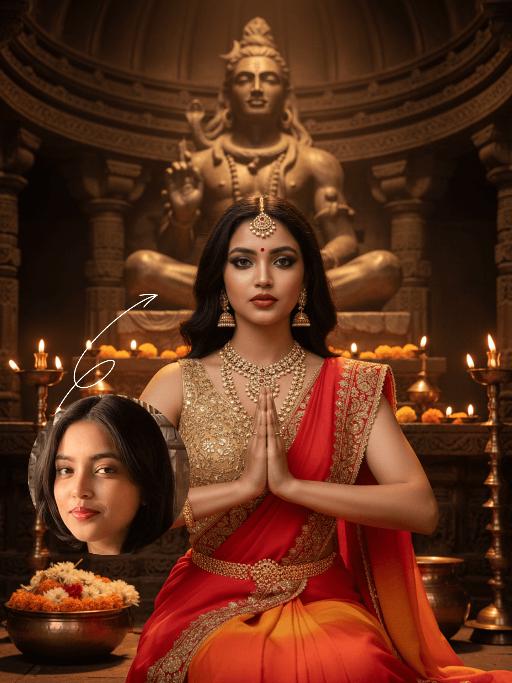
The identity of the uploaded portrait is strictly preserved (retaining facial contours, authentic Indian skin tone, hairstyle and age). This is a bust portrait featuring a young Indian woman (aged 20-25) embodying a goddess, with a sacred and solemn demeanor and highly ritualistic makeup: smoldering smoky eyes with a profound, icy allure, paired with a matte true red lip, and a teardrop-shaped red bindi adorned between her brows. Her voluminous black wavy curls fall naturally, and an ornate maang tikka inlaid with rubies and micro-diamonds rests on her forehead, exuding the solemnity of a divine being. She is dressed in a sacred sari with a red-to-orange gradient: the sleeveless blouse is fully embroidered with golden interlocking floral patterns, the sari’s edge is trimmed with woven gold, and an intricately carved gold waist chain cinches her waist. She adorns herself with a full set of elaborate heavy gold jewelry, including multi-layered openwork carved necklaces, dangling gold earrings, and multiple pairs of bangles and arm cuffs, all embodying unparalleled luxury and divine grace. She sits upright before the altar of a millennial Hindu temple, with her hands pressed together in Anjali Mudra, her gaze fixed firmly on the camera with unwavering resolve. The background is the interior of an ancient Hindu temple, featuring dark brown bronze domes and carved stone pillars, with a statue of Shiva standing in the distance. The altar is adorned with brass candlesticks and offering bowls brimming with marigolds and jasmine, and the flickering candlelight casts a sacred aura over the scene. Epic cinematic lighting is employed: warm golden backlight outlines her figure and gilds her hair with a shimmering halo, making each strand glint with golden light; side light illuminates her facial features and the intricate textures of her attire, with dramatic contrast between light and shadow that accentuates her divine radiance. The style is a religious-themed portrait blending realism and mythology, boasting ultra-high definition and exquisite detail, rich and saturated colors, and an immersive, all-encompassing atmosphere – as if the goddess has stepped straight out of an Indian epic. The overall impression is one of sacred magnificence and dazzling radiance.

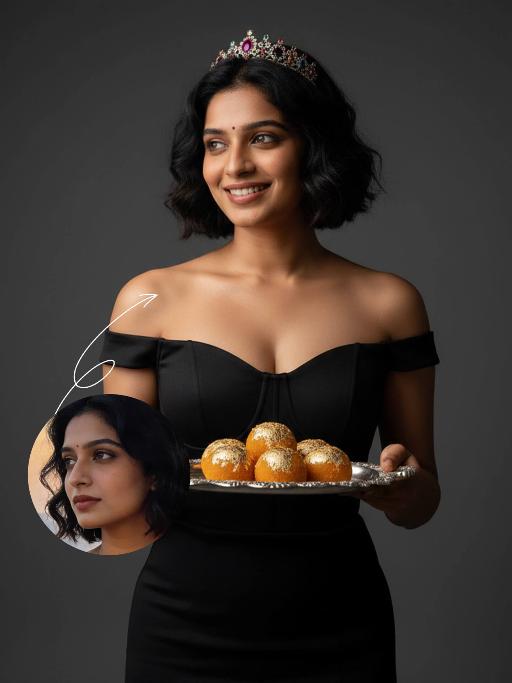
Elegant AI effects generated image

Elegant

The identity of the uploaded portrait is strictly preserved (retaining facial contours, hairline, authentic Indian skin tone and age). A stunning and glamorous Indian woman exuding a rich South Asian charm by nature; she is dressed in an elegant black off-the-shoulder corset dress that accentuates her striking figure, with a delicate mini crown hair ornament inlaid with tiny colorful gemstones adorning the top of her head, fully embodying the elegant and luxurious temperament of an Indian princess. She holds an exquisitely carved silver platter with both hands, on which rests traditional Indian laddu sweets inlaid with gold leaf. Her smile is warm and healing, and her eyes radiate the unique gentle grace inherent to Indian women. The background is a solid dark gray backdrop that makes her silhouette stand out sharply. A strong contrast between light and shadow is adopted, creating a stylish portrait atmosphere that complements the texture of Indian skin tone. The style blends modern minimalism with traditional Indian aesthetics, boasting an extremely minimalist and sophisticated color palette. The image is ultra-high definition and delicate with rich, well-defined details, accurately capturing the unique charm of the Indian woman.

Black Rose

Preserve the original facial features of the uploaded figure. An ultra-realistic portrait photograph, close-up shot with a shallow depth of field (blurred background). The figure from the uploaded image (unchanged facial features) has messy shoulder-length hair in ash purple taupe, green eyes, light pink blush, nude pink lips, and faint freckles scattered across the cheeks and shoulders. They are wearing a black strapless slip dress with thin shoulder straps, small stud earrings and a delicate chain necklace, holding a bouquet of black roses close to the cheek, and turning half their body to look at the camera. Shooting angle: eye-level perspective, dramatic contrasting light from a flash against the night scene, a cool-toned color palette (black, ash purple taupe, pale skin tone, urban night view background), a melancholic and dreamy atmosphere, high level of detail, film texture, retro color tones, vintage film portrait style, grain texture, film light leak effects, ultra-high-definition details. An orange vertical digital date watermark (2026:00:00) is added to the bottom right corner.

Lens Heartbeat

The uploaded figure (with unchanged facial features) forms a heart shape with both hands in front of the lens for a framed composition, featuring a shallow depth of field (the large, tilted hands in the foreground are slightly blurred). This is a portrait photoshoot in the ppgalclub style, with Japanese Shibuya Y2K fashion styling. Captured in a fisheye lens close-up (strong fisheye distortion with slight stretching at the frame edges) from a slightly low-angle perspective, the figure is centered to fill the entire frame. The figure has short, curly golden bob hair and bold makeup (thick black eyeliner + plump red lips + translucent pink-toned blush), leaning forward with the face facing the camera directly. The outfit includes a black leather vest with a fur collar, a white camisole, a red stud-embellished belt (with a cropped waist design), a golden cross necklace paired with multi-layered metal chokers, sequin-embellished nail art, pearl-encircled rings, and a small golden chain bag. The scene is set in a Shibuya underground passage at night, with dim artificial lighting and a high-intensity flash fired directly at the figure (creating stark light and shadow contrast, prominent highlights on the figure’s face, and a dark-toned background), plus blurred bokeh light spots in the background. The image features film grain texture, a highly saturated black/gold/red color scheme, and ultra-high-definition details; a black fisheye lens vignetting frames the entire image, and an orange vertical digital date watermark (2026:00:00) is added to the bottom right corner.

Darkroom Flash AI effects generated image

Darkroom Flash

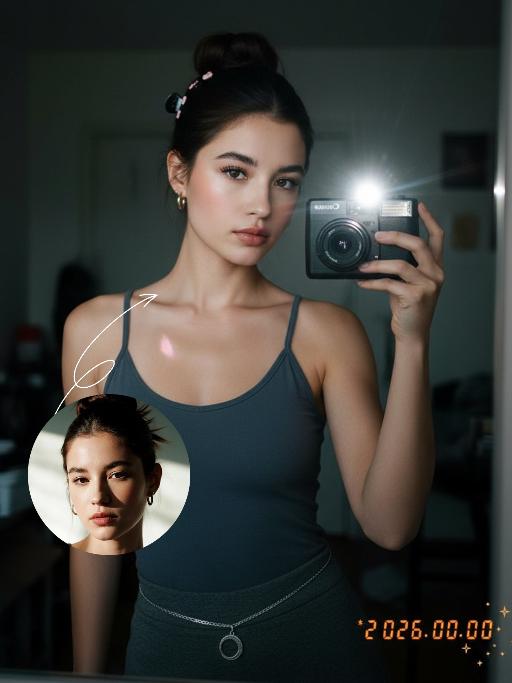
Subject & Makeup: The figure from the uploaded image (unchanged facial features) with a cold and natural expression and a light, translucent makeup look; Shooting & Atmosphere: soft pink blush on the apples of the cheeks, nude pink lip gloss, long and curled false eyelashes, natural eyebrow shape; taking a selfie with a Canon retro point-and-shoot camera, with the camera’s flash shining directly into the lens (creating a distinct white lens flare), shot from a selfie perspective in front of an indoor mirror; a dim everyday room background (blurred furniture and decorations), a relaxed edgy-sweet portrait style, dark natural color tones, film photography texture, a retro natural film filter and film grain; Detail Embellishments: add an orange digital date watermark (2026.00.00) plus a small starburst decoration at the bottom right corner.

Cosmetics

A cute 25-year-old Japanese woman in a cozy, neutral-toned bedroom. She holds a cosmetic product in her right hand, presenting it naturally to the camera as if introducing it, but without applying it to her face. The product she displays is exactly the same as the one shown in the provided image. Facing the camera with a friendly expression, she highlights the product design, which follows the style shown in the provided image. The setting has an authentic, everyday bedroom vibe with soft, warm lighting, capturing the natural feel of a mobile phone shot. The background is realistic and everyday, with no blur, showcasing simple furniture and decor that feel lived-in and comfortable. The lighting diffuses naturally across her face, creating a soft, inviting atmosphere with gentle shadows.

McDonald

Ultra-realistic photography, ultra-fine details, sharp focus, 8K resolution, surreal composition. Composition: A giant child (with an oversized head proportion, far larger than the buildings) is lying on the roof of a realistic McDonald’s restaurant. Foreground: The child is smiling while holding an oversized crispy fried chicken drumstick (facing the camera, an extremely close perspective with a strong sense of perspective). Background: A realistic urban street with pedestrians coming and going, under a blue sky with white clouds. Subject: The figure from the uploaded image (unchanged facial features, age and gender). Posture: Lying on the roof (holding an oversized fried chicken drumstick toward the camera with one hand). Outfit: A yellow short-sleeved shirt paired with red work pants (with the yellow McDonald’s "M" logo). Accessories: A red beret (with the yellow McDonald’s "M" logo). Shooting perspective: Eye-level or a slightly low angle, a realistic lifestyle photography perspective. Light and shadow: Bright daytime with natural sunlight, soft and ample light, and natural, distinct shadows (e.g., the child’s shadow cast on the buildings). Color scheme: Dominated by McDonald’s iconic red and yellow (for the child’s outfit), paired with the black, yellow and white of the buildings, the golden brown of the fried chicken drumstick, featuring bright, high-saturation realistic colors. Cinematic texture with a Fuji filter effect.

Load more

Next-Gen Multi-Model AI Video Architecture

Vivago AI isn't just one engine—it’s a unified hub for the world’s most advanced video AI. Whether you need cinematic realism or high-speed social content, we provide the right model for your creative vision.

Free Generate

Beauty and Dolphins

Vacation Time

Stellar Tear

Fish Tank Supervisor

Cinematic Quality & Precision Control

Enables 4K resolution with multi-lens motion control, generating delicate scene via text prompts for customized cinematography.​

TRY NOW

Dynamic AV Sync

Auto-generates original audio to avoid copyright issues. Build 3D immersive environments through layered sound design automatically.

TRY NOW

OpenAI Sora 2

​Advanced visual storytelling with unparalleled physics and consistency.

TRY NOW

Kling v2.6 Pro

Industry-leading cinematic image animation and motion control.

TRY NOW

Google Veo 3 & 3.1

Ultra-fast generation with enhanced realism for creative workflows.

TRY NOW

Vivago AI 2.0

Our proprietary model optimized for efficiency, speed, and cost-effective generation.
TRY NOW

Users' Voice

We listen carefully to the opinions of every user.
Free Generate
Contact Us
I tried the Lip Sync feature inside Vivago.ai’s AI Video Generator for my educational podcast, and the results were stunning! The avatar's lip movements perfectly matched my audio recording, creating a professional AI-generated video without complex editing. Compared with tools like OpenAI Sora 2 and Google Veo 3.1, Vivago Image-to-Video delivers fast, studio-quality results online. It saved me hours of post-production work.
ElenaM (Spain)
Vivago’s Image-to-Video AI transformed my marketing workflow. I uploaded a product image and described the launch scene in text, and it generated a 10-second cinematic AI video with background music and dynamic visuals. The output quality rivals Kling v2.6 Pro and Google Veo 3 Fast. It’s now my go-to AI video generator for social media ads and product campaigns.
KenjiT (Japan)
As a digital artist, I use Vivago.ai 2.0 daily for Image-to-Image and AI Image-to-Video creation. The e-book covers and animated visuals I generate for clients look cinematic and professional. Unlike many standalone AI tools, Vivago integrates multiple leading models into one platform, making it easier to create copyright-safe AI images and videos for publishing.
ChenL (China)
I tried the Lip Sync feature inside Vivago.ai’s AI Video Generator for my educational podcast, and the results were stunning! The avatar's lip movements perfectly matched my audio recording, creating a professional AI-generated video without complex editing. Compared with tools like OpenAI Sora 2 and Google Veo 3.1, Vivago Image-to-Video delivers fast, studio-quality results online. It saved me hours of post-production work.
ElenaM (Spain)
Vivago’s Image-to-Video AI transformed my marketing workflow. I uploaded a product image and described the launch scene in text, and it generated a 10-second cinematic AI video with background music and dynamic visuals. The output quality rivals Kling v2.6 Pro and Google Veo 3 Fast. It’s now my go-to AI video generator for social media ads and product campaigns.
KenjiT (Japan)
As a digital artist, I use Vivago.ai 2.0 daily for Image-to-Image and AI Image-to-Video creation. The e-book covers and animated visuals I generate for clients look cinematic and professional. Unlike many standalone AI tools, Vivago integrates multiple leading models into one platform, making it easier to create copyright-safe AI images and videos for publishing.
ChenL (China)
I absolutely love Vivago’s AI Image-to-Video Generator. As a travel blogger, static images often fail to capture real atmosphere, but Vivago helps me turn photos into vivid cinematic AI videos with motion effects. It feels comparable to OpenAI Sora 2 and Google Veo 3.1, but more accessible and faster for creators who need high-quality AI videos online.
LiamK (Australia)
I tried the Lip Sync feature inside Vivago.ai’s AI Video Generator for my educational podcast, and the results were stunning! The avatar's lip movements perfectly matched my audio recording, creating a professional AI-generated video without complex editing. Compared with tools like OpenAI Sora 2 and Google Veo 3.1, Vivago Image-to-Video delivers fast, studio-quality results online. It saved me hours of post-production work.
ElenaM (Spain)
Vivago’s Image-to-Video AI transformed my marketing workflow. I uploaded a product image and described the launch scene in text, and it generated a 10-second cinematic AI video with background music and dynamic visuals. The output quality rivals Kling v2.6 Pro and Google Veo 3 Fast. It’s now my go-to AI video generator for social media ads and product campaigns.
KenjiT (Japan)
As a digital artist, I use Vivago.ai 2.0 daily for Image-to-Image and AI Image-to-Video creation. The e-book covers and animated visuals I generate for clients look cinematic and professional. Unlike many standalone AI tools, Vivago integrates multiple leading models into one platform, making it easier to create copyright-safe AI images and videos for publishing.
ChenL (China)
I absolutely love Vivago’s AI Image-to-Video Generator. As a travel blogger, static images often fail to capture real atmosphere, but Vivago helps me turn photos into vivid cinematic AI videos with motion effects. It feels comparable to OpenAI Sora 2 and Google Veo 3.1, but more accessible and faster for creators who need high-quality AI videos online.
LiamK (Australia)
Using Vivago.ai’s Image-to-Video AI has greatly enhanced my classroom teaching. I transform textbook notes into historical AI videos with cinematic filters and dynamic animations. Compared with tools like Kling v2.6 Pro and Google Veo 3 Fast, Vivago offers faster generation and easier parameter control for educators who need reliable AI video creation.
RajivG (India)
I frequently create AI videos on Vivago and publish them on TikTok and YouTube Shorts. The AI video templates and trending content ideas help me produce viral-ready clips quickly. With Vivago’s integrated models—including advanced video engines similar to OpenAI Sora 2—I can generate anime-style and cinematic social media videos that drive high engagement.
MarieJ (Spain)
What attracts me most about Vivago.ai is not only the powerful AI Video Generator but also the active AIGC creator community. It combines AI Image-to-Video, Text-to-Video, and leading model integrations like Google Veo 3.1 into one creative platform.
TomW (India)
At first, I was hesitant about using AI video tools. But after trying Vivago Image-to-Video, I realized how easy it is to create professional AI-generated videos online. I just upload an image, add a short prompt, and adjust a few settings. The results are cinematic and copyright-safe, which is essential for commercial projects.
HectorC (Mexico)
Using Vivago.ai’s Image-to-Video AI has greatly enhanced my classroom teaching. I transform textbook notes into historical AI videos with cinematic filters and dynamic animations. Compared with tools like Kling v2.6 Pro and Google Veo 3 Fast, Vivago offers faster generation and easier parameter control for educators who need reliable AI video creation.
RajivG (India)
I frequently create AI videos on Vivago and publish them on TikTok and YouTube Shorts. The AI video templates and trending content ideas help me produce viral-ready clips quickly. With Vivago’s integrated models—including advanced video engines similar to OpenAI Sora 2—I can generate anime-style and cinematic social media videos that drive high engagement.
MarieJ (Spain)
What attracts me most about Vivago.ai is not only the powerful AI Video Generator but also the active AIGC creator community. It combines AI Image-to-Video, Text-to-Video, and leading model integrations like Google Veo 3.1 into one creative platform.
TomW (India)
At first, I was hesitant about using AI video tools. But after trying Vivago Image-to-Video, I realized how easy it is to create professional AI-generated videos online. I just upload an image, add a short prompt, and adjust a few settings. The results are cinematic and copyright-safe, which is essential for commercial projects.
HectorC (Mexico)