SunnyBake

Create this AI visual effect from any photo or image. Upload your image and generate your AI effect free on Vivago AI.

Use Template
arrow

More From VIVAGO AI

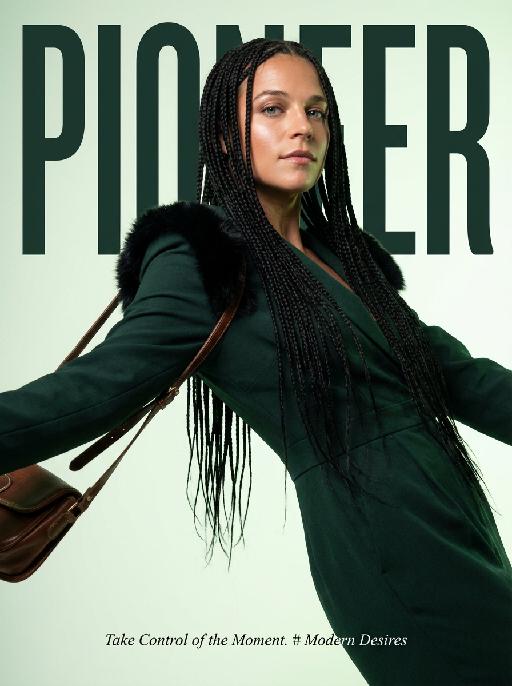
Magazine Cover AI effects generated image

Magazine Cover

This is the cover of the high-end fashion magazine series, with the title in a large, dark green font: "PIONEER". The figure is in front of the text, captured in a medium close-up shot. The cover showcases a radiant image (with no changes in facial features, gender, or age), presented through the uploaded picture. She has several flowing and slender black braids, wearing a well-tailored dark green outfit, with soft black fur decorations on the shoulders, holding a retro high-end custom cross-body bag, her body in an inclined hanging position, arms stretched out, with an enchanting expression and exquisite makeup. The background is a gradient of pale green, the strong contrast of light highlights the facial contours and hair texture. The focal length is 50mm, captured with a professional portrait camera, clear focus, using an elegant editing style, with modern and avant-garde aesthetics. The small and exquisite text layout adds the content: "Take Control of the Moment. # Modern Desires"

Jewelry Theft AI effects generated image

Jewelry Theft

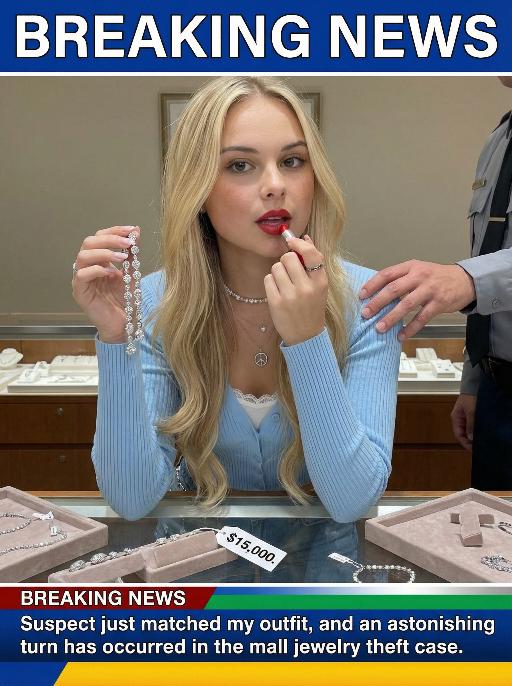
An interesting breaking news photo has been released. In the picture, the person depicted (with their facial features, gender and age remaining unchanged) is caught in the act of stealing when she is captured on camera. One hand is holding a string of diamond earrings, and the other hand is holding a lipstick, as if nothing has happened as she is applying it to her lips. The main figure occupies 80% of the overall picture. The jewelry counter is in a mess, with velvet jewelry pads scattered around, and a fallen price tag that reads "$15,000". Outside the frame, a security guard's hand is reaching towards her shoulder. Above the picture, there is a prominent large headline text (blue background with white characters): BREAKING NEWS;Below the picture, there is a news text (in red, blue and black color combination): Suspect just matched my outfit and an astonishing turn has occurred in the mall jewelry theft case.

Goddess AI effects generated image

Goddess

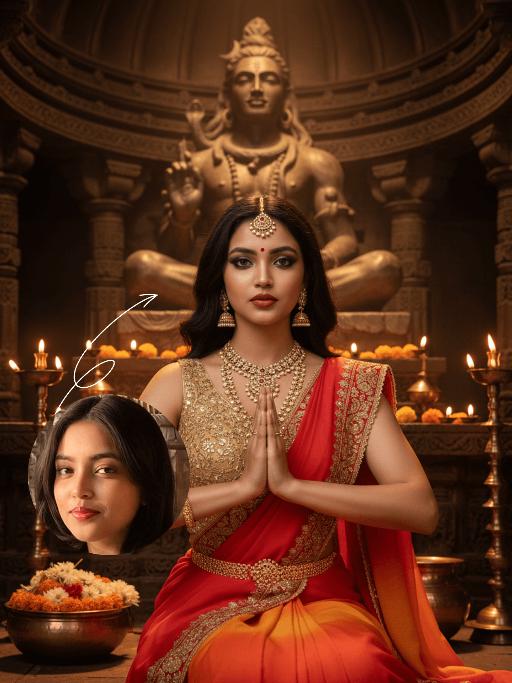
The identity of the uploaded portrait is strictly preserved (retaining facial contours, authentic Indian skin tone, hairstyle and age). This is a bust portrait featuring a young Indian woman (aged 20-25) embodying a goddess, with a sacred and solemn demeanor and highly ritualistic makeup: smoldering smoky eyes with a profound, icy allure, paired with a matte true red lip, and a teardrop-shaped red bindi adorned between her brows. Her voluminous black wavy curls fall naturally, and an ornate maang tikka inlaid with rubies and micro-diamonds rests on her forehead, exuding the solemnity of a divine being. She is dressed in a sacred sari with a red-to-orange gradient: the sleeveless blouse is fully embroidered with golden interlocking floral patterns, the sari’s edge is trimmed with woven gold, and an intricately carved gold waist chain cinches her waist. She adorns herself with a full set of elaborate heavy gold jewelry, including multi-layered openwork carved necklaces, dangling gold earrings, and multiple pairs of bangles and arm cuffs, all embodying unparalleled luxury and divine grace. She sits upright before the altar of a millennial Hindu temple, with her hands pressed together in Anjali Mudra, her gaze fixed firmly on the camera with unwavering resolve. The background is the interior of an ancient Hindu temple, featuring dark brown bronze domes and carved stone pillars, with a statue of Shiva standing in the distance. The altar is adorned with brass candlesticks and offering bowls brimming with marigolds and jasmine, and the flickering candlelight casts a sacred aura over the scene. Epic cinematic lighting is employed: warm golden backlight outlines her figure and gilds her hair with a shimmering halo, making each strand glint with golden light; side light illuminates her facial features and the intricate textures of her attire, with dramatic contrast between light and shadow that accentuates her divine radiance. The style is a religious-themed portrait blending realism and mythology, boasting ultra-high definition and exquisite detail, rich and saturated colors, and an immersive, all-encompassing atmosphere – as if the goddess has stepped straight out of an Indian epic. The overall impression is one of sacred magnificence and dazzling radiance.

Throne of Noir AI effects generated image

Throne of Noir

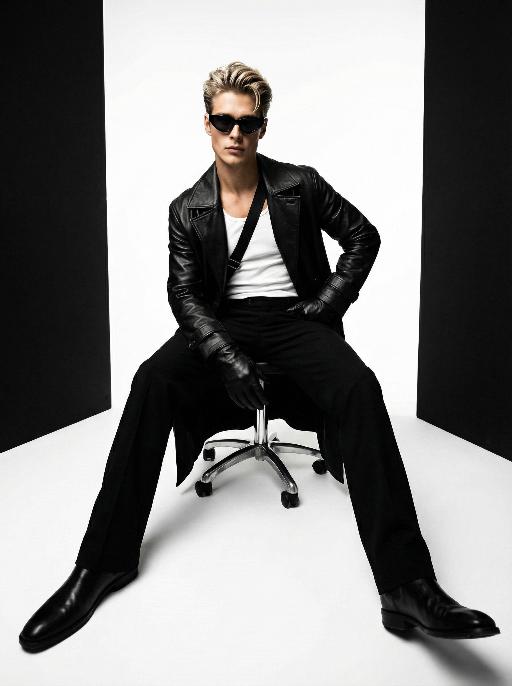
Use the exact same facial features, gender, and age as the character in the uploaded image. Low-angle wide-angle shot, avant-garde art photography, high-end men's fashion portrait, handsome East Asian male, sleek back-combed messy hair, futuristic cat-eye black sunglasses, long black leather trench coat with strong drape, white tank top inner wear, black diagonal strap across the chest, black leather gloves, sitting on a metallic silver swivel office chair, one hand on hip, the other resting on the chair leg, legs spread and extended forward to emphasize long legs, minimalist studio, seamless pure white floor, symmetrical vertical black background panels on both sides, cinematic lighting with subtle warm and cool tonal contrast, rich black and white tones with natural depth and texture, ultra-sharp focus, commercial blockbuster texture, 8K, ultra-detailed, no redundant elements, vertical composition

Snow Scene AI effects generated image

Snow Scene

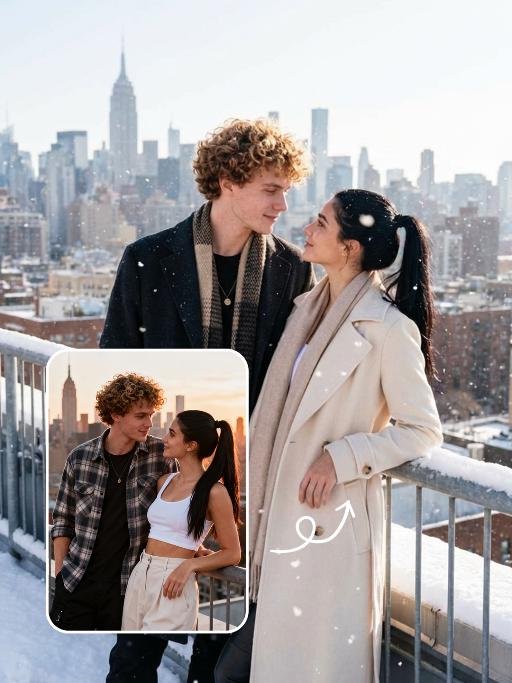
"Preserve the facial features of the figure in the image and transform the scene into a photo-realistic romantic winter snow photograph: the figure is wearing a matte black wool knee-length overcoat paired with a thick knit scarf in an interwoven coffee-brown and off-white check pattern (or a matte off-white wool waist-cinched double-breasted coat with gold buttons paired with a matching cashmere mid-length tassel scarf), set against a romantic outdoor scene with heavy snow falling. The lighting is bright natural light (noon sunlight), creating an exquisite and high-end atmosphere. Shoot with a 24mm wide-angle lens to highlight the immersive ambiance of the romantic realistic scene. Scene: Vintage red brick rooftops with light snow traces, frosted silver-toned metal railings with slightly melted snow on the edges; the New York skyline in the background, featuring a scattered mix of light gray glass curtain wall skyscrapers and vintage brownstone buildings with the clear spire of the Empire State Building, and fine snow falling gently. Photography: 85mm f/2.8 lens, winter side light, film texture, cool color tones. Image Quality: 8K ultra-detailed, realistic light and shadow. Atmosphere: A romantic and warm urban architectural snow scene bathed in the afterglow of the setting sun. Shooting Angle: Eye-level with a slight bird's-eye perspective."

Show Doodle AI effects generated image

Show Doodle

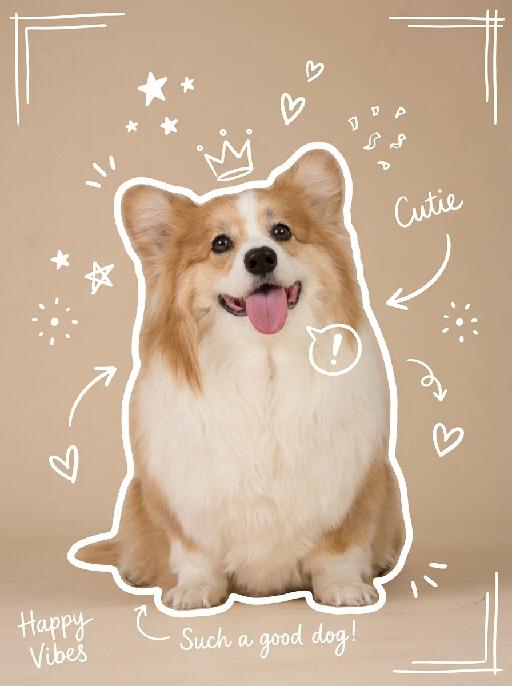
"Keep the original photo fully unchanged, maintain realistic colors, lighting, and texture. Overlay clear, hand-drawn white line doodles on top with a casual marker style, making sure they stand out clearly against the background. 1. Add a **bold, thick, slightly uneven white outline** around the main subject, tracing the full silhouette, making it look like a sticker cutout. 2. Add multiple hand-drawn decorative elements around the subject: stars, sparkles, hearts, arrows, crowns, speech bubbles, confetti, and doodle-style frames, placed in empty corners and around the subject. 3. Add short, playful handwritten text in a thin white cursive font, such as captions, mood words, or fun labels, placed in unobtrusive areas of the image. All doodles are clearly visible, well-balanced, and naturally overlaid on the photo without covering the main subject or overcrowding the image. "

Dinner Party

"Keep the facial features of the uploaded figure unchanged, with a sophisticated, noble and elegant makeup look that is exquisitely retro. The facial skin resurfacing is natural with a delicate texture; the eyeliner is smudged out softly and diffused, paired with slender, curved eyebrows, retro matte red lipstick and pale pink foundation, plus exaggerated contoured cheekbones for a stunning and refined makeup finish. The figure is dressed in a high-end custom-made exquisite gown—crafted from luxurious red velvet with diamond and pearl inlays, boasting a designer luxury aesthetic, noble and elegant style—accompanied by delicate high-end diamond accessories. The scene is transformed into an upscale Christmas dinner set in a premium VIP venue with a Christmas tree as the backdrop. At the bottom of the frame lies the large artistic typography of Merry Christmas! in a playful English floral script with a high-end golden shimmering texture. The text is surrounded by scattered small golden stars, silver snowflake patterns, and the secondary typography of A fashionable Christmas VIP dinner party. The overall style follows high-end magazine photography, featuring a fashion-forward vibe, strong design and artistic sensibilities, retro and cinematic touches. Maintain the original camera focal length for a medium close-up shot that frames the figure’s upper body, captured with a large aperture to create a soft blur (bokeh) of the background and other people. Apply a film filter with flash photography effects, infusing the frame with a dreamy feel, soft focus, gentle light, glow and halation, as well as the distinctive texture of Fujifilm film. The atmosphere is dim and moody, with golden star and silver snowflake patterns adorned on the four corners and upper edges of the frame."

Princess AI effects generated image

Princess

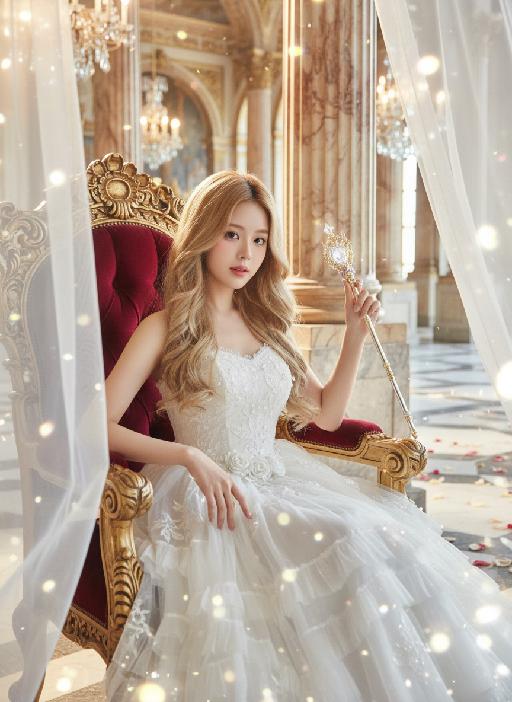
Strictly lock the facial features of the uploaded portrait (completely preserve facial contours, native skin tone, hairstyle and age); medium shot (bust-up), young girl with light golden long curly hair, Korean sweet style looks, delicate facial features with clear nude makeup and light pink blush, proud and elegant princess demeanor, sitting gracefully on an ornate throne with one hand resting lightly on the armrest and the other gently holding a delicate scepter/flower, head tilted slightly with a haughty yet gentle gaze; wearing a white strapless tulle dress with multi-layered flowing tulle skirt, delicate white lace embroidery and subtle pearl decorations, exuding a noble and dreamy fairy-tale princess aura; background is a magnificent and dreamy royal palace hall with towering marble columns, intricate golden carvings, soft warm chandelier light casting a glowing halo around her, sheer white tulle curtains fluttering gently, scattered rose petals on the marble floor, distant palace arches blurred into a soft bokeh effect, air filled with sparkling light particles; overall **dreamy fairy-tale + French retro + royal palace princess atmosphere photo, soft and ethereal ambient light, warm romantic film texture, high saturation dreamy tones, cinematic lighting with glowing rim light, motion blur (light particles/curtains), rich texture details, 8K ultra-clear, realistic human photography, flawless, full of magical and noble royal princess charm

Black Paint AI effects generated image

Black Paint

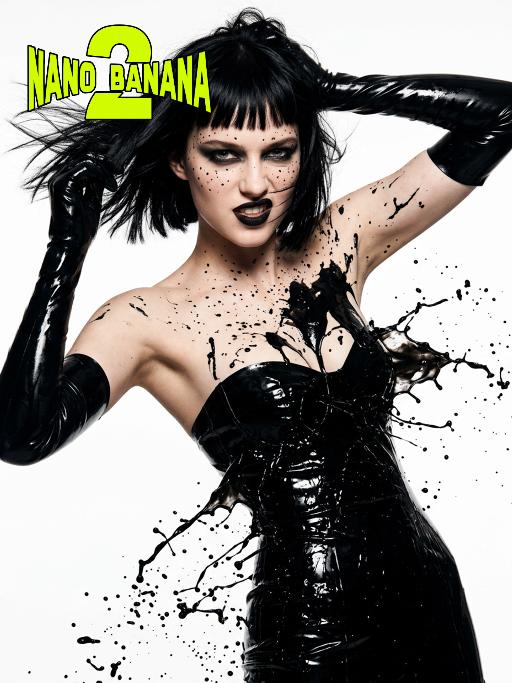
Medium close-up shot: The image of a modern model (with unchanged facial features, gender, and age) presented in the picture, whose black straight bangs and short hair are fluttering in the wind; the dark smoky makeup is paired with matte black lips, with fine black spots accentuate around the eyes, sharp and aggressive eyes, and a slightly raised the corners of the mouth revealing a rebellious expression; wearing a shiny black strapless latex tight-fitting dress (exposing the cleavage, sexy), paired with the same material long gloves, the entire body is covered with thick liquid black paint, the paint is in a dynamic state of splashing and bursting; the body is in a highly tense pose, with a large backward tilt, one arm stretched upwards, and the other hand grasping the hair; using a dramatic side backlighting + top lighting hard light combination, creating a strong contrast of light and dark between the body and the background, a pure white minimalist background, in the style of a fashion magazine photo, high definition, fine skin texture and liquid viscous texture, visual impact is at its peak, fashionable avant-garde photography art

Load more

Next-Gen Multi-Model AI Video Architecture

Vivago AI isn't just one engine—it’s a unified hub for the world’s most advanced video AI. Whether you need cinematic realism or high-speed social content, we provide the right model for your creative vision.

Free Generate

Beauty and Dolphins

Vacation Time

Stellar Tear

Fish Tank Supervisor

Cinematic Quality & Precision Control

Enables 4K resolution with multi-lens motion control, generating delicate scene via text prompts for customized cinematography.​

TRY NOW

Dynamic AV Sync

Auto-generates original audio to avoid copyright issues. Build 3D immersive environments through layered sound design automatically.

TRY NOW

OpenAI Sora 2

​Advanced visual storytelling with unparalleled physics and consistency.

TRY NOW

Kling v2.6 Pro

Industry-leading cinematic image animation and motion control.

TRY NOW

Google Veo 3 & 3.1

Ultra-fast generation with enhanced realism for creative workflows.

TRY NOW

Vivago AI 2.0

Our proprietary model optimized for efficiency, speed, and cost-effective generation.
TRY NOW

Users' Voice

We listen carefully to the opinions of every user.
Free Generate
Contact Us
I tried the Lip Sync feature inside Vivago.ai’s AI Video Generator for my educational podcast, and the results were stunning! The avatar's lip movements perfectly matched my audio recording, creating a professional AI-generated video without complex editing. Compared with tools like OpenAI Sora 2 and Google Veo 3.1, Vivago Image-to-Video delivers fast, studio-quality results online. It saved me hours of post-production work.
ElenaM (Spain)
Vivago’s Image-to-Video AI transformed my marketing workflow. I uploaded a product image and described the launch scene in text, and it generated a 10-second cinematic AI video with background music and dynamic visuals. The output quality rivals Kling v2.6 Pro and Google Veo 3 Fast. It’s now my go-to AI video generator for social media ads and product campaigns.
KenjiT (Japan)
As a digital artist, I use Vivago.ai 2.0 daily for Image-to-Image and AI Image-to-Video creation. The e-book covers and animated visuals I generate for clients look cinematic and professional. Unlike many standalone AI tools, Vivago integrates multiple leading models into one platform, making it easier to create copyright-safe AI images and videos for publishing.
ChenL (China)
I tried the Lip Sync feature inside Vivago.ai’s AI Video Generator for my educational podcast, and the results were stunning! The avatar's lip movements perfectly matched my audio recording, creating a professional AI-generated video without complex editing. Compared with tools like OpenAI Sora 2 and Google Veo 3.1, Vivago Image-to-Video delivers fast, studio-quality results online. It saved me hours of post-production work.
ElenaM (Spain)
Vivago’s Image-to-Video AI transformed my marketing workflow. I uploaded a product image and described the launch scene in text, and it generated a 10-second cinematic AI video with background music and dynamic visuals. The output quality rivals Kling v2.6 Pro and Google Veo 3 Fast. It’s now my go-to AI video generator for social media ads and product campaigns.
KenjiT (Japan)
As a digital artist, I use Vivago.ai 2.0 daily for Image-to-Image and AI Image-to-Video creation. The e-book covers and animated visuals I generate for clients look cinematic and professional. Unlike many standalone AI tools, Vivago integrates multiple leading models into one platform, making it easier to create copyright-safe AI images and videos for publishing.
ChenL (China)
I absolutely love Vivago’s AI Image-to-Video Generator. As a travel blogger, static images often fail to capture real atmosphere, but Vivago helps me turn photos into vivid cinematic AI videos with motion effects. It feels comparable to OpenAI Sora 2 and Google Veo 3.1, but more accessible and faster for creators who need high-quality AI videos online.
LiamK (Australia)
I tried the Lip Sync feature inside Vivago.ai’s AI Video Generator for my educational podcast, and the results were stunning! The avatar's lip movements perfectly matched my audio recording, creating a professional AI-generated video without complex editing. Compared with tools like OpenAI Sora 2 and Google Veo 3.1, Vivago Image-to-Video delivers fast, studio-quality results online. It saved me hours of post-production work.
ElenaM (Spain)
Vivago’s Image-to-Video AI transformed my marketing workflow. I uploaded a product image and described the launch scene in text, and it generated a 10-second cinematic AI video with background music and dynamic visuals. The output quality rivals Kling v2.6 Pro and Google Veo 3 Fast. It’s now my go-to AI video generator for social media ads and product campaigns.
KenjiT (Japan)
As a digital artist, I use Vivago.ai 2.0 daily for Image-to-Image and AI Image-to-Video creation. The e-book covers and animated visuals I generate for clients look cinematic and professional. Unlike many standalone AI tools, Vivago integrates multiple leading models into one platform, making it easier to create copyright-safe AI images and videos for publishing.
ChenL (China)
I absolutely love Vivago’s AI Image-to-Video Generator. As a travel blogger, static images often fail to capture real atmosphere, but Vivago helps me turn photos into vivid cinematic AI videos with motion effects. It feels comparable to OpenAI Sora 2 and Google Veo 3.1, but more accessible and faster for creators who need high-quality AI videos online.
LiamK (Australia)
Using Vivago.ai’s Image-to-Video AI has greatly enhanced my classroom teaching. I transform textbook notes into historical AI videos with cinematic filters and dynamic animations. Compared with tools like Kling v2.6 Pro and Google Veo 3 Fast, Vivago offers faster generation and easier parameter control for educators who need reliable AI video creation.
RajivG (India)
I frequently create AI videos on Vivago and publish them on TikTok and YouTube Shorts. The AI video templates and trending content ideas help me produce viral-ready clips quickly. With Vivago’s integrated models—including advanced video engines similar to OpenAI Sora 2—I can generate anime-style and cinematic social media videos that drive high engagement.
MarieJ (Spain)
What attracts me most about Vivago.ai is not only the powerful AI Video Generator but also the active AIGC creator community. It combines AI Image-to-Video, Text-to-Video, and leading model integrations like Google Veo 3.1 into one creative platform.
TomW (India)
At first, I was hesitant about using AI video tools. But after trying Vivago Image-to-Video, I realized how easy it is to create professional AI-generated videos online. I just upload an image, add a short prompt, and adjust a few settings. The results are cinematic and copyright-safe, which is essential for commercial projects.
HectorC (Mexico)
Using Vivago.ai’s Image-to-Video AI has greatly enhanced my classroom teaching. I transform textbook notes into historical AI videos with cinematic filters and dynamic animations. Compared with tools like Kling v2.6 Pro and Google Veo 3 Fast, Vivago offers faster generation and easier parameter control for educators who need reliable AI video creation.
RajivG (India)
I frequently create AI videos on Vivago and publish them on TikTok and YouTube Shorts. The AI video templates and trending content ideas help me produce viral-ready clips quickly. With Vivago’s integrated models—including advanced video engines similar to OpenAI Sora 2—I can generate anime-style and cinematic social media videos that drive high engagement.
MarieJ (Spain)
What attracts me most about Vivago.ai is not only the powerful AI Video Generator but also the active AIGC creator community. It combines AI Image-to-Video, Text-to-Video, and leading model integrations like Google Veo 3.1 into one creative platform.
TomW (India)
At first, I was hesitant about using AI video tools. But after trying Vivago Image-to-Video, I realized how easy it is to create professional AI-generated videos online. I just upload an image, add a short prompt, and adjust a few settings. The results are cinematic and copyright-safe, which is essential for commercial projects.
HectorC (Mexico)