Love Rose

Capture heartfelt moments with AI-generated romantic scenes. Craft tender interactions, vibrant red roses, and affectionate expressions using vivago.ai's tools. Enhance emotional connections with soft lighting, zoom effects, and professional editing for cinematic gestures. Perfect for creating surprise proposals, anniversary videos, or AI-powered love story visuals with realistic ambiance and expressive facial focus.

Use Template
arrow

FAQs

What are Effect Templates?

Effect Templates are predefined AI workflows that automatically transform static images into specific visual styles or animated formats, delivering consistent, high-quality results without manual adjustments.

How do I apply Effect Templates?

Select your preferred template > Upload an image > Generate. No text prompts required - templates handle all style parameters.

Where can I find more templates?

Explore 1000+ curated templates in our Explore Hub: https://vivago.ai/studio. New templates added weekly across categories.

What's the pricing?

Daily login grants 100 free credits. Exhausted credits? Choose: 1) Subscribe a membership plan, 2) Get a credit pack. Details: https://vivago.ai/subscribe

More From VIVAGO AI

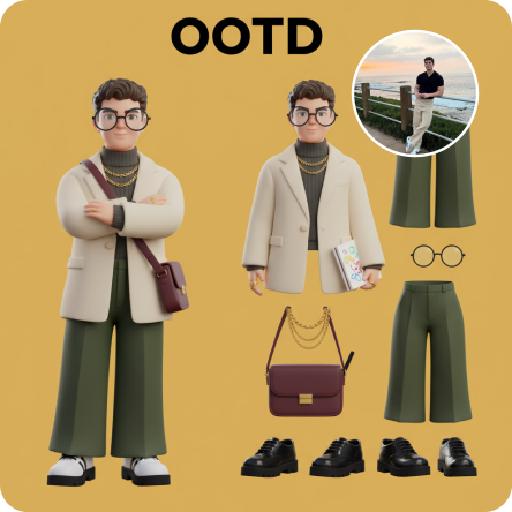
3D OOTD AI effects generated image

3D OOTD

Generate a Q-style 3D C4D-rendered character based on the person in the photo, dressed in a fashion-forward “outfit of the day” (OOTD) inspired by a specific profession.Profession: Fashion Designer – Keep the original facial features and character pose – Stylize the character with a cute, long-legged chibi proportion – Outfit and accessories should reflect the profession, including trendy designer wear, glasses, sketchbook or tablet, and stylish shoes – Match the outfit with fashion accessories to complete the look – Use a solid background color that complements the character’s overall color palette (no gradients or textures) Top text: “OOTD” Left side: the full-body chibi character wearing the complete outfit Right side: individual clothing items and accessories laid out separately, as if in a style breakdown

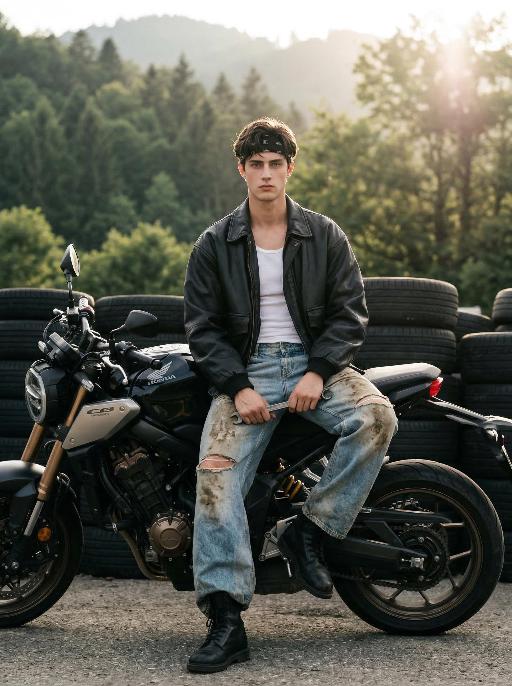
Forest Walk AI effects generated image

Forest Walk

Maintain the exact same facial features, gender, and age as the person in the uploaded image. Photorealistic editorial photo of a handsome young man in his early 20s, sitting casually on a larger, more aggressive black Honda CB650R motorcycle at an outdoor tire yard. He wears a black bandana on his head, an oversized black leather jacket over a white slim tank top, heavily distressed and mud-stained wide-leg light blue jeans with knee rips, and black combat boots. He holds a metal wrench in one hand, facing directly toward the camera, making his facial features clearly visible, with a calm and pensive expression. Background: stacked black rubber tires, lush green forested hills, soft golden hour backlighting with lens flare, hazy sunlight filtering through trees. Cinematic atmosphere, film grain, natural muted color grading, shallow depth of field, shot with Sony A7R V, 85mm f/1.4 lens, hyper-detailed textures of leather, denim, and motorcycle mechanics, 8K resolution.

Candy Sweet

Strictly follow the overall style and composition of my provided jam jar reference image: a transparent giant jam jar filled with red jam liquid, strawberries, raspberries, blueberries, peach slices, and similar fruit, with the liquid level, jam texture, fruit distribution, glass thickness, clear reflections, studio lighting, magenta-to-red solid background, and the overall sweet, fresh, high-end commercial advertising look matching the reference image closely. Replace the person inside the jar with [Universal Subject (the uploaded user character)], strictly keeping the exact same subject as the reference image, the same species, the same face, and the original appearance unchanged; if the subject is an animal, use an anthropomorphic pose while still being instantly recognizable as the exact same subject from the reference image; the full body must be fully visible. Pose the subject inside the jar in the same cute seated pose as the reference image, with both legs naturally bent and tucked in front, body slightly curled, one hand resting naturally near the head, creating a sweet, playful, and relaxed feeling. The subject wears proper stylish non-revealing clothing. The jar must be a clean pure glass design with no text, no logo, no label, and no packaging graphics. The whole image should feel bright, translucent, refined, fashionable, cute, like a premium jam advertisement, lightly surreal, and visually very close to the reference image.

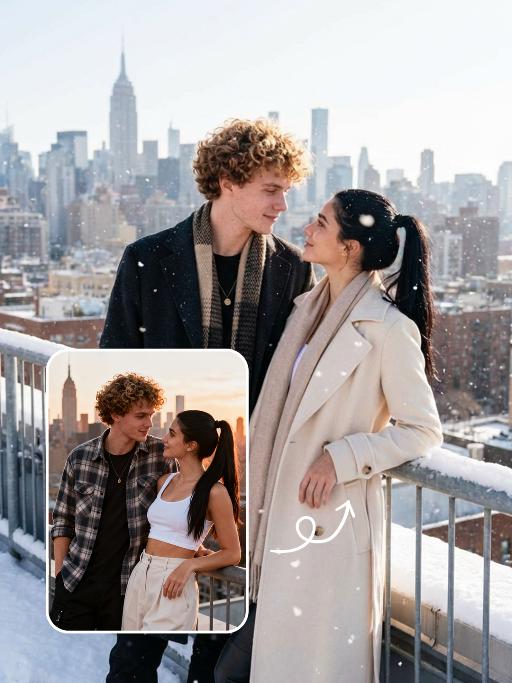
Snow Scene AI effects generated image

Snow Scene

Preserve the facial features of the figure in the image and transform the scene into a photo-realistic romantic winter snow photograph: the figure is wearing a matte black wool knee-length overcoat paired with a thick knit scarf in an interwoven coffee-brown and off-white check pattern (or a matte off-white wool waist-cinched double-breasted coat with gold buttons paired with a matching cashmere mid-length tassel scarf), set against a romantic outdoor scene with heavy snow falling. The lighting is bright natural light (noon sunlight), creating an exquisite and high-end atmosphere. Shoot with a 24mm wide-angle lens to highlight the immersive ambiance of the romantic realistic scene. Scene: Vintage red brick rooftops with light snow traces, frosted silver-toned metal railings with slightly melted snow on the edges; the New York skyline in the background, featuring a scattered mix of light gray glass curtain wall skyscrapers and vintage brownstone buildings with the clear spire of the Empire State Building, and fine snow falling gently. Photography: 85mm f/2.8 lens, winter side light, film texture, cool color tones. Image Quality: 8K ultra-detailed, realistic light and shadow. Atmosphere: A romantic and warm urban architectural snow scene bathed in the afterglow of the setting sun. Shooting Angle: Eye-level with a slight bird's-eye perspective.

Elegant AI effects generated image

Elegant

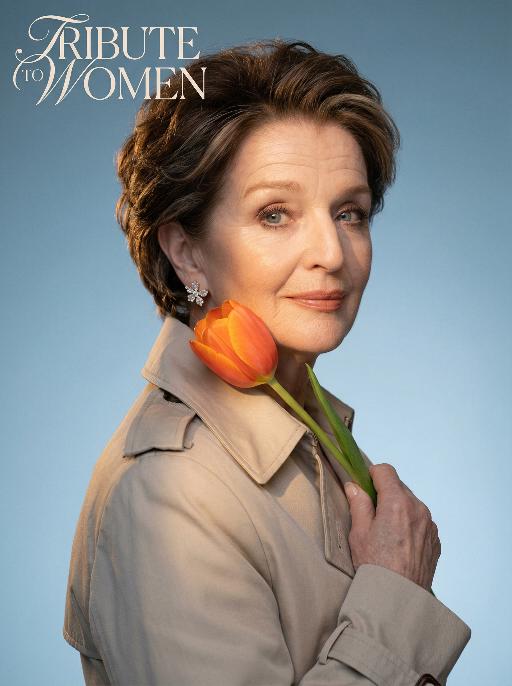
Use the exact same facial features, gender, and age as the uploaded image.Studio portrait, half-body shot. standing sideways, holding a vibrant orange tulip gently against the cheek. Wearing a light beige trench coat with a structured collar, adorned with delicate sparkling floral earrings. The background is a smooth cool blue gradient, creating a minimalist and sophisticated atmosphere.Soft warm side lighting casts gentle shadows on the face, highlighting the skin texture and the luster of the tulip petals. Medium close-up composition, focusing on the calm and gentle expression of the subject, as well as the strong color contrast between the warm tones of the flower and clothing against the cool background. The image features cinematic color grading, high detail, and ultra-realistic quality. The text “TRIBUTE TO WOMEN” is artistically integrated into the upper left corner as stylized art font, harmonizing with the portrait’s elegant tone without overwhelming the visual.

Forest AI effects generated image

Forest

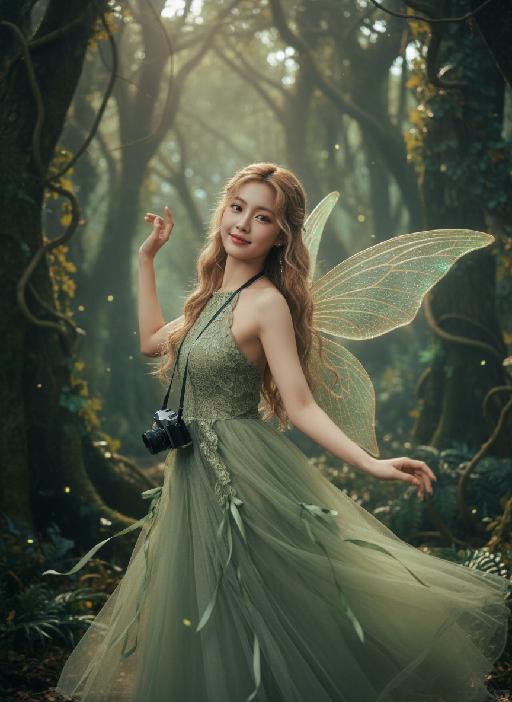
Strictly lock the facial features of the uploaded portrait (completely preserve facial contours, native skin tone, hairstyle, and age); young adult woman (early 20s) with light golden long curly hair, Korean sweet pictorial style, delicate facial features, clear nude makeup with light pink blush, sweet and healing smile. She is gracefully dancing like a forest elf, body slightly twisting in motion, one shoulder subtly turned toward the camera while the upper body leans lightly back, arms lifted in a soft, flowing dance gesture, fingers relaxed and elegant; holding a black vintage camera loosely near her waist as if captured mid-movement. Pose remains consistent with the original sideways orientation, but enriched with dynamic motion and rhythm; close-up facial shot with visible upper-body movement. Behind her, a pair of delicate translucent fairy wings softly glowing — semi-transparent, leaf-vein textures, subtle green-golden luminescence, naturally extending from her back, blending harmoniously with the forest light (not dominant, not cartoonish, realistic fantasy photography style). Wearing an elf-green lace halter tulle dress with a flowing skirt and green ribbon decorations; skirt and ribbons caught mid-sway by movement, enhancing the dancing elf aura. Background: a mysterious dense jungle with towering ancient trees, tangled vines, dappled sunlight filtering through a thick canopy, mist curling around trunks, soft glowing fireflies flickering, deep green foliage with subtle golden autumn tones; no cherry blossoms or peach blossoms. Atmosphere: enchanted secret forest vibe, forest elf + dark fantasy + French retro + Korean pictorial aesthetic; soft and moody natural light, cinematic lighting with dramatic shadows, warm film texture with mysterious undertones, strong hair-light atmosphere, natural motion blur on vines, ribbons, and skirt edges, ultra-detailed, 8K ultra-clear, realistic human photography, flawless skin texture, full of fairy and enchanted forest mystery

Princess AI effects generated image

Princess

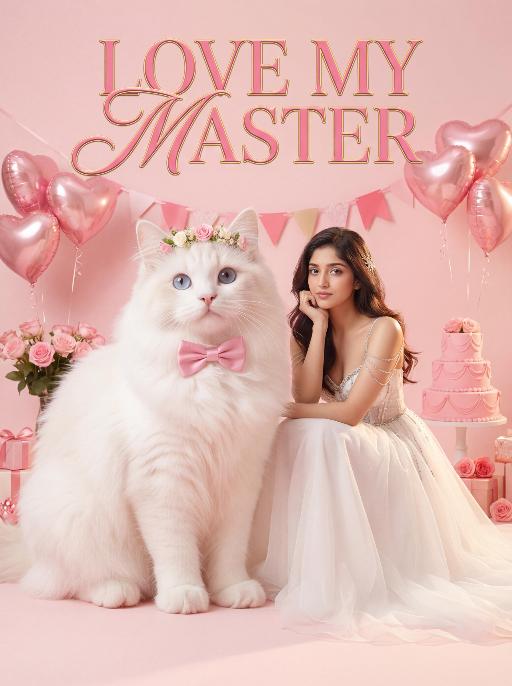
Surreal photography art: In the uploaded picture, the pet (with its features remaining the same, but its size transformed into a huge one with fluffy fur, occupying the left side of the picture and wearing cute accessories), and a person in the uploaded picture (with unchanged facial features, gender, and age) wearing an exquisite white high-end custom dress (wearing delicate accessories), places their chin on their hand and sits slightly on the ground beside the aforementioned pet, with the proportion of the pet and the person in the picture being 1 to 1; the color scheme is pink, with a natural realistic style, a photography studio photography style, the background is a simple pale pink clean photography studio background surface, surrounded by pink cakes and roses, with princess-style, Valentine's Day elements such as heart-shaped decorative balloons, a realistic pet photography style. High-key, soft, bright light, soft diffused shadows, warm low saturation tones (mutton white, pink, warm orange), creating a warm, intimate romantic Valentine's Day atmosphere between the pet and the person, fashionable avant-garde photography art, realistic film-level realistic effect, with a large title artistic design font: LOVE MY MASTER

Load more

Next-Gen Multi-Model AI Video Architecture

Vivago AI isn't just one engine—it’s a unified hub for the world’s most advanced video AI. Whether you need cinematic realism or high-speed social content, we provide the right model for your creative vision.

Free Generate

Beauty and Dolphins

Vacation Time

Stellar Tear

Fish Tank Supervisor

Cinematic Quality & Precision Control

Enables 4K resolution with multi-lens motion control, generating delicate scene via text prompts for customized cinematography.​

TRY NOW

Dynamic AV Sync

Auto-generates original audio to avoid copyright issues. Build 3D immersive environments through layered sound design automatically.

TRY NOW

OpenAI Sora 2

​Advanced visual storytelling with unparalleled physics and consistency.

TRY NOW

Kling v2.6 Pro

Industry-leading cinematic image animation and motion control.

TRY NOW

Google Veo 3 & 3.1

Ultra-fast generation with enhanced realism for creative workflows.

TRY NOW

Vivago AI 2.0

Our proprietary model optimized for efficiency, speed, and cost-effective generation.

TRY NOW

Users' Voice

We listen carefully to the opinions of every user.
Free Generate
Contact Us
I tried the Lip Sync feature inside Vivago.ai’s AI Video Generator for my educational podcast, and the results were stunning! The avatar's lip movements perfectly matched my audio recording, creating a professional AI-generated video without complex editing. Compared with tools like OpenAI Sora 2 and Google Veo 3.1, Vivago Image-to-Video delivers fast, studio-quality results online. It saved me hours of post-production work.
ElenaM (Spain)
Vivago’s Image-to-Video AI transformed my marketing workflow. I uploaded a product image and described the launch scene in text, and it generated a 10-second cinematic AI video with background music and dynamic visuals. The output quality rivals Kling v2.6 Pro and Google Veo 3 Fast. It’s now my go-to AI video generator for social media ads and product campaigns.
KenjiT (Japan)
As a digital artist, I use Vivago.ai 2.0 daily for Image-to-Image and AI Image-to-Video creation. The e-book covers and animated visuals I generate for clients look cinematic and professional. Unlike many standalone AI tools, Vivago integrates multiple leading models into one platform, making it easier to create copyright-safe AI images and videos for publishing.
ChenL (China)
I tried the Lip Sync feature inside Vivago.ai’s AI Video Generator for my educational podcast, and the results were stunning! The avatar's lip movements perfectly matched my audio recording, creating a professional AI-generated video without complex editing. Compared with tools like OpenAI Sora 2 and Google Veo 3.1, Vivago Image-to-Video delivers fast, studio-quality results online. It saved me hours of post-production work.
ElenaM (Spain)
Vivago’s Image-to-Video AI transformed my marketing workflow. I uploaded a product image and described the launch scene in text, and it generated a 10-second cinematic AI video with background music and dynamic visuals. The output quality rivals Kling v2.6 Pro and Google Veo 3 Fast. It’s now my go-to AI video generator for social media ads and product campaigns.
KenjiT (Japan)
As a digital artist, I use Vivago.ai 2.0 daily for Image-to-Image and AI Image-to-Video creation. The e-book covers and animated visuals I generate for clients look cinematic and professional. Unlike many standalone AI tools, Vivago integrates multiple leading models into one platform, making it easier to create copyright-safe AI images and videos for publishing.
ChenL (China)
I absolutely love Vivago’s AI Image-to-Video Generator. As a travel blogger, static images often fail to capture real atmosphere, but Vivago helps me turn photos into vivid cinematic AI videos with motion effects. It feels comparable to OpenAI Sora 2 and Google Veo 3.1, but more accessible and faster for creators who need high-quality AI videos online.
LiamK (Australia)
I tried the Lip Sync feature inside Vivago.ai’s AI Video Generator for my educational podcast, and the results were stunning! The avatar's lip movements perfectly matched my audio recording, creating a professional AI-generated video without complex editing. Compared with tools like OpenAI Sora 2 and Google Veo 3.1, Vivago Image-to-Video delivers fast, studio-quality results online. It saved me hours of post-production work.
ElenaM (Spain)
Vivago’s Image-to-Video AI transformed my marketing workflow. I uploaded a product image and described the launch scene in text, and it generated a 10-second cinematic AI video with background music and dynamic visuals. The output quality rivals Kling v2.6 Pro and Google Veo 3 Fast. It’s now my go-to AI video generator for social media ads and product campaigns.
KenjiT (Japan)
As a digital artist, I use Vivago.ai 2.0 daily for Image-to-Image and AI Image-to-Video creation. The e-book covers and animated visuals I generate for clients look cinematic and professional. Unlike many standalone AI tools, Vivago integrates multiple leading models into one platform, making it easier to create copyright-safe AI images and videos for publishing.
ChenL (China)
I absolutely love Vivago’s AI Image-to-Video Generator. As a travel blogger, static images often fail to capture real atmosphere, but Vivago helps me turn photos into vivid cinematic AI videos with motion effects. It feels comparable to OpenAI Sora 2 and Google Veo 3.1, but more accessible and faster for creators who need high-quality AI videos online.
LiamK (Australia)
Using Vivago.ai’s Image-to-Video AI has greatly enhanced my classroom teaching. I transform textbook notes into historical AI videos with cinematic filters and dynamic animations. Compared with tools like Kling v2.6 Pro and Google Veo 3 Fast, Vivago offers faster generation and easier parameter control for educators who need reliable AI video creation.
RajivG (India)
I frequently create AI videos on Vivago and publish them on TikTok and YouTube Shorts. The AI video templates and trending content ideas help me produce viral-ready clips quickly. With Vivago’s integrated models—including advanced video engines similar to OpenAI Sora 2—I can generate anime-style and cinematic social media videos that drive high engagement.
MarieJ (Spain)
What attracts me most about Vivago.ai is not only the powerful AI Video Generator but also the active AIGC creator community. It combines AI Image-to-Video, Text-to-Video, and leading model integrations like Google Veo 3.1 into one creative platform.
TomW (India)
At first, I was hesitant about using AI video tools. But after trying Vivago Image-to-Video, I realized how easy it is to create professional AI-generated videos online. I just upload an image, add a short prompt, and adjust a few settings. The results are cinematic and copyright-safe, which is essential for commercial projects.
HectorC (Mexico)
Using Vivago.ai’s Image-to-Video AI has greatly enhanced my classroom teaching. I transform textbook notes into historical AI videos with cinematic filters and dynamic animations. Compared with tools like Kling v2.6 Pro and Google Veo 3 Fast, Vivago offers faster generation and easier parameter control for educators who need reliable AI video creation.
RajivG (India)
I frequently create AI videos on Vivago and publish them on TikTok and YouTube Shorts. The AI video templates and trending content ideas help me produce viral-ready clips quickly. With Vivago’s integrated models—including advanced video engines similar to OpenAI Sora 2—I can generate anime-style and cinematic social media videos that drive high engagement.
MarieJ (Spain)
What attracts me most about Vivago.ai is not only the powerful AI Video Generator but also the active AIGC creator community. It combines AI Image-to-Video, Text-to-Video, and leading model integrations like Google Veo 3.1 into one creative platform.
TomW (India)
At first, I was hesitant about using AI video tools. But after trying Vivago Image-to-Video, I realized how easy it is to create professional AI-generated videos online. I just upload an image, add a short prompt, and adjust a few settings. The results are cinematic and copyright-safe, which is essential for commercial projects.
HectorC (Mexico)