More From VIVAGO AI

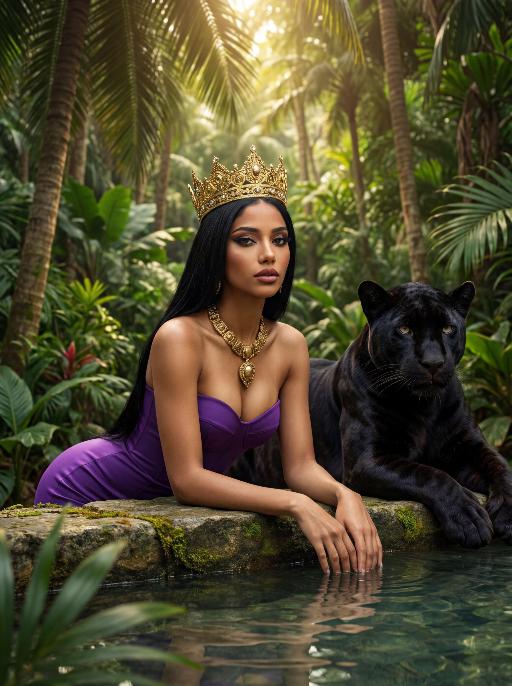
Jungle Queen AI effects generated image

Jungle Queen

The character in the uploaded picture (unchanged facial features, gender and age). A striking woman with long, sleek black straight hair, embodying a powerful jungle queen, captured in a hyper-realistic, cinematic portrait. She has a regal, intense gaze, and bold, dramatic makeup. She wears a form-fitting, strapless purple bustier dress that accentuates her curvy, graceful figure. She is adorned with a large, imposing golden crown on her head, and a thick, ornate golden necklace with a prominent pendant around her neck. She leans forward, resting her forearms on a weathered stone ledge at the edge of a shallow pool, her hands submerged in the clear, still water. A majestic black panther with sleek, glossy black fur rests calmly beside her, its body partially visible behind her, exuding a sense of primal power and quiet companionship. The setting is a lush, dense tropical jungle. Towering palm trees and broad-leafed plants fill the background, their vibrant green leaves creating a dense, verdant canopy. Soft, dappled sunlight filters through the foliage, casting a warm, golden glow on the scene and creating a serene, otherworldly atmosphere. The image is rendered in a hyper-realistic, cinematic style, with sharp focus on the subject, soft bokeh on the background, and dramatic, natural lighting that accentuates the rich purple of her dress, the glossy black of the panther's fur, and the intricate details of the golden crown and necklace. The color palette is rich and vibrant, featuring deep purples, glossy blacks, radiant golds, and lush greens, creating a timeless, powerful, and awe-inspiring atmosphere. The overall aesthetic is detailed, lifelike, and reminiscent of a scene from a grand fantasy epic, blending primal power with regal elegance


Crystal Ball

The uploaded figure is dressed in a full Christmas-style costume and is completely inside a giant transparent snow globe: She wears a red-and-green plush-edged bow hair accessory on her head; the upper body is a white long-sleeve shirt printed with red antler patterns, layered with a burgundy argyle cropped vest (adorned with golden bells at the collar), and the lower body is paired with a matching argyle pleated skirt embroidered with white snowflake patterns; on her feet are red over-the-knee plush boots, with the cuffs folded down to reveal the white plush lining. The figure is curled up on her knees, leaning against the items inside the snow globe. One hand gently rests on the edge of a Christmas stocking, while the other holds a golden star decorated with ribbons, with a sweet and lively expression. Inside the snow globe, there are a mini Christmas tree wrapped in fairy lights, a teddy bear doll wearing a scarf, golden star ornaments and cinnamon stick decorations; outside the snow globe stands a pine-branch Christmas tree dusted with snow, hung with red and white berries and golden bells, with the word "CHRISTMAS" printed in hot gold on the base. The scene is a cozy outdoor night snowscape, featuring several outdoor Christmas trees and decorations, warm string lights twinkling softly, and fluffy snowflakes drifting in the background, creating an overall warm and healing atmosphere. The style is realistic with a cinematic texture. The figure’s makeup is beautiful and natural, with a natural skin-smoothing effect that highlights an excellent skin condition. The camera moves in a rotating transition, with magical particle sparkles and falling white snowflakes added during the transition for a whimsical touch.

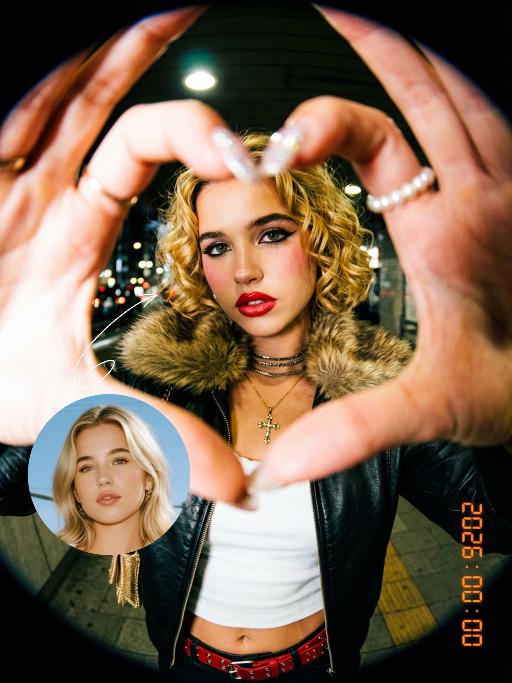
Lens Heartbeat AI effects generated image

Lens Heartbeat

The uploaded figure (with unchanged facial features) forms a heart shape with both hands in front of the lens for a framed composition, featuring a shallow depth of field (the large, tilted hands in the foreground are slightly blurred). This is a portrait photoshoot in the ppgalclub style, with Japanese Shibuya Y2K fashion styling. Captured in a fisheye lens close-up (strong fisheye distortion with slight stretching at the frame edges) from a slightly low-angle perspective, the figure is centered to fill the entire frame. The figure has short, curly golden bob hair and bold makeup (thick black eyeliner + plump red lips + translucent pink-toned blush), leaning forward with the face facing the camera directly. The outfit includes a black leather vest with a fur collar, a white camisole, a red stud-embellished belt (with a cropped waist design), a golden cross necklace paired with multi-layered metal chokers, sequin-embellished nail art, pearl-encircled rings, and a small golden chain bag. The scene is set in a Shibuya underground passage at night, with dim artificial lighting and a high-intensity flash fired directly at the figure (creating stark light and shadow contrast, prominent highlights on the figure’s face, and a dark-toned background), plus blurred bokeh light spots in the background. The image features film grain texture, a highly saturated black/gold/red color scheme, and ultra-high-definition details; a black fisheye lens vignetting frames the entire image, and an orange vertical digital date watermark (2026:00:00) is added to the bottom right corner.

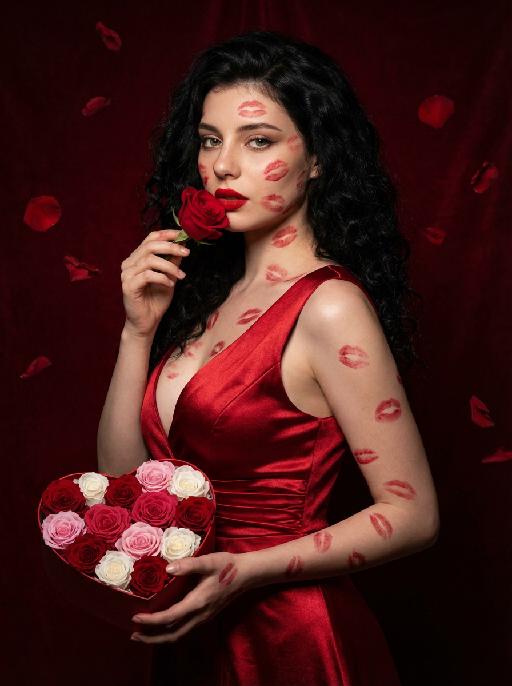
Love Yourself AI effects generated image

Love Yourself

A charming and alluring figure in the uploaded picture (with unchanged facial features, gender and age), stands sideways and turns around, looking at the camera. She has long, fluffy, jet-black curly hair, exquisite eye makeup and a bright matte red lipstick. Red lipstick marks are all over her face, neck, chest and arms. She is wearing a luxurious deep V-neck red satin dress. One hand holds a heart-shaped box filled with various colored roses, and the other hand holds a rose placed near her mouth. Background: A dark red velvet texture studio background. Several red rose petals float slowly in the air in the background. Lighting hint: Low-key high-contrast dramatic light, soft directional highlights shining on her facial features and the satin dress, deep velvet-like shadows to enhance the sexy effect, with a cinematic sense of melancholy and depth. Tone hint: Rich, saturated deep red contrasts with dark black and soft charcoal gray, warm and passionate color combination, with subtle velvet texture in the shadow areas. Style: High-end fashion editing photography, highly realistic detail depiction, precise capture of skin texture and fabric luster, full of charm and allure Valentine's Day theme, with professional photography studio level, fashion pioneer photography.

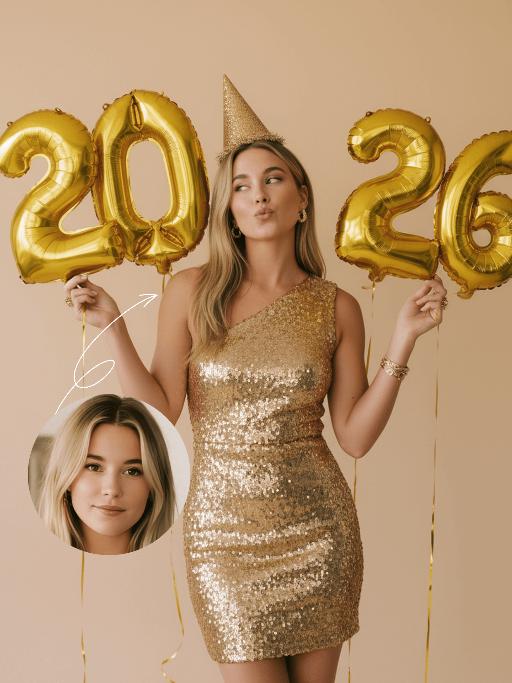
Golden 2026 AI effects generated image

Golden 2026

The figure from the uploaded image (with unchanged facial features, age and gender, natural skin retouching on the face, and a fresh, sheer makeup look). This is a fashion portrait photography piece with a centered composition and an eye-level shooting perspective, captured with a Canon EOS R5 camera paired with an 85mm f/1.4 lens. The figure holds golden number balloons (20 and 26) in each hand, with arms raised naturally, body slightly turned and head tilted gently. Their gaze is directed diagonally upward, with a playful pout and a relaxed expression, striking an elegant posture. They are dressed in a high-customized gold sequined one-shoulder slim-fit dress with a distinctive design, and wear a gold glitter party hat, paired with high-end, luxurious and exquisitely designed accessories (necklace, rings, earrings, bracelet). Set against a solid pale off-white background with soft warm studio lighting, the image features high-texture skin details and sharply defined sequin details, presenting a delicate and sophisticated visual effect. It adopts an avant-garde fashion photography style with high-end photographic quality and a low-saturation color palette.

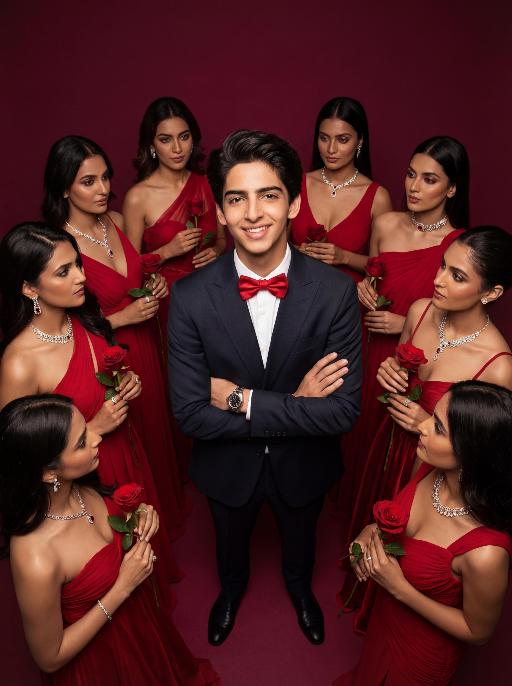
Women Surround AI effects generated image

Women Surround

Low-angle shot: The central figure from the uploaded image is the subject, with a confident smile, keeping original facial features, gender and age unchanged. He is dressed in a well-tailored high-end custom suit, paired with a red bow tie and a luxury watch, with his arms crossed over his chest. Surrounding him are 8 to 9 beautiful Indian women in stylish red high-end custom gowns, adorned with luxurious accessories, each holding a fresh red rose. These women are arranged in a circular formation around the central figure against a solid deep burgundy background. Lighting & Color Settings: High-quality cinematic lighting effects, soft yet dramatic shadows, moderate contrast, rich depth of field, smooth and translucent skin texture, creating an overall luxurious and romantic atmosphere, with a faint highlight on the facial features for enhancement. Color Hints: Dominated by rich deep red and pure black, natural and clear skin tones, highly saturated colors without overexposure, a cohesive high-end color palette with warm tones, and striking contrast between light and shadow. Style Supplement: Avant-garde fashion art style, fashion portrait photography, the overall atmosphere is elegant and charming, evoking the grandeur of a luxurious Valentine's Day celebrity gala.

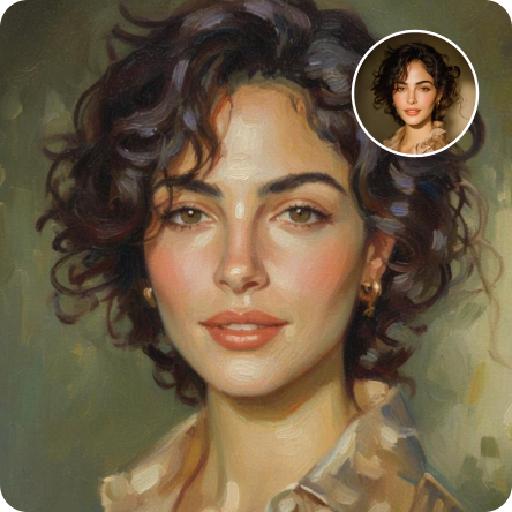
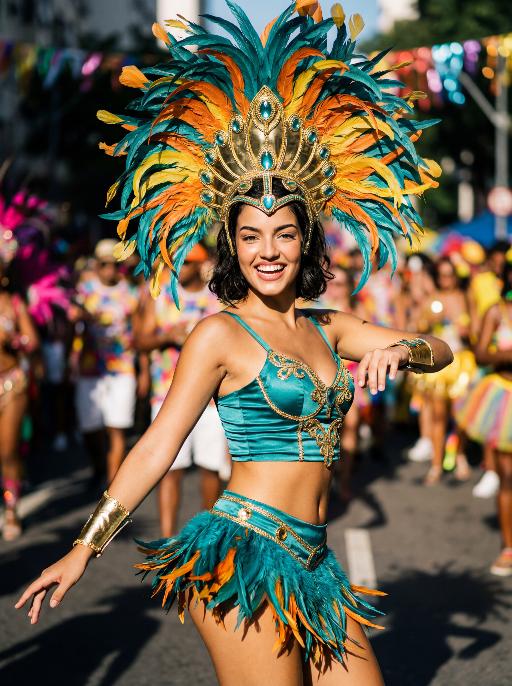
Street Carnival AI effects generated image

Street Carnival

The character in the uploaded picture (unchanged facial features, gender and age). Avant-garde portrait photography of a young Brazilian Carnival dancer, sharp focus on the subject, front-facing dynamic pose. has short wavy dark hair, warm brown eyes, and a genuine, joyful smile with visible teeth. wears an opulent Carnival costume: a towering, structured headdress crafted with layered iridescent teal, vivid tangerine, and sunflower yellow feathers, accented with polished gold metalwork and teal gemstone inlays. outfit features a form-fitting teal satin crop top with gold filigree trim, matching teal feather fringe mini skirt with gold hardware, and gold arm cuffs with teal bead detailing. Captured mid-dance on a sun-drenched Rio de Janeiro street during Carnival, one arm extended outward, the other bent at the elbow in a lively gesture. The background is heavily stylized with experimental shallow depth of field—blurred Carnival revellers in colorful costumes and festive street decorations create an abstract, textured backdrop. Pioneering photographic techniques: high-contrast natural daylight, bold color grading, hard directional light casting dramatic shadows, film grain texture, 35mm prime lens, f/1.4 aperture. The overall style is edgy, high-fashion avant-garde portraiture, ultra-detailed, 8K resolution, museum-quality, raw photographic aesthetic.

Load more

Next-Gen Multi-Model AI Video Architecture

Vivago AI isn't just one engine—it’s a unified hub for the world’s most advanced video AI. Whether you need cinematic realism or high-speed social content, we provide the right model for your creative vision.

Free Generate

Beauty and Dolphins

Vacation Time

Stellar Tear

Fish Tank Supervisor

Cinematic Quality & Precision Control

Enables 4K resolution with multi-lens motion control, generating delicate scene via text prompts for customized cinematography.​

TRY NOW

Dynamic AV Sync

Auto-generates original audio to avoid copyright issues. Build 3D immersive environments through layered sound design automatically.

TRY NOW

OpenAI Sora 2

​Advanced visual storytelling with unparalleled physics and consistency.

TRY NOW

Kling v2.6 Pro

Industry-leading cinematic image animation and motion control.

TRY NOW

Google Veo 3 & 3.1

Ultra-fast generation with enhanced realism for creative workflows.

TRY NOW

Vivago AI 2.0

Our proprietary model optimized for efficiency, speed, and cost-effective generation.

TRY NOW

Users' Voice

We listen carefully to the opinions of every user.
Free Generate
Contact Us
I tried the Lip Sync feature inside Vivago.ai’s AI Video Generator for my educational podcast, and the results were stunning! The avatar's lip movements perfectly matched my audio recording, creating a professional AI-generated video without complex editing. Compared with tools like OpenAI Sora 2 and Google Veo 3.1, Vivago Image-to-Video delivers fast, studio-quality results online. It saved me hours of post-production work.
ElenaM (Spain)
Vivago’s Image-to-Video AI transformed my marketing workflow. I uploaded a product image and described the launch scene in text, and it generated a 10-second cinematic AI video with background music and dynamic visuals. The output quality rivals Kling v2.6 Pro and Google Veo 3 Fast. It’s now my go-to AI video generator for social media ads and product campaigns.
KenjiT (Japan)
As a digital artist, I use Vivago.ai 2.0 daily for Image-to-Image and AI Image-to-Video creation. The e-book covers and animated visuals I generate for clients look cinematic and professional. Unlike many standalone AI tools, Vivago integrates multiple leading models into one platform, making it easier to create copyright-safe AI images and videos for publishing.
ChenL (China)
I tried the Lip Sync feature inside Vivago.ai’s AI Video Generator for my educational podcast, and the results were stunning! The avatar's lip movements perfectly matched my audio recording, creating a professional AI-generated video without complex editing. Compared with tools like OpenAI Sora 2 and Google Veo 3.1, Vivago Image-to-Video delivers fast, studio-quality results online. It saved me hours of post-production work.
ElenaM (Spain)
Vivago’s Image-to-Video AI transformed my marketing workflow. I uploaded a product image and described the launch scene in text, and it generated a 10-second cinematic AI video with background music and dynamic visuals. The output quality rivals Kling v2.6 Pro and Google Veo 3 Fast. It’s now my go-to AI video generator for social media ads and product campaigns.
KenjiT (Japan)
As a digital artist, I use Vivago.ai 2.0 daily for Image-to-Image and AI Image-to-Video creation. The e-book covers and animated visuals I generate for clients look cinematic and professional. Unlike many standalone AI tools, Vivago integrates multiple leading models into one platform, making it easier to create copyright-safe AI images and videos for publishing.
ChenL (China)
I absolutely love Vivago’s AI Image-to-Video Generator. As a travel blogger, static images often fail to capture real atmosphere, but Vivago helps me turn photos into vivid cinematic AI videos with motion effects. It feels comparable to OpenAI Sora 2 and Google Veo 3.1, but more accessible and faster for creators who need high-quality AI videos online.
LiamK (Australia)
I tried the Lip Sync feature inside Vivago.ai’s AI Video Generator for my educational podcast, and the results were stunning! The avatar's lip movements perfectly matched my audio recording, creating a professional AI-generated video without complex editing. Compared with tools like OpenAI Sora 2 and Google Veo 3.1, Vivago Image-to-Video delivers fast, studio-quality results online. It saved me hours of post-production work.
ElenaM (Spain)
Vivago’s Image-to-Video AI transformed my marketing workflow. I uploaded a product image and described the launch scene in text, and it generated a 10-second cinematic AI video with background music and dynamic visuals. The output quality rivals Kling v2.6 Pro and Google Veo 3 Fast. It’s now my go-to AI video generator for social media ads and product campaigns.
KenjiT (Japan)
As a digital artist, I use Vivago.ai 2.0 daily for Image-to-Image and AI Image-to-Video creation. The e-book covers and animated visuals I generate for clients look cinematic and professional. Unlike many standalone AI tools, Vivago integrates multiple leading models into one platform, making it easier to create copyright-safe AI images and videos for publishing.
ChenL (China)
I absolutely love Vivago’s AI Image-to-Video Generator. As a travel blogger, static images often fail to capture real atmosphere, but Vivago helps me turn photos into vivid cinematic AI videos with motion effects. It feels comparable to OpenAI Sora 2 and Google Veo 3.1, but more accessible and faster for creators who need high-quality AI videos online.
LiamK (Australia)
Using Vivago.ai’s Image-to-Video AI has greatly enhanced my classroom teaching. I transform textbook notes into historical AI videos with cinematic filters and dynamic animations. Compared with tools like Kling v2.6 Pro and Google Veo 3 Fast, Vivago offers faster generation and easier parameter control for educators who need reliable AI video creation.
RajivG (India)
I frequently create AI videos on Vivago and publish them on TikTok and YouTube Shorts. The AI video templates and trending content ideas help me produce viral-ready clips quickly. With Vivago’s integrated models—including advanced video engines similar to OpenAI Sora 2—I can generate anime-style and cinematic social media videos that drive high engagement.
MarieJ (Spain)
What attracts me most about Vivago.ai is not only the powerful AI Video Generator but also the active AIGC creator community. It combines AI Image-to-Video, Text-to-Video, and leading model integrations like Google Veo 3.1 into one creative platform.
TomW (India)
At first, I was hesitant about using AI video tools. But after trying Vivago Image-to-Video, I realized how easy it is to create professional AI-generated videos online. I just upload an image, add a short prompt, and adjust a few settings. The results are cinematic and copyright-safe, which is essential for commercial projects.
HectorC (Mexico)
Using Vivago.ai’s Image-to-Video AI has greatly enhanced my classroom teaching. I transform textbook notes into historical AI videos with cinematic filters and dynamic animations. Compared with tools like Kling v2.6 Pro and Google Veo 3 Fast, Vivago offers faster generation and easier parameter control for educators who need reliable AI video creation.
RajivG (India)
I frequently create AI videos on Vivago and publish them on TikTok and YouTube Shorts. The AI video templates and trending content ideas help me produce viral-ready clips quickly. With Vivago’s integrated models—including advanced video engines similar to OpenAI Sora 2—I can generate anime-style and cinematic social media videos that drive high engagement.
MarieJ (Spain)
What attracts me most about Vivago.ai is not only the powerful AI Video Generator but also the active AIGC creator community. It combines AI Image-to-Video, Text-to-Video, and leading model integrations like Google Veo 3.1 into one creative platform.
TomW (India)
At first, I was hesitant about using AI video tools. But after trying Vivago Image-to-Video, I realized how easy it is to create professional AI-generated videos online. I just upload an image, add a short prompt, and adjust a few settings. The results are cinematic and copyright-safe, which is essential for commercial projects.
HectorC (Mexico)