Text to Video

La gattina Luna, piccola, morbida e dolce, si avvicina alla sua ciotola di latte per bere felice. Ma, presa dall'entusiasmo, la rovescia per sbaglio e si bagna tutta. Triste e infreddolita, inizia a piangere, ma poi scopre che può leccare il latte dal suo pelo. Questo la rende felice, e si diverte a pulirsi gustando ogni goccia. Alla fine si addormenta serena, imparando che anche un piccolo incidente può diventare una dolce sorpresa.

Recreate
arrow

More From VIVAGO AI

Seagull AI effects generated image

Seagull

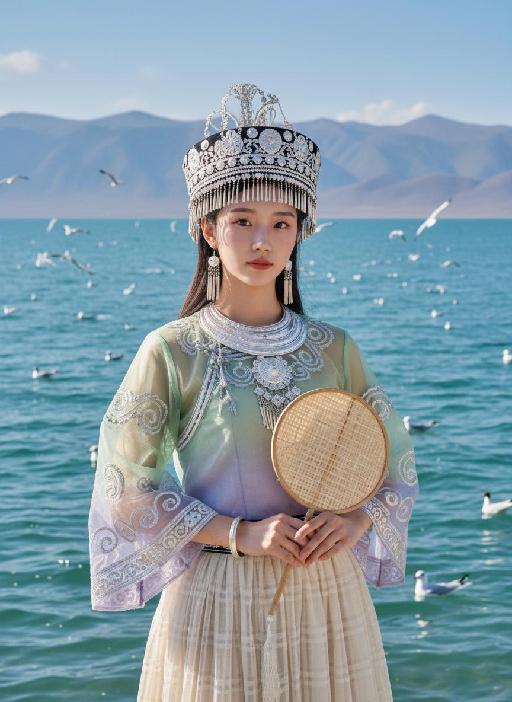
Strictly lock facial features: fully preserving the original facial contours, skin texture, eye shape, lip shape, and youthful appearance with zero deviations allowed. Camera zoomed in for a tighter composition, eye-level perspective, half-body close-up (subject occupies 85% of the frame), a young East Asian woman with a gentle temperament stands facing forward, hands naturally holding a bamboo-woven round fan in front of her, posture dignified, expression gentle and calm, eyes soft looking at the camera; Facial state exactly as original: fresh nude makeup, transparent porcelain base, natural pink lips, soft eye makeup, no heavy colors. Sheer tulle clothing exactly as original: - Headdress: Traditional Miao silver headdress, black base with multiple layers of silver tassels and carvings, hanging pearl strings on both sides - Accessories: Multi-layered Miao silver collar, silver bracelets - Top: Sheer tulle Miao top with gradient from light green to light purple, round neck design, wide sleeves covered with scroll grass pattern embroidery, edged with silver patterns, presenting a light and semi-transparent texture - Skirt: Light beige sheer tulle plaid pleated long skirt, with strong drape and a light, flowing hem Lighting and image quality exactly as original: Bright outdoor natural light with soft diffusion, sheer tulle fabric showing transparent luster, silver ornaments showing natural highlights, high-definition and transparent image quality, fresh and soft colors, with delicate natural grain, restoring the film texture of the original image. Background exactly as original (partially cropped due to zoom): Plateau lake scene, azure blue water with sparkling waves, distant continuous gray-blue mountains, multiple black-headed gulls in the blue sky (some flying, some swimming on the water surface); the picture is dominated by light green, silver white and blue tones, strictly 1:1 replicate the original image's movements, clothing details and light and shadow atmosphere.

Bags

A realistic Instagram-style lifestyle photo. A model is sitting casually in a modern walk-in closet, surrounded by neatly arranged clothes, handbags, and shoes. Model faces the camera naturally, holding a product (Refer to the pictures uploaded by the user) and introducing it with expressive hand gestures. Model`s mouth is slightly open, suggesting model is speaking to the viewer. The camera angle is slightly zoomed-in, showing model`s upper body, the product, and part of the stylish closet behind model. The background should remain clear and detailed, not blurred, so that the clothes, shelves, and accessories in the closet are visible. Lighting is soft and natural, enhancing the cozy and elegant atmosphere. The overall look should feel candid, authentic, and Instagram-worthy, as if part of a product introduction in a real closet setting.

Samba

The image of a Brazilian samba dancer, with the same facial features, gender and age as in the uploaded picture. Fair and healthy skin, well-defined and exquisite facial features, thick black long curly hair, vibrant Carnival makeup, red lip with sequins; wearing classic Brazilian Carnival samba costume, in green, yellow and blue colors of the Brazilian flag, sequin feather bikini top, colorful fringed maxi skirt, golden feather headwear, metal waist chain accessory; dynamic samba dance posture, twisting waist and hips, flowing skirt, extended arms, dynamic vitality, graceful body lines; the background is the Rio Carnival scene, colorful floats, tropical palm trees, warm yellow stage lights. No other people should appear except the main figure. 8K ultra-high definition, realistic photography, cinematic texture, rich details, clear skin texture, high saturation colors, side backlighting to outline the outline, commercial blockbuster texture.

Spring AI effects generated image

Spring

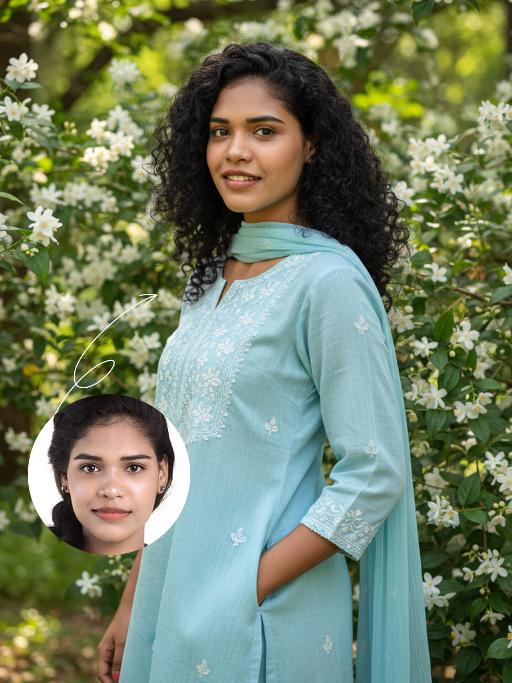
The identity of the uploaded portrait is strictly preserved (retaining facial contours, authentic Indian skin tone, hairstyle and age). This is a bust portrait with a 3:4 aspect ratio, featuring a 20-year-old young Indian woman with naturally voluminous long black curly hair. Her makeup is fresh and dewy: only the lip color and eyebrow shape are refined, the delicate texture of her natural skin is preserved, and her smile is warm and soothing. She is dressed in a light sky-blue cotton and linen Kurta set: the top is a loose-fit style with delicate white thread-embroidered floral patterns adorning the neckline and cuffs, paired with a sheer matching Dupatta draped gently over her shoulders. She stands sideways beside a garden in full bloom with white jasmine, her body leaning slightly, one hand in the pocket, and her eyes looking softly at the camera. The background consists of lush green foliage and clusters of blooming white flowers, with soft natural light filtering through the branches and leaves casting dappled light and shadow on her figure. Fresh and natural outdoor lighting is adopted: backlight from the side outlines the hair silhouette, and soft light illuminates the face, highlighting the gentle hues of the attire and the fresh texture of the flowers. The style is a life-like forest-themed portrait, with an ultra-high-definition and delicate frame and soft, fresh colors, creating a relaxed and soothing atmosphere.

Romantic Snow

Keep the facial features of the uploaded person unchanged (with natural facial blurring and exquisite makeup). Transform the scene into a romantic heavy snow scene in winter (with a realistic full-screen snowfall effect). The person strikes a relaxed leaning pose—lightly resting against a snow-covered stone balustrade, with one hand casually placed on the edge of the balustrade and the other hanging loosely by the side, the overall posture elegant and stretched. The person is wearing a light gray turtleneck ribbed knit dress paired with a khaki haute couture coat with a sophisticated design, standing by the River Thames in London. In the background are Westminster Bridge (dusted with some snow), the Houses of Parliament and Big Ben (both dusted with some snow) with a soft background bokeh effect. Golden afterglow shines in from the side, casting a halo on the hair; a gentle breeze stirs and tousles the strands of hair. The style is avant-garde fashion photography art, with the film texture of Kodak Portra 400, shot with an 85mm f/1.4 lens (creating a shallow depth of field). The image is processed with warm tones, retaining natural skin texture (without plastic-like smoothness) and a cinematic luster, with clear details of the clothing fabrics. The shot is taken from an eye-level (slightly flat-angle) perspective, with the lens basically at the same horizontal level as the person’s line of sight—this perspective clearly showcases the person’s state while also harmoniously presenting the snow-covered architectural background and the heavy snow environment. The person is adorned with exquisite jewelry including a ring and a delicate designer necklace.

Moving Figure

Create a 1/7 scale commercialized figure of the character in the illustration, in a realistic style and environment. Render the exact hairstyle and the same outfit with the uploaded figure. Render garments as molded plastic with engraved seams and sculpted folds; keep accessories as plastic parts. Fictionalize any brand text/logos while keeping layout and colors. Place the figure on a computer desk, using a circular transparent acrylic base without any text. On the Apple computer screen, display the Z Brush modeling process of the figure. Next to the Apple computer screen, place a BANDAl-style toy packaging box printed with the original artwork. The background shows a modern realistic room furnished with contemporary furniture, including a display cabinet filled with books, dolls, and scale figures, adding a casual and everyday atmosphere. Behind the Apple computer, place a desk lamp to add detail and depth to the scene.

Load more

Next-Gen Multi-Model AI Video Architecture

Vivago AI isn't just one engine—it’s a unified hub for the world’s most advanced video AI. Whether you need cinematic realism or high-speed social content, we provide the right model for your creative vision.

Free Generate

Beauty and Dolphins

Vacation Time

Stellar Tear

Fish Tank Supervisor

Cinematic Quality & Precision Control

Enables 4K resolution with multi-lens motion control, generating delicate scene via text prompts for customized cinematography.​

TRY NOW

Dynamic AV Sync

Auto-generates original audio to avoid copyright issues. Build 3D immersive environments through layered sound design automatically.

TRY NOW

OpenAI Sora 2

​Advanced visual storytelling with unparalleled physics and consistency.

TRY NOW

Kling v2.6 Pro

Industry-leading cinematic image animation and motion control.

TRY NOW

Google Veo 3 & 3.1

Ultra-fast generation with enhanced realism for creative workflows.

TRY NOW

Vivago AI 2.0

Our proprietary model optimized for efficiency, speed, and cost-effective generation.

TRY NOW

Users' Voice

We listen carefully to the opinions of every user.
Free Generate
Contact Us
I tried the Lip Sync feature inside Vivago.ai’s AI Video Generator for my educational podcast, and the results were stunning! The avatar's lip movements perfectly matched my audio recording, creating a professional AI-generated video without complex editing. Compared with tools like OpenAI Sora 2 and Google Veo 3.1, Vivago Image-to-Video delivers fast, studio-quality results online. It saved me hours of post-production work.
ElenaM (Spain)
Vivago’s Image-to-Video AI transformed my marketing workflow. I uploaded a product image and described the launch scene in text, and it generated a 10-second cinematic AI video with background music and dynamic visuals. The output quality rivals Kling v2.6 Pro and Google Veo 3 Fast. It’s now my go-to AI video generator for social media ads and product campaigns.
KenjiT (Japan)
As a digital artist, I use Vivago.ai 2.0 daily for Image-to-Image and AI Image-to-Video creation. The e-book covers and animated visuals I generate for clients look cinematic and professional. Unlike many standalone AI tools, Vivago integrates multiple leading models into one platform, making it easier to create copyright-safe AI images and videos for publishing.
ChenL (China)
I tried the Lip Sync feature inside Vivago.ai’s AI Video Generator for my educational podcast, and the results were stunning! The avatar's lip movements perfectly matched my audio recording, creating a professional AI-generated video without complex editing. Compared with tools like OpenAI Sora 2 and Google Veo 3.1, Vivago Image-to-Video delivers fast, studio-quality results online. It saved me hours of post-production work.
ElenaM (Spain)
Vivago’s Image-to-Video AI transformed my marketing workflow. I uploaded a product image and described the launch scene in text, and it generated a 10-second cinematic AI video with background music and dynamic visuals. The output quality rivals Kling v2.6 Pro and Google Veo 3 Fast. It’s now my go-to AI video generator for social media ads and product campaigns.
KenjiT (Japan)
As a digital artist, I use Vivago.ai 2.0 daily for Image-to-Image and AI Image-to-Video creation. The e-book covers and animated visuals I generate for clients look cinematic and professional. Unlike many standalone AI tools, Vivago integrates multiple leading models into one platform, making it easier to create copyright-safe AI images and videos for publishing.
ChenL (China)
I absolutely love Vivago’s AI Image-to-Video Generator. As a travel blogger, static images often fail to capture real atmosphere, but Vivago helps me turn photos into vivid cinematic AI videos with motion effects. It feels comparable to OpenAI Sora 2 and Google Veo 3.1, but more accessible and faster for creators who need high-quality AI videos online.
LiamK (Australia)
I tried the Lip Sync feature inside Vivago.ai’s AI Video Generator for my educational podcast, and the results were stunning! The avatar's lip movements perfectly matched my audio recording, creating a professional AI-generated video without complex editing. Compared with tools like OpenAI Sora 2 and Google Veo 3.1, Vivago Image-to-Video delivers fast, studio-quality results online. It saved me hours of post-production work.
ElenaM (Spain)
Vivago’s Image-to-Video AI transformed my marketing workflow. I uploaded a product image and described the launch scene in text, and it generated a 10-second cinematic AI video with background music and dynamic visuals. The output quality rivals Kling v2.6 Pro and Google Veo 3 Fast. It’s now my go-to AI video generator for social media ads and product campaigns.
KenjiT (Japan)
As a digital artist, I use Vivago.ai 2.0 daily for Image-to-Image and AI Image-to-Video creation. The e-book covers and animated visuals I generate for clients look cinematic and professional. Unlike many standalone AI tools, Vivago integrates multiple leading models into one platform, making it easier to create copyright-safe AI images and videos for publishing.
ChenL (China)
I absolutely love Vivago’s AI Image-to-Video Generator. As a travel blogger, static images often fail to capture real atmosphere, but Vivago helps me turn photos into vivid cinematic AI videos with motion effects. It feels comparable to OpenAI Sora 2 and Google Veo 3.1, but more accessible and faster for creators who need high-quality AI videos online.
LiamK (Australia)
Using Vivago.ai’s Image-to-Video AI has greatly enhanced my classroom teaching. I transform textbook notes into historical AI videos with cinematic filters and dynamic animations. Compared with tools like Kling v2.6 Pro and Google Veo 3 Fast, Vivago offers faster generation and easier parameter control for educators who need reliable AI video creation.
RajivG (India)
I frequently create AI videos on Vivago and publish them on TikTok and YouTube Shorts. The AI video templates and trending content ideas help me produce viral-ready clips quickly. With Vivago’s integrated models—including advanced video engines similar to OpenAI Sora 2—I can generate anime-style and cinematic social media videos that drive high engagement.
MarieJ (Spain)
What attracts me most about Vivago.ai is not only the powerful AI Video Generator but also the active AIGC creator community. It combines AI Image-to-Video, Text-to-Video, and leading model integrations like Google Veo 3.1 into one creative platform.
TomW (India)
At first, I was hesitant about using AI video tools. But after trying Vivago Image-to-Video, I realized how easy it is to create professional AI-generated videos online. I just upload an image, add a short prompt, and adjust a few settings. The results are cinematic and copyright-safe, which is essential for commercial projects.
HectorC (Mexico)
Using Vivago.ai’s Image-to-Video AI has greatly enhanced my classroom teaching. I transform textbook notes into historical AI videos with cinematic filters and dynamic animations. Compared with tools like Kling v2.6 Pro and Google Veo 3 Fast, Vivago offers faster generation and easier parameter control for educators who need reliable AI video creation.
RajivG (India)
I frequently create AI videos on Vivago and publish them on TikTok and YouTube Shorts. The AI video templates and trending content ideas help me produce viral-ready clips quickly. With Vivago’s integrated models—including advanced video engines similar to OpenAI Sora 2—I can generate anime-style and cinematic social media videos that drive high engagement.
MarieJ (Spain)
What attracts me most about Vivago.ai is not only the powerful AI Video Generator but also the active AIGC creator community. It combines AI Image-to-Video, Text-to-Video, and leading model integrations like Google Veo 3.1 into one creative platform.
TomW (India)
At first, I was hesitant about using AI video tools. But after trying Vivago Image-to-Video, I realized how easy it is to create professional AI-generated videos online. I just upload an image, add a short prompt, and adjust a few settings. The results are cinematic and copyright-safe, which is essential for commercial projects.
HectorC (Mexico)